brake light HYUNDAI TUCSON 2015 Owner's Manual
[x] Cancel search | Manufacturer: HYUNDAI, Model Year: 2015, Model line: TUCSON, Model: HYUNDAI TUCSON 2015Pages: 653, PDF Size: 8.45 MB
Page 484 of 653
5-38
Driving your vehicle
VSM operation
VSM ON condition
The VSM operates when:
The Electronic Stability Control(ESC) is on.
Vehicle speed is approximately above 9mph (15 km/h) on curve
roads.
Vehicle speed is approximately above 18mph (30 km/h) when the
vehicle is braking on rough roads.
When operating
When you apply your brakes under
conditions which may activate the
ESC, you may hear sounds from the
brakes, or feel a corresponding sen-
sation in the brake pedal. This is nor-
mal and it means your VSM is active.
✽✽ NOTICE
The VSM does not operate when:
Driving rearward.
ESC OFF indicator light is on.
EPS (Electric Power Steering) warning light ( ) is on. VSM OFF condition
To cancel VSM operation, press the
ESC OFF button. ESC OFF indicator
light ( ) will illuminate.
To turn on VSM, press the ESC OFF
button again. The ESC OFF indicatorlight will go out.
If ESC indicator light ( ) or EPS
warning light ( ) stays on,
your vehicle may have a mal-
function with the VSM system.When the warning light illumi-
nates, have your vehicle
checked by an authorized
HYUNDAI dealer as soon as pos-
sible.
WARNING
Page 486 of 653
5-40
Driving your vehicle
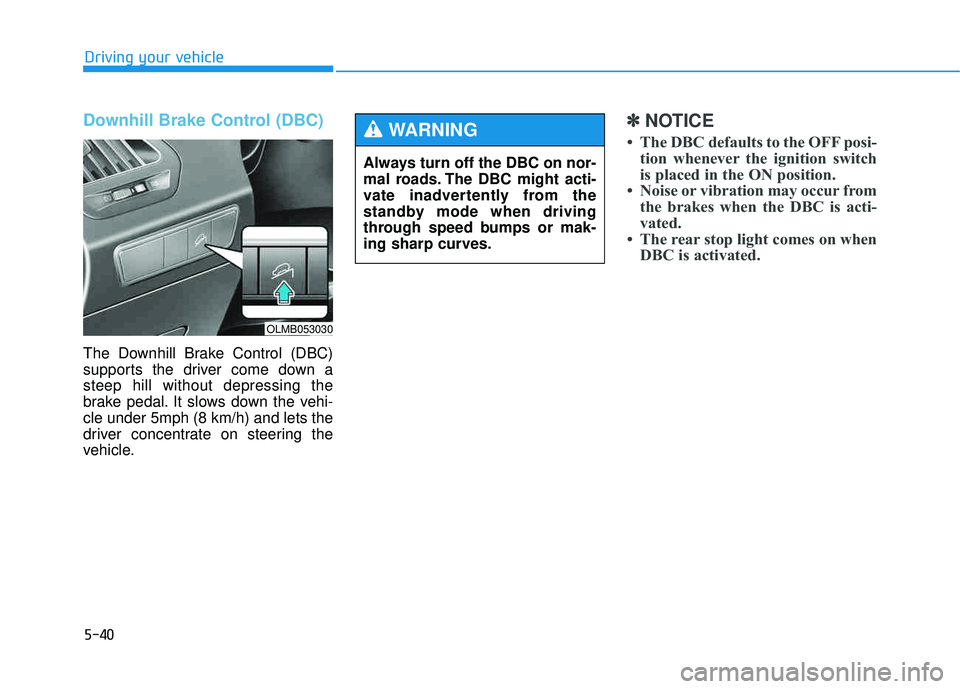
Downhill Brake Control (DBC)
The Downhill Brake Control (DBC)
supports the driver come down asteep hill without depressing the
brake pedal. It slows down the vehi-cle under 5mph (8 km/h) and lets the
driver concentrate on steering the
vehicle.
✽✽NOTICE
The DBC defaults to the OFF posi- tion whenever the ignition switch
is placed in the ON position.
Noise or vibration may occur from the brakes when the DBC is acti-
vated.
The rear stop light comes on when DBC is activated.
Always turn off the DBC on nor-
mal roads. The DBC might acti-
vate inadvertently from the
standby mode when driving
through speed bumps or mak-
ing sharp curves.
WARNING
OLMB053030
Page 487 of 653
5-41
Driving your vehicle
5✽✽NOTICE
The DBC may not deactivate on steep inclines even though the
brake or accelerator pedal is
depressed.
The DBC does not operate when: - The shift lever is in P (Park).
- The ESC is activated.
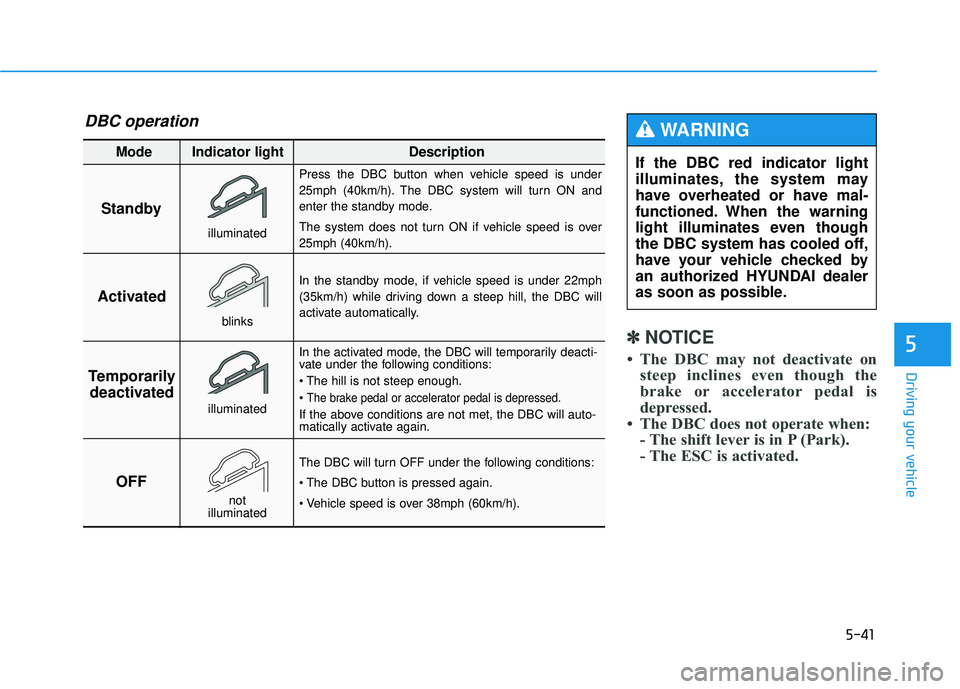
Standby Press the DBC button when vehicle speed is under
25mph (40km/h). The DBC system will turn ON and
enter the standby mode.
The system does not turn ON if vehicle speed is over 25mph (40km/h).
In the standby mode, if vehicle speed is under 22mph
(35km/h) while driving down a steep hill, the DBC will
activate automatically.
In the activated mode, the DBC will temporarily deacti-
vate under the following conditions:
The brake pedal or accelerator pedal is depressed.
If the above conditions are not met, the DBC will auto-
matically activate again.
The DBC will turn OFF under the following conditions:
Activated
Temporarily deactivated
OFF
Mode Indicator light Description
blinks
illuminated
not
illuminated
illuminated
If the DBC red indicator light
illuminates, the system may
have overheated or have mal-
functioned. When the warning
light illuminates even though
the DBC system has cooled off,
have your vehicle checked by
an authorized HYUNDAI dealer
as soon as possible.
WARNING DBC operation
Page 488 of 653
5-42
Driving your vehicle
Good braking practices Wet brakes can be dangerous! The
brakes may get wet if the vehicle is
driven through standing water or if it
is washed. Your vehicle will not stop
as quickly if the brakes are wet. Wet
brakes may cause the vehicle to pull
to one side.
To dry the brakes, apply the brakes
lightly until the braking action returns
to normal, taking care to keep the
vehicle under control at all times. If the
braking action does not return to nor-
mal, stop as soon as it is safe to do so
and call an authorized HYUNDAI
dealer for assistance.
DO NOT drive with your foot resting
on the brake pedal. Even light, butconstant pedal pressure can result in
the brakes overheating, brake wear,
and possibly even brake failure.If a tire goes flat while you are driv-
ing, apply the brakes gently and
keep the vehicle pointed straight
ahead while you slow down. When
you are moving slowly enough for it
to be safe to do so, pull off the road
and stop in a safe location.
Keep your foot firmly on the brake
pedal when the vehicle is stopped to
prevent the vehicle from rolling for-
ward.
Whenever leaving the vehicle or
parking, always come to a com-
plete stop and continue to
depress the brake pedal. Move
the shift lever into the P (Park)
position, then apply the parking
brake, and place the ignition
switch in the LOCK/OFF posi-tion.
Vehicles with the parking brake
not fully engaged are at risk for
moving inadvertently and caus-
ing injury to yourself or others.
WARNING
Page 493 of 653
5-47
Driving your vehicle
5
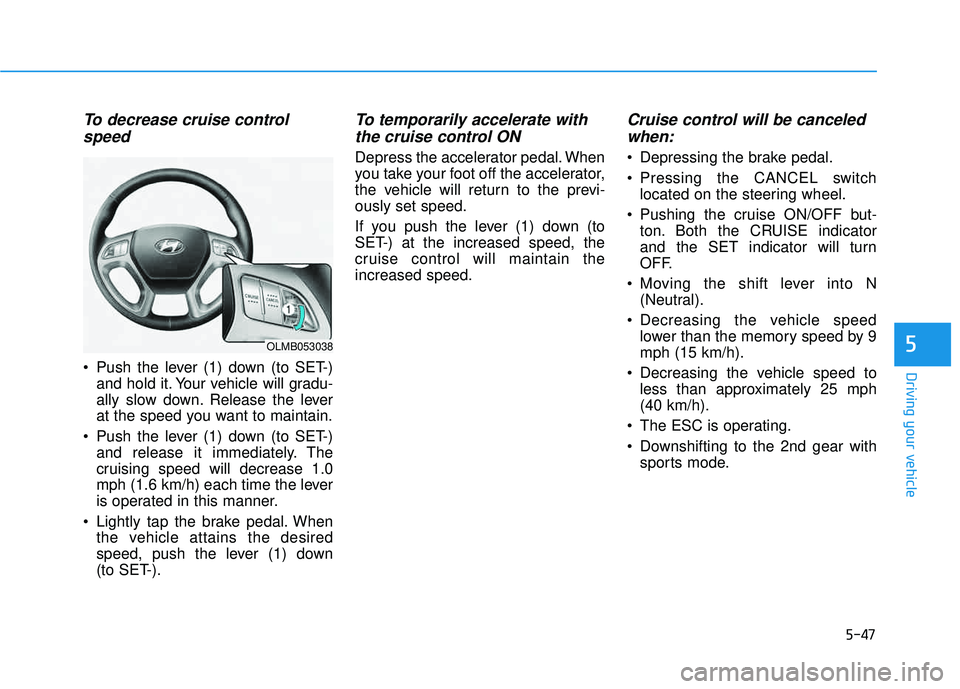
To decrease cruise controlspeed
Push the lever (1) down (to SET-) and hold it. Your vehicle will gradu-
ally slow down. Release the lever
at the speed you want to maintain.
Push the lever (1) down (to SET-) and release it immediately. The
cruising speed will decrease 1.0
mph (1.6 km/h) each time the lever
is operated in this manner.
Lightly tap the brake pedal. When the vehicle attains the desired
speed, push the lever (1) down
(to SET-).
To temporarily accelerate with
the cruise control ON
Depress the accelerator pedal. When
you take your foot off the accelerator,
the vehicle will return to the previ-ously set speed.
If you push the lever (1) down (to
SET-) at the increased speed, the
cruise control will maintain theincreased speed.
Cruise control will be canceledwhen:
Depressing the brake pedal.
Pressing the CANCEL switch located on the steering wheel.
Pushing the cruise ON/OFF but- ton. Both the CRUISE indicator
and the SET indicator will turn
OFF.
Moving the shift lever into N (Neutral).
Decreasing the vehicle speed lower than the memory speed by 9mph (15 km/h).
Decreasing the vehicle speed to less than approximately 25 mph(40 km/h).
The ESC is operating.
Downshifting to the 2nd gear with sports mode.
OLMB053038
Page 497 of 653
5-51
Driving your vehicle
5
Keep your headlights clean andproperly aimed. Dirty or improperly
aimed headlights will make it muchmore difficult to see at night.
Avoid staring directly at the head- lights of oncoming vehicles. You
could be temporarily blinded, and it
will take several seconds for your
eyes to readjust to the darkness.Driving in the rain
Rain and wet roads can make driving
dangerous. Here are a few things to
consider when driving in the rain or
on slick pavement:
Slow down and allow extra follow-ing distance. A heavy rainfall
makes it harder to see and increas-es the distance needed to stop
your vehicle.
Turn OFF your Cruise Control.
Replace your windshield wiper blades when they show signs of streaking or missing areas on thewindshield. Be sure your tires have enough
tread. If your tires do not have
enough tread, making a quick stop
on wet pavement can cause a skid
and possibly lead to an accident.
See “Tire Tread ”in chapter 7.
Turn on your headlights to make it easier for others to see you.
Driving too fast through large pud- dles can affect your brakes. If you
must go through puddles, try to
drive through them slowly.
If you believe your brakes may be wet, apply them lightly while driv-
ing until normal braking operation
returns.
OLMB053043
Page 499 of 653
5-53
Driving your vehicle
5
Snow or icy conditions
You need to keep sufficient distance
between your vehicle and the vehicle
in front of you.
Apply the brakes gently. Speeding,
rapid acceleration, sudden brake
applications, and sharp turns are
potentially very hazardous practices.
During deceleration, use engine
braking to the fullest extent. Sudden
brake applications on snowy or icy
roads may cause skids to occur.To drive your vehicle in deep snow, it
may be necessary to use snow tires
or to install tire chains on your tires.
Always carry emergency equipment.
Some of the items you may want to
carry include tire chains, tow straps
or chains, a flashlight, emergency
flares, sand, a shovel, jumper cables,
a window scraper, gloves, ground
cloth, coveralls, a blanket, etc.
Snow tires
WW
IINN TTEERR DD RRIIVV IINN GG
OLMB053045
Snow tires should be equivalent
in size and type to the vehicle's
standard tires. Otherwise, the
safety and handling of your
vehicle may be adversely affect-ed.
WARNING
Page 503 of 653
5-57
Driving your vehicle
Don't let your parking brake freeze
Under some conditions your parking
brake can freeze in the engaged
position. This is most likely to happen
when there is an accumulation of
snow or ice around or near the rear
brakes or if the brakes are wet. If
there is a risk the parking brake may
freeze, apply it only temporarily while
you put the shift lever in P (automat-
ic transaxle) and block the rear
wheels so the vehicle cannot roll.
Then release the parking brake.
Don't let ice and snow accumulate underneath
Under some conditions, snow and
ice can build up under the fenders
and interfere with the steering. When
driving in severe winter conditions
where this may happen, you should
periodically check underneath the
vehicle to be sure the movement of
the front wheels and the steering
components is not obstructed.Carry emergency equipment
Depending on the severity of the
weather, you should carry appropri-
ate emergency equipment. Some of
the items you may want to carry
include tire chains, tow straps or
chains, flashlight, emergency flares,
sand, a shovel, jumper cables, a win-
dow scraper, gloves, ground cloth,
coveralls or a blanket, etc.
Don't place foreign objects or
materials in the engine compart-ment
Placement of foreign objects or
materials which prevent cooling of
the engine, in the engine compart-
ment, may cause a failure or com-
bustion. The manufacturer is not
responsible for the damage caused
by such placement.
5
Page 508 of 653
5-62
Driving your vehicle
Driving with a trailer
Towing a trailer requires a certain
amount of experience. Before setting
out for the open road, you must get
to know your trailer. Acquaint your-
self with the feel of handling and
braking with the added weight of the
trailer. And always keep in mind that
the vehicle you are driving is now
longer and not nearly as responsive
as your vehicle is by itself.
Before you start, check the trailer
hitch and platform, safety chains,
electrical connector(s), lights, tires
and brakes.
During your trip, occasionally check
to be sure that the load is secure,
and that the lights and trailer brakes
are still working.
Distance
Stay at least twice as far behind the
vehicle ahead as you would when
driving your vehicle without a trailer.
This can help you avoid situations
that require heavy braking and sud-
den turns.
Passing
You will need more passing distance
up ahead when you’re towing a trail-
er. And, because of the increased
vehicle length, you’ll need to go
much farther beyond the passed
vehicle before you can return to your
lane.
Backing up
Hold the bottom of the steering
wheel with one hand. Then, to move
the trailer to the left, move your hand
to the left. To move the trailer to the
right, move your hand to the right.
Always back up slowly and, if possi-
ble, have someone guide you.
Making turns
When you’re turning with a trailer,
make wider turns than normal. Do
this so your trailer won’t strike soft
shoulders, curbs, road signs, trees,
or other objects. Avoid jerky or sud-
den maneuvers. Signal well in
advance.
Page 509 of 653
5-63
Driving your vehicle
5
Turn signals
When you tow a trailer, your vehicle
has to have a different turn signal
flasher and extra wiring. The green
arrows on your instrument panel will
flash whenever you signal a turn or
lane change. Properly connected,
the trailer lights will also flash to alert
other drivers you’re about to turn,
change lanes, or stop.
When towing a trailer, the green
arrows on your instrument panel will
flash for turns even if the bulbs on
the trailer are burned out. Thus, you
may think drivers behind you are
seeing your signals when, in fact,
they are not. It’s important to check
occasionally to be sure the trailer
bulbs are still working. You must also
check the lights every time you dis-connect and then reconnect the
wires.
Driving on hills
Reduce speed and shift to a lower
gear before you start down a long or
steep downgrade. If you don’t shift
down, you might have to use your
brakes so much that they would get
overheated and may not operate effi-
ciently.
On a long uphill grade, shift down
and reduce your speed to around 45mph (70 km/h) to reduce the possi-
bility of engine and transaxle over-heating.
If your trailer weighs more than the
maximum trailer weight without trail-
er brakes and you have an automat-
ic transaxle , you should drive in D
(Drive) when towing a trailer.
Operating your vehicle in D (Drive)
when towing a trailer will minimize
heat build-up and extend the life of
your transaxle .
Do not connect a trailer lighting
system directly to your vehi-
cle’s lighting system. Use an
approved trailer wiring harness.
Failure to do so could result in
damage to the vehicle electrical
system and/or personal injury.
Consult an authorized
HYUNDAI dealer for assistance.WARNING