USB HYUNDAI TUCSON 2015 Owner's Guide
[x] Cancel search | Manufacturer: HYUNDAI, Model Year: 2015, Model line: TUCSON, Model: HYUNDAI TUCSON 2015Pages: 653, PDF Size: 8.45 MB
Page 327 of 653
![HYUNDAI TUCSON 2015 Owners Guide 4-116
Multimedia System
Text Scroll
Press the key Select
[Display] Select [Text Scroll]
This feature is used to scroll text dis-
played on the screen when it is too
long to be displayed at once.](/img/35/56202/w960_56202-326.png "HYUNDAI TUCSON 2015 Owners Guide 4-116
Multimedia System
Text Scroll
Press the key Select
[Display] Select [Text Scroll]
This feature is used to scroll text dis-
played on the screen when it is too
long to be displayed at once.")
4-116
Multimedia System
Text Scroll
Press the key Select
[Display] Select [Text Scroll]
This feature is used to scroll text dis-
played on the screen when it is too
long to be displayed at once.
When turned on, the text is repeat-
edly scrolled. When turned off, the
text is scrolled just once.
MP3 Information Display
Press the key Select
[Display] Select [Media Display]
This feature is used to change the
information displayed within USB
and MP3 CD modes.
1) Folder File : Displays file nameand folder name
2) Album Artist Song : Displays album name/artist name/song
Sound Settings
Sound Settings
Press the key Select
[Sound] Select [Sound Setting]SETUP
SETUP
SETUP
Page 338 of 653
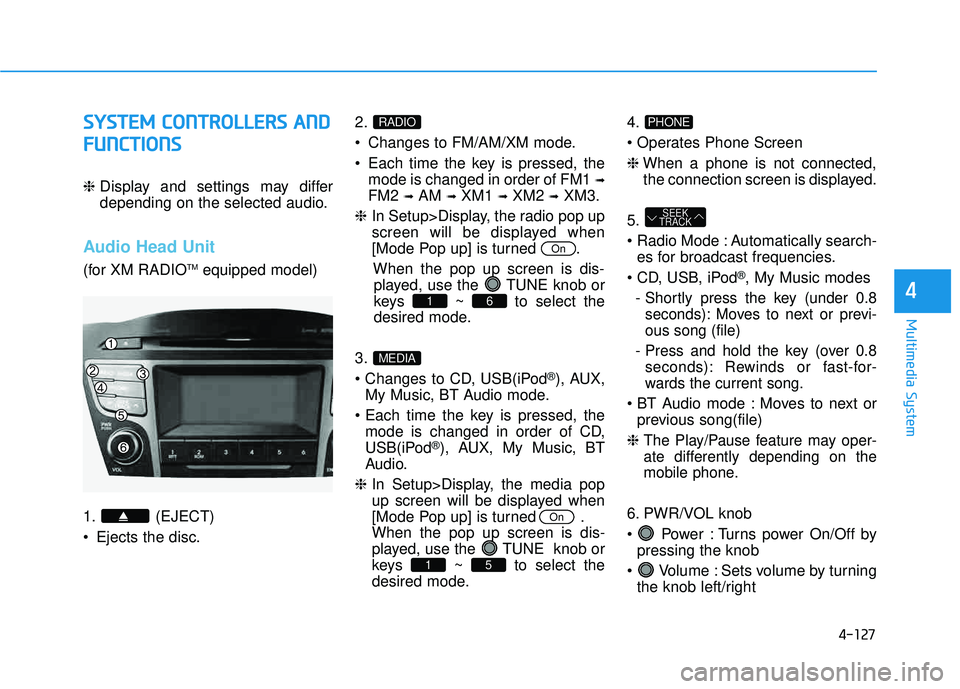
4-127
Multimedia System
4
SSYY SSTT EEMM CC OO NNTTRR OO LLLL EE RR SS AA NN DD
F
F UU NNCCTT IIOO NNSS
❈ Display and settings may differ
depending on the selected audio.
Audio Head Unit
(for XM RADIO TM
equipped model)
1. (EJECT)
• Ejects the disc. 2.
Changes to FM/AM/XM mode.
Each time the key is pressed, the
mode is changed in order of FM1 ➟
FM2 ➟AM ➟XM1 ➟XM2 ➟XM3.
❈ In Setup>Display, the radio pop up
screen will be displayed when
[Mode Pop up] is turned .
When the pop up screen is dis-played, use the TUNE knob or
keys ~ to select the
desired mode.
3.
®), AUX,
My Music, BT Audio mode.
mode is changed in order of CD,
USB(iPod
®), AUX, My Music, BT
Audio.
❈ In Setup>Display, the media pop
up screen will be displayed when
[Mode Pop up] is turned .When the pop up screen is dis-
played, use the TUNE knob or
keys ~ to select the
desired mode. 4.
❈
When a phone is not connected,
the connection screen is displayed.
5.
Automatically search- es for broadcast frequencies.
®, My Music modes
- Shortly press the key (under 0.8 seconds): Moves to next or previ- ous song (file)
- Press and hold the key (over 0.8 seconds): Rewinds or fast-for-
wards the current song.
Moves to next or previous song(file)
❈
The Play/Pause feature may oper-
ate differently depending on the
mobile phone.
6. PWR/VOL knob
Power : Turns power On/Off by pressing the knob
Volume : Sets volume by turning the knob left/right
SEEK
TRACK
PHONE
51
On
MEDIA
61
On
RADIO
Page 339 of 653
4-128
Multimedia System
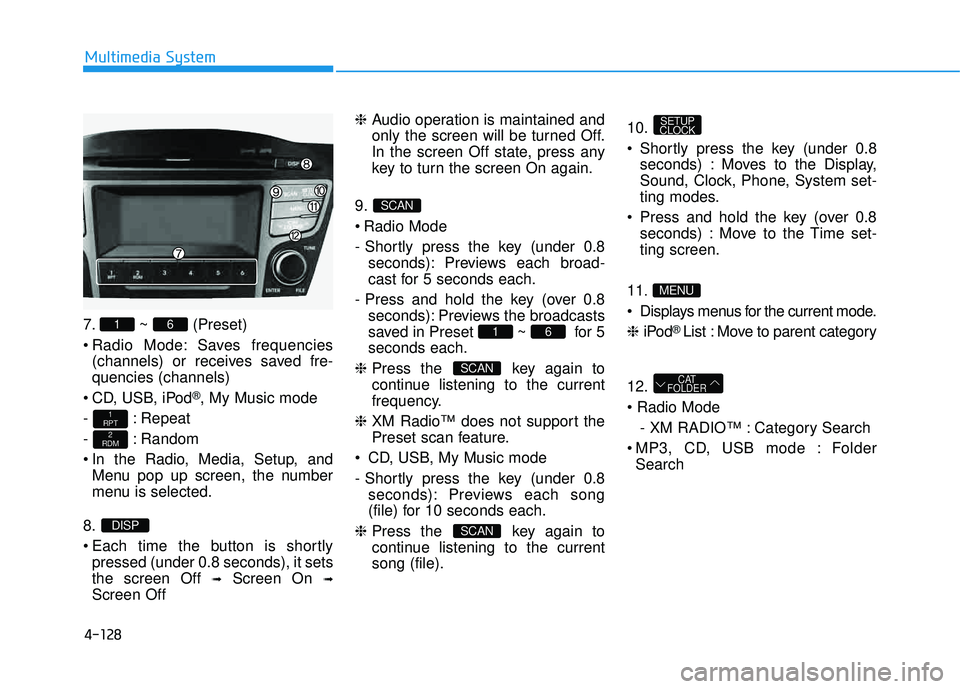
7. ~ (Preset)
Radio Mode: Saves frequencies(channels) or receives saved fre- quencies (channels)
CD, USB, iPod
®, My Music mode
- : Repeat
- : Random
In the Radio, Media, Setup, and Menu pop up screen, the number
menu is selected.
8.
Each time the button is shortly pressed (under 0.8 seconds), it sets the screen Off ➟Screen On ➟
Screen Off ❈
Audio operation is maintained and
only the screen will be turned Off.
In the screen Off state, press any
key to turn the screen On again.
9.
Radio Mode
- Shortly press the key (under 0.8 seconds): Previews each broad-
cast for 5 seconds each.
- Press and hold the key (over 0.8 seconds): Previews the broadcasts
saved in Preset ~ for 5seconds each.
❈ Press the key again to
continue listening to the current
frequency.
❈ XM Radio™ does not support the
Preset scan feature.
CD, USB, My Music mode
- Shortly press the key (under 0.8 seconds): Previews each song
(file) for 10 seconds each.
❈ Press the key again to
continue listening to the currentsong (file). 10.
Shortly press the key (under 0.8
seconds) : Moves to the Display,
Sound, Clock, Phone, System set-
ting modes.
Press and hold the key (over 0.8 seconds) : Move to the Time set-ting screen.
11
.
Displays menus for the current mode. ❈ iPod
® List : Move to parent category
12.
- XM RADIO™ : Category Search
MP3, CD, USB mode : Folder Search
CAT
FOLDER
MENU
SETUP
CLOCK
SCAN
SCAN
61
SCAN
DISP
2
RDM
1
RPT
61
Page 340 of 653
4-129
Multimedia System
4
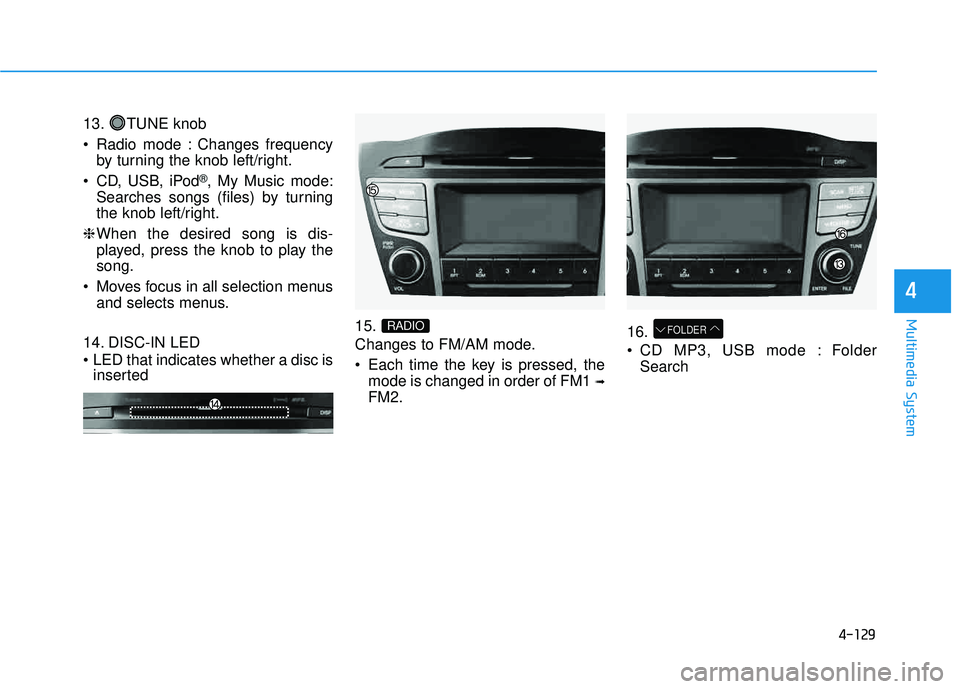
13. TUNE knob
Radio mode : Changes frequencyby turning the knob left/right.
CD, USB, iPod
®, My Music mode:
Searches songs (files) by turning
the knob left/right.
❈ When the desired song is dis-
played, press the knob to play thesong.
Moves focus in all selection menus and selects menus.
14. DISC-IN LED
LED that indicates whether a disc is inserted 15.
Changes to FM/AM mode.
Each time the key is pressed, the
mode is changed in order of FM1 ➟
FM2. 16.
CD MP3, USB mode : Folder
Search
FOLDERRADIO
Page 348 of 653
4-137
Multimedia System
4
BBAA SSIICC MM EETT HH OO DD OO FF UU SSEE ::
A
A uuddiioo CC DD // MM PP33 CC DD // UU SSBB //
i
i PP oodd ®®
// MM yy MM uussiicc
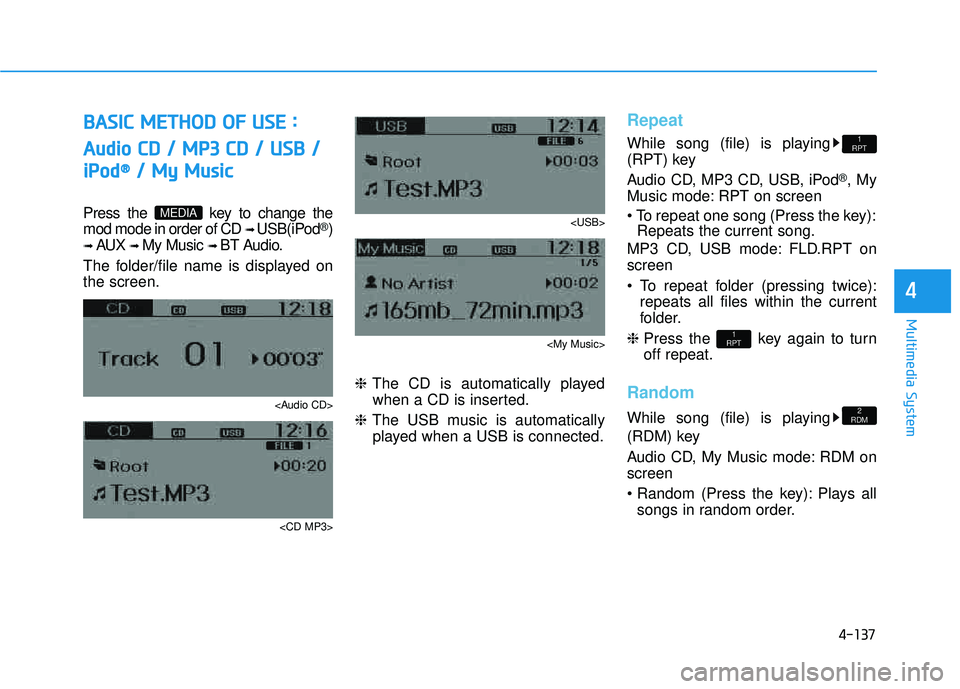
Press the key to change the mod mode in order of CD ➟ USB(iPod®)
➟ AUX ➟ My Music ➟ BT Audio.
The folder/file name is displayed on the screen.
Page 349 of 653
4-138
Multimedia System
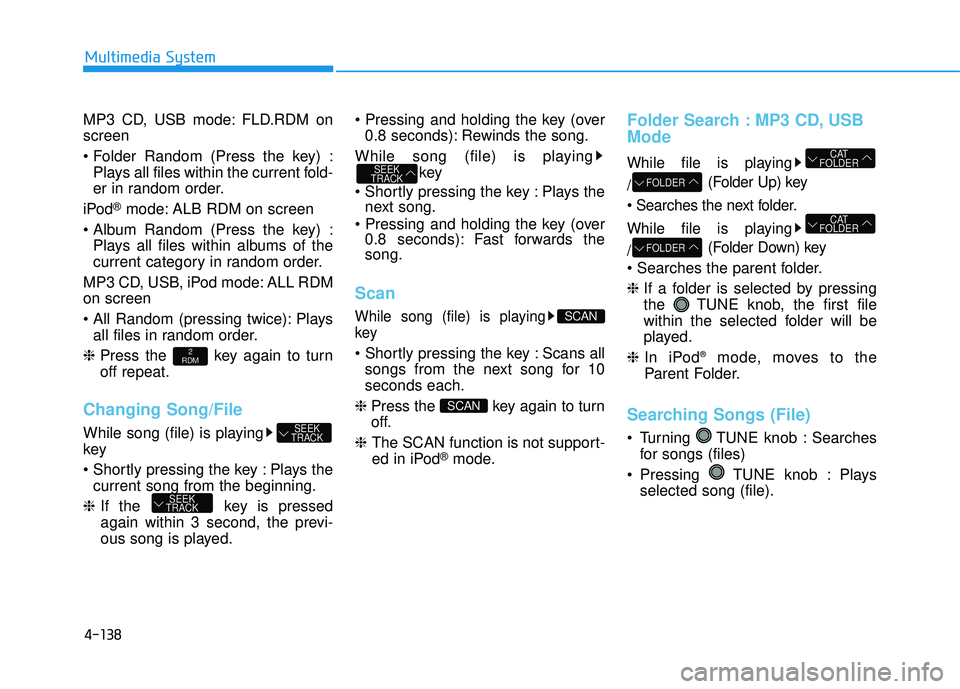
MP3 CD, USB mode: FLD.RDM on screen
Plays all files within the current fold-
er in random order.
iPod
®mode: ALB RDM on screen
Plays all files within albums of the
current category in random order.
MP3 CD, USB, iPod mode: ALL RDMon screen
Plays all files in random order.
❈ Press the key again to turn off repeat.
Changing Song/File
While song (file) is playing key
Plays the
current song from the beginning.
❈ If the key is pressed
again within 3 second, the previ-
ous song is played.
0.8 seconds): Rewinds the song.
While song (file) is playing key
Plays the next song.
0.8 seconds): Fast forwards the song.
Scan
While song (file) is playing key
Scans all
songs from the next song for 10seconds each.
❈ Press the key again to turn
off.
❈ The SCAN function is not support-
ed in iPod
®mode.
Folder Search : MP3 CD, USB Mode
While file is playing / (Folder Up) key
While file is playing / (Folder Down) key
❈
If a folder is selected by pressing
the TUNE knob, the first file
within the selected folder will be
played.
❈ In iPod ®
mode, moves to the
Parent Folder.
Searching Songs (File)
Turning TUNE knob : Searches for songs (files)
Pressing TUNE knob : Plays selected song (file).
FOLDER
CAT
FOLDER
FOLDER
CAT
FOLDER
SCAN
SCAN
SEEK
TRACK
SEEK
TRACK
SEEK
TRACK
2
RDM
Page 350 of 653
![HYUNDAI TUCSON 2015 Owners Guide 4-139
Multimedia System
4
MENU : Audio CD
Press the CD MP3 mode key to set the Repeat, Random,
Information features.
Repeat
Press the key Set [ RPT] through the TUNEknob or
key to repeat the curren](/img/35/56202/w960_56202-349.png "HYUNDAI TUCSON 2015 Owners Guide 4-139
Multimedia System
4
MENU : Audio CD
Press the CD MP3 mode key to set the Repeat, Random,
Information features.
Repeat
Press the key Set [ RPT] through the TUNEknob or
key to repeat the curren")
4-139
Multimedia System
4
MENU : Audio CD
Press the CD MP3 mode key to set the Repeat, Random,
Information features.
Repeat
Press the key Set [ RPT] through the TUNEknob or
key to repeat the current song. ❈ Press RPT again to turn off.
Random
Press the key Set [ RDM] through the
TUNEknob or
key to randomly play songs within
the current folder. ❈ Press RDM again to turn off.
Information
Press the key Set [ Info] through the
TUNEknob or
key to display information of the cur-rent song. ❈ Press the key to turn off
info display
.
MENU : MP3 CD / USB
Press the CD MP3 mode key
to set the Repeat, Folder Random,
Folder Repeat, All Random,
Information, and Copy features.
Repeat
Press the key Set [ RPT] through the
TUNEknob or
key to repeat the current song. ❈ Press RPT again to turn off.1
RPTMENU
MENU
MENU
3
MENU
2
RDMMENU
1
RPTMENU
MENU
Page 351 of 653
![HYUNDAI TUCSON 2015 Owners Guide 4-140
Multimedia System
Folder Random
Press the key Set [ F.RDM] through the
TUNEknob or
key to randomly play songs within the
current folder. ❈ Press F.RDM again to turn off.
Folder Repeat
Pres](/img/35/56202/w960_56202-350.png "HYUNDAI TUCSON 2015 Owners Guide 4-140
Multimedia System
Folder Random
Press the key Set [ F.RDM] through the
TUNEknob or
key to randomly play songs within the
current folder. ❈ Press F.RDM again to turn off.
Folder Repeat
Pres")
4-140
Multimedia System
Folder Random
Press the key Set [ F.RDM] through the
TUNEknob or
key to randomly play songs within the
current folder. ❈ Press F.RDM again to turn off.
Folder Repeat
Press the key Set [ F.RPT] through the
TUNEknob or
key to repeat songs within the cur-
rent folder. ❈ Press F.RPT again to turn off.
All Random
Press the key Set [ A.RDM] through the
TUNEknob or key
to randomly play all songs within the
CD. ❈ Press A.RDM again to turn off.
Information
Press the key Set [ Info] through the
TUNEknob or
key to display information of the cur-rent song. ❈ Press the key to turn off
info display.
Copy
Press the key Set [ Copy]
through the TUNE knob or
key.
song into My Music. You can play the copied Music in My Music
mode.
❈ If another key is pressed while
copying is in progress, a pop up
asking you whether to cancel
copying is displayed.
❈ If another media is connected or
inserted (USB, CD, iPod
®, AUX)
while copying is in progress, copy- ing is canceled.
❈ Music will not be played while
copying is in progress.
MENU : iPod®
In iPod®mode, press the key
to set the Repeat, Album Random, All
Random, Information and Search fea-
tures.
Repeat
Press the key Set [ RPT] through the
TUNEknob or
key to repeat the current song. ❈ Press RPT again to turn repeat off.
Album Random
Press the key Set [ Alb.RDM] through the TUNEknob or key.
Plays albums within the currently
playing category in random order. ❈ Press Alb.RDM again to turn off.
2
RDMMENU
1
RPTMENU
MENU
6
MENU
MENU
5
MENU
4
MENU
3
MENU
2
RDMMENU
Page 356 of 653
4-145
Multimedia System
4
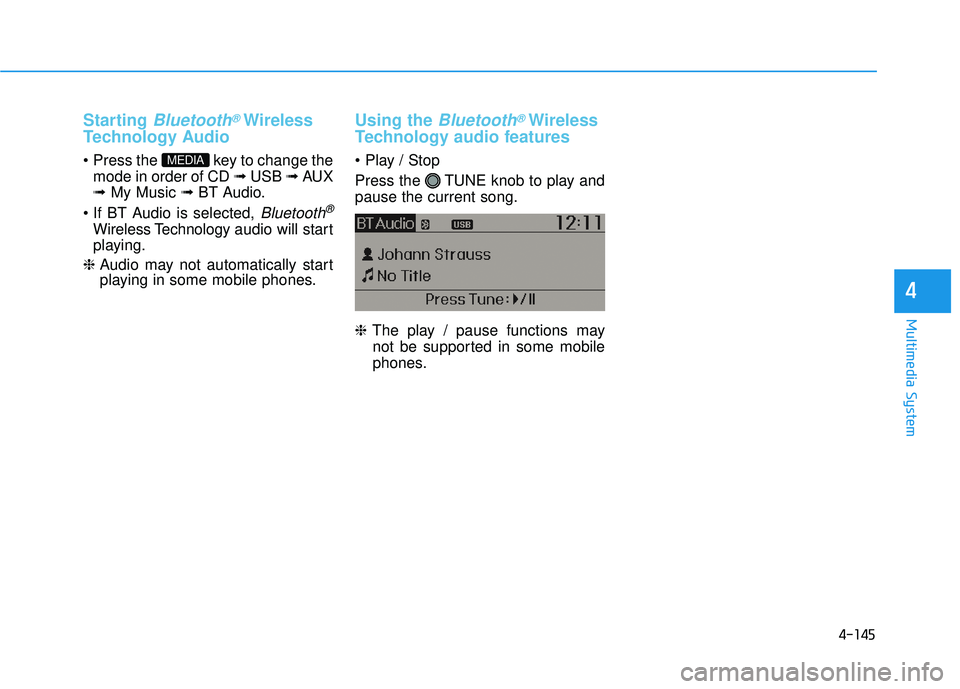
Starting Bluetooth®Wireless
Technology Audio
key to change the mode in order of CD ➟ USB ➟ AUX
➟ My Music ➟ BT Audio.
Bluetooth®
Wireless Technology audio will start
playing.
❈ Audio may not automatically start
playing in some mobile phones.
Using the Bluetooth®Wireless
Technology audio features
Press the TUNE knob to play and pause the current song. ❈ The play / pause functions may
not be supported in some mobile
phones.MEDIA
Page 373 of 653
4-162
Multimedia System
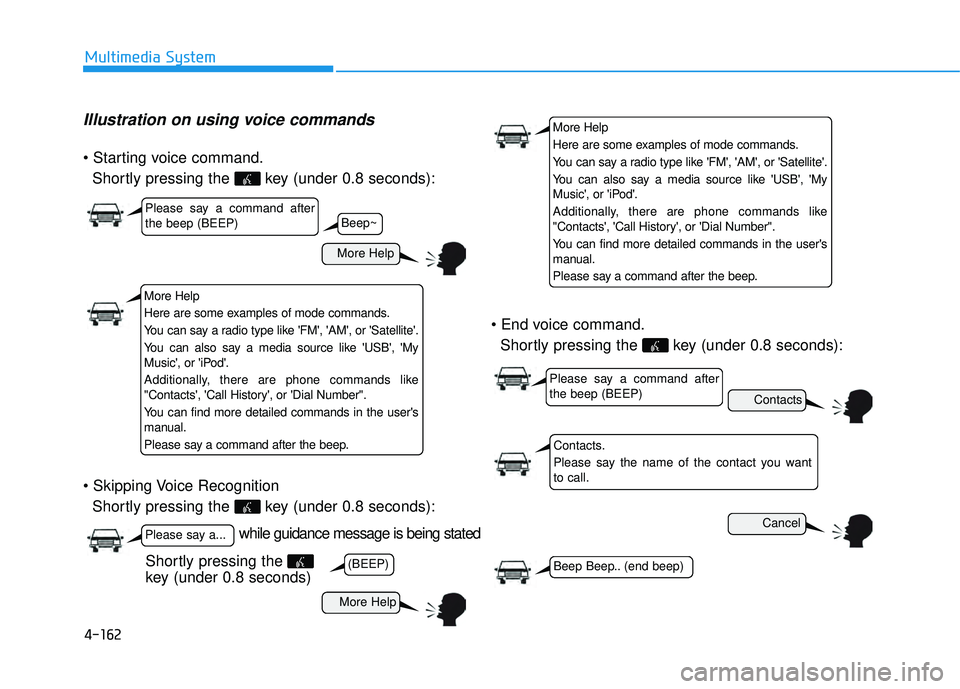
Illustration on using voice commands
Shortly pressing the key (under 0.8 seconds):
Shortly pressing the key (under 0.8 seconds):
Shortly pressing the key (under 0.8 seconds):
while guidance message is being stated
More Help
Contacts
Cancel
More Help
Please say a command after the beep (BEEP)
Please say a...
Contacts.
Please say the name of the contact you want to call.
(BEEP)Beep Beep.. (end beep)
Shortly pressing the
key (under 0.8 seconds)
Beep~
More Help
Here are some examples of mode commands.
You can say a radio type like 'FM', 'AM', or 'Satellite'.
You can also say a media source like 'USB', 'My
Music', or 'iPod'.
Additionally, there are phone commands like
"Contacts', 'Call History', or 'Dial Number".
You can find more detailed commands in the user's
manual.
Please say a command after the beep.
More Help
Here are some examples of mode commands.
You can say a radio type like 'FM', 'AM', or 'Satellite'.
You can also say a media source like 'USB', 'My
Music', or 'iPod'.
Additionally, there are phone commands like
"Contacts', 'Call History', or 'Dial Number".
You can find more detailed commands in the user's
manual.
Please say a command after the beep.
Please say a command after the beep (BEEP)