engine HYUNDAI TUCSON 2015 Owner's Guide
[x] Cancel search | Manufacturer: HYUNDAI, Model Year: 2015, Model line: TUCSON, Model: HYUNDAI TUCSON 2015Pages: 653, PDF Size: 8.45 MB
Page 121 of 653
3-35
Convenient features of your vehicle
3
Immobilizer indicator (if equipped)
Without smart key system
This indicator illuminates when the
immobilizer key is inserted and
turned to the ON position to start the
engine.
At this time, you can start the engine. The indicator goes out after the
engine is running.
If this indicator blinks when the igni-
tion switch is in the ON position
before starting the engine, have the
system checked by an authorized
HYUNDAI dealer.
With smart key system
If any of the following occurs in a vehi-
cle equipped with the smart key, the
immobilizer indicator illuminates, blinks
or goes off.
When the smart key is in the vehi- cle, if the Engine Start/Stop button
is in the ACC or ON position, the
indicator will illuminate for approxi-mately 30 seconds to indicate that
you are able to start the engine.
However, when the smart key is
not in the vehicle, if the Engine
Start/Stop button is pressed, the
indicator will blink for a few sec-
onds to indicate that you are not be
able to start the engine.
If the indicator illuminates only for 2 seconds and goes out when the
Engine Start/Stop button is turned
to ON position with the smart key in
the vehicle, have the system
checked by an authorized
HYUNDAI dealer. When the battery is weak, if the
Engine Start/Stop button is
pressed, the indicator will blink and
you are not able to start the
engine. However, you can start the
engine if you press the Engine
Start/Stop Button with the smart
key. Also, if the smart key system
related parts have a problem, the
indicator will blink.
Page 122 of 653
3-36
Convenient features of your vehicle
Malfunction indicator(MIL) (check engine light)
This indicator light is part of the Engine Control System which moni-
tors various emission control system
components. If this light illuminates
while driving, it indicates that apotential malfunction has been
detected somewhere in the emissioncontrol system. This light will also illuminate when
the ignition switch is turned to the
ON position, and will go out in a few
seconds after the engine is started. If
it illuminates while driving, or doesnot illuminate when the ignition
switch is turned to the ON position,
take your vehicle to your nearest
authorized HYUNDAI dealer and
have the system checked. Generally, your vehicle will continue
to be drivable, but have the system
checked by an authorized HYUNDAI
dealer promptly.Prolonged driving with the
Emission Control SystemMalfunction Indicator Light
illuminated may cause damage
to the emission control sys-
tems which could effect dri-
vability and/or fuel economy.
If the EmissionControl System
Malfunction Indicator Light illu-
minates, potential catalytic
converter damage is possible
which could result in loss of
engine power. Have the Engine
Control System inspected as
soon as possible by an author-
ized HYUNDAI dealer.
CAUTION
Page 125 of 653
3-39
Convenient features of your vehicle
3
Engine coolanttemperature warninglight (if equipped)
The warning light illuminates if the
temperature of the engine coolant is
above 248±5.4°F (120±3°C).
Do not continue driving with an over-
heated engine. If your vehicle over-
heats, refer to “Overheating” in chap-ter 6.
✽✽ NOTICE
If the engine coolant temperature
warning light illuminates, it indi-
cates overheating that may damage
the engine.
Electric power steer- ing (EPS) systemwarning light
This indicator light comes on after
the ignition key is turned to the ONposition and then it will go out after
the engine is started. This light also comes on when the
EPS is not functioning properly. If it
comes on while driving, have your
vehicle inspected by an authorized
HYUNDAI dealer.
Safe stopping
The TPMS cannot alert you to
severe and sudden tire dam-
age caused by external fac-
tors.
If you feel any vehicle instabil-
ity, immediately take your foot
off the accelerator, apply the
brakes gradually and with
light force, and slowly move to
a safe position off the road.
WARNING
Page 126 of 653
3-40
Convenient features of your vehicle
Cruise indicator(if equipped)
The indicator light illuminates when
the cruise control system is enabled.
The cruise indicator light in the
instrument cluster is illuminated
when the cruise control ON-OFF but-
ton on the steering wheel is pushed.
The indicator light turns off when the
cruise control ON-OFF button is
pushed again. For more information
about the use of cruise control, refer to
“Cruise control system” in chapter 5.
Cruise SET indicator (if equipped)
The indicator light illuminates when
the cruise function switch (SET- orRES+) is ON.
The cruise SET indicator light in the
instrument cluster is illuminated
when the cruise control switch (SET-
or RES+) is pushed. The cruise SETindicator light does not illuminate
when the cruise control switch (CAN-CEL) is pushed or the system is dis-engaged.
KEY OUT indicator (if equipped)
When the Engine Start/Stop button
is in the ACC or ON position, if any
door is open, the system checks for
the smart key. If the smart key is not
in the vehicle, the indicator will blink,and if all doors are closed, the chime
will also sound for about 5 seconds.The indicator will go off while the
vehicle is moving. Keep the smart
key in the vehicle.
KEY
OUTSETCRUISE
Page 128 of 653
3-42
Electric Power Steering (EPS)
This system assists you with steering
the vehicle.
If the engine is turned off or if the
EPS becomes inoperative, you may
still steer the vehicle, but it will
require increased steering effort.
Should you notice any change in the
effort required to steer during normal
vehicle operation, have the EPS
checked by an authorized HYUNDAI
dealer.
✽✽NOTICE
The steering effort may be high immediately after placing the igni-
tion switch in the ON position.
This happens as the system per-
forms the EPS system diagnostics.
When the diagnostics is complet-
ed, the steering wheel will return
to its normal condition.
A click noise may be heard from the EPS relay after the ignition
switch is placed in the ON or
LOCK/OFF position.
A motor noise may be heard when the vehicle is at a stop or at a low
driving speed.
When you operate the steering wheel in low temperature, abnor-
mal noise may occur. If tempera-
ture rises, the noise will disappear.
This is a normal condition.Tilt steering/Telescope steering
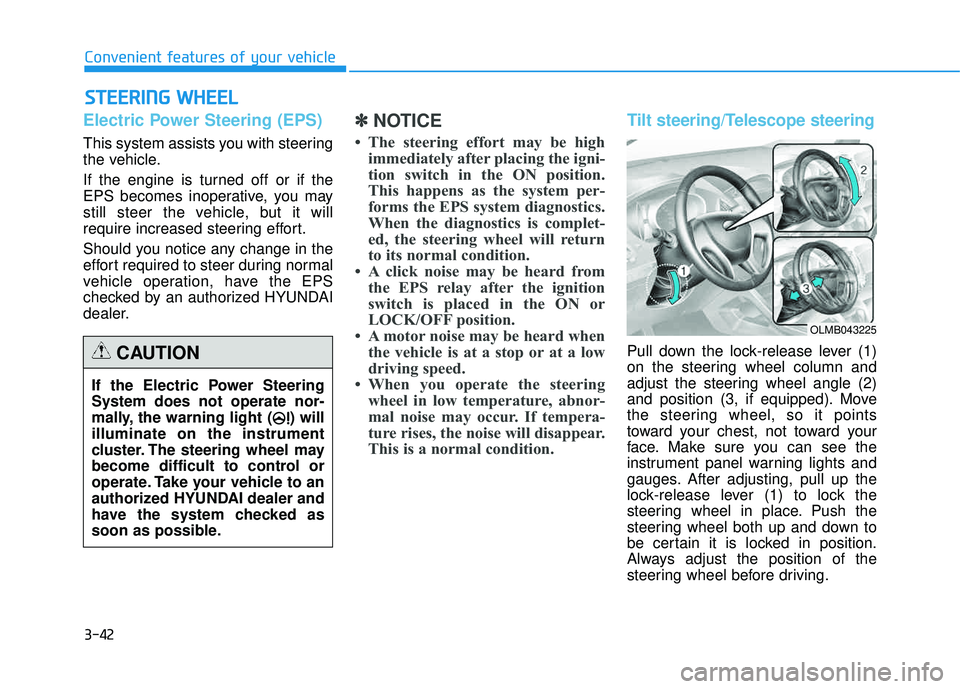
Pull down the lock-release lever (1)
on the steering wheel column and
adjust the steering wheel angle (2)
and position (3, if equipped). Move
the steering wheel, so it points
toward your chest, not toward your
face. Make sure you can see the
instrument panel warning lights and
gauges. After adjusting, pull up the
lock-release lever (1) to lock the
steering wheel in place. Push the
steering wheel both up and down to
be certain it is locked in position.
Always adjust the position of the
steering wheel before driving.
SSTT EEEERR IINN GG WW HHEEEELL
Convenient features of your vehicle
If the Electric Power Steering System does not operate nor-
mally, the warning light ( ) willilluminate on the instrument
cluster. The steering wheel may
become difficult to control or
operate. Take your vehicle to an
authorized HYUNDAI dealer and
have the system checked as
soon as possible.
CAUTION
OLMB043225
Page 131 of 653
3-45
Convenient features of your vehicle
3
Electric chromic mirror (ECM) (if equipped)
The electric rearview mirror automati- cally controls the glare from the head-
lights of the car behind you in night-
time or low light driving conditions.
When the engine is running, the
glare is automatically controlled by
the sensor mounted in the rearview
mirror. The sensor detects the light
level around the vehicle, and auto-matically adjusts to control the head-
light glare from vehicles behind you.
Whenever the shift lever is placed in
R (Reverse), the mirror will automat-
ically go to the brightest setting to
improve the driver’s view behind the
vehicle.
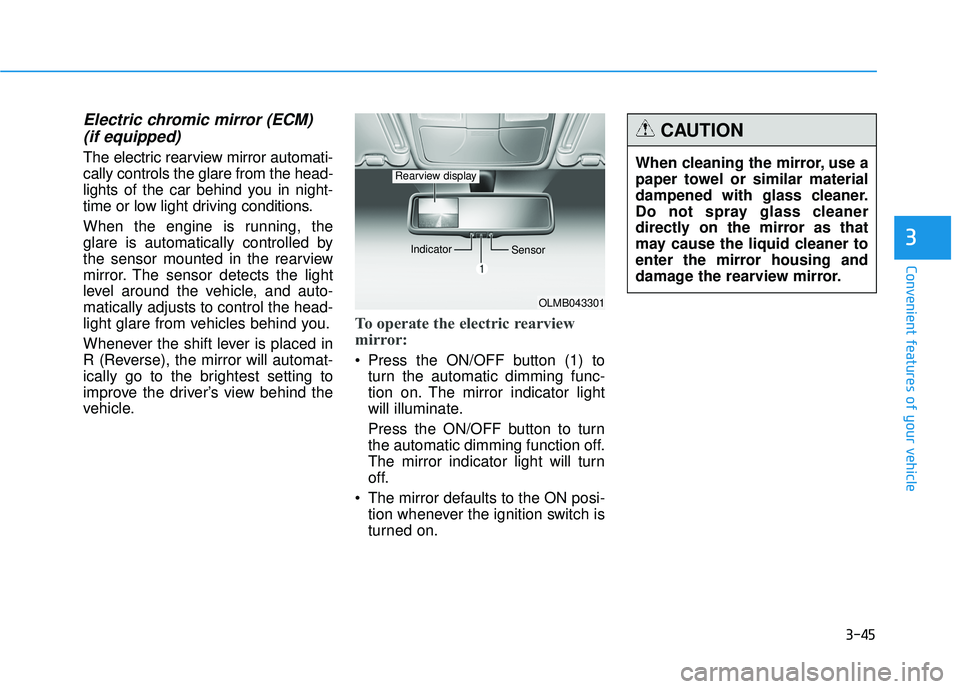
To operate the electric rearview
mirror:
Press the ON/OFF button (1) to turn the automatic dimming func-
tion on. The mirror indicator light
will illuminate.
Press the ON/OFF button to turn
the automatic dimming function off.
The mirror indicator light will turn
off.
The mirror defaults to the ON posi- tion whenever the ignition switch is
turned on.
OLMB043301
Indicator
Sensor
Rearview displayWhen cleaning the mirror, use a
paper towel or similar material
dampened with glass cleaner.
Do not spray glass cleaner
directly on the mirror as that
may cause the liquid cleaner to
enter the mirror housing and
damage the rearview mirror.
CAUTION
Page 156 of 653
3-70
Convenient features of your vehicle
Sunroof open warming
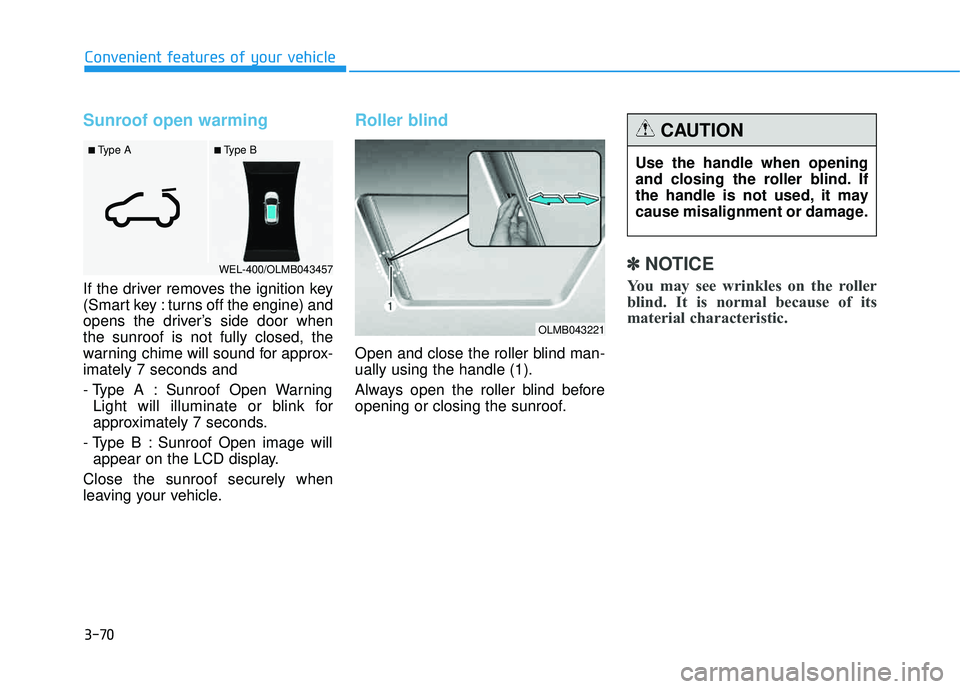
If the driver removes the ignition key
(Smart key : turns off the engine) and
opens the driver’s side door whenthe sunroof is not fully closed, the
warning chime will sound for approx-imately 7 seconds and
- Type A : Sunroof Open WarningLight will illuminate or blink for
approximately 7 seconds.
- Type B : Sunroof Open image will appear on the LCD display.
Close the sunroof securely when
leaving your vehicle.
Roller blind
Open and close the roller blind man- ually using the handle (1).
Always open the roller blind before
opening or closing the sunroof.
✽✽ NOTICE
You may see wrinkles on the roller
blind. It is normal because of its
material characteristic.
■ Type B
■ Type A
WEL-400/OLMB043457
Use the handle when opening
and closing the roller blind. If
the handle is not used, it may
cause misalignment or damage.
CAUTION
OLMB043221
Page 157 of 653
3-71
Convenient features of your vehicle
3
Opening the hood
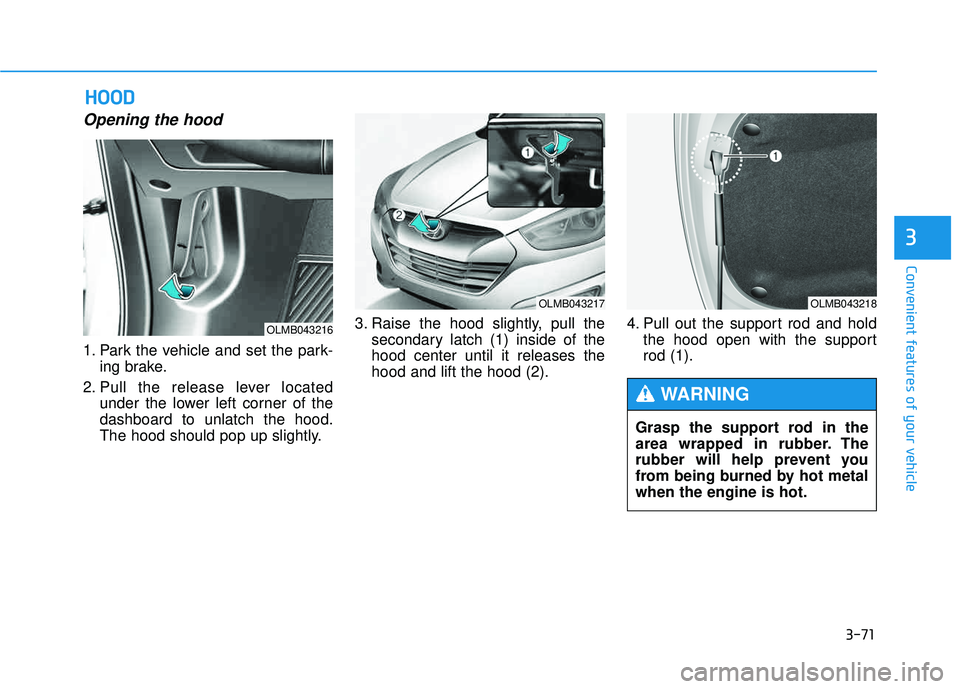
1. Park the vehicle and set the park-ing brake.
2. Pull the release lever located under the lower left corner of the dashboard to unlatch the hood.
The hood should pop up slightly. 3. Raise the hood slightly, pull the
secondary latch (1) inside of thehood center until it releases thehood and lift the hood (2). 4. Pull out the support rod and hold
the hood open with the supportrod (1).
HHOO OO DD
OLMB043216
OLMB043217OLMB043218
Grasp the support rod in the
area wrapped in rubber. The
rubber will help prevent you
from being burned by hot metalwhen the engine is hot.
WARNING
Page 158 of 653
3-72
Convenient features of your vehicle
Closing the hood
1. Before closing the hood, check thefollowing:
partment must be correctly installed.
bustible material must be
removed from the engine com-
partment.
2. Return the support rod to its clip to prevent it from rattling.
3. Lower the hood halfway and push down to securely lock in place.
Then double check to be sure the
hood is secure.
Before closing the hood, ensure all obstructions are
removed from around thehood opening.
Always double check that the
hood is firmly latched before
driving away. If it is not
latched, the hood could open
while the vehicle is being driv-
en, causing a total loss of vis-
ibility, which might result in anaccident.
Do not move the vehicle with the hood in the raised posi-
tion, as vision is obstructed,
which might result in an acci-
dent, and the hood could fall
or be damaged.
WARNING
Page 162 of 653
3-76
Convenient features of your vehicle
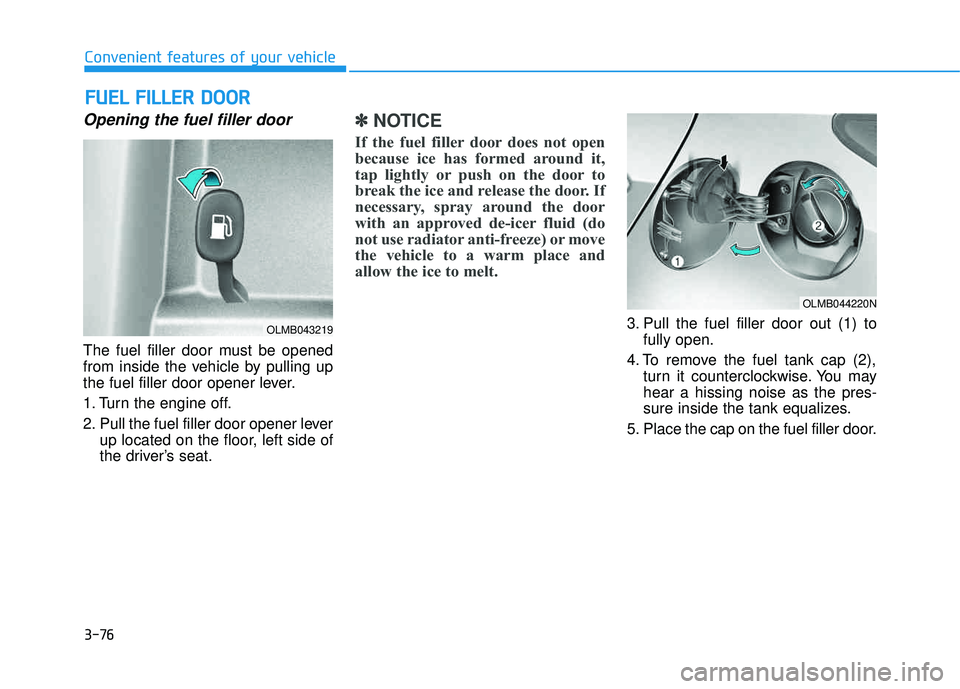
Opening the fuel filler door
The fuel filler door must be opened
from inside the vehicle by pulling up
the fuel filler door opener lever.
1. Turn the engine off.
2. Pull the fuel filler door opener leverup located on the floor, left side of
the driver’s seat.
✽✽ NOTICE
If the fuel filler door does not open
because ice has formed around it,
tap lightly or push on the door to
break the ice and release the door. If
necessary, spray around the door
with an approved de-icer fluid (do
not use radiator anti-freeze) or move
the vehicle to a warm place and
allow the ice to melt.
3. Pull the fuel filler door out (1) to fully open.
4. To remove the fuel tank cap (2), turn it counterclockwise. You may hear a hissing noise as the pres-
sure inside the tank equalizes.
5. Place the cap on the fuel filler door.
FF UU EELL FF IILL LLEE RR DD OO OORR
OLMB043219
OLMB044220N