button HYUNDAI TUCSON 2016 Owners Manual
[x] Cancel search | Manufacturer: HYUNDAI, Model Year: 2016, Model line: TUCSON, Model: HYUNDAI TUCSON 2016Pages: 642, PDF Size: 9.78 MB
Page 245 of 642
3-147
Convenient features of your vehicle
3
Air conditioning system operation
tips
If the vehicle has been parked indirect sunlight during hot weather,
open the windows for a short time
to let the hot air inside the vehicle
escape.
After sufficient cooling has been achieved, switch back from therecirculated air to the fresh outsideair position.
To help reduce moisture inside of the windows on rainy or humid
days, decrease the humidity inside
the vehicle by operating the airconditioning system with the win-
dows and sunroof closed.
Use the air conditioning system every month for a few minutes to
ensure maximum system perform-
ance. If you operate the air conditioner
excessively, the difference
between the temperature of theoutside air and that of the wind-shield could cause the outer sur-
face of the windshield to fog up,
causing loss of visibility. In this
case, toggle the mode selection
button to the position and set
the fan speed control knob to the
lowest speed setting.
System Maintenance
Climate control air filter
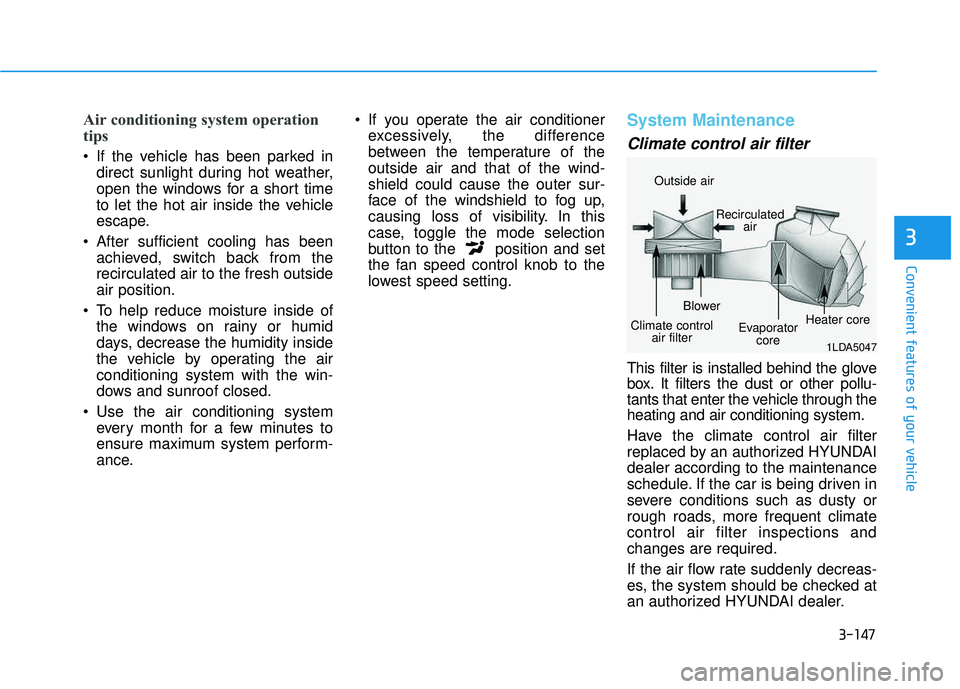
This filter is installed behind the glove
box. It filters the dust or other pollu-
tants that enter the vehicle through theheating and air conditioning system.
Have the climate control air filter
replaced by an authorized HYUNDAIdealer according to the maintenance
schedule. If the car is being driven in
severe conditions such as dusty or
rough roads, more frequent climatecontrol air filter inspections andchanges are required.
If the air flow rate suddenly decreas-
es, the system should be checked at
an authorized HYUNDAI dealer.
1LDA5047
Outside air
Recirculatedair
Climate control air filter Blower
Evaporatorcore Heater core
Page 247 of 642
3-149
Convenient features of your vehicle
3
WWIINN DDSSHH IIEE LLDD DD EEFFRR OO SSTT IINN GG AA NN DD DD EEFFOO GGGGIINN GG
For maximum windshield defrost-
ing, set the temperature control
knob to the highest temperature
setting and the fan control knob to
the highest fan speed. Select the
front defrost button on the climate
control display. After the engine
warm-up period, warm air will bedirected to the front windshield.
If warm air to the floor is desired while defrosting or defogging, set themode to the floor-defrost position.
Before driving, clear all snow and ice from the windshield, rear win-
dow, outside rear view mirrors, and
all side windows.
Clear all snow and ice from the hood and air inlet in the cowl grill to
improve heater and defroster effi-ciency and to reduce the probability
of fogging up the inside of the wind-shield.
If the engine temperature is still
cold after starting, then a brief
engine warm up period may be
required for the vented air flow tobecome warm or hot.Manual Climate Control System
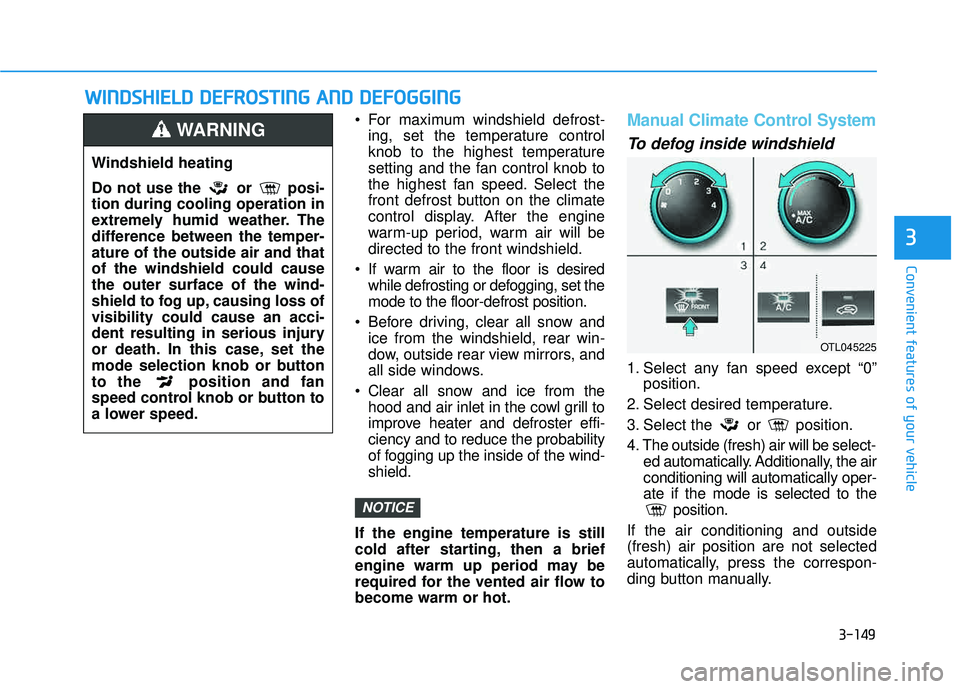
To defog inside windshield
1. Select any fan speed except “0” position.
2. Select desired temperature.
3. Select the or position.
4. The outside (fresh) air will be select- ed automatically. Additionally, the air conditioning will automatically oper-ate if the mode is selected to the position.
If the air conditioning and outside(fresh) air position are not selected
automatically, press the correspon-
ding button manually.
NOTICE
Windshield heating
Do not use the or posi- tion during cooling operation in
extremely humid weather. The
difference between the temper-ature of the outside air and thatof the windshield could causethe outer surface of the wind-
shield to fog up, causing loss ofvisibility could cause an acci-
dent resulting in serious injury
or death. In this case, set the
mode selection knob or button
to the position and fan
speed control knob or button to
a lower speed.
WARNING
OTL045225
Page 248 of 642
3-150
Convenient features of your vehicle
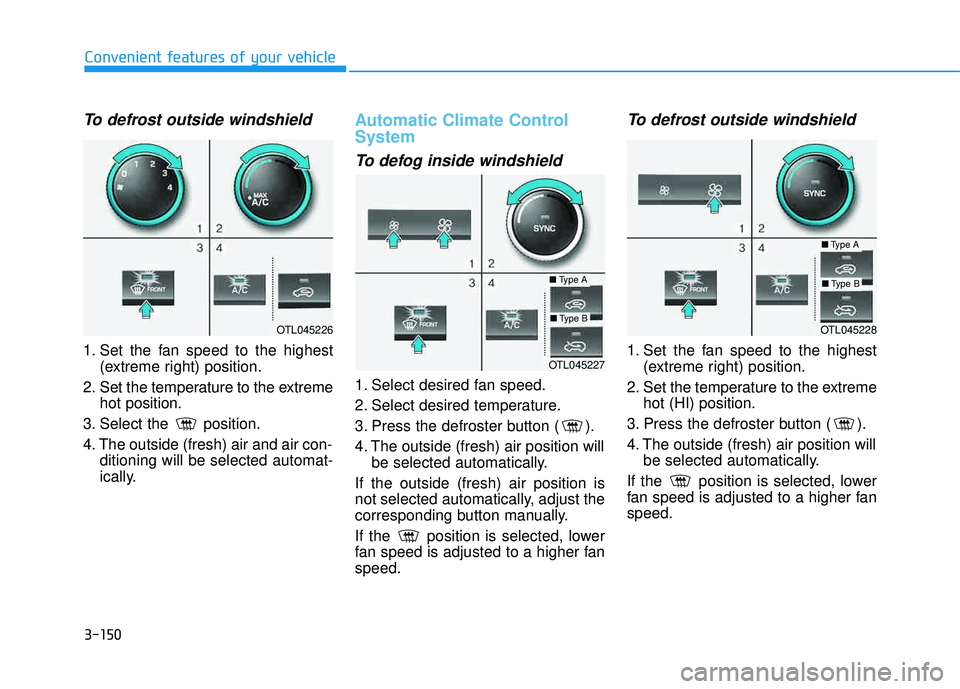
To defrost outside windshield
1. Set the fan speed to the highest(extreme right) position.
2. Set the temperature to the extreme hot position.
3. Select the position.
4. The outside (fresh) air and air con- ditioning will be selected automat-
ically.
Automatic Climate Control System
To defog inside windshield
1. Select desired fan speed.
2. Select desired temperature.
3. Press the defroster button ( ).
4. The outside (fresh) air position willbe selected automatically.
If the outside (fresh) air position is
not selected automatically, adjust the
corresponding button manually.
If the position is selected, lower
fan speed is adjusted to a higher fanspeed.
To defrost outside windshield
1. Set the fan speed to the highest (extreme right) position.
2. Set the temperature to the extreme hot (HI) position.
3. Press the defroster button ( ).
4. The outside (fresh) air position will be selected automatically.
If the position is selected, lower
fan speed is adjusted to a higher fanspeed.OTL045227
■ Type A
■Type BOTL045226OTL045228
■Type A
■Type B
Page 249 of 642
3-151
Convenient features of your vehicle
3
Defogging logic
To reduce the probability of fogging up the inside of the windshield, the
air intake or air conditioning are con-trolled automatically according to
certain conditions such as or
position. To cancel or return the
defogging logic, do the following.
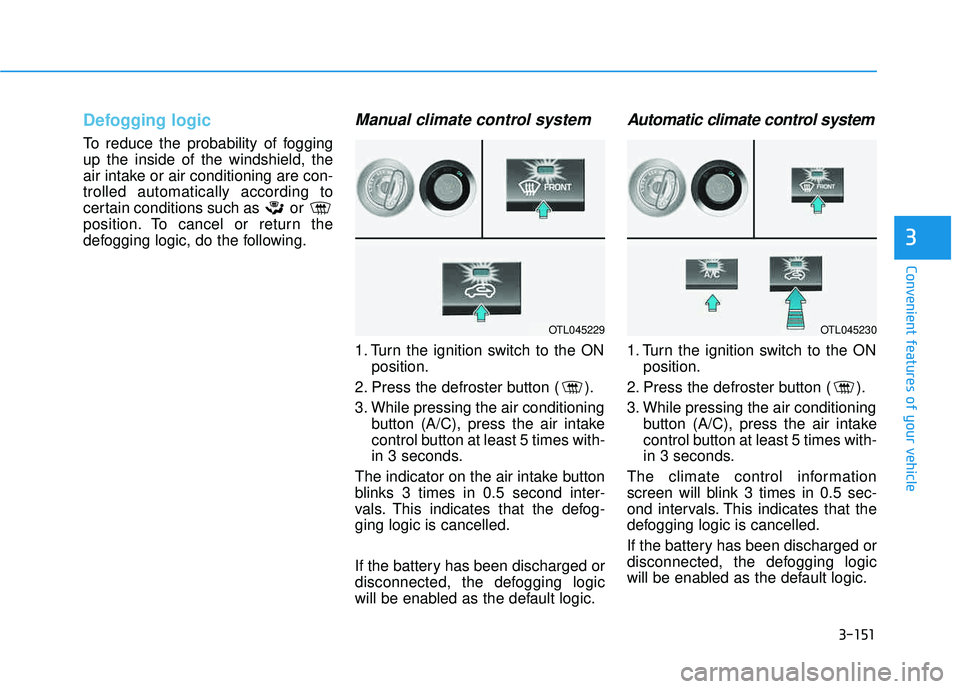
Manual climate control system
1. Turn the ignition switch to the ONposition.
2. Press the defroster button ( ).
3. While pressing the air conditioning button (A/C), press the air intake
control button at least 5 times with-
in 3 seconds.
The indicator on the air intake button
blinks 3 times in 0.5 second inter-
vals. This indicates that the defog-ging logic is cancelled.
If the battery has been discharged or
disconnected, the defogging logic
will be enabled as the default logic.
Automatic climate control system
1. Turn the ignition switch to the ON position.
2. Press the defroster button ( ).
3. While pressing the air conditioning button (A/C), press the air intake
control button at least 5 times with-
in 3 seconds.
The climate control information
screen will blink 3 times in 0.5 sec-
ond intervals. This indicates that the
defogging logic is cancelled.
If the battery has been discharged or
disconnected, the defogging logic
will be enabled as the default logic.
OTL045229OTL045230
Page 250 of 642
3-152
Convenient features of your vehicle
CCLLIIMM AATTEE CC OO NNTTRR OO LL AA DDDDIITT IIOO NNAALL FF EE AA TTUU RREESS
Automatic Ventilation
When the ignition is ON or when the
engine is running and the outside
temperature is below 59°F (15°C),
the automatic ventilation feature will
activate if the recirculated air intake
position is selected for more than 5
minutes while A/C is off and floor
mode is selected. In this condition
the air intake position will automati-
cally switch to the outside (fresh) air
intake position.
To cancel or reset the Automatic
Ventilation
When the air conditioning system is
on, select Face Level mode and
while pressing the A/C button, press
the recirculated air position button
five times within three seconds.
Sunroof Inside Air
Recirculation
When the heater or air conditioning system is on with the sunroofopened, the outside (fresh) air posi-
tion will be automatically selected. At
this time, if you press the recirculated
air position button, the recirculated
air position will be selected but will
change back to the outside (fresh) air
position after 3 minutes. When the sunroof is closed, the air
intake position will return to the orig-
inal position that was selected.
Page 251 of 642
3-153
Convenient features of your vehicle
3
SSTT OO RRAA GG EE CC OO MM PPAA RRTTMM EENN TT
To avoid possible theft, do not
leave valuables in the storage
compartments.
Center Console Storage
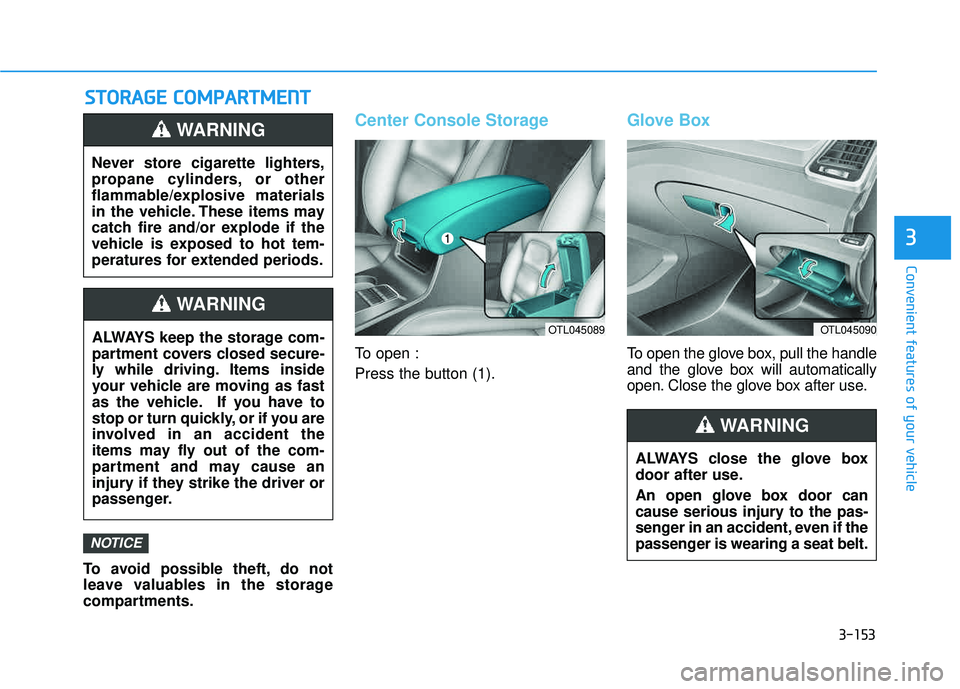
To open :
Press the button (1).
Glove Box
To open the glove box, pull the handle
and the glove box will automatically
open. Close the glove box after use.
NOTICE
Never store cigarette lighters,
propane cylinders, or other
flammable/explosive materials
in the vehicle. These items may
catch fire and/or explode if the
vehicle is exposed to hot tem-
peratures for extended periods.
WARNING
ALWAYS keep the storage com-
partment covers closed secure-
ly while driving. Items inside
your vehicle are moving as fast
as the vehicle. If you have to
stop or turn quickly, or if you are
involved in an accident the
items may fly out of the com-
partment and may cause an
injury if they strike the driver or
passenger.
WARNING
OTL045090
ALWAYS close the glove box
door after use.
An open glove box door can
cause serious injury to the pas-
senger in an accident, even if the
passenger is wearing a seat belt.
WARNING
OTL045089
Page 256 of 642
3-158
Convenient features of your vehicle
With Audio system
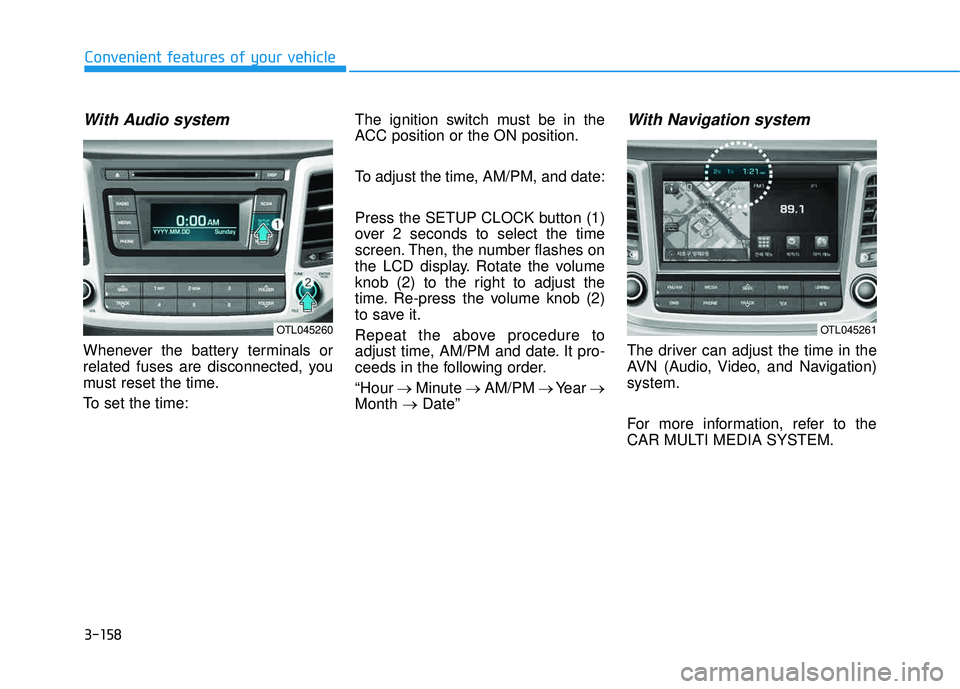
Whenever the battery terminals or
related fuses are disconnected, you
must reset the time.
To set the time:The ignition switch must be in the
ACC position or the ON position.
To adjust the time, AM/PM, and date:
Press the SETUP CLOCK button (1)
over 2 seconds to select the time
screen. Then, the number flashes on
the LCD display. Rotate the volume
knob (2) to the right to adjust the
time. Re-press the volume knob (2)
to save it.
Repeat the above procedure to
adjust time, AM/PM and date. It pro-
ceeds in the following order. “Hour
Minute AM/PM Year
Month Date”
With Navigation system
The driver can adjust the time in the
AVN (Audio, Video, and Navigation)system.
For more information, refer to the
CAR MULTI MEDIA SYSTEM.
OTL045260OTL045261
Page 266 of 642
4-3
Multimedia System
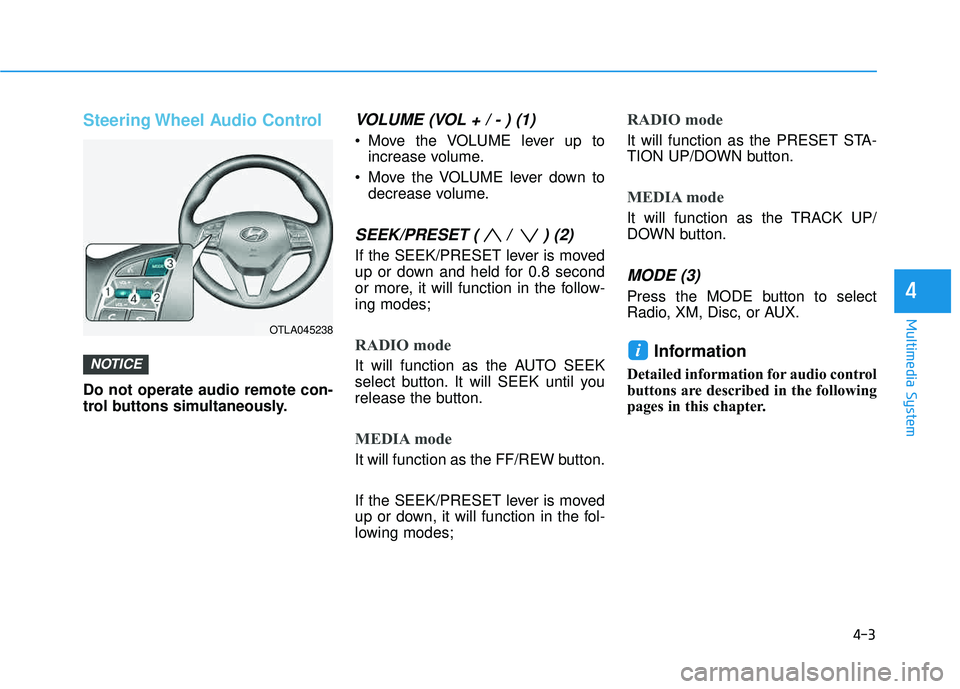
Steering Wheel Audio Control
Do not operate audio remote con-
trol buttons simultaneously.
VOLUME (VOL + / - ) (1)
Move the VOLUME lever up toincrease volume.
Move the VOLUME lever down to decrease volume.
SEEK/PRESET ( / ) (2)
If the SEEK/PRESET lever is moved
up or down and held for 0.8 second
or more, it will function in the follow-ing modes;
RADIO mode
It will function as the AUTO SEEK
select button. It will SEEK until you
release the button.
MEDIA mode
It will function as the FF/REW button.
If the SEEK/PRESET lever is moved
up or down, it will function in the fol-
lowing modes;
RADIO mode
It will function as the PRESET STA-
TION UP/DOWN button.
MEDIA mode
It will function as the TRACK UP/
DOWN button.
MODE (3)
Press the MODE button to select
Radio, XM, Disc, or AUX.
Information
Detailed information for audio control
buttons are described in the following
pages in this chapter.
iNOTICE
4
OTLA045238
Page 267 of 642
4-4
Audio / Video / Navigation
System (AVN)
Detailed information for the AVN sys-
tem is described in a separately sup-
plied manual.
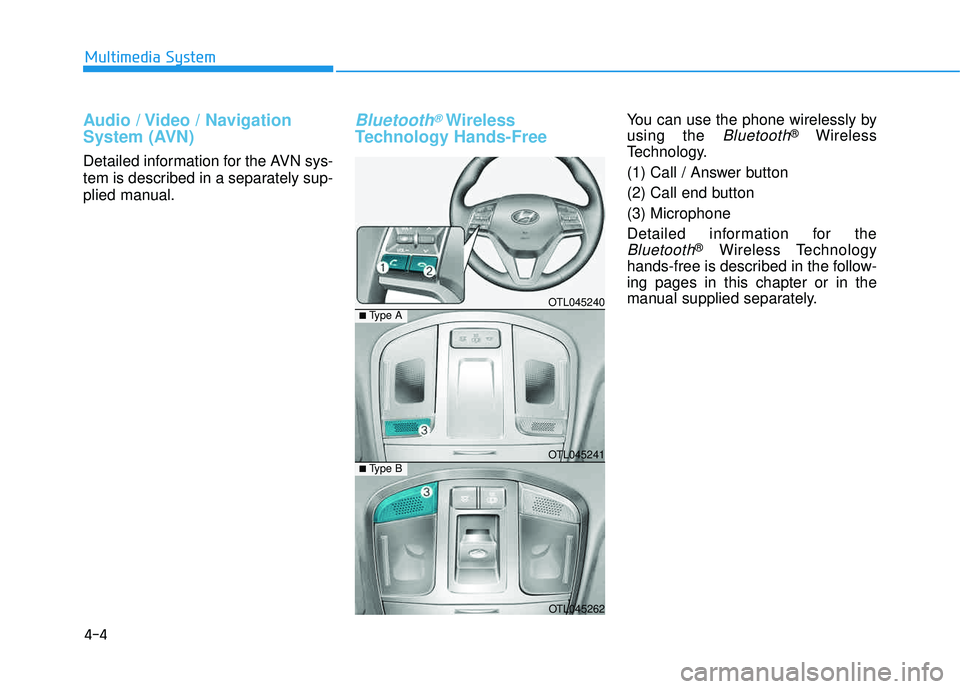
Bluetooth®Wireless
Technology Hands-FreeYou can use the phone wirelessly by using the
Bluetooth®Wireless
Technology.
(1) Call / Answer button
(2) Call end button (3) Microphone
Detailed information for the
Bluetooth®Wireless Technology
hands-free is described in the follow- ing pages in this chapter or in the
manual supplied separately.
Multimedia System
OTL045240
OTL045241
OTL045262
■ Type B
■Type A
Page 285 of 642
4-22
Multimedia System
RRaadd iioo MM ooddee
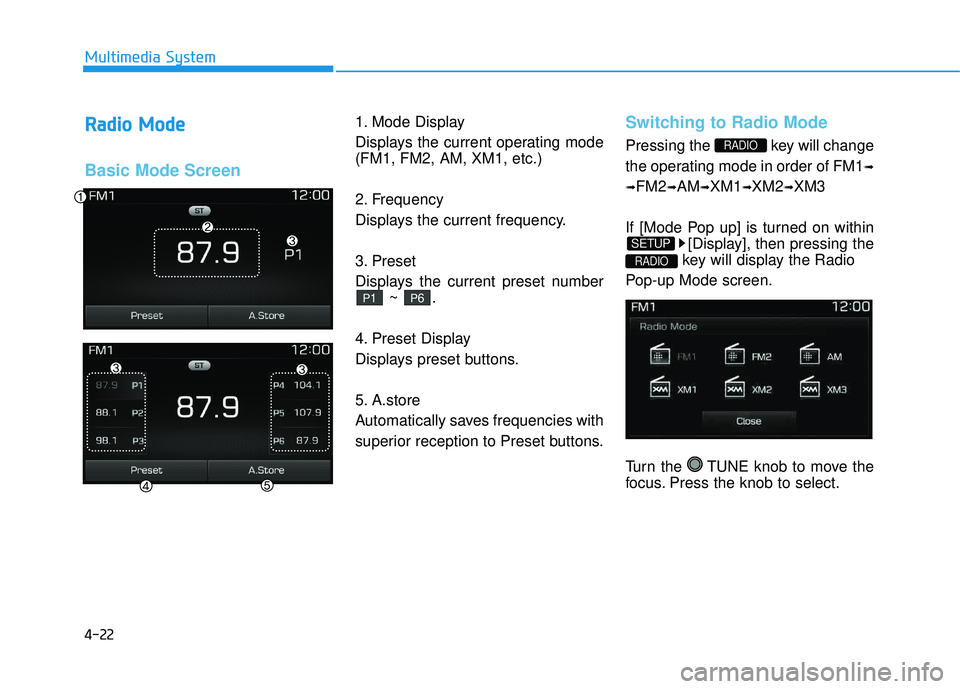
Basic Mode Screen
1. Mode Display
Displays the current operating mode (FM1, FM2, AM, XM1, etc.)
2. Frequency
Displays the current frequency.
3. Preset
Displays the current preset number
~ .
4. Preset Display
Displays preset buttons.
5. A.store
Automatically saves frequencies with
superior reception to Preset buttons.Switching to Radio Mode
Pressing the key will change
the operating mode in order of FM1 ➟
➟ FM2
➟AM ➟XM1 ➟XM2 ➟XM3
If [Mode Pop up] is turned on within [Display], then pressing the
key will display the Radio
Pop-up Mode screen.
Turn the TUNE knob to move the
focus. Press the knob to select.
RADIO
SETUP
RADIO
P6P1