door lock HYUNDAI TUCSON 2016 Owner's Guide
[x] Cancel search | Manufacturer: HYUNDAI, Model Year: 2016, Model line: TUCSON, Model: HYUNDAI TUCSON 2016Pages: 642, PDF Size: 9.78 MB
Page 160 of 642
3-62
If you press the door unlock but-ton (2), the Smart Liftgate func-
tion will be deactivated tem-
porarily. But, if you do not open
any door for 30 seconds, the
Smart Liftgate function will be
activated again.
If you press the liftgate open button (3) for more than 1 sec-
ond, the liftgate opens.
The Smart Liftgate function will still be activated if you press the
door lock button (1) or liftgate
open button (3) on the smart key
as long as the Smart Liftgate is
not already in the Detect and
Alert stage.
In case you have deactivated the Smart Liftgate function by
pressing the smart key button
and opened a door, the Smart
Liftgate function can be activat-
ed again by closing and locking
all doors.
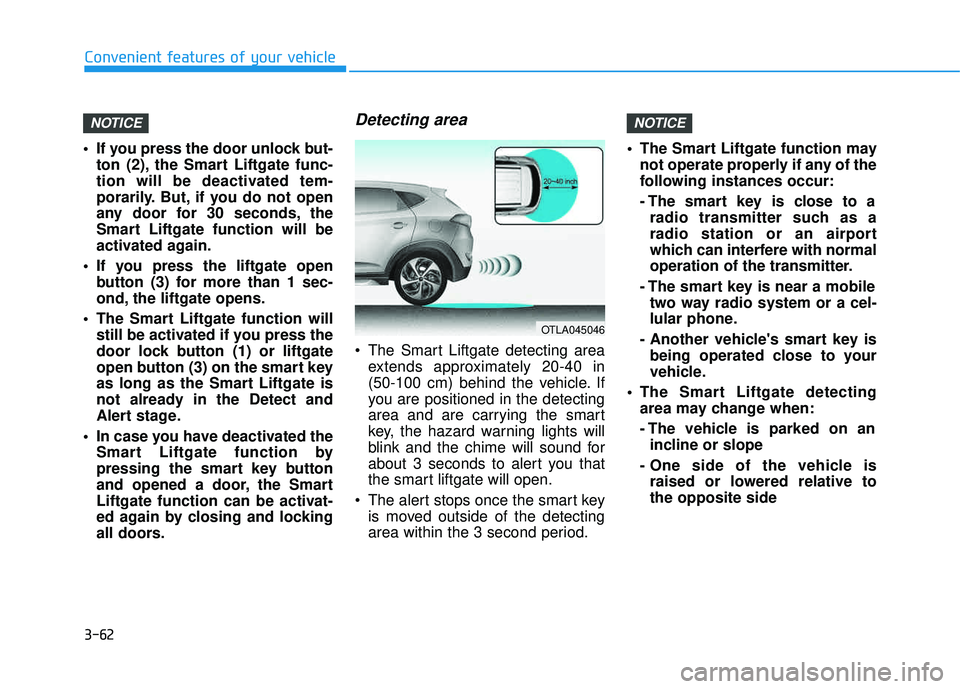
Detecting area
The Smart Liftgate detecting areaextends approximately 20-40 in
(50-100 cm) behind the vehicle. If
you are positioned in the detecting
area and are carrying the smart
key, the hazard warning lights will
blink and the chime will sound for
about 3 seconds to alert you that
the smart liftgate will open.
The alert stops once the smart key is moved outside of the detecting
area within the 3 second period. The Smart Liftgate function may
not operate properly if any of the
following instances occur:
- The smart key is close to aradio transmitter such as a
radio station or an airport
which can interfere with normal
operation of the transmitter.
- The smart key is near a mobile two way radio system or a cel-
lular phone.
- Another vehicle's smart key is being operated close to your
vehicle.
The Smart Liftgate detecting area may change when:
- The vehicle is parked on anincline or slope
- One side of the vehicle is raised or lowered relative to the opposite side
NOTICENOTICE
Convenient features of your vehicle
OTLA045046
Page 174 of 642
3-76
Convenient features of your vehicle
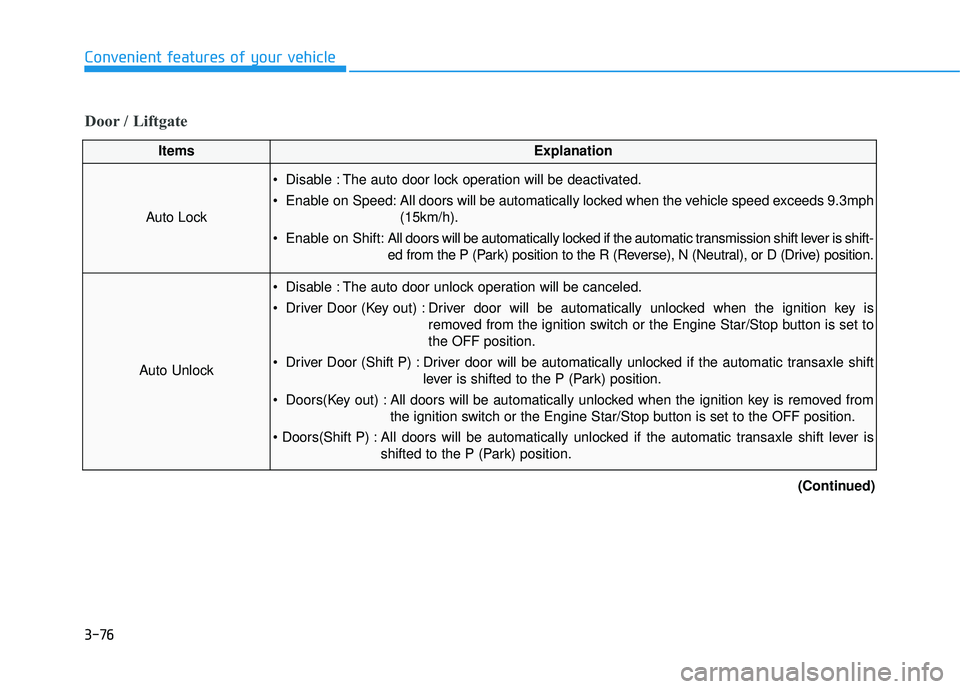
Door / Liftgate
ItemsExplanation
Auto Lock
Disable : The auto door lock operation will be deactivated.
Enable on Speed: All doors will be automatically locked when the vehicle speed exceeds 9.3mph(15km/h).
Enable on Shift: All doors will be automatically locked if the automatic transmission shift lever is shift-
ed from the P (Park) position to the R (Reverse), N (Neutral), or D (Drive) position.
Auto Unlock
Disable : The auto door unlock operation will be canceled.
Driver Door (Key out) : Driver door will be automatically unlocked when the ignition key is
removed from the ignition switch or the Engine Star/Stop button is set to the OFF position.
Driver Door (Shift P) : Driver door will be automatically unlocked if the automatic transaxle shift lever is shifted to the P (Park) position.
Doors(Key out) : All doors will be automatically unlocked when the ignition key is removed from the ignition switch or the Engine Star/Stop button is set to the OFF position.
All doors will be automatically unlocked if the automatic transaxle shift lever is shifted to the P (Park) position.
(Continued)
Page 175 of 642
3-77
Convenient features of your vehicle
3
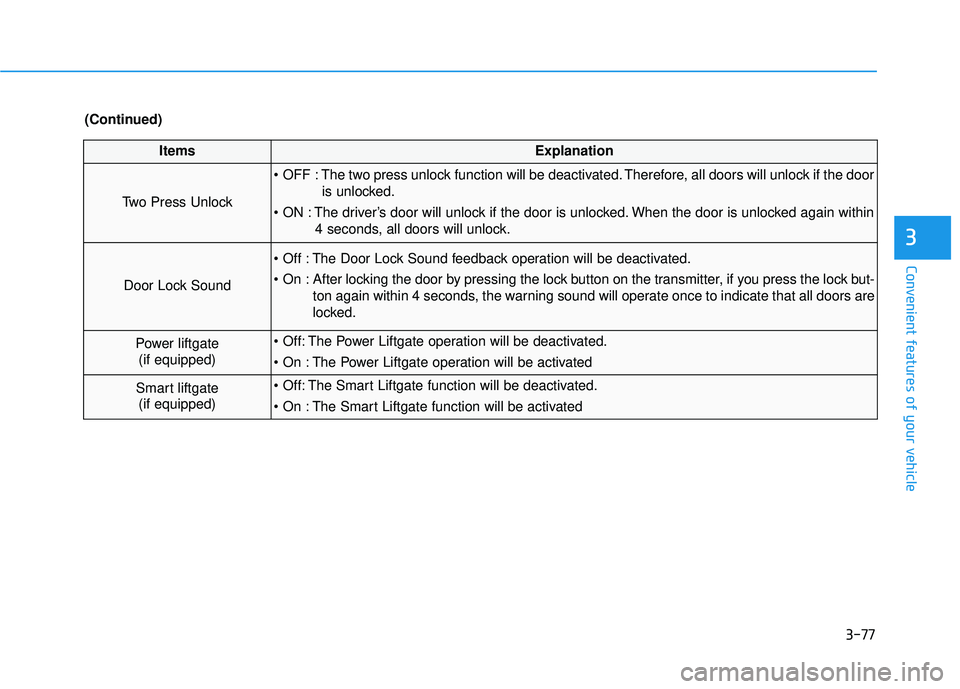
ItemsExplanation
Two Press Unlock
The two press unlock function will be deactivated. Therefore, all doors will unlock if the dooris unlocked.
The driver’s door will unlock if the door is unlocked. When the door is unlocked again within 4 seconds, all doors will unlock.
Door Lock Sound
The Door Lock Sound feedback operation will be deactivated.
After locking the door by pressing the lock button on the transmitter, if you press the lock but-ton again within 4 seconds, the warning sound will operate once to indicate that all doors are
locked.
Power liftgate(if equipped) The Power Liftgate operation will be deactivated.
The Power Liftgate operation will be activated
Smart liftgate(if equipped) The Smart Liftgate function will be deactivated.
The Smart Liftgate function will be activated
(Continued)
Page 209 of 642
3-111
Convenient features of your vehicle
3
When in operation, the fog lamps
consume large amounts of vehicle
electrical power. Only use the fog
lamps when visibility is poor.
Battery saver function
The purpose of this feature is to pre-
vent the battery from being dis-
charged. The system automatically
turns off the parking lamp when the
key is removed (remote key) or when
the driver turns the engine off (smart
key) and opens the driver-side door.
With this feature, the parking lamps
will turn off automatically if the driver
parks on the side of road at night.
If necessary, to keep the lamps on
when the engine is turned off, perform
the following:
1) Open the driver-side door.
2) Turn the parking lamps OFF andON again using the light switch on
the steering column.
Headlamp delay function
If the key is removed from the ignition
switch or placed in the ACC position orthe LOCK/OFF position with the head-lamps ON, the headlamps (and/or
parking lamps) remain on for about 5
minutes. However, if the driver’s dooris opened and closed, the headlights
are turned off after 15 seconds.
However, with the engine off if the dri-
ver’s door is opened and closed, the
headlamps (and/or parking lamps) are
turned off after 15 seconds.
The headlamps (and/or parking lamps)
can be turned off by pressing the lock
button on the remote key or smart key
twice or turning the light switch to the
OFF or AUTO position. However, if you
turn the light switch to the AUTO posi-
tion when it is dark outside, the head-
lamps will not be turned off.
NOTICE
Page 211 of 642
3-113
Convenient features of your vehicle
3
Welcome System (if equipped)
Welcome light
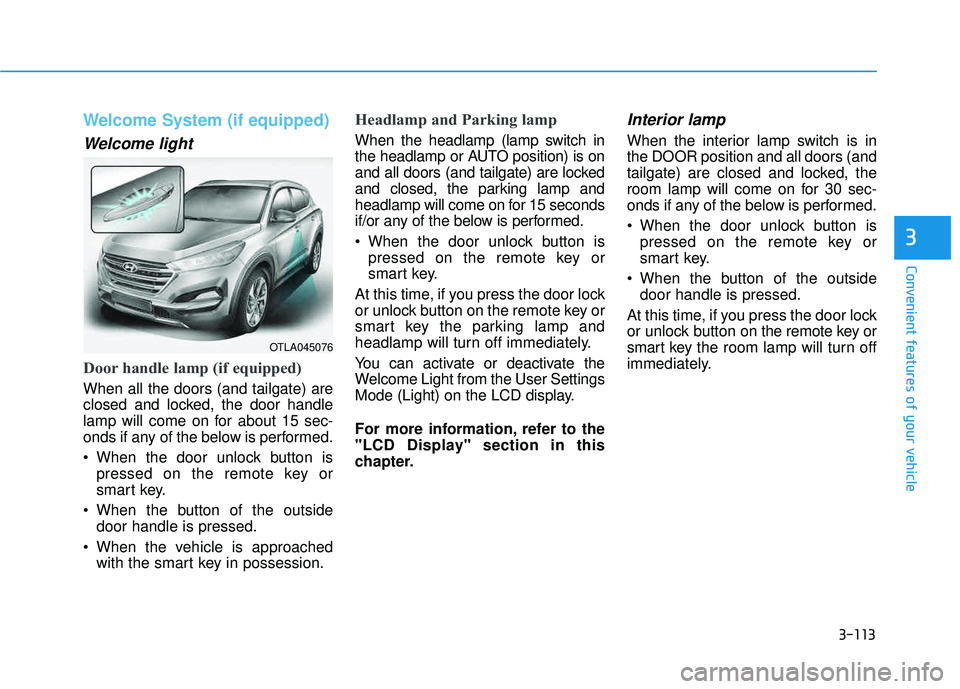
Door handle lamp (if equipped)
When all the doors (and tailgate) are
closed and locked, the door handle
lamp will come on for about 15 sec-
onds if any of the below is performed.
When the door unlock button ispressed on the remote key or
smart key.
When the button of the outside door handle is pressed.
When the vehicle is approached with the smart key in possession.
Headlamp and Parking lamp
When the headlamp (lamp switch in
the headlamp or AUTO position) is on
and all doors (and tailgate) are locked
and closed, the parking lamp and
headlamp will come on for 15 seconds
if/or any of the below is performed.
When the door unlock button ispressed on the remote key or
smart key.
At this time, if you press the door lock
or unlock button on the remote key or
smart key the parking lamp and
headlamp will turn off immediately.
You can activate or deactivate the
Welcome Light from the User Settings
Mode (Light) on the LCD display.
For more information, refer to the
"LCD Display" section in this
chapter.
Interior lamp
When the interior lamp switch is inthe DOOR position and all doors (and
tailgate) are closed and locked, the
room lamp will come on for 30 sec-
onds if any of the below is performed.
When the door unlock button is pressed on the remote key or
smart key.
When the button of the outside door handle is pressed.
At this time, if you press the door lock
or unlock button on the remote key or
smart key the room lamp will turn off
immediately.
OTLA045076
Page 212 of 642
3-114
Convenient features of your vehicle
Interior Lights
Do not use the interior lights for
extended periods when the engine
is turned off or the battery will dis-
charge.
Interior lamp AUTO cut
The interior lamps will automatically
go off approximately 20 minutes after
the engine is turned off and the
doors closed. If a door is opened, the
lamp will go off 40 minutes after the
engine is turned off. If the doors are
locked by the remote key or smart
key and the vehicle enters the armed
stage of the theft alarm system, the
lamps will go off five seconds later.
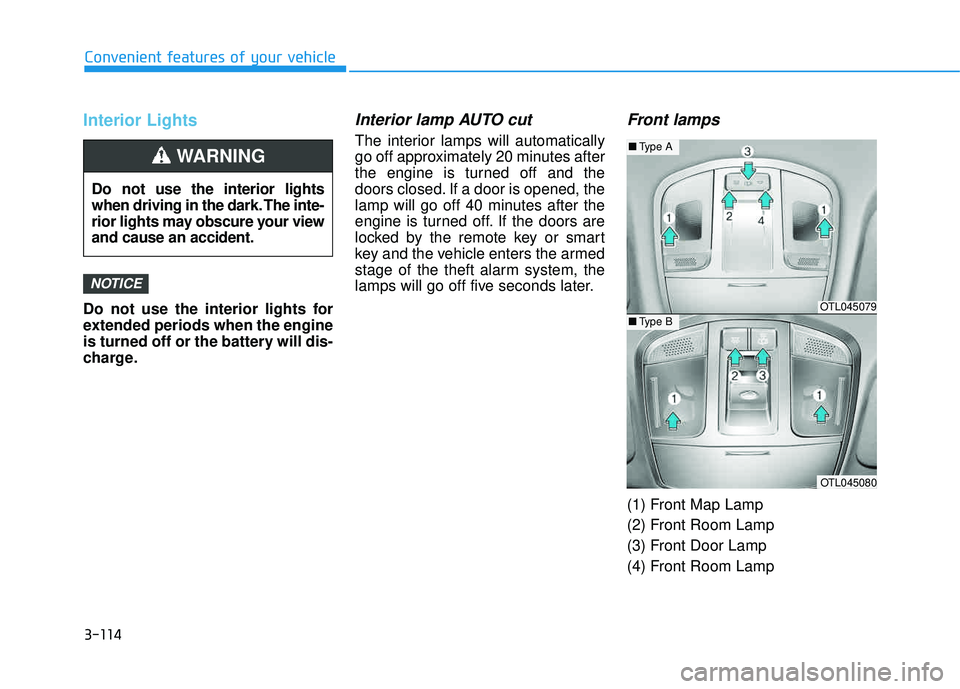
Front lamps
(1) Front Map Lamp
(2) Front Room Lamp
(3) Front Door Lamp
(4) Front Room Lamp
NOTICE
Do not use the interior lights
when driving in the dark. The inte-
rior lights may obscure your viewand cause an accident.
WARNING
OTL045079
OTL045080
■Type A
■Type B
Page 213 of 642
3-115
Convenient features of your vehicle
3
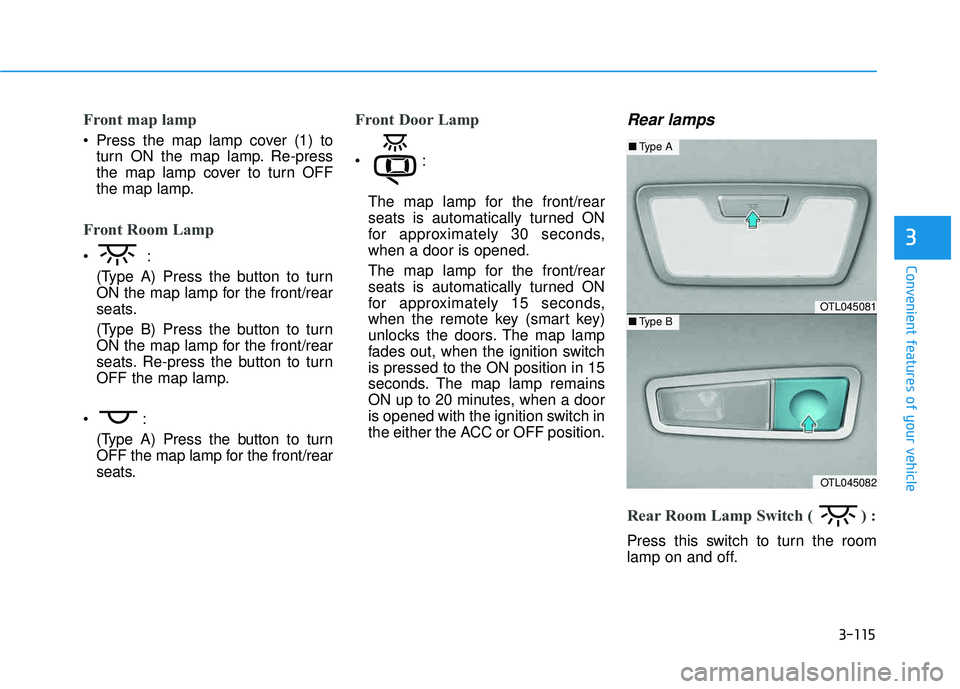
Front map lamp
Press the map lamp cover (1) toturn ON the map lamp. Re-press
the map lamp cover to turn OFF
the map lamp.
Front Room Lamp
(Type A) Press the button to turn
ON the map lamp for the front/rear
seats.
(Type B) Press the button to turn
ON the map lamp for the front/rear
seats. Re-press the button to turn
OFF the map lamp.
(Type A) Press the button to turn
OFF the map lamp for the front/rear
seats.
Front Door Lamp
The map lamp for the front/rear
seats is automatically turned ON
for approximately 30 seconds,when a door is opened.
The map lamp for the front/rear
seats is automatically turned ON
for approximately 15 seconds,
when the remote key (smart key)
unlocks the doors. The map lamp
fades out, when the ignition switchis pressed to the ON position in 15
seconds. The map lamp remains
ON up to 20 minutes, when a door
is opened with the ignition switch in
the either the ACC or OFF position.
Rear lamps
Rear Room Lamp Switch ( ) :
Press this switch to turn the room
lamp on and off.
OTL045081
OTL045082
■Type A
■Type B
Page 252 of 642
3-154
Convenient features of your vehicle
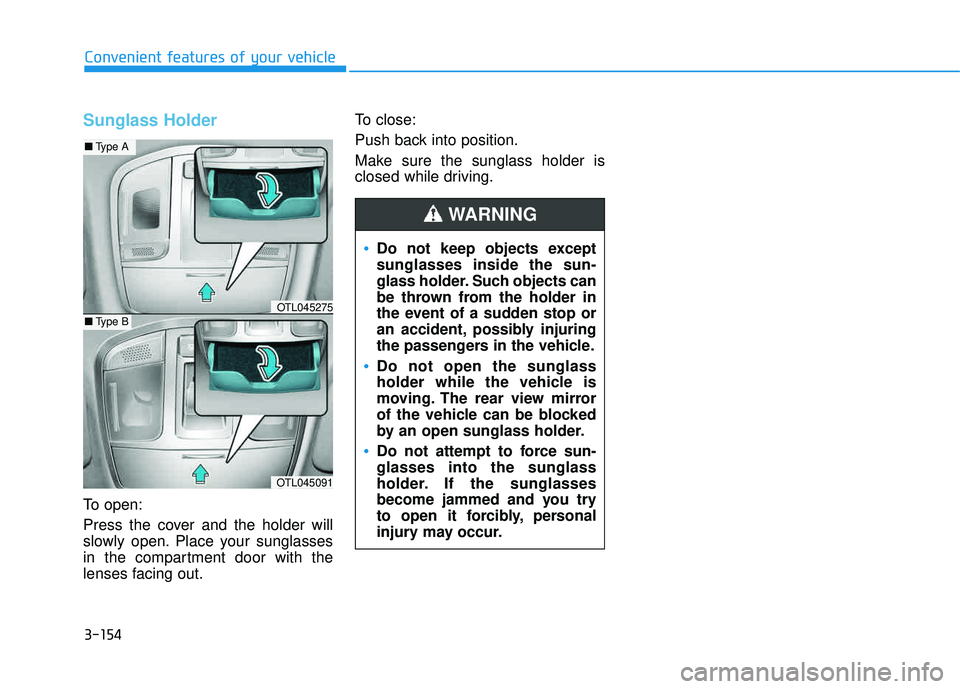
Sunglass Holder
To open:
Press the cover and the holder will
slowly open. Place your sunglasses
in the compartment door with the
lenses facing out.To close:
Push back into position.
Make sure the sunglass holder is
closed while driving.
Do not keep objects except sunglasses inside the sun-
glass holder. Such objects can
be thrown from the holder in
the event of a sudden stop or
an accident, possibly injuring
the passengers in the vehicle.
Do not open the sunglass
holder while the vehicle is
moving. The rear view mirror
of the vehicle can be blocked
by an open sunglass holder.
Do not attempt to force sun- glasses into the sunglass
holder. If the sunglasses
become jammed and you try
to open it forcibly, personal
injury may occur.
WARNING
OTL045091
■
Type A
■Type BOTL045275
Page 257 of 642
3-159
Convenient features of your vehicle
3
GPS Time check
The clock is automatically updated
through the navigation system.
GPS Time non-check
The clock can be manually adjusted.
1. Select the "System Settings" onthe "INFO/Setup" screen.
2. Select the "Clock Settings".
3. Select "Time Settings" on the screen
4. Select the "Time Format" to the 12 hour or 24 hour format.
For more information, please refer to
the manual that was separately sup-
plied with your vehicle.
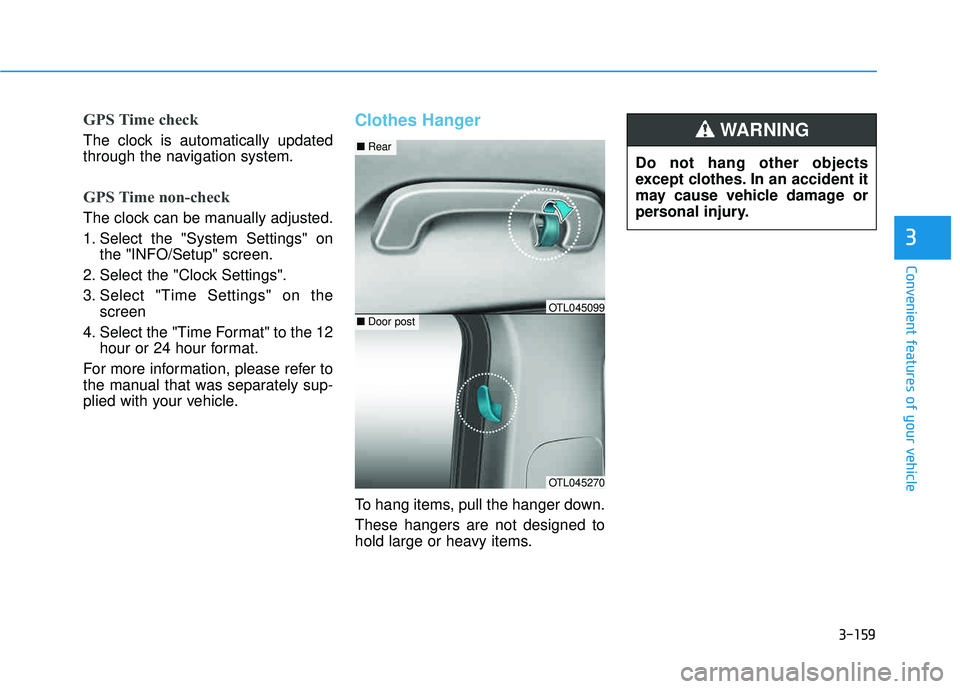
Clothes Hanger
To hang items, pull the hanger down. These hangers are not designed to
hold large or heavy items. Do not hang other objects
except clothes. In an accident it
may cause vehicle damage or
personal injury.
WARNING
OTL045270
■
Rear
■Door postOTL045099
Page 388 of 642
5-4
Driving your vehicle
Before Entering the Vehicle
• Be sure all windows, outside mir-ror(s), and outside lights are clean
and unobstructed.
Remove frost, snow, or ice.
Visually check the tires for uneven wear and damage.
Check under the vehicle for any sign of leaks.
Be sure there are no obstacles behind you if you intend to back up.
Before Starting
Make sure the hood, the liftgate,and the doors are securely closed
and locked.
Adjust the position of the seat and steering wheel.
Adjust the inside and outside rearview mirrors.
Verify all the lights work.
Fasten your seatbelt. Check that all passengers have fastened their
seatbelts.
Check the gauges and indicators in the instrument panel and the mes-
sages on the instrument display
when the ignition switch is in theON position.
Check that any items you are car- rying are stored properly or fas-
tened down securely.
CALIFORNIA PROPOSITION 65
WARNING
Engine exhaust and a wide vari- ety of automobile components
including components found inthe interior furnishings in a
vehicle, contain or emit harmful
chemicals known to the State of
California to cause cancer and
birth defects and reproductive
harm. In addition, certain fluids
contained in vehicles and cer-
tain products of components
contain or emit chemicals
known to the State of California
to cause cancer and birth
defects or other reproductiveharm.WARNING
BB
EEFFOO RREE DD RRIIVV IINN GG