display HYUNDAI TUCSON 2016 Owners Manual
[x] Cancel search | Manufacturer: HYUNDAI, Model Year: 2016, Model line: TUCSON, Model: HYUNDAI TUCSON 2016Pages: 642, PDF Size: 9.78 MB
Page 13 of 642

F13F13
Accessing your vehicle .........................................3-4
Remote Key.........................................................................3-4
Smart Key ............................................................................3-8
Immobilizer System .........................................................3-12
Door locks .............................................................3-14
Operating Door Locks from Outside the Vehicle ....3-14
Operating Door Locks from Inside the Vehicle .......3-15
Auto Door Lock/Unlock Features ...............................3-17
Child-Protector Rear Door locks ................................3-18
Theft-alarm system.............................................3-19
Steering wheel......................................................3-20
Electric Power Steering (EPS) .....................................3-20
Tilt Steering / Telescope Steering ..............................3-21
Heated Steering Wheel ..................................................3-21
Horn ....................................................................................3-22
Mirrors ...................................................................3-23
Inside Rearview Mirror ..................................................3-23
Outside Rearview Mirror ...............................................3-35
Windows ................................................................3-38
Power Windows ...............................................................3-39
Panoramic sunroof ..............................................3-42
Sunshade ...........................................................................3-42
Sliding the Sunroof .........................................................3-43
Tilting the Sunroof .........................................................3-43
Closing the Sunroof........................................................3-44
To Reset the Sunroof.....................................................3-45
Exterior features .................................................3-46
Hood ...................................................................................3-46
Fuel Filler Door ................................................................3-48
Liftgate ..................................................................3-51
Non-Powered liftgate ....................................................3-51
Power liftgate ..................................................................3-52
Smart Liftgate ..................................................................3-59
Instrument cluster................................................3-63
Instrument Cluster Control............................................3-64
LCD Display Control ........................................................3-64
Gauges ...............................................................................3-65
3Convenient features of your vehicle
Page 14 of 642
F14F14
LCD Display ...........................................................3-70
LCD Modes ........................................................................3-70
Trip Computer Mode.......................................................3-71
Turn By Turn (TBT) Mode ............................................3-72
LDWS Mode ......................................................................3-72
A/V Mode..........................................................................3-72
Information Mode ...........................................................3-73
User Settings Mode ........................................................3-75
Warning Messages..........................................................3-81
Trip computer .......................................................3-89
Overview............................................................................3-89
Trip A/B .............................................................................3-90
Fuel Economy...................................................................3-91
Digital Speedometer .......................................................3-93
Warning and indicator lights ..............................3-94
Warning Lights .................................................................3-94
Indicator Lights ..............................................................3-102
Light .....................................................................3-107
Exterior Lights ...............................................................3-107
Welcome System ...........................................................3-113
Interior Lights ................................................................3-114
Wipers and washers ..........................................3-118
Windshield Wipers ........................................................3-118
Windshield Washers .....................................................3-119
Rear window wiper and washer switch ..................3-120
Driver Assist System .........................................3-121
Rear View Camera ........................................................3-121
Rear Parking Assist System .......................................3-122
Rear parking assist system precautions .................3-125
Defroster .............................................................3-126
Rear Window Defroster ..............................................3-126
Manual climate control system........................3-127
Heating and Air Conditioning .....................................3-128
System Operation .........................................................3-133
System Maintenance....................................................3-135
Automatic climate control system ...................3-137
Automatic Heating and Air Conditioning.................3-138
Manual Heating and Air Conditioning......................3-139
System Operation .........................................................3-145
System Maintenance....................................................3-147
Windshield defrosting and defogging ............3-149
Manual Climate Control System ................................3-149
Automatic Climate Control System ...........................3-150
Defogging logic..............................................................3-151
Page 18 of 642
F18
Special driving conditions ...................................5-80
Hazardous driving conditions.......................................5-80
Rocking the vehicle ........................................................5-80
Smooth cornering ...........................................................5-81
Driving at night ................................................................5-81
Driving in the rain ...........................................................5-82
Driving in flooded areas ................................................5-82
Highway driving ...............................................................5-83
Reducing the risk of a rollover ...................................5-83
Winter driving .......................................................5-85
Snow or Icy Conditions ..................................................5-85
Winter Precautions .........................................................5-87
Trailer towing .......................................................5-89
If you decide to pull a trailer? .....................................5-90
Trailer towing equipment ..............................................5-92
Driving with a trailer ......................................................5-93
Maintenance when trailer towing ...............................5-97
Vehicle load limit ..................................................5-98
Tire Loading Information Label ...................................5-99
Hazard warning flasher ........................................6-2
In case of an emergency while driving ..............6-2
If the Engine Stalls While Driving .................................6-2
If the Engine Stalls at a Crossroad or Crossing ........6-2
If you Have a Flat Tire While Driving ..........................6-3
If the engine will not start ..................................6-3
If the Engine Doesn't Turn Over or Turns
Over Slowly .........................................................................6-3
If the Engine Turns Over Normally but
Doesn't Start ......................................................................6-3
Jump starting ..........................................................6-4
If the engine overheats ........................................6-7
Tire pressure monitoring system (TPMS) ..........6-9
Check Tire Pressure .........................................................6-9
Tire Pressure Monitoring System ...............................6-10
Low tire pressure indicator ..........................................6-11
Low tire pressure LCD display with position
indicator.............................................................................6-11
TPMS (Tire Pressure Monitoring System)
Malfunction Indicator.....................................................6-12
Changing a Tire with TPMS..........................................6-13
F18
6What to do in an emergency
Page 81 of 642
2-54
Safety system of your vehicle
10. Side pressure sensors
11. Driver's and front passenger’sseat belt buckle sensors
12. Emergency Fastening Device (EFD)
13. Occupant classification system
The SRSCM continually monitors all SRS components while the Engine
Start/Stop button is in the ON posi-
tion to determine if a crash impact is
severe enough to require air bag
deployment or pre-tensioner seat
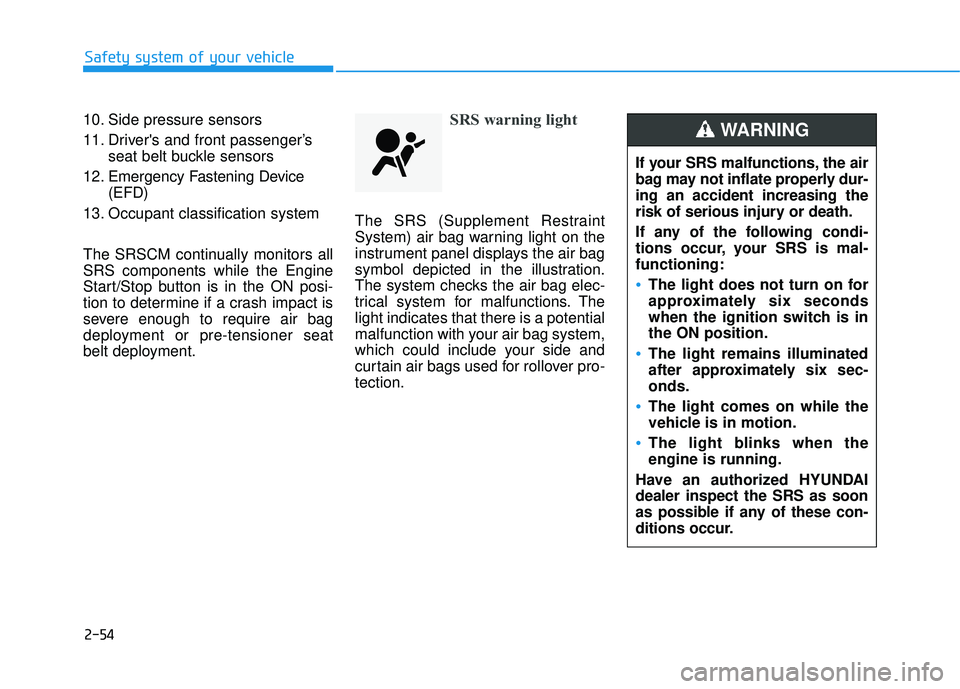
belt deployment.SRS warning light
The SRS (Supplement Restraint
System) air bag warning light on the
instrument panel displays the air bag
symbol depicted in the illustration.
The system checks the air bag elec-
trical system for malfunctions. Thelight indicates that there is a potential
malfunction with your air bag system,
which could include your side and
curtain air bags used for rollover pro-tection.
If your SRS malfunctions, the air
bag may not inflate properly dur-ing an accident increasing the
risk of serious injury or death.
If any of the following condi-
tions occur, your SRS is mal-functioning:
The light does not turn on for
approximately six seconds
when the ignition switch is inthe ON position.
The light remains illuminated
after approximately six sec-onds.
The light comes on while the
vehicle is in motion.
The light blinks when the engine is running.
Have an authorized HYUNDAIdealer inspect the SRS as soon
as possible if any of these con-
ditions occur.
WARNING
Page 99 of 642

Convenient features of your vehicle
Accessing your vehicle .........................................3-4
Remote Key.........................................................................3-4
Smart Key ............................................................................3-8
Immobilizer System .........................................................3-12
Door locks .............................................................3-14
Operating Door Locks from Outside the Vehicle ....3-14
Operating Door Locks from Inside the Vehicle .......3-15
Auto Door Lock/Unlock Features ...............................3-17
Child-Protector Rear Door locks ................................3-18
Theft-alarm system.............................................3-19
Steering wheel......................................................3-20
Electric Power Steering (EPS) .....................................3-20
Tilt Steering / Telescope Steering ..............................3-21
Heated Steering Wheel ..................................................3-21
Horn ....................................................................................3-22
Mirrors ...................................................................3-23
Inside Rearview Mirror ..................................................3-23
Outside Rearview Mirror ...............................................3-35
Windows ................................................................3-38
Power Windows ...............................................................3-39
Panoramic sunroof ..............................................3-42
Sunshade ...........................................................................3-42
Sliding the Sunroof .........................................................3-43
Tilting the Sunroof .........................................................3-43
Closing the Sunroof........................................................3-44
To Reset the Sunroof.....................................................3-45
Exterior features .................................................3-46
Hood ...................................................................................3-46
Fuel Filler Door ................................................................3-48
Liftgate ..................................................................3-51
Non-Powered liftgate ....................................................3-51
Power liftgate ..................................................................3-52
Smart Liftgate ..................................................................3-59
Instrument cluster................................................3-63
Instrument Cluster Control............................................3-64
LCD Display Control ........................................................3-64
Gauges ...............................................................................3-65
3
Page 100 of 642
LCD Display ...........................................................3-70
LCD Modes ........................................................................3-70
Trip Computer Mode.......................................................3-71
Turn By Turn (TBT) Mode ............................................3-72
LDWS Mode ......................................................................3-72
A/V Mode..........................................................................3-72
Information Mode ...........................................................3-73
User Settings Mode ........................................................3-75
Warning Messages..........................................................3-81
Trip computer .......................................................3-89
Overview............................................................................3-89
Trip A/B .............................................................................3-90
Fuel Economy...................................................................3-91
Digital Speedometer .......................................................3-93
Warning and indicator lights ..............................3-94
Warning Lights .................................................................3-94
Indicator Lights ..............................................................3-102
Light .....................................................................3-107
Exterior Lights ...............................................................3-107
Welcome System ...........................................................3-113
Interior Lights ................................................................3-114
Wipers and washers ..........................................3-118
Windshield Wipers ........................................................3-118
Windshield Washers .....................................................3-119
Rear window wiper and washer switch ..................3-120
Driver Assist System .........................................3-121
Rear View Camera ........................................................3-121
Rear Parking Assist System .......................................3-122
Rear parking assist system precautions .................3-125
Defroster .............................................................3-126
Rear Window Defroster ..............................................3-126
Manual climate control system........................3-127
Heating and Air Conditioning .....................................3-128
System Operation .........................................................3-133
System Maintenance....................................................3-135
Automatic climate control system ...................3-137
Automatic Heating and Air Conditioning.................3-138
Manual Heating and Air Conditioning......................3-139
System Operation .........................................................3-145
System Maintenance....................................................3-147
Windshield defrosting and defogging ............3-149
Manual Climate Control System ................................3-149
Automatic Climate Control System ...........................3-150
Defogging logic..............................................................3-151
3
Page 115 of 642
3-17
Convenient features of your vehicle
3
Auto Door Lock/Unlock Features
Impact sensing door unlocksystem
All doors will be automatically
unlocked when an impact causes the
air bags to deploy.
Speed sensing door lock system
All doors will be automatically locked
when vehicle speed exceeds 9 mph(15 km/h). All of the doors will be automatically
unlocked after the engine is turned off.
Shift lever auto door lock
All doors will be automatically locked
when shifting the shift lever out of P
(Park) with the engine running.
You can activate or deactivate the
Auto Door Lock/Unlock features fromthe User Settings Mode on the LCD
display.
For more information, refer to the
"LCD Display" section in this
chapter.
Always secure your vehicle.
Leaving your vehicle unlocked increases the potential risk to
you or others from someone
hiding in your vehicle.
To secure your vehicle, while
depressing the brake, move the
shift lever to the P (Park) posi-
tion, engage the parking brake,
and place the ignition switch in
the LOCK/OFF position, close
all windows, lock all doors, and
always take the key with you.WARNING
Opening a door when something
is approaching may cause dam-
age or injury. Be careful when
opening doors and watch for
vehicles, motorcycles, bicycles
or pedestrians approaching the
vehicle in the path of the door.
CAUTION
Page 126 of 642
3-28
Operating HomeLink
To operate, simply press the pro-
grammed HomeLink button.
Activation will now occur for the
trained product (garage door, securi-
ty system, entry door lock, estate
gate, or home or office lighting). For
convenience, the hand-held trans-
mitter of the device may also be used
at any time. The HomeLink Wireless
Controls System (once programmed)
or the original hand-held transmitter
may be used to activate the device
(e.g. garage door, entry door lock,
etc.). In the event that there are still
programming difficulties, contactHomeLink at 1-800-355-3515 or on
the internet at www.homelink.com.Erasing programmed HomeLink
buttons
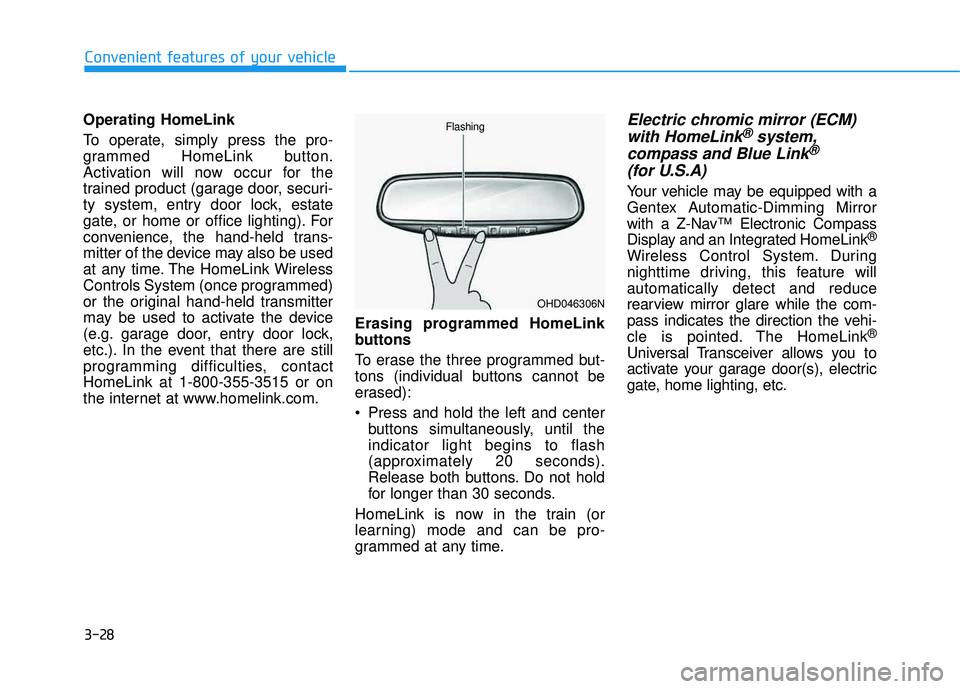
To erase the three programmed but-
tons (individual buttons cannot be
erased):
Press and hold the left and center
buttons simultaneously, until the indicator light begins to flash
(approximately 20 seconds).
Release both buttons. Do not hold
for longer than 30 seconds.
HomeLink is now in the train (or
learning) mode and can be pro-
grammed at any time.Electric chromic mirror (ECM) with HomeLink®system,
compass and Blue Link®
(for U.S.A)
Your vehicle may be equipped with a
Gentex Automatic-Dimming Mirror
with a Z-Nav™ Electronic Compass
Display and an Integrated HomeLink ®
Wireless Control System. During
nighttime driving, this feature willautomatically detect and reduce
rearview mirror glare while the com-
pass indicates the direction the vehi-
cle is pointed. The HomeLink ®
Universal Transceiver allows you to
activate your garage door(s), electric
gate, home lighting, etc.
Convenient features of your vehicle
OHD046306N
Flashing
Page 127 of 642
3-29
Convenient features of your vehicle
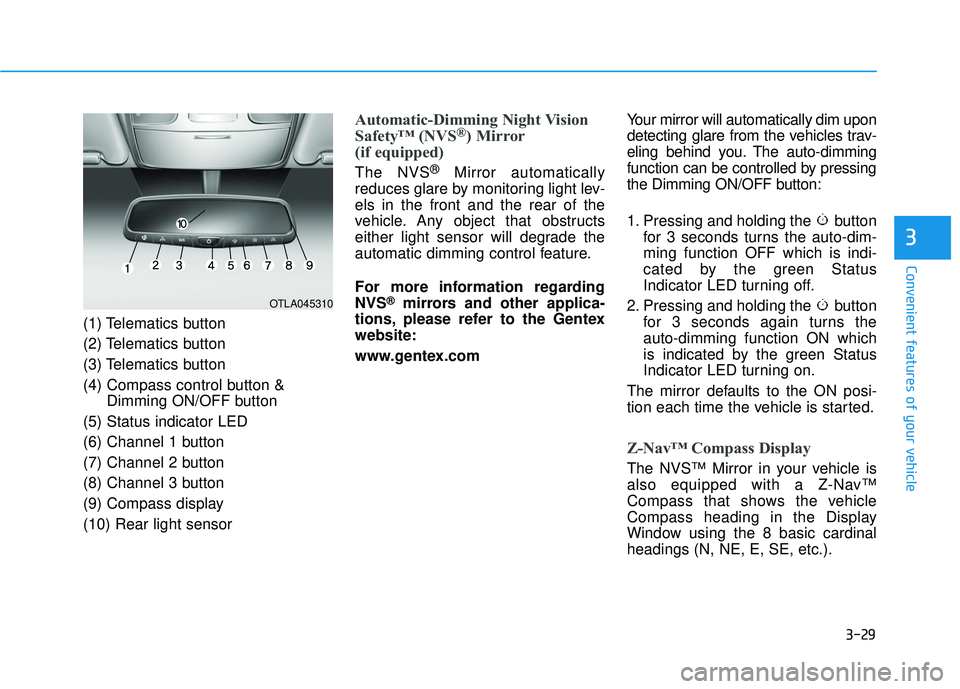
(1) Telematics button
(2) Telematics button
(3) Telematics button
(4) Compass control button &Dimming ON/OFF button
(5) Status indicator LED
(6) Channel 1 button
(7) Channel 2 button
(8) Channel 3 button
(9) Compass display (10) Rear light sensor
Automatic-Dimming Night Vision
Safety™ (NVS®) Mirror
(if equipped)
The NVS ®
Mirror automatically
reduces glare by monitoring light lev- els in the front and the rear of the
vehicle. Any object that obstructs
either light sensor will degrade the
automatic dimming control feature.
For more information regarding NVS
®mirrors and other applica-
tions, please refer to the Gentexwebsite:
www.gentex.com Your mirror will automatically dim upon
detecting glare from the vehicles trav-
eling behind you. The auto-dimming
function can be controlled by pressing
the Dimming ON/OFF button:
1. Pressing and holding the button
for 3 seconds turns the auto-dim- ming function OFF which is indi-
cated by the green Status
Indicator LED turning off.
2. Pressing and holding the button for 3 seconds again turns theauto-dimming function ON which
is indicated by the green Status
Indicator LED turning on.
The mirror defaults to the ON posi-
tion each time the vehicle is started.
Z-Nav™ Compass Display
The NVS™ Mirror in your vehicle is
also equipped with a Z-Nav™
Compass that shows the vehicle
Compass heading in the Display
Window using the 8 basic cardinalheadings (N, NE, E, SE, etc.).
3
OTLA045310
Page 128 of 642
3-30
Convenient features of your vehicle
Compass function
The Compass can be turned ON and OFF and will remember the last state
when the ignition is cycled. To turn
the display feature ON/OFF:
1. Press and release the buttonwithin 1 second to turn the display
feature OFF.
2. Press and release the button again within 1 second to turn the
display back ON.
Additional options can be set withpress and hold sequences of the
button and are detailed below.
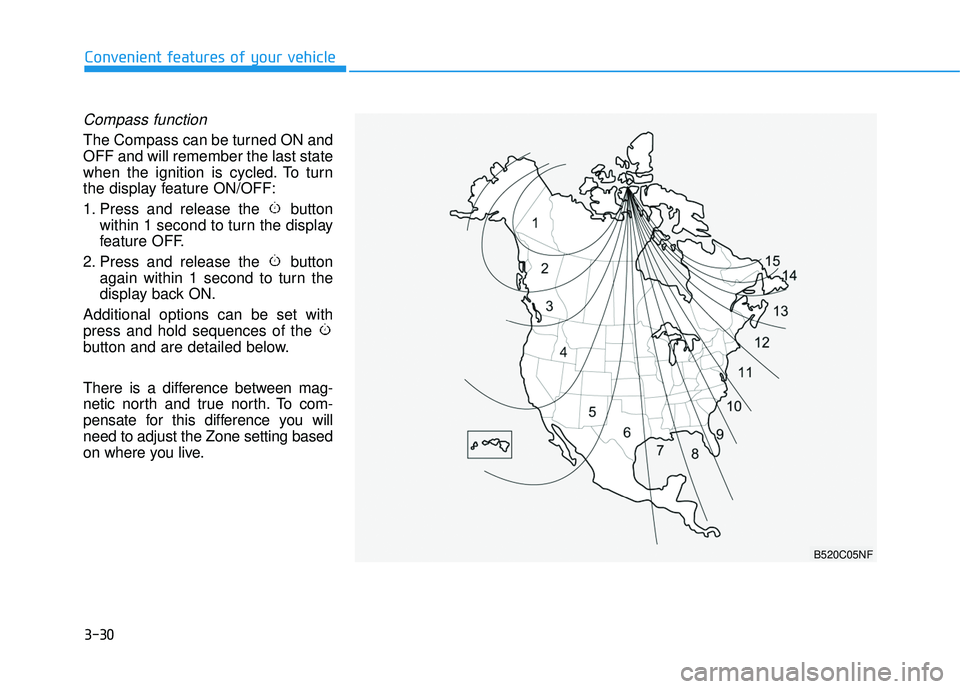
There is a difference between mag-
netic north and true north. To com-
pensate for this difference you willneed to adjust the Zone setting based
on where you live.
B520C05NF