air condition Hyundai Tucson 2019 - RHD (UK, Australia) Service Manual
[x] Cancel search | Manufacturer: HYUNDAI, Model Year: 2019, Model line: Tucson, Model: Hyundai Tucson 2019Pages: 685, PDF Size: 17.76 MB
Page 259 of 685
3-167
Convenient features of your vehicle
3
CLIMATE CONTROL ADDITIONAL FEATURES
Automatic ventilation
(if equipped)
When the ignition switch is in the ON
position or when the engine is run-
ning and temperature is low with the
recirculated air position selected
more than 5 min ~ 30 min, the air
intake position will automatically
change to the outside (fresh) air
position.
To cancel or set the Automatic
Ventilation
When the air conditioning system is
on, select Face Level mode and
press the recirculated air position
button more than five times for three
seconds whilst pressing A/C button.
When the automatic ventilation is set,
the air intake control button (recircu-
lated air position) indicator will blink 6
times. When cancelled, the air intake
control button (recirculated air posi-
tion) indicator will blink 3 times.
Sunroof inside air recirculation
(if equipped)
When the heater or air conditioning
system is on with the sunroof opened,
the outside (fresh) air position will be
automatically selected. At this time, if
you press the recirculated air position
button, the recirculated air position
will be selected but will change back
to the outside (fresh) air position after
3 minutes.
When the sunroof is closed, the air
intake position will return to the orig-
inal position that was selected.
TLe UK 3b(110~).qxp 6/12/2018 2:41 PM Page 167
Page 261 of 685
3-169
Convenient features of your vehicle
3
Glove box
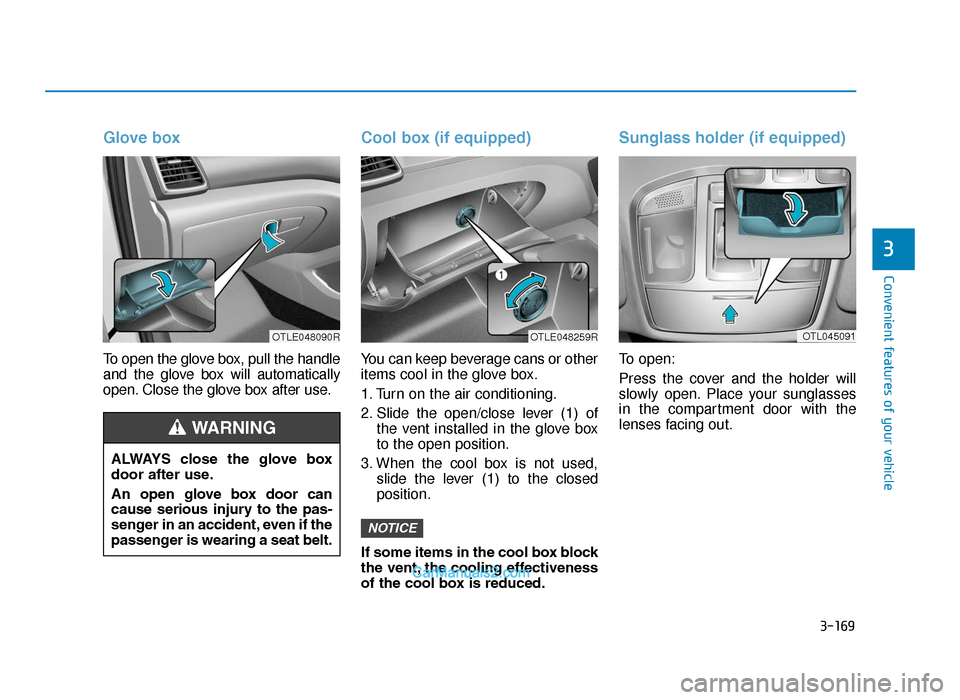
To open the glove box, pull the handle
and the glove box will automatically
open. Close the glove box after use.
Cool box (if equipped)
You can keep beverage cans or other
items cool in the glove box.
1. Turn on the air conditioning.
2. Slide the open/close lever (1) ofthe vent installed in the glove box
to the open position.
3. When the cool box is not used, slide the lever (1) to the closed
position.
If some items in the cool box block
the vent, the cooling effectiveness
of the cool box is reduced.
Sunglass holder (if equipped)
To open:
Press the cover and the holder will
slowly open. Place your sunglasses
in the compartment door with the
lenses facing out.
NOTICE
ALWAYS close the glove box
door after use.
An open glove box door can
cause serious injury to the pas-
senger in an accident, even if the
passenger is wearing a seat belt.
WARNING
OTLE048090ROTLE048259ROTL045091
TLe UK 3b(110~).qxp 6/12/2018 2:41 PM Page 169
Page 265 of 685
3-173
Convenient features of your vehicle
3• Do not put several tickets in theticket holder at one time. This
could cause damage to the tick-
et holder.
• Avoid putting a plastic card such as a credit card in the ticket hold-
er located in the outside of the
sunvisor. This could cause dam-
age to the plastic card.
Power outlet (if equipped)
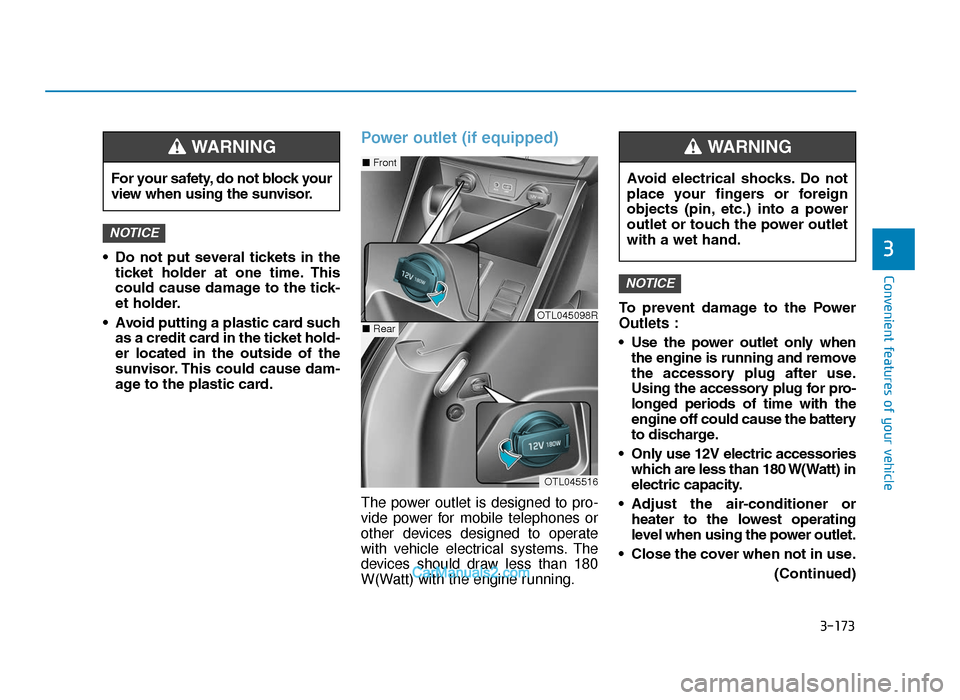
The power outlet is designed to pro-
vide power for mobile telephones or
other devices designed to operate
with vehicle electrical systems. The
devices should draw less than 180
W(Watt) with the engine running. To prevent damage to the Power
Outlets :
• Use the power outlet only when
the engine is running and remove
the accessory plug after use.
Using the accessory plug for pro-
longed periods of time with the
engine off could cause the battery
to discharge.
• Only use 12V electric accessories which are less than 180 W(Watt) in
electric capacity.
• Adjust the air-conditioner or heater to the lowest operating
level when using the power outlet.
• Close the cover when not in use. (Continued)
NOTICE
NOTICE
For your safety, do not block your
view when using the sunvisor.
WARNING
OTL045516
■Front
■RearOTL045098R
Avoid electrical shocks. Do not
place your fingers or foreign
objects (pin, etc.) into a power
outlet or touch the power outlet
with a wet hand.
WARNING
TLe UK 3b(110~).qxp 6/12/2018 2:41 PM Page 173
Page 284 of 685
• Do not place beverages close tothe audio system. Spilling bever-
ages may lead to system mal-
function.
• In case of product malfunction, please contact your place of pur-
chase or After Service centre.
• Placing the audio system within an electromagnetic environment
may result in noise interference.
• Prevent caustic solutions such as perfume and cosmetic oil
from contacting the dashboard
because they may cause dam-
age or discolouration.
NOTICE
4-9
Multimedia System
4
•Operating the device whilst
driving could lead to accidents
due to a lack of attention to
external surroundings. First
park the vehicle before operat-
ing the device.
•Adjust the volume to levels that
allow the driver to hear sounds
from outside of the vehicle.
Driving in a state where exter-
nal sounds cannot be heard
may lead to accidents.
•Pay attention to the volume
setting when turning the
device on. A sudden output of
extreme volume upon turning
the device on could lead to
hearing impairment. (Adjust
the volume to a suitable level
before turning off the device.)
CAUTION
•Do not stare at the screen
whilst driving. Staring at the
screen for prolonged periods
of time could lead to traffic
accidents.
•Do not disassemble, assem-
ble, or modify the audio sys-
tem. Such acts could result in
accidents, fire, or electric
shock.
•Using the phone whilst driving
may lead to a lack of attention of
traffic conditions and increase
the likelihood of accidents.
Use the phone feature after
parking the vehicle.
•Heed caution not to spill water
or introduce foreign objects
into the device. Such acts
could lead to smoke, fire, or
product malfunction.
WARNING
TLe UK 4.qxp 5/10/2018 12:04 PM Page 9
Page 357 of 685
5-33
Driving your vehicle
5
• For smooth launch uphill, pressdown the accelerator pedal
smoothly depending on the current
conditions.
• If you release your foot from the accelerator pedal at low vehicle
speed, you may feel strong engine
brake, which is similar to manual
transaxle.
• When driving downhill, you may use Sports Mode to downshift to a
lower gear in order to control your
speed without using the brake
pedal excessively.
• When you turn the engine on and off, you may hear clicking sounds
as the system goes through a self
test. This is a normal sound for the
Dual clutch transmission.LCD display for transmission
temperature and warning mes-
sage
Transmission temperaturegauge
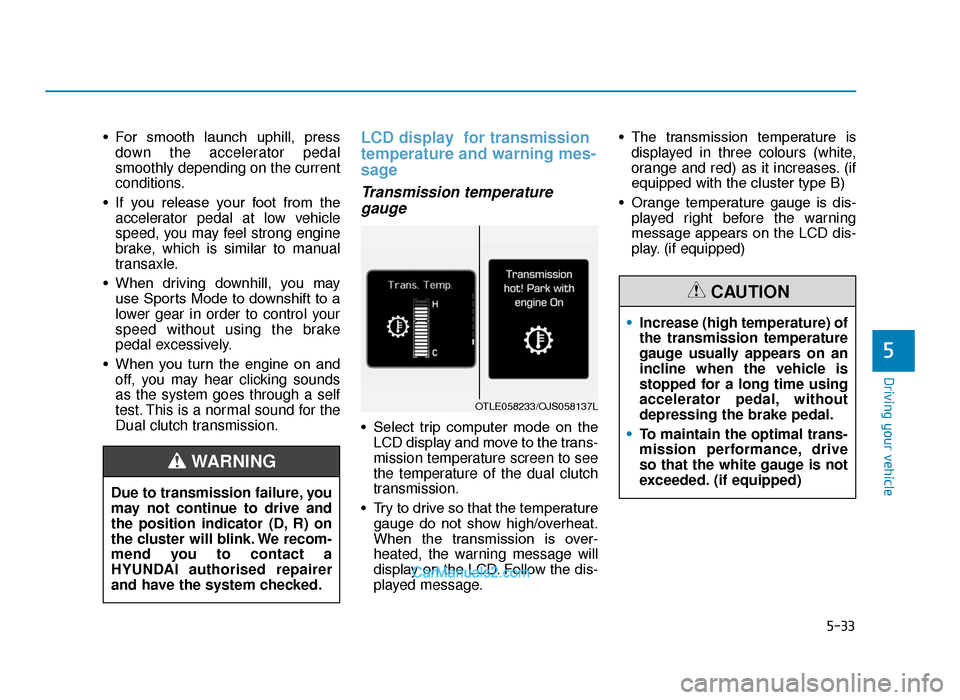
• Select trip computer mode on the
LCD display and move to the trans-
mission temperature screen to see
the temperature of the dual clutch
transmission.
• Try to drive so that the temperature gauge do not show high/overheat.
When the transmission is over-
heated, the warning message will
display on the LCD. Follow the dis-
played message. • The transmission temperature is
displayed in three colours (white,
orange and red) as it increases. (if
equipped with the cluster type B)
• Orange temperature gauge is dis- played right before the warning
message appears on the LCD dis-
play. (if equipped)
Due to transmission failure, you
may not continue to drive and
the position indicator (D, R) on
the cluster will blink. We recom-
mend you to contact a
HYUNDAI authorised repairer
and have the system checked.
WARNING
OTLE058233/OJS058137L
• Increase (high temperature) of
the transmission temperature
gauge usually appears on an
incline when the vehicle is
stopped for a long time using
accelerator pedal, without
depressing the brake pedal.
• To maintain the optimal trans-
mission performance, drive
so that the white gauge is not
exceeded. (if equipped)
CAUTION
TLe UK 5.qxp 5/10/2018 12:20 PM Page 33
Page 361 of 685
5-37
Driving your vehicle
• If this occurs, pull over to a safelocation, stop the vehicle with the
engine running, apply the brakes
and shift the vehicle to P (Park),
and allow the transmission to cool.
• If you ignore this warning, the driv- ing condition may become worse.
You may experience abrupt shifts,
frequent shifts, or jerkiness. To
return to the normal driving condi-
tion, stop the vehicle and apply the
foot brake or shift into P (Park).
Then allow the transmission to cool
for a few minutes with engine on,
before driving off.
• When possible, drive the vehicle smoothly.
Transmission overheated
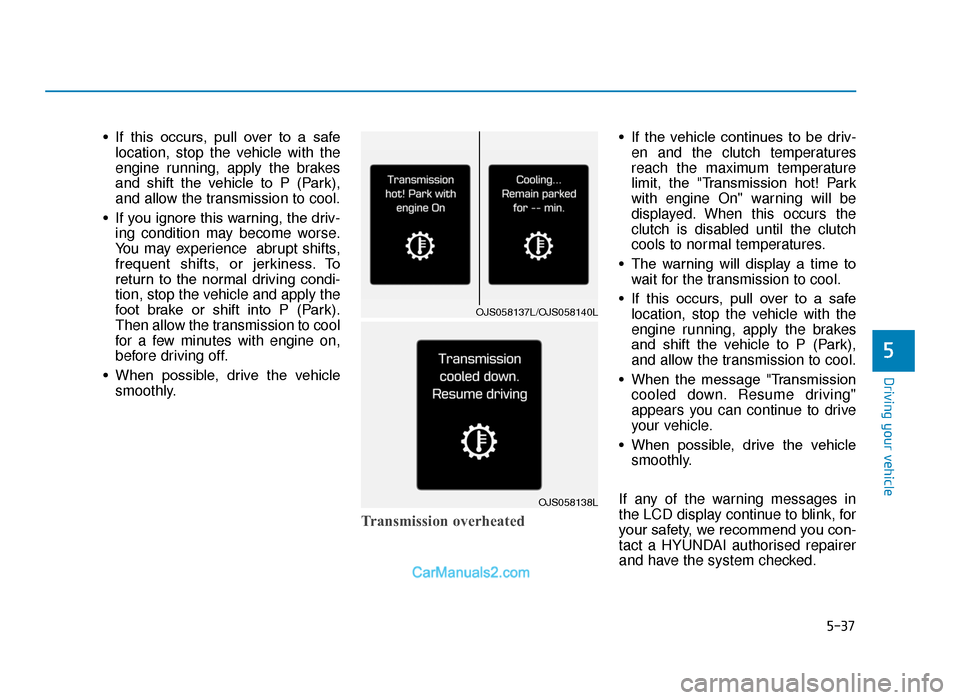
• If the vehicle continues to be driv-en and the clutch temperatures
reach the maximum temperature
limit, the "Transmission hot! Park
with engine On" warning will be
displayed. When this occurs the
clutch is disabled until the clutch
cools to normal temperatures.
• The warning will display a time to wait for the transmission to cool.
• If this occurs, pull over to a safe location, stop the vehicle with the
engine running, apply the brakes
and shift the vehicle to P (Park),
and allow the transmission to cool.
• When the message "Transmission cooled down. Resume driving"
appears you can continue to drive
your vehicle.
• When possible, drive the vehicle smoothly.
If any of the warning messages in
the LCD display continue to blink, for
your safety, we recommend you con-
tact a HYUNDAI authorised repairer
and have the system checked.
5
OJS058137L/OJS058140L
OJS058138L
TLe UK 5.qxp 5/10/2018 12:21 PM Page 37
Page 381 of 685
5-57
Driving your vehicle
5
ABS is an electronic braking system
that helps prevent a braking skid.
ABS allows the driver to steer and
brake at the same time.
Using ABS
To obtain the maximum benefit from
your ABS in an emergency situation,
do not attempt to modulate your
brake pressure and do not try to
pump your brakes. Depress your
brake pedal as hard as possible.
When you apply your brakes under
conditions which may lock the
wheels, you may hear sounds from
the brakes, or feel a corresponding
sensation in the brake pedal. This is
normal and it means your ABS is
active.
ABS does not reduce the time or dis-
tance it takes to stop the vehicle.
Always maintain a safe distance from
the vehicle in front of you.
ABS will not prevent a skid that
results from sudden changes in
direction, such as trying to take a
corner too fast or making a sudden
lane change. Always drive at a safe
speed for the road and weather con-
ditions.ABS cannot prevent a loss of stabili-
ty. Always steer moderately when
braking hard. Severe or sharp steer-
ing wheel movement can still cause
your vehicle to veer into oncoming
traffic or off the road.
On loose or uneven road surfaces,
operation of the anti-lock brake sys-
tem may result in a longer stopping
distance than for vehicles equipped
with a conventional brake system.
The ABS warning light ( ) will stay
on for several seconds after the
Engine Start/Stop button is in the ON
position. During that time, the ABS
will go through self-diagnosis and the
light will go off if everything is nor-
mal. If the light stays on, you may
have a problem with your ABS. We
recommend that you contact a
HYUNDAI authorised repairer as
soon as possible.(Continued)
•On roads where the road sur-
face is pitted or has different
surface height.
•Tyre chains are installed on
your vehicle.
The safety features of an ABS
or ESC equipped vehicle should
not be tested by high speed
driving or cornering. This could
endanger the safety of yourself
or others.
TLe UK 5.qxp 5/10/2018 12:22 PM Page 57
Page 382 of 685
5-58
Driving your vehicle
When you drive on a road having
poor traction, such as an icy road,
and apply your brakes continu-
ously, the ABS will be active con-
tinuously and the ABS warning
light ( ) may illuminate. Pull
your car over to a safe place and
turn the engine off.
Restart the engine. If the ABS
warning light is off, then your ABS
system is normal.
Otherwise, you may have a prob-
lem with your ABS system. We
recommend that you contact a
HYUNDAI authorised repairer as
soon as possible.
Information
When you jump start your vehicle
because of a drained battery, the ABS
warning light ( ) may turn on at the
same time. This happens because of
the low battery voltage. It does not
mean your ABS is malfunctioning.
Have the battery recharged before
driving the vehicle.
Electronic Stability Control
(ESC) (if equipped)
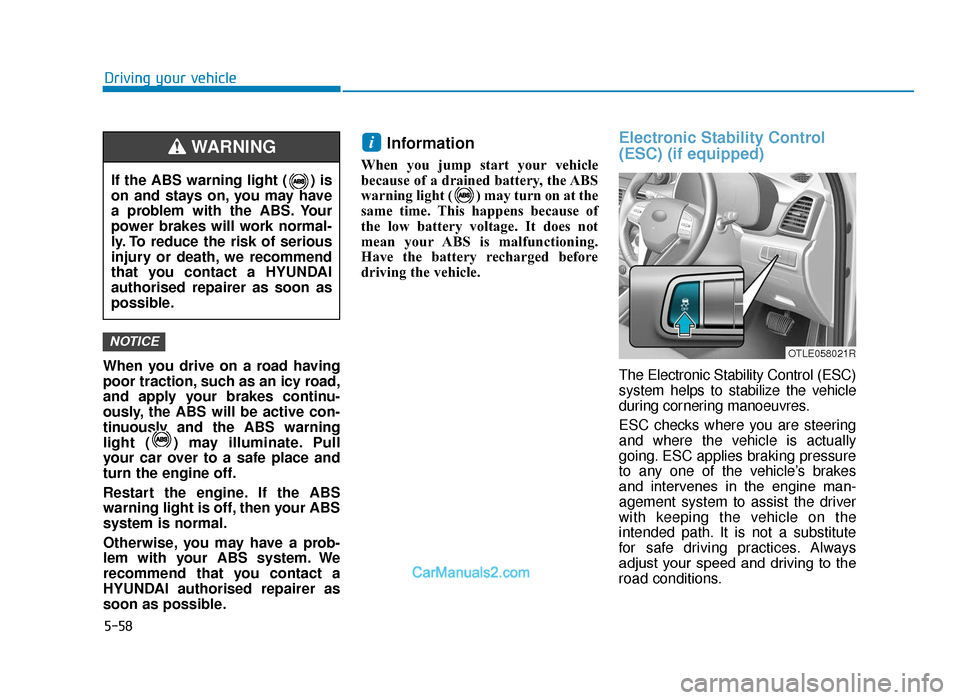
The Electronic Stability Control (ESC)
system helps to stabilize the vehicle
during cornering manoeuvres.
ESC checks where you are steering
and where the vehicle is actually
going. ESC applies braking pressure
to any one of the vehicle’s brakes
and intervenes in the engine man-
agement system to assist the driver
with keeping the vehicle on the
intended path. It is not a substitute
for safe driving practices. Always
adjust your speed and driving to the
road conditions.
i
NOTICE
If the ABS warning light ( ) is
on and stays on, you may have
a problem with the ABS. Your
power brakes will work normal-
ly. To reduce the risk of serious
injury or death, we recommend
that you contact a HYUNDAI
authorised repairer as soon as
possible.
WARNING
OTLE058021R
TLe UK 5.qxp 5/10/2018 12:22 PM Page 58
Page 386 of 685
5-62
Driving your vehicle
To prevent damage to the
transaxle:
• Do not allow wheel(s) of one axle to spin excessively whilst
the ESC, ABS, and parking brake
warning lights are displayed.
The repairs would not be cov-
ered by the vehicle warranty.
Reduce engine power and do
not spin the wheel(s) excessive-
ly whilst these lights are dis-
played.
• When operating the vehicle on a dynamometer, make sure the
ESC is turned off (ESC OFF light
illuminated).
Information
Turning the ESC off does not affect
ABS or standard brake system opera-
tion.
Vehicle Stability Management
(VSM) (if equipped)
Vehicle Stability Management (VSM)
helps ensure the vehicle stays stable
when accelerating or braking sud-
denly on wet, slippery and rough
roads where traction over the four
tyres can suddenly become uneven.
VSM operation
VSM ON condition
The VSM operates when:
• The Electronic Stability Control(ESC) is on.
• Vehicle speed is approximately above 15 km/h (9mph) on curve
roads.
• Vehicle speed is approximately above 20 km/h (12mph) when the
vehicle is braking on rough roads.
When operating
When you apply your brakes under
conditions which may activate the
ESC, you may hear sounds from the
brakes, or feel a corresponding sen-
sation in the brake pedal. This is nor-
mal and it means your VSM is active.
i
NOTICE
Take the following precautions
when using the Vehicle Stability
Management (VSM):
•ALWAYS check the speed and
the distance to the vehicle
ahead. The VSM is not a sub-
stitute for safe driving prac-
tices.
•Never drive too fast for the
road conditions. The VSM sys-
tem will not prevent acci-
dents. Excessive speed in bad
weather, slippery and uneven
roads can result in severe
accidents.
WARNING
TLe UK 5.qxp 5/10/2018 12:22 PM Page 62
Page 387 of 685
5-63
Driving your vehicle
5
Information
The VSM does not operate when:
• Driving on bank road such as gradi-ent or incline
• Driving rearward.
• ESC OFF indicator light is on.
• EPS (Electric Power Steering) warn- ing light ( ) is on.
VSM OFF condition
To cancel VSM operation, press the
ESC OFF button. ESC OFF indicator
light ( ) will illuminate.
To turn on VSM, press the ESC OFF
button again. The ESC OFF indicator
light will go out.
Driving with varying tyre or wheel
sizes may cause the ESC system
to malfunction. When replacing
tyres, make sure they are the
same size as your original tyres
for this vehicle.
Hill-Start Assist Control (HAC)
(if equipped)
A vehicle has the tendency to slide
backwards on a steep slope, before
depressing the accelerator after a
stop. The HAC prevents the vehicle
from sliding backwards by automati-
cally operating the brake systems for
about 2 seconds. The brake systems
are automatically released, when the
accelerator pedal is depressed
NOTICE
i
If ESC indicator light ( ) or
EPS warning light ( ) stays
on, your vehicle may have a
malfunction with the VSM sys-
tem. When the warning light illu-
minates we recommend that the
vehicle be checked by a
HYUNDAI authorised repairer
as soon as possible.
WARNING
The HAC is activated only for
about 2 seconds, so always
depress the accelerator pedal
to begin driving upwards after a
stop.
WARNING
TLe UK 5.qxp 5/10/2018 12:22 PM Page 63