Downhill Hyundai Tucson 2019 User Guide
[x] Cancel search | Manufacturer: HYUNDAI, Model Year: 2019, Model line: Tucson, Model: Hyundai Tucson 2019Pages: 546, PDF Size: 61.38 MB
Page 372 of 546
5-106
Driving your vehicle
Smart Cruise Control Speed
To set Smart Cruise Control
speed
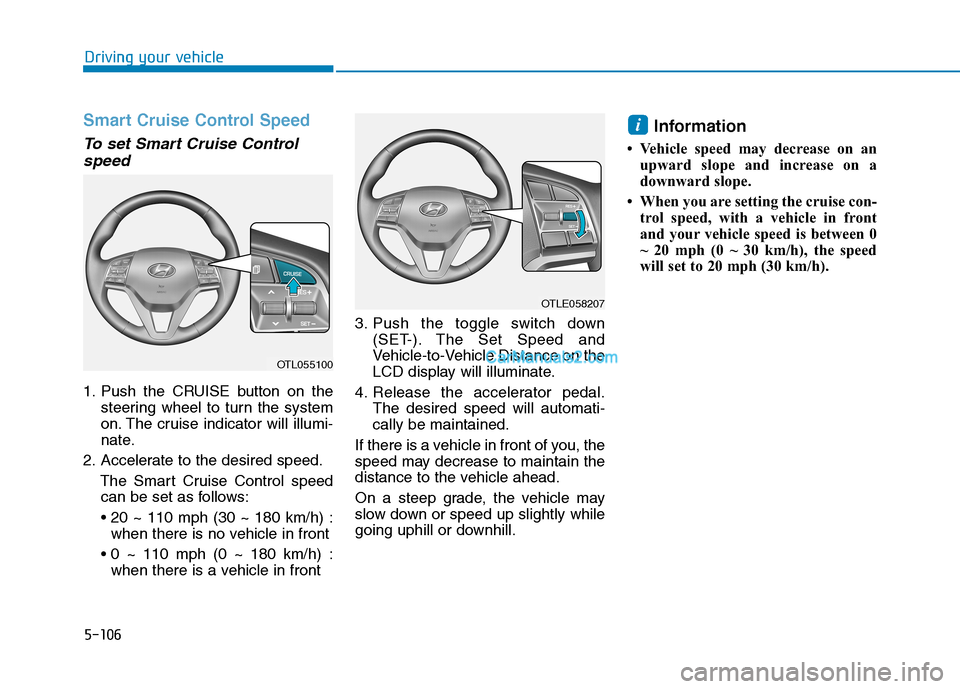
1. Push the CRUISE button on the
steering wheel to turn the system
on. The cruise indicator will illumi-
nate.
2. Accelerate to the desired speed.
The Smart Cruise Control speed
can be set as follows:
when there is no vehicle in front
when there is a vehicle in front3. Push the toggle switch down
(SET-). The Set Speed and
Vehicle-to-Vehicle Distance on the
LCD display will illuminate.
4. Release the accelerator pedal.
The desired speed will automati-
cally be maintained.
If there is a vehicle in front of you, the
speed may decrease to maintain the
distance to the vehicle ahead.
On a steep grade, the vehicle may
slow down or speed up slightly while
going uphill or downhill.
Information
• Vehicle speed may decrease on an
upward slope and increase on a
downward slope.
• When you are setting the cruise con-
trol speed, with a vehicle in front
and your vehicle speed is between 0
~ 20 mph (0 ~ 30 km/h), the speed
will set to 20 mph (30 km/h).
i
OTL055100
OTLE058207
Page 379 of 546
5-113
Driving your vehicle
5
If you push the smart cruise control
toggle switch (RES+ or SET-) while
Auto Hold and smart cruise control
is operating the Auto Hold will be
released regardless of accelerator
pedal operation and the vehicle will
start to move. The AUTO HOLD
indicator changes from green to
white.- Driving on rainy, icy, or
snow-covered roads
- Driving on a steep downhill
or uphill
- Driving in windy areas
- Driving in parking lots
- Driving near crash barriers
- Driving on a sharp curve
- Driving with limited view
(possibly due to bad weath-
er, such as fog, snow, rain or
sandstorm)
- The vehicle's sensing ability
decreases due to vehicle
modification, resulting in a
level difference of the vehi-
cle's front and rear
Unexpected situations may
lead to possible accidents.
Pay attention continuously to
road conditions and driving
even when the smart cruise
control system is being oper-
ated.
Take the following precautions :
Always set the vehicle speed
under the speed limit.
If the Smart Cruise Control is
left on, (cruise indicator light
in the instrument cluster is
illuminated) the Smart Cruise
Control can be activated unin-
tentionally. Keep the Smart
Cruise Control system off
(cruise indicator light OFF)
when the Smart Cruise
Control is not in use, to avoid
inadvertently setting a speed.
Use the Smart Cruise Control
system only when traveling
on open highways in good
weather.
Do not use the Smart Cruise
Control when it may not be
safe to keep the vehicle at a
constant speed.
Do not use when:
- Driving in heavy traffic or
when traffic conditions make
it difficult to drive at a con-
stant speed
WARNING
Page 384 of 546
5-118
Driving your vehicle
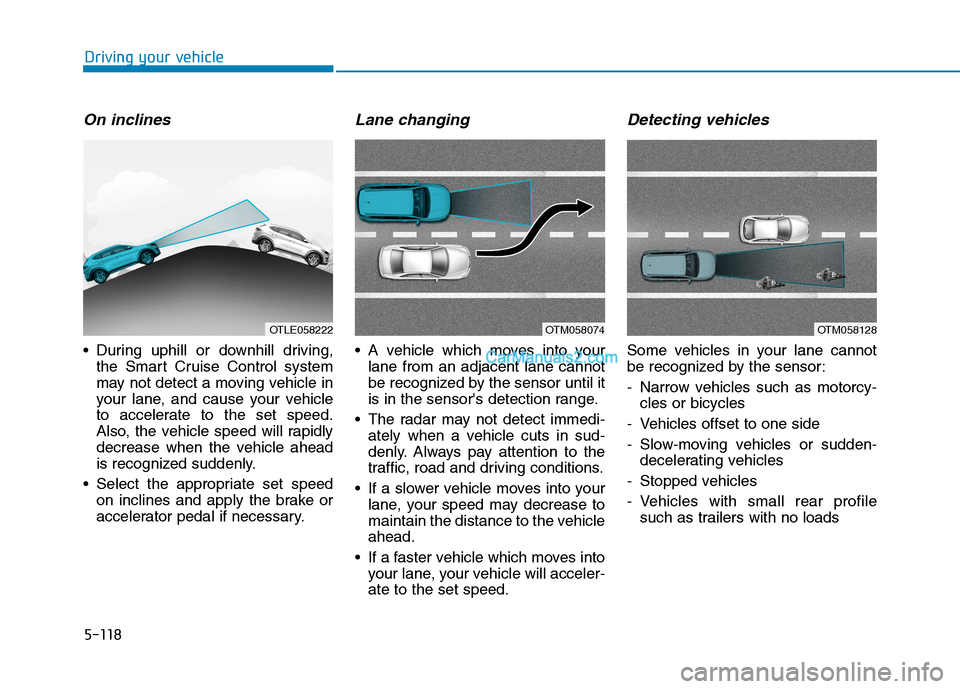
On inclines
During uphill or downhill driving,
the Smart Cruise Control system
may not detect a moving vehicle in
your lane, and cause your vehicle
to accelerate to the set speed.
Also, the vehicle speed will rapidly
decrease when the vehicle ahead
is recognized suddenly.
Select the appropriate set speed
on inclines and apply the brake or
accelerator pedal if necessary.
Lane changing
A vehicle which moves into your
lane from an adjacent lane cannot
be recognized by the sensor until it
is in the sensor's detection range.
The radar may not detect immedi-
ately when a vehicle cuts in sud-
denly. Always pay attention to the
traffic, road and driving conditions.
If a slower vehicle moves into your
lane, your speed may decrease to
maintain the distance to the vehicle
ahead.
If a faster vehicle which moves into
your lane, your vehicle will acceler-
ate to the set speed.
Detecting vehicles
Some vehicles in your lane cannot
be recognized by the sensor:
- Narrow vehicles such as motorcy-
cles or bicycles
- Vehicles offset to one side
- Slow-moving vehicles or sudden-
decelerating vehicles
- Stopped vehicles
- Vehicles with small rear profile
such as trailers with no loads
OTM058074OTLE058222OTM058128
Page 442 of 546
S SC
CH
HE
ED
DU
UL
LE
ED
D
M
MA
AI
IN
NT
TE
EN
NA
AN
NC
CE
E
S
SE
ER
RV
VI
IC
CE
ES
S
Follow Normal Maintenance Schedule if the vehicle is usually operated where none of the following conditions apply.
If any of the following conditions apply, you must follow the Maintenance Under Severe Usage Conditions.
Repeatedly driving short distances of less than 5 miles (8 km) in normal temperature or less than 10 miles (16 km)
in freezing temperature
Extensive engine idling or low speed driving for long distances
Driving on rough, dusty, muddy, unpaved, graveled or salt- spread roads
Driving in areas using salt or other corrosive materials or in very cold weather
Driving in heavy dust conditions
Driving in heavy traffic area
Driving on uphill, downhill, or mountain road
Towing a trailer, or using a camper, or roof rack
Driving as a patrol car, taxi, other commercial use or vehicle towing
Driving over 106 mph (170 km/h)
Frequently driving in stop-and-go conditions
For additional information or assistance see your authorized HYUNDAI dealer.
7-8
Maintenance
Page 447 of 546
7-13
7
Maintenance
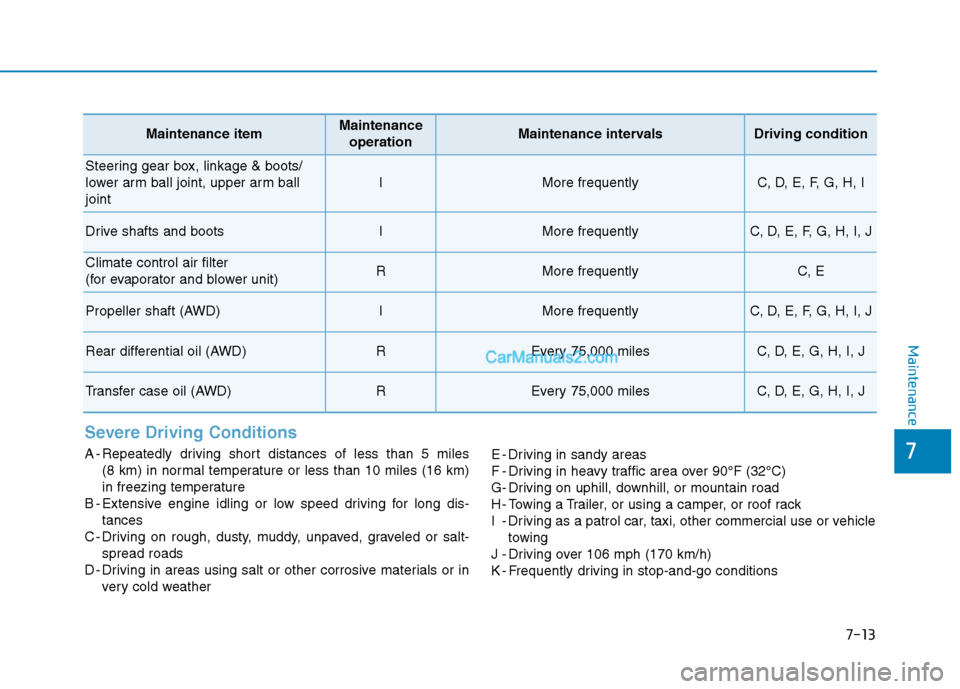
Severe Driving Conditions
A - Repeatedly driving short distances of less than 5 miles
(8 km) in normal temperature or less than 10 miles (16 km)
in freezing temperature
B - Extensive engine idling or low speed driving for long dis-
tances
C - Driving on rough, dusty, muddy, unpaved, graveled or salt-
spread roads
D - Driving in areas using salt or other corrosive materials or in
very cold weatherE - Driving in sandy areas
F - Driving in heavy traffic area over 90°F (32°C)
G- Driving on uphill, downhill, or mountain road
H - Towing a Trailer, or using a camper, or roof rack
I - Driving as a patrol car, taxi, other commercial use or vehicle
towing
J - Driving over 106 mph (170 km/h)
K - Frequently driving in stop-and-go conditions
Maintenance itemMaintenance
operationMaintenance intervalsDriving condition
Steering gear box, linkage & boots/
lower arm ball joint, upper arm ball
joint
IMore frequentlyC, D, E, F, G, H, I
Drive shafts and bootsIMore frequentlyC, D, E, F, G, H, I, J
Climate control air filter
(for evaporator and blower unit)RMore frequentlyC, E
Propeller shaft (AWD)IMore frequentlyC, D, E, F, G, H, I, J
Rear differential oil (AWD)REvery 75,000 milesC, D, E, G, H, I, J
Transfer case oil (AWD)REvery 75,000 milesC, D, E, G, H, I, J
Page 538 of 546
I-3
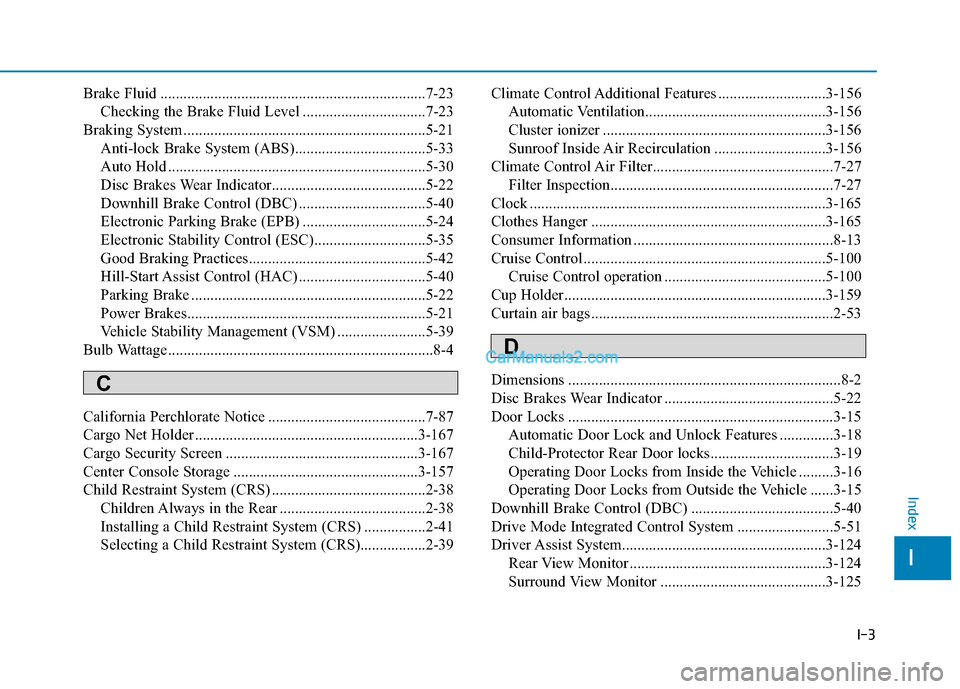
Brake Fluid .....................................................................7-23
Checking the Brake Fluid Level ................................7-23
Braking System ...............................................................5-21
Anti-lock Brake System (ABS)..................................5-33
Auto Hold ...................................................................5-30
Disc Brakes Wear Indicator........................................5-22
Downhill Brake Control (DBC) .................................5-40
Electronic Parking Brake (EPB) ................................5-24
Electronic Stability Control (ESC).............................5-35
Good Braking Practices..............................................5-42
Hill-Start Assist Control (HAC) .................................5-40
Parking Brake .............................................................5-22
Power Brakes..............................................................5-21
Vehicle Stability Management (VSM) .......................5-39
Bulb Wattage .....................................................................8-4
California Perchlorate Notice .........................................7-87
Cargo Net Holder ..........................................................3-167
Cargo Security Screen ..................................................3-167
Center Console Storage ................................................3-157
Child Restraint System (CRS) ........................................2-38
Children Always in the Rear ......................................2-38
Installing a Child Restraint System (CRS) ................2-41
Selecting a Child Restraint System (CRS).................2-39Climate Control Additional Features ............................3-156
Automatic Ventilation...............................................3-156
Cluster ionizer ..........................................................3-156
Sunroof Inside Air Recirculation .............................3-156
Climate Control Air Filter...............................................7-27
Filter Inspection..........................................................7-27
Clock .............................................................................3-165
Clothes Hanger .............................................................3-165
Consumer Information ....................................................8-13
Cruise Control ...............................................................5-100
Cruise Control operation ..........................................5-100
Cup Holder....................................................................3-159
Curtain air bags ...............................................................2-53
Dimensions .......................................................................8-2
Disc Brakes Wear Indicator ............................................5-22
Door Locks .....................................................................3-15
Automatic Door Lock and Unlock Features ..............3-18
Child-Protector Rear Door locks................................3-19
Operating Door Locks from Inside the Vehicle .........3-16
Operating Door Locks from Outside the Vehicle ......3-15
Downhill Brake Control (DBC) .....................................5-40
Drive Mode Integrated Control System .........................5-51
Driver Assist System.....................................................3-124
Rear View Monitor ...................................................3-124
Surround View Monitor ...........................................3-125
I
Index
C
D