Fog Hyundai Tucson 2019 Owner's Guide
[x] Cancel search | Manufacturer: HYUNDAI, Model Year: 2019, Model line: Tucson, Model: Hyundai Tucson 2019Pages: 546, PDF Size: 61.38 MB
Page 348 of 546
5-82
Driving your vehicle
Detecting vehicles
The sensor may be limited when:
The radar sensor or camera is
blocked with a foreign object or
debris
The camera lens is contaminated
due to tinted, filmed or coated
windshield, damaged glass, or
stuck of foreign matter (sticker,
bug, etc.) on the glass
Inclement weather such as heavy
rain or snow obscures the field of
view of the radar sensor or camera
There is interference by electro-
magnetic waves
The vehicle is on unpaved or
uneven rough surfaces, or road
with sudden gradient changes.
The vehicle drives through a con-
struction area, on an unpaved
road, or above metal materials,
such as a railway
The radar/camera sensor recogni-
tion is limited
The vehicle in front is too small to
be detected (for example a motor-
cycle or a bicycle, etc.) The camera does not recognize
the entire vehicle in front.
The vehicle in front is an oversize
vehicle or trailer that is too big to
be detected by the camera recog-
nition system (for example a tractor
trailer, etc.)
The camera's field of view is not
well illuminated (either too dark or
too much reflection or too much
backlight that obscures the field of
view)
The vehicle in front does not have
their rear lights properly turned ON
The outside brightness changes
suddenly, for example when enter-
ing or exiting a tunnel
The field of view in front is
obstructed by sun glare
The vehicle drives inside a build-
ing, such as a basement parking
lot
The adverse road conditions cause
excessive vehicle vibrations while
driving
The camera is damaged. The brightness outside is too low
such as when the headlamps are
not on at night or the vehicle is
going through a tunnel.
Light coming from a street light or
an oncoming vehicle is reflected on
a wet road surface such as a pud-
dle in the road
The shadow is on the road by a
median strip, trees, etc.
The vehicle drives through a toll-
gate.
The windshield glass is fogged up;
a clear view of the road is obstruct-
ed
The rear part of the vehicle in front
is not normally visible (for example,
the vehicle is spinning or the vehi-
cle is overturned)
There is severe irregular reflection
from the radar sensor
The sensor recognition changes
suddenly when passing over a
speed bump
The vehicle in front is driving errat-
ically
The vehicle in front is moving verti-
cally to the driving direction
Page 351 of 546
5-85
Driving your vehicle
5
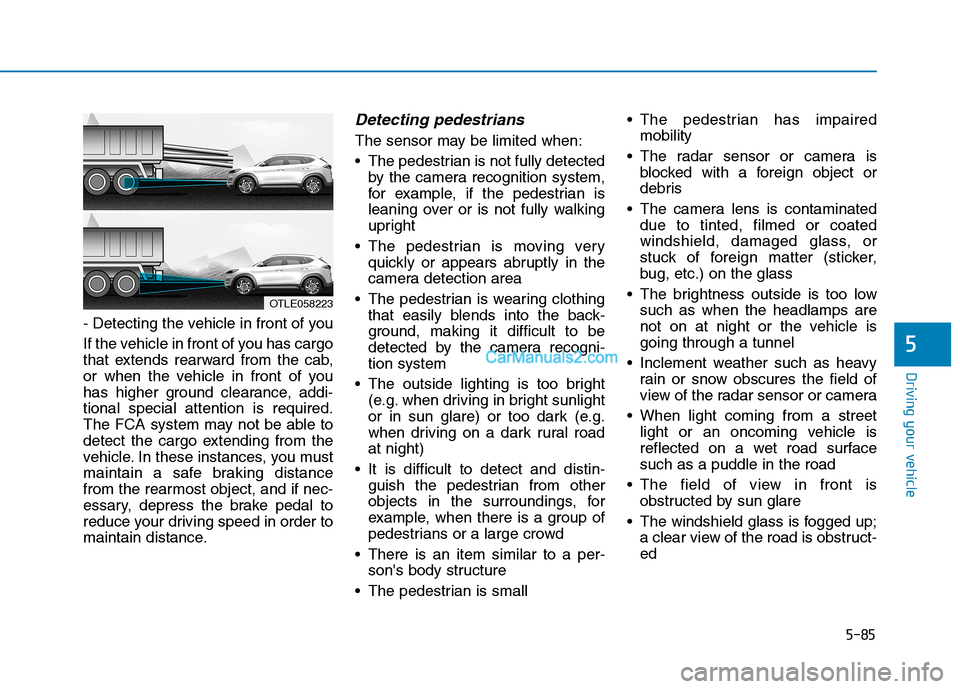
- Detecting the vehicle in front of you
If the vehicle in front of you has cargo
that extends rearward from the cab,
or when the vehicle in front of you
has higher ground clearance, addi-
tional special attention is required.
The FCA system may not be able to
detect the cargo extending from the
vehicle. In these instances, you must
maintain a safe braking distance
from the rearmost object, and if nec-
essary, depress the brake pedal to
reduce your driving speed in order to
maintain distance.
Detecting pedestrians
The sensor may be limited when:
The pedestrian is not fully detected
by the camera recognition system,
for example, if the pedestrian is
leaning over or is not fully walking
upright
The pedestrian is moving very
quickly or appears abruptly in the
camera detection area
The pedestrian is wearing clothing
that easily blends into the back-
ground, making it difficult to be
detected by the camera recogni-
tion system
The outside lighting is too bright
(e.g. when driving in bright sunlight
or in sun glare) or too dark (e.g.
when driving on a dark rural road
at night)
It is difficult to detect and distin-
guish the pedestrian from other
objects in the surroundings, for
example, when there is a group of
pedestrians or a large crowd
There is an item similar to a per-
son's body structure
The pedestrian is small The pedestrian has impaired
mobility
The radar sensor or camera is
blocked with a foreign object or
debris
The camera lens is contaminated
due to tinted, filmed or coated
windshield, damaged glass, or
stuck of foreign matter (sticker,
bug, etc.) on the glass
The brightness outside is too low
such as when the headlamps are
not on at night or the vehicle is
going through a tunnel
Inclement weather such as heavy
rain or snow obscures the field of
view of the radar sensor or camera
When light coming from a street
light or an oncoming vehicle is
reflected on a wet road surface
such as a puddle in the road
The field of view in front is
obstructed by sun glare
The windshield glass is fogged up;
a clear view of the road is obstruct-
ed
OTLE058223
Page 359 of 546
5-93
Driving your vehicle
5
LKA system failure indicator
The LKA system failure
indicator (yellow) will illu-
minate if the LKA system
is not working properly.
Have your vehicle
checked by an authorized
HYUNDAI dealer.
When there is a problem with the
system do one of the following:
Turn the system on after turning
the engine off and on again.
Check if the ignition switch is in the
ON position.
Check if the system is affected by
the weather. (ex: fog, heavy rain,
etc.)
Check if there is foreign matter on
the camera lens.
If the problem is not solved, have
your vehicle checked by an author-
ized HYUNDAI dealer.
The LKA system will not be in the
ENABLED state and/or the steering
wheel will not be assisted when:
The turn signal is turned on before
changing a lane. If you change
lanes without the turn signal on, the
steering wheel might be controlled.
The vehicle is not driven in the mid-
dle of the lane when the system is
turned on or right after changing a
lane.
ESC (Electronic Stability Control) or
VSM (Vehicle Stability Management)
is activated.
The vehicle is driven on a sharp
curve.
Vehicle speed is below 35 mph
(56 km/h) and over 110 mph (177
km/h).
The vehicle makes sharp lane
changes.
The vehicle brakes suddenly.
The lane is very wide or narrow.
There are more than two lane lines
on the road. (e.g. construction area)
Only one side of the lane marker is
detected. Radius of a curve is too small.
The vehicle is driven on a steep
incline.
The steering wheel is turned sud-
denly.
Limitations of the System
The LKA system may operate pre-
maturely even if the vehicle does not
depart from the intended lane, OR,
the LKA system may not warn you if
the vehicle leaves the intended lane
under the following circumstances:
When the lane and road condi-
tions are poor
It is difficult to distinguish the lane
marker from the road because the
lane marker is covered with dust or
sand.
It is difficult to distinguish the color
of the lane marker from the road.
There are markings on the road
surface that look like a lane marker
that is inadvertently being detected
by the camera.
The lane marker is indistinct or
damaged.
Page 361 of 546
5-95
Driving your vehicle
5
When front visibility is poor
The windshield or the camera lens
is blocked with dirt or debris.
The windshield glass is fogged up;
a clear view of the road is obstruct-
ed.
Placing objects on the dashboard,
etc.
The sensor cannot detect the lane
because of fog, heavy rain or snow.LKA System Function Change
The driver can change LKA to Lane
Departure Warning from the LCD
display. Go to the 'User Settings →
Driver Assistance →Lane Safety →
Active LKA/Lane Keeping Assist/
Lane Departure Warning.
Active LKA
The Active LKA mode provides more
frequent steering wheel control in
comparison with the Standard LKA
mode.
Lane Keeping Assist
This mode guides the driver to help
keep the vehicle within the lanes. It
rarely controls the steering wheel,
when the vehicle drives well inside
the lanes. However, it starts to con-
trol the steering wheel, when the
vehicle is about to deviate out of the
lane.
Lane Departure Warning
LDW system alerts the driver with a
visual warning and a warning alarm
when the system detects the vehicle
departing the lane. The steering
wheel will not be controlled.
Information
This device complies with Part 15 of
the FCC rules.
Operation is subject to the following
two conditions:
1. This device may not cause harmful
interference, and
2. This device must accept any inter-
ference received, including interfer-
ence that may cause undesired
operation.
i
Page 366 of 546
5-100
Driving your vehicle
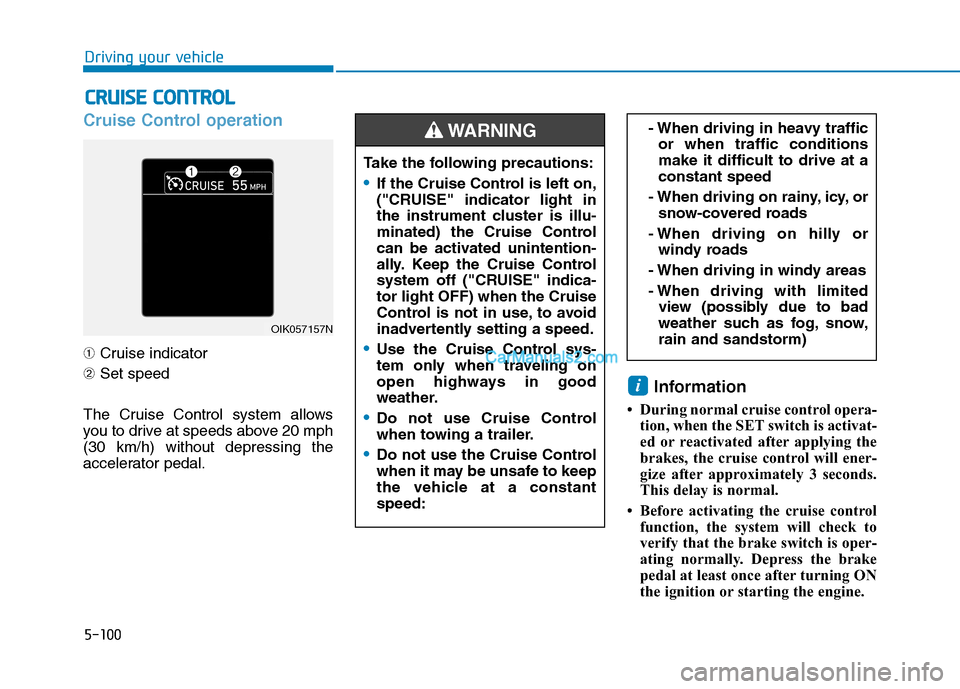
Cruise Control operation
➀Cruise indicator
➁Set speed
The Cruise Control system allows
you to drive at speeds above 20 mph
(30 km/h) without depressing the
accelerator pedal.
Information
• During normal cruise control opera-
tion, when the SET switch is activat-
ed or reactivated after applying the
brakes, the cruise control will ener-
gize after approximately 3 seconds.
This delay is normal.
• Before activating the cruise control
function, the system will check to
verify that the brake switch is oper-
ating normally. Depress the brake
pedal at least once after turning ON
the ignition or starting the engine.
i
C CR
RU
UI
IS
SE
E
C
CO
ON
NT
TR
RO
OL
L
- When driving in heavy traffic
or when traffic conditions
make it difficult to drive at a
constant speed
- When driving on rainy, icy, or
snow-covered roads
- When driving on hilly or
windy roads
- When driving in windy areas
- When driving with limited
view (possibly due to bad
weather such as fog, snow,
rain and sandstorm)
OIK057157N
Take the following precautions:
If the Cruise Control is left on,
("CRUISE" indicator light in
the instrument cluster is illu-
minated) the Cruise Control
can be activated unintention-
ally. Keep the Cruise Control
system off ("CRUISE" indica-
tor light OFF) when the Cruise
Control is not in use, to avoid
inadvertently setting a speed.
Use the Cruise Control sys-
tem only when traveling on
open highways in good
weather.
Do not use Cruise Control
when towing a trailer.
Do not use the Cruise Control
when it may be unsafe to keep
the vehicle at a constant
speed:
WARNING
Page 379 of 546
5-113
Driving your vehicle
5
If you push the smart cruise control
toggle switch (RES+ or SET-) while
Auto Hold and smart cruise control
is operating the Auto Hold will be
released regardless of accelerator
pedal operation and the vehicle will
start to move. The AUTO HOLD
indicator changes from green to
white.- Driving on rainy, icy, or
snow-covered roads
- Driving on a steep downhill
or uphill
- Driving in windy areas
- Driving in parking lots
- Driving near crash barriers
- Driving on a sharp curve
- Driving with limited view
(possibly due to bad weath-
er, such as fog, snow, rain or
sandstorm)
- The vehicle's sensing ability
decreases due to vehicle
modification, resulting in a
level difference of the vehi-
cle's front and rear
Unexpected situations may
lead to possible accidents.
Pay attention continuously to
road conditions and driving
even when the smart cruise
control system is being oper-
ated.
Take the following precautions :
Always set the vehicle speed
under the speed limit.
If the Smart Cruise Control is
left on, (cruise indicator light
in the instrument cluster is
illuminated) the Smart Cruise
Control can be activated unin-
tentionally. Keep the Smart
Cruise Control system off
(cruise indicator light OFF)
when the Smart Cruise
Control is not in use, to avoid
inadvertently setting a speed.
Use the Smart Cruise Control
system only when traveling
on open highways in good
weather.
Do not use the Smart Cruise
Control when it may not be
safe to keep the vehicle at a
constant speed.
Do not use when:
- Driving in heavy traffic or
when traffic conditions make
it difficult to drive at a con-
stant speed
WARNING
Page 436 of 546
7
Tire Traction .....................................................................7-41
Tire Maintenance ............................................................7-41
Tire Sidewall Labeling ....................................................7-41
Tire Terminology and Definitions................................7-45
All Season Tires ...............................................................7-48
Summer Tires ...................................................................7-48
Snow Tires ........................................................................7-49
Radial-Ply Tires ...............................................................7-49
Low Aspect Ratio Tires..................................................7-50
Fuses ......................................................................7-51
Instrument Panel Fuse Replacement..........................7-52
Engine Compartment Panel Fuse Replacement.......7-53
Fuse/Relay Panel Description ......................................7-56
Light Bulbs ............................................................7-64
Headlamp, Daytime Running Lamp, Side Marker,
Parking Lamp, Turn Signal Lamp and
Fog Lamp Replacement .................................................7-65
Side Repeater Lamp Replacement ..............................7-69
Rear Combination Light Bulb Replacement ..............7-70
High Mounted Stop Lamp Replacement ....................7-73
License Plate Light Bulb Replacement ......................7-73
Interior Light Bulb Replacement .................................7-73
Appearance Care..................................................7-75
Exterior Care ....................................................................7-75
Interior Care .....................................................................7-80
Emission Control System ....................................7-83
Crankcase Emission Control System ..........................7-83
Evaporative Emission Control System Including
Onboard Refueling Vapor Recovery (ORVR)............7-83
Exhaust Emission Control System ..............................7-84
California Perchlorate Notice.............................7-87
Page 495 of 546
7
Maintenance
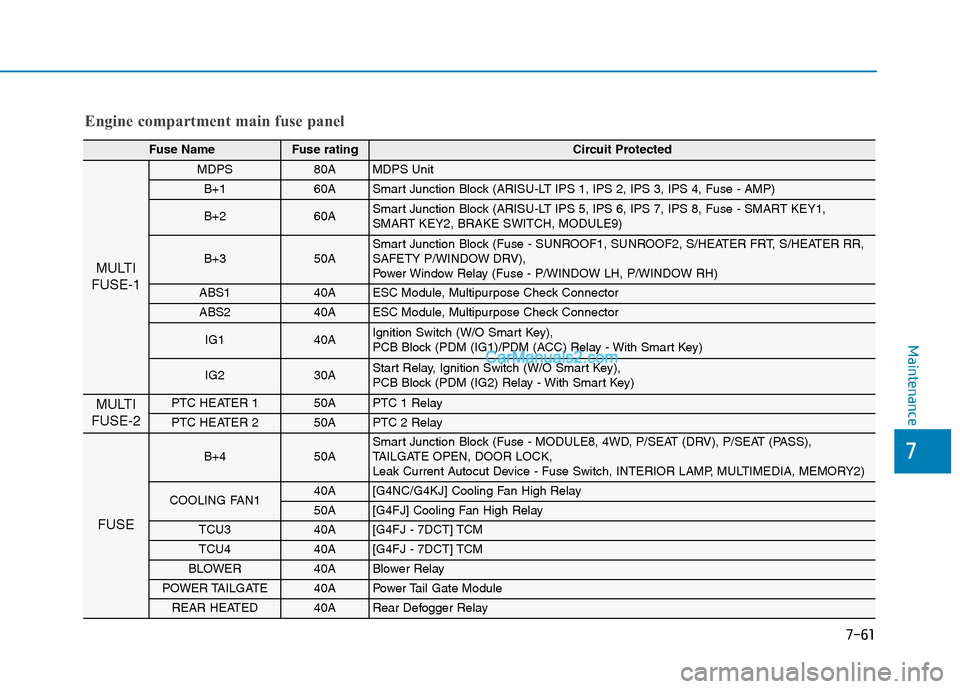
Engine compartment main fuse panel
Fuse NameFuse rating Circuit Protected
MULTI
FUSE-1
MDPS 80AMDPS Unit
B+1 60ASmart Junction Block (ARISU-LT IPS 1, IPS 2, IPS 3, IPS 4, Fuse - AMP)
B+2 60ASmart Junction Block (ARISU-LT IPS 5, IPS 6, IPS 7, IPS 8, Fuse - SMART KEY1,
SMART KEY2, BRAKE SWITCH, MODULE9)
B+3 50ASmart Junction Block (Fuse - SUNROOF1, SUNROOF2, S/HEATER FRT, S/HEATER RR,
SAFETY P/WINDOW DRV),
Power Window Relay (Fuse - P/WINDOW LH, P/WINDOW RH)
ABS1 40AESC Module, Multipurpose Check Connector
ABS2 40AESC Module, Multipurpose Check Connector
IG1 40AIgnition Switch (W/O Smart Key),
PCB Block (PDM (IG1)/PDM (ACC) Relay - With Smart Key)
IG2 30AStart Relay, Ignition Switch (W/O Smart Key),
PCB Block (PDM (IG2) Relay - With Smart Key)
MULTI
FUSE-2PTC HEATER 150APTC 1 Relay
PTC HEATER 250APTC 2 Relay
FUSE
B+450A Smart Junction Block (Fuse - MODULE8, 4WD, P/SEAT (DRV), P/SEAT (PASS),
TAILGATE OPEN, DOOR LOCK,
Leak Current Autocut Device - Fuse Switch, INTERIOR LAMP, MULTIMEDIA, MEMORY2)
COOLING FAN140A [G4NC/G4KJ] Cooling Fan High Relay
50A [G4FJ] Cooling Fan High Relay
TCU340A [G4FJ - 7DCT] TCM
TCU440A [G4FJ - 7DCT] TCM
BLOWER40A Blower Relay
POWER TAILGATE40A Power Tail Gate Module
REAR HEATED40A Rear Defogger Relay
7-61
Page 498 of 546
7-64
Maintenance
L LI
IG
GH
HT
T
B
BU
UL
LB
BS
S
Consult an authorized HYUNDAI
dealer to replace most vehicle light
bulbs. It is difficult to replace vehicle
light bulbs because other parts of the
vehicle must be removed before you
can get to the bulb. This is especially
true for removing the headlamp
assembly to get to the bulb(s).
Removing/installing the headlamp
assembly can result in damage to
the vehicle.
Information
After heavy driving, rain or washing,
headlamp and liftgate lenses could
appear frosty. This condition is caused
by the temperature difference
between the lamp inside and the out-
side temperature. This is similar to the
condensation on your windows inside
your vehicle during the rain and does-
n't indicate a problem with your vehi-
cle. If the water leaks into the lamp
bulb circuitry, have your vehicle
checked by an authorized HYUNDAI
dealer.
Information - Desiccant
(if equipped)
This vehicle is equipped with desic-
cant to reduce fogging inside the head-
lamp due to moisture.
The desiccant is consumable and its
performance may change based on the
used period or environment.
If fogging inside the headlamp due to
moisture continues for a long time,
have your vehicle checked by an
authorized HYUNDAI dealer. i
i
Prior to replacing a lamp,
depress the brake pedal,
move the shift lever into P
(Park) apply the parking
brake, place the igntion
switch to the LOCK/OFF posi-
tion, and take the key with you
when leaving the vehicle to
avoid sudden movement of
the vehicle and to prevent
possible electric shock.
Be aware the bulbs may be
hot and may burn your fin-
gers.
WARNING
Page 499 of 546
7-65
Maintenance
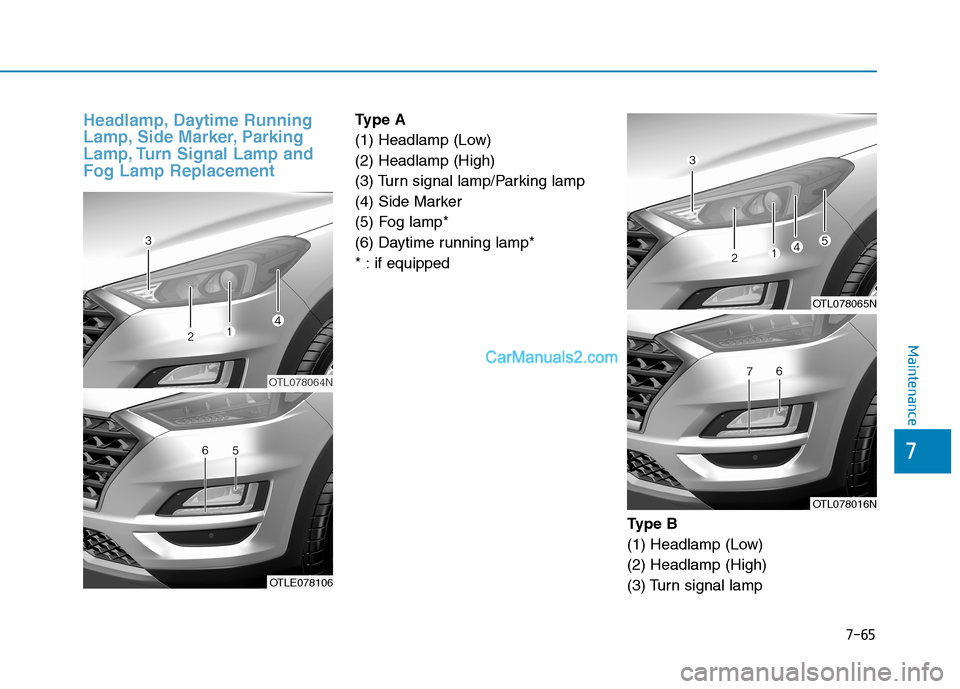
Headlamp, Daytime Running
Lamp, Side Marker, Parking
Lamp, Turn Signal Lamp and
Fog Lamp ReplacementType A
(1) Headlamp (Low)
(2) Headlamp (High)
(3) Turn signal lamp/Parking lamp
(4) Side Marker
(5) Fog lamp*
(6) Daytime running lamp*
* : if equipped
Ty p e B
(1) Headlamp (Low)
(2) Headlamp (High)
(3) Turn signal lamp
OTL078064N
OTLE078106
OTL078065N
OTL078016N
7