Antenna Hyundai Tucson 2019 Owner's Manual
[x] Cancel search | Manufacturer: HYUNDAI, Model Year: 2019, Model line: Tucson, Model: Hyundai Tucson 2019Pages: 546, PDF Size: 61.38 MB
Page 14 of 546
1-3
Your vehicle at a glance
1
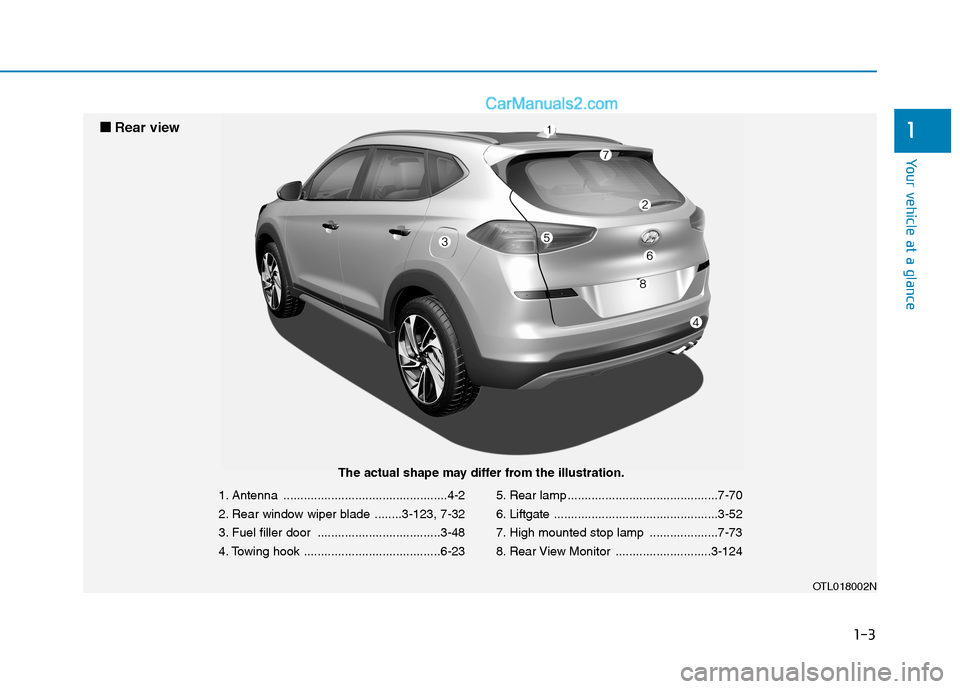
1. Antenna ................................................4-2
2. Rear window wiper blade ........3-123, 7-32
3. Fuel filler door ....................................3-48
4. Towing hook ........................................6-235. Rear lamp ............................................7-70
6. Liftgate ................................................3-52
7. High mounted stop lamp ....................7-73
8. Rear View Monitor ............................3-124
OTL018002N
■ ■
Rear view
The actual shape may differ from the illustration.
Page 263 of 546
Multimedia System
Multimedia System.................................................4-3
AUX, USB and iPod® ®Port ...............................................4-2
Antenna ...............................................................................4-2
Steering Wheel Audio Control........................................4-3
Audio / Video / Navigation System (AVN) ..................4-4
Bluetooth® ®Wireless Technology Hands-Free ...........4-4
4
Page 264 of 546
4-2
• If you install an aftermarket HID
head lamp, your vehicle's audio
and electronic device may mal-
function.
Use caution to keep chemicals
such as perfumes, cosmetics,
sun screen lotions, hand sanitiz-
ers, or air fresheners from con-
tacting any interior components.
These chemicals may cause
damage or discoloration to the
interior materials.
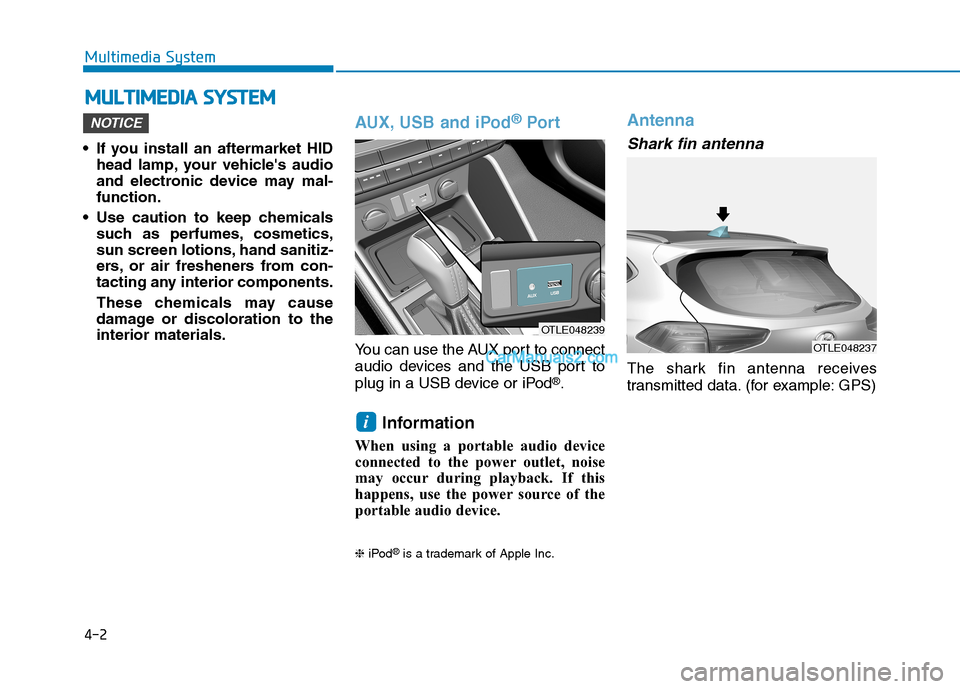
AUX, USB and iPod®Por t
You can use the AUX port to connect
audio devices and the USB port to
plug in a USB device or iPod
®.
Information
When using a portable audio device
connected to the power outlet, noise
may occur during playback. If this
happens, use the power source of the
portable audio device.
❈iPod®is a trademark of Apple Inc.
Antenna
Shark fin antenna
The shark fin antenna receives
transmitted data. (for example: GPS)
i
NOTICE
M MU
UL
LT
TI
IM
ME
ED
DI
IA
A
S
SY
YS
ST
TE
EM
M
Multimedia System
OTLE048239
OTLE048237
Page 387 of 546
5-121
Driving your vehicle
5
Information
The Smart Cruise Control system
may not operate temporarily due to:
• Electrical interference
• Modifying the suspension
• Differences of tire abrasion or tire
pressure
• Installing different type of tires
Information
This device complies with Part 15 of
the FCC rules.
Operation is subject to the following
three conditions:
1. This device may not cause harmful
interference, and
2. This device must accept any inter-
ference received, including interfer-
ence that may cause undesired
operation.
3. Changes or modifications not
expressly approved by the party
responsible for compliance could
void the user's authority to operate
the device.
Information
Radio frequency radiation exposure
information:
This equipment complies with FCC
radiation exposure limits set forth for
an uncontrolled environment.
This equipment should be installed
and operated with minimum distance
of 8 in. (20 cm) between the radiator
(antenna) and your body.
This transmitter must not be co-locat-
ed or operating in conjunction with
any other antenna or transmitter.
i
i
iVehicles moving in front of
you with a frequent lane
change may cause a delay in
the system's reaction or may
cause the system to react to a
vehicle actually in an adjacent
lane. Always drive cautiously
to prevent unexpected and
sudden situations from occur-
ring.
Always be aware of the select-
ed speed and vehicle to vehi-
cle distance. The driver
should not solely rely on the
system but always pay atten-
tion to driving conditions and
control your vehicle speed.
The Smart Cruise Control sys-
tem may not recognize com-
plex driving situations so
always pay attention to driv-
ing conditions and control
your vehicle speed.
Page 542 of 546
I-7
Lane Keeping Assist (LKA) System ..............................5-87
Limitations of the System ..........................................5-93
LKA System Function Change ..................................5-95
LKA System Operation ..............................................5-89
Warning Light and Message.......................................5-91
LCD Display ...................................................................3-91
LCD Display Control .................................................3-91
LCD Display Modes ..................................................3-92
Liftgate ............................................................................3-52
Non-Powered liftgate .................................................3-52
Power Liftgate ............................................................3-54
Smart Liftgate.............................................................3-61
Light ..............................................................................3-107
Exterior Lights..........................................................3-107
Interior Lights ...........................................................3-116
Welcome System ......................................................3-115
Light Bulbs .....................................................................7-64
Daytime Running Lamp Replacement .......................7-65
Fog Lamp Replacement .............................................7-65
Headlamp Replacement..............................................7-65
High Mounted Stop Lamp Replacement....................7-73
Interior Light Bulb Replacement ...............................7-73
License Plate Light Bulb Replacement ......................7-73
Parking Lamp Replacement .......................................7-65
Rear Combination Light Bulb Replacement ..............7-70Side Marker Replacement ..........................................7-65
Side Repeater Lamp Replacement .............................7-69
Turn Signal Lamp Replacement.................................7-65
Luggage Tray ................................................................3-170
Luggage Volume ...............................................................8-3
Maintenance Services .......................................................7-4
Owner Maintenance Precautions..................................7-4
Owner's Responsibility.................................................7-4
Manual Climate Control System ..................................3-127
Heating and Air Conditioning ..................................3-128
System Maintenance ................................................3-135
System Operation .....................................................3-133
Mirrors ............................................................................3-24
Inside Rearview Mirror ..............................................3-24
Side View Mirrors ......................................................3-36
Multimedia System ...........................................................4-3
Antenna ........................................................................4-2
Audio / Video / Navigation System (AVN) .................4-4
AUX, USB and iPod
®Port ..........................................4-2
Bluetooth®Wireless Technology Hands-Free ..............4-4
Steering Wheel Audio Control .....................................4-3
I
Index
L
M