Dim Hyundai Tucson 2019 Owner's Manual
[x] Cancel search | Manufacturer: HYUNDAI, Model Year: 2019, Model line: Tucson, Model: Hyundai Tucson 2019Pages: 546, PDF Size: 61.38 MB
Page 116 of 546
3-25
Convenient features of your vehicle
3
Pull the day/night lever toward you to
reduce glare from the headlights of
the vehicles behind you during night
driving.
Remember that you lose some
rearview clarity in the night position.Blue Link®center (if equipped)
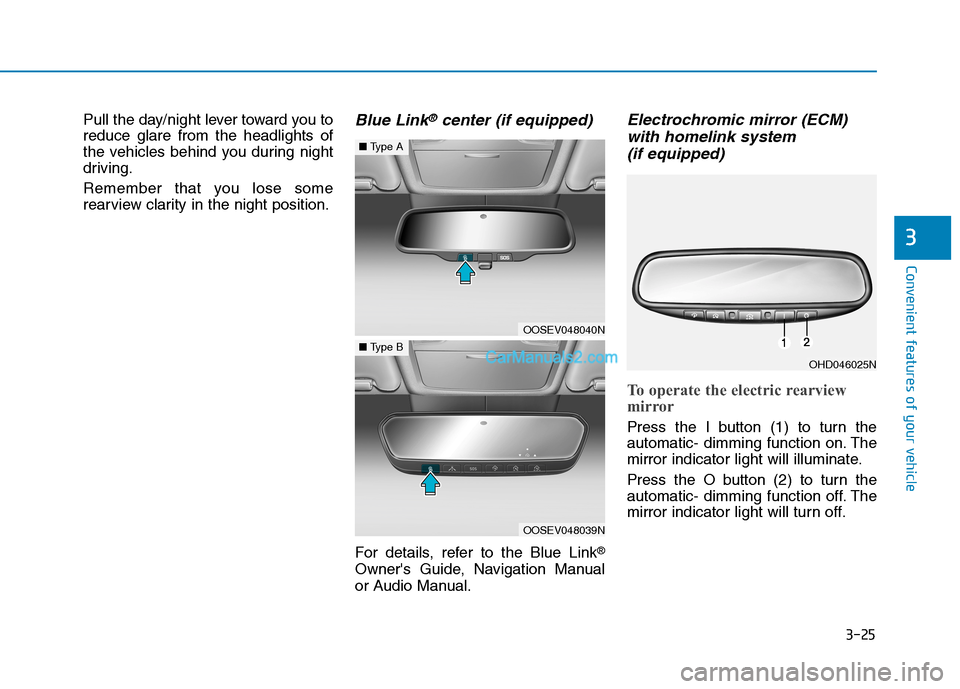
For details, refer to the Blue Link®
Owner's Guide, Navigation Manual
or Audio Manual.
Electrochromic mirror (ECM)
with homelink system
(if equipped)
To operate the electric rearview
mirror
Press the I button (1) to turn the
automatic- dimming function on. The
mirror indicator light will illuminate.
Press the O button (2) to turn the
automatic- dimming function off. The
mirror indicator light will turn off.
OHD046025N
OOSEV048040N
■Type A
OOSEV048039N
■Type B
Page 121 of 546
3-30
Convenient features of your vehicle
Electrochromic mirror (ECM)
with HomeLink®system and
Blue Link®(if equipped)
Your vehicle may be equipped with a
Gentex Automatic-Dimming Mirror
and an Integrated HomeLink
®
Wireless Control System. The
HomeLink®Universal Transceiver
allows you to activate your garage
door(s), electric gate, home lighting,
etc.
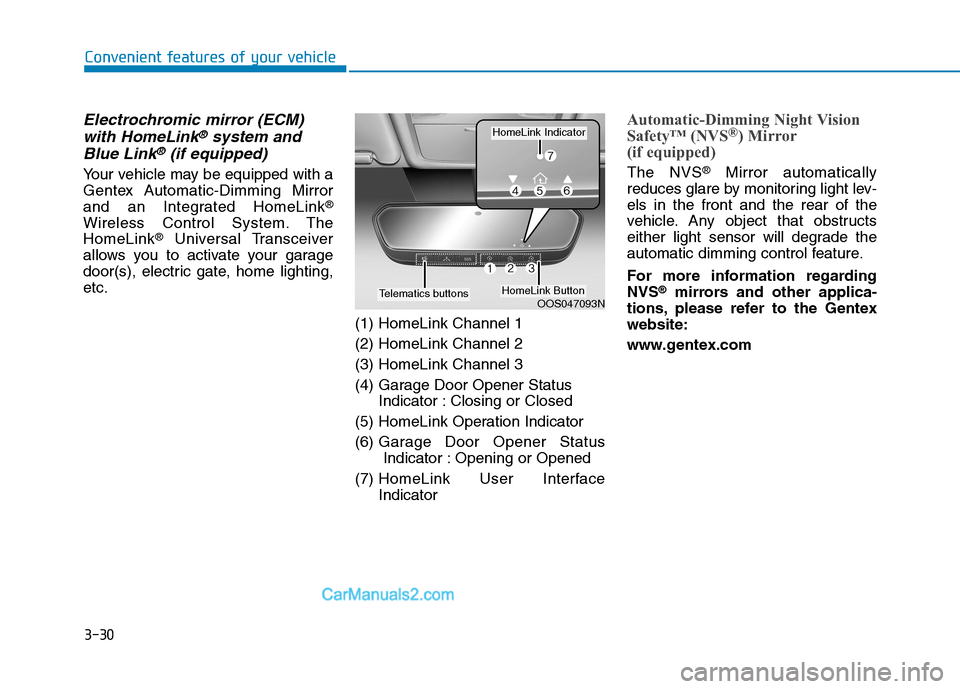
(1) HomeLink Channel 1
(2) HomeLink Channel 2
(3) HomeLink Channel 3
(4) Garage Door Opener Status
Indicator : Closing or Closed
(5) HomeLink Operation Indicator
(6) Garage Door Opener Status
Indicator : Opening or Opened
(7) HomeLink User Interface
Indicator
Automatic-Dimming Night Vision
Safety™ (NVS®) Mirror
(if equipped)
The NVS®Mirror automatically
reduces glare by monitoring light lev-
els in the front and the rear of the
vehicle. Any object that obstructs
either light sensor will degrade the
automatic dimming control feature.
For more information regarding
NVS
®mirrors and other applica-
tions, please refer to the Gentex
website:
www.gentex.comOOS047093N
HomeLink Indicator
HomeLink ButtonTelematics buttons
Page 122 of 546
3-31
Convenient features of your vehicle
3
Your mirror will automatically dim
upon detecting glare from the vehi-
cles traveling behind you. The auto-
dimming function can be controlled
by pressing the Dimming ON/OFF
button:
1. Pressing and holding the button
for 3 seconds turns the auto-dim-
ming function OFF which is indi-
cated by the green Status
Indicator LED turning off.
2. Pressing and holding the button
for 3 seconds again turns the auto-
dimming function ON which is indi-
cated by the green Status Indicator
LED turning on.
The mirror defaults to the ON posi-
tion each time the vehicle is started.Integrated HomeLink®Wireless
Control System
The HomeLink®Wireless Control
System can replace up to three
hand-held radio-frequency (RF)
transmitters with a single built-in
device. This innovative feature will
learn the radio frequency codes of
most current transmitters to operate
devices such as gate operators,
garage door openers, entry door
locks, security systems, even home
lighting. Both standard and rolling
code-equipped transmitters can be
programmed by following the out-
lined procedures.
Additional HomeLink
®information
can be found at: www.homelink.com
or by calling 1-800-355-3515.
Retain the original transmitter of the
RF device you are programming for
use in other vehicles as well as for
future HomeLink
®programming. It is
also suggested that upon the sale of
the vehicle, the programmed
HomeLink
®buttons be erased for
security purposes.
Before programming
HomeLink®to a garage door
opener or gate operator, make
sure people and objects are out
of the way of the device to pre-
vent potential harm or damage.
Do not use the HomeLink
®with
any garage door opener that
lacks the safety stop and
reverse features required by
U.S. federal safety standards
(this includes any garage door
opener model manufactured
before April 1, 1982). A garage
door that cannot detect an
object - signaling the door to
stop and reverse - does not
meet current U.S. federal safety
standards. Using a garage door
opener without these features
increases the risk of serious
injury or death.
WARNING
Page 202 of 546
3-111
Convenient features of your vehicle
3
When the High Beam Assist (HBA) is
operating, the high beam switches to
low beam if any of the following con-
ditions occur :
- When the headlamp of an on-com-
ing vehicle is detected.
- When the tail lamp of a vehicle in
front is detected.
- When the headlamp or tail lamp of
a motorcycle or a bicycle is detect-
ed.
- When the surrounding ambient
light is bright enough that high
beams are not required.
- When streetlights or other lights
are detected.
- When the headlamp switch is not
in the AUTO position.
- When the High Beam Assist (HBA)
is off.
- When vehicle speed is below 15
mph (24 km/h).
Warning light and message
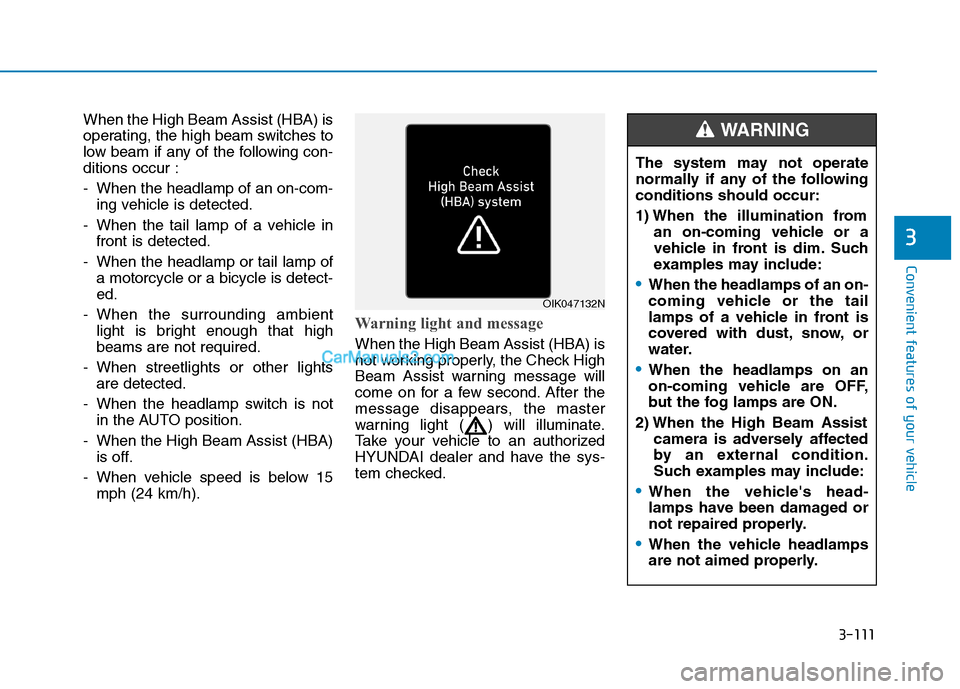
When the High Beam Assist (HBA) is
not working properly, the Check High
Beam Assist warning message will
come on for a few second. After the
message disappears, the master
warning light ( ) will illuminate.
Take your vehicle to an authorized
HYUNDAI dealer and have the sys-
tem checked.
OIK047132N
The system may not operate
normally if any of the following
conditions should occur:
1) When the illumination from
an on-coming vehicle or a
vehicle in front is dim. Such
examples may include:
When the headlamps of an on-
coming vehicle or the tail
lamps of a vehicle in front is
covered with dust, snow, or
water.
When the headlamps on an
on-coming vehicle are OFF,
but the fog lamps are ON.
2) When the High Beam Assist
camera is adversely affected
by an external condition.
Such examples may include:
When the vehicle's head-
lamps have been damaged or
not repaired properly.
When the vehicle headlamps
are not aimed properly.
WARNING
Page 412 of 546
6-3
What to do in an emergency
If you Have a Flat Tire While
Driving
If a tire goes flat while you are driving:
Take your foot off the accelerator
pedal and let the vehicle slow down
while driving straight ahead. Do not
apply the brakes immediately or
attempt to pull off the road as this
may cause loss of vehicle control
resulting in an accident. When the
vehicle has slowed to such a speed
that it is safe to do so, brake care-
fully and pull off the road. Drive off
the road as far as possible and park
on firm, level ground. If you are on
a divided highway, do not park in
the median area between the two
traffic lanes.
When the vehicle is stopped, press
the hazard warning flasher button,
move the shift lever into P(Park),
and apply the parking brake, and
place the ignition switch in the
LOCK/OFF position.
Have all passengers get out of the
vehicle. Be sure they all get out on
the side of the vehicle that is away
from traffic.
When changing a flat tire, follow
the instructions provided later in
this chapter.
If the Engine Doesn't Turn
Over or Turns Over Slowly
Be sure the shift lever is in N
(Neutral) or P (Park). The engine
starts only when the shift lever is in
N (Neutral) or P (Park).
Check the battery connections to
be sure they are clean and tight.
Turn on the interior light. If the light
dims or goes out when you operate
the starter, the battery is drained.
Do not push or pull the vehicle to
start it. This could cause damage to
your vehicle. See instructions for
"Jump Starting" provided in this
chapter.
If the Engine Turns Over
Normally but Doesn't Start
Check the fuel level and add fuel if
necessary.
If the engine still does not start, have
your vehicle checked by an author-
ized HYUNDAI dealer.
6
I IF
F
T
TH
HE
E
E
EN
NG
GI
IN
NE
E
W
WI
IL
LL
L
N
NO
OT
T
S
ST
TA
AR
RT
T
Push or pull starting the vehicle
may cause the catalytic con-
verter to overload which can
lead to damage to the emission
control system.
CAUTION
Page 426 of 546
6-17
What to do in an emergency
6
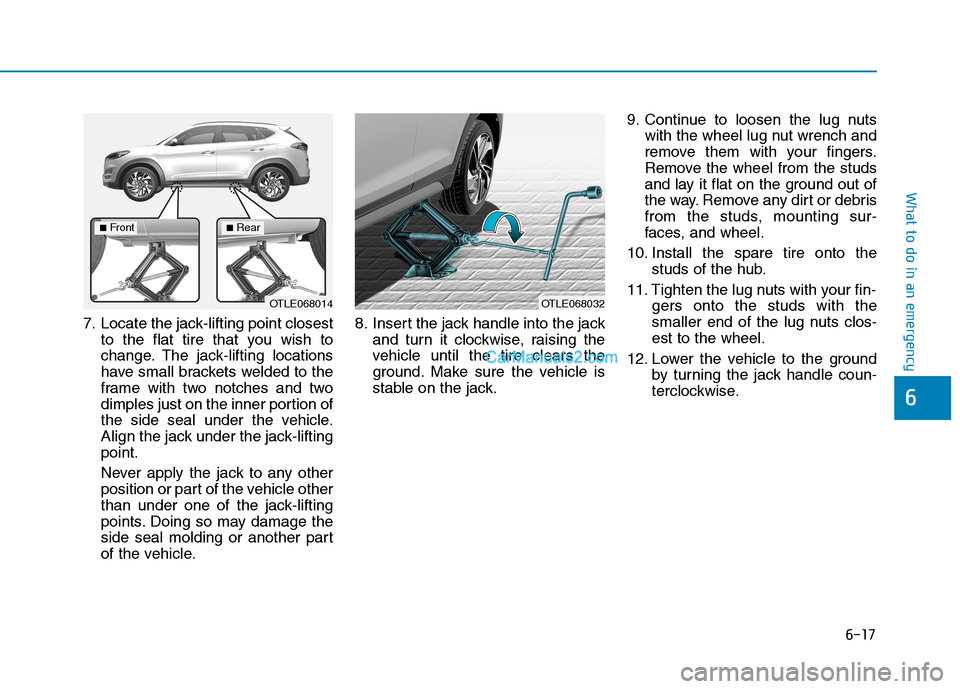
7. Locate the jack-lifting point closest
to the flat tire that you wish to
change. The jack-lifting locations
have small brackets welded to the
frame with two notches and two
dimples just on the inner portion of
the side seal under the vehicle.
Align the jack under the jack-lifting
point.
Never apply the jack to any other
position or part of the vehicle other
than under one of the jack-lifting
points. Doing so may damage the
side seal molding or another part
of the vehicle.8. Insert the jack handle into the jack
and turn it clockwise, raising the
vehicle until the tire clears the
ground. Make sure the vehicle is
stable on the jack.9. Continue to loosen the lug nuts
with the wheel lug nut wrench and
remove them with your fingers.
Remove the wheel from the studs
and lay it flat on the ground out of
the way. Remove any dirt or debris
from the studs, mounting sur-
faces, and wheel.
10. Install the spare tire onto the
studs of the hub.
11. Tighten the lug nuts with your fin-
gers onto the studs with the
smaller end of the lug nuts clos-
est to the wheel.
12. Lower the vehicle to the ground
by turning the jack handle coun-
terclockwise.
OTLE068014OTLE068032
■Front■Rear
Page 522 of 546
Specifications, Consumer information and Reporting safety defects
8
Dimensions ..............................................................8-2
Engine ......................................................................8-2
Gross Vehicle Weight ............................................8-3
Luggage Volume .....................................................8-3
Bulb Wattage ..........................................................8-4
Tires and Wheels ...................................................8-6
Air Conditioning System........................................8-7
Recommended Lubricants and Capacities ..........8-8
Recommended SAE Viscosity Number .......................8-10
Vehicle Identification Number (VIN) .................8-11
Vehicle Certification Label .................................8-11
Tire Specification and Pressure Label .............8-12
Engine Number .....................................................8-12
Refrigerant Label .................................................8-12
Consumer Information .........................................8-13
Reporting Safety Defects ...................................8-14
Page 538 of 546
I-3
Brake Fluid .....................................................................7-23
Checking the Brake Fluid Level ................................7-23
Braking System ...............................................................5-21
Anti-lock Brake System (ABS)..................................5-33
Auto Hold ...................................................................5-30
Disc Brakes Wear Indicator........................................5-22
Downhill Brake Control (DBC) .................................5-40
Electronic Parking Brake (EPB) ................................5-24
Electronic Stability Control (ESC).............................5-35
Good Braking Practices..............................................5-42
Hill-Start Assist Control (HAC) .................................5-40
Parking Brake .............................................................5-22
Power Brakes..............................................................5-21
Vehicle Stability Management (VSM) .......................5-39
Bulb Wattage .....................................................................8-4
California Perchlorate Notice .........................................7-87
Cargo Net Holder ..........................................................3-167
Cargo Security Screen ..................................................3-167
Center Console Storage ................................................3-157
Child Restraint System (CRS) ........................................2-38
Children Always in the Rear ......................................2-38
Installing a Child Restraint System (CRS) ................2-41
Selecting a Child Restraint System (CRS).................2-39Climate Control Additional Features ............................3-156
Automatic Ventilation...............................................3-156
Cluster ionizer ..........................................................3-156
Sunroof Inside Air Recirculation .............................3-156
Climate Control Air Filter...............................................7-27
Filter Inspection..........................................................7-27
Clock .............................................................................3-165
Clothes Hanger .............................................................3-165
Consumer Information ....................................................8-13
Cruise Control ...............................................................5-100
Cruise Control operation ..........................................5-100
Cup Holder....................................................................3-159
Curtain air bags ...............................................................2-53
Dimensions .......................................................................8-2
Disc Brakes Wear Indicator ............................................5-22
Door Locks .....................................................................3-15
Automatic Door Lock and Unlock Features ..............3-18
Child-Protector Rear Door locks................................3-19
Operating Door Locks from Inside the Vehicle .........3-16
Operating Door Locks from Outside the Vehicle ......3-15
Downhill Brake Control (DBC) .....................................5-40
Drive Mode Integrated Control System .........................5-51
Driver Assist System.....................................................3-124
Rear View Monitor ...................................................3-124
Surround View Monitor ...........................................3-125
I
Index
C
D