rear camera Hyundai Tucson 2019 Owner's Manual
[x] Cancel search | Manufacturer: HYUNDAI, Model Year: 2019, Model line: Tucson, Model: Hyundai Tucson 2019Pages: 546, PDF Size: 61.38 MB
Page 215 of 546
3-124
Convenient features of your vehicle
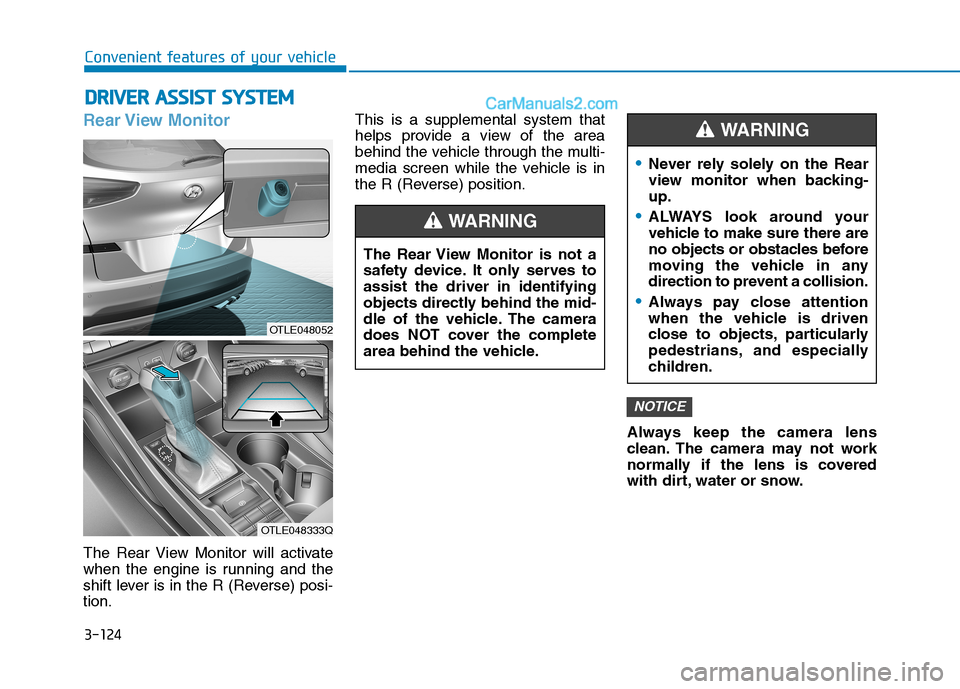
Rear View Monitor
The Rear View Monitor will activate
when the engine is running and the
shift lever is in the R (Reverse) posi-
tion.This is a supplemental system that
helps provide a view of the area
behind the vehicle through the multi-
media screen while the vehicle is in
the R (Reverse) position.
Always keep the camera lens
clean. The camera may not work
normally if the lens is covered
with dirt, water or snow.
NOTICE
D DR
RI
IV
VE
ER
R
A
AS
SS
SI
IS
ST
T
S
SY
YS
ST
TE
EM
M
The Rear View Monitor is not a
safety device. It only serves to
assist the driver in identifying
objects directly behind the mid-
dle of the vehicle. The camera
does NOT cover the complete
area behind the vehicle.
WARNING
Never rely solely on the Rear
view monitor when backing-
up.
ALWAYS look around your
vehicle to make sure there are
no objects or obstacles before
moving the vehicle in any
direction to prevent a collision.
Always pay close attention
when the vehicle is driven
close to objects, particularly
pedestrians, and especially
children.
WARNING
OTLE048052
OTLE048333Q
Page 217 of 546
3-126
Convenient features of your vehicle
Always keep the camera lens
clean. The camera may not work
normally if the lens is covered
with foreign material.
NOTICE
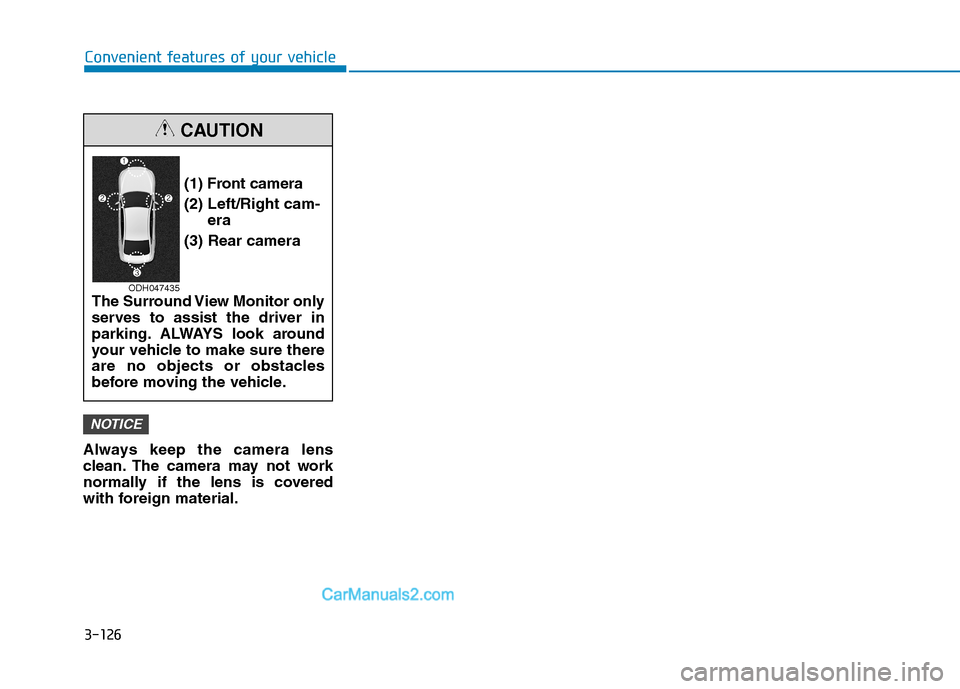
(1) Front camera
(2) Left/Right cam-
era
(3) Rear camera
The Surround View Monitor only
serves to assist the driver in
parking. ALWAYS look around
your vehicle to make sure there
are no objects or obstacles
before moving the vehicle.
CAUTION
ODH047435
Page 267 of 546
Driving your vehicle
5
Before Driving ........................................................5-4
Before Entering the Vehicle ...........................................5-4
Before Starting ..................................................................5-4
Ignition Switch ........................................................5-6
Key Ignition Switch ...........................................................5-6
Engine Start/Stop Button................................................5-9
Automatic Transmission ......................................5-14
Automatic transmission operation ..............................5-14
Good Driving Practices ..................................................5-19
Braking System ....................................................5-21
Power Brakes ...................................................................5-21
Disc Brakes Wear Indicator ..........................................5-22
Parking Brake...................................................................5-22
Electronic Parking Brake (EPB)...................................5-24
Auto Hold ..........................................................................5-30
Anti-lock Brake System (ABS) ....................................5-33
Electronic Stability Control (ESC)................................5-35
Vehicle Stability Management (VSM).........................5-39
Hill-Start Assist Control (HAC) ....................................5-40
Downhill Brake Control (DBC) ......................................5-40
Good Braking Practices .................................................5-42
All Wheel Drive (AWD) ........................................5-43
AWD operation.................................................................5-45
Emergency precautions .................................................5-49
Drive Mode Integrated Control System ............5-51
Blind-Spot Collision Warning (BCW) System...5-52
BCW (Blind-Spot Collision Warning) ..........................5-53
RCCW (Rear Cross-Traffic Collision Warning) .........5-55
Blind-Spot Collision Warning - Sensor Location ....5-57
Limitations of the System .............................................5-58
Forward Collision-Avoidance Assist (FCA)
System - Camera Type........................................5-60
System Setting and Activation.....................................5-60
FCA Warning Message and System Control ............5-63
FCA Sensor .......................................................................5-65
System Not Operating....................................................5-67
Limitations of the System .............................................5-68
Forward Collision-Avoidance Assist (FCA)
System - Sensor Fusion Type
(Front Radar + Front Camera) ...........................5-73
System Setting and Activation.....................................5-73
FCA Warning Message and System Control ............5-76
FCA Sensor .......................................................................5-78
System Not Operating....................................................5-80
Limitations of the System .............................................5-81
Page 335 of 546
5-69
Driving your vehicle
5
Detecting vehicles
The sensor may be limited when:
The camera is blocked with a for-
eign object or debris
The camera lens is contaminated
due to tinted, filmed or coated
windshield, damaged glass, or
stuck of foreign matter (sticker,
bug, etc.) on the glass
Inclement weather such as heavy
rain or snow obscures the field of
view of the camera
The vehicle is on unpaved or
uneven rough surfaces, or road
with sudden gradient changes.
The camera sensor recognition is
limited
The vehicle in front is too small to
be detected (for example a motor-
cycle or a bicycle, etc.)
The camera does not recognize
the entire vehicle in front.
The vehicle in front is an oversize
vehicle or trailer that is too big to
be detected by the camera recog-
nition system (for example a tractor
trailer, etc.) The camera's field of view is not
well illuminated (either too dark or
too much reflection or too much
backlight that obscures the field of
view)
The vehicle in front does not have
their rear lights properly turned ON
The outside brightness changes
suddenly, for example when enter-
ing or exiting a tunnel
Light coming from a street light or
an oncoming vehicle is reflected on
a wet road surface such as a pud-
dle in the road
The field of view in front is
obstructed by sun glare
The vehicle drives inside a build-
ing, such as a basement parking
lot
The adverse road conditions cause
excessive vehicle vibrations while
driving
The camera is damaged.
The brightness outside is too low
such as when the headlamps are
not on at night or the vehicle is
going through a tunnel. The shadow is on the road by a
median strip, trees, etc.
The vehicle drives through a toll-
gate.
The windshield glass is fogged up;
a clear view of the road is obstruct-
ed
The rear part of the vehicle in front
is not normally visible (for example,
the vehicle is spinning or the vehi-
cle is overturned)
The sensor recognition changes
suddenly when passing over a
speed bump
The vehicle in front is driving errat-
ically
The vehicle in front is moving verti-
cally to the driving direction
The vehicle in front is stopped ver-
tically
The vehicle in front is driving
towards your vehicle or reversing
You are on a roundabout and the
vehicle in front circles
Page 338 of 546
5-72
Driving your vehicle
Information
In some instances, the FCA system
may be cancelled when subjected to
electromagnetic interference.
Information
This device complies with Part 15 of
the FCC rules.
Operation is subject to the following
two conditions:
1. This device may not cause harmful
interference, and
2. This device must accept any inter-
ference received, including interfer-
ence that may cause undesired
operation.
i
i
Do not use the Forward
Collision-Avoidance Assist
(FCA) system when towing a
vehicle. Application of the
FCA system while towing may
adversely affect the safety of
your vehicle or the towing
vehicle.
Use extreme caution when the
vehicle in front of you has
cargo that extends rearward
from the cab, or when the
vehicle in front of you has
higher ground clearance.
The FCA system is designed
to help detect and monitor the
vehicle ahead in the roadway
through camera recognition. It
is not designed to detect bicy-
cles, motorcycles, or smaller
wheeled objects such as lug-
gage bags, shopping carts, or
strollers.
Never try to test the operation
of the FCA system. Doing so
may cause severe injury or
death.
If the front glass or camera
have been replaced or
repaired, have your vehicle
inspected by an authorized
HYUNDAI dealer.WARNING
Page 348 of 546
5-82
Driving your vehicle
Detecting vehicles
The sensor may be limited when:
The radar sensor or camera is
blocked with a foreign object or
debris
The camera lens is contaminated
due to tinted, filmed or coated
windshield, damaged glass, or
stuck of foreign matter (sticker,
bug, etc.) on the glass
Inclement weather such as heavy
rain or snow obscures the field of
view of the radar sensor or camera
There is interference by electro-
magnetic waves
The vehicle is on unpaved or
uneven rough surfaces, or road
with sudden gradient changes.
The vehicle drives through a con-
struction area, on an unpaved
road, or above metal materials,
such as a railway
The radar/camera sensor recogni-
tion is limited
The vehicle in front is too small to
be detected (for example a motor-
cycle or a bicycle, etc.) The camera does not recognize
the entire vehicle in front.
The vehicle in front is an oversize
vehicle or trailer that is too big to
be detected by the camera recog-
nition system (for example a tractor
trailer, etc.)
The camera's field of view is not
well illuminated (either too dark or
too much reflection or too much
backlight that obscures the field of
view)
The vehicle in front does not have
their rear lights properly turned ON
The outside brightness changes
suddenly, for example when enter-
ing or exiting a tunnel
The field of view in front is
obstructed by sun glare
The vehicle drives inside a build-
ing, such as a basement parking
lot
The adverse road conditions cause
excessive vehicle vibrations while
driving
The camera is damaged. The brightness outside is too low
such as when the headlamps are
not on at night or the vehicle is
going through a tunnel.
Light coming from a street light or
an oncoming vehicle is reflected on
a wet road surface such as a pud-
dle in the road
The shadow is on the road by a
median strip, trees, etc.
The vehicle drives through a toll-
gate.
The windshield glass is fogged up;
a clear view of the road is obstruct-
ed
The rear part of the vehicle in front
is not normally visible (for example,
the vehicle is spinning or the vehi-
cle is overturned)
There is severe irregular reflection
from the radar sensor
The sensor recognition changes
suddenly when passing over a
speed bump
The vehicle in front is driving errat-
ically
The vehicle in front is moving verti-
cally to the driving direction
Page 351 of 546
5-85
Driving your vehicle
5
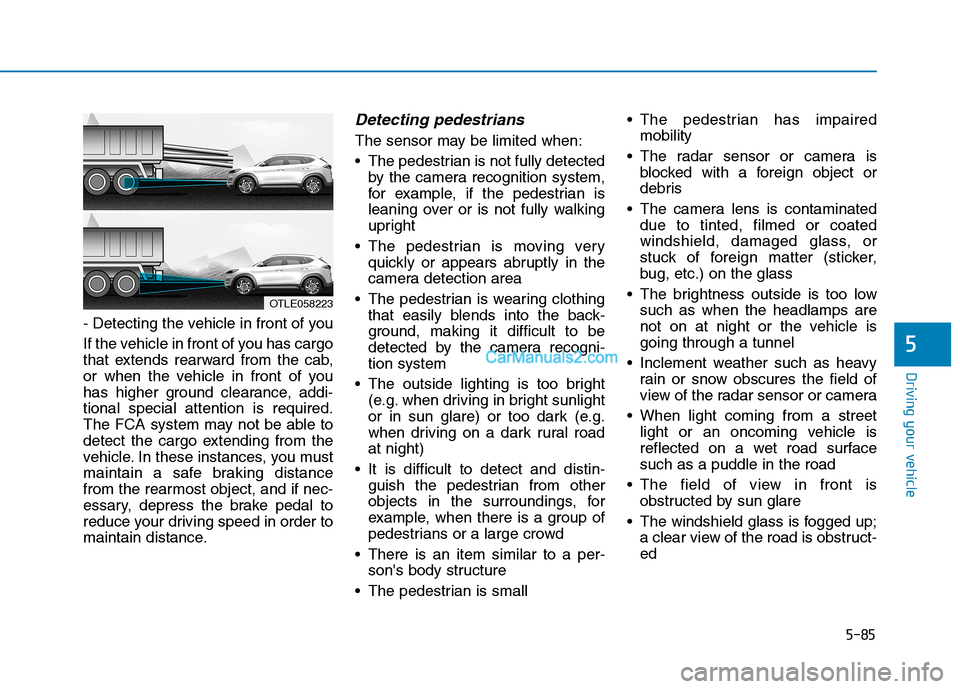
- Detecting the vehicle in front of you
If the vehicle in front of you has cargo
that extends rearward from the cab,
or when the vehicle in front of you
has higher ground clearance, addi-
tional special attention is required.
The FCA system may not be able to
detect the cargo extending from the
vehicle. In these instances, you must
maintain a safe braking distance
from the rearmost object, and if nec-
essary, depress the brake pedal to
reduce your driving speed in order to
maintain distance.
Detecting pedestrians
The sensor may be limited when:
The pedestrian is not fully detected
by the camera recognition system,
for example, if the pedestrian is
leaning over or is not fully walking
upright
The pedestrian is moving very
quickly or appears abruptly in the
camera detection area
The pedestrian is wearing clothing
that easily blends into the back-
ground, making it difficult to be
detected by the camera recogni-
tion system
The outside lighting is too bright
(e.g. when driving in bright sunlight
or in sun glare) or too dark (e.g.
when driving on a dark rural road
at night)
It is difficult to detect and distin-
guish the pedestrian from other
objects in the surroundings, for
example, when there is a group of
pedestrians or a large crowd
There is an item similar to a per-
son's body structure
The pedestrian is small The pedestrian has impaired
mobility
The radar sensor or camera is
blocked with a foreign object or
debris
The camera lens is contaminated
due to tinted, filmed or coated
windshield, damaged glass, or
stuck of foreign matter (sticker,
bug, etc.) on the glass
The brightness outside is too low
such as when the headlamps are
not on at night or the vehicle is
going through a tunnel
Inclement weather such as heavy
rain or snow obscures the field of
view of the radar sensor or camera
When light coming from a street
light or an oncoming vehicle is
reflected on a wet road surface
such as a puddle in the road
The field of view in front is
obstructed by sun glare
The windshield glass is fogged up;
a clear view of the road is obstruct-
ed
OTLE058223
Page 352 of 546
5-86
Driving your vehicle
The adverse road conditions cause
excessive vehicle vibrations while
driving
The sensor recognition changes
suddenly when passing over a
speed bump
You are on a roundabout
Information
In some instances, the FCA system
may be cancelled when subjected to
electromagnetic interference.
Information
This device complies with Part 15 of
the FCC rules.
Operation is subject to the following
two conditions:
1. This device may not cause harmful
interference, and
2. This device must accept any inter-
ference received, including interfer-
ence that may cause undesired
operation.
i
i
Do not use the Forward
Collision-Avoidance Assist
(FCA) system when towing a
vehicle. Application of the
FCA system while towing may
adversely affect the safety of
your vehicle or the towing
vehicle.
Use extreme caution when the
vehicle in front of you has
cargo that extends rearward
from the cab, or when the
vehicle in front of you has
higher ground clearance.
The FCA system is designed
to help detect and monitor the
vehicle ahead or help detect a
pedestrian in the roadway
through radar signals and
camera recognition. It is not
designed to detect bicycles,
motorcycles, or smaller
wheeled objects such as lug-
gage bags, shopping carts, or
strollers.
Never try to test the operation
of the FCA system. Doing so
may cause severe injury or
death.
If the front bumper, front
glass, radar or camera have
been replaced or repaired,
have your vehicle inspected
by an authorized HYUNDAI
dealer.
WARNING
Page 360 of 546
5-94
Driving your vehicle
The lane marker is merged or
divided. (e.g. tollgate)
The lane number increases or
decreases or the lane marker are
crossing complicatedly.
There are more than two lane
markers on the road in front of you.
The lane marker is very thick or
thin.
The lane marker ahead is not visi-
ble due to rain, snow, water on the
road, damaged or stained road
surface, or other factors.
The shadow is on the lane marker
by a median strip, trees, guardrail,
noise barriers, etc.
The lane markers are complicated
or a structure substitutes for the
lines such as a construction area.
There are crosswalk signs or other
symbols on the road.
The lane marker in a tunnel is
stained with oil, etc.
The lane suddenly disappears
such as at the intersection.When external condition is inter-
vened
The brightness outside changes
suddenly such as when entering or
exiting a tunnel, or when passing
under a bridge.
The brightness outside is too low
such as when the headlamps are
not on at night or the vehicle is
going through a tunnel.
There is a boundary structure in
the roadway such as a concrete
barrier, guardrail and reflector post
that is inadvertently being detected
by the camera.
When light coming from a street
light or an oncoming vehicle is
reflected on a wet road surface
such as a puddle in the road.
The field of view in front is
obstructed by sun glare.
There is not enough distance
between you and the vehicle in
front to be able to detect the lane
marker or the vehicle ahead is driv-
ing on the lane marker. Driving on a steep grade, over a
hill, or when driving on a curved
road.
The adverse road conditions cause
excessive vehicle vibrations while
driving.
The surrounding of the inside rear
view mirror temperature is high
due to direct sunlight, etc.