check engine light HYUNDAI TUCSON 2021 User Guide
[x] Cancel search | Manufacturer: HYUNDAI, Model Year: 2021, Model line: TUCSON, Model: HYUNDAI TUCSON 2021Pages: 546, PDF Size: 44.38 MB
Page 254 of 546
3-163
Convenient features of your vehicle
3
To charge a cellular phone
The wireless cellular phone charging
system charges only the Qi-enabled
cellular phones ( ). Read the label
on the cellular phone accessory
cover or visit your cellular phone
manufacturer's website to check
whether your cellular phone supports
the Qi technology.
The wireless charging process starts
when you put a Qi-enabled cellular
phone on the wireless charging unit.
1. Remove other items, including the
smart key, from the wireless
charging unit. If not, the wireless
charging process may be inter-
rupted. Place the cellular phone
on the center of the charging pad
().
2. The indicator light is orange when
the cellular phone is charging. The
indicator light turns green when
phone charging is complete.
3. You can turn ON or OFF the wire-
less charging function in the user
settings mode on the instrument
cluster. For further information,
refer to the "LCD Display Modes"
in this chapter.If your cellular phone is not charging:
- Slightly change the position of the
cellular phone on the charging
pad.
- Make sure the indicator light is
orange.
The indicator light will blink orange
for 10 seconds if there is a malfunc-
tion in the wireless charging system.
In this case, temporarily stop the
charging process, and re-attempt to
charge your cellular phone again.
The system warns you with a mes-
sage on the LCD display if the cellu-
lar phone is still on the wireless
charging unit after the engine is
turned OFF and the front door is
opened.
Information
For some manufacturer's cellular
phones, the system may not warn you
even though the cellular phone is left
on the wireless charging unit. This is
due to the particular characteristic of
the cellular phone and not a malfunc-
tion of the wireless charging. The wireless cellular phone
charging system may not sup-
port certain cellular phones,
which are not verified for the Qi
specification ( ).
When placing your cellular
phone on the charging mat,
position the phone in the middle
of the mat for optimal charging
performance. If your cell phone
is off to the side, the charging
rate may be less and in some
cases the cell phone may experi-
ence higher heat conduction.
In some cases, the wireless
charging may stop temporarily
when the Remote Key or Smart
Key is used, either when starting
the vehicle or locking/unlocking
the doors, etc.
When charging certain cellular
phones, the charging indicator
may not change to green when
the cell phone is fully charged.
NOTICE
i
Page 270 of 546
5-4
Driving your vehicle
Before Entering the Vehicle
• Be sure all windows, outside mir-
ror(s), and outside lights are clean
and unobstructed.
Remove frost, snow, or ice.
Visually check the tires for uneven
wear and damage.
Check under the vehicle for any
sign of leaks.
Be sure there are no obstacles
behind you if you intend to back up.
Before Starting
Make sure the hood, the liftgate,
and the doors are securely closed
and locked.
Adjust the position of the seat and
steering wheel.
Adjust the inside and outside
rearview mirrors.
Verify all the lights work.
Fasten your seatbelt. Check that all
passengers have fastened their
seatbelts.
Check the gauges and indicators in
the instrument panel and the mes-
sages on the instrument display
when the ignition switch is in the
ON position.
Check that any items you are car-
rying are stored properly or fas-
tened down securely. CALIFORNIA PROPOSITION 65
WARNING
Engine exhaust and a wide vari-
ety of automobile components
including components found in
the interior furnishings in a
vehicle, contain or emit harmful
chemicals known to the State of
California to cause cancer and
birth defects and reproductive
harm. In addition, certain fluids
contained in vehicles and cer-
tain products of components
contain or emit chemicals
known to the State of California
to cause cancer and birth
defects or other reproductive
harm.WARNING
B BE
EF
FO
OR
RE
E
D
DR
RI
IV
VI
IN
NG
G
Page 273 of 546
5-7
Driving your vehicle
5
Key ignition switch positions
Switch
PositionActionNotice
LOCK
To turn the ignition switch to the LOCK position, push the
key in slightly at the ACC position and turn the key
towards the LOCK position.
The ignition key can be removed in the LOCK position.
The steering wheel locks to protect the vehicle from theft.
(if equipped)
ACC
Some of the electrical accessories are usable.
The steering wheel unlocks.
ON
This is the normal key position when the engine has
started.
All features and accessories are usable.
The warning lights can be checked when you turn the
ignition switch from ACC to ON.Do not leave the ignition switch in the ON position when
the engine is not running in order to prevent the battery
from discharging.
START
To start the engine, turn the ignition switch to the START
position. The switch returns to the ON position when you
let go of the key.The engine will crank until you release the key.
Page 277 of 546
5-11
Driving your vehicle
5
Button Position Action Notice
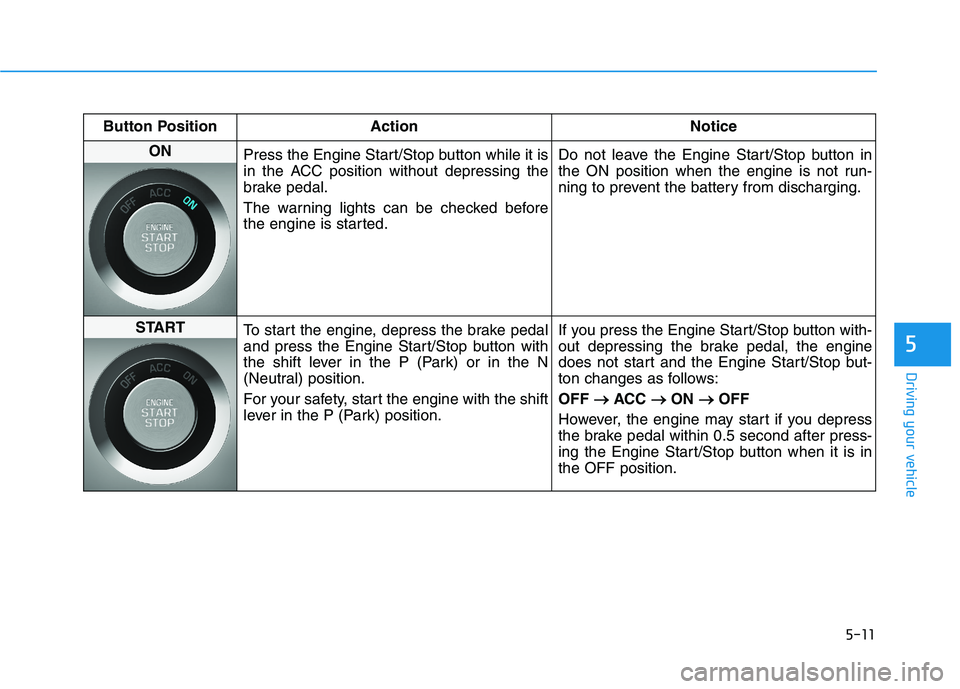
ON
Press the Engine Start/Stop button while it is
in the ACC position without depressing the
brake pedal.
The warning lights can be checked before
the engine is started.Do not leave the Engine Start/Stop button in
the ON position when the engine is not run-
ning to prevent the battery from discharging.
START
To start the engine, depress the brake pedal
and press the Engine Start/Stop button with
the shift lever in the P (Park) or in the N
(Neutral) position.
For your safety, start the engine with the shift
lever in the P (Park) position.If you press the Engine Start/Stop button with-
out depressing the brake pedal, the engine
does not start and the Engine Start/Stop but-
ton changes as follows:
OFF → →
ACC → →
ON → →
OFF
However, the engine may start if you depress
the brake pedal within 0.5 second after press-
ing the Engine Start/Stop button when it is in
the OFF position.
Page 290 of 546
5-24
Driving your vehicle
Check the Parking
Brake Warning Light
by placing the ignition
switch to the ON posi-
tion (do not start the
engine).
This light will be illuminated when the
parking brake is applied with the igni-
tion switch in the START or ON posi-
tion.
Before driving, be sure the parking
brake is released and the Brake
Warning Light is OFF.
If the Parking Brake Warning Light
remains on after the parking brake is
released while engine is running,
there may be a malfunction in the
brake system. Immediate attention is
necessary.
If at all possible, cease driving the
vehicle immediately. If that is not pos-
sible, use extreme caution while
operating the vehicle and only con-
tinue to drive the vehicle until you
can reach a safe location.
Electronic Parking Brake (EPB)
Applying the parking brake
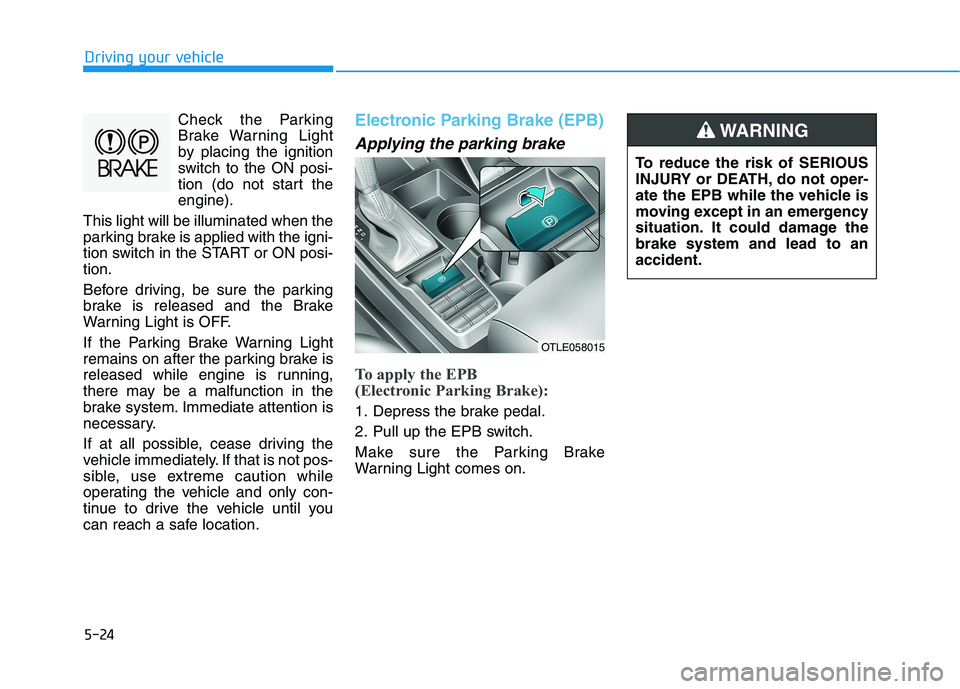
To apply the EPB
(Electronic Parking Brake):
1. Depress the brake pedal.
2. Pull up the EPB switch.
Make sure the Parking Brake
Warning Light comes on.
OTLE058015
To reduce the risk of SERIOUS
INJURY or DEATH, do not oper-
ate the EPB while the vehicle is
moving except in an emergency
situation. It could damage the
brake system and lead to an
accident.
WARNING
Page 291 of 546
5-25
Driving your vehicle
5
Releasing the Electronic
Parking Brake (EPB)
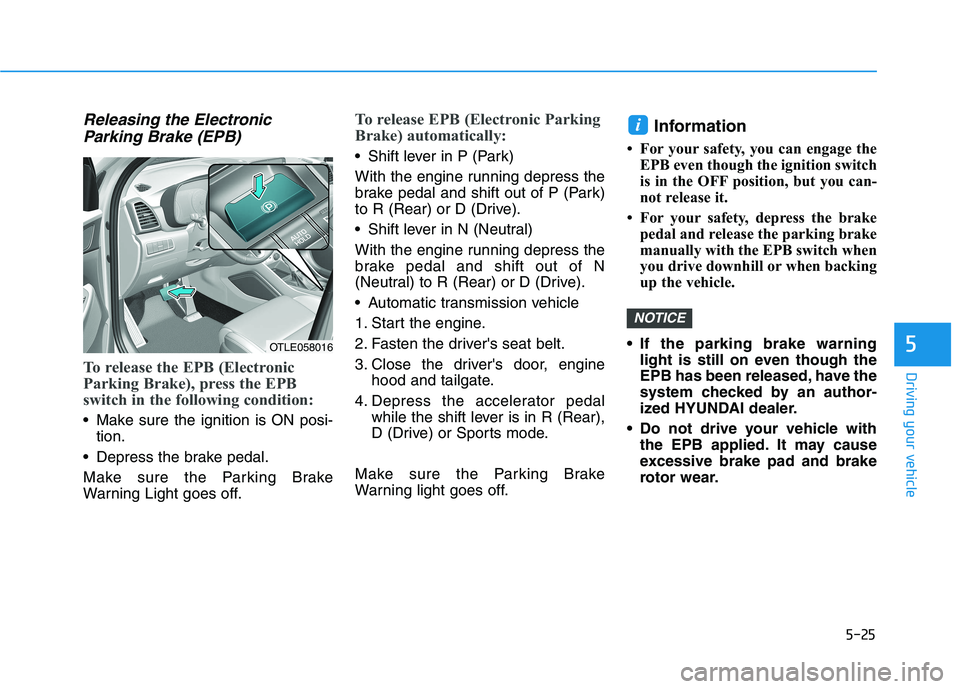
To release the EPB (Electronic
Parking Brake), press the EPB
switch in the following condition:
• Make sure the ignition is ON posi-
tion.
Depress the brake pedal.
Make sure the Parking Brake
Warning Light goes off.
To release EPB (Electronic Parking
Brake) automatically:
Shift lever in P (Park)
With the engine running depress the
brake pedal and shift out of P (Park)
to R (Rear) or D (Drive).
Shift lever in N (Neutral)
With the engine running depress the
brake pedal and shift out of N
(Neutral) to R (Rear) or D (Drive).
Automatic transmission vehicle
1. Start the engine.
2. Fasten the driver's seat belt.
3. Close the driver's door, engine
hood and tailgate.
4. Depress the accelerator pedal
while the shift lever is in R (Rear),
D (Drive) or Sports mode.
Make sure the Parking Brake
Warning light goes off.
Information
• For your safety, you can engage the
EPB even though the ignition switch
is in the OFF position, but you can-
not release it.
• For your safety, depress the brake
pedal and release the parking brake
manually with the EPB switch when
you drive downhill or when backing
up the vehicle.
• If the parking brake warning
light is still on even though the
EPB has been released, have the
system checked by an author-
ized HYUNDAI dealer.
Do not drive your vehicle with
the EPB applied. It may cause
excessive brake pad and brake
rotor wear.
NOTICE
i
OTLE058016
Page 295 of 546
5-29
Driving your vehicle
5
Parking brake warning light
Check the Parking
Brake Warning Light
by placing the ignition
switch to the ON posi-
tion (do not start the
engine).
This light will be illuminated when the
parking brake is applied with the igni-
tion switch in the START or ON posi-
tion.
Before driving, be sure the parking
brake is released and the Brake
Warning Light is OFF.
If the Parking Brake Warning Light
remains on after the parking brake is
released while engine is running,
there may be a malfunction in the
brake system. Immediate attention is
necessary.
If at all possible, cease driving the
vehicle immediately. If that is not pos-
sible, use extreme caution while
operating the vehicle and only con-
tinue to drive the vehicle until you
can reach a safe location.
Emergency braking
If there is a problem with the brake
pedal while driving, emergency brak-
ing is possible by pulling up and
holding the EPB switch. Braking is
possible only while you are holding
the EPB switch. However, braking
distance will be longer than normal.
Information
During emergency braking, the park-
ing brake warning light will illumi-
nate to indicate that the system is
operating.If you continuously notice a noise
or burning smell when the EPB is
used for emergency braking, have
system checked by an authorized
HYUNDAI dealer.
When the EPB (Electronic Parking
Brake) does not release
If the EPB does not release normal-
ly, we recommend that you contact
an authorized HYUNDAI dealer by
loading the vehicle on a flatbed tow
truck and have the system checked.
NOTICE
i
Do not operate the parking
brake while the vehicle is mov-
ing except in an emergency sit-
uation. It could damage the
brake system and lead to a
severe accident.
WARNING
Page 297 of 546
![HYUNDAI TUCSON 2021 User Guide 5-31
Driving your vehicle
5
To cancel :
1. Depress the brake pedal.
2. Press the [AUTO HOLD] switch.
The AUTO HOLD indicator will turn
off.
Information
• The Auto Hold does not operate
when:
- The](/img/35/56200/w960_56200-296.png "HYUNDAI TUCSON 2021 User Guide 5-31
Driving your vehicle
5
To cancel :
1. Depress the brake pedal.
2. Press the [AUTO HOLD] switch.
The AUTO HOLD indicator will turn
off.
Information
• The Auto Hold does not operate
when:
- The")
5-31
Driving your vehicle
5
To cancel :
1. Depress the brake pedal.
2. Press the [AUTO HOLD] switch.
The AUTO HOLD indicator will turn
off.
Information
• The Auto Hold does not operate
when:
- The driver's door is opened
- The engine hood is opened
- The shift lever is in P (Park) or R
(Reverse)
- The EPB is applied
• For your safety, the Auto Hold auto-
matically switches to EPB when:
- The driver's door is opened with
the shift lever in D (Drive) or N
(Neutral)
- The engine hood is opened with the
shift lever in D (Drive) or N
(Neutral)
- The vehicle stops for more than 10
minutes
- The vehicle stands on a steep slope
- The vehicle moves several timesIn these cases, the parking brake
warning light comes on, the AUTO
HOLD indicator changes from
green to white, and a warning sound
and a message will appear to inform
you that EPB has been automatical-
ly engaged. Before driving off again,
press foot brake pedal, check the
surrounding area near your vehicle
and release parking brake manually
with the EPB switch.
• While operating Auto Hold, you
may hear mechanical noise.
However, it is normal operating
noise.
If the AUTO HOLD indicator
changes to yellow, the Auto Hold
is not working properly. Contact
an authorized HYUNDAI dealer.
NOTICE
i
OTL055020
To prevent, unexpected and
sudden vehicle movement,
ALWAYS press your foot on the
brake pedal to cancel the Auto
Hold before you:
- Drive downhill.
- Drive the vehicle in R (Reverse).
- Park the vehicle.
WARNING
Page 301 of 546
5-35
Driving your vehicle
5
When you drive on a road having
poor traction, such as an icy road,
and apply your brakes continu-
ously, the ABS will be active con-
tinuously and the ABS warning
light ( ) may illuminate. Pull
your car over to a safe place and
turn the engine off.
Restart the engine. If the ABS
warning light is off, then your ABS
system is normal.
Otherwise, you may have a prob-
lem with your ABS system.
Contact an authorized HYUNDAI
dealer as soon as possible.
Information
When you jump start your vehicle
because of a drained battery, the ABS
warning light ( ) may turn on at the
same time. This happens because of
the low battery voltage. It does not
mean your ABS is malfunctioning.
Have the battery recharged before
driving the vehicle.
Electronic Stability Control
(ESC)
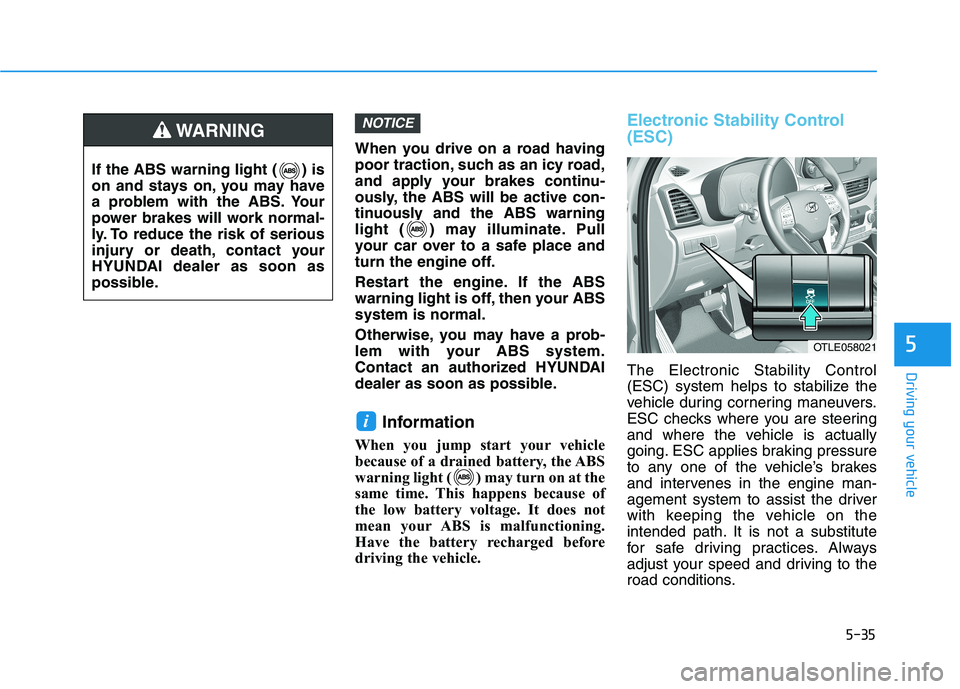
The Electronic Stability Control
(ESC) system helps to stabilize the
vehicle during cornering maneuvers.
ESC checks where you are steering
and where the vehicle is actually
going. ESC applies braking pressure
to any one of the vehicle’s brakes
and intervenes in the engine man-
agement system to assist the driver
with keeping the vehicle on the
intended path. It is not a substitute
for safe driving practices. Always
adjust your speed and driving to the
road conditions.
i
NOTICE
If the ABS warning light ( ) is
on and stays on, you may have
a problem with the ABS. Your
power brakes will work normal-
ly. To reduce the risk of serious
injury or death, contact your
HYUNDAI dealer as soon as
possible.
WARNING
OTLE058021
Page 303 of 546
5-37
Driving your vehicle
5
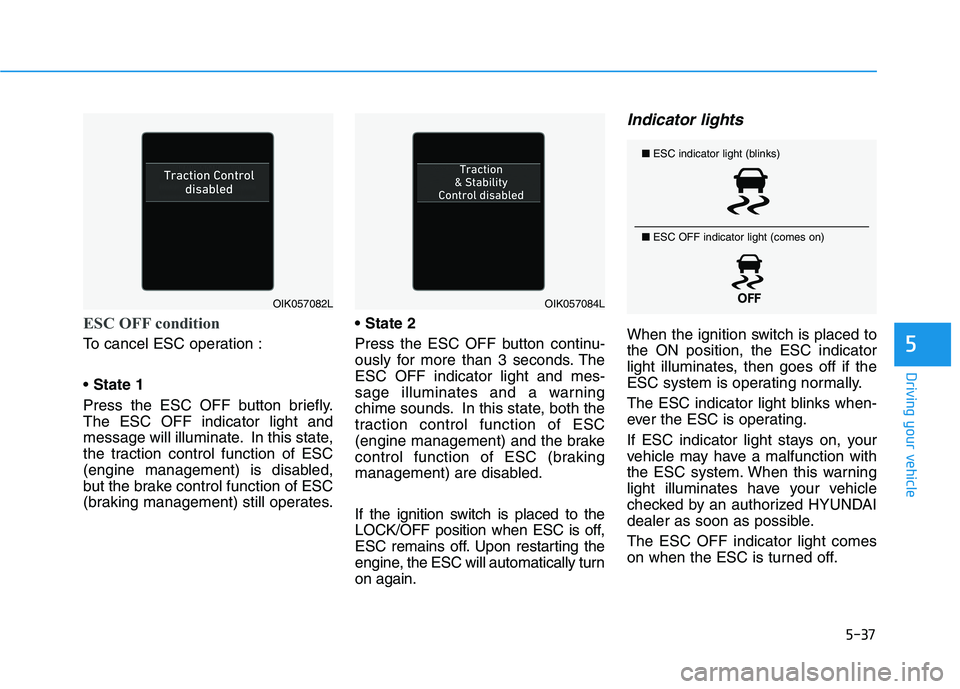
ESC OFF condition
To cancel ESC operation :
State 1
Press the ESC OFF button briefly.
The ESC OFF indicator light and
message will illuminate. In this state,
the traction control function of ESC
(engine management) is disabled,
but the brake control function of ESC
(braking management) still operates.
Press the ESC OFF button continu-
ously for more than 3 seconds. The
ESC OFF indicator light and mes-
sage illuminates and a warning
chime sounds. In this state, both the
traction control function of ESC
(engine management) and the brake
control function of ESC (braking
management) are disabled.
If the ignition switch is placed to the
LOCK/OFF position when ESC is off,
ESC remains off. Upon restarting the
engine, the ESC will automatically turn
on again.
Indicator lights
When the ignition switch is placed to
the ON position, the ESC indicator
light illuminates, then goes off if the
ESC system is operating normally.
The ESC indicator light blinks when-
ever the ESC is operating.
If ESC indicator light stays on, your
vehicle may have a malfunction with
the ESC system. When this warning
light illuminates have your vehicle
checked by an authorized HYUNDAI
dealer as soon as possible.
The ESC OFF indicator light comes
on when the ESC is turned off.
OIK057082LOIK057084L
■ESC indicator light (blinks)
■ ESC OFF indicator light (comes on)