Temperature HYUNDAI TUCSON 2021 Owner's Guide
[x] Cancel search | Manufacturer: HYUNDAI, Model Year: 2021, Model line: TUCSON, Model: HYUNDAI TUCSON 2021Pages: 546, PDF Size: 44.38 MB
Page 242 of 546
3-151
Convenient features of your vehicle
3
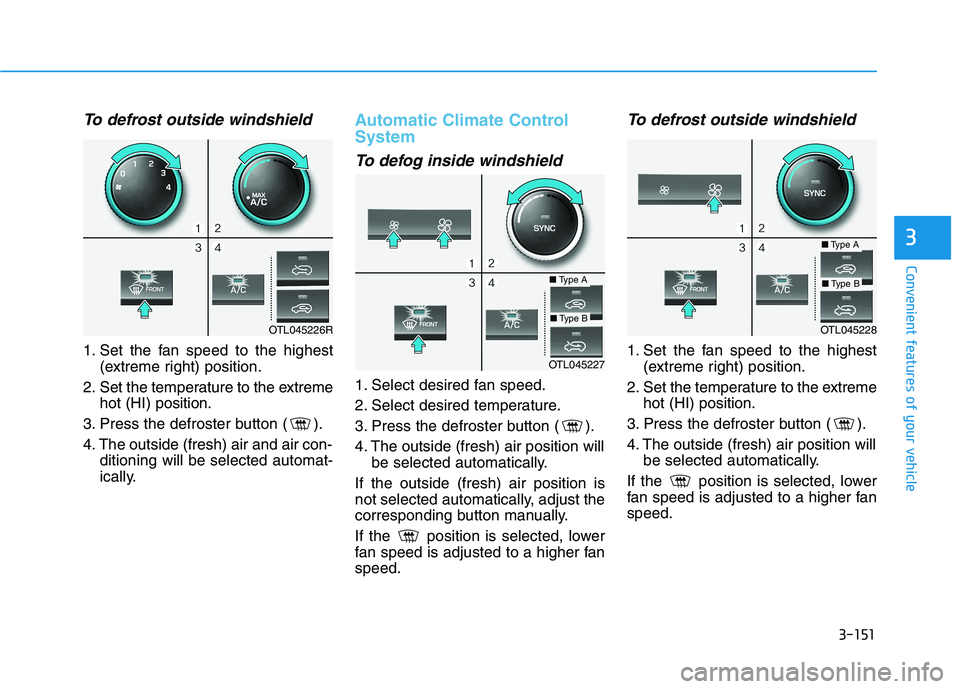
To defrost outside windshield
1. Set the fan speed to the highest
(extreme right) position.
2. Set the temperature to the extreme
hot (HI) position.
3. Press the defroster button ( ).
4. The outside (fresh) air and air con-
ditioning will be selected automat-
ically.
Automatic Climate Control
System
To defog inside windshield
1. Select desired fan speed.
2. Select desired temperature.
3. Press the defroster button ( ).
4. The outside (fresh) air position will
be selected automatically.
If the outside (fresh) air position is
not selected automatically, adjust the
corresponding button manually.
If the position is selected, lower
fan speed is adjusted to a higher fan
speed.
To defrost outside windshield
1. Set the fan speed to the highest
(extreme right) position.
2. Set the temperature to the extreme
hot (HI) position.
3. Press the defroster button ( ).
4. The outside (fresh) air position will
be selected automatically.
If the position is selected, lower
fan speed is adjusted to a higher fan
speed.OTL045227
■Type A
■Type BOTL045226ROTL045228
■Type A
■Type B
Page 247 of 546
3-156
Convenient features of your vehicle
C CL
LI
IM
MA
AT
TE
E
C
CO
ON
NT
TR
RO
OL
L
A
AD
DD
DI
IT
TI
IO
ON
NA
AL
L
F
FE
EA
AT
TU
UR
RE
ES
S
Cluster ionizer
When the ignition switch is in the ON
position, the clean air function turns
on automatically.
Also, the clean air function turns off
automatically, when the ignition
switch is in the OFF position.
Automatic Ventilation
When the ignition switch is in the ON
position or when the engine is run-
ning and the outside temperature is
below 59°F (15°C), the automatic
ventilation feature will activate if the
recirculated air intake position is
selected for more than 5 minutes
while A/C is off and floor mode is
selected. In this condition the air
intake position will automatically
switch to the outside (fresh) air
intake position.
To cancel or reset the Automatic
Ventilation
When the air conditioning system is
on, select Face Level mode and
while pressing the A/C button, press
the recirculated air position button
five times within three seconds.
Sunroof Inside Air
Recirculation
When the sunroof is opened, outside
(fresh) air will be automatically
selected. At this time, if you press the
air intake control button, recirculated
air position will be selected but will
change back to outside (fresh) air
after 3 minutes. When the sunroof is
closed, the air intake position will
return to the original position that
was selected.
Page 255 of 546
3-164
Convenient features of your vehicle
For certain cellular phones with
their own protection, the wire-
less charging speed may
decrease and the wireless
charging may stop if the temper-
ature inside the vehicle is too
high or low.
When the inside temperature is
too high or low do not use the
system and wait until the tem-
perature maintains a proper
level before using the system.
The wireless charging process
may temporarily stop, when tem-
perature abnormally increases
inside the wireless cellular
phone charging system. Stop
the charging cellular phone and
wait until temperature falls to a
certain level.
The wireless charging process
may temporarily stop when
there is any metallic item, such
as a coin, between the wireless
cellular phone charging system
and the cellular phone. When charging some cellular
phones with a self-protection
feature, the wireless charging
speed may decrease and the
wireless charging may stop.
If the cellular phone has a thick
cover, the wireless charging may
not be possible.
If the cell phone is not complete-
ly contacting the charging pad,
wireless charging may not oper-
ate properly.
Some magnetic items like credit
cards, phone cards or rail tickets
may be damaged if left with the
cellular phone during the charg-
ing process.
When any cellular phone with-
out a wireless charging function
or a metallic object is placed on
the charging pad, a small noise
may sound. This small sound is
due to the vehicle discerning
compatibility of the object
placed on the charging pad. It
does not affect your vehicle or
the cellular phone in any way.
Information
If the ignition switch is in the OFF
position, the charging also stops.
Information
This device complies with part 15 of
the FCC Rules.
Operation is subject to the following
two conditions:
1. This device may not cause harmful
interference, and
2. This device must accept any inter-
ference received, including interfer-
ence that may cause undesired
operation.
i
i
Page 287 of 546
5-21
Driving your vehicle
5
Power Brakes
Your vehicle has power-assisted
brakes that adjust automatically
through normal usage.
If the engine is not running or is
turned off while driving, the power
assist for the brakes will not work.
You can still stop your vehicle by
applying greater force to the brake
pedal than typical. The stopping dis-
tance, however, will be longer than
with power brakes.
When the engine is not running, the
reserve brake power is partially
depleted each time the brake pedal
is applied. Do not pump the brake
pedal when the power assist has
been interrupted.
Pump the brake pedal only when
necessary to maintain steering con-
trol on slippery surfaces.
B BR
RA
AK
KI
IN
NG
G
S
SY
YS
ST
TE
EM
M
Take the following precautions:
Do not drive with your foot
resting on the brake pedal.
This will create abnormal high
brake temperatures, exces-
sive brake lining and pad
wear, and increased stopping
distances.
When descending down a
long or steep hill, move the
gear shift lever to Manual
Shift Mode and manually
downshift to a lower gear in
order to control your speed
without using the brake pedal
excessively. Applying the
brakes continuously will
cause the brakes to overheat
and could result in a tempo-
rary loss of braking perform-
ance.
Wet brakes may impair the
vehicle's ability to safely slow
down; the vehicle may also
pull to one side when the
brakes are applied. Applying
the brakes lightly will indicate
whether they have been
affected in this way. Always
test your brakes in this fash-
ion after driving through deep
water. To dry the brakes, light-
ly tap the brake pedal to heat
up the brakes while maintain-
ing a safe forward speed until
brake performance returns to
normal. Avoid driving at high
speeds until the brakes func-
tion correctly.WARNING
Page 324 of 546
5-58
Driving your vehicle
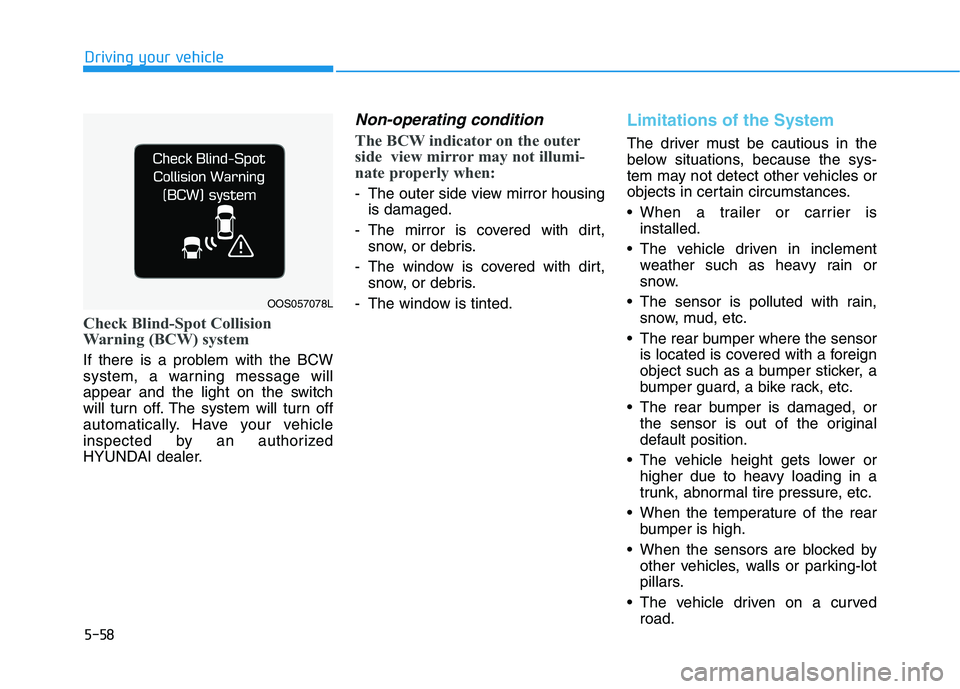
Check Blind-Spot Collision
Warning (BCW) system
If there is a problem with the BCW
system, a warning message will
appear and the light on the switch
will turn off. The system will turn off
automatically. Have your vehicle
inspected by an authorized
HYUNDAI dealer.
Non-operating condition
The BCW indicator on the outer
side view mirror may not illumi-
nate properly when:
- The outer side view mirror housing
is damaged.
- The mirror is covered with dirt,
snow, or debris.
- The window is covered with dirt,
snow, or debris.
- The window is tinted.
Limitations of the System
The driver must be cautious in the
below situations, because the sys-
tem may not detect other vehicles or
objects in certain circumstances.
When a trailer or carrier is
installed.
The vehicle driven in inclement
weather such as heavy rain or
snow.
The sensor is polluted with rain,
snow, mud, etc.
The rear bumper where the sensor
is located is covered with a foreign
object such as a bumper sticker, a
bumper guard, a bike rack, etc.
The rear bumper is damaged, or
the sensor is out of the original
default position.
The vehicle height gets lower or
higher due to heavy loading in a
trunk, abnormal tire pressure, etc.
When the temperature of the rear
bumper is high.
When the sensors are blocked by
other vehicles, walls or parking-lot
pillars.
The vehicle driven on a curved
road.
OOS057078L
Page 360 of 546
5-94
Driving your vehicle
The lane marker is merged or
divided. (e.g. tollgate)
The lane number increases or
decreases or the lane marker are
crossing complicatedly.
There are more than two lane
markers on the road in front of you.
The lane marker is very thick or
thin.
The lane marker ahead is not visi-
ble due to rain, snow, water on the
road, damaged or stained road
surface, or other factors.
The shadow is on the lane marker
by a median strip, trees, guardrail,
noise barriers, etc.
The lane markers are complicated
or a structure substitutes for the
lines such as a construction area.
There are crosswalk signs or other
symbols on the road.
The lane marker in a tunnel is
stained with oil, etc.
The lane suddenly disappears
such as at the intersection.When external condition is inter-
vened
The brightness outside changes
suddenly such as when entering or
exiting a tunnel, or when passing
under a bridge.
The brightness outside is too low
such as when the headlamps are
not on at night or the vehicle is
going through a tunnel.
There is a boundary structure in
the roadway such as a concrete
barrier, guardrail and reflector post
that is inadvertently being detected
by the camera.
When light coming from a street
light or an oncoming vehicle is
reflected on a wet road surface
such as a puddle in the road.
The field of view in front is
obstructed by sun glare.
There is not enough distance
between you and the vehicle in
front to be able to detect the lane
marker or the vehicle ahead is driv-
ing on the lane marker. Driving on a steep grade, over a
hill, or when driving on a curved
road.
The adverse road conditions cause
excessive vehicle vibrations while
driving.
The surrounding of the inside rear
view mirror temperature is high
due to direct sunlight, etc.
Page 388 of 546
5-122
Driving your vehicle
Hazardous driving conditions
When hazardous driving elements
are encountered such as water,
snow, ice, mud and sand, take the
below suggestions:
Drive cautiously and keep a longer
braking distance.
Avoid abrupt braking or steering.
When your vehicle is stuck in snow,
mud, or sand, use second gear.
Accelerate slowly to avoid unnec-
essary wheel spin.
Put sand, rock salt, tire chains or
other non-slip materials under the
wheels to provide additional trac-
tion while the vehicle becomes
stuck in ice, snow, or mud.
Rocking the vehicle
If it is necessary to rock the vehicle
to free it from snow, sand, or mud,
first turn the steering wheel right and
left to clear the area around your
front wheels. Then, shift back and
forth between R (Reverse) and a for-
ward gear.
Try to avoid spinning the wheels, and
do not race the engine.
To prevent transmission wear, wait
until the wheels stop spinning before
shifting gears. Release the accelera-
tor pedal while shifting, and press
lightly on the accelerator pedal while
the transmission is in gear. Slowly
spinning the wheels in forward and
reverse directions causes a rocking
motion that may free the vehicle.
S SP
PE
EC
CI
IA
AL
L
D
DR
RI
IV
VI
IN
NG
G
C
CO
ON
ND
DI
IT
TI
IO
ON
NS
S
Downshifting with an automatic
transmission while driving on
slippery surfaces can cause an
accident. The sudden change in
tire speed could cause the tires
to skid. Be careful when down-
shifting on slippery surfaces.
WARNING
If the vehicle is stuck and
excessive wheel spin occurs,
the temperature in the tires can
increase very quickly. If the tires
become damaged, a tire blow
out or tire explosion can occur.
This condition is dangerous -
you and others may be injured.
Do not attempt this procedure if
people or objects are anywhere
near the vehicle.
If you attempt to free the vehicle,
the vehicle can overheat quickly,
possibly causing an engine
compartment fire or other dam-
age. Try to avoid spinning the
wheels as much as possible to
prevent overheating of either the
tires or the engine. DO NOT
allow the vehicle to spin the
wheels above 35 mph (56 km/h).
WARNING
Page 394 of 546
5-128
Driving your vehicle
- When using tire chains:
Wrong size chains or improperly
installed chains can damage
your vehicle's brake lines, sus-
pension, body and wheels.
Use SAE "S" class or wire
chains.
If you hear noise caused by
chains contacting the body,
retighten the chain to prevent
contact with the vehicle body.
To prevent body damage,
retighten the chains after driving
0.3~0.6 miles (0.5~1.0 km).
Do not use tire chains on vehi-
cles equipped with aluminum
wheels. If unavoidable, use a
wire type chain.
Use wire chains less than 0.59
inch (15 mm) wide to prevent
damage to the chain’s connec-
tion.
Winter Precautions
Use high quality ethylene glycol
coolant
Your vehicle is delivered with high
quality ethylene glycol coolant in the
cooling system. It is the only type of
coolant that should be used because
it helps prevent corrosion in the cool-
ing system, lubricates the water
pump and prevents freezing. Be sure
to replace or replenish your coolant
in accordance with the maintenance
schedule in chapter 7. Before winter,
have your coolant tested to assure
that its freezing point is sufficient for
the temperatures anticipated during
the winter.
Change to "winter weight" oil if
necessary
In some climates it is recommended
that a lower viscosity "winter weight"
oil be used during cold weather. See
chapter 8 for recommendations. If
you aren't sure what weight oil you
should use, consult an authorized
HYUNDAI dealer.
Check battery and cables
Winter puts additional burdens on
the battery system. Visually inspect
the battery and cables as described
in chapter 7. The level of charge in
your battery can be checked by an
authorized HYUNDAI dealer or a
service station.
NOTICE
Page 397 of 546
5-131
Driving your vehicle
5
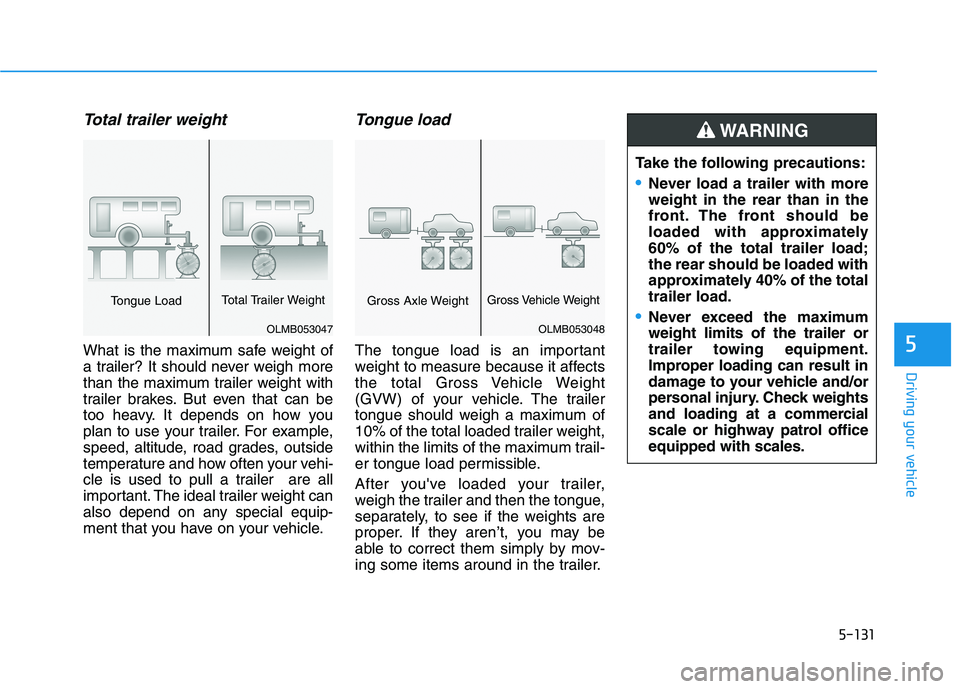
Total trailer weight
What is the maximum safe weight of
a trailer? It should never weigh more
than the maximum trailer weight with
trailer brakes. But even that can be
too heavy. It depends on how you
plan to use your trailer. For example,
speed, altitude, road grades, outside
temperature and how often your vehi-
cle is used to pull a trailer are all
important. The ideal trailer weight can
also depend on any special equip-
ment that you have on your vehicle.
Tongue load
The tongue load is an important
weight to measure because it affects
the total Gross Vehicle Weight
(GVW) of your vehicle. The trailer
tongue should weigh a maximum of
10% of the total loaded trailer weight,
within the limits of the maximum trail-
er tongue load permissible.
After you've loaded your trailer,
weigh the trailer and then the tongue,
separately, to see if the weights are
proper. If they aren’t, you may be
able to correct them simply by mov-
ing some items around in the trailer.
OLMB053047
Tongue LoadTotal Trailer Weight
OLMB053048
Gross Axle WeightGross Vehicle Weight
Take the following precautions:
Never load a trailer with more
weight in the rear than in the
front. The front should be
loaded with approximately
60% of the total trailer load;
the rear should be loaded with
approximately 40% of the total
trailer load.
Never exceed the maximum
weight limits of the trailer or
trailer towing equipment.
Improper loading can result in
damage to your vehicle and/or
personal injury. Check weights
and loading at a commercial
scale or highway patrol office
equipped with scales.
WARNING
Page 401 of 546
5-135
Driving your vehicle
5
Driving on hills
Reduce speed and shift to a lower
gear before you start down a long or
steep downgrade. If you don't shift
down, you might have to use your
brakes so much that they would get
overheated and may not operate effi-
ciently.
On a long uphill grade, shift down
and reduce your speed to around 45
mph (70 km/h) to reduce the possibil-
ity of engine and transmission over-
heating.
If your trailer weighs more than the
maximum trailer weight without trailer
brakes, you should drive in D (Drive)
when towing a trailer. Operating your
vehicle in D (Drive) when towing a
trailer will minimize heat build-up and
extend the life of your transmission.To prevent engine and/or trans-
mission overheating:
When towing a trailer on steep
grades (in excess of 6%) pay
close attention to the engine
coolant temperature gauge to
ensure the engine does not
overheat. If the needle of the
coolant temperature gauge
moves towards "H" (HOT), pull
over and stop as soon as it is
safe to do so, and allow the
engine to idle until it cools
down. You may proceed once the
engine has cooled sufficiently.
When towing a trailer, your vehi-
cle speed may be much slower
than the general flow of traffic,
especially when climbing an
uphill grade. Use the right hand
lane when towing a trailer on an
uphill grade. Choose your vehi-
cle speed according to the max-
imum posted speed limit for
vehicles with trailers, the steep-
ness of the grade, and your trail-
er weight.
Parking on hills
Generally, if you have a trailer attached
to your vehicle, you should not park
your vehicle on a hill.
However, if you ever have to park your
trailer on a hill, here's how to do it:
1. Pull the vehicle into the parking
area.
Turn the steering wheel in the
direction of the curb (right if head-
ed down hill, left if headed up hill).
2. Shift the vehicle to P (Park).
3. Set the parking brake and shut off
the vehicle.
4. Place wheel chocks under the
trailer wheels on the down hill side
of the wheels.
NOTICE