navigation system HYUNDAI TUCSON 2021 Owners Manual
[x] Cancel search | Manufacturer: HYUNDAI, Model Year: 2021, Model line: TUCSON, Model: HYUNDAI TUCSON 2021Pages: 546, PDF Size: 44.38 MB
Page 16 of 546
I IN
NS
ST
TR
RU
UM
ME
EN
NT
T
P
PA
AN
NE
EL
L
O
OV
VE
ER
RV
VI
IE
EW
W
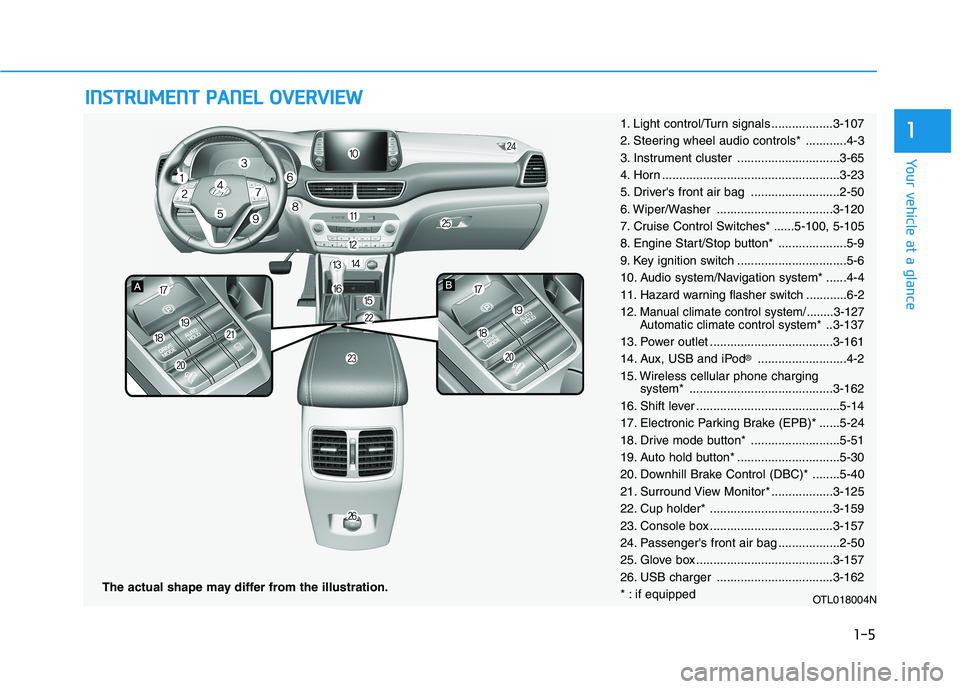
The actual shape may differ from the illustration.
1-5
Your vehicle at a glance
11. Light control/Turn signals ..................3-107
2. Steering wheel audio controls* ............4-3
3. Instrument cluster ..............................3-65
4. Horn ....................................................3-23
5. Driver's front air bag ..........................2-50
6. Wiper/Washer ..................................3-120
7. Cruise Control Switches* ......5-100, 5-105
8. Engine Start/Stop button* ....................5-9
9. Key ignition switch ................................5-6
10. Audio system/Navigation system* ......4-4
11. Hazard warning flasher switch ............6-2
12. Manual climate control system/........3-127
Automatic climate control system*..3-137
13. Power outlet ....................................3-161
14. Aux, USB and iPod
®..........................4-2
15. Wireless cellular phone charging
system* ..........................................3-162
16. Shift lever ..........................................5-14
17. Electronic Parking Brake (EPB)* ......5-24
18. Drive mode button* ..........................5-51
19. Auto hold button* ..............................5-30
20. Downhill Brake Control (DBC)* ........5-40
21. Surround View Monitor* ..................3-125
22. Cup holder* ....................................3-159
23. Console box ....................................3-157
24. Passenger's front air bag ..................2-50
25. Glove box ........................................3-157
26. USB charger ..................................3-162
* : if equipped
OTL018004N
Page 116 of 546
3-25
Convenient features of your vehicle
3
Pull the day/night lever toward you to
reduce glare from the headlights of
the vehicles behind you during night
driving.
Remember that you lose some
rearview clarity in the night position.Blue Link®center (if equipped)
For details, refer to the Blue Link®
Owner's Guide, Navigation Manual
or Audio Manual.
Electrochromic mirror (ECM)
with homelink system
(if equipped)
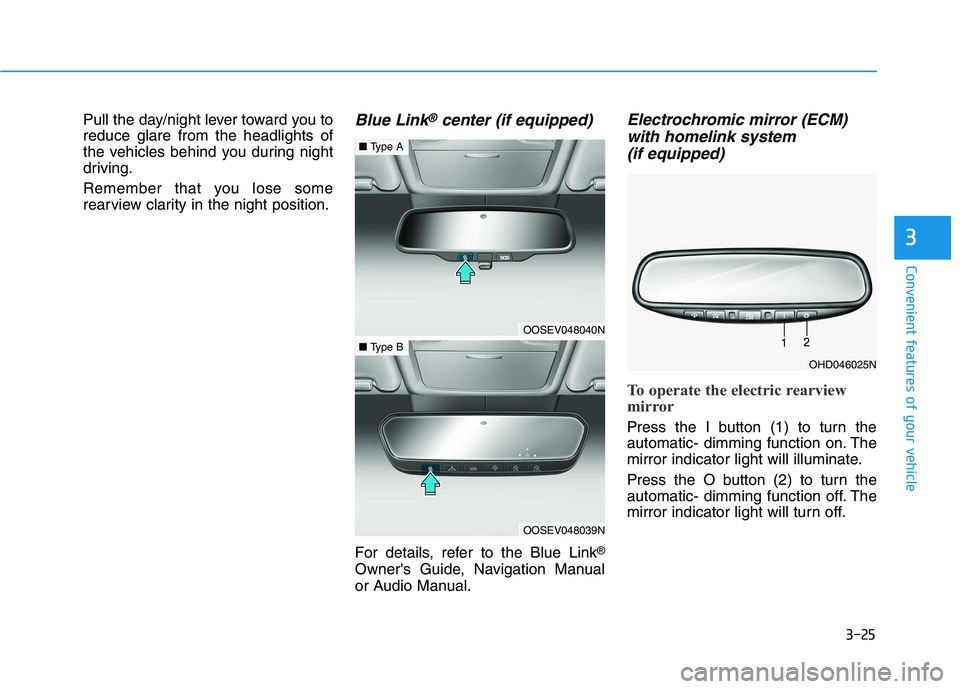
To operate the electric rearview
mirror
Press the I button (1) to turn the
automatic- dimming function on. The
mirror indicator light will illuminate.
Press the O button (2) to turn the
automatic- dimming function off. The
mirror indicator light will turn off.
OHD046025N
OOSEV048040N
■Type A
OOSEV048039N
■Type B
Page 183 of 546
3-92
Convenient features of your vehicle
Modes SymbolExplanation
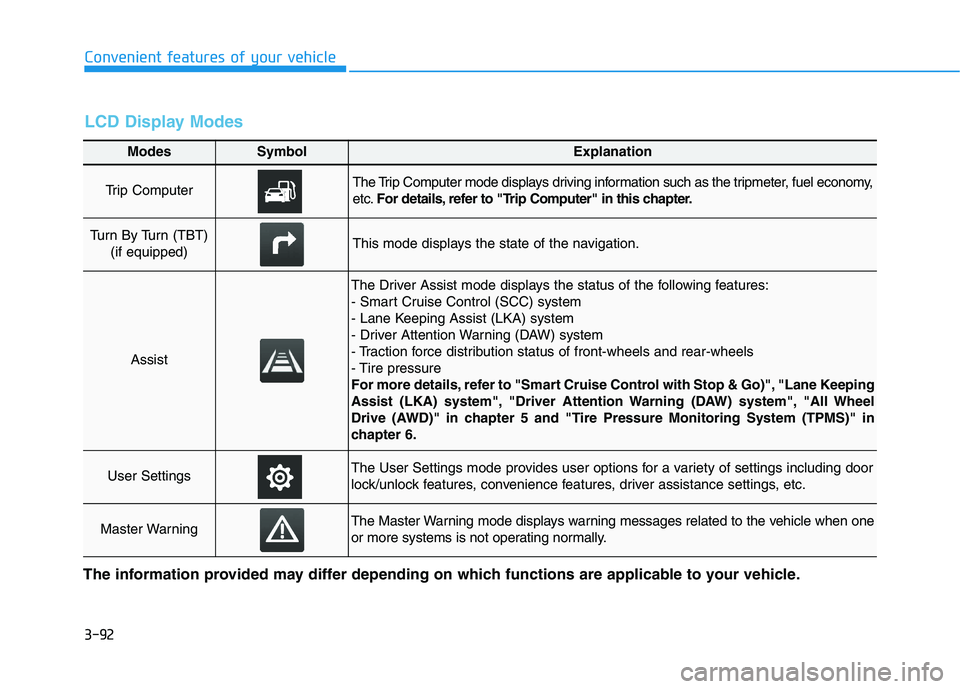
Trip Computer The Trip Computer mode displays driving information such as the tripmeter, fuel economy,
etc.For details, refer to "Trip Computer" in this chapter.
Turn By Turn (TBT)
(if equipped)This mode displays the state of the navigation.
Assist
The Driver Assist mode displays the status of the following features:
- Smart Cruise Control (SCC) system
- Lane Keeping Assist (LKA) system
- Driver Attention Warning (DAW) system
- Traction force distribution status of front-wheels and rear-wheels
- Tire pressure
For more details, refer to "Smart Cruise Control with Stop & Go)", "Lane Keeping
Assist (LKA) system", "Driver Attention Warning (DAW) system", "All Wheel
Drive (AWD)" in chapter 5 and "Tire Pressure Monitoring System (TPMS)" in
chapter 6.
User SettingsThe User Settings mode provides user options for a variety of settings including door
lock/unlock features, convenience features, driver assistance settings, etc.
Master WarningThe Master Warning mode displays warning messages related to the vehicle when one
or more systems is not operating normally.
The information provided may differ depending on which functions are applicable to your vehicle.
LCD Display Modes
Page 184 of 546
3-93
Convenient features of your vehicle
3
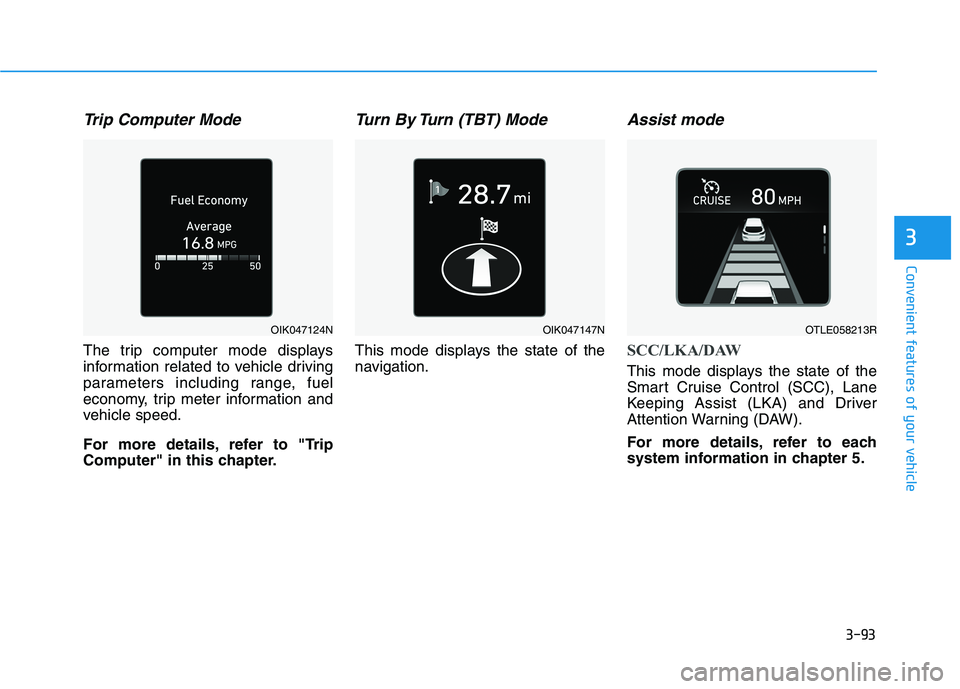
Trip Computer Mode
The trip computer mode displays
information related to vehicle driving
parameters including range, fuel
economy, trip meter information and
vehicle speed.
For more details, refer to "Trip
Computer" in this chapter.
Turn By Turn (TBT) Mode
This mode displays the state of the
navigation.
Assist mode
SCC/LKA/DAW
This mode displays the state of the
Smart Cruise Control (SCC), Lane
Keeping Assist (LKA) and Driver
Attention Warning (DAW).
For more details, refer to each
system information in chapter 5.
OIK047124NOIK047147NOTLE058213R
Page 256 of 546
3-165
Convenient features of your vehicle
3
Clock
Set the clock on the multimedia dis-
play by pressing the SETUP button
on the side of the audio unit and
selecting Date/Time icon on the dis-
play.
For more details, refer to the
"Infotainment System" in chapter 4
or Navigation System Manual that
was supplied with your vehicle.
Clothes Hanger
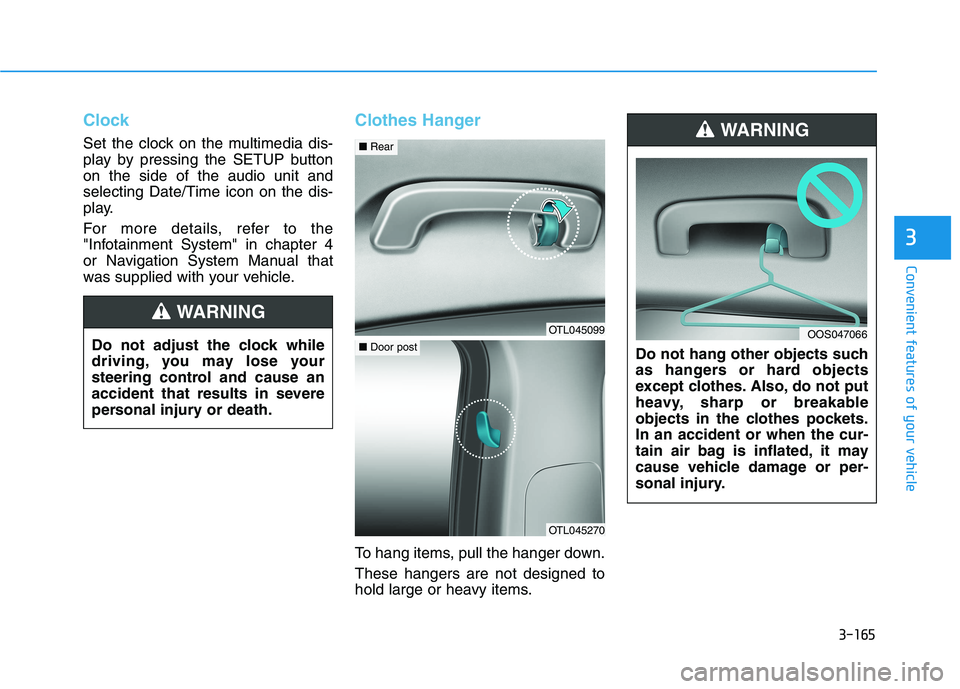
To hang items, pull the hanger down.
These hangers are not designed to
hold large or heavy items.Do not hang other objects such
as hangers or hard objects
except clothes. Also, do not put
heavy, sharp or breakable
objects in the clothes pockets.
In an accident or when the cur-
tain air bag is inflated, it may
cause vehicle damage or per-
sonal injury.
WARNING
OOS047066Do not adjust the clock while
driving, you may lose your
steering control and cause an
accident that results in severe
personal injury or death.
WARNING
OTL045099
■Rear
OTL045270
■Door post
Page 263 of 546
Infotainment System
Infotainment System..............................................4-2
AUX, USB and iPod® ®Port ...............................................4-2
Antenna ...............................................................................4-2
Steering Wheel Audio Control........................................4-3
Bluetooth® ®Wireless Technology Hands-Free ...........4-4
Audio / Video / Navigation System ............................4-4
4
Page 266 of 546
4-4
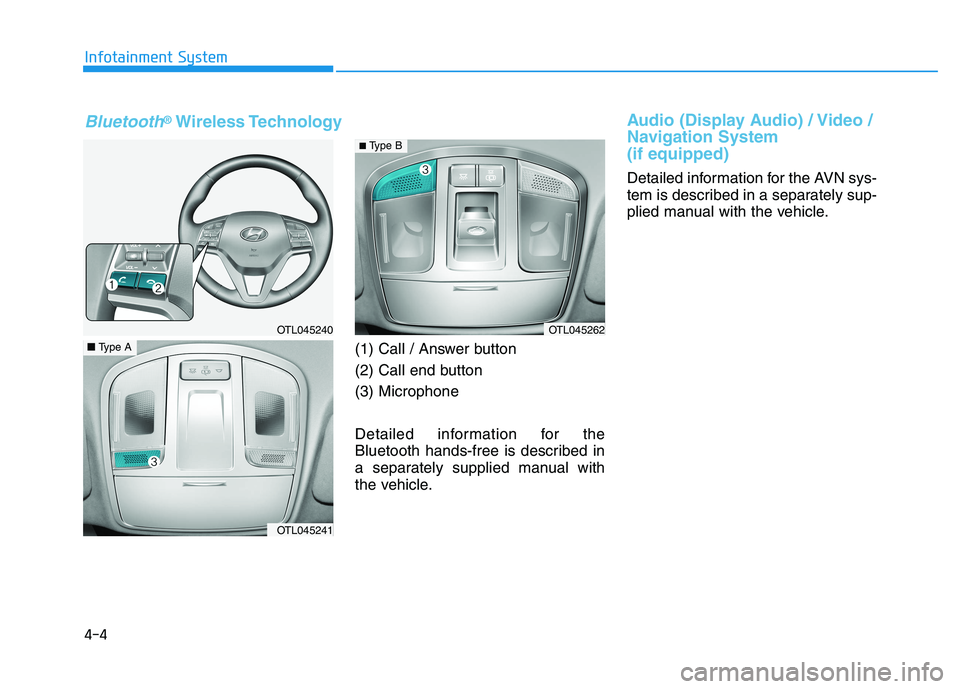
(1) Call / Answer button
(2) Call end button
(3) Microphone
Detailed information for the
Bluetooth hands-free is described in
a separately supplied manual with
the vehicle.
Audio (Display Audio) / Video /
Navigation System
(if equipped)
Detailed information for the AVN sys-
tem is described in a separately sup-
plied manual with the vehicle. Infotainment System
OTL045240
OTL045241
■Type A
OTL045262
Bluetooth®Wireless Technology
■ Type B
Page 541 of 546
I-6
Important Safety Precautions............................................2-2
Air Bag Hazards ...........................................................2-2
Always Wear Your Seat Belt ........................................2-2
Control Your Speed ......................................................2-3
Driver Distraction.........................................................2-2
Keep Your Vehicle in Safe Condition ..........................2-3
Restrain All Children....................................................2-2
In Case of an Emergency While Driving .........................6-2
If the Engine Stalls at a Crossroad or Crossing ...........6-2
If the Engine Stalls While Driving...............................6-2
If you Have a Flat Tire While Driving.........................6-3
Infotainment System .........................................................4-2
Antenna ........................................................................4-2
Audio / Video / Navigation System .............................4-4
AUX, USB and iPod
®Port ..........................................4-2
Bluetooth®Wireless Technology Hands-Free ..............4-4
Steering Wheel Audio Control .....................................4-3
Inside Rearview Mirror...................................................3-24
Instrument Cluster...........................................................3-65
Gauges and Meters .....................................................3-67
Icy Road Warning Light .............................................3-70
Instrument Cluster Control .........................................3-66
LCD Display Messages ..............................................3-84
Warning and Indicator Lights.....................................3-72
Instrument panel overview ...............................................1-5
Interior Features ............................................................3-159
Cargo Net Holder .....................................................3-167
Cargo Security Screen ..............................................3-167
Clock ........................................................................3-165Clothes Hanger .........................................................3-165
Cup Holder ...............................................................3-159
Floor Mat Anchor(s) .................................................3-166
Luggage Tray............................................................3-170
Plastic Bag Hook ......................................................3-166
Power Outlet.............................................................3-161
Sunvisor ....................................................................3-160
USB Charger ............................................................3-162
Wireless Cellular Phone Charging System ..............3-162
Interior Lights ...............................................................3-116
Front Door Lamp ......................................................3-118
Front Map Lamp.......................................................3-117
Front Room Lamp ....................................................3-117
Glove box lamp ........................................................3-119
Interior lamp AUTO cut ...........................................3-117
Liftgate room lamp ...................................................3-119
Rear lamp..................................................................3-118
Vanity mirror lamp ...................................................3-119
Interior overview...............................................................1-4
Jump Starting ....................................................................6-4
Index
J