LED HYUNDAI TUCSON 2022 Owners Manual
[x] Cancel search | Manufacturer: HYUNDAI, Model Year: 2022, Model line: TUCSON, Model: HYUNDAI TUCSON 2022Pages: 638, PDF Size: 82.3 MB
Page 443 of 638
Driver assistance system
7-80
OCN7060120
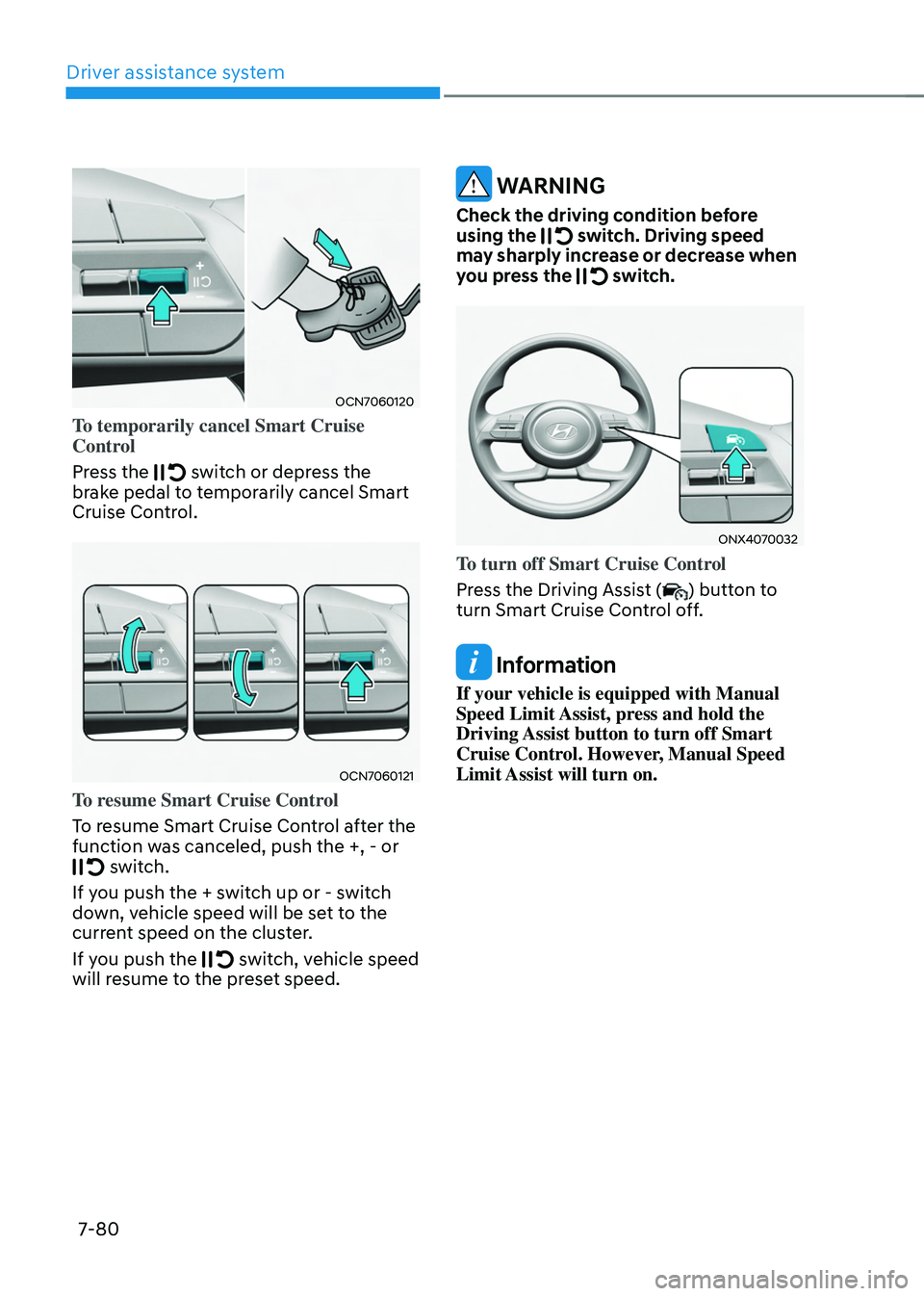
To temporarily cancel Smart Cruise
Control
Press the
switch or depress the brake pedal to temporarily cancel Smart
Cruise Control.
OCN7060121
To resume Smart Cruise Control
To resume Smart Cruise Control after the
function was canceled, push the +, - or
switch.
If you push the + switch up or - switch
down, vehicle speed will be set to the
current speed on the cluster.
If you push the
switch, vehicle speed will resume to the preset speed.
WARNING
Check the driving condition before
using the switch. Driving speed may sharply increase or decrease when
you press the switch.
ONX4070032
To turn off Smart Cruise Control
Press the Driving Assist (
) button to
turn Smart Cruise Control off.
Information
If your vehicle is equipped with Manual
Speed Limit Assist, press and hold the
Driving Assist button to turn off Smart
Cruise Control. However, Manual Speed
Limit Assist will turn on.
Page 446 of 638
07
7-83
Smart Cruise Control Display and
Control
Basic function
You can see the status of the Smart
Cruise Control operation in the Driving
Assist mode on the cluster. Refer to “LCD
Display Modes” section in chapter 4.
Smart Cruise Control will be displayed
as below depending on the status of the
function.
OTM070245E
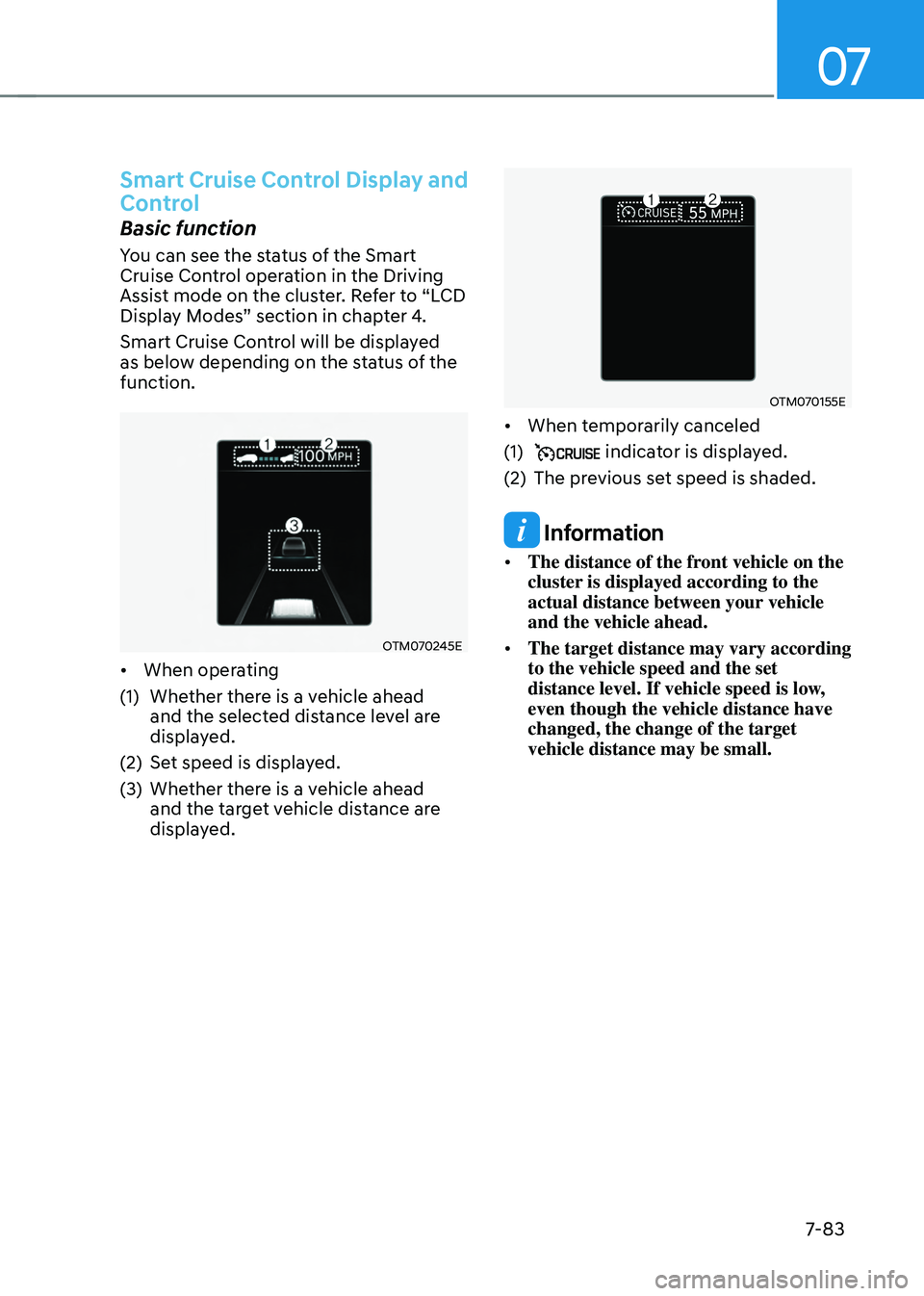
• When operating
(1) Whether there is a vehicle ahead
and the selected distance level are
displayed.
(2) Set speed is displayed.
(3) Whether there is a vehicle ahead
and the target vehicle distance are
displayed.
OTM070155E
• When temporarily canceled
(1) indicator is displayed.
(2) The previous set speed is shaded.
Information
• The distance of the front vehicle on the
cluster is displayed according to the
actual distance between your vehicle
and the vehicle ahead.
• The target distance may vary according
to the vehicle speed and the set
distance level. If vehicle speed is low,
even though the vehicle distance have
changed, the change of the target
vehicle distance may be small.
Page 447 of 638
Driver assistance system
7-84
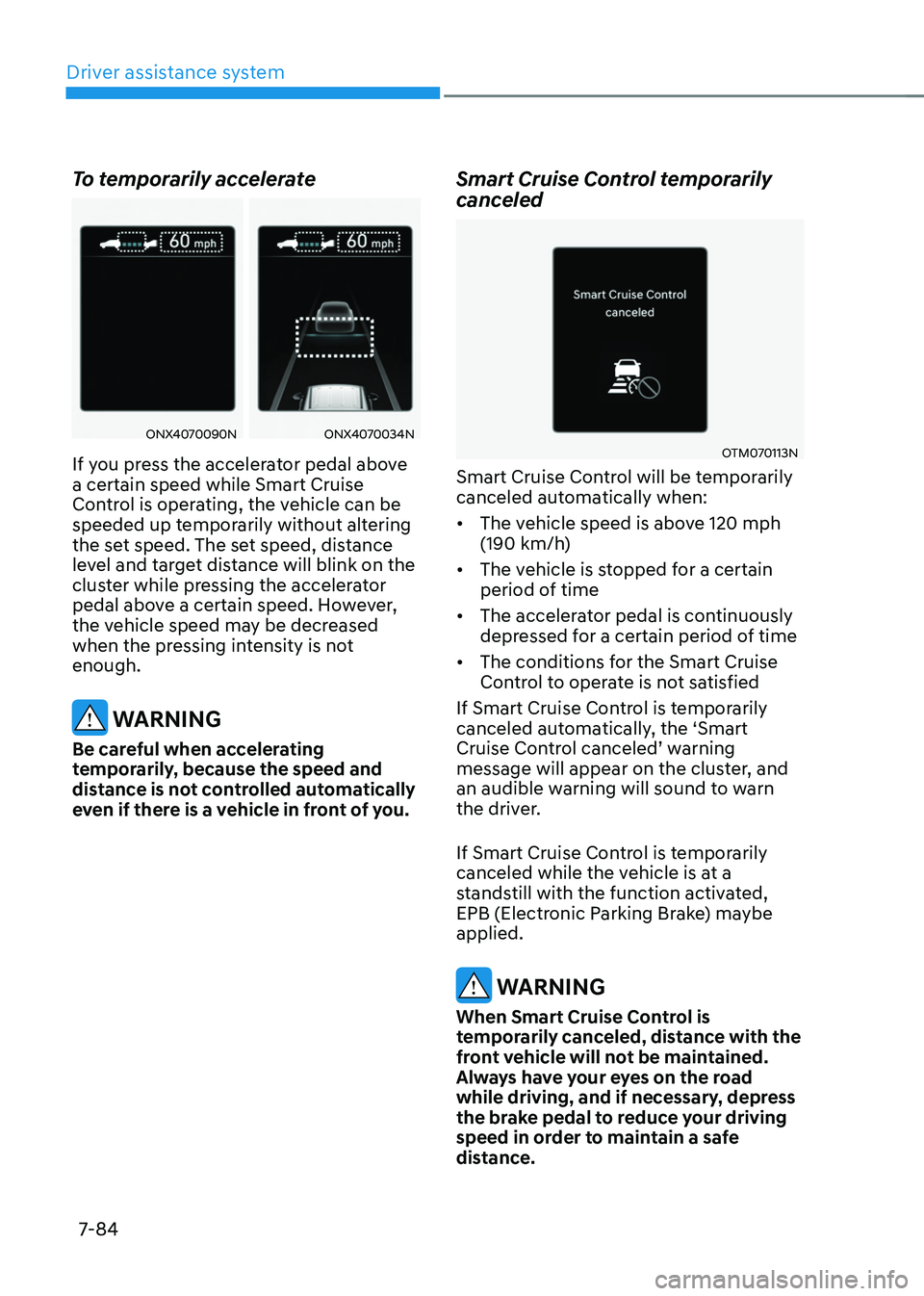
To temporarily accelerate
ONX4070090NONX4070034N
If you press the accelerator pedal above
a certain speed while Smart Cruise
Control is operating, the vehicle can be
speeded up temporarily without altering
the set speed. The set speed, distance
level and target distance will blink on the
cluster while pressing the accelerator
pedal above a certain speed. However,
the vehicle speed may be decreased
when the pressing intensity is not
enough.
WARNING
Be careful when accelerating
temporarily, because the speed and
distance is not controlled automatically
even if there is a vehicle in front of you.
Smart Cruise Control temporarily
canceled
OTM070113N
Smart Cruise Control will be temporarily
canceled automatically when:
• The vehicle speed is above 120 mph
(190 km/h)
• The vehicle is stopped for a certain
period of time
• The accelerator pedal is continuously
depressed for a certain period of time
• The conditions for the Smart Cruise
Control to operate is not satisfied
If Smart Cruise Control is temporarily
canceled automatically, the ‘Smart
Cruise Control canceled’ warning message will appear on the cluster, and
an audible warning will sound to warn
the driver.
If Smart Cruise Control is temporarily
canceled while the vehicle is at a
standstill with the function activated,
EPB (Electronic Parking Brake) maybe
applied.
WARNING
When Smart Cruise Control is
temporarily canceled, distance with the
front vehicle will not be maintained.
Always have your eyes on the road
while driving, and if necessary, depress
the brake pedal to reduce your driving
speed in order to maintain a safe
distance.
Page 448 of 638
07
7-85
Smart Cruise Control conditions not
satisfied
OTM070112N
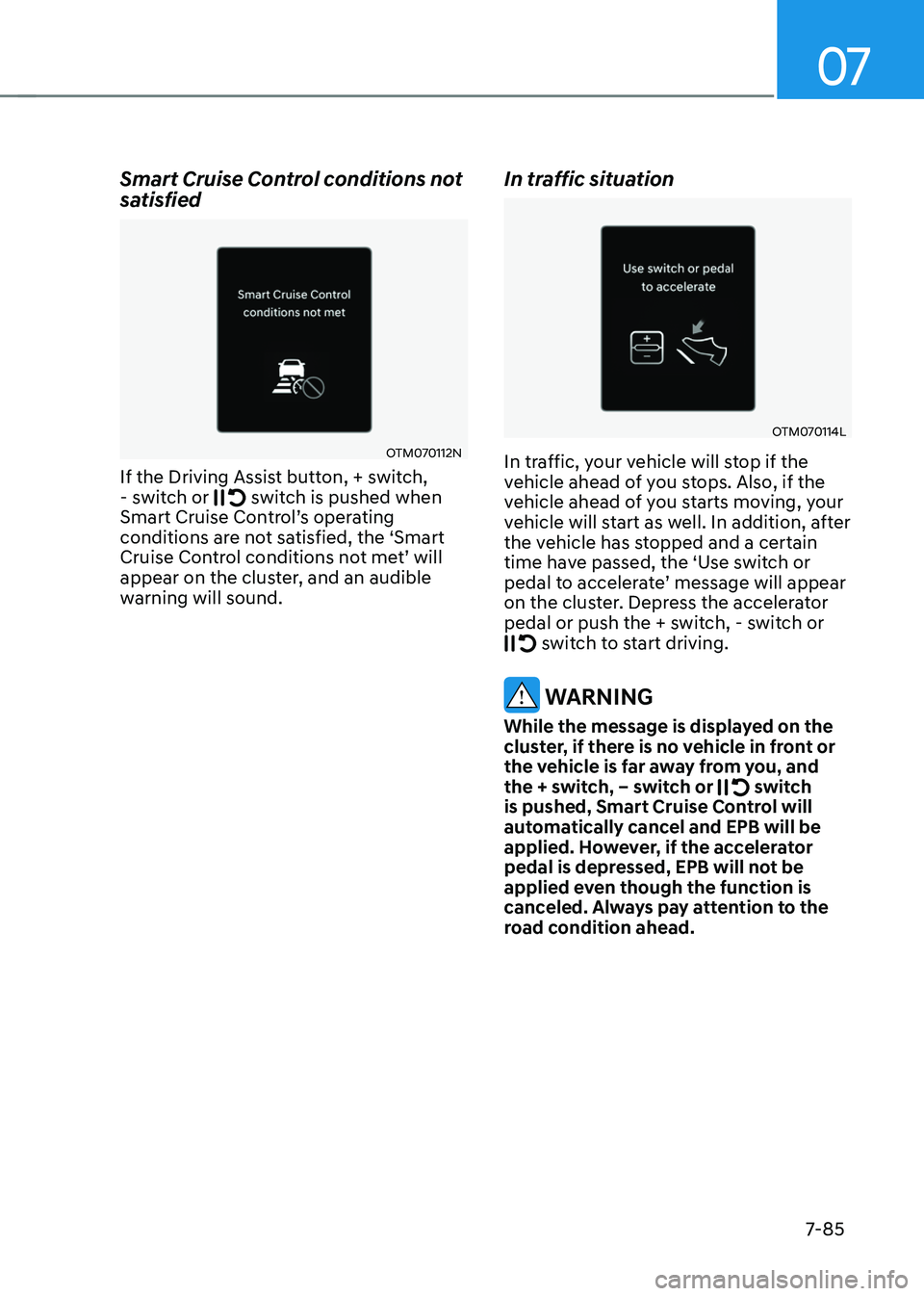
If the Driving Assist button, + switch, - switch or switch is pushed when Smart Cruise Control’s operating conditions are not satisfied, the ‘Smart Cruise Control conditions not met’ will appear on the cluster, and an audible
warning will sound.
In traffic situation
OTM070114L
In traffic, your vehicle will stop if the
vehicle ahead of you stops. Also, if the
vehicle ahead of you starts moving, your
vehicle will start as well. In addition, after
the vehicle has stopped and a certain
time have passed, the ‘Use switch or
pedal to accelerate’ message will appear on the cluster. Depress the accelerator
pedal or push the + switch, - switch or
switch to start driving.
WARNING
While the message is displayed on the
cluster, if there is no vehicle in front or
the vehicle is far away from you, and
the + switch, – switch or
switch is pushed, Smart Cruise Control will
automatically cancel and EPB will be
applied. However, if the accelerator
pedal is depressed, EPB will not be
applied even though the function is
canceled. Always pay attention to the
road condition ahead.
Page 450 of 638
07
7-87
WARNING
Take the following precautions when
using Smart Cruise Control:
• Smart Cruise Control does not
substitute for proper and safe
driving. It is the responsibility of the
driver to always check the speed and
distance to the vehicle ahead.
• Smart Cruise Control may not
recognize unexpected and sudden
situations or complex driving
situations, so always pay attention to
driving conditions and control your
vehicle speed.
• Keep Smart Cruise Control off when
the function is not in use to avoid
inadvertently setting a speed.
• Do not open the door or leave the
vehicle when Smart Cruise Control
is operating, even if the vehicle is
stopped.
• Always be aware of the selected
speed and vehicle distance.
• Keep a safe distance according to
road conditions and vehicle speed.
If the vehicle distance is too close
during high-speed driving, a serious
collision may result.
• When maintaining distance with
the vehicle ahead, if the front
vehicle disappears, Smart Cruise
Control may suddenly accelerate to
the set speed. Always be aware of
unexpected and sudden situations
from occurring.
• Vehicle speed may decrease on an
upward slope and increase on a
downward slope.
• Always be aware of situations such
as when a vehicle cuts in suddenly.
• When you are towing a trailer or
another vehicle, we recommend that
Smart Cruise Control is turned off
due to safety reasons.
• Turn off Smart Cruise Control when
your vehicle is being towed. •
Smart Cruise Control may not
operate normally if interfered by
strong electromagnetic waves.
• Smart Cruise Control may not
detect an obstacle in front and lead
to a collision. Always look ahead
cautiously to prevent unexpected
and sudden situations from
occurring.
• Vehicles moving in front of you with
a frequent lane change may cause
a delay in Smart Cruise Control
reaction or may cause Smart Cruise
Control to react to a vehicle actually
in an adjacent lane. Always drive
cautiously to prevent unexpected
and sudden situations from
occurring.
• Always be aware of the surroundings
and drive safely, even though a
warning message does not appear or
an audible warning does not sound.
• If any other system’s warning
message is displayed or warning
sound is generated, Smart Cruise
Control warning message may not
be displayed and warning sound may
not be generated.
• You may not hear the warning sound
of Forward Collision-Avoidance
Assist if the surrounding is noisy.
• The vehicle manufacturer is not
responsible for any traffic violation
or accidents caused by the driver.
• Always set the vehicle speed to the
speed limit in your country.
Information
• Smart Cruise Control may not operate
for 15 seconds after the vehicle is
started or the front view camera or
front radar is initialized.
• You may hear a sound when the brake
is controlled by Smart Cruise Control.
Page 451 of 638
Driver assistance system
7-88
Smart Cruise Control
Malfunction and Limitations
Smart Cruise Control malfunction
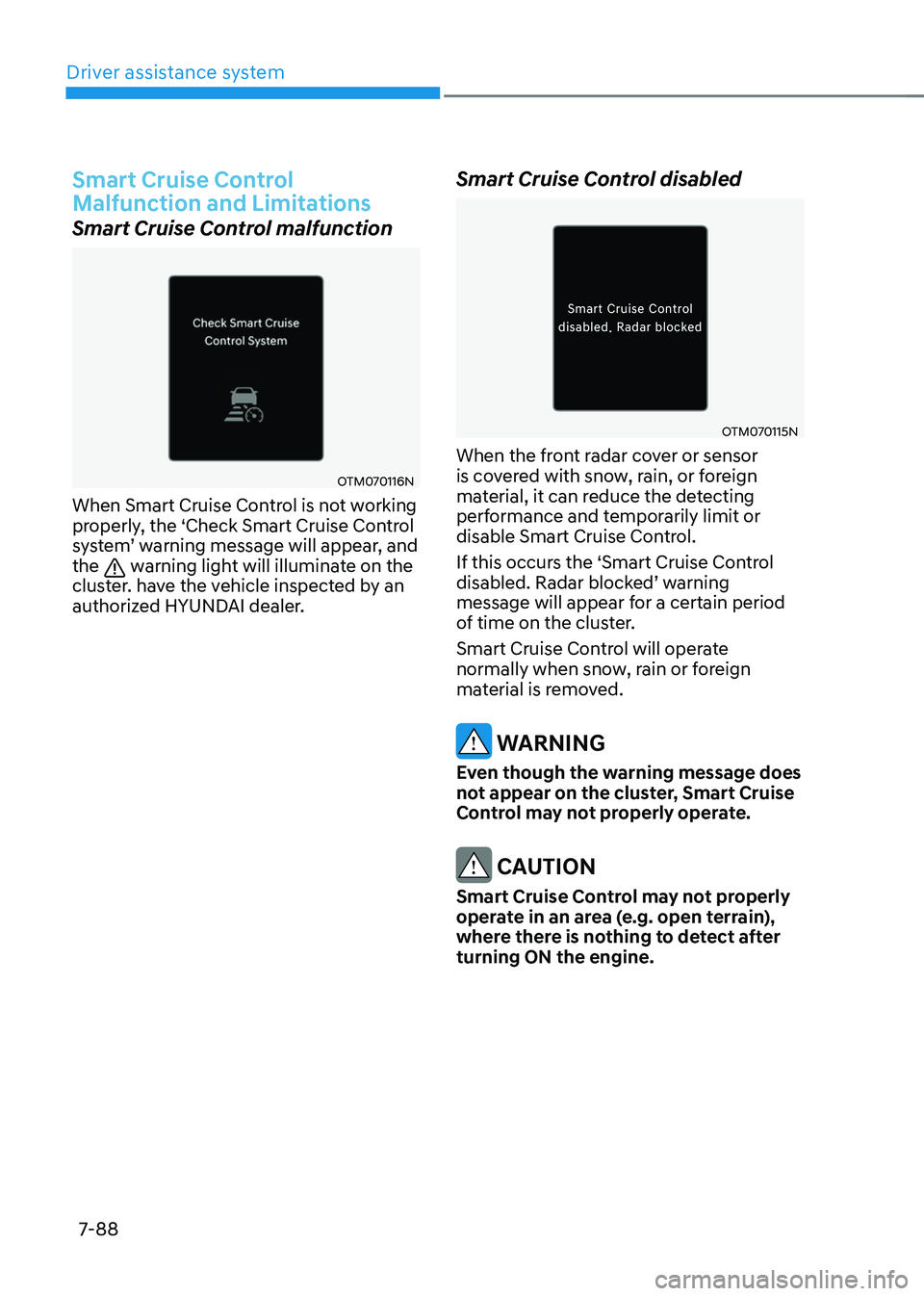
OTM070116N
When Smart Cruise Control is not working
properly, the ‘Check Smart Cruise Control
system’ warning message will appear, and the warning light will illuminate on the
cluster. have the vehicle inspected by an
authorized HYUNDAI dealer.
Smart Cruise Control disabled
OTM070115N
When the front radar cover or sensor
is covered with snow, rain, or foreign
material, it can reduce the detecting
performance and temporarily limit or
disable Smart Cruise Control.
If this occurs the ‘Smart Cruise Control
disabled. Radar blocked’ warning message will appear for a certain period
of time on the cluster.
Smart Cruise Control will operate
normally when snow, rain or foreign
material is removed.
WARNING
Even though the warning message does
not appear on the cluster, Smart Cruise
Control may not properly operate.
CAUTION
Smart Cruise Control may not properly
operate in an area (e.g. open terrain),
where there is nothing to detect after
turning ON the engine.
Page 456 of 638
07
7-93
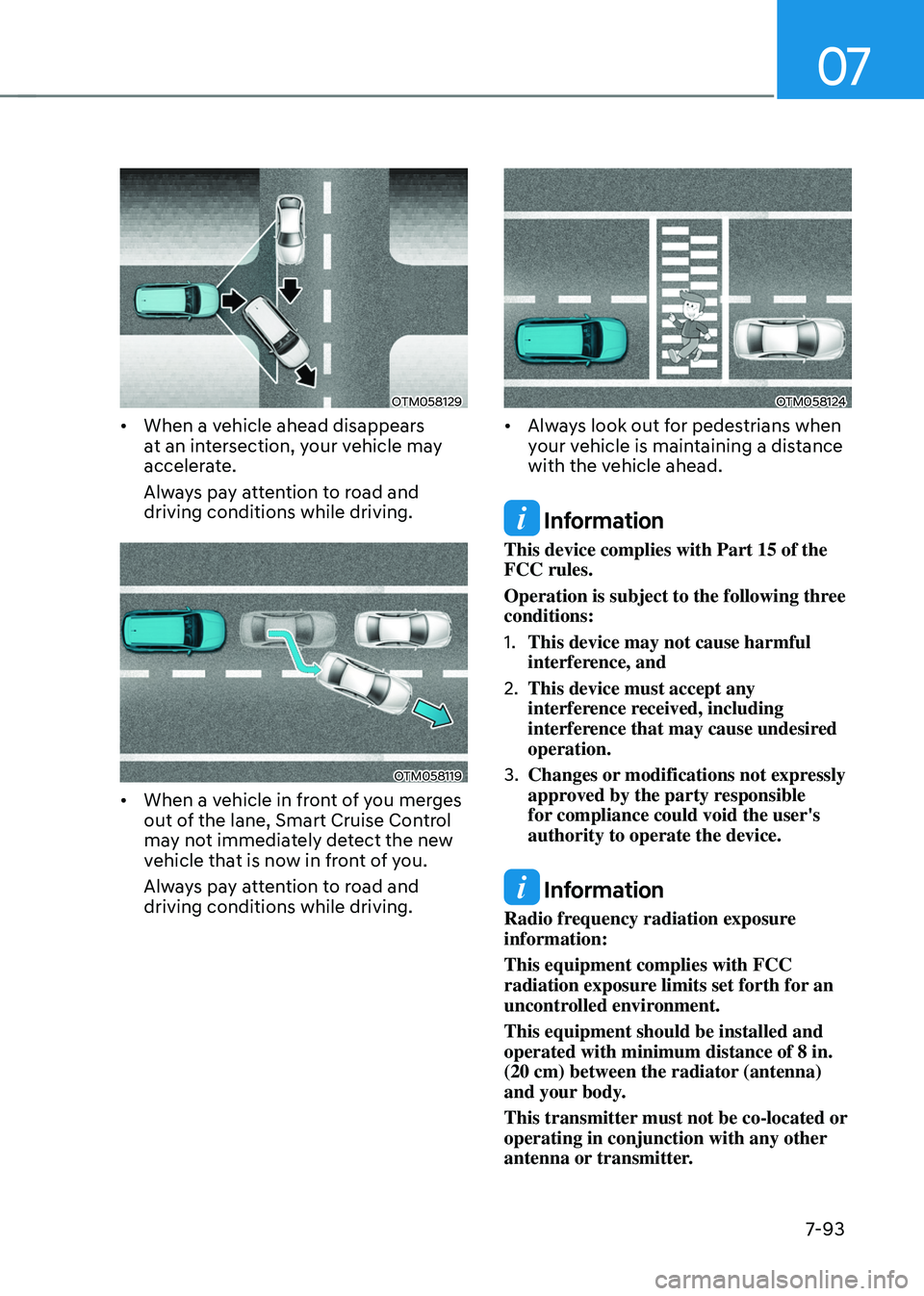
OTM058129
• When a vehicle ahead disappears
at an intersection, your vehicle may
accelerate.
Always pay attention to road and
driving conditions while driving.
OTM058119
• When a vehicle in front of you merges
out of the lane, Smart Cruise Control
may not immediately detect the new
vehicle that is now in front of you.
Always pay attention to road and
driving conditions while driving.
OTM058124
• Always look out for pedestrians when
your vehicle is maintaining a distance
with the vehicle ahead.
Information
This device complies with Part 15 of the
FCC rules.
Operation is subject to the following three
conditions:
1. This device may not cause harmful
interference, and
2. This device must accept any
interference received, including
interference that may cause undesired
operation.
3. Changes or modifications not expressly
approved by the party responsible
for compliance could void the user's
authority to operate the device.
Information
Radio frequency radiation exposure
information:
This equipment complies with FCC
radiation exposure limits set forth for an
uncontrolled environment.
This equipment should be installed and
operated with minimum distance of 8 in.
(20 cm) between the radiator (antenna)
and your body.
This transmitter must not be co-located or
operating in conjunction with any other
antenna or transmitter.
Page 457 of 638
Driver assistance system7-94
NAVIGATION-BASED SMART CRUISE CONTROL (NSCC)
(IF EQUIPPED)
Navigation-based Smart Cruise Control
will help drive at a safe speed according
to the road conditions when driving on
highways (or motorways) by using road
information from the navigation system
while Smart Cruise Control is operating.
Information
• Navigation-based Smart Cruise Control
is available only on controlled access
road of certain highways.
ÃControlled access road indicates
roads with limited entrances and
exits that allow uninterrupted high
speed traffic flow. Only passenger
cars and motorcycles are allowed on
controlled access roads.
• Additional highways may be expanded
by future navigation updates.
Information
Navigation-based Smart Cruise Control
operates on main roads of highways (or
motorways), and does not operate on
interchanges or junctions.
Highway Curve Zone Auto Slowdown
If vehicle speed is high, Highway Curve
Zone Auto Slowdown function will
temporarily decelerate your vehicle
or limit acceleration to help you drive
safely on a curve based on the curve
information from the navigation.
Highway Set Speed Auto Change
Highway Set Speed Auto Change
function automatically changes Smart
Cruise Control set speed based on
the speed limit information from the
navigation.
Navigation-based Smart Cruise
Control Settings
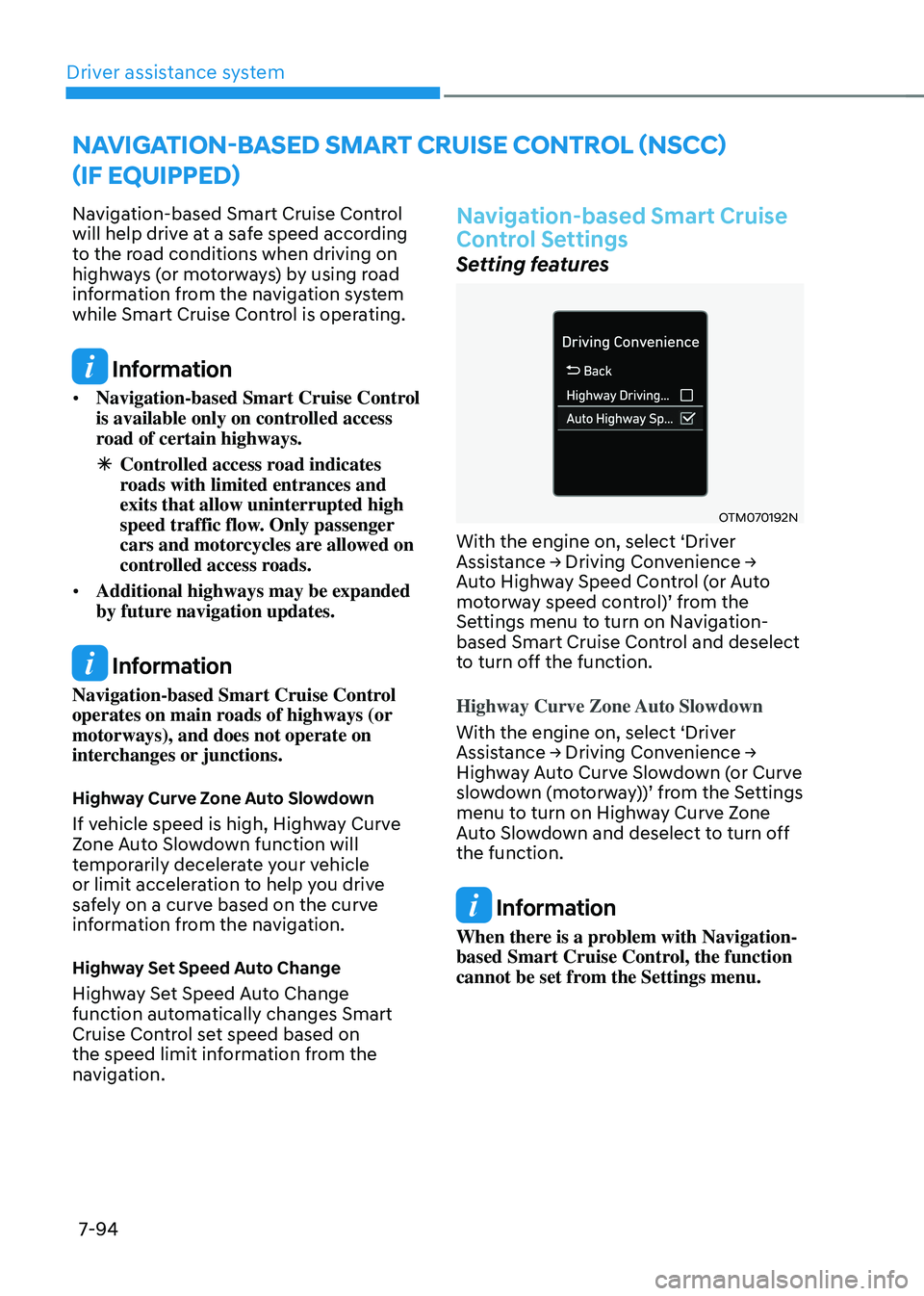
Setting features
OTM070192N
With the engine on, select ‘Driver Assistance → Driving Convenience → Auto Highway Speed Control (or Auto motorway speed control)’ from the Settings menu to turn on Navigation-
based Smart Cruise Control and deselect
to turn off the function.
Highway Curve Zone Auto Slowdown
With the engine on, select ‘Driver
Assistance → Driving Convenience → Highway Auto Curve Slowdown (or Curve slowdown (motorway))’ from the Settings menu to turn on Highway Curve Zone
Auto Slowdown and deselect to turn off
the function.
Information
When there is a problem with Navigation-
based Smart Cruise Control, the function
cannot be set from the Settings menu.
Page 460 of 638
07
7-97
Limitations of Navigation-based
Smart Cruise Control
Navigation-based Smart Cruise Control
may not operate normally under the
following circumstances:
• The navigation is not working properly
• Speed limit and road information in
the navigation is not updated
• The map information and the actual
road is different because of real-time
GPS data or map information error
• The navigation searches for a route
while driving
• GPS signals are blocked in areas such
as a tunnel
• The navigation is updated while
driving
• Map information is not transmitted
due to infotainment system's
abnormal operation
• A road that divides into two or more
roads and joins again
• The driver goes off course the route
set in the navigation
• The route to the destination is
changed or canceled by resetting the
navigation •
The vehicle enters a service station or
rest area
• The speed limit of some sections
changes according to the road
situations
• Android Auto or Car Play is operating
• The navigation cannot detect the
current vehicle position (ex: elevated
roads including overpass adjacent to
general roads or nearby roads exist in
a parallel way)
• The navigation is being updated while
driving
• The navigation is being restarted while
driving
• There is bad weather, such as heavy
rain, heavy snow, etc.
• Driving on a road under construction
• Driving on a road that is controlled
• Driving on a road that is sharply
curved
Page 462 of 638
![HYUNDAI TUCSON 2022 Owners Manual 07
7-99
OJX1070282L[1] : Driving route, [2] : Branch line,
[3] : Curved road section, [4] : Main road
• If there is no destination set on the
navigation, Highway Curve Zone Auto
Slowdown function](/img/35/41173/w960_41173-461.png "HYUNDAI TUCSON 2022 Owners Manual 07
7-99
OJX1070282L[1] : Driving route, [2] : Branch line,
[3] : Curved road section, [4] : Main road
• If there is no destination set on the
navigation, Highway Curve Zone Auto
Slowdown function")
07
7-99
OJX1070282L[1] : Driving route, [2] : Branch line,
[3] : Curved road section, [4] : Main road
• If there is no destination set on the
navigation, Highway Curve Zone Auto
Slowdown function will operate based
on the curve information on the main
road.
• Even if you depart from the main road,
Highway Curve Zone Auto Slowdown
function may temporarily operate
due to navigation information of the
highway curve section.
WARNING
• Navigation-based Smart Cruise
Control is not a substitute for safe
driving practices, but a convenience
function. Always have your eyes on
the road, and it is the responsibility
of the driver to avoid violating traffic
laws.
• The navigation’s speed limit
information may differ from the
actual speed limit information on the
road. It is the driver's responsibility
to check the speed limit on the
actual driving road or lane.
• Navigation-based Smart Cruise
Control will automatically be
cancelled when you leave the
highway (or motorway) main road.
Always pay attention to road and
driving conditions while driving.
• Navigation-based Smart Cruise
Control may not operate due to the
existence of leading vehicles and
the driving conditions of the vehicle.
Always pay attention to road and
driving conditions while driving.
• When you are towing a trailer or
another vehicle, we recommend
that Navigation-based Smart Cruise
Control is turned off due to safety
reasons.