reverse HYUNDAI TUCSON 2022 User Guide
[x] Cancel search | Manufacturer: HYUNDAI, Model Year: 2022, Model line: TUCSON, Model: HYUNDAI TUCSON 2022Pages: 638, PDF Size: 82.3 MB
Page 294 of 638
06
6-9
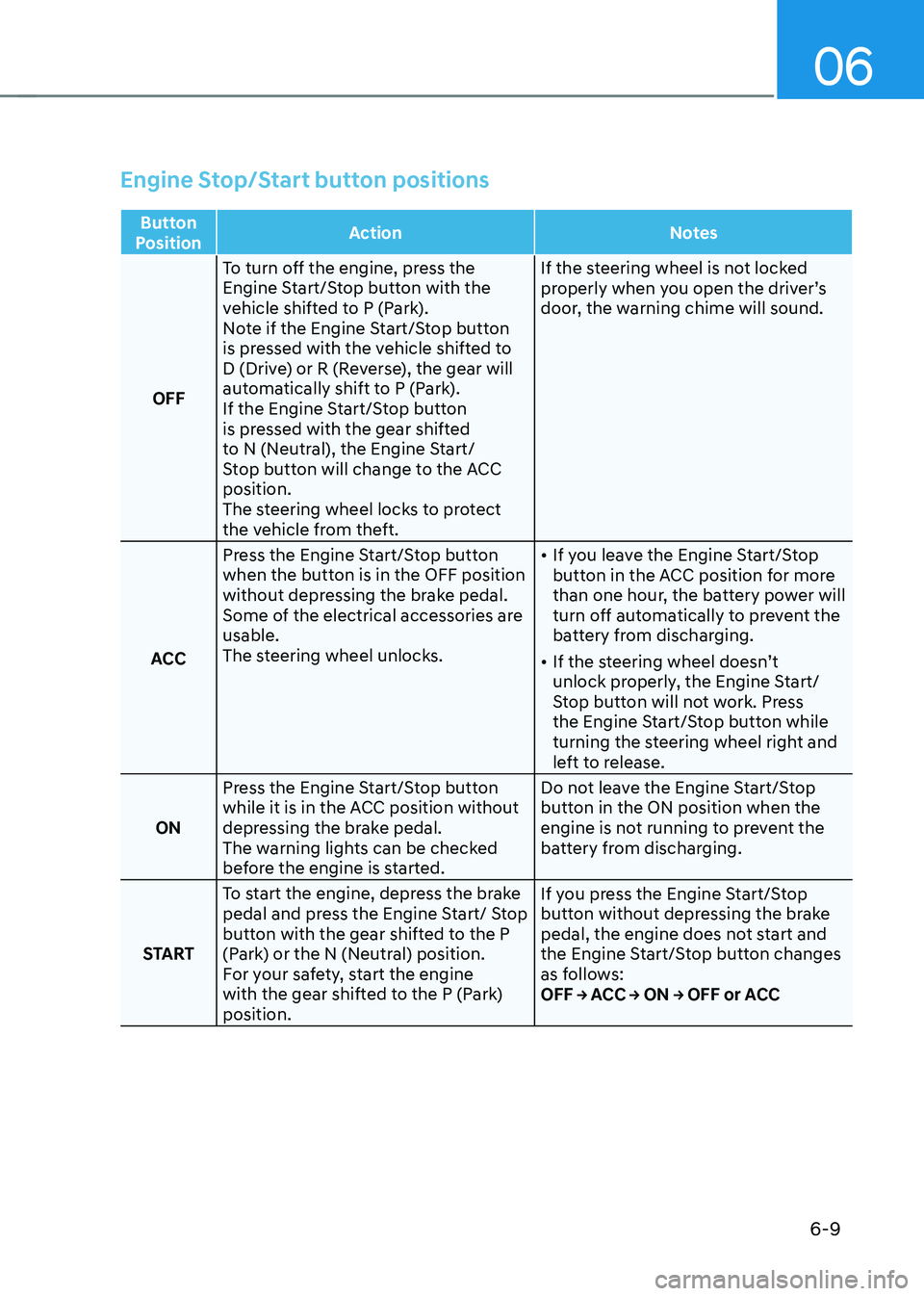
Engine Stop/Start button positions
Button
Position Action
Notes
OFF To turn off the engine, press the
Engine Start/Stop button with the
vehicle shifted to P (Park).
Note if the Engine Start/Stop button
is pressed with the vehicle shifted to
D (Drive) or R (Reverse), the gear will
automatically shift to P (Park).
If the Engine Start/Stop button
is pressed with the gear shifted
to N (Neutral), the Engine Start/
Stop button will change to the ACC
position.
The steering wheel locks to protect
the vehicle from theft. If the steering wheel is not locked
properly when you open the driver’s
door, the warning chime will sound.
ACC Press the Engine Start/Stop button
when the button is in the OFF position
without depressing the brake pedal.
Some of the electrical accessories are
usable.
The steering wheel unlocks.
•
If you leave the Engine Start/Stop
button in the ACC position for more
than one hour, the battery power will
turn off automatically to prevent the
battery from discharging.
• If the steering wheel doesn’t
unlock properly, the Engine Start/
Stop button will not work. Press
the Engine Start/Stop button while
turning the steering wheel right and
left to release.
ON Press the Engine Start/Stop button
while it is in the ACC position without
depressing the brake pedal.
The warning lights can be checked
before the engine is started. Do not leave the Engine Start/Stop
button in the ON position when the
engine is not running to prevent the
battery from discharging.
START To start the engine, depress the brake
pedal and press the Engine Start/ Stop
button with the gear shifted to the P
(Park) or the N (Neutral) position.
For your safety, start the engine
with the gear shifted to the P (Park)
position. If you press the Engine Start/Stop
button without depressing the brake
pedal, the engine does not start and
the Engine Start/Stop button changes
as follows:
OFF → ACC → ON → OFF or ACC
Page 299 of 638
![HYUNDAI TUCSON 2022 User Guide Driving your vehicle6-14
„„Lever type„„Button type
ONX4E060039ONX4060003
[A] : Shift lever, [B] : Shift release button, [C] : Manual shift mode
Depress the brake pedal and press th](/img/35/41173/w960_41173-298.png "HYUNDAI TUCSON 2022 User Guide Driving your vehicle6-14
„„Lever type„„Button type
ONX4E060039ONX4060003
[A] : Shift lever, [B] : Shift release button, [C] : Manual shift mode
Depress the brake pedal and press th")
Driving your vehicle6-14
„„Lever type„„Button type
ONX4E060039ONX4060003
[A] : Shift lever, [B] : Shift release button, [C] : Manual shift mode
Depress the brake pedal and press the Shift release button while moving the shift lever.
Press the Shift release button while moving the shift lever.
The shift lever can freely operate.
Automatic transmission operation
The automatic transmission has six forward speeds (eight forward speeds, if equipped)
and one reverse speed.
The individual speeds are selected automatically in the D (Drive) position.
AUTOMATIC TRANSMISSION
Page 300 of 638
06
6-15
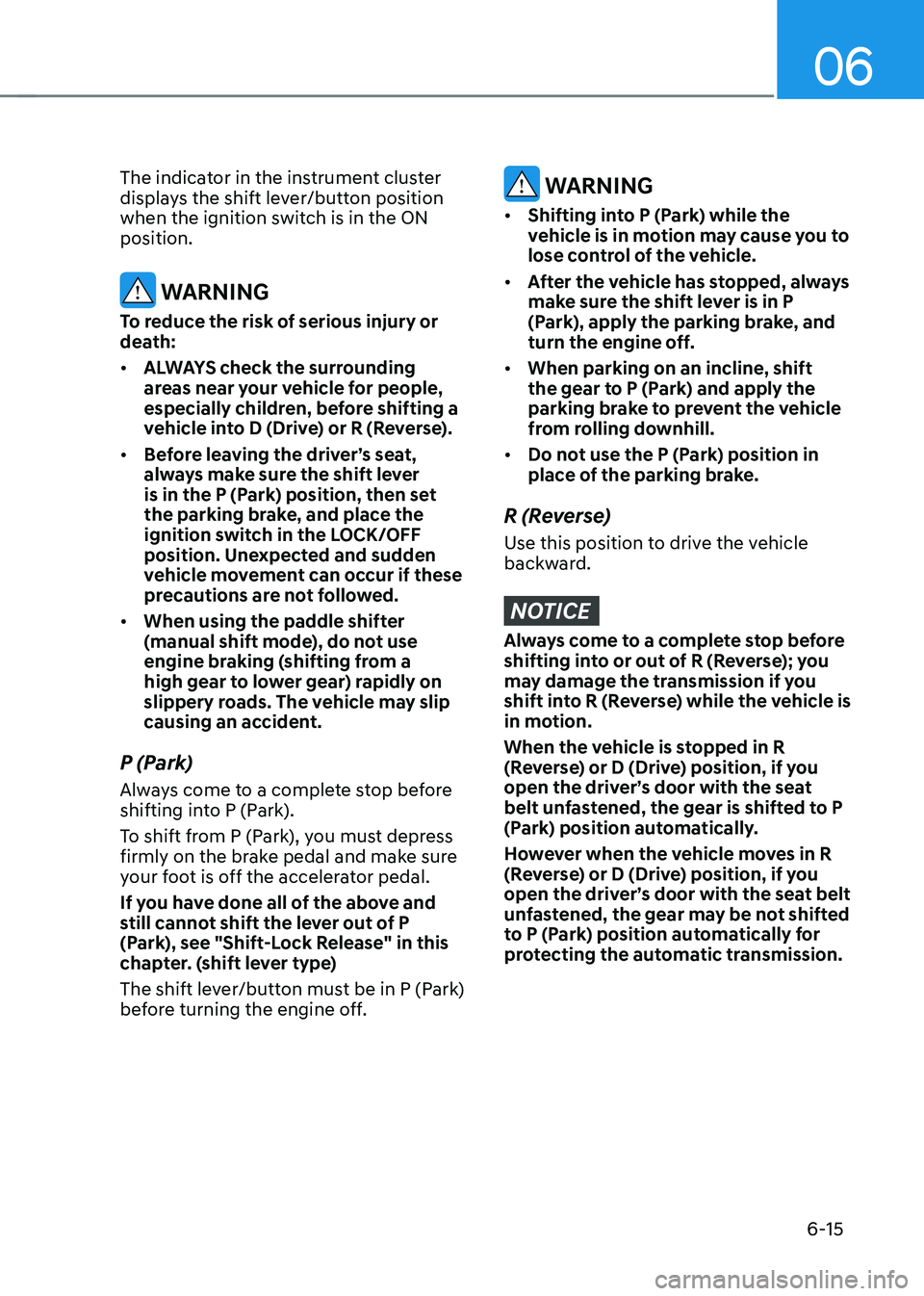
The indicator in the instrument cluster
displays the shift lever/button position
when the ignition switch is in the ON
position.
WARNING
To reduce the risk of serious injury or
death:
• ALWAYS check the surrounding
areas near your vehicle for people,
especially children, before shifting a
vehicle into D (Drive) or R (Reverse).
• Before leaving the driver’s seat,
always make sure the shift lever
is in the P (Park) position, then set
the parking brake, and place the
ignition switch in the LOCK/OFF
position. Unexpected and sudden
vehicle movement can occur if these
precautions are not followed.
• When using the paddle shifter
(manual shift mode), do not use
engine braking (shifting from a
high gear to lower gear) rapidly on
slippery roads. The vehicle may slip
causing an accident.
P (Park)
Always come to a complete stop before
shifting into P (Park).
To shift from P (Park), you must depress
firmly on the brake pedal and make sure
your foot is off the accelerator pedal.
If you have done all of the above and
still cannot shift the lever out of P
(Park), see "Shift-Lock Release" in this
chapter. (shift lever type)
The shift lever/button must be in P (Park)
before turning the engine off.
WARNING
• Shifting into P (Park) while the
vehicle is in motion may cause you to
lose control of the vehicle.
• After the vehicle has stopped, always
make sure the shift lever is in P
(Park), apply the parking brake, and
turn the engine off.
• When parking on an incline, shift
the gear to P (Park) and apply the
parking brake to prevent the vehicle
from rolling downhill.
• Do not use the P (Park) position in
place of the parking brake.
R (Reverse)
Use this position to drive the vehicle
backward.
NOTICE
Always come to a complete stop before
shifting into or out of R (Reverse); you
may damage the transmission if you
shift into R (Reverse) while the vehicle is
in motion.
When the vehicle is stopped in R
(Reverse) or D (Drive) position, if you
open the driver’s door with the seat
belt unfastened, the gear is shifted to P
(Park) position automatically.
However when the vehicle moves in R
(Reverse) or D (Drive) position, if you
open the driver’s door with the seat belt
unfastened, the gear may be not shifted
to P (Park) position automatically for
protecting the automatic transmission.
Page 304 of 638
06
6-19
Information
• Only the eight forward gears can be
selected. To reverse or park the vehicle,
move the shift lever to the R (Reverse)
or P (Park) position as required.
• Downshifts are made automatically
when the vehicle slows down. When the
vehicle stops, 1st gear is automatically
selected.
• When the engine RPM approaches the
red zone the transmission will upshift
automatically.
•
If the driver presses the lever to + (Up) or - (Down) position, the transmission may not make the requested gear
change if the next gear is outside of
the allowable engine RPM range.
The driver must execute upshifts in
accordance with road conditions,
taking care to keep the engine RPMs
below the red zone.
• When driving on a slippery road, push
the shift lever forward into the + (Up) position. This causes the transmission
to shift into the 2nd gear which is better
for smooth driving on a slippery road.
Push the shift lever to the - (Down) side to shift back to the 1st gear.
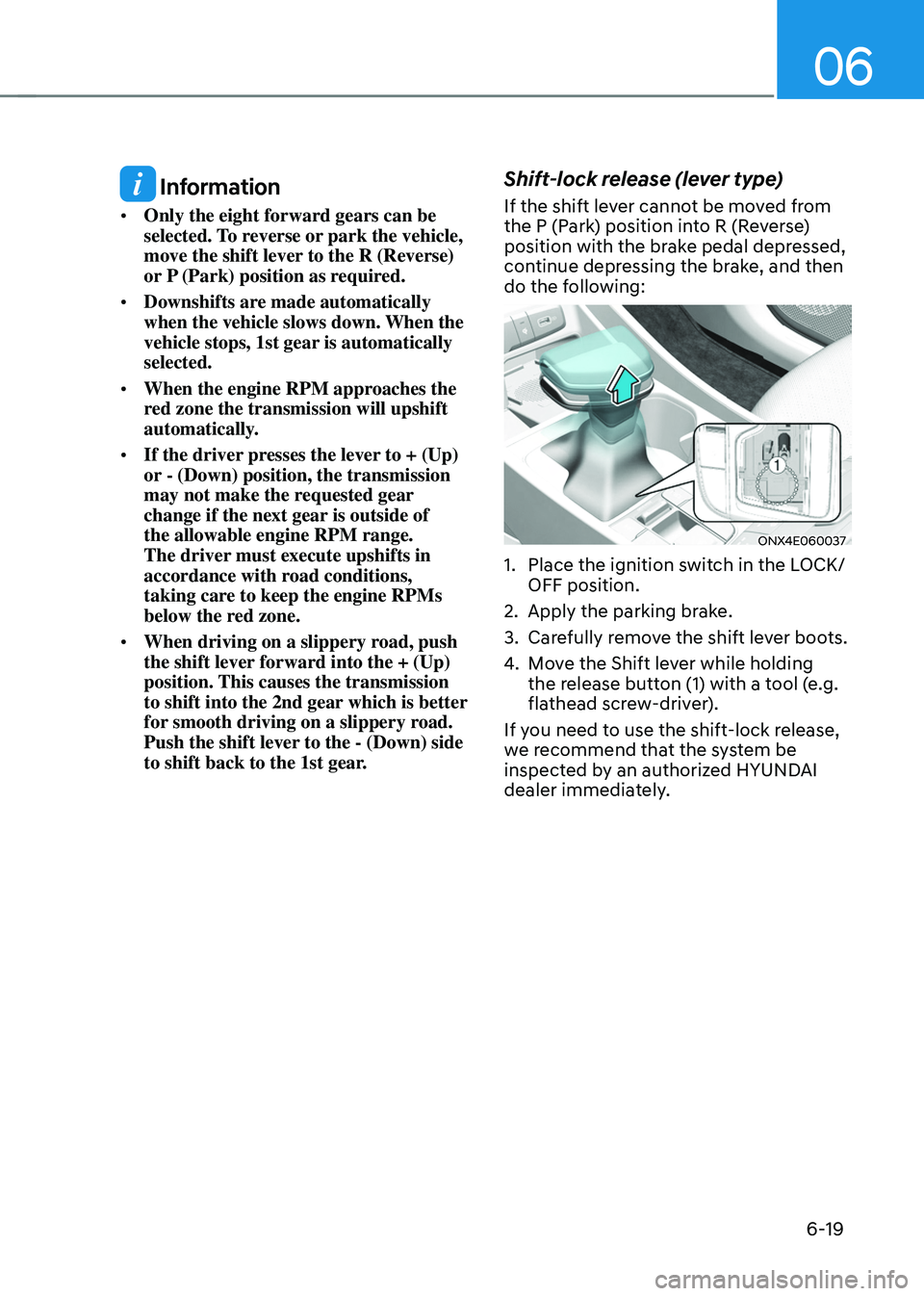
Shift-lock release (lever type)
If the shift lever cannot be moved from
the P (Park) position into R (Reverse)
position with the brake pedal depressed,
continue depressing the brake, and then
do the following:
ONX4E060037
1. Place the ignition switch in the LOCK/
OFF position.
2. Apply the parking brake.
3. Carefully remove the shift lever boots.
4. Move the Shift lever while holding
the release button (1) with a tool (e.g.
flathead screw-driver).
If you need to use the shift-lock release,
we recommend that the system be
inspected by an authorized HYUNDAI
dealer immediately.
Page 305 of 638
Driving your vehicle
6-20
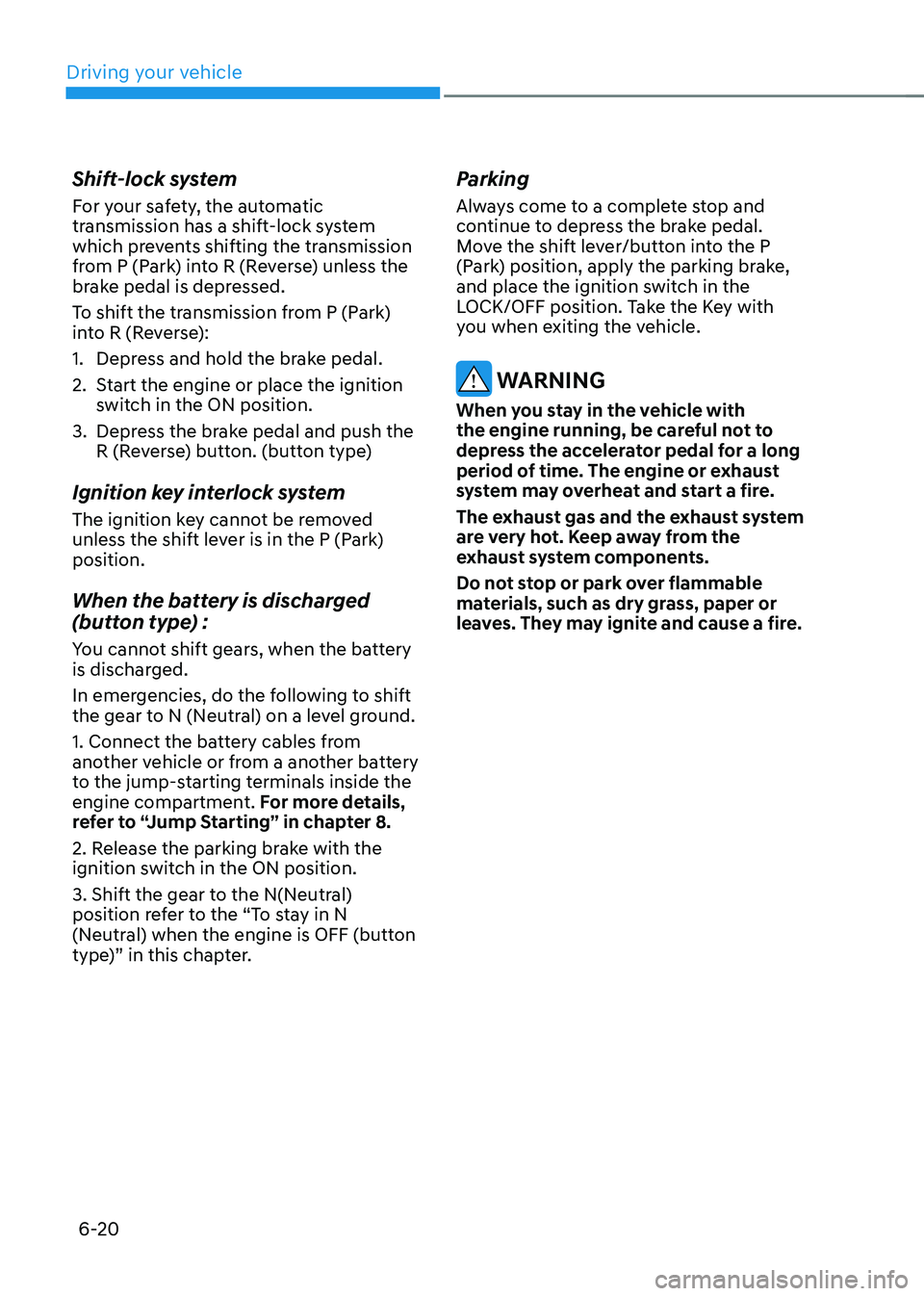
Shift-lock system
For your safety, the automatic
transmission has a shift-lock system
which prevents shifting the transmission
from P (Park) into R (Reverse) unless the
brake pedal is depressed.
To shift the transmission from P (Park)
into R (Reverse):
1. Depress and hold the brake pedal.
2. Start the engine or place the ignition
switch in the ON position.
3. Depress the brake pedal and push the
R (Reverse) button. (button type)
Ignition key interlock system
The ignition key cannot be removed
unless the shift lever is in the P (Park)
position.
When the battery is discharged
(button type) :
You cannot shift gears, when the battery
is discharged.
In emergencies, do the following to shift
the gear to N (Neutral) on a level ground.
1. Connect the battery cables from
another vehicle or from a another battery
to the jump-starting terminals inside the
engine compartment. For more details,
refer to “Jump Starting” in chapter 8.
2. Release the parking brake with the
ignition switch in the ON position.
3. Shift the gear to the N(Neutral)
position refer to the “To stay in N
(Neutral) when the engine is OFF (button
type)” in this chapter.
Parking
Always come to a complete stop and
continue to depress the brake pedal.
Move the shift lever/button into the P
(Park) position, apply the parking brake,
and place the ignition switch in the
LOCK/OFF position. Take the Key with
you when exiting the vehicle.
WARNING
When you stay in the vehicle with
the engine running, be careful not to
depress the accelerator pedal for a long
period of time. The engine or exhaust
system may overheat and start a fire.
The exhaust gas and the exhaust system
are very hot. Keep away from the
exhaust system components.
Do not stop or park over flammable
materials, such as dry grass, paper or
leaves. They may ignite and cause a fire.
Page 308 of 638
06
6-23
The manual shift mode also changes
back to automatic shift mode in one of
following situations
-When the accelerator pedal is gently
depressed for more than 6 seconds
while driving
-When the vehicle stops
Information
If the [+] and [-] paddle shifters are pulled
at the same time, gear shift may not occur.
Good driving practices
• Never move the shift button from
P (Park) or N (Neutral) to any other
position with the accelerator pedal
depressed.
• Never move the shift lever/button into
P (Park) when the vehicle is in motion.
Be sure the vehicle is completely
stopped before you attempt to shift
into R (Reverse) or D (Drive).
• Do not move the shift button to N
(Neutral) when driving. Doing so
may result in an accident because
of a loss of engine braking and the
transmission could be damaged.
• Driving uphill or downhill, shift to D
(Drive) to drive forward or R (Reverse)
to drive backwards, and check
the gear position indicated on the
cluster before driving. If the vehicle
is moving in the opposite direction
of the selected gear, the engine may
stop and a serious accident may
occur. Never attempt to select a gear
that is opposite to the direction of
the vehicle motion. Stop the vehicle
before changing to the desired gear.
• Do not drive with your foot resting
on the brake pedal. Even light, but
consistent pedal pressure can result
in the brakes overheating, brake wear
and possibly even brake failure.
• When driving with shifter paddles,
slow down before shifting to a lower
gear. Otherwise, the lower gear may
not be engaged if the engine RPMs
are outside of the allowable range.
• Always apply the parking brake when
leaving the vehicle. Do not depend on
placing the transmission in P (Park) to
keep the vehicle from moving.
Page 312 of 638
06
6-27
Releasing the parking brake
„„Type A
ONX4E060025
„„Type B
ONX4E060026
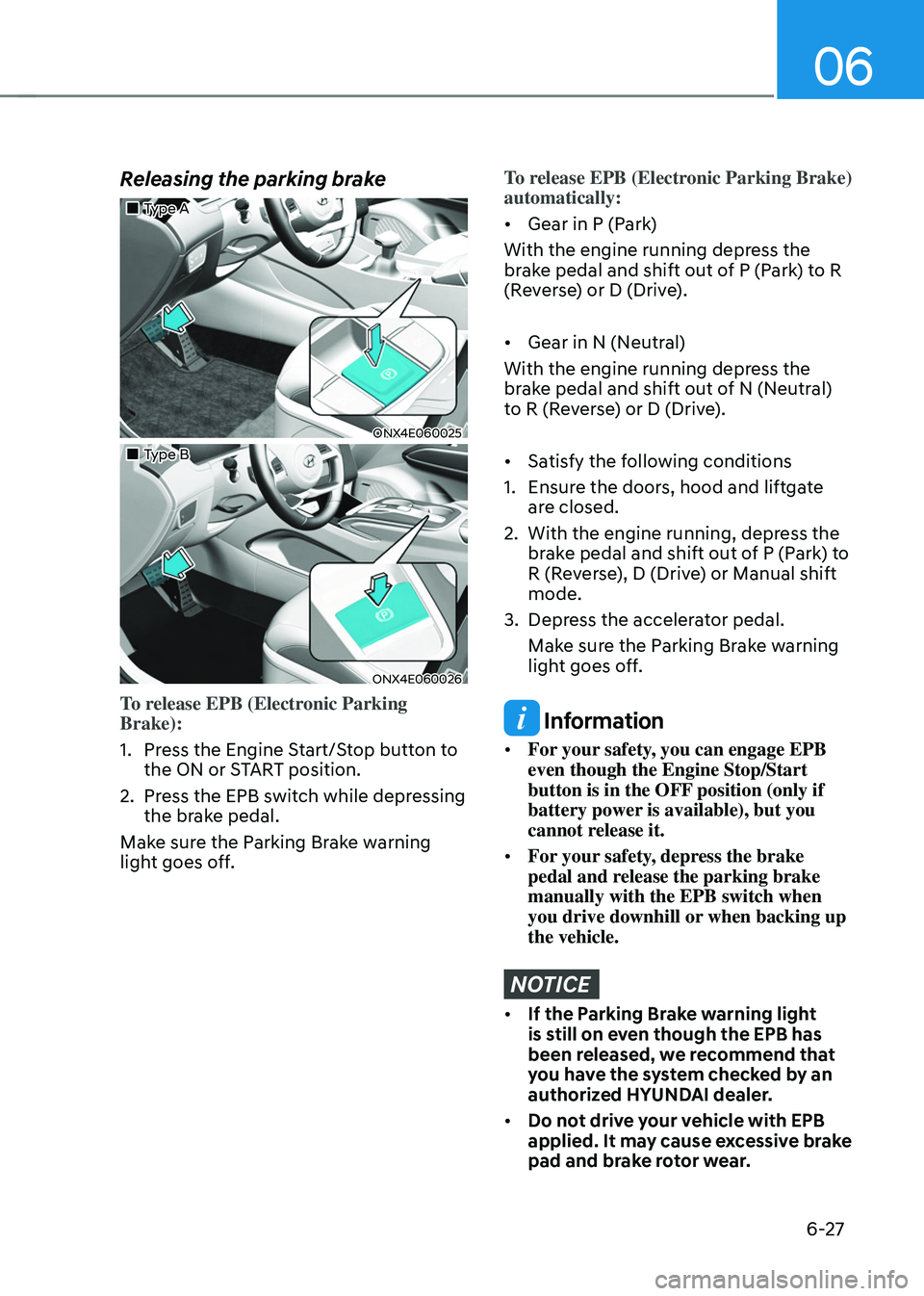
To release EPB (Electronic Parking
Brake):
1. Press the Engine Start/Stop button to
the ON or START position.
2. Press the EPB switch while depressing
the brake pedal.
Make sure the Parking Brake warning
light goes off.
To release EPB (Electronic Parking Brake)
automatically:
• Gear in P (Park)
With the engine running depress the
brake pedal and shift out of P (Park) to R
(Reverse) or D (Drive).
• Gear in N (Neutral)
With the engine running depress the
brake pedal and shift out of N (Neutral)
to R (Reverse) or D (Drive).
• Satisfy the following conditions
1. Ensure the doors, hood and liftgate
are closed.
2. With the engine running, depress the
brake pedal and shift out of P (Park) to
R (Reverse), D (Drive) or Manual shift
mode.
3. Depress the accelerator pedal.
Make sure the Parking Brake warning
light goes off.
Information
• For your safety, you can engage EPB
even though the Engine Stop/Start
button is in the OFF position (only if
battery power is available), but you
cannot release it.
• For your safety, depress the brake
pedal and release the parking brake
manually with the EPB switch when
you drive downhill or when backing up
the vehicle.
NOTICE
• If the Parking Brake warning light
is still on even though the EPB has
been released, we recommend that
you have the system checked by an
authorized HYUNDAI dealer.
• Do not drive your vehicle with EPB
applied. It may cause excessive brake
pad and brake rotor wear.
Page 316 of 638
06
6-31
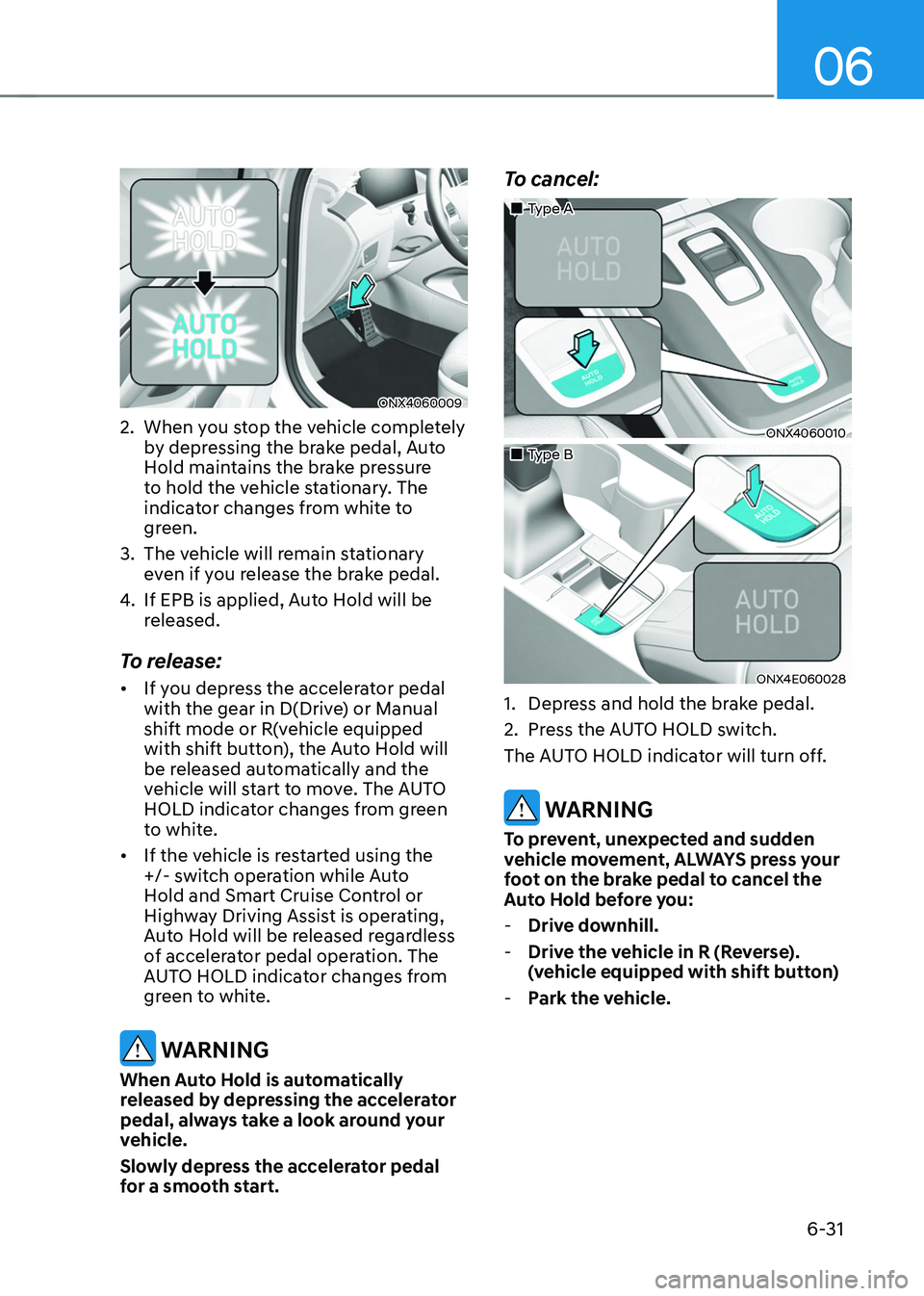
ONX4060009
2. When you stop the vehicle completely
by depressing the brake pedal, Auto
Hold maintains the brake pressure
to hold the vehicle stationary. The
indicator changes from white to
green.
3. The vehicle will remain stationary
even if you release the brake pedal.
4. If EPB is applied, Auto Hold will be
released.
To release:
• If you depress the accelerator pedal
with the gear in D(Drive) or Manual
shift mode or R(vehicle equipped
with shift button), the Auto Hold will
be released automatically and the
vehicle will start to move. The AUTO
HOLD indicator changes from green
to white.
• If the vehicle is restarted using the
+/- switch operation while Auto
Hold and Smart Cruise Control or
Highway Driving Assist is operating,
Auto Hold will be released regardless
of accelerator pedal operation. The
AUTO HOLD indicator changes from
green to white.
WARNING
When Auto Hold is automatically
released by depressing the accelerator
pedal, always take a look around your
vehicle.
Slowly depress the accelerator pedal
for a smooth start.
To cancel:
„„Type A
ONX4060010
„„Type B
ONX4E060028
1. Depress and hold the brake pedal.
2. Press the AUTO HOLD switch.
The AUTO HOLD indicator will turn off.
WARNING
To prevent, unexpected and sudden
vehicle movement, ALWAYS press your
foot on the brake pedal to cancel the
Auto Hold before you:
- Drive downhill.
-Drive the vehicle in R (Reverse).
(vehicle equipped with shift button)
-Park the vehicle.
Page 323 of 638
Driving your vehicle
6-38
Vehicle Stability Management
(VSM)
Vehicle Stability Management is a
function of the Electronic Stability
Control (ESC) system. It helps the vehicle
stay stable when accelerating or braking
suddenly on wet, slippery and rough
roads where traction over the four tires
can suddenly become uneven.
WARNING
Take the following precautions when
using Vehicle Stability Management:
• ALWAYS check the speed and the
distance to the vehicle ahead. VSM
is not a substitute for safe driving
practices.
• Never drive too fast for the road
conditions. VSM will not prevent
accidents. Excessive speed in bad
weather, on slippery and uneven
roads can result in severe accidents.
VSM operation
When operating
When you apply your brakes under
conditions which may activate ESC, you
may hear sounds from the brakes, or feel
a corresponding sensation in the brake
pedal. This is normal and it means your
VSM is active.
Information
VSM does not operate when:
• Driving on a banked road such as
gradient or incline.
• Driving in reverse.
• The ESC OFF indicator light is on.
• The EPS (Electric power steering)
warning light (
) is on or blinks.
Page 331 of 638

Driving your vehicle
6-46
Auto start
When the engine stops automatically by
ISG, the engine will restart if one of the
following is done.
-Release the brake pedal.
-When Auto Hold is activated, take
your foot off the brake pedal and then
depress the accelerator pedal.
-While depressing the brake pedal,
shift the gear from N (Neutral) or D
(Drive) to R (Reverse) or P (Park).
-While depressing the brake pedal,
shift the gear from N (Neutral) to D
(Drive).
The Auto Stop (
) indicator goes to
white on the instrument cluster, when
the engine is restarted.
LCD display messages
The messages are displayed on the
instrument cluster to help use ISG
system.
OJX1069042L
Auto Stop is Off. Shift to P or N to start
engine
When the system is deactivated, the ISG
off button indicator will illuminate and
a message will appear on the cluster
LCD display with a warning sound in the
following situations.
- When the engine hood is opened.
-When ISG system is not working
normally.
If this occurs, depress the brake pedal
and restart the engine manually. For your
safety, restart the vehicle in the P (Park)
position.