Climate HYUNDAI TUCSON 2022 Owners Manual
[x] Cancel search | Manufacturer: HYUNDAI, Model Year: 2022, Model line: TUCSON, Model: HYUNDAI TUCSON 2022Pages: 638, PDF Size: 82.3 MB
Page 18 of 638
2-6
Vehicle Information, Consumer Information and Reporting Safety Defects
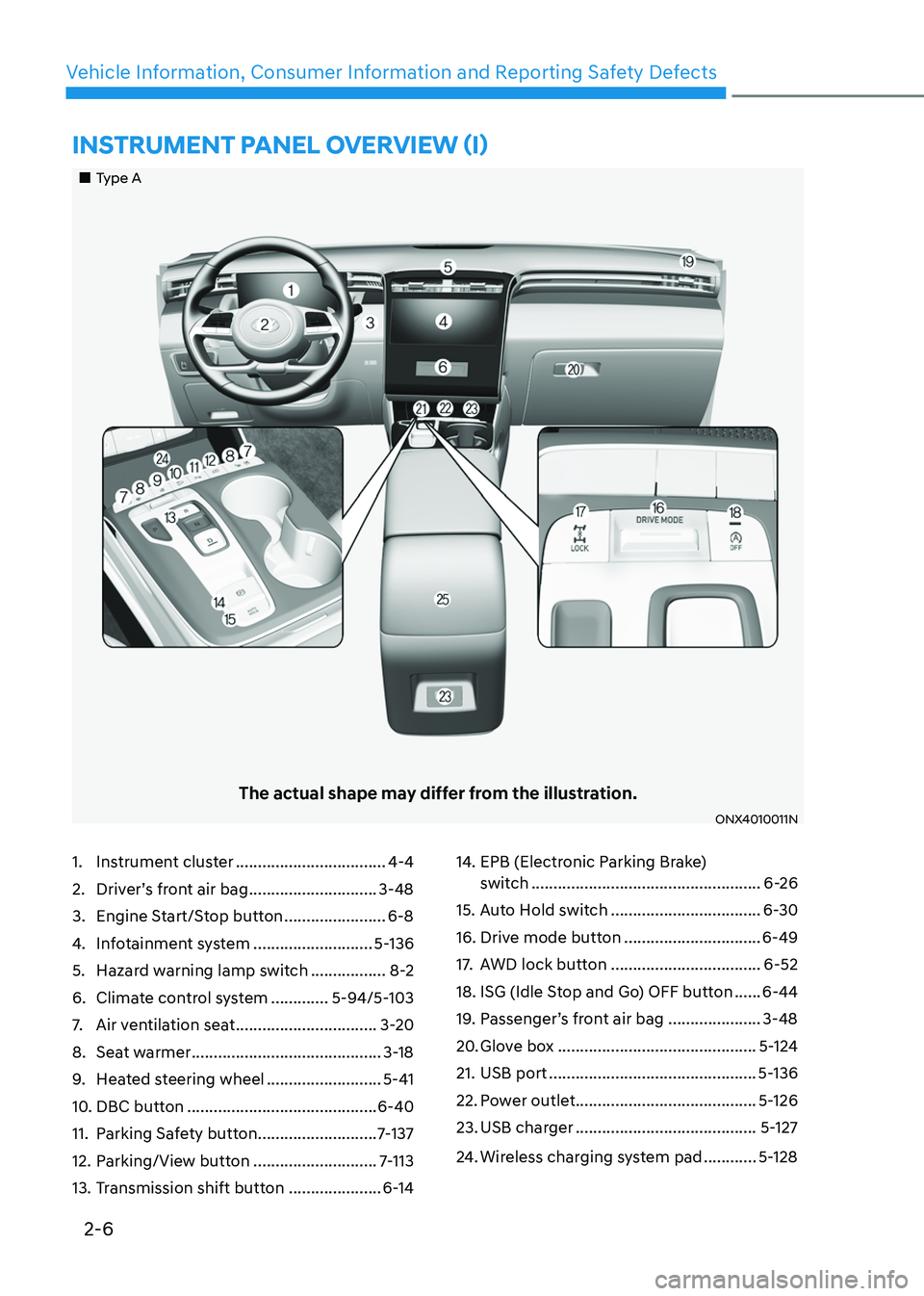
1. Instrument cluster ..................................4-4
2. Driver’s front air bag .............................3-48
3. Engine Start/Stop button .......................6-8
4. Infotainment system ...........................5-136
5. Hazard warning lamp switch .................8-2
6. Climate control system .............5-94/5-103
7. Air ventilation seat ................................3-20
8. Seat warmer ...........................................3-18
9. Heated steering wheel ..........................5-41
10. DBC button ...........................................6-40
11. Parking Safety button ...........................7-137
12. Parking/View button ............................7-113
13. Transmission shift button .....................6-14
14. EPB (Electronic Parking Brake)
switch ....................................................6-26
15. Auto Hold switch ..................................6-30
16. Drive mode button ...............................6-49
17. AWD lock button ..................................6-52
18. ISG (Idle Stop and Go) OFF button ......6-44
19. Passenger’s front air bag .....................3-48
20. Glove box .............................................5-124
21. USB port ...............................................5-136
22. Power outlet .........................................5-126
23. USB charger .........................................5-127
24. Wireless charging system pad ............5-128
„„Type A
The actual shape may differ from the illustration.
ONX4010011N
INSTRUMENT PANEL OVERVIEW (I)
Page 19 of 638
2-7
02
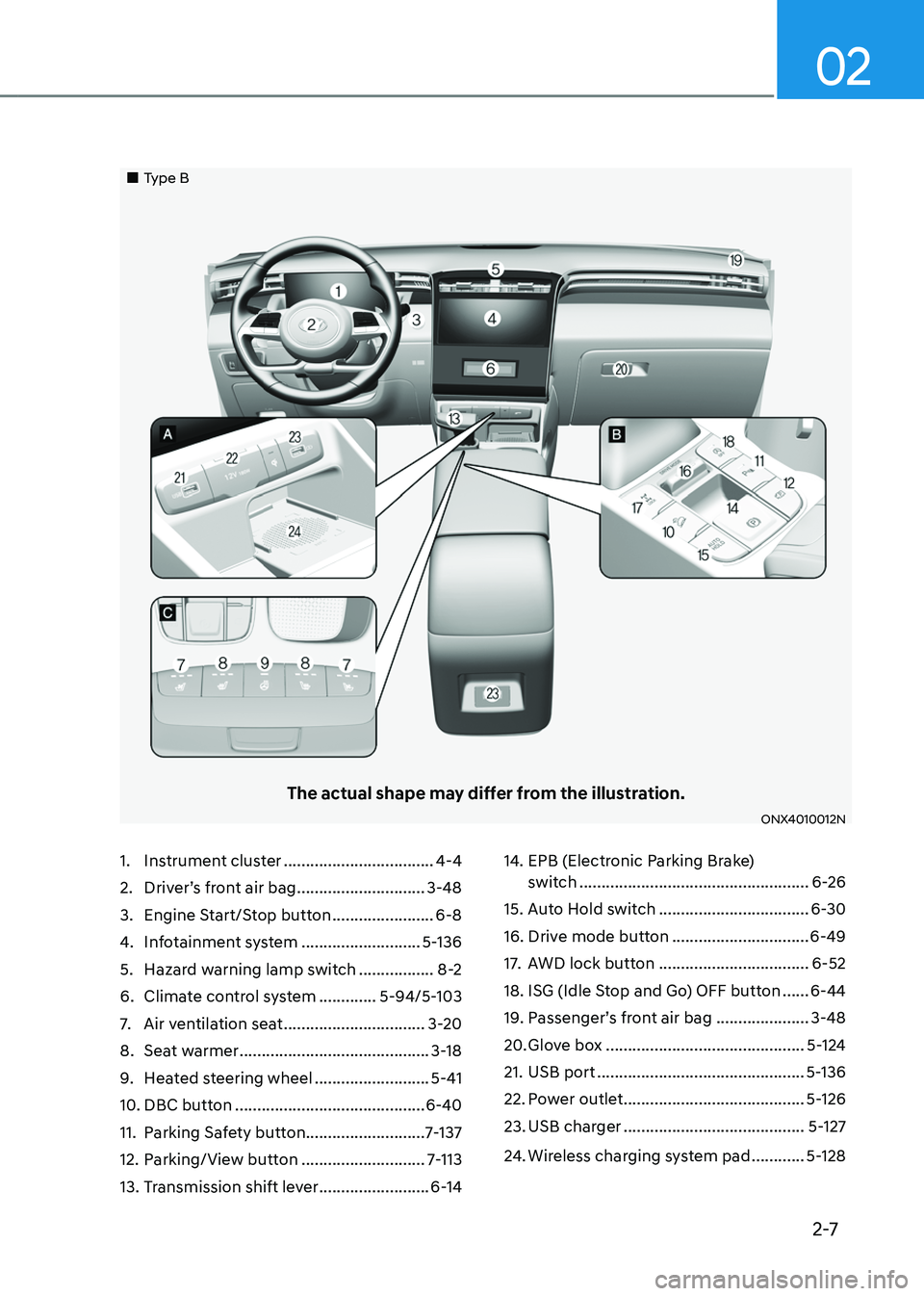
1. Instrument cluster ..................................4-4
2. Driver’s front air bag .............................3-48
3. Engine Start/Stop button .......................6-8
4. Infotainment system ...........................5-136
5. Hazard warning lamp switch .................8-2
6. Climate control system .............5-94/5-103
7. Air ventilation seat ................................3-20
8. Seat warmer ...........................................3-18
9. Heated steering wheel ..........................5-41
10. DBC button ...........................................6-40
11. Parking Safety button ...........................7-137
12. Parking/View button ............................7-113
13. Transmission shift lever .........................6-14
14. EPB (Electronic Parking Brake)
switch ....................................................6-26
15. Auto Hold switch ..................................6-30
16. Drive mode button ...............................6-49
17. AWD lock button ..................................6-52
18. ISG (Idle Stop and Go) OFF button ......6-44
19. Passenger’s front air bag .....................3-48
20. Glove box .............................................5-124
21. USB port ...............................................5-136
22. Power outlet .........................................5-126
23. USB charger .........................................5-127
24. Wireless charging system pad ............5-128
„„Type B
The actual shape may differ from the illustration.
ONX4010012N
Page 51 of 638
Seats & Safety System
3-20
• When pressing the switch for more
than 1.5 seconds with the seat warmer
operating, the seat warmer will turn
OFF.
• The seat warmer defaults to the OFF
position whenever the ignition switch
is ON.
• Auto Comfort Control (for driver’s
seat) (if equipped)
-The seat warmer automatically
controls the seat temperature
depending on the ambient
temperature and the set climate
control temperature when the
engine is running. If the seat
warmer switch is pushed, the seat
warmer will have to be controlled
manually.
To use this function, it must be
activated from the Settings menu in
the AV/AVN system screen.
-The seat warmer defaults to the
OFF position whenever the ignition
switch is ON. However, if the Auto
Comfort Control function is ON, the
driver’s seat warmer will turn on
and off depending on the ambient
temperature and the set climate
control temperature.
For more details, refer to the separately
supplied Infotainment manual with
your vehicle.
Information
With the seat warmer switch in the ON
position, the heating system in the seat
turns off or on automatically depending on
the seat temperature.
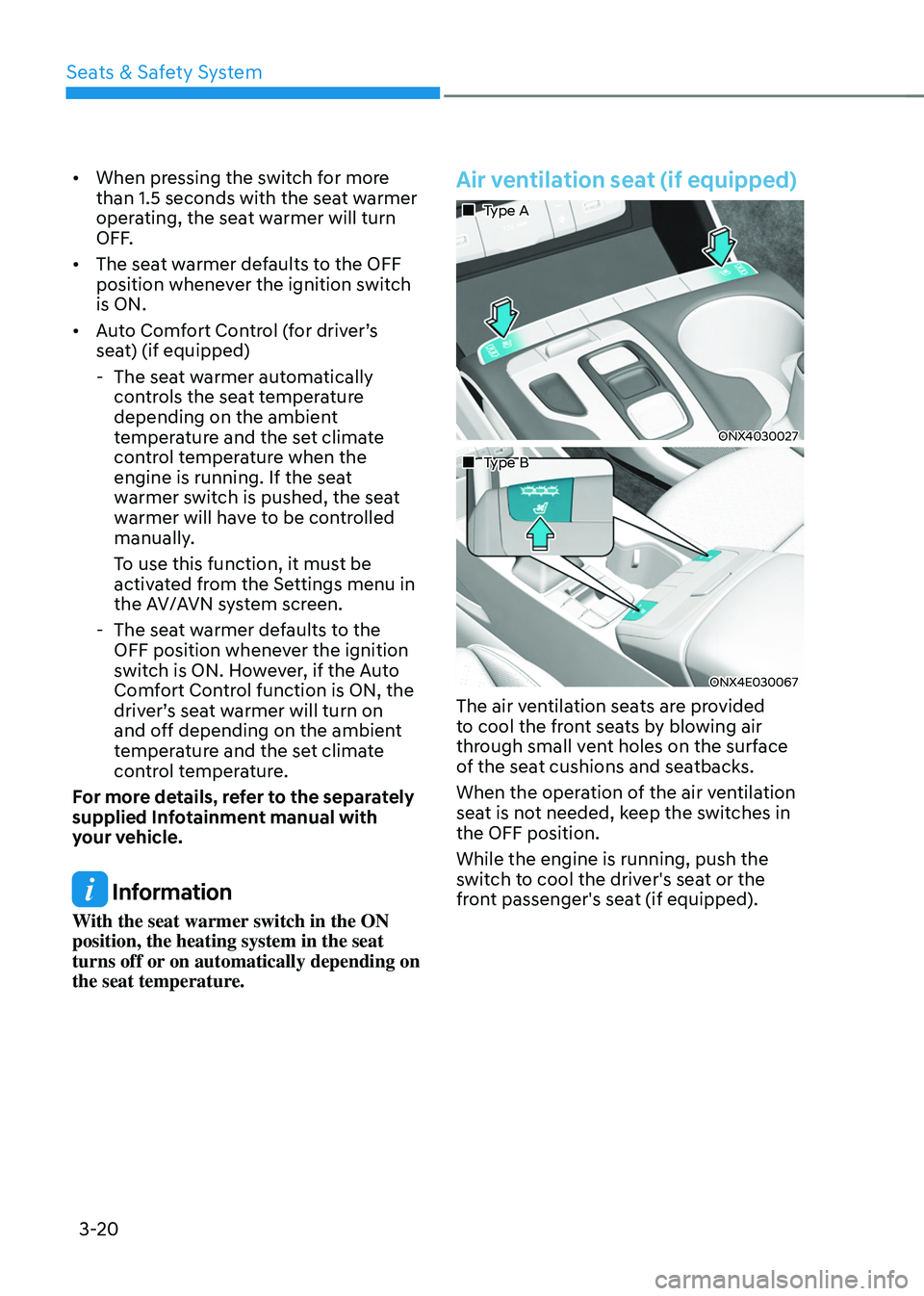
Air ventilation seat (if equipped)
„„ Type A
ONX4030027
„„ Type B
ONX4E030067
The air ventilation seats are provided
to cool the front seats by blowing air
through small vent holes on the surface
of the seat cushions and seatbacks.
When the operation of the air ventilation
seat is not needed, keep the switches in
the OFF position.
While the engine is running, push the
switch to cool the driver's seat or the
front passenger's seat (if equipped).
Page 52 of 638
03
3-21
NOTICE
To prevent damage to the air ventilation
seats:
• Never use a solvent such as paint
thinner, benzene, alcohol or gasoline
to clean the seats.
• Avoid spilling liquids on the surface
of the front seats and seatbacks; this
may cause the air vent holes to block
and not work properly.
• Do not place materials such as plastic
bags or newspapers under the seats.
They may block the air intake causing
malfunction of the air vent.
• Do not change the seat covers. It may
damage the air ventilation seat.
• If the air vents do not operate, restart
the vehicle. If there is no change,
have the vehicle inspected by an
authorized HYUNDAI dealer. •
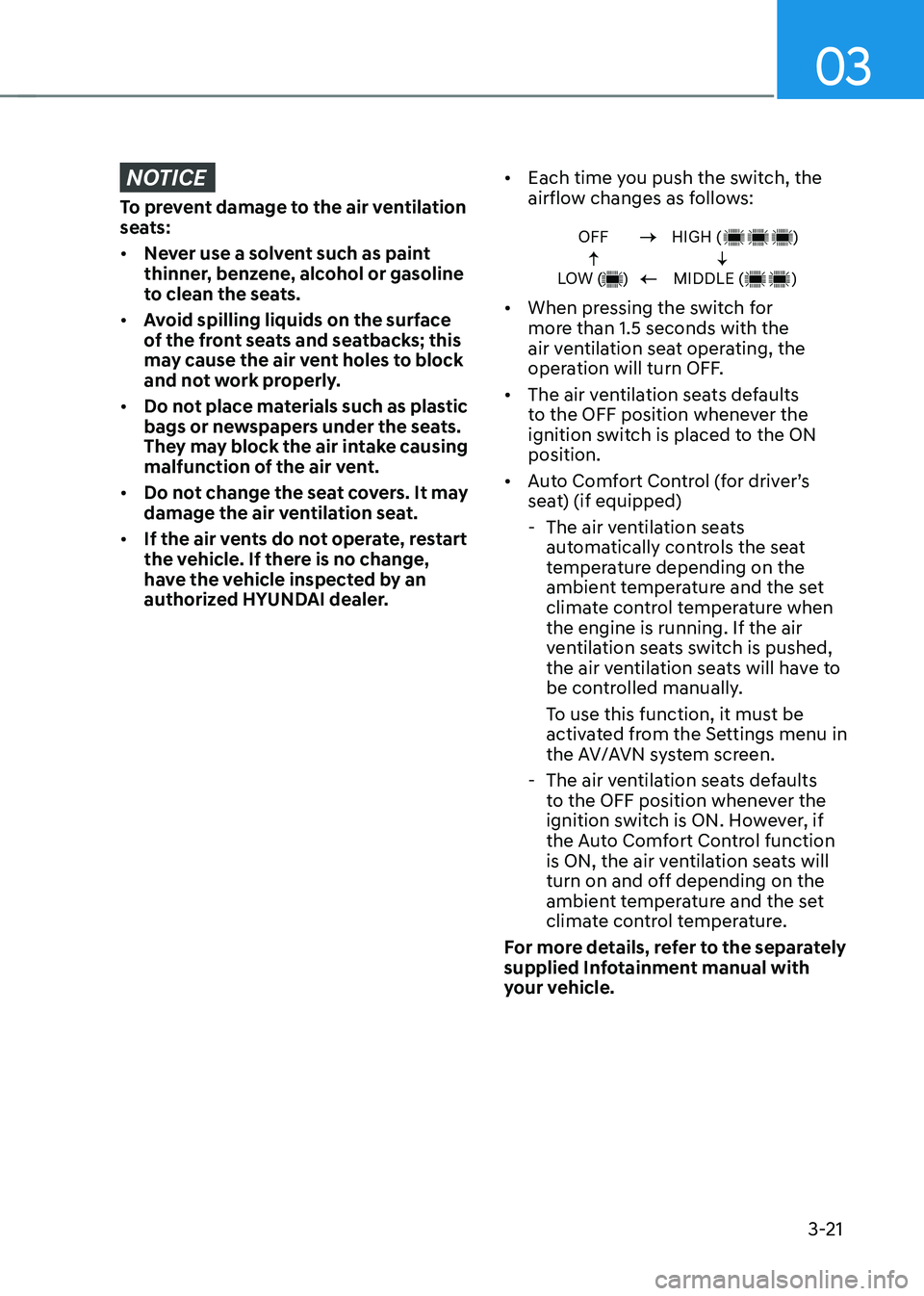
Each time you push the switch, the
airflow changes as follows:
OFF
LOW ( )HIGH ( )
MIDDLE ( )
• When pressing the switch for
more than 1.5 seconds with the
air ventilation seat operating, the
operation will turn OFF.
• The air ventilation seats defaults
to the OFF position whenever the
ignition switch is placed to the ON
position.
• Auto Comfort Control (for driver’s
seat) (if equipped)
-The air ventilation seats
automatically controls the seat
temperature depending on the
ambient temperature and the set
climate control temperature when
the engine is running. If the air
ventilation seats switch is pushed,
the air ventilation seats will have to
be controlled manually.
To use this function, it must be
activated from the Settings menu in
the AV/AVN system screen.
-The air ventilation seats defaults
to the OFF position whenever the
ignition switch is ON. However, if
the Auto Comfort Control function
is ON, the air ventilation seats will
turn on and off depending on the
ambient temperature and the set
climate control temperature.
For more details, refer to the separately
supplied Infotainment manual with
your vehicle.
Page 144 of 638
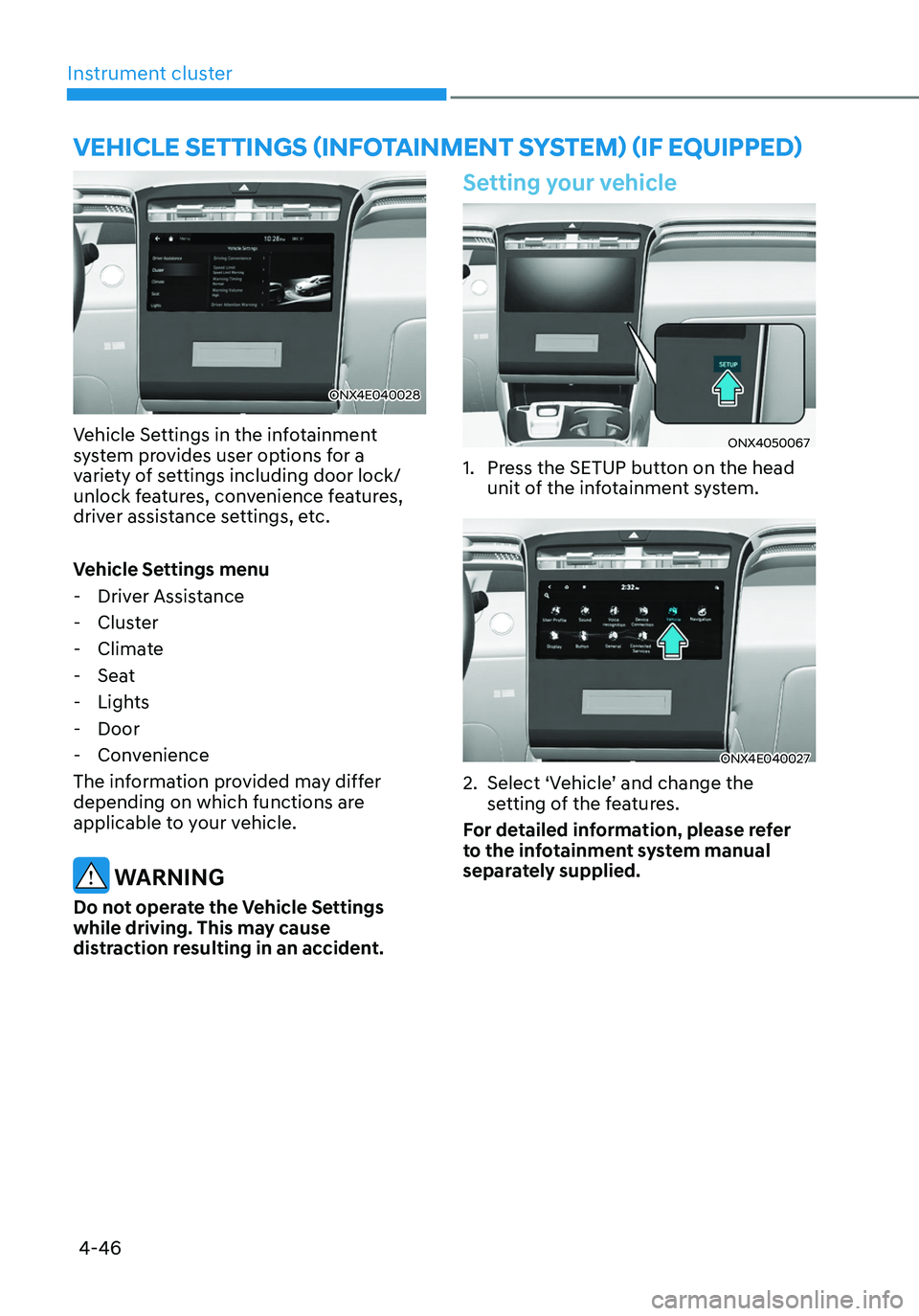
Instrument cluster
4-46
ONX4E040028
Vehicle Settings in the infotainment
system provides user options for a
variety of settings including door lock/
unlock features, convenience features,
driver assistance settings, etc.
Vehicle Settings menu
-Driver Assistance
-Cluster
-Climate
-Seat
-Lights
-Door
-Convenience
The information provided may differ
depending on which functions are
applicable to your vehicle.
WARNING
Do not operate the Vehicle Settings
while driving. This may cause
distraction resulting in an accident.
Setting your vehicle
ONX4050067
1. Press the SETUP button on the head
unit of the infotainment system.
ONX4E040027
2. Select ‘Vehicle’ and change the
setting of the features.
For detailed information, please refer
to the infotainment system manual
separately supplied.
VEHICLE SETTINGS (INFOTAINMENT SYSTEM) (IF EQUIPPED)
Page 146 of 638

Lighting ........................................................................\
.....................................5-79Exterior lights........................................................................\
...................................... 5-79
High Beam Assist (HBA) ........................................................................\
........5-83System settings ........................................................................\
..................................5-83
System operation ........................................................................\
..............................5-84
System malfunction and limitations ........................................................................\
5-84
Interior lights ........................................................................\
...........................5-86Interior Lamp AUTO OFF ........................................................................\
...................5-86
Front lamps ........................................................................\
........................................5-86
Rear lamps ........................................................................\
.........................................5-87
Vanity mirror lamp ........................................................................\
.............................5-87
Glove box lamp ........................................................................\
...................................5-87
Luggage compartment lamp ........................................................................\
...........5-88
Welcome system ........................................................................\
..............................5-88
Wipers and washers ........................................................................\
................5-90Windshield wipers ........................................................................\
.............................5-90
Front windshield washers ........................................................................\
..................5-92
Rear window wiper and washer ........................................................................\
........5-93
Manual climate control system ......................................................................5-94Heating and air conditioning ........................................................................\
.............5-95
System operation ........................................................................\
..............................5-99
System maintenance ........................................................................\
........................5-101
Automatic climate control system ................................................................5-103Automatic heating and air conditioning .................................................................5-104
Manual heating and air conditioning ......................................................................5-105
Multi Air Mode ........................................................................\
...................................5-111
System operation ........................................................................\
..............................5-112
System maintenance ........................................................................\
........................5-114
Windshield defrosting and defogging ...........................................................5-116Manual climate control system ........................................................................\
........5-116
Automatic climate control system ........................................................................\
...5-117
Auto Defogging System on Models with Automatic Temperature Control ...........5-118
Rear window defroster ........................................................................\
.....................5-119
5
Page 147 of 638
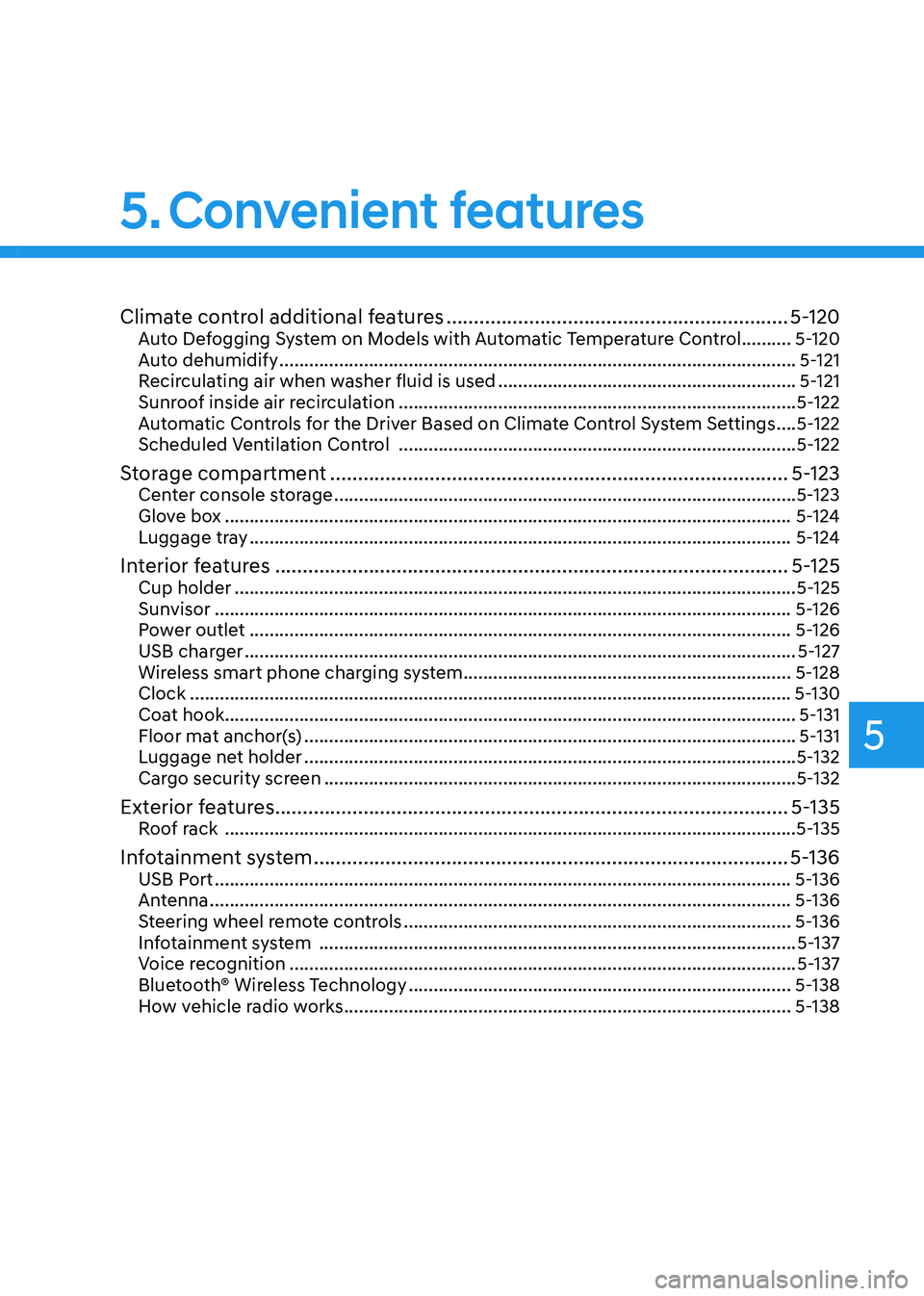
Climate control additional features ..............................................................5-120Auto Defogging System on Models with Automatic Temperature Control ..........5-120
Auto dehumidify ........................................................................\
................................5-121
Recirculating air when washer fluid is used ............................................................5-121
Sunroof inside air recirculation ........................................................................\
........5-122
Automatic Controls for the Driver Based on Climate Control System Settings ....5-122
Scheduled Ventilation Control ........................................................................\
........5-122
Storage compartment ........................................................................\
...........5-123Center console storage ........................................................................\
.....................5-123
Glove box ........................................................................\
..........................................5-124
Luggage tray ........................................................................\
.....................................5-124
Interior features ........................................................................\
.....................5-125Cup holder ........................................................................\
.........................................5-125
Sunvisor ........................................................................\
............................................5-126
Power outlet ........................................................................\
.....................................5-126
USB charger ........................................................................\
.......................................5-127
Wireless smart phone charging system ..................................................................5-128
Clock ........................................................................\
.................................................5-130
Coat hook ........................................................................\
...........................................5-131
Floor mat anchor(s) ........................................................................\
...........................5-131
Luggage net holder ........................................................................\
...........................5-132
Cargo security screen ........................................................................\
.......................5-132
Exterior features ........................................................................\
.....................5-135Roof rack ........................................................................\
...........................................5-135
Infotainment system ........................................................................\
..............5-136USB Port ........................................................................\
............................................5-136
Antenna ........................................................................\
.............................................5-136
Steering wheel remote controls ........................................................................\
......5-136
Infotainment system ........................................................................\
........................5-137
Voice recognition ........................................................................\
..............................5-137
Bluetooth® Wireless Technology ........................................................................\
.....5-138
How vehicle radio works ........................................................................\
..................5-138
5. Convenient features
5
Page 165 of 638
05
5-21
Remote Start with Digital Key
• Using the Hyundai Digital Key app
on your phone, press the Door Lock
button and then press the Remote
Start button (buttons must be pressed
within about 4 seconds). If all the
doors of your vehicle are closed
(including the hood and the liftgate),
the engine will be automatically
started.
Note that when the remote start
feature is activated, the hazard
warning lights will blink two times
and a chime will sound before engine
startup. Also note the following:
• The climate control system will come
on using the same settings from when
you last used the vehicle
• To turn off the engine, press the
Remote Engine Stop button within the
Hyundai Digital Key app.
• The engine will remain running for
approximately 10 minutes, and then
engine will automatically shut OFF.
• To keep the engine running, access
the vehicle and place the smartphone
on the wireless charging pad
(authentication pad) while the engine
is still in remote engine-ON mode.
For more information, refer to the Engine
Start/Stop button in chapter 6. Vehicle information Display
The digital key application displays
the vehicle information such as
driving or door conditions through the
communication with the vehicle.
•
How to check : Select the vehicle
what you want to check and touch
the vehicle image, then vehicle
information display page will be
shown.
• Contents : accumulated odometer,
latest fuel economy, driving range,
fuel remaining, tire pressure, doors
lock/unlock status and last data
updated time.
ÃNote that displayed vehicle data may
be slightly different from the current
vehicle condition
ÃFor more information, please refer to
the ‘Tutorial’ on your Digital key app.
Page 175 of 638
05
5-31
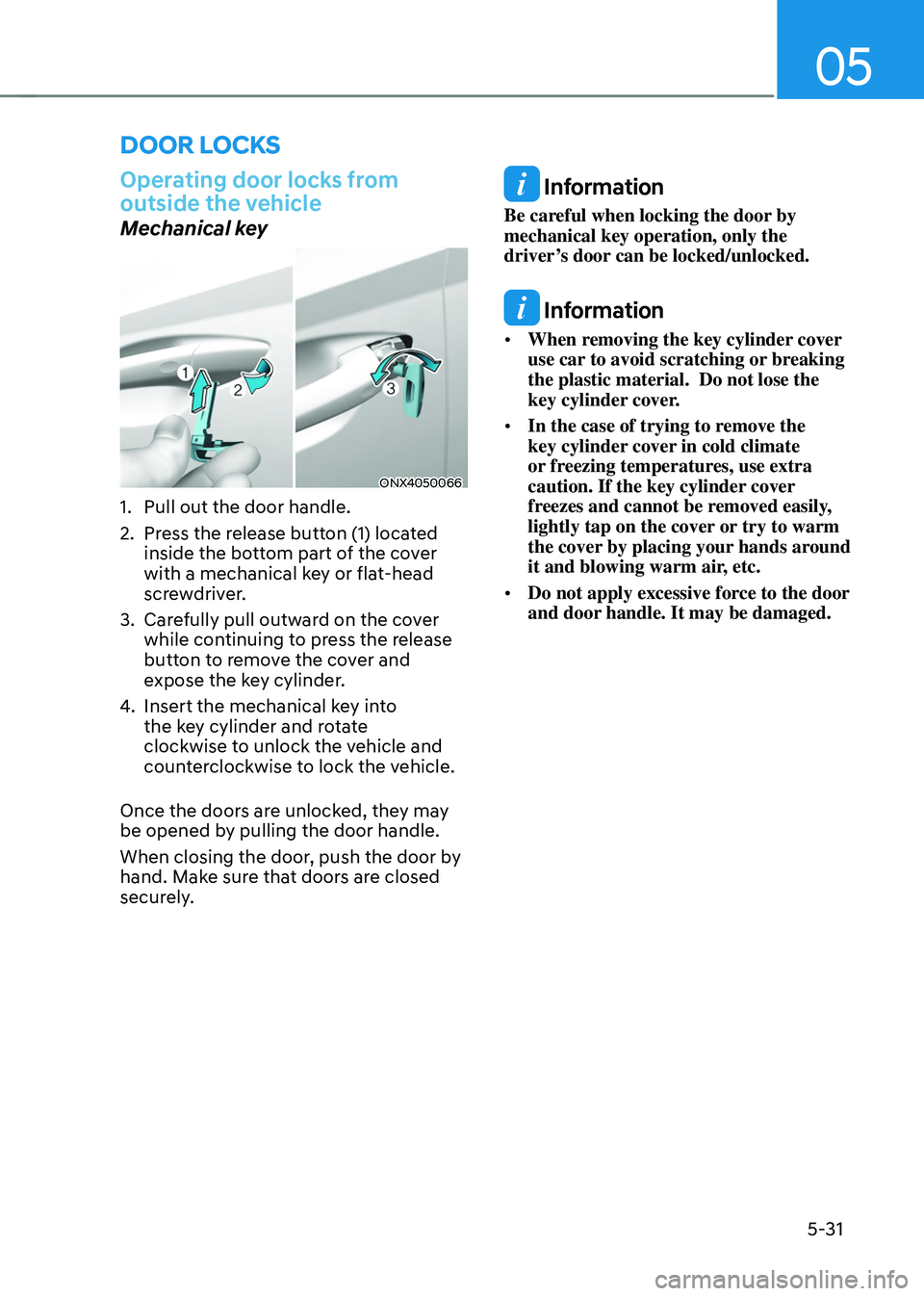
Operating door locks from
outside the vehicle
Mechanical key
ONX4050066
1. Pull out the door handle.
2. Press the release button (1) located
inside the bottom part of the cover
with a mechanical key or flat-head
screwdriver.
3. Carefully pull outward on the cover
while continuing to press the release
button to remove the cover and
expose the key cylinder.
4. Insert the mechanical key into
the key cylinder and rotate
clockwise to unlock the vehicle and
counterclockwise to lock the vehicle.
Once the doors are unlocked, they may
be opened by pulling the door handle.
When closing the door, push the door by
hand. Make sure that doors are closed
securely.
Information
Be careful when locking the door by
mechanical key operation, only the
driver’s door can be locked/unlocked.
Information
• When removing the key cylinder cover
use car to avoid scratching or breaking
the plastic material. Do not lose the
key cylinder cover.
• In the case of trying to remove the
key cylinder cover in cold climate
or freezing temperatures, use extra
caution. If the key cylinder cover
freezes and cannot be removed easily,
lightly tap on the cover or try to warm
the cover by placing your hands around
it and blowing warm air, etc.
• Do not apply excessive force to the door
and door handle. It may be damaged.
DOOR LOCKS
Page 176 of 638
Convenient features
5-32
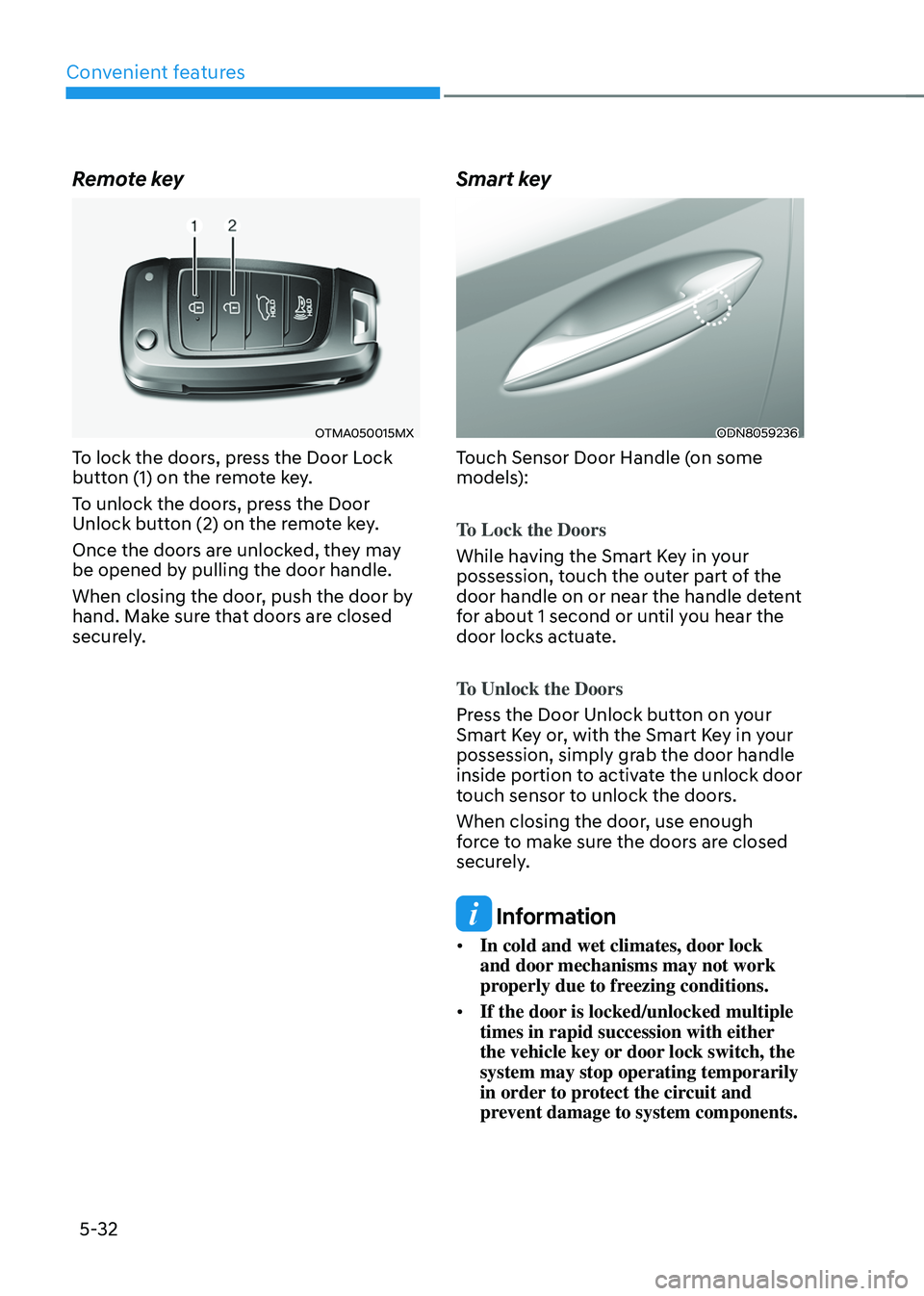
Remote key
OTMA050015MX
To lock the doors, press the Door Lock
button (1) on the remote key.
To unlock the doors, press the Door
Unlock button (2) on the remote key.
Once the doors are unlocked, they may
be opened by pulling the door handle.
When closing the door, push the door by
hand. Make sure that doors are closed
securely.
Smart key
ODN8059236
Touch Sensor Door Handle (on some
models):
To Lock the Doors
While having the Smart Key in your
possession, touch the outer part of the
door handle on or near the handle detent
for about 1 second or until you hear the
door locks actuate.
To Unlock the Doors
Press the Door Unlock button on your
Smart Key or, with the Smart Key in your
possession, simply grab the door handle
inside portion to activate the unlock door
touch sensor to unlock the doors.
When closing the door, use enough
force to make sure the doors are closed
securely.
Information
• In cold and wet climates, door lock
and door mechanisms may not work
properly due to freezing conditions.
• If the door is locked/unlocked multiple
times in rapid succession with either
the vehicle key or door lock switch, the
system may stop operating temporarily
in order to protect the circuit and
prevent damage to system components.