Evan HYUNDAI TUCSON 2022 Owners Manual
[x] Cancel search | Manufacturer: HYUNDAI, Model Year: 2022, Model line: TUCSON, Model: HYUNDAI TUCSON 2022Pages: 638, PDF Size: 82.3 MB
Page 156 of 638
Convenient features
5-12
Mechanical key
If the Smart Key does not operate
normally, you can lock or unlock the
driver’s door by using the mechanical
key.
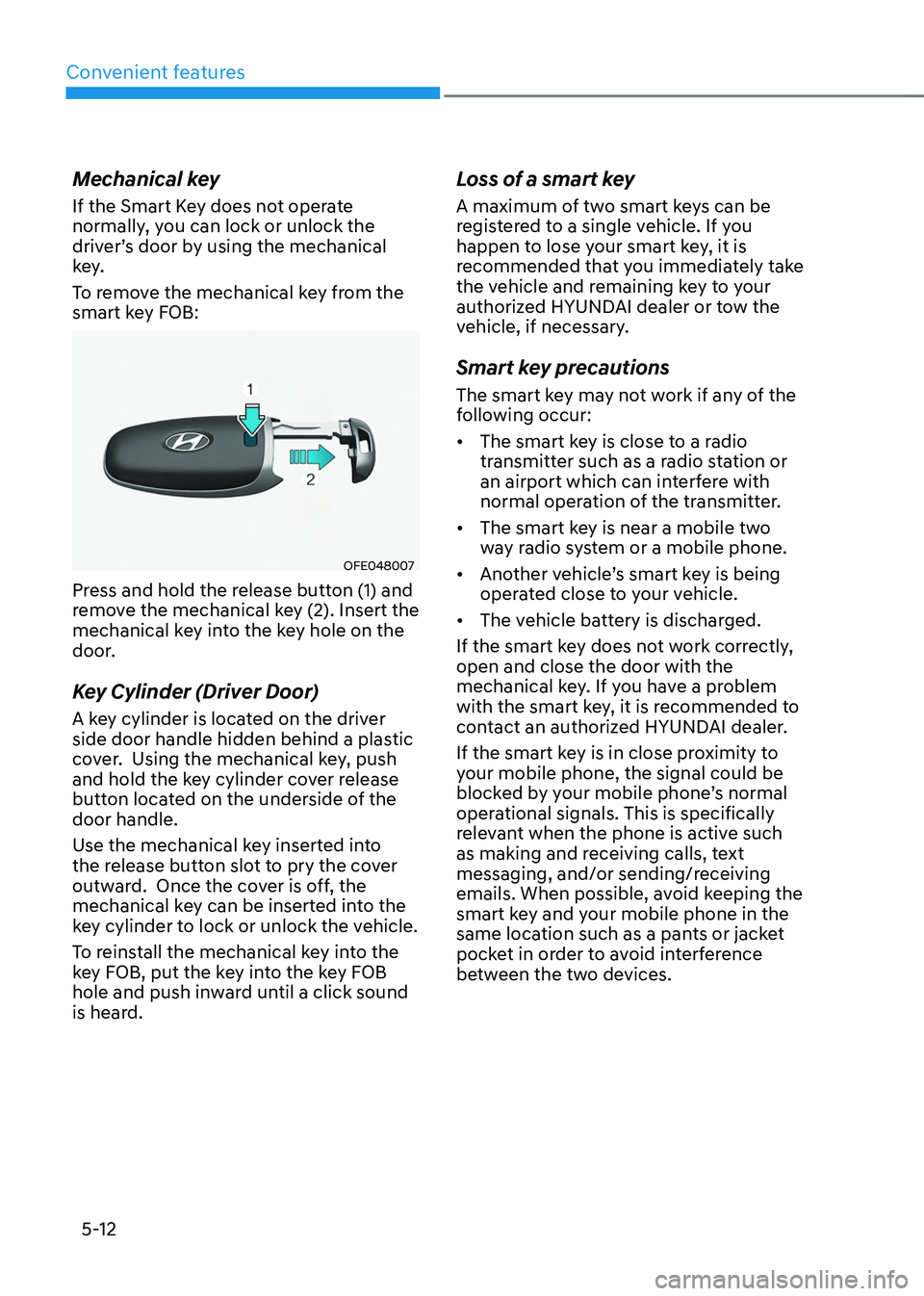
To remove the mechanical key from the
smart key FOB:
OFE048007
Press and hold the release button (1) and
remove the mechanical key (2). Insert the
mechanical key into the key hole on the
door.
Key Cylinder (Driver Door)
A key cylinder is located on the driver
side door handle hidden behind a plastic
cover. Using the mechanical key, push
and hold the key cylinder cover release
button located on the underside of the
door handle.
Use the mechanical key inserted into
the release button slot to pry the cover
outward. Once the cover is off, the
mechanical key can be inserted into the
key cylinder to lock or unlock the vehicle.
To reinstall the mechanical key into the
key FOB, put the key into the key FOB
hole and push inward until a click sound
is heard.
Loss of a smart key
A maximum of two smart keys can be
registered to a single vehicle. If you
happen to lose your smart key, it is
recommended that you immediately take
the vehicle and remaining key to your
authorized HYUNDAI dealer or tow the
vehicle, if necessary.
Smart key precautions
The smart key may not work if any of the
following occur:
• The smart key is close to a radio
transmitter such as a radio station or
an airport which can interfere with
normal operation of the transmitter.
• The smart key is near a mobile two
way radio system or a mobile phone.
• Another vehicle’s smart key is being
operated close to your vehicle.
• The vehicle battery is discharged.
If the smart key does not work correctly,
open and close the door with the
mechanical key. If you have a problem
with the smart key, it is recommended to
contact an authorized HYUNDAI dealer.
If the smart key is in close proximity to
your mobile phone, the signal could be
blocked by your mobile phone’s normal
operational signals. This is specifically
relevant when the phone is active such
as making and receiving calls, text
messaging, and/or sending/receiving
emails. When possible, avoid keeping the
smart key and your mobile phone in the
same location such as a pants or jacket
pocket in order to avoid interference
between the two devices.
Page 568 of 638
Maintenance
9-18
NOTICE
To prevent damage to your engine:
• Do not spill engine oil when adding
or changing engine oil. Wipe off
spilled oil immediately.
• The engine oil consumption may
increase while you break in a new
vehicle and it will be stabilized after
driving 4,000 miles (6,000 km).
• The engine oil consumption can be
affected by driving habits, climate
conditions, traffic conditions,
oil quality, etc. Therefore, it is
recommended that you inspect the
engine oil level regularly and refill it
if necessary.
Checking the Engine Oil and
Filter
• Have engine oil and filter changed
by an authorized HYUNDAI dealer
according to the Maintenance
Schedule at the beginning of this
chapter.
• If the maintenance schedule to
replace engine oil is exceeded,
the engine oil performance may
deteriorate, and the engine condition
may be affected. Therefore, replace
the engine oil according to the
maintenance schedule.
• To keep the engine in optimal
condition, use the recommended
engine oil and filter. If the
recommended engine oil and filter are
not used, replace it according to the
maintenance schedule under severe
usage conditions.
• The purpose of the maintenance
schedule for engine oil replacement
is to prevent oil deterioration and it is
irrelevant to oil consumption. Check
and refill engine oil regularly.