Hood HYUNDAI TUCSON 2022 Owners Manual
[x] Cancel search | Manufacturer: HYUNDAI, Model Year: 2022, Model line: TUCSON, Model: HYUNDAI TUCSON 2022Pages: 638, PDF Size: 82.3 MB
Page 14 of 638
2-2
Vehicle Information, Consumer Information and Reporting Safety Defects
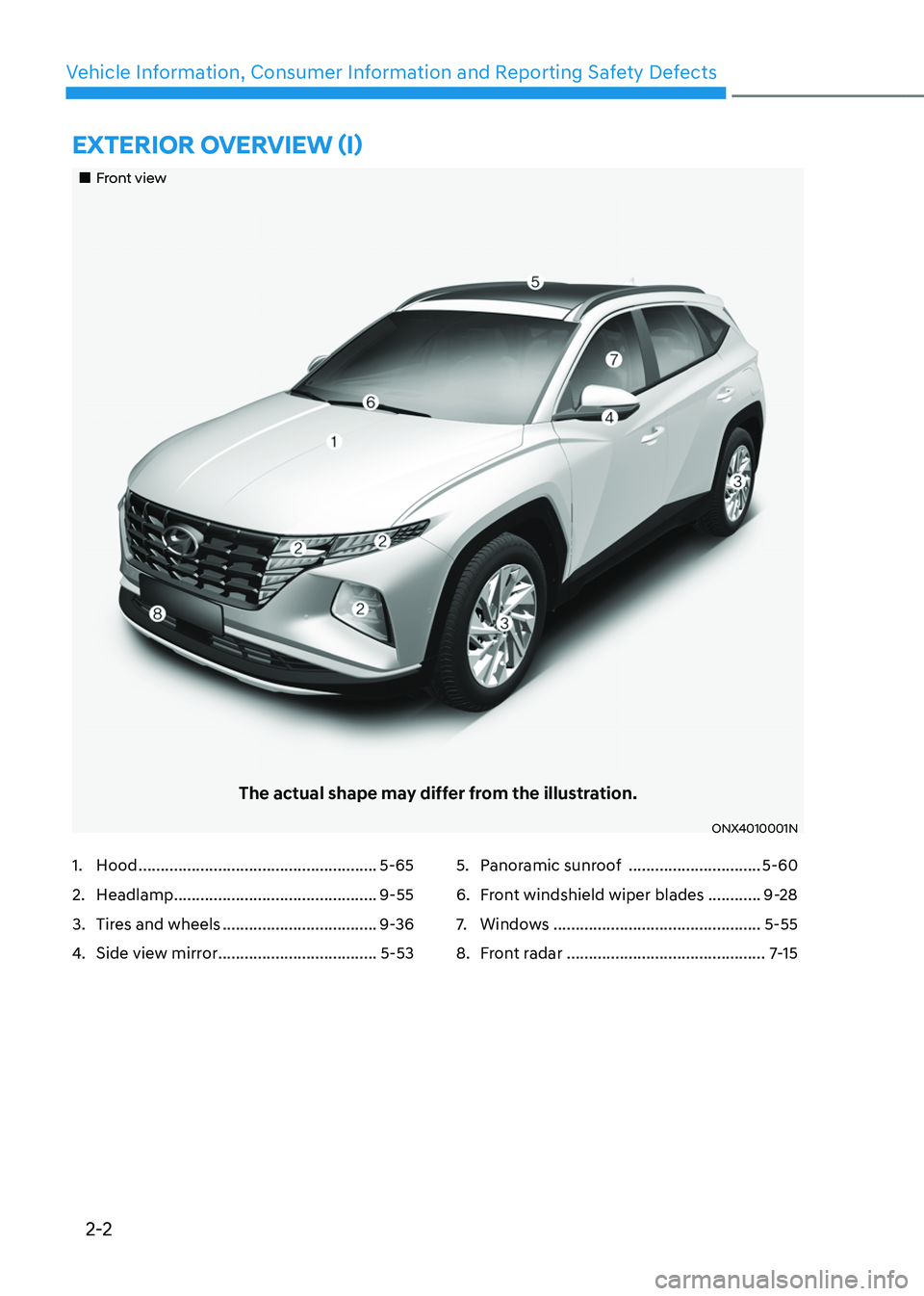
EXTERIOR OVERVIEW (I)
„„Front view
The actual shape may differ from the illustration.
ONX4010001N
1. Hood ......................................................5-65
2. Headlamp ..............................................9-55
3. Tires and wheels ...................................9-36
4. Side view mirror ....................................5-53
5. Panoramic sunroof ..............................5-60
6. Front windshield wiper blades ............9-28
7. Windows ...............................................5-55
8. Front radar .............................................7-15
Page 16 of 638

2-4
Vehicle Information, Consumer Information and Reporting Safety Defects
1. Inside door handle ................................5-33
2. Power window switches ......................5-55
3. Power window lock button ..................5-58
4. Outside rearview mirror control
switch
....................................................5-54
5. Driver door lock switch ........................5-34
6. Instrument panel illumination control
switch
......................................................4-5
7. Power liftgate button ...........................5-69
8. ESC OFF button ....................................6-35
9. Steering wheel ......................................5-40
10. Steering wheel tilt/telescopic lever .....5-41
11. Fuse box ................................................9-45
12. Hood release lever ................................5-65
13. Seat ..........................................................3-3
INTERIOR OVERVIEW
„„Type A
The actual shape may differ from the illustration.
ONX4010003N
Page 17 of 638

2-5
02
1. Inside door handle ................................5-33
2. Power window switches ......................5-55
3. Power window lock button ..................5-58
4. Outside rearview mirror control
switch
....................................................5-54
5. Driver door lock switch ........................5-34
6. Instrument panel illumination control
switch
......................................................4-5
7. Power liftgate button ...........................5-69
8. ESC OFF button ....................................6-35
9. Steering wheel ......................................5-40
10. Steering wheel tilt/telescopic lever .....5-41
11. Fuse box ................................................9-45
12. Hood release lever ................................5-65
13. Seat ..........................................................3-3
„„Type B
The actual shape may differ from the illustration.
ONX4010010N
Page 100 of 638

AUTO STOP indicator light ........................................................................\
..............4-20
Turn signal indicator light ........................................................................\
.................4-21
High beam indicator light ........................................................................\
................4-21
High Beam Assist indicator light ........................................................................\
......4-21
Cruise Indicator Light ........................................................................\
.......................4-21
SPORT Mode Indicator Light ........................................................................\
...........4-22
SMART Mode Indicator Light ........................................................................\
..........4-22
Master warning light ........................................................................\
........................4-22
LCD display messages for vehicles equipped with Smart Key ...............................4-23
Shift to P ........................................................................\
...........................................4-23
Low key battery ........................................................................\
................................4-23
Press START button while turning wheel ...............................................................4-23
Check steering wheel lock system ........................................................................\
.4-23
Press brake pedal to start engine ........................................................................\
..4-23
Key not in vehicle ........................................................................\
.............................4-23
Key not detected ........................................................................\
..............................4-23
Press START button again ........................................................................\
..............4-23
Press START button with key ........................................................................\
..........4-24
Check BRAKE SWITCH fuse ........................................................................\
...........4-24
Shift to P or N to start engine ........................................................................\
.........4-24
Battery discharging due to external electrical devices .........................................4-24
Door, Hood, Liftgate open indicator
.......................................................................4-25
Sunroof open indicator ........................................................................\
....................4-25
Low tire pressure ........................................................................\
.............................4-25
Lights ........................................................................\
................................................4-26
Wiper ........................................................................\
................................................4-26
Low washer fluid ........................................................................\
..............................4-26
Low fuel ........................................................................\
............................................4-26
Low engine oil ........................................................................\
..................................4-26
Engine overheated / Engine has overheated .........................................................4-27
Check exhaust system ........................................................................\
.....................4-27
Check headlight ........................................................................\
...............................4-27
Check turn signal ........................................................................\
.............................4-27
Check headlamp LED ........................................................................\
......................4-27
Check Forward Collision-Avoidance Assist system ...............................................4-28
Check Lane Keeping Assist system ........................................................................\
4-28
Check Blind-Spot Collision Warning system ..........................................................4-28
Check Driver Attention Warning system
................................................................4-28
Check High Beam Assist system ........................................................................\
.....4-28
Check Smart Cruise Control system .......................................................................4-28
4
Page 123 of 638
04
4-25
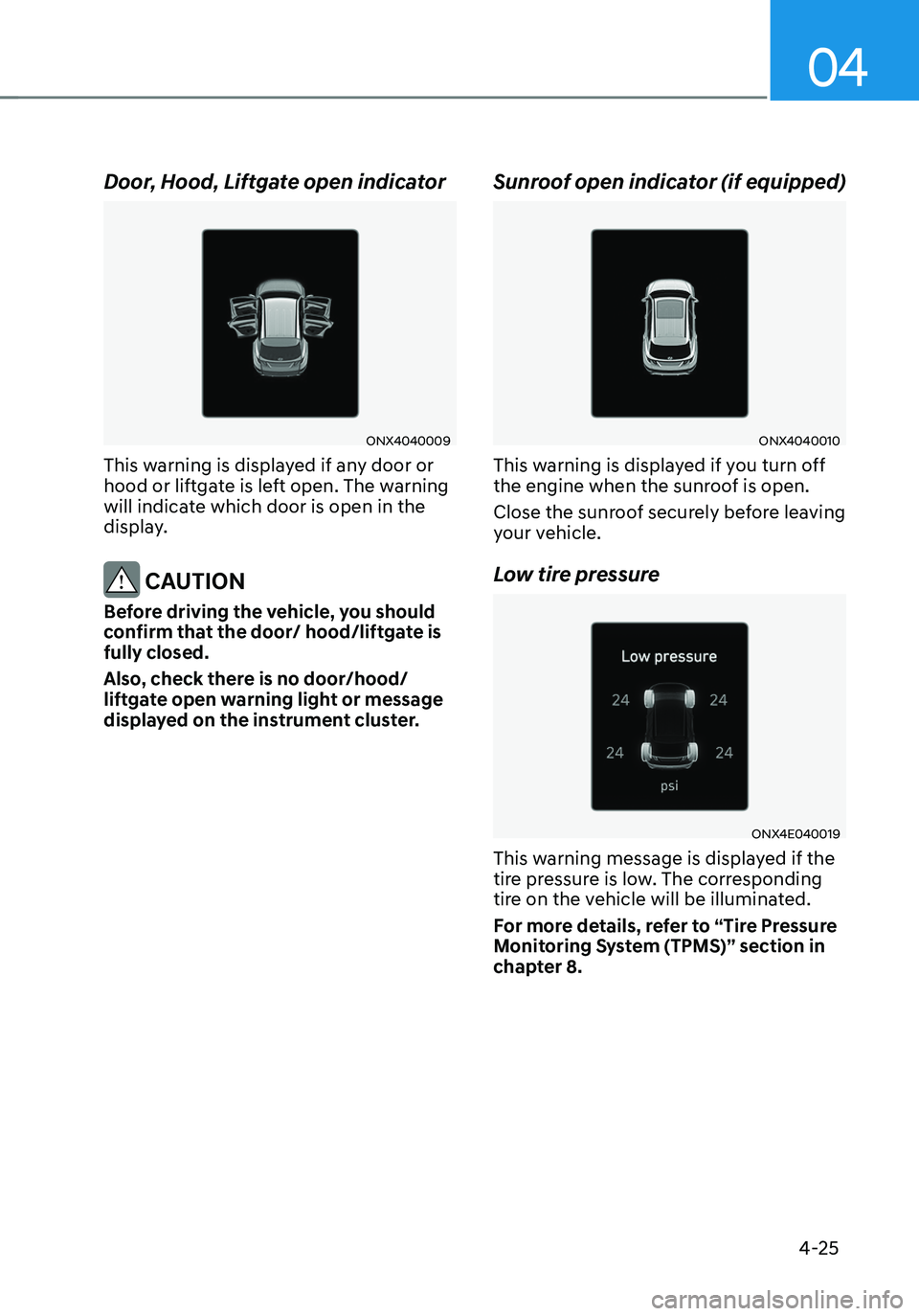
Door, Hood, Liftgate open indicator
ONX4040009
This warning is displayed if any door or
hood or liftgate is left open. The warning
will indicate which door is open in the
display.
CAUTION
Before driving the vehicle, you should
confirm that the door/ hood/liftgate is
fully closed.
Also, check there is no door/hood/
liftgate open warning light or message
displayed on the instrument cluster.
Sunroof open indicator (if equipped)
ONX4040010
This warning is displayed if you turn off
the engine when the sunroof is open.
Close the sunroof securely before leaving
your vehicle.
Low tire pressure
ONX4E040019
This warning message is displayed if the
tire pressure is low. The corresponding
tire on the vehicle will be illuminated.
For more details, refer to “Tire Pressure
Monitoring System (TPMS)” section in
chapter 8.
Page 145 of 638

Convenient features
Accessing your vehicle ........................................................................\
.............5-4Remote key ........................................................................\
...........................................5-4
Smart key ........................................................................\
..............................................5 -7
Immobilizer system ........................................................................\
............................5-14
Hyundai Digital Key ........................................................................\
.............................5-15
Door locks........................................................................\
................................. 5-31Operating door locks from outside the vehicle.........................................................5-31
Operating door unlocks from inside the vehicle ......................................................5-33
Auto door lock/unlock features ........................................................................\
......... 5-35
Child-protector rear door locks
........................................................................\
.........5-35
Theft-alarm system ........................................................................\
.................5-36
Integrated memory system
........................................................................\
.....5-37Storing memory positions ........................................................................\
.................5-37
Recalling memory positions ........................................................................\
..............5-38
Resetting the system ........................................................................\
.........................5-38
Seat Easy Access Operation ........................................................................\
..............5-39
Steering wheel ........................................................................\
........................5-40Electric Power Steering (EPS) ........................................................................\
...........5-40
Tilt / Telescopic steering ........................................................................\
....................5-41
Heated steering wheel ........................................................................\
.......................5-41
Horn ........................................................................\
..................................................... 5-42
Mirrors ........................................................................\
.....................................5-43Inside rearview mirror ........................................................................\
........................5-43
Side View mirrors ........................................................................\
...............................5-53
Windows ........................................................................\
..................................5-55Power windows ........................................................................\
..................................5-56
Panoramic sunroof ........................................................................\
..................5-60Power sunshade ........................................................................\
...............................5-60
Tilt open/close ........................................................................\
...................................5-61
Slide open/close ........................................................................\
................................5-61
Automatic reversal ........................................................................\
............................5-62
Resetting the sunroof ........................................................................\
........................5-63
Sunroof open warning ........................................................................\
......................5-64
Exterior features ........................................................................\
......................5-65Hood ........................................................................\
....................................................5-65
Liftgate ........................................................................\
...............................................5-66
Power liftgate ........................................................................\
....................................5-68
Smart liftgate ........................................................................\
......................................5 -74
Fuel filler door ........................................................................\
..................................... 5 -76
5. Convenient features
5
Page 148 of 638
Convenient features
5-4
Remote key (if equipped)
OPD046001
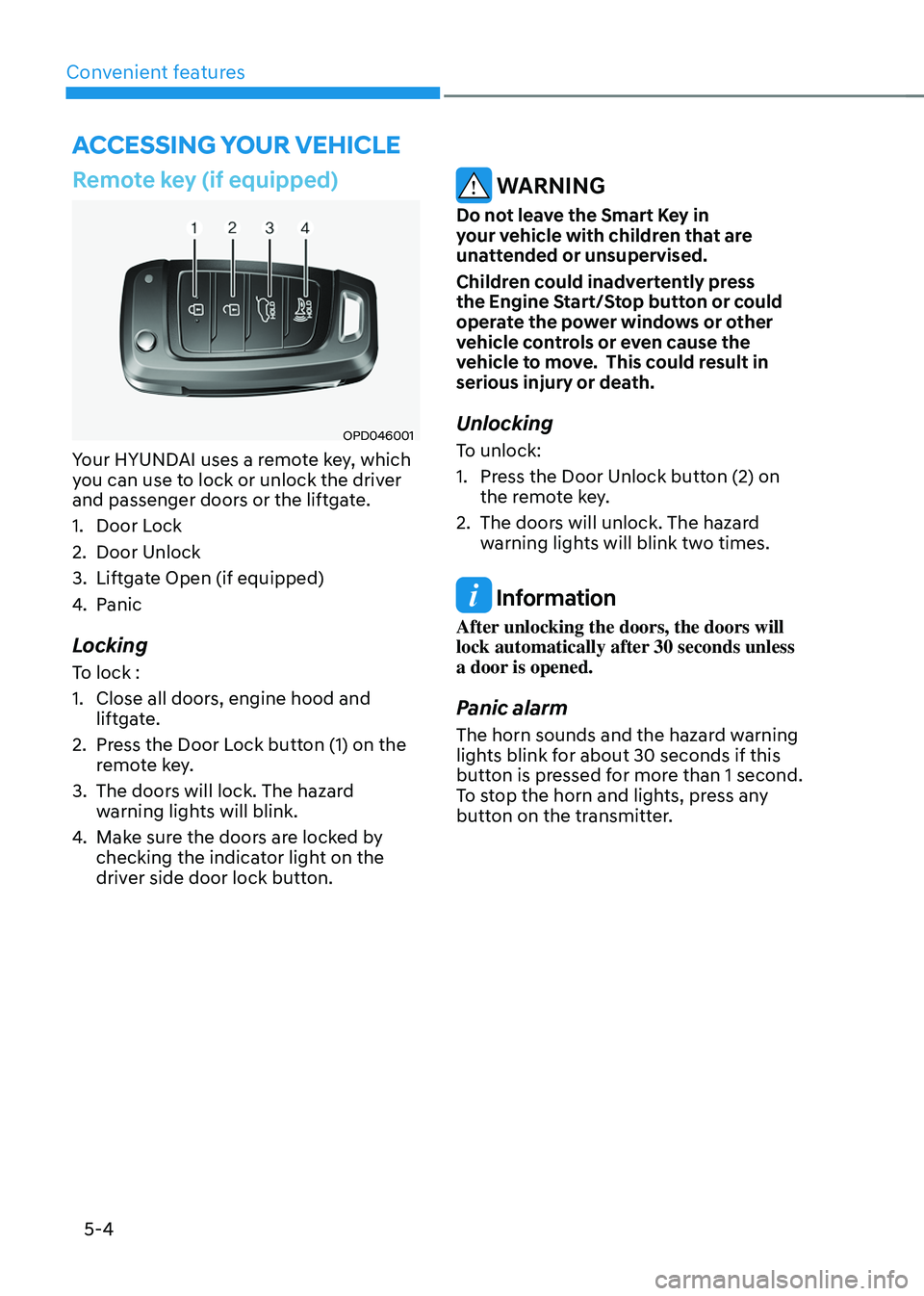
Your HYUNDAI uses a remote key, which
you can use to lock or unlock the driver
and passenger doors or the liftgate.
1. Door Lock
2. Door Unlock
3. Liftgate Open (if equipped)
4. Panic
Locking
To lock :
1. Close all doors, engine hood and
liftgate.
2. Press the Door Lock button (1) on the
remote key.
3. The doors will lock. The hazard
warning lights will blink.
4. Make sure the doors are locked by
checking the indicator light on the
driver side door lock button.
WARNING
Do not leave the Smart Key in
your vehicle with children that are
unattended or unsupervised.
Children could inadvertently press
the Engine Start/Stop button or could
operate the power windows or other
vehicle controls or even cause the
vehicle to move. This could result in
serious injury or death.
Unlocking
To unlock:
1. Press the Door Unlock button (2) on
the remote key.
2. The doors will unlock. The hazard
warning lights will blink two times.
Information
After unlocking the doors, the doors will
lock automatically after 30 seconds unless
a door is opened.
Panic alarm
The horn sounds and the hazard warning
lights blink for about 30 seconds if this
button is pressed for more than 1 second.
To stop the horn and lights, press any
button on the transmitter.
ACCESSING YOUR VEHICLE
Page 152 of 638
Convenient features
5-8
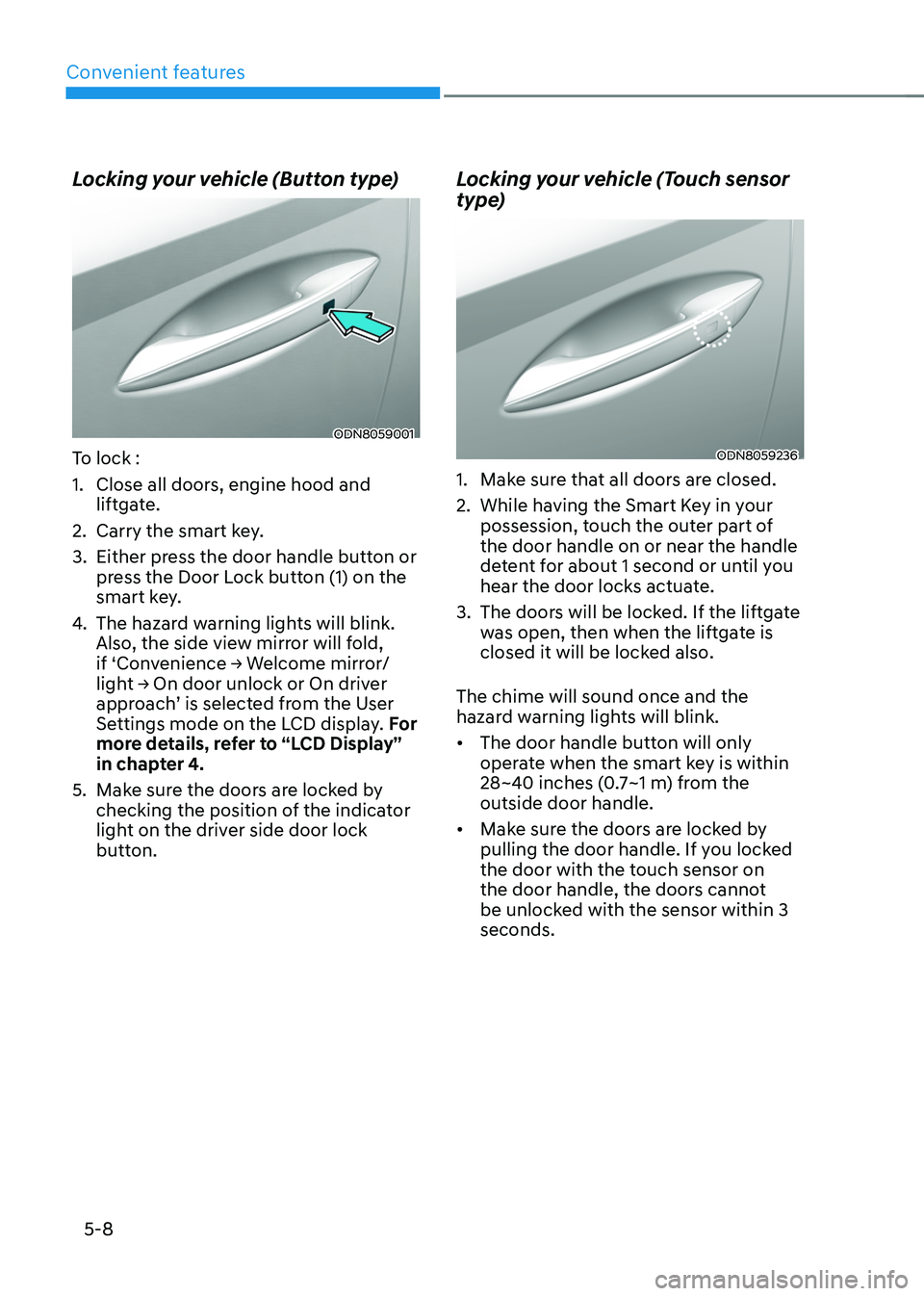
Locking your vehicle (Button type)
ODN8059001
To lock :
1. Close all doors, engine hood and
liftgate.
2. Carry the smart key.
3. Either press the door handle button or
press the Door Lock button (1) on the
smart key.
4. The hazard warning lights will blink.
Also, the side view mirror will fold,
if ‘Convenience → Welcome mirror/light → On door unlock or On driver approach’ is selected from the User
Settings mode on the LCD display. For
more details, refer to “LCD Display”
in chapter 4.
5. Make sure the doors are locked by
checking the position of the indicator
light on the driver side door lock
button.
Locking your vehicle (Touch sensor
type)
ODN8059236
1. Make sure that all doors are closed.
2. While having the Smart Key in your
possession, touch the outer part of
the door handle on or near the handle
detent for about 1 second or until you
hear the door locks actuate.
3. The doors will be locked. If the liftgate
was open, then when the liftgate is
closed it will be locked also.
The chime will sound once and the
hazard warning lights will blink.
• The door handle button will only
operate when the smart key is within
28~40 inches (0.7~1 m) from the
outside door handle.
• Make sure the doors are locked by
pulling the door handle. If you locked
the door with the touch sensor on
the door handle, the doors cannot
be unlocked with the sensor within 3
seconds.
Page 155 of 638
05
5-11
Information
• The vehicle must be in P (Park) for the
remote start function to start.
• The engine turns off if you get on the
vehicle without a registered smart key.
• The engine turns off if you do not get
on the vehicle within 10 minutes after
remotely starting the vehicle.
• The Remote Start button may not
operate if the smart key is not within 32
feet (10 m).
• The vehicle will not remotely start if the
engine hood or liftgate is opened.
• Do not idle the engine for a long period.
Remote Smart Parking Assist
Feature (if equipped)
Some models are equipped with Remote
Smart Parking Assist Feature. With the
Smart Key, the vehicle can be moved
forward or backward remotely to enter or
exit a tight parking space.
For more details, refer to “Remote
Smart Parking Assist (RSPA)” section in
chapter 7.
Panic alarm
The horn sounds and the hazard warning
lights blink for about 30 seconds if this
button is pressed for more than 1 second
To stop the horn and lights, press any
button on the transmitter.
Push Button Start/Stop (if equipped)
Some models are equipped with a push
button start instead of a key cylinder.
You can leave your Smart Key in your
pocket or purse when you start your
vehicle.
For more details, refer to the “Engine
Start/Stop Button” section in chapter 6.
Information
If the smart key is not moved for some
time, the detection function for smart key
operation will pause. Lift the smart key to
activate the detection again.
NOTICE
To prevent damaging the smart key:
• Keep the smart key in a cool,
dry place to avoid damage or
malfunction. Exposure to moisture
or high temperature may cause
the internal circuit of the smart key
to malfunction which may not be
covered under warranty.
• Avoid dropping or throwing the
smart key.
• Protect the smart key from extreme
temperatures.
Page 162 of 638
Convenient features
5-18
Set up main vehicle
You can manage multiple digital keys
from the Digital key app. From the list of
digital keys you own, select the vehicle
you want to make your priority vehicle.
For more information, please refer to
the ‘Tutorial’ on your Digital key app.
ONX4050001
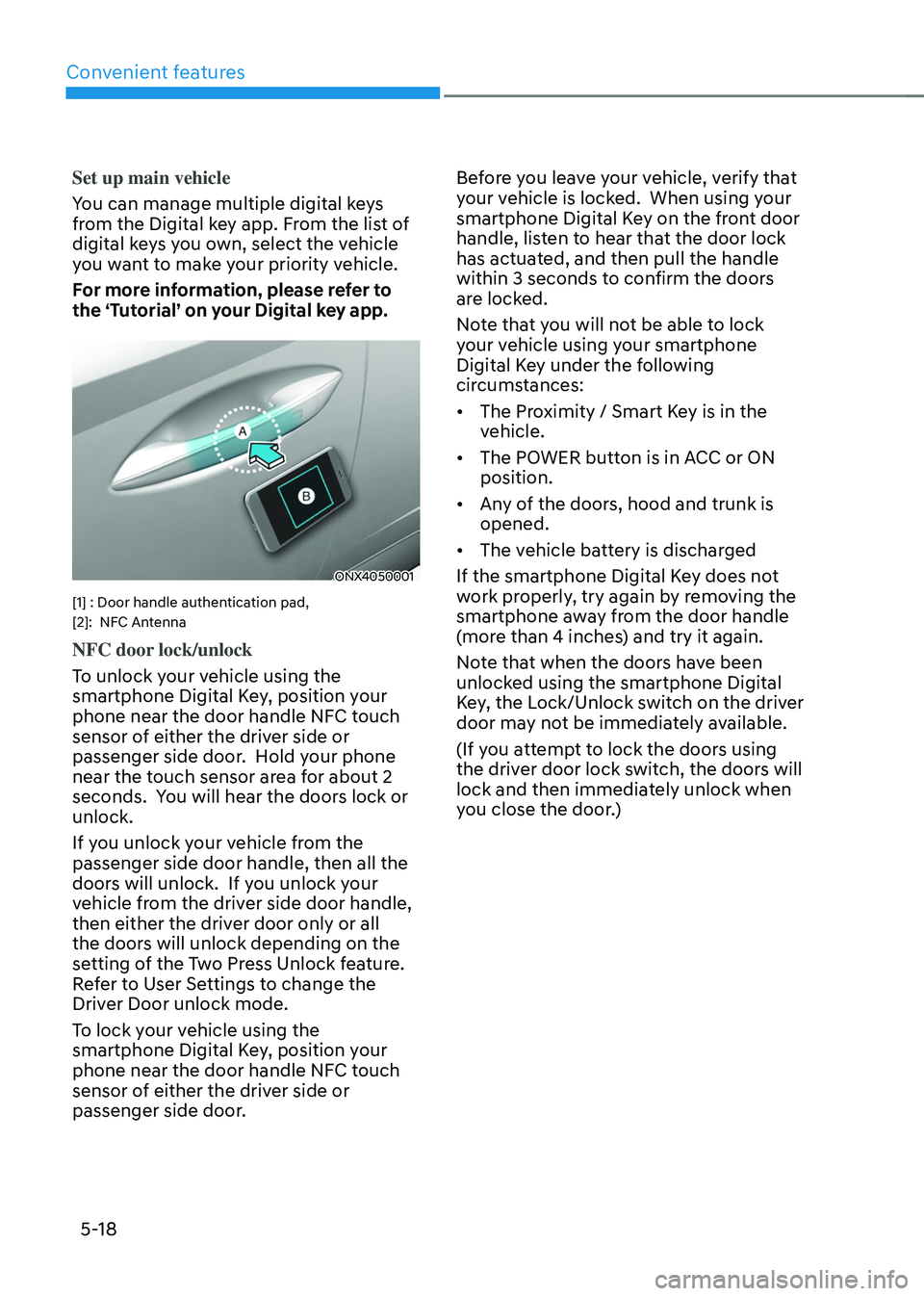
[1] : Door handle authentication pad,
[2]: NFC Antenna
NFC door lock/unlock
To unlock your vehicle using the
smartphone Digital Key, position your
phone near the door handle NFC touch
sensor of either the driver side or
passenger side door. Hold your phone
near the touch sensor area for about 2
seconds. You will hear the doors lock or
unlock.
If you unlock your vehicle from the
passenger side door handle, then all the
doors will unlock. If you unlock your
vehicle from the driver side door handle,
then either the driver door only or all
the doors will unlock depending on the
setting of the Two Press Unlock feature.
Refer to User Settings to change the
Driver Door unlock mode.
To lock your vehicle using the
smartphone Digital Key, position your
phone near the door handle NFC touch
sensor of either the driver side or
passenger side door. Before you leave your vehicle, verify that
your vehicle is locked. When using your
smartphone Digital Key on the front door
handle, listen to hear that the door lock
has actuated, and then pull the handle
within 3 seconds to confirm the doors
are locked.
Note that you will not be able to lock
your vehicle using your smartphone
Digital Key under the following
circumstances:
•
The Proximity / Smart Key is in the
vehicle.
• The POWER button is in ACC or ON
position.
• Any of the doors, hood and trunk is
opened.
• The vehicle battery is discharged
If the smartphone Digital Key does not
work properly, try again by removing the
smartphone away from the door handle
(more than 4 inches) and try it again.
Note that when the doors have been
unlocked using the smartphone Digital
Key, the Lock/Unlock switch on the driver
door may not be immediately available.
(If you attempt to lock the doors using
the driver door lock switch, the doors will
lock and then immediately unlock when
you close the door.)