sun HYUNDAI TUCSON 2022 Owners Manual
[x] Cancel search | Manufacturer: HYUNDAI, Model Year: 2022, Model line: TUCSON, Model: HYUNDAI TUCSON 2022Pages: 638, PDF Size: 82.3 MB
Page 14 of 638
2-2
Vehicle Information, Consumer Information and Reporting Safety Defects
EXTERIOR OVERVIEW (I)
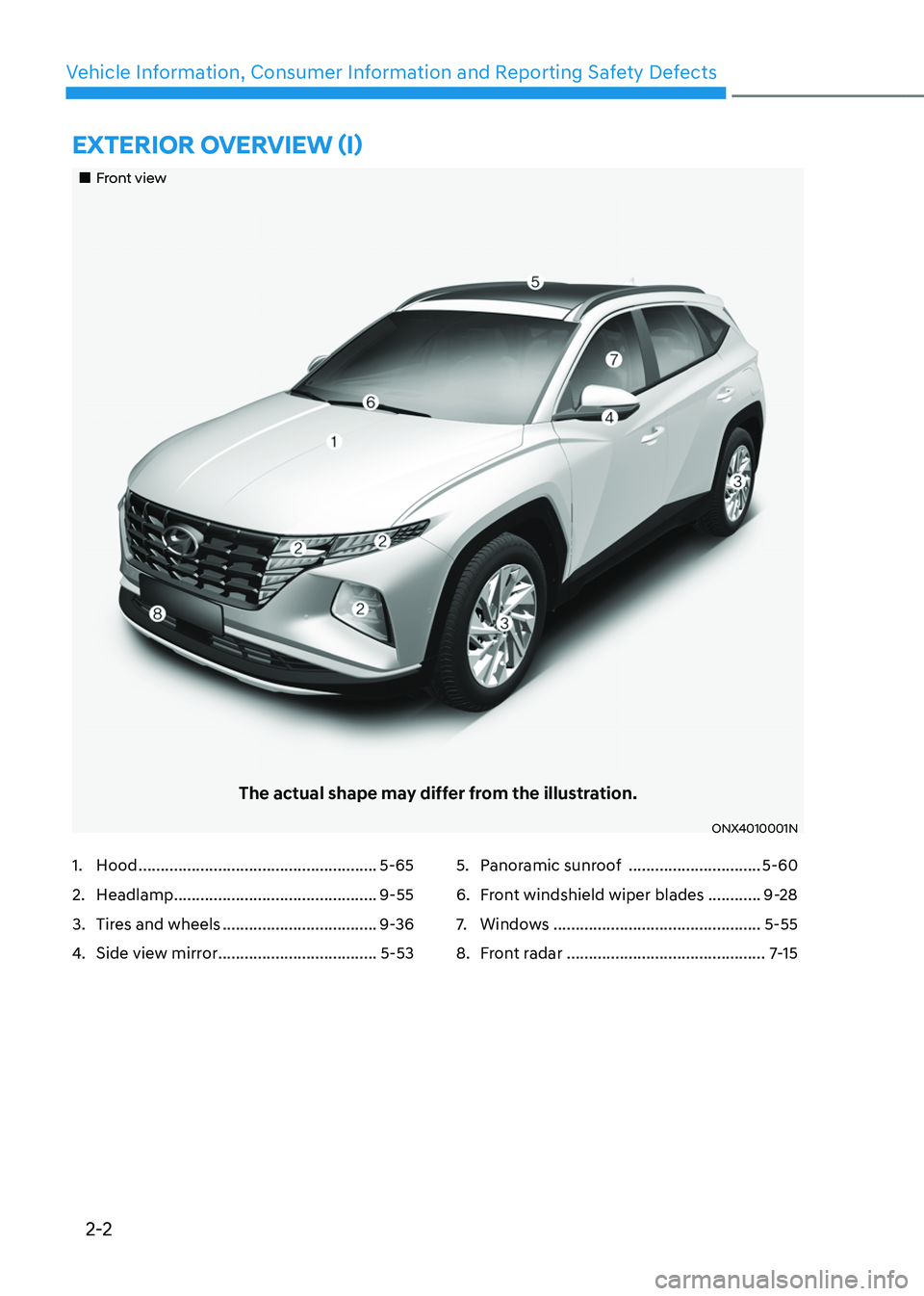
„„Front view
The actual shape may differ from the illustration.
ONX4010001N
1. Hood ......................................................5-65
2. Headlamp ..............................................9-55
3. Tires and wheels ...................................9-36
4. Side view mirror ....................................5-53
5. Panoramic sunroof ..............................5-60
6. Front windshield wiper blades ............9-28
7. Windows ...............................................5-55
8. Front radar .............................................7-15
Page 23 of 638
02
2-11
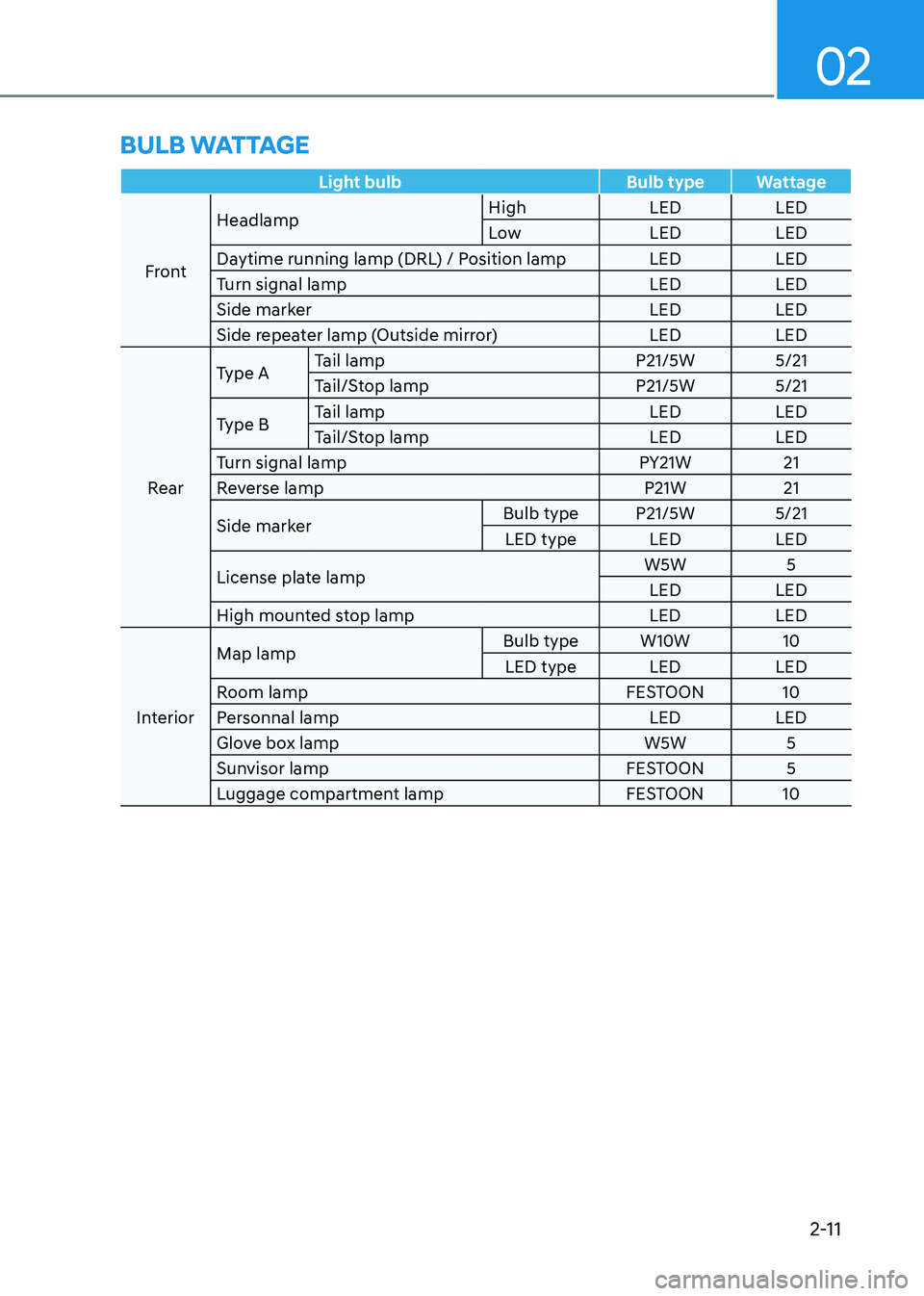
Light bulbBulb typeWattage
Front Headlamp
High
LEDLED
Low LEDLED
Daytime running lamp (DRL) / Position lamp LEDLED
Turn signal lamp LEDLED
Side marker LEDLED
Side repeater lamp (Outside mirror) LEDLED
Rear Type A
Tail lamp
P21/5W5/21
Tail/Stop lamp P21/5W5/21
Type B Tail lamp
LEDLED
Tail/Stop lamp LEDLED
Turn signal lamp PY21W21
Reverse lamp P21W21
Side marker Bulb type
P21/5W 5/21
LED type LEDLED
License plate lamp W5W
5
LED LED
High mounted stop lamp LEDLED
Interior Map lamp
Bulb type
W10W 10
LED type LEDLED
Room lamp FESTOON10
Personnal lamp LEDLED
Glove box lamp W5W5
Sunvisor lamp FESTOON5
Luggage compartment lamp FESTOON10
BULB WATTAGE
Page 46 of 638
03
3-15
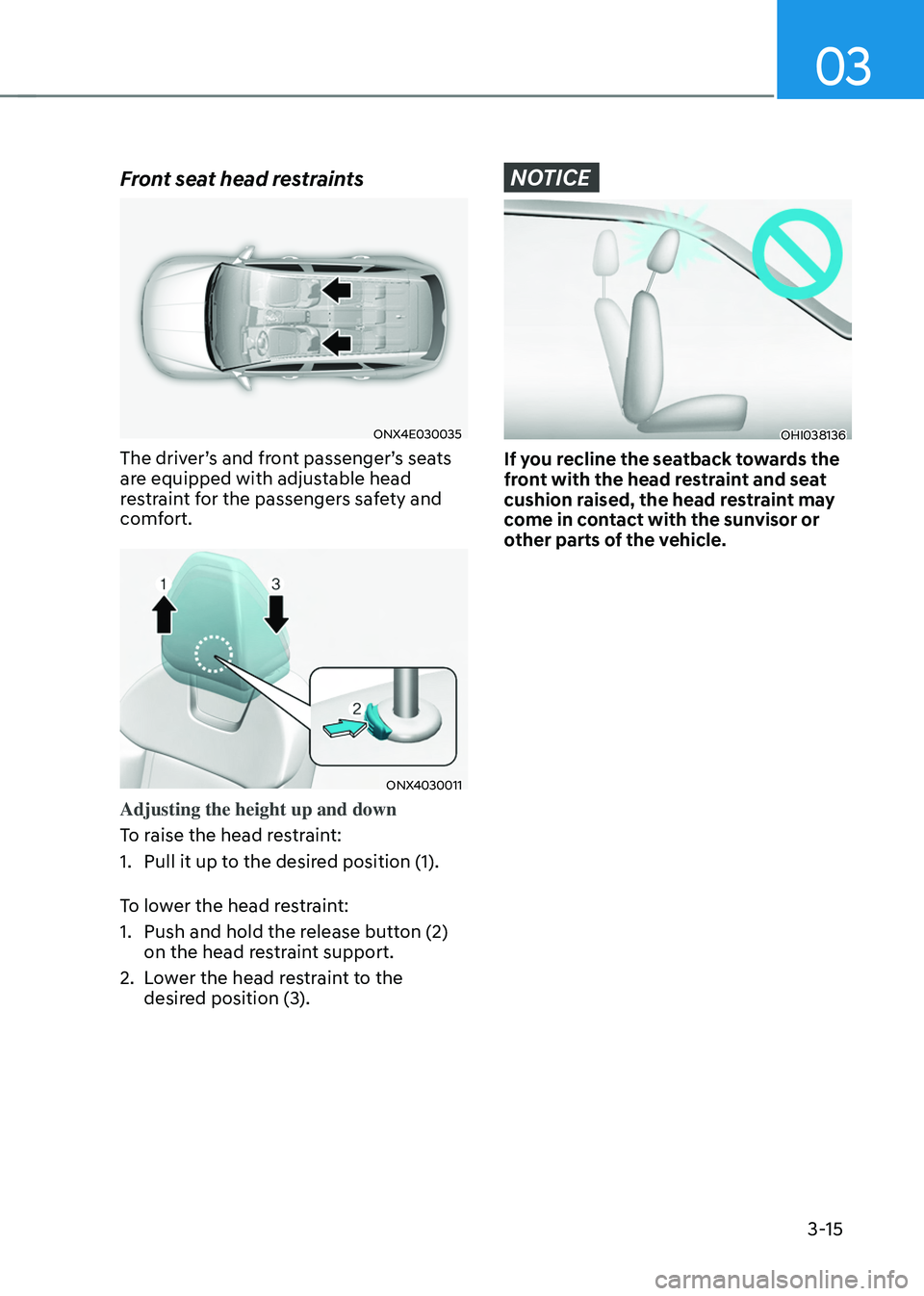
Front seat head restraints
ONX4E030035
The driver’s and front passenger’s seats
are equipped with adjustable head
restraint for the passengers safety and
comfort.
ONX4030011
Adjusting the height up and down
To raise the head restraint:
1. Pull it up to the desired position (1).
To lower the head restraint:
1. Push and hold the release button (2)
on the head restraint support.
2. Lower the head restraint to the
desired position (3).
NOTICE
OHI038136
If you recline the seatback towards the
front with the head restraint and seat
cushion raised, the head restraint may
come in contact with the sunvisor or
other parts of the vehicle.
Page 100 of 638

AUTO STOP indicator light ........................................................................\
..............4-20
Turn signal indicator light ........................................................................\
.................4-21
High beam indicator light ........................................................................\
................4-21
High Beam Assist indicator light ........................................................................\
......4-21
Cruise Indicator Light ........................................................................\
.......................4-21
SPORT Mode Indicator Light ........................................................................\
...........4-22
SMART Mode Indicator Light ........................................................................\
..........4-22
Master warning light ........................................................................\
........................4-22
LCD display messages for vehicles equipped with Smart Key ...............................4-23
Shift to P ........................................................................\
...........................................4-23
Low key battery ........................................................................\
................................4-23
Press START button while turning wheel ...............................................................4-23
Check steering wheel lock system ........................................................................\
.4-23
Press brake pedal to start engine ........................................................................\
..4-23
Key not in vehicle ........................................................................\
.............................4-23
Key not detected ........................................................................\
..............................4-23
Press START button again ........................................................................\
..............4-23
Press START button with key ........................................................................\
..........4-24
Check BRAKE SWITCH fuse ........................................................................\
...........4-24
Shift to P or N to start engine ........................................................................\
.........4-24
Battery discharging due to external electrical devices .........................................4-24
Door, Hood, Liftgate open indicator
.......................................................................4-25
Sunroof open indicator ........................................................................\
....................4-25
Low tire pressure ........................................................................\
.............................4-25
Lights ........................................................................\
................................................4-26
Wiper ........................................................................\
................................................4-26
Low washer fluid ........................................................................\
..............................4-26
Low fuel ........................................................................\
............................................4-26
Low engine oil ........................................................................\
..................................4-26
Engine overheated / Engine has overheated .........................................................4-27
Check exhaust system ........................................................................\
.....................4-27
Check headlight ........................................................................\
...............................4-27
Check turn signal ........................................................................\
.............................4-27
Check headlamp LED ........................................................................\
......................4-27
Check Forward Collision-Avoidance Assist system ...............................................4-28
Check Lane Keeping Assist system ........................................................................\
4-28
Check Blind-Spot Collision Warning system ..........................................................4-28
Check Driver Attention Warning system
................................................................4-28
Check High Beam Assist system ........................................................................\
.....4-28
Check Smart Cruise Control system .......................................................................4-28
4
Page 123 of 638
04
4-25
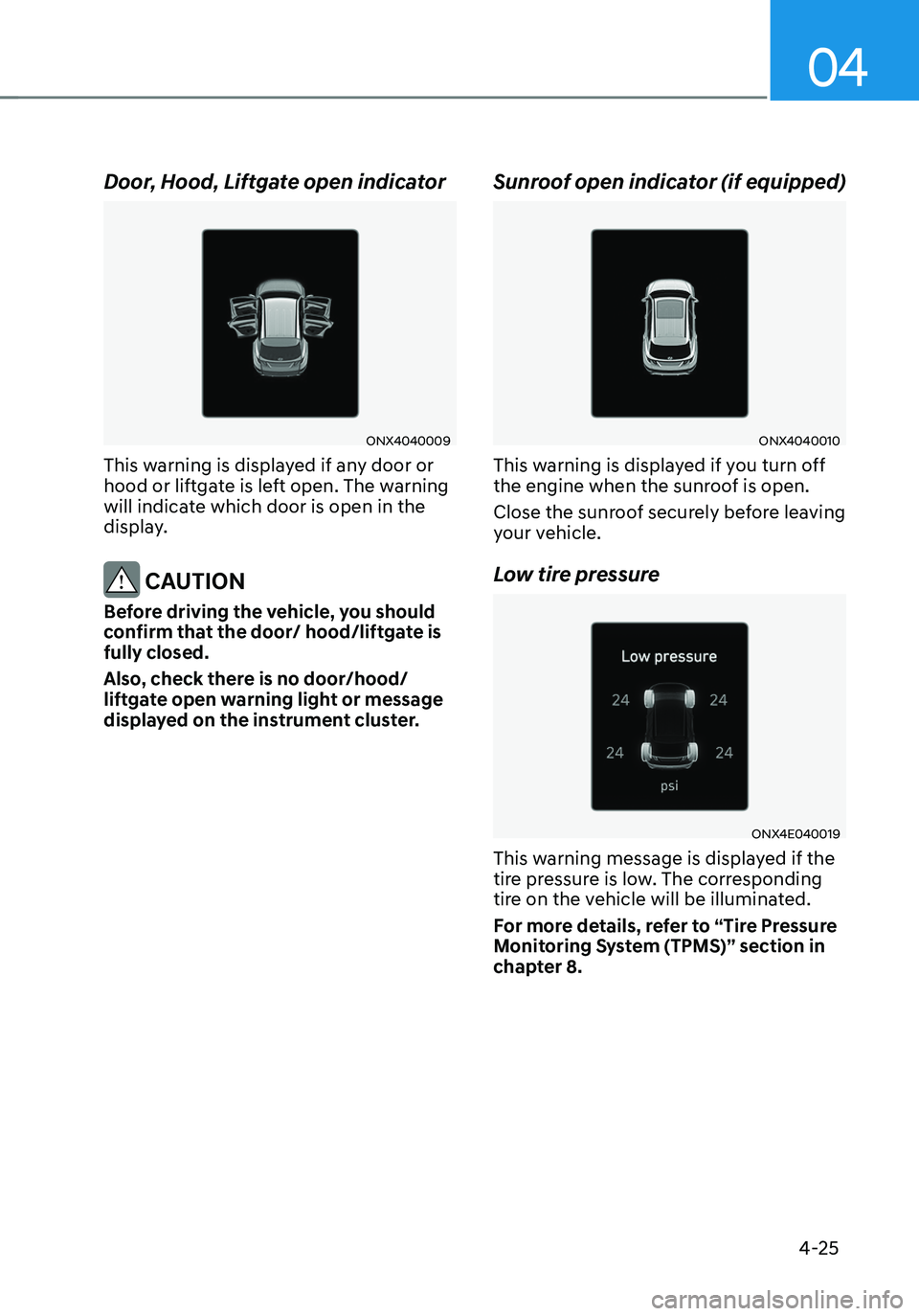
Door, Hood, Liftgate open indicator
ONX4040009
This warning is displayed if any door or
hood or liftgate is left open. The warning
will indicate which door is open in the
display.
CAUTION
Before driving the vehicle, you should
confirm that the door/ hood/liftgate is
fully closed.
Also, check there is no door/hood/
liftgate open warning light or message
displayed on the instrument cluster.
Sunroof open indicator (if equipped)
ONX4040010
This warning is displayed if you turn off
the engine when the sunroof is open.
Close the sunroof securely before leaving
your vehicle.
Low tire pressure
ONX4E040019
This warning message is displayed if the
tire pressure is low. The corresponding
tire on the vehicle will be illuminated.
For more details, refer to “Tire Pressure
Monitoring System (TPMS)” section in
chapter 8.
Page 135 of 638
04
4-37
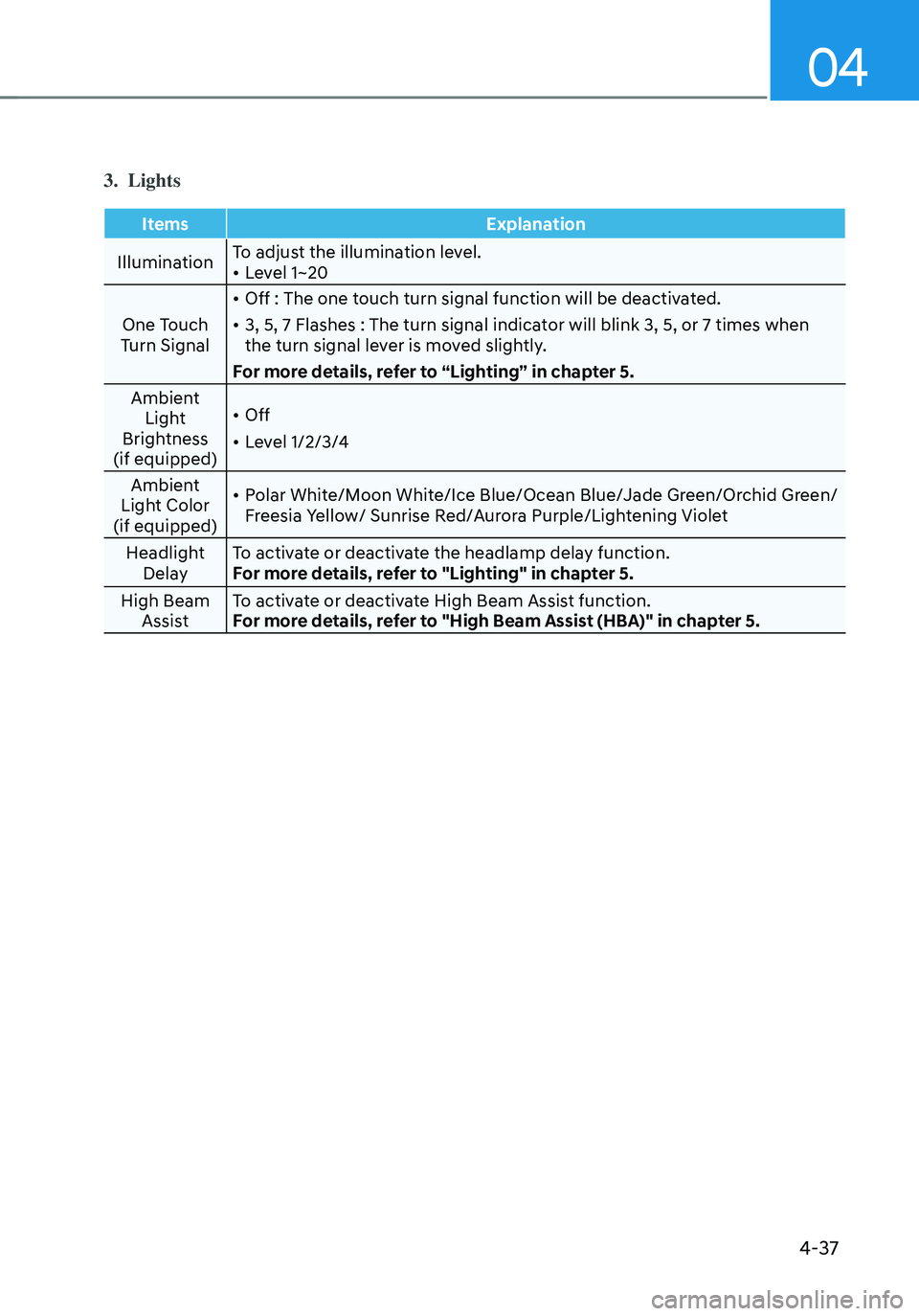
3. Lights
ItemsExplanation
Illumination To adjust the illumination level.
• Level 1~20
One Touch
Turn Signal
• Off : The one touch turn signal function will be deactivated.
• 3, 5, 7 Flashes : The turn signal indicator will blink 3, 5, or 7 times when
the turn signal lever is moved slightly.
For more details, refer to “Lighting” in chapter 5.
Ambient Light
Brightness
(if equipped)
• Off
• Level 1/2/3/4
Ambient
Light Color
(if equipped)
• Polar White/Moon White/Ice Blue/Ocean Blue/Jade Green/Orchid Green/
Freesia Yellow/ Sunrise Red/Aurora Purple/Lightening Violet
Headlight Delay To activate or deactivate the headlamp delay function.
For more details, refer to "Lighting" in chapter 5.
High Beam Assist To activate or deactivate High Beam Assist function.
For more details, refer to "High Beam Assist (HBA)" in chapter 5.
Page 145 of 638

Convenient features
Accessing your vehicle ........................................................................\
.............5-4Remote key ........................................................................\
...........................................5-4
Smart key ........................................................................\
..............................................5 -7
Immobilizer system ........................................................................\
............................5-14
Hyundai Digital Key ........................................................................\
.............................5-15
Door locks........................................................................\
................................. 5-31Operating door locks from outside the vehicle.........................................................5-31
Operating door unlocks from inside the vehicle ......................................................5-33
Auto door lock/unlock features ........................................................................\
......... 5-35
Child-protector rear door locks
........................................................................\
.........5-35
Theft-alarm system ........................................................................\
.................5-36
Integrated memory system
........................................................................\
.....5-37Storing memory positions ........................................................................\
.................5-37
Recalling memory positions ........................................................................\
..............5-38
Resetting the system ........................................................................\
.........................5-38
Seat Easy Access Operation ........................................................................\
..............5-39
Steering wheel ........................................................................\
........................5-40Electric Power Steering (EPS) ........................................................................\
...........5-40
Tilt / Telescopic steering ........................................................................\
....................5-41
Heated steering wheel ........................................................................\
.......................5-41
Horn ........................................................................\
..................................................... 5-42
Mirrors ........................................................................\
.....................................5-43Inside rearview mirror ........................................................................\
........................5-43
Side View mirrors ........................................................................\
...............................5-53
Windows ........................................................................\
..................................5-55Power windows ........................................................................\
..................................5-56
Panoramic sunroof ........................................................................\
..................5-60Power sunshade ........................................................................\
...............................5-60
Tilt open/close ........................................................................\
...................................5-61
Slide open/close ........................................................................\
................................5-61
Automatic reversal ........................................................................\
............................5-62
Resetting the sunroof ........................................................................\
........................5-63
Sunroof open warning ........................................................................\
......................5-64
Exterior features ........................................................................\
......................5-65Hood ........................................................................\
....................................................5-65
Liftgate ........................................................................\
...............................................5-66
Power liftgate ........................................................................\
....................................5-68
Smart liftgate ........................................................................\
......................................5 -74
Fuel filler door ........................................................................\
..................................... 5 -76
5. Convenient features
5
Page 147 of 638
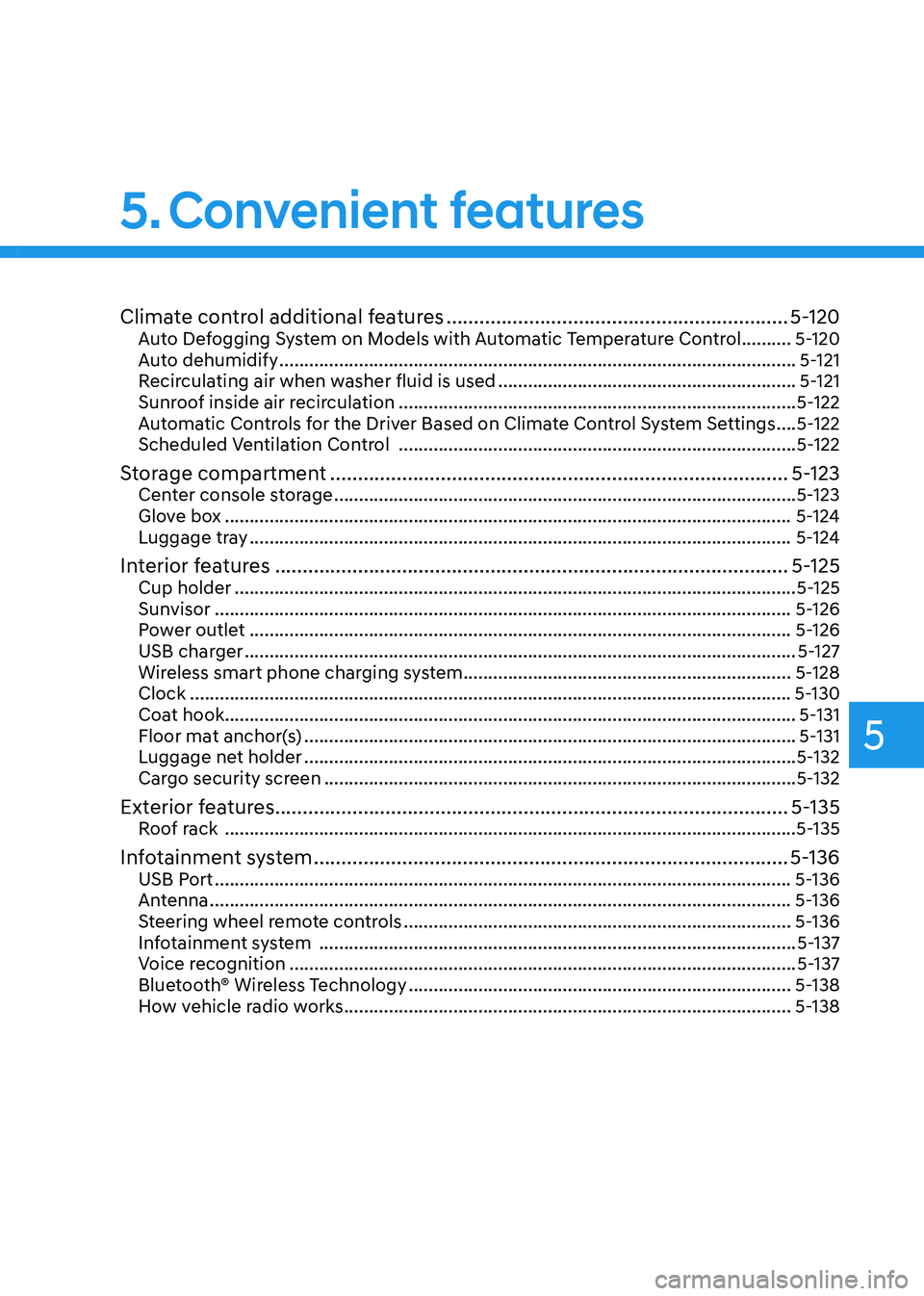
Climate control additional features ..............................................................5-120Auto Defogging System on Models with Automatic Temperature Control ..........5-120
Auto dehumidify ........................................................................\
................................5-121
Recirculating air when washer fluid is used ............................................................5-121
Sunroof inside air recirculation ........................................................................\
........5-122
Automatic Controls for the Driver Based on Climate Control System Settings ....5-122
Scheduled Ventilation Control ........................................................................\
........5-122
Storage compartment ........................................................................\
...........5-123Center console storage ........................................................................\
.....................5-123
Glove box ........................................................................\
..........................................5-124
Luggage tray ........................................................................\
.....................................5-124
Interior features ........................................................................\
.....................5-125Cup holder ........................................................................\
.........................................5-125
Sunvisor ........................................................................\
............................................5-126
Power outlet ........................................................................\
.....................................5-126
USB charger ........................................................................\
.......................................5-127
Wireless smart phone charging system ..................................................................5-128
Clock ........................................................................\
.................................................5-130
Coat hook ........................................................................\
...........................................5-131
Floor mat anchor(s) ........................................................................\
...........................5-131
Luggage net holder ........................................................................\
...........................5-132
Cargo security screen ........................................................................\
.......................5-132
Exterior features ........................................................................\
.....................5-135Roof rack ........................................................................\
...........................................5-135
Infotainment system ........................................................................\
..............5-136USB Port ........................................................................\
............................................5-136
Antenna ........................................................................\
.............................................5-136
Steering wheel remote controls ........................................................................\
......5-136
Infotainment system ........................................................................\
........................5-137
Voice recognition ........................................................................\
..............................5-137
Bluetooth® Wireless Technology ........................................................................\
.....5-138
How vehicle radio works ........................................................................\
..................5-138
5. Convenient features
5
Page 170 of 638
![HYUNDAI TUCSON 2022 Owners Manual Convenient features
5-26
ONX4050002
[1] : Door handle authentication pad,
[2]: NFC Antenna
NFC door lock/unlock
To unlock your vehicle using the NFC
card key, touch the card key near the
door han](/img/35/41173/w960_41173-169.png "HYUNDAI TUCSON 2022 Owners Manual Convenient features
5-26
ONX4050002
[1] : Door handle authentication pad,
[2]: NFC Antenna
NFC door lock/unlock
To unlock your vehicle using the NFC
card key, touch the card key near the
door han")
Convenient features
5-26
ONX4050002
[1] : Door handle authentication pad,
[2]: NFC Antenna
NFC door lock/unlock
To unlock your vehicle using the NFC
card key, touch the card key near the
door handle NFC touch sensor of either
the driver side or passenger side door.
Hold the card key near the touch sensor
area for about 2 seconds. You will hear
the doors lock or unlock.
If you unlock your vehicle from the
passenger side door handle, then all the
doors will unlock. If you unlock your
vehicle from the driver side door handle,
then either the driver door only or all
the doors will unlock depending on the
setting of the Two Press Unlock feature.
Refer to User Settings to change the
Driver Door unlock mode.
To lock your vehicle using the NFC card
key, touch the card key near the door
handle NFC touch sensor of either the
driver side or passenger side door.
Before you leave your vehicle, verify
that your vehicle is locked. When using
your NFC card key on the front door
handle, listen to hear that the door lock
has actuated, and then pull the handle
within 3 seconds to confirm the doors
are locked.
Inoperable condition
When using the NFC card key to lock or
unlock your vehicle, be sure to touch
the card key near the center of the door
handle to enable the sensor to activate.
Note that you must take the card out of
your wallet or purse to use the card key
correctly. If the card key is not touching
the door handle sensor or is in close
proximity to other NFC-enabled cards, it
may not work.
Note that if you attempt to use the
NFC card key to lock the doors, the
doors will not lock under the following
circumstances:
•
The Smart Key is in the vehicle
• The Engine Start/Stop button is in the
ACC or ON position
• Any of the doors are open (except for
the liftgate)
If this occurs, then a chime will sound
for about 3 seconds. Check the vehicle
before attempting to lock the car again.
If you have difficulty locking or unlocking
the vehicle using the NFC card key,
remove the card key away from the door
handle sensor for a few seconds (card
key must be more than 4 inches away)
and then retry.
If the card key is damaged or bent, the
sensor on the door handle may not
properly detect the card key. If this
occurs contact your authorized Hyundai
dealer for a card key replacement.
Be careful not to damage the card
key or expose the card key to extreme
temperatures or direct sunlight for long
periods of time.
Note that when the doors have been
unlocked using the NFC digital card key,
the Lock/Unlock switch on the driver
door may not be immediately available.
(If you attempt to lock the doors using
the driver door lock switch, the doors will
lock and then immediately unlock when
you close the door.)
Page 204 of 638
Convenient features
5-60
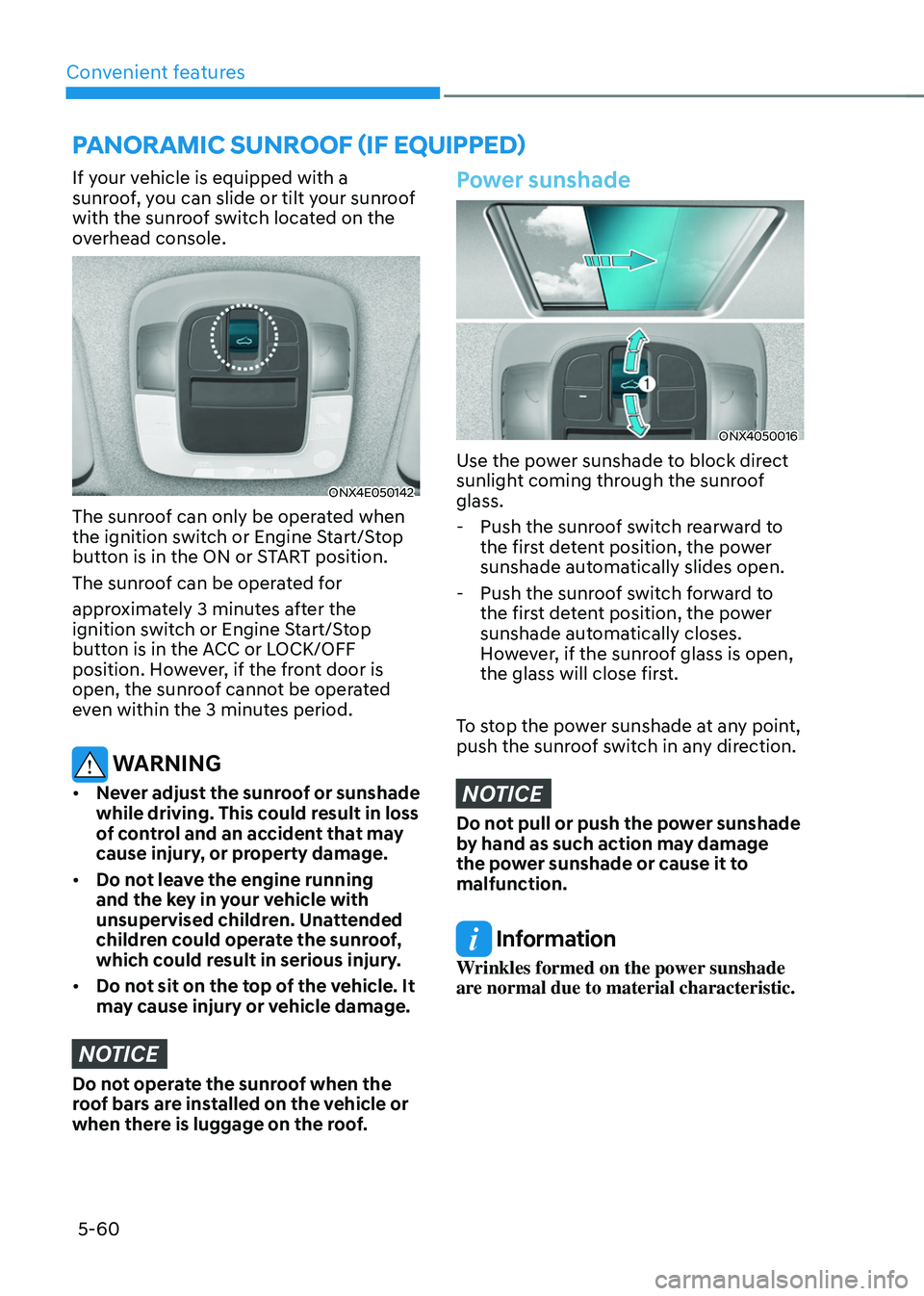
If your vehicle is equipped with a
sunroof, you can slide or tilt your sunroof
with the sunroof switch located on the
overhead console.
ONX4E050142
The sunroof can only be operated when
the ignition switch or Engine Start/Stop
button is in the ON or START position.
The sunroof can be operated for
approximately 3 minutes after the
ignition switch or Engine Start/Stop
button is in the ACC or LOCK/OFF
position. However, if the front door is
open, the sunroof cannot be operated
even within the 3 minutes period.
WARNING
• Never adjust the sunroof or sunshade
while driving. This could result in loss
of control and an accident that may
cause injury, or property damage.
• Do not leave the engine running
and the key in your vehicle with
unsupervised children. Unattended
children could operate the sunroof,
which could result in serious injury.
• Do not sit on the top of the vehicle. It
may cause injury or vehicle damage.
NOTICE
Do not operate the sunroof when the
roof bars are installed on the vehicle or
when there is luggage on the roof.
Power sunshade
ONX4050016
Use the power sunshade to block direct
sunlight coming through the sunroof
glass.
-Push the sunroof switch rearward to
the first detent position, the power
sunshade automatically slides open.
-Push the sunroof switch forward to
the first detent position, the power
sunshade automatically closes.
However, if the sunroof glass is open,
the glass will close first.
To stop the power sunshade at any point,
push the sunroof switch in any direction.
NOTICE
Do not pull or push the power sunshade
by hand as such action may damage
the power sunshade or cause it to
malfunction.
Information
Wrinkles formed on the power sunshade
are normal due to material characteristic.
PANORAMIC SUNROOF (IF EQUIPPED)