wire HYUNDAI TUCSON 2022 Owners Manual
[x] Cancel search | Manufacturer: HYUNDAI, Model Year: 2022, Model line: TUCSON, Model: HYUNDAI TUCSON 2022Pages: 638, PDF Size: 82.3 MB
Page 11 of 638
01
1 -7
VEHICLE MODIFICATIONS
• This vehicle should not be modified. Modification of your vehicle could affect its
performance, safety or durability and may even violate governmental safety and
emissions regulations.
In addition, damage or performance problems resulting from any modification may
not be covered under warranty.
• If you use unauthorized electronic devices, it may cause the vehicle to operate
abnormally, wire damage, battery discharge and fire. For your safety, we
recommend that you do not use unauthorized electronic devices.
VEHICLE BREAK-IN PROCESS
By following a few simple precautions for the first 600 miles (1,000km) you may add to
the performance, economy and life of your vehicle.
• Do not race the engine.
• While driving, keep your engine speed (RPM, or revolutions per minute) between
2,000 RPM and 4,000 RPM.
• Do not maintain a single speed for long periods of time, either fast or slow. Varying
engine speed is needed to properly break-in the engine.
• Avoid hard stops, except in emergencies, to allow the brakes to seat properly.
• Fuel economy and engine performance may vary depending on vehicle break-in
process and be stabilized after 4,000 miles (6,000 km). New engines may consume
more oil during the vehicle break-in period.
• Do not tow a trailer during the first 1,200 miles (2,000km) of operation.
WARNING
CALIFORNIA PROPOSITION 65 WARNING
Items contained in motor vehicles or emitted from them are known to the State of
California to cause cancer and birth defects or reproductive harm. These include:
• Gasoline and its vapors
• Engine exhaust
• Used engine oil
• Interior passenger compartment components and materials
• Component parts which are subject to heat and wear
In addition, battery posts, terminals and related accessories contain lead, lead
compounds and other chemicals known to the State of California to cause cancer
and reproductive harm.
For more information go to https://www.p65warnings.ca.gov/passenger-vehicle
Page 18 of 638
2-6
Vehicle Information, Consumer Information and Reporting Safety Defects
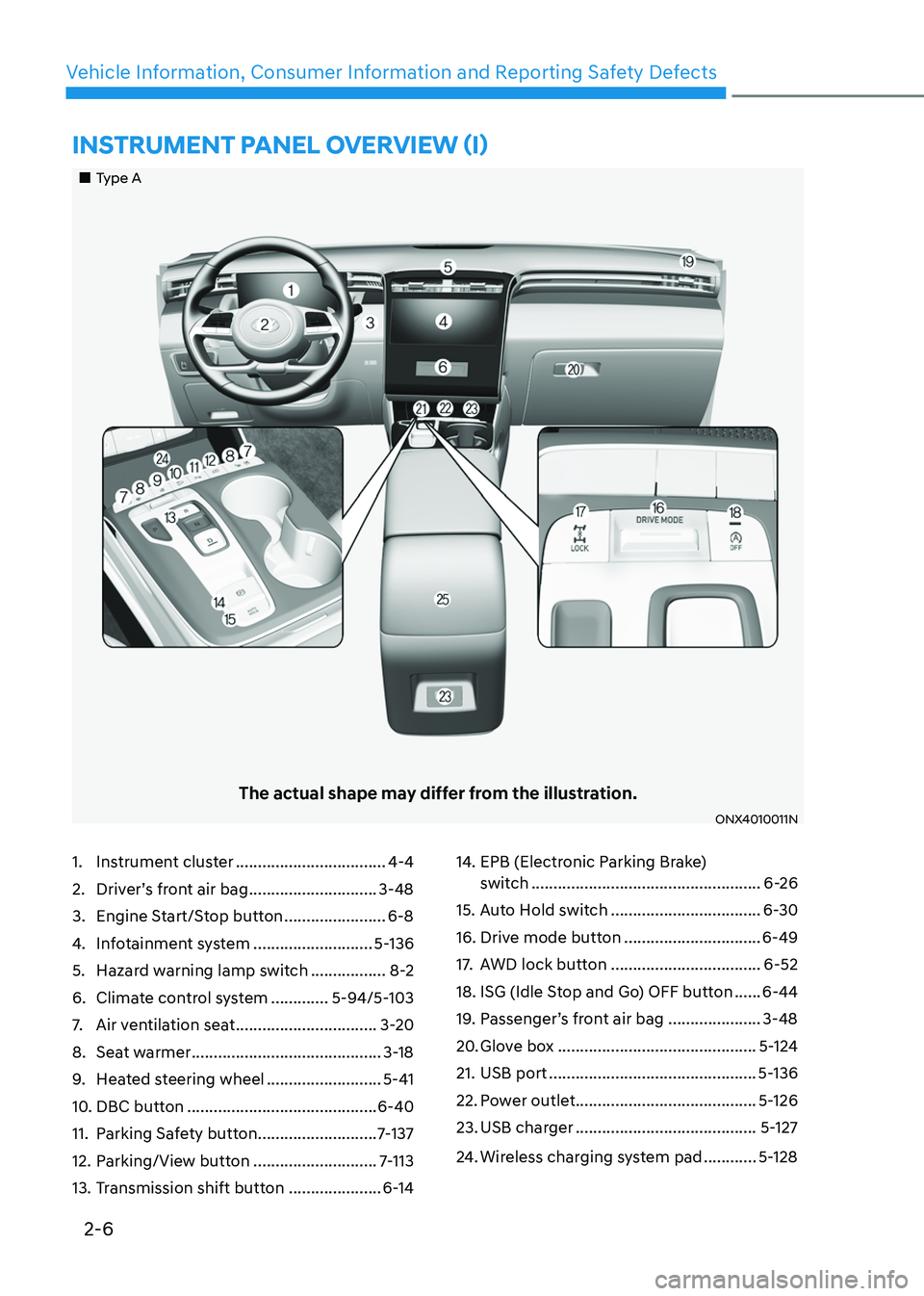
1. Instrument cluster ..................................4-4
2. Driver’s front air bag .............................3-48
3. Engine Start/Stop button .......................6-8
4. Infotainment system ...........................5-136
5. Hazard warning lamp switch .................8-2
6. Climate control system .............5-94/5-103
7. Air ventilation seat ................................3-20
8. Seat warmer ...........................................3-18
9. Heated steering wheel ..........................5-41
10. DBC button ...........................................6-40
11. Parking Safety button ...........................7-137
12. Parking/View button ............................7-113
13. Transmission shift button .....................6-14
14. EPB (Electronic Parking Brake)
switch ....................................................6-26
15. Auto Hold switch ..................................6-30
16. Drive mode button ...............................6-49
17. AWD lock button ..................................6-52
18. ISG (Idle Stop and Go) OFF button ......6-44
19. Passenger’s front air bag .....................3-48
20. Glove box .............................................5-124
21. USB port ...............................................5-136
22. Power outlet .........................................5-126
23. USB charger .........................................5-127
24. Wireless charging system pad ............5-128
„„Type A
The actual shape may differ from the illustration.
ONX4010011N
INSTRUMENT PANEL OVERVIEW (I)
Page 19 of 638
2-7
02
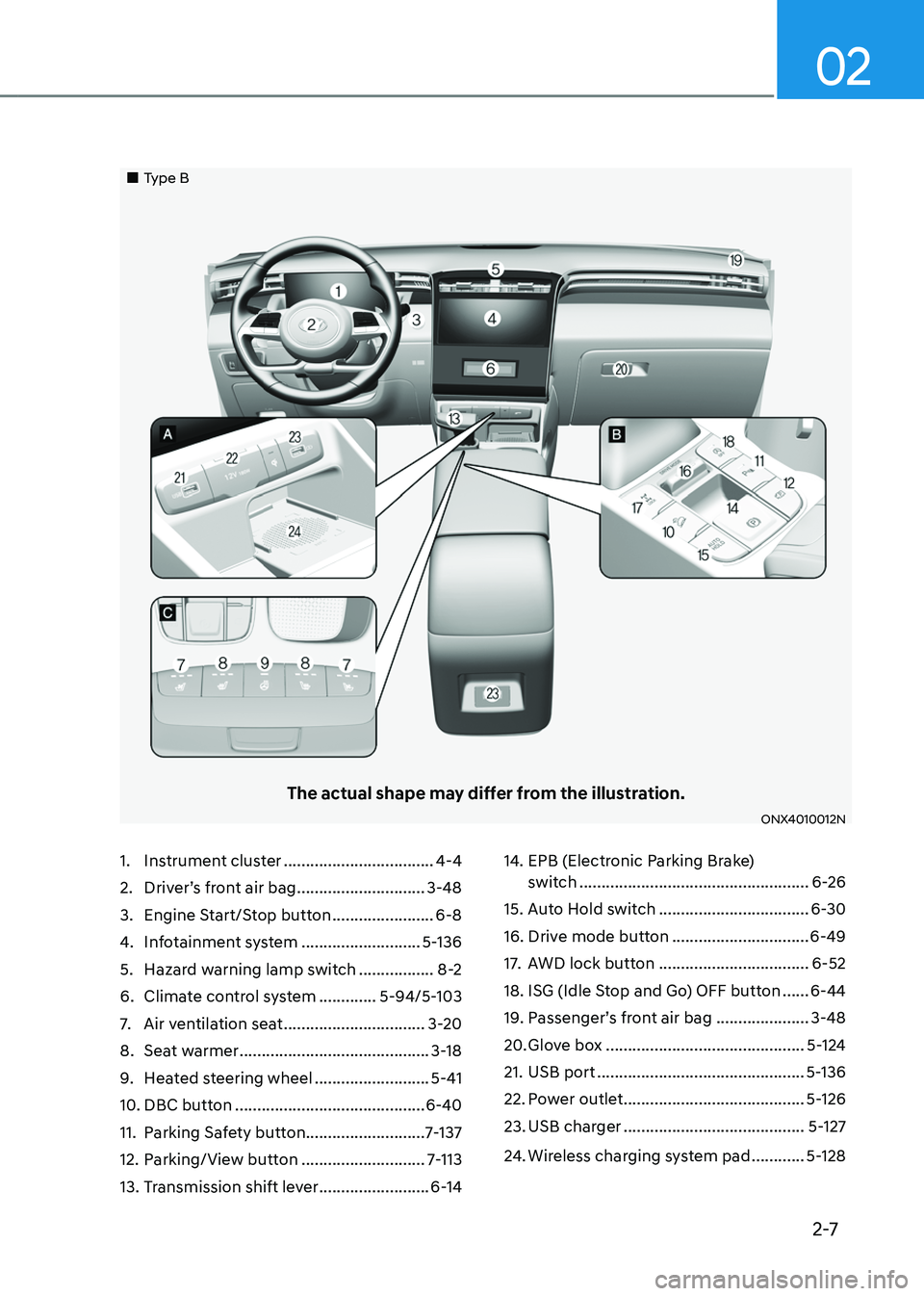
1. Instrument cluster ..................................4-4
2. Driver’s front air bag .............................3-48
3. Engine Start/Stop button .......................6-8
4. Infotainment system ...........................5-136
5. Hazard warning lamp switch .................8-2
6. Climate control system .............5-94/5-103
7. Air ventilation seat ................................3-20
8. Seat warmer ...........................................3-18
9. Heated steering wheel ..........................5-41
10. DBC button ...........................................6-40
11. Parking Safety button ...........................7-137
12. Parking/View button ............................7-113
13. Transmission shift lever .........................6-14
14. EPB (Electronic Parking Brake)
switch ....................................................6-26
15. Auto Hold switch ..................................6-30
16. Drive mode button ...............................6-49
17. AWD lock button ..................................6-52
18. ISG (Idle Stop and Go) OFF button ......6-44
19. Passenger’s front air bag .....................3-48
20. Glove box .............................................5-124
21. USB port ...............................................5-136
22. Power outlet .........................................5-126
23. USB charger .........................................5-127
24. Wireless charging system pad ............5-128
„„Type B
The actual shape may differ from the illustration.
ONX4010012N
Page 71 of 638
![HYUNDAI TUCSON 2022 Owners Manual Seats & Safety System
3-40
„„Rear passenger seat
ONX4E030082
[A] : Lower Anchor Position Indicator(Type A- ,Type B- ),[B] : Lower Anchor
The lower anchor position indicator
symbols are lo](/img/35/41173/w960_41173-70.png "HYUNDAI TUCSON 2022 Owners Manual Seats & Safety System
3-40
„„Rear passenger seat
ONX4E030082
[A] : Lower Anchor Position Indicator(Type A- ,Type B- ),[B] : Lower Anchor
The lower anchor position indicator
symbols are lo")
Seats & Safety System
3-40
„„Rear passenger seat
ONX4E030082
[A] : Lower Anchor Position Indicator(Type A- ,Type B- ),[B] : Lower Anchor
The lower anchor position indicator
symbols are located on the left and right
rear seat backs to identify the position
of the lower anchors in your vehicle (see
arrows in illustration).
The LATCH anchors are located between
the seatback and the seat cushion of the
rear seat left and right outboard seating
positions.
WARNING
Before installing the Child Restraint
System, make sure that there are no
objects (e.g. toy, pen, wire) around the
lower anchor area. Those objects may
damage either the seat belt system or
the Child Restraint System during the
installment procedure. If necessary,
have the vehicle inspected by an
authorized HYUNDAI dealer.
Securing a Child Restraint System
with the “LATCH Anchors System”
To install a LATCH-compatible Child
Restraint System in either of the rear
outboard seating positions:
1. Move the seat belt buckle away from
the lower anchors.
2. Move any other objects away from
the anchorages that could prevent
a secure connection between the
Child Restraint System and the lower
anchors.
3. Place the Child Restraint System on
the vehicle seat, then attach the seat
to the lower anchors according to the
instructions provided by the Child
Restraint System manufacturer.
4. Follow the instructions of the Child
Restraint System’s manufacturer for
proper installation and connection of
the lower attachments on the Child
Restraint System to the lower anchors.
Page 137 of 638
04
4-39
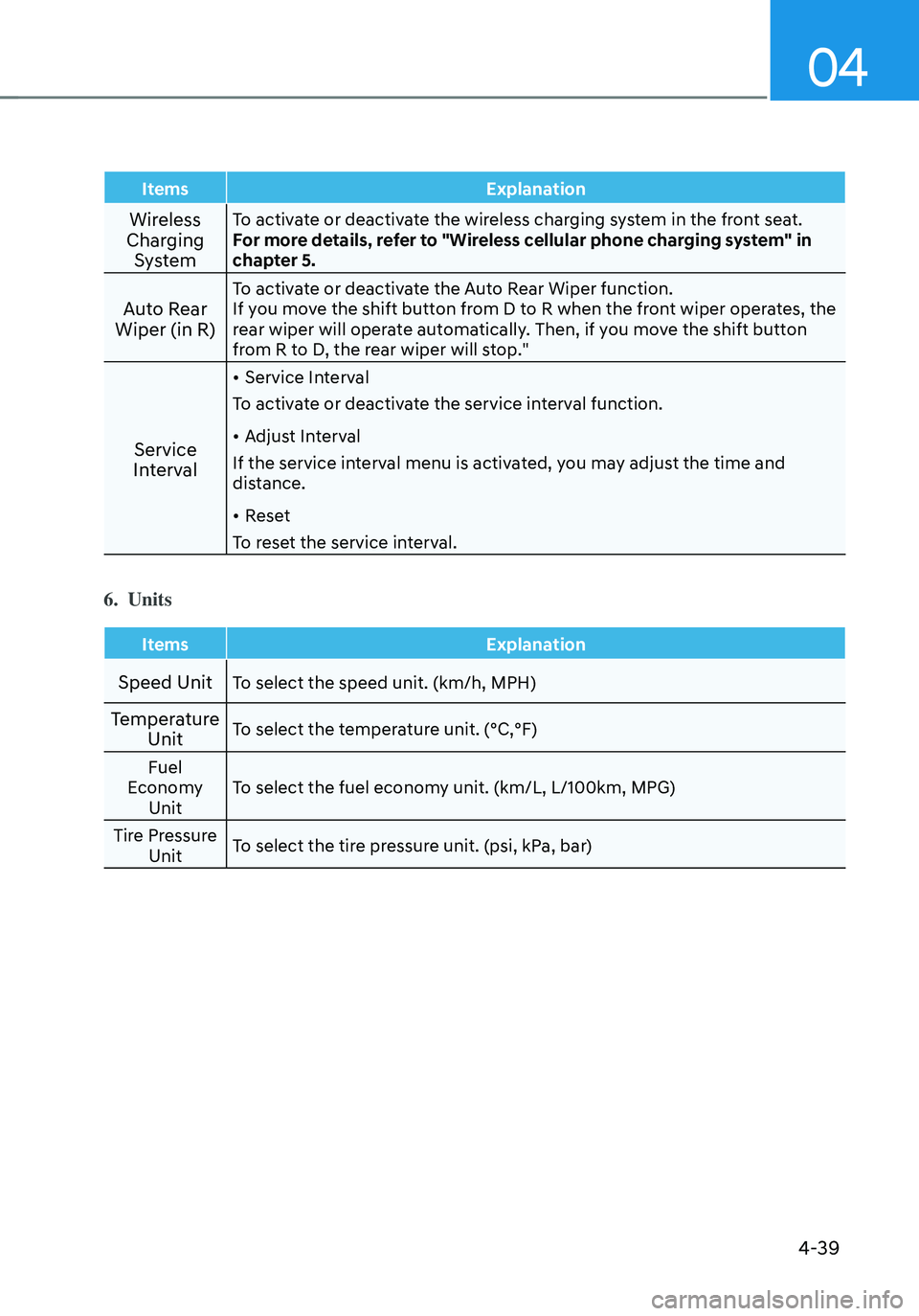
ItemsExplanation
Wireless
Charging SystemTo activate or deactivate the wireless charging system in the front seat.
For more details, refer to "Wireless cellular phone charging system" in
chapter 5.
Auto Rear
Wiper (in R)To activate or deactivate the Auto Rear Wiper function.
If you move the shift button from D to R when the front wiper operates, the
rear wiper will operate automatically. Then, if you move the shift button
from R to D, the rear wiper will stop."
Service
Interval
• Service Interval
To activate or deactivate the service interval function.
• Adjust Interval
If the service interval menu is activated, you may adjust the time and
distance.
• Reset
To reset the service interval.
6. Units
Items Explanation
Speed UnitTo select the speed unit. (km/h, MPH)
Temperature
UnitTo select the temperature unit. (°C,°F)
Fuel
Economy Unit To select the fuel economy unit. (km/L, L/100km, MPG)
Tire Pressure Unit To select the tire pressure unit. (psi, kPa, bar)
Page 147 of 638
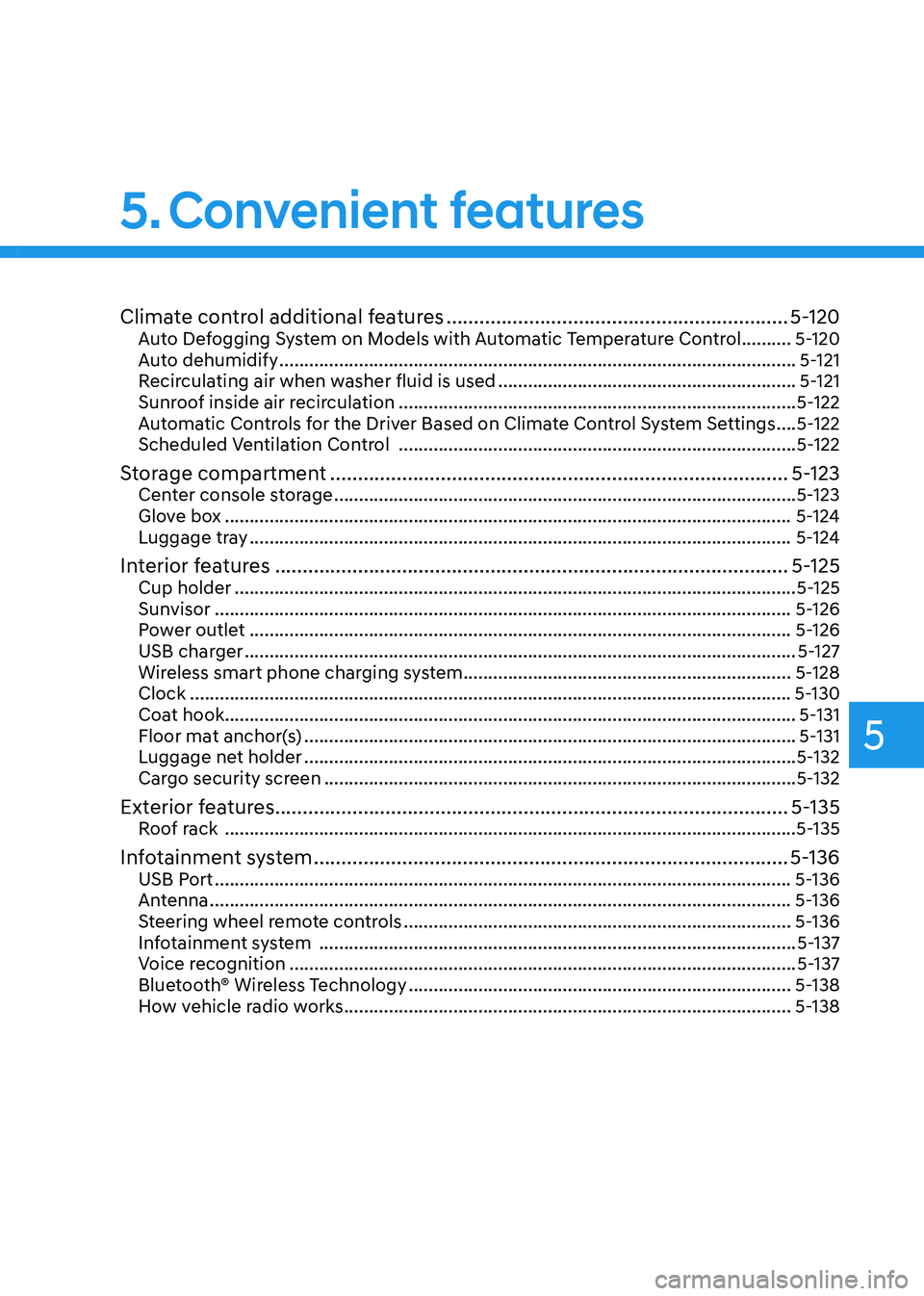
Climate control additional features ..............................................................5-120Auto Defogging System on Models with Automatic Temperature Control ..........5-120
Auto dehumidify ........................................................................\
................................5-121
Recirculating air when washer fluid is used ............................................................5-121
Sunroof inside air recirculation ........................................................................\
........5-122
Automatic Controls for the Driver Based on Climate Control System Settings ....5-122
Scheduled Ventilation Control ........................................................................\
........5-122
Storage compartment ........................................................................\
...........5-123Center console storage ........................................................................\
.....................5-123
Glove box ........................................................................\
..........................................5-124
Luggage tray ........................................................................\
.....................................5-124
Interior features ........................................................................\
.....................5-125Cup holder ........................................................................\
.........................................5-125
Sunvisor ........................................................................\
............................................5-126
Power outlet ........................................................................\
.....................................5-126
USB charger ........................................................................\
.......................................5-127
Wireless smart phone charging system ..................................................................5-128
Clock ........................................................................\
.................................................5-130
Coat hook ........................................................................\
...........................................5-131
Floor mat anchor(s) ........................................................................\
...........................5-131
Luggage net holder ........................................................................\
...........................5-132
Cargo security screen ........................................................................\
.......................5-132
Exterior features ........................................................................\
.....................5-135Roof rack ........................................................................\
...........................................5-135
Infotainment system ........................................................................\
..............5-136USB Port ........................................................................\
............................................5-136
Antenna ........................................................................\
.............................................5-136
Steering wheel remote controls ........................................................................\
......5-136
Infotainment system ........................................................................\
........................5-137
Voice recognition ........................................................................\
..............................5-137
Bluetooth® Wireless Technology ........................................................................\
.....5-138
How vehicle radio works ........................................................................\
..................5-138
5. Convenient features
5
Page 160 of 638
Convenient features
5-16
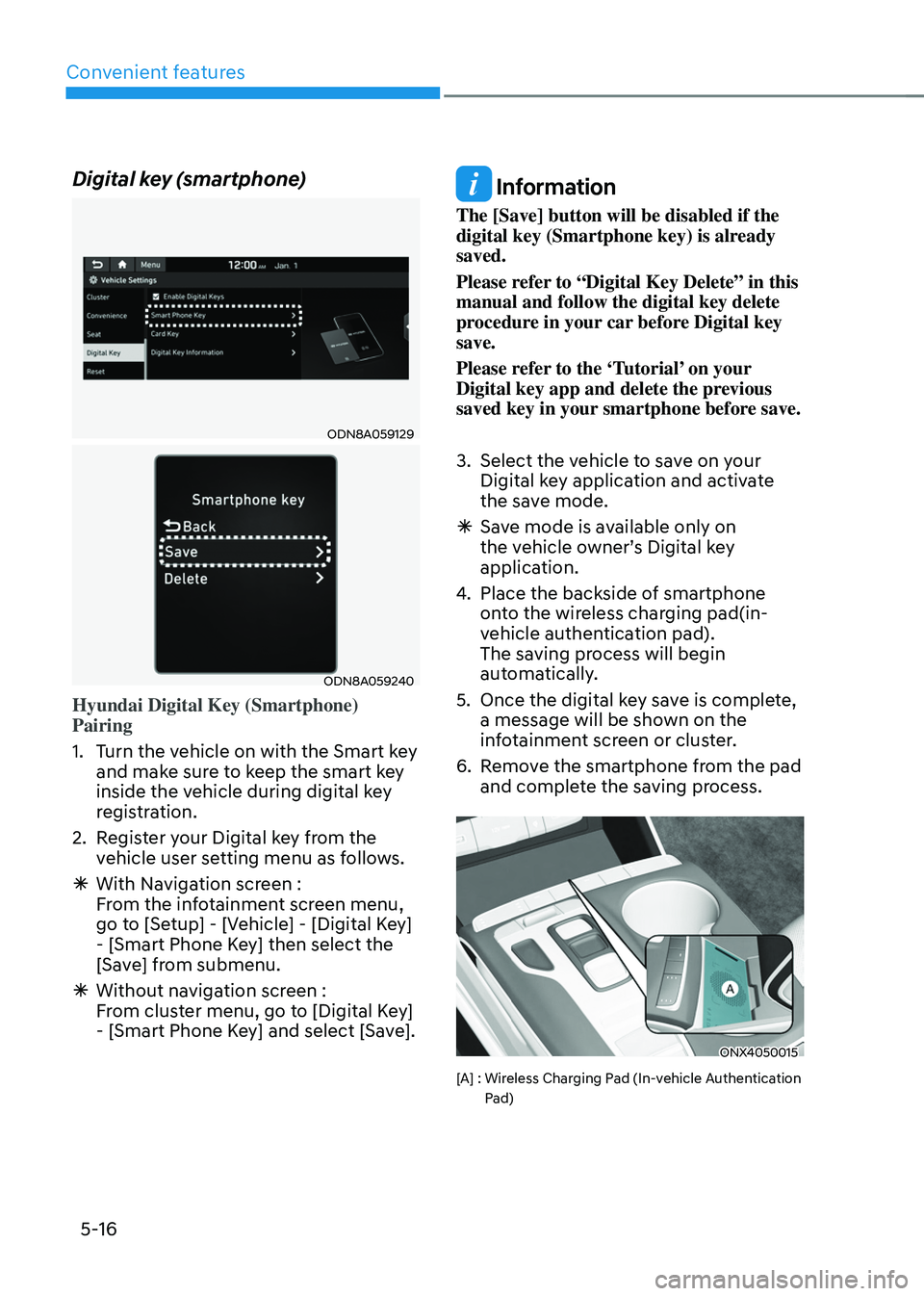
Digital key (smartphone)
ODN8A059129
ODN8A059240
Hyundai Digital Key (Smartphone)
Pairing
1. Turn the vehicle on with the Smart key
and make sure to keep the smart key
inside the vehicle during digital key
registration.
2. Register your Digital key from the
vehicle user setting menu as follows.
ÃWith Navigation screen :
From the infotainment screen menu,
go to [Setup] - [Vehicle] - [Digital Key]
- [Smart Phone Key] then select the
[Save] from submenu.
ÃWithout navigation screen :
From cluster menu, go to [Digital Key]
- [Smart Phone Key] and select [Save].
Information
The [Save] button will be disabled if the
digital key (Smartphone key) is already
saved.
Please refer to “Digital Key Delete” in this
manual and follow the digital key delete
procedure in your car before Digital key
save.
Please refer to the ‘Tutorial’ on your
Digital key app and delete the previous
saved key in your smartphone before save.
3. Select the vehicle to save on your
Digital key application and activate
the save mode.
ÃSave mode is available only on
the vehicle owner’s Digital key
application.
4. Place the backside of smartphone
onto the wireless charging pad(in-
vehicle authentication pad).
The saving process will begin
automatically.
5. Once the digital key save is complete,
a message will be shown on the
infotainment screen or cluster.
6. Remove the smartphone from the pad
and complete the saving process.
ONX4050015
[A] : Wireless Charging Pad (In-vehicle Authentication Pad)
Page 163 of 638
05
5-19
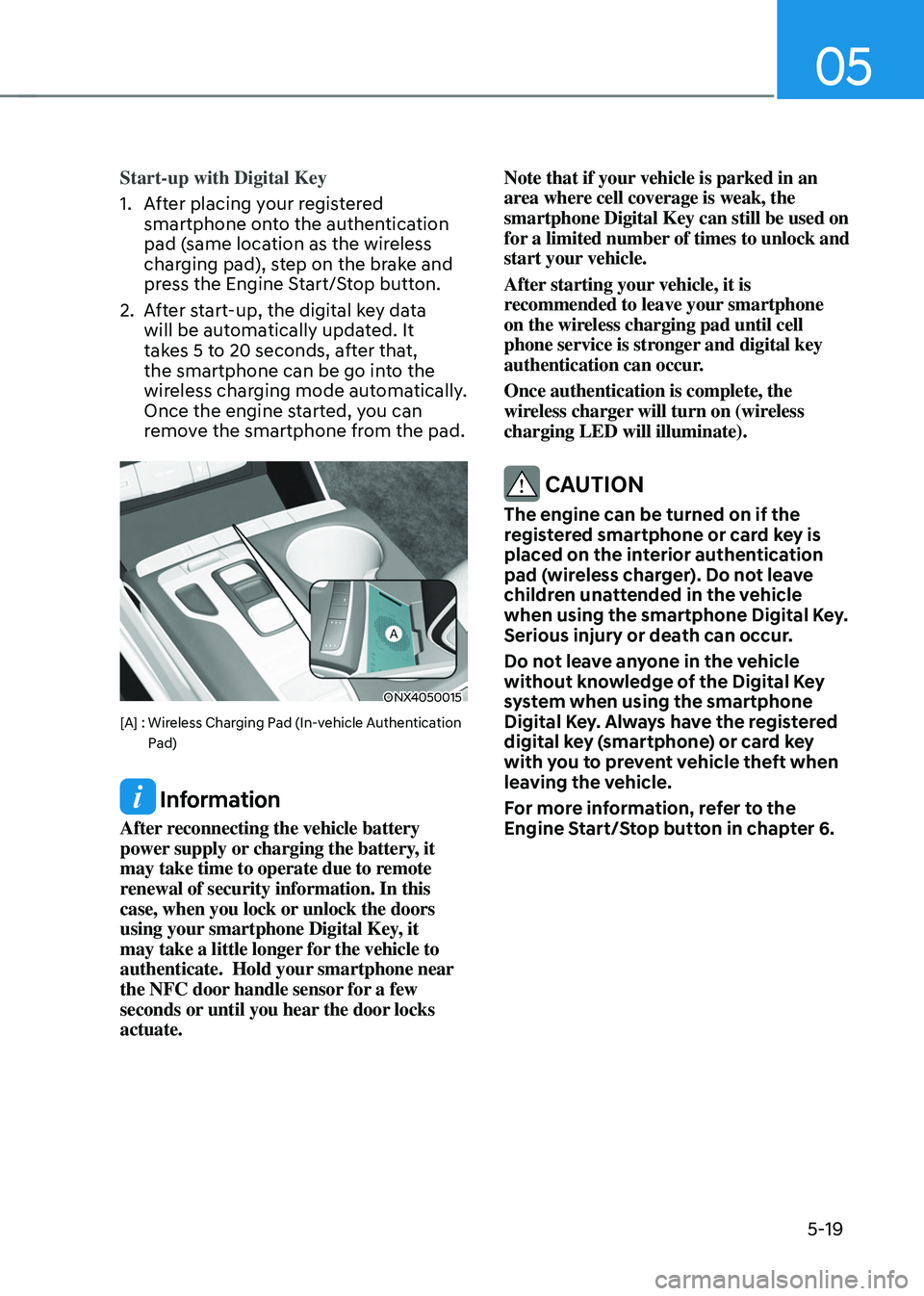
Start-up with Digital Key
1. After placing your registered
smartphone onto the authentication
pad (same location as the wireless
charging pad), step on the brake and
press the Engine Start/Stop button.
2. After start-up, the digital key data
will be automatically updated. It
takes 5 to 20 seconds, after that,
the smartphone can be go into the
wireless charging mode automatically.
Once the engine started, you can
remove the smartphone from the pad.
ONX4050015
[A] : Wireless Charging Pad (In-vehicle Authentication Pad)
Information
After reconnecting the vehicle battery
power supply or charging the battery, it
may take time to operate due to remote
renewal of security information. In this
case, when you lock or unlock the doors
using your smartphone Digital Key, it
may take a little longer for the vehicle to
authenticate. Hold your smartphone near
the NFC door handle sensor for a few
seconds or until you hear the door locks
actuate. Note that if your vehicle is parked in an
area where cell coverage is weak, the
smartphone Digital Key can still be used on
for a limited number of times to unlock and
start your vehicle.
After starting your vehicle, it is
recommended to leave your smartphone
on the wireless charging pad until cell
phone service is stronger and digital key
authentication can occur.
Once authentication is complete, the
wireless charger will turn on (wireless
charging LED will illuminate).
CAUTION
The engine can be turned on if the
registered smartphone or card key is
placed on the interior authentication
pad (wireless charger). Do not leave
children unattended in the vehicle
when using the smartphone Digital Key.
Serious injury or death can occur.
Do not leave anyone in the vehicle
without knowledge of the Digital Key
system when using the smartphone
Digital Key. Always have the registered
digital key (smartphone) or card key
with you to prevent vehicle theft when
leaving the vehicle.
For more information, refer to the
Engine Start/Stop button in chapter 6.
Page 165 of 638
05
5-21
Remote Start with Digital Key
• Using the Hyundai Digital Key app
on your phone, press the Door Lock
button and then press the Remote
Start button (buttons must be pressed
within about 4 seconds). If all the
doors of your vehicle are closed
(including the hood and the liftgate),
the engine will be automatically
started.
Note that when the remote start
feature is activated, the hazard
warning lights will blink two times
and a chime will sound before engine
startup. Also note the following:
• The climate control system will come
on using the same settings from when
you last used the vehicle
• To turn off the engine, press the
Remote Engine Stop button within the
Hyundai Digital Key app.
• The engine will remain running for
approximately 10 minutes, and then
engine will automatically shut OFF.
• To keep the engine running, access
the vehicle and place the smartphone
on the wireless charging pad
(authentication pad) while the engine
is still in remote engine-ON mode.
For more information, refer to the Engine
Start/Stop button in chapter 6. Vehicle information Display
The digital key application displays
the vehicle information such as
driving or door conditions through the
communication with the vehicle.
•
How to check : Select the vehicle
what you want to check and touch
the vehicle image, then vehicle
information display page will be
shown.
• Contents : accumulated odometer,
latest fuel economy, driving range,
fuel remaining, tire pressure, doors
lock/unlock status and last data
updated time.
ÃNote that displayed vehicle data may
be slightly different from the current
vehicle condition
ÃFor more information, please refer to
the ‘Tutorial’ on your Digital key app.
Page 166 of 638
Convenient features
5-22
Smartphone change/App deletion
If you change your smartphone or delete
the Hyundai Digital Key App, please refer
to the following to set up your Digital
Key:
Smartphone Change/ Reset
If you change or reset the smartphone,
the registered digital key in your previous
smartphone may not be used. Please
refer to following procedure to use the
digital key.
1. Install the digital key application and
log in.
2. If you are the owner, retry the Digital
key save process.
3. If you are the sharer, need to re-share
the key from owner.
App delete & reinstall/ Delete App data
You can re-download the digital key
from server in these cases as follow
procedure.
1. Reinstall the application and log in.
2. Input the PIN number for user
verification.
3. If PIN is correct, digital key data
will be re-downloaded to your
smartphone and you can use it
without any further registration or
sharing.
Smartphone operability with Digital Key
The digital key application may not
be available to old type smartphones.
Please check the available smartphone
models with your dealer. NFC antenna
position on the smartphone can be
confirmed on each smartphone’s manual
or contact to customer service center of
the smartphone manufacture.
CAUTION
• Do not leave the registered digital
key (smartphone) and card key in
your vehicle. Please carry around
your keys all the times.
• If you happen to lose your digital
key (smartphone) or card key
registered as a main user’s key, you
should immediately delete the key
on the vehicle’s key menu. For more
information, refer to the Digital Key
Deletion in this chapter.
• If you registered your digital key
(smartphone) or card key in the
vehicle, a message appears on the
instrument cluster and let you know
the key is registered.
(Message: Digital key(s) active.)
• If you buy a used vehicle, you should
confirm the message and delete the
registered smartphone key and card
key. In this case, you should carry
your smart key.
• If you keep place the NFC card
of the digital key on the interior
authentication pad (wireless
charger) while driving, it may cause a
malfunction of the NFC card.
• You should remove your NFC card
of the digital key on the interior
authentication pad after turning on
the engine.
• Hyundai digital key app may not
work properly when the NFC or
Bluetooth communication between
smartphone and car is not good.
• If the remote control operation
is executed where the mobile
connection is weak, Bluetooth
connection is poor due to lots of
Bluetooth devices or there is an
object such as metal or concrete, it
might be delayed or the operable
distance might decrease. Especially,
you should not cover the smartphone
with your hand or place other
devices which can cause frequency
interference. It may result in poor
performance.