display HYUNDAI TUCSON 2023 Workshop Manual
[x] Cancel search | Manufacturer: HYUNDAI, Model Year: 2023, Model line: TUCSON, Model: HYUNDAI TUCSON 2023Pages: 638, PDF Size: 26.51 MB
Page 262 of 638
Convenient features
5-118
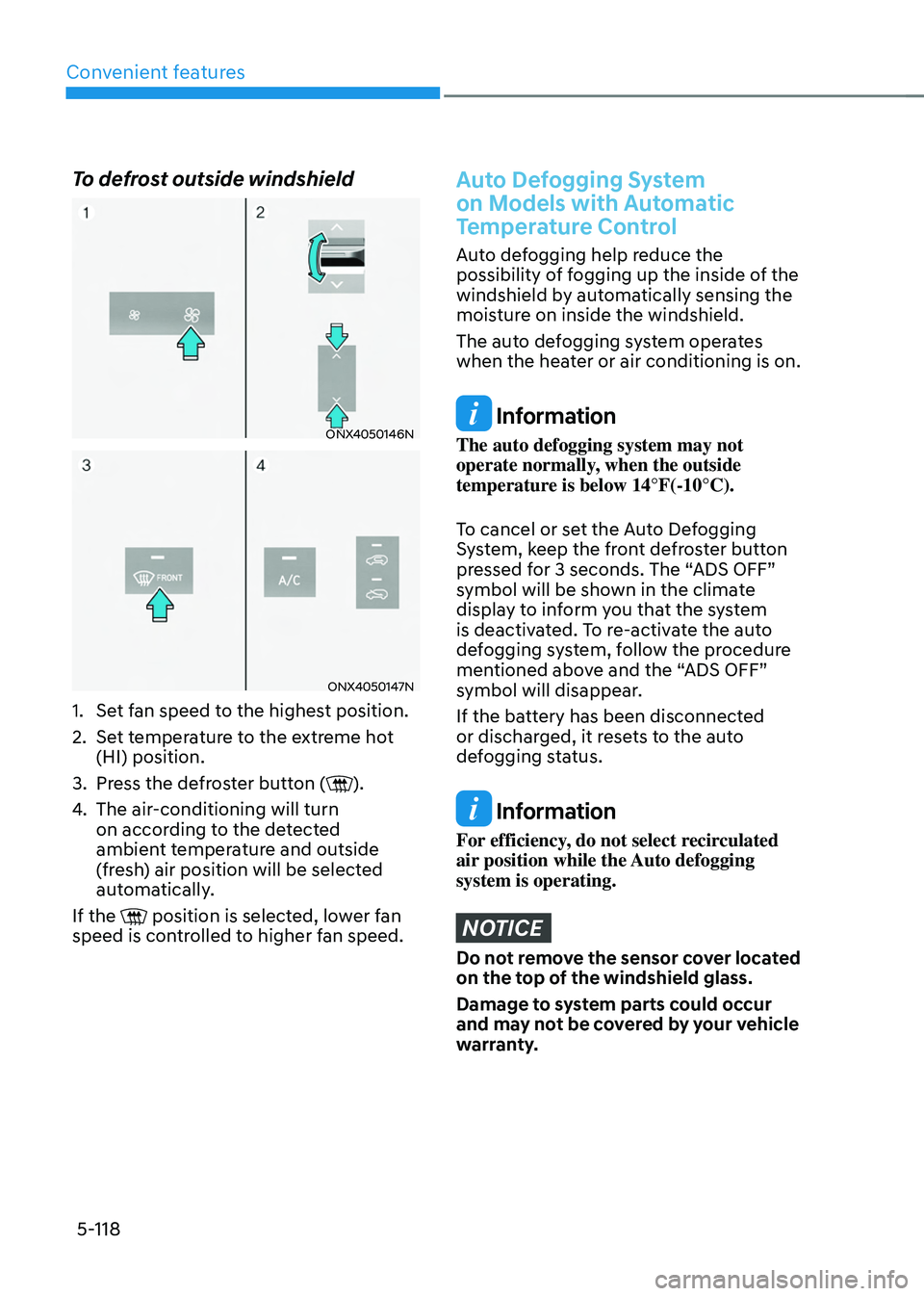
To defrost outside windshield
ONX4050146N
ONX4050147N
1. Set fan speed to the highest position.
2. Set temperature to the extreme hot
(HI) position.
3. Press the defroster button ().
4. The air-conditioning will turn
on according to the detected
ambient temperature and outside
(fresh) air position will be selected
automatically.
If the
position is selected, lower fan speed is controlled to higher fan speed.
Auto Defogging System
on Models with Automatic
Temperature Control
Auto defogging help reduce the
possibility of fogging up the inside of the
windshield by automatically sensing the
moisture on inside the windshield.
The auto defogging system operates
when the heater or air conditioning is on.
Information
The auto defogging system may not
operate normally, when the outside
temperature is below 14°F(-10°C).
To cancel or set the Auto Defogging
System, keep the front defroster button
pressed for 3 seconds. The “ADS OFF”
symbol will be shown in the climate
display to inform you that the system
is deactivated. To re-activate the auto
defogging system, follow the procedure
mentioned above and the “ADS OFF”
symbol will disappear.
If the battery has been disconnected
or discharged, it resets to the auto
defogging status.
Information
For efficiency, do not select recirculated
air position while the Auto defogging
system is operating.
NOTICE
Do not remove the sensor cover located
on the top of the windshield glass.
Damage to system parts could occur
and may not be covered by your vehicle
warranty.
Page 264 of 638
Convenient features
5-120
Auto Defogging System
on Models with Automatic
Temperature Control
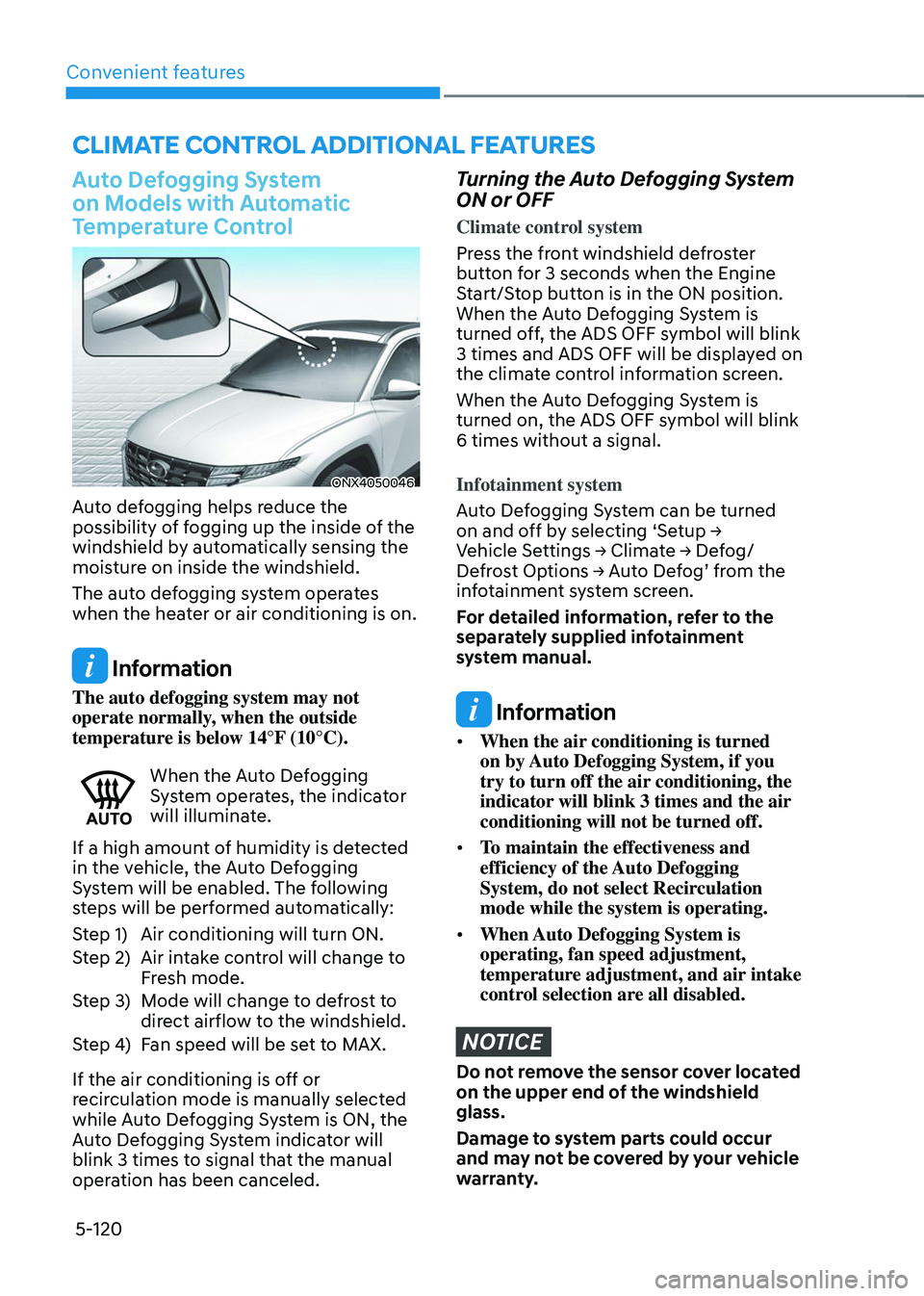
ONX4050046
Auto defogging helps reduce the
possibility of fogging up the inside of the
windshield by automatically sensing the
moisture on inside the windshield.
The auto defogging system operates
when the heater or air conditioning is on.
Information
The auto defogging system may not
operate normally, when the outside
temperature is below 14°F (10°C).
When the Auto Defogging System operates, the indicator
will illuminate.
If a high amount of humidity is detected
in the vehicle, the Auto Defogging
System will be enabled. The following
steps will be performed automatically:
Step 1) Air conditioning will turn ON.
Step 2) Air intake control will change to
Fresh mode.
Step 3) Mode will change to defrost to
direct airflow to the windshield.
Step 4) Fan speed will be set to MAX.
If the air conditioning is off or
recirculation mode is manually selected
while Auto Defogging System is ON, the
Auto Defogging System indicator will
blink 3 times to signal that the manual
operation has been canceled.
Turning the Auto Defogging System
ON or OFF
Climate control system
Press the front windshield defroster
button for 3 seconds when the Engine
Start/Stop button is in the ON position.
When the Auto Defogging System is
turned off, the ADS OFF symbol will blink
3 times and ADS OFF will be displayed on
the climate control information screen.
When the Auto Defogging System is
turned on, the ADS OFF symbol will blink
6 times without a signal.
Infotainment system
Auto Defogging System can be turned
on and off by selecting ‘Setup → Vehicle Settings → Climate → Defog/Defrost Options → Auto Defog’ from the infotainment system screen.
For detailed information, refer to the
separately supplied infotainment
system manual.
Information
• When the air conditioning is turned
on by Auto Defogging System, if you
try to turn off the air conditioning, the
indicator will blink 3 times and the air
conditioning will not be turned off.
• To maintain the effectiveness and
efficiency of the Auto Defogging
System, do not select Recirculation
mode while the system is operating.
• When Auto Defogging System is
operating, fan speed adjustment,
temperature adjustment, and air intake
control selection are all disabled.
NOTICE
Do not remove the sensor cover located
on the upper end of the windshield
glass.
Damage to system parts could occur
and may not be covered by your vehicle
warranty.
CLIMATE CONTROL ADDITIONAL FEATURES
Page 273 of 638
05
5-129
The indicator light will blink orange for 10
seconds if there is a malfunction in the
wireless charging system.
In this case, temporarily stop the
charging process, and re-attempt to
charge your smart phone again.
The system warns you with a message on
the LCD display if the smart phone is still
on the wireless charging unit after the
vehicle is turned OFF and the front door
is opened.
For some manufacturer’s smart phones,
the system may not warn you even
though the smart phone is left on the
wireless charging unit. This is due to the
particular characteristic of the smart
phone and not a malfunction of the
wireless charging.
Information
For some manufacturers’ cellular phones,
the system may not warn you even though
the cellular phone is left on the wireless
charging unit. This is due to the particular
characteristic of the cellular phone and
not a malfunction of the wireless charging.
NOTICE
• The wireless smart phone charging
system may not support certain
smart phones, which are not verified
for the Qi specification (
).
• When placing your smart phone on
the charging pad, position the phone
in the middle of the mat for optimal
charging performance. If your smart
phone is off to the side, the charging
rate may be less and in some cases
the smart phone may experience
higher heat conduction.
• In some cases, the wireless charging
may stop temporarily when the
smart key is used, either when
starting the vehicle or locking/
unlocking the doors, etc.
• When charging certain smart
phones, the charging indicator may
not change to blue when the smart
phone is fully charged.
• The wireless charging process may
temporarily stop, when temperature
abnormally increases inside the
wireless smart phone charging
system. The wireless charging
process restarts, when temperature
falls to a certain level.
• The wireless charging process may
temporarily stop when there is
any metallic item, such as a coin,
between the wireless smart phone
charging system and smart phone.
Page 286 of 638

Before driving ........................................................................\
............................6-4Before entering the vehicle ........................................................................\
................6-4
Before starting ........................................................................\
.....................................6-4
Ignition switch ........................................................................\
...........................6-5Key ignition switch ........................................................................\
...............................6-5
Key ignition switch positions ........................................................................\
..............6-6
Starting the engine ........................................................................\
...............................6 -7
Engine Start/Stop button ........................................................................\
.........6-8Engine Stop/Start button positions ........................................................................\
...6-9
Starting the engine ........................................................................\
.............................6-10
Turning off the engine ........................................................................\
.........................6-11
Remote start ........................................................................\
.......................................6-12
Automatic transmission ........................................................................\
..........6-14Automatic transmission operation ........................................................................\
....6-14
LCD display message (button type) ........................................................................\
..6-21
Paddle shifter (Manual shift mode) ........................................................................\
...6-22
Good driving practices ........................................................................\
.......................6-23
Braking system ........................................................................\
........................6-25Power-assist brakes ........................................................................\
...........................6-25
Disc brakes wear indicator ........................................................................\
................6-25
Electronic Parking Brake (EPB) ........................................................................\
.........6-26
Auto Hold ........................................................................\
...........................................6-30
Anti-lock Brake System (ABS) ........................................................................\
............6-34
Electronic Stability Control (ESC) ........................................................................\
.....6-35
Vehicle Stability Management (VSM) .....................................................................6-38
Trailer stability assist (TSA) ........................................................................\
...............6-39
Hill-Start Assist Control (HAC) ........................................................................\
.........6-40
Downhill Brake Control (DBC) ........................................................................\
.........6-40
Good braking practices ........................................................................\
.....................6-43
Idle Stop and Go (ISG) ........................................................................\
...........6-44ISG system operation ........................................................................\
........................6-44
ISG system off ........................................................................\
.....................................6-47
Forced to restart engine
........................................................................\
...................6-48
ISG malfunction ........................................................................\
.................................6-48
Drive mode integrated control system .........................................................6-49
All Wheel Drive (AWD)
........................................................................\
...........6-52AWD operation ........................................................................\
...................................6-53
Emergency precautions
........................................................................\
....................6-56
6. Driving your v ehicle
Driving your vehicle
6
Page 289 of 638
Driving your vehicle
6-4
Before entering the vehicle
• Be sure all windows, outside mirror(s),
and outside lights are clean and
unobstructed.
• Remove frost, snow, or ice.
• Visually check the tires for uneven
wear and damage.
• Check under the vehicle for any sign
of leaks.
• Be sure there are no obstacles behind
you if you intend to back up.
Before starting
• Make sure the hood, the liftgate, and
the doors are securely closed and
locked.
• Adjust the position of the seat and
steering wheel.
• Adjust the inside and side view
mirrors.
• Verify all the lights work.
• Fasten your seat belt. Check that all
passengers have fastened their seat
belts.
• Check the gauges and indicators
in the instrument panel and the
messages on the instrument display
when the ignition switch is in the ON
position.
• Check that any items you are carrying
are stored properly or fastened down
securely.
WARNING
To reduce the risk of SERIOUS INJURY or
DEATH, take the following precautions:
• ALWAYS wear your seat belt. All
passengers must be properly belted
whenever the vehicle is moving.
For more information, refer to “Seat
Belts” section in chapter 3.
• Always drive defensively. Assume
other drivers or pedestrians may be
careless and make mistakes.
• Stay focused on the task of driving.
Driver distraction can cause
accidents.
• Leave plenty of space between you
and the vehicle in front of you.
WARNING
NEVER drink or take drugs and drive.
Drinking or taking drugs and driving
is dangerous and may result in an
accident and SERIOUS INJURY or
DEATH.
Drunk driving is the number one
contributor to the highway death
toll each year. Even a small amount
of alcohol will affect your reflexes,
perceptions and judgment. Just
one drink can reduce your ability to
respond to changing conditions and
emergencies and your reaction time
gets worse with each additional drink.
Driving while under the influence
of drugs is as dangerous or more
dangerous than driving under the
influence of alcohol.
You are much more likely to have a
serious accident if you drink or take
drugs and drive. If you are drinking or
taking drugs, don’t drive. Do not ride
with a driver who has been drinking
or taking drugs. Choose a designated
driver or call a taxi.
BEFORE DRIVING
Page 300 of 638
06
6-15
The indicator in the instrument cluster
displays the shift lever/button position
when the ignition switch is in the ON
position.
WARNING
To reduce the risk of serious injury or
death:
• ALWAYS check the surrounding
areas near your vehicle for people,
especially children, before shifting a
vehicle into D (Drive) or R (Reverse).
• Before leaving the driver’s seat,
always make sure the shift lever
is in the P (Park) position, then set
the parking brake, and place the
ignition switch in the LOCK/OFF
position. Unexpected and sudden
vehicle movement can occur if these
precautions are not followed.
• When using the paddle shifter
(manual shift mode), do not use
engine braking (shifting from a
high gear to lower gear) rapidly on
slippery roads. The vehicle may slip
causing an accident.
P (Park)
Always come to a complete stop before
shifting into P (Park).
To shift from P (Park), you must depress
firmly on the brake pedal and make sure
your foot is off the accelerator pedal.
If you have done all of the above and
still cannot shift the lever out of P
(Park), see "Shift-Lock Release" in this
chapter. (shift lever type)
The shift lever/button must be in P (Park)
before turning the engine off.
WARNING
• Shifting into P (Park) while the
vehicle is in motion may cause you to
lose control of the vehicle.
• After the vehicle has stopped, always
make sure the shift lever is in P
(Park), apply the parking brake, and
turn the engine off.
• When parking on an incline, shift
the gear to P (Park) and apply the
parking brake to prevent the vehicle
from rolling downhill.
• Do not use the P (Park) position in
place of the parking brake.
R (Reverse)
Use this position to drive the vehicle
backward.
NOTICE
Always come to a complete stop before
shifting into or out of R (Reverse); you
may damage the transmission if you
shift into R (Reverse) while the vehicle is
in motion.
When the vehicle is stopped in R
(Reverse) or D (Drive) position, if you
open the driver’s door with the seat
belt unfastened, the gear is shifted to P
(Park) position automatically.
However when the vehicle moves in R
(Reverse) or D (Drive) position, if you
open the driver’s door with the seat belt
unfastened, the gear may be not shifted
to P (Park) position automatically for
protecting the automatic transmission.
Page 301 of 638
Driving your vehicle
6-16
N (Neutral)
The wheels and transmission are not
engaged.
Use N (Neutral) if you need to restart a
stalled engine, or if it is necessary to stop
with the engine ON. Shift into P (Park)
if you need to leave your vehicle for any
reason.
Always depress the brake pedal when
you are shifting from N (Neutral) to
another gear.
WARNING
Do not shift into gear unless your foot is
firmly on the brake pedal. Shifting into
gear when the engine is running at high
speed can cause the vehicle to move
very rapidly. You could lose control of
the vehicle and hit people or objects.To stay in N (Neutral) when vehicle is
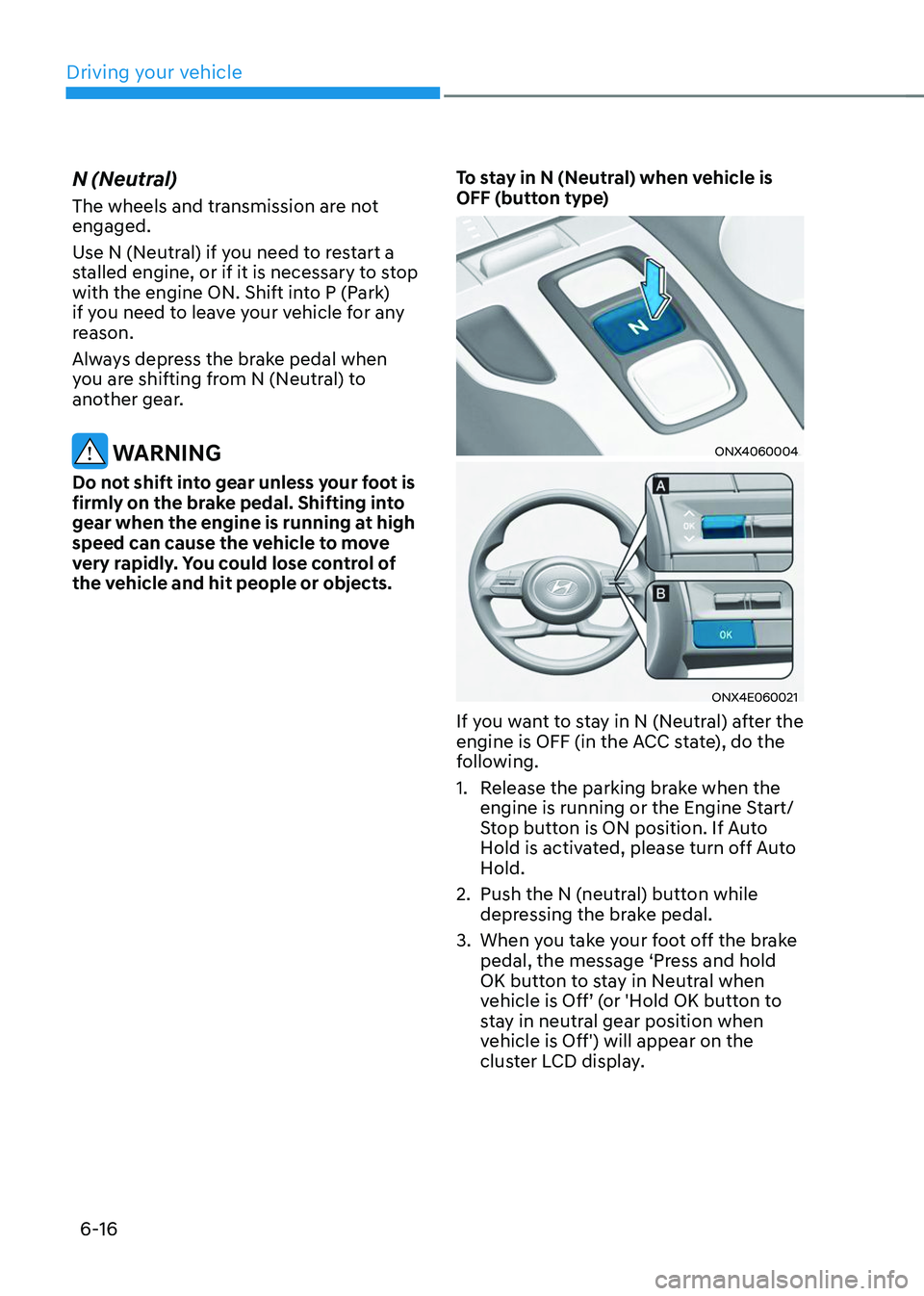
OFF (button type)
ONX4060004
ONX4E060021
If you want to stay in N (Neutral) after the
engine is OFF (in the ACC state), do the
following.
1. Release the parking brake when the
engine is running or the Engine Start/
Stop button is ON position. If Auto
Hold is activated, please turn off Auto
Hold.
2. Push the N (neutral) button while
depressing the brake pedal.
3. When you take your foot off the brake
pedal, the message ‘Press and hold
OK button to stay in Neutral when
vehicle is Off’ (or 'Hold OK button to
stay in neutral gear position when
vehicle is Off') will appear on the
cluster LCD display.
Page 302 of 638
06
6-17
4. Press and hold the OK button on
the steering wheel for more than 1
second.
5. When the message ‘Vehicle will stay in
(N). Change gear to cancel’ (or ‘N will
stay engaged when the vehicle is Off’)
will appear on the cluster LCD display,
press the Engine Start/Stop button
while depressing the brake pedal.
However, if you open the driver's
door, the gear will automatically
shift to P (Park) and the Engine Start/
Stop button will change to the OFF
position.
NOTICE
With the gear in N (Neutral) the Engine
Start/Stop button will be in the ACC
position. Note that the doors cannot be
locked in the ACC position. The battery
may discharge if left in the ACC position
for a long period.
D (Drive)
This is the normal driving position. The
transmission will automatically shift
through an 8-gear sequence, providing
the best fuel economy and power.
To start the vehicle forward, push the D
(Drive) button by depressing the brake
pedal with the engine ON. (button type)
Then depress the accelerator pedal
smoothly.
For extra power when passing another
vehicle or driving uphill, depress the
accelerator fully. The transmission will
automatically downshift to the next
lower gear (or gears, as appropriate).
When the vehicle is stopped in D (Drive)
position, if you open the driver’s door
with the seat belt unfastened, the gear is
shifted to P (Park) position automatically.
(button type)
However while the vehicle is moving in D
(Drive) position, if you open the driver’s
door with the seat belt unfastened, the
gear may not shift to P (Park) position
automatically to protect the automatic
transmission.
The DRIVE MODE switch, located on the
shift lever console, allows the driver to
switch from NORMAL/COMFORT mode
to SPORT. (if equipped)
For more Details, refer to "Drive Mode
Integrated Control System" later in this
chapter.
Page 306 of 638
06
6-21
LCD display message (button
type)
ÃThe actual message may differ from
the following LCD display message.
ÃThe application of the following
message may vary according to the
vehicle model.
Shifting conditions not met. Reduce
speed, then shift
The warning message appears on the
LCD display, when engine RPM is too
high, or when driving speed is too fast to
shift the gear.
We recommend you decrease the engine
speed or slow down before shifting the
gear.
Press brake pedal to change gear
The warning message appears on the
LCD display, when the brake pedal is not
depressed while shifting the gear.
We recommend you to depress the brake
pedal and then shift the gear.
Shift to P after stopping
The warning message appears on the
LCD display, when the gear is shifted to P
(Park) while the vehicle is moving.
Stop the vehicle before shifting to P
(Park).
PARK engaged
Make sure that the vehicle is completely
stopped before shifting to P (Park).
Push-button gear selector
If the gear selector is shifted to P (Park)
while the vehicle is still moving, a
warning message will appear in the LCD
display.
Press and hold the OK button on the
steering wheel to stay in Neutral
The warning message appears on
the LCD display, when pushing the
N(Neutral) button. If you want to stay
N(Neutral) after turning off the engine,
press and hold the “OK” button on the
steering wheel more than 1 second.
Vehicle will stay in (N). Change gear
to cancel
The warning message appears on the
LCD display, when pushing the “OK”
button on the steering wheel after the
message (“Press and hold OK button
to stay in Neutral when vehicle is Off”)
appears on the cluster LCD display. The
gear stays in N(Neutral) position after
turning off the engine.
NEUTRAL engaged
The message appears on the LCD
display, when the N (Neutral) position is
engaged.
Gear already selected
The message appears on the LCD
display, when pushing the current shift
button again.
Page 307 of 638
Driving your vehicle
6-22
Shift button held down / Shift
button is stuck
The warning message appears on the
LCD display, when the shift button is
pressed continuously or the shift button
does not properly operate. Clean the
surroundings of gear shift button.
If this message appears again, we
recommend you to have the vehicle
inspected by an authorized HYUNDAI
dealer.
Shifter system malfunction! Service
immediately
The warning message appears on the
LCD display, when the transmission
or the shift button does not properly
operate in the P (Park) position.
In this case, we recommend you to
immediately have the vehicle inspected
by an authorized HYUNDAI dealer.
Check shift controls
The warning message appears on the
LCD display, when there is a malfunction
with transmission shift button.
In this case, we recommend you to
immediately have the vehicle inspected
by an authorized HYUNDAI dealer.
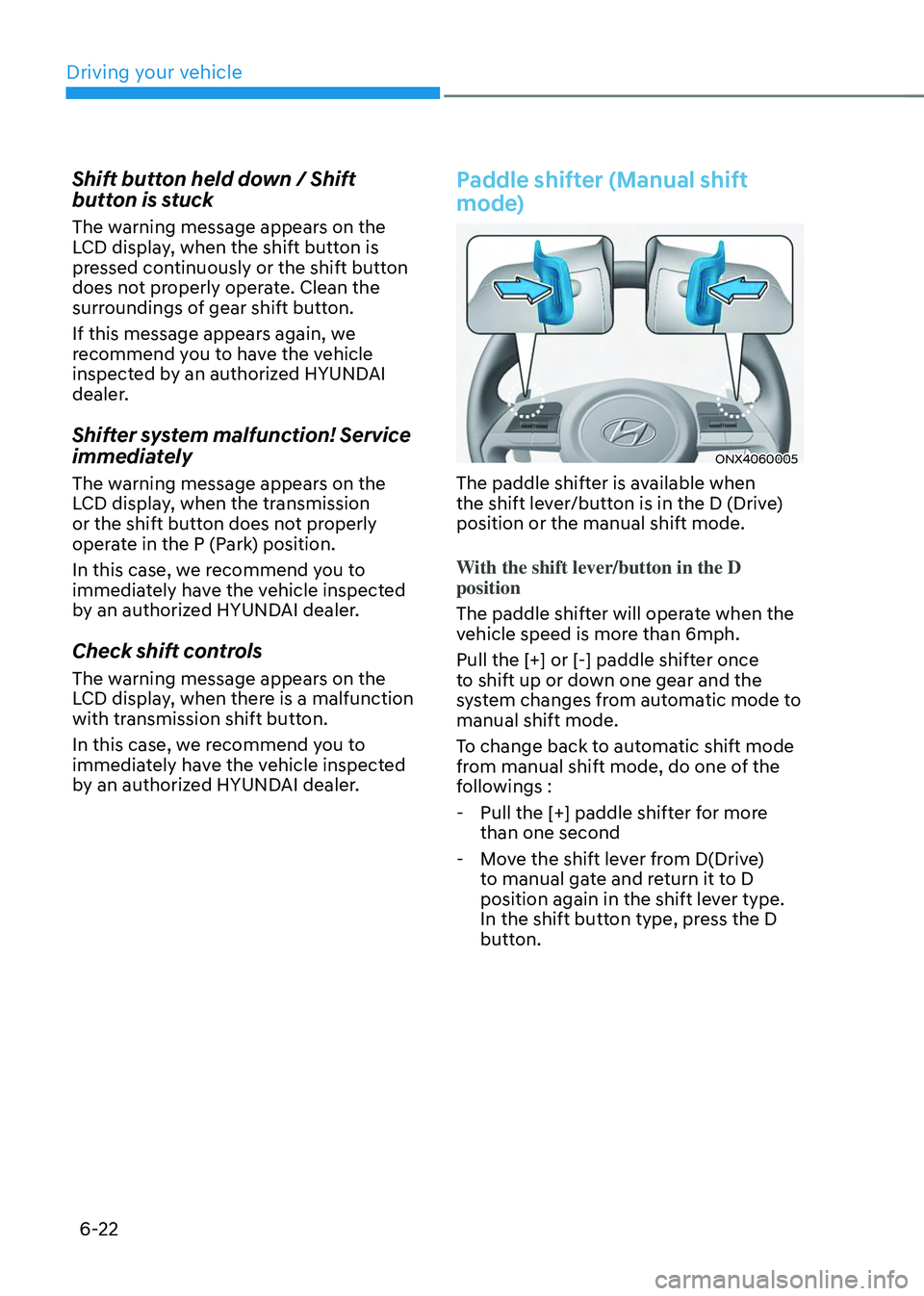
Paddle shifter (Manual shift
mode)
ONX4060005
The paddle shifter is available when
the shift lever/button is in the D (Drive)
position or the manual shift mode.
With the shift lever/button in the D
position
The paddle shifter will operate when the
vehicle speed is more than 6mph.
Pull the [+] or [-] paddle shifter once
to shift up or down one gear and the
system changes from automatic mode to
manual shift mode.
To change back to automatic shift mode
from manual shift mode, do one of the
followings :
-Pull the [+] paddle shifter for more
than one second
-Move the shift lever from D(Drive)
to manual gate and return it to D
position again in the shift lever type.
In the shift button type, press the D
button.