Press START button with key HYUNDAI TUCSON 2023 Owners Manual
[x] Cancel search | Manufacturer: HYUNDAI, Model Year: 2023, Model line: TUCSON, Model: HYUNDAI TUCSON 2023Pages: 638, PDF Size: 26.51 MB
Page 53 of 638
Seats & Safety System
3-22
Rear Occupant Alert (ROA) (if
equipped)
Rear Occupant Alert is provided to
prevent a driver from leaving a vehicle
with a rear passenger left in the vehicle.
System setting
To use Rear Occupant Alert, it must be
enabled from the Settings menu in the
infotainment system screen. Select:
-Setup → Vehicle Settings → Convenience → Rear Occupant Alert
For detailed information, scan the QR
code in the separately supplied simple
manual.
System operation
• First alert
When you turn off the engine and
open the driver’s door after opening
and closing the rear door or liftgate,
the ‘Check rear seats’ warning
message appears on the cluster.
• Second alert
After the first alert, the second alert
operates when any movement is
detected in the vehicle after the
driver’s door is closed and all the
doors are locked. The horn will sound
for approximately 25 seconds. If
the system continues to detect a
movement, the alert operates up to 8
times.
Unlock the doors with the smart key
to stop the alert.
• The system detects movement in the
vehicle for 8 hours after the door is
locked.
• The second alert is activated only after
the prior activation of the first alert.
System precautions
• Make sure that all the windows are
closed. If the window is open, the
alert may operate by the sensor
detecting an unintended movement
(e.g. wind or bugs).
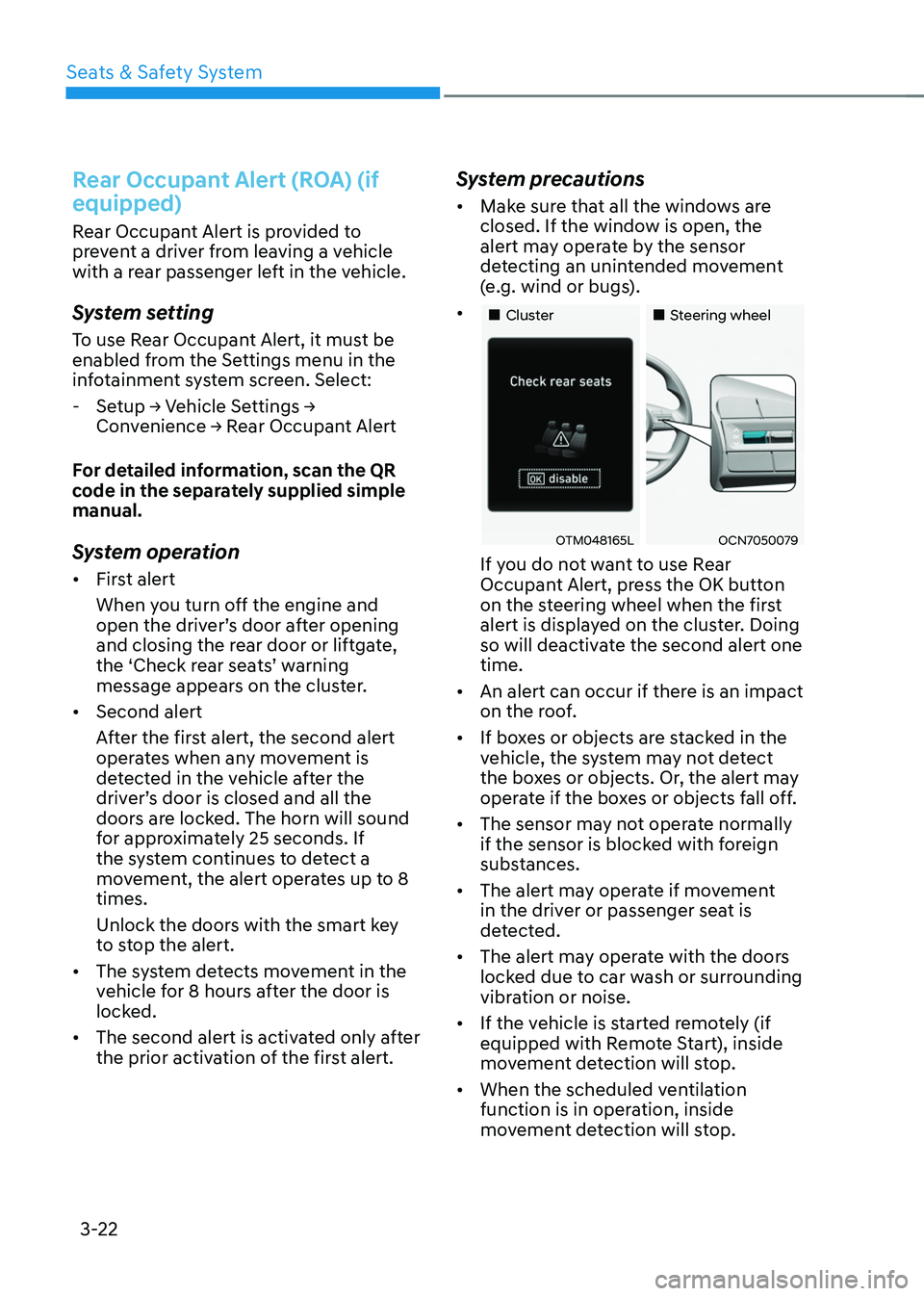
• „„Cluster„„Steering wheel
OTM048165LOCN7050079
If you do not want to use Rear
Occupant Alert, press the OK button
on the steering wheel when the first
alert is displayed on the cluster. Doing
so will deactivate the second alert one
time.
• An alert can occur if there is an impact
on the roof.
• If boxes or objects are stacked in the
vehicle, the system may not detect
the boxes or objects. Or, the alert may
operate if the boxes or objects fall off.
• The sensor may not operate normally
if the sensor is blocked with foreign
substances.
• The alert may operate if movement
in the driver or passenger seat is
detected.
• The alert may operate with the doors
locked due to car wash or surrounding
vibration or noise.
• If the vehicle is started remotely (if
equipped with Remote Start), inside
movement detection will stop.
• When the scheduled ventilation
function is in operation, inside
movement detection will stop.
Page 100 of 638

AUTO STOP indicator light ........................................................................\
..............4-20
Turn signal indicator light ........................................................................\
.................4-21
High beam indicator light ........................................................................\
................4-21
High Beam Assist indicator light ........................................................................\
......4-21
Cruise Indicator Light ........................................................................\
.......................4-21
SPORT Mode Indicator Light ........................................................................\
...........4-22
SMART Mode Indicator Light ........................................................................\
..........4-22
Master warning light ........................................................................\
........................4-22
LCD display messages for vehicles equipped with Smart Key ...............................4-23
Shift to P ........................................................................\
...........................................4-23
Low key battery ........................................................................\
................................4-23
Press START button while turning wheel ...............................................................4-23
Check steering wheel lock system ........................................................................\
.4-23
Press brake pedal to start engine ........................................................................\
..4-23
Key not in vehicle ........................................................................\
.............................4-23
Key not detected ........................................................................\
..............................4-23
Press START button again ........................................................................\
..............4-23
Press START button with key ........................................................................\
..........4-24
Check BRAKE SWITCH fuse ........................................................................\
...........4-24
Shift to P or N to start engine ........................................................................\
.........4-24
Battery discharging due to external electrical devices .........................................4-24
Door, Hood, Liftgate open indicator
.......................................................................4-25
Sunroof open indicator ........................................................................\
....................4-25
Low tire pressure ........................................................................\
.............................4-25
Lights ........................................................................\
................................................4-26
Wiper ........................................................................\
................................................4-26
Low washer fluid ........................................................................\
..............................4-26
Low fuel ........................................................................\
............................................4-26
Low engine oil ........................................................................\
..................................4-26
Engine overheated / Engine has overheated .........................................................4-27
Check exhaust system ........................................................................\
.....................4-27
Check headlight ........................................................................\
...............................4-27
Check turn signal ........................................................................\
.............................4-27
Check headlamp LED ........................................................................\
......................4-27
Check Forward Collision-Avoidance Assist system ...............................................4-28
Check Lane Keeping Assist system ........................................................................\
4-28
Check Blind-Spot Collision Warning system ..........................................................4-28
Check Driver Attention Warning system
................................................................4-28
Check High Beam Assist system ........................................................................\
.....4-28
Check Smart Cruise Control system .......................................................................4-28
4
Page 121 of 638
04
4-23
LCD Display Messages for
Vehicles Equipped with Smart
Key
Shift to P
This message is displayed if you try to
turn off the vehicle without the gear in
the P (Park) position.
If this occurs, the Engine Start/Stop
button turns to the ACC position.
Low key battery
When the Engine Start/Stop button
is pressed to turn OFF the engine,
this message may be displayed. This
message indicates that the internal
battery of the Smart Key is low. Consider
replacing the Smart Key internal battery.
Press START button while turning
wheel
This message is displayed if the steering
wheel does not unlock normally when
the Engine Start/Stop button is pressed.
You should press the Engine Start/Stop
button while turning the steering wheel
right and left.
Check steering wheel lock system
This message is displayed if the steering
wheel does not lock normally while the
Engine Start/Stop button is pressed to
the OFF position.
Press brake pedal to start engine
This message is displayed if the Engine
Start/Stop button changes to the ACC
position twice by pressing the button
repeatedly without depressing the brake
pedal.
You can start the vehicle by depressing
the brake pedal and then pressing the
Engine Start/Stop button.
Key not in vehicle
This message is displayed if the smart
key is not in the vehicle when you leave
the vehicle with the Engine Start/Stop
button in the ON or Start position.
Always turn off the engine before leaving
your vehicle.
Key not detected
This message is displayed if the smart
key is not detected when you press the
Engine Start/Stop button.
Press START button again
This message is displayed if you were
unable to start the vehicle when the
Engine Start/Stop button was pressed.
If this occurs, attempt to start the engine
by pressing the Engine Start/ Stop button
again.
If the warning message appears each
time you press the Engine Start/Stop
button, we recommend that you have
the vehicle inspected by an authorized
HYUNDAI dealer.
Page 122 of 638
Instrument cluster
4-24
Press START button with key
This message is displayed if you press
the Engine Start/Stop button while the
warning message “Key not detected” is
displayed.
At this time, the immobilizer indicator
light blinks.
Check BRAKE SWITCH fuse
This message is displayed if the brake
switch fuse is disconnected.
You need to replace the fuse with a new
one before starting the engine.
If that is not possible, you can start the
engine by pressing the Engine Start/
Stop button for 10 seconds in the ACC
position.
Shift to P or N to start engine
This message is displayed if you try to
start the engine in any other position
except P (Park) or N (Neutral).
Information
You can start the engine with the gear
in N (Neutral). But, for your safety, we
recommend that you start the engine with
the gear shifted to P (Park).
Battery discharging due to external
electrical devices
This message is displayed if the vehicle
battery voltage is low or if a current draw
is detected that could drain the vehicle
battery.
Check to see that there are no non-
factory external electronic devices
connected to the vehicle battery system,
otherwise battery discharge may occur.
If this message appears in the LCD
cluster and there are no other non-
factory electronic devices connected to
the vehicle, have the vehicle inspected
by an authorized HYUNDAI dealer.
Page 148 of 638
Convenient features
5-4
Remote key (if equipped)
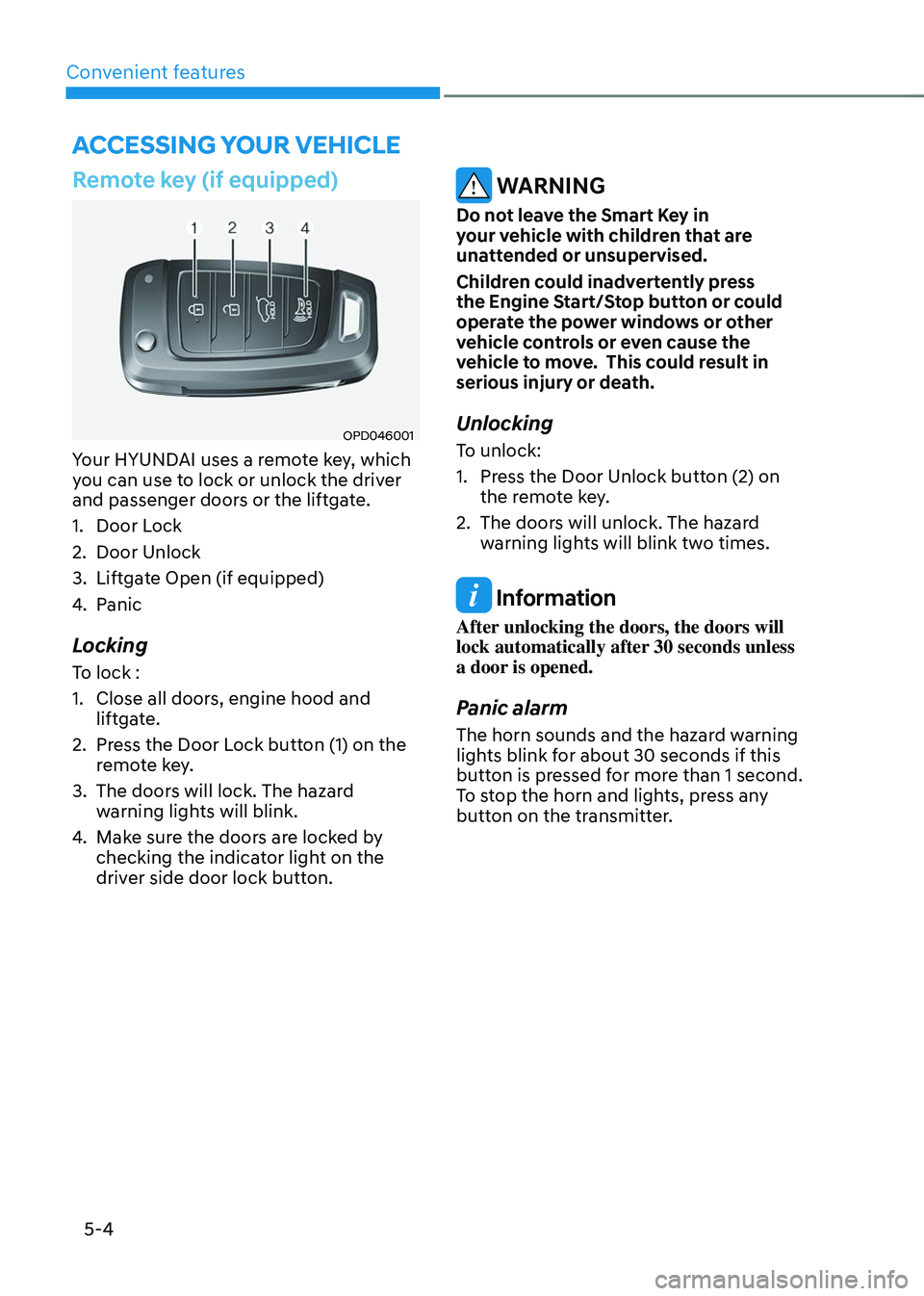
OPD046001
Your HYUNDAI uses a remote key, which
you can use to lock or unlock the driver
and passenger doors or the liftgate.
1. Door Lock
2. Door Unlock
3. Liftgate Open (if equipped)
4. Panic
Locking
To lock :
1. Close all doors, engine hood and
liftgate.
2. Press the Door Lock button (1) on the
remote key.
3. The doors will lock. The hazard
warning lights will blink.
4. Make sure the doors are locked by
checking the indicator light on the
driver side door lock button.
WARNING
Do not leave the Smart Key in
your vehicle with children that are
unattended or unsupervised.
Children could inadvertently press
the Engine Start/Stop button or could
operate the power windows or other
vehicle controls or even cause the
vehicle to move. This could result in
serious injury or death.
Unlocking
To unlock:
1. Press the Door Unlock button (2) on
the remote key.
2. The doors will unlock. The hazard
warning lights will blink two times.
Information
After unlocking the doors, the doors will
lock automatically after 30 seconds unless
a door is opened.
Panic alarm
The horn sounds and the hazard warning
lights blink for about 30 seconds if this
button is pressed for more than 1 second.
To stop the horn and lights, press any
button on the transmitter.
ACCESSING YOUR VEHICLE
Page 149 of 638
05
5-5
Information
The word “HOLD” is written on the
button to inform you that you must press
and hold the button for more than one
second.
Start-up
For detailed information refer to “Key
Ignition Switch” in chapter 6.
NOTICE
To prevent damaging the remote key:
• Keep the remote key away from
liquids or any type of extreme heat.
If water or liquid gets inside of the
remote or if the remote is subjected
to extreme heat, damage to the
internal circuit may result. This
would void the vehicle warranty.
• Avoid dropping or throwing the
remote key.
• Protect the remote key from extreme
temperatures.
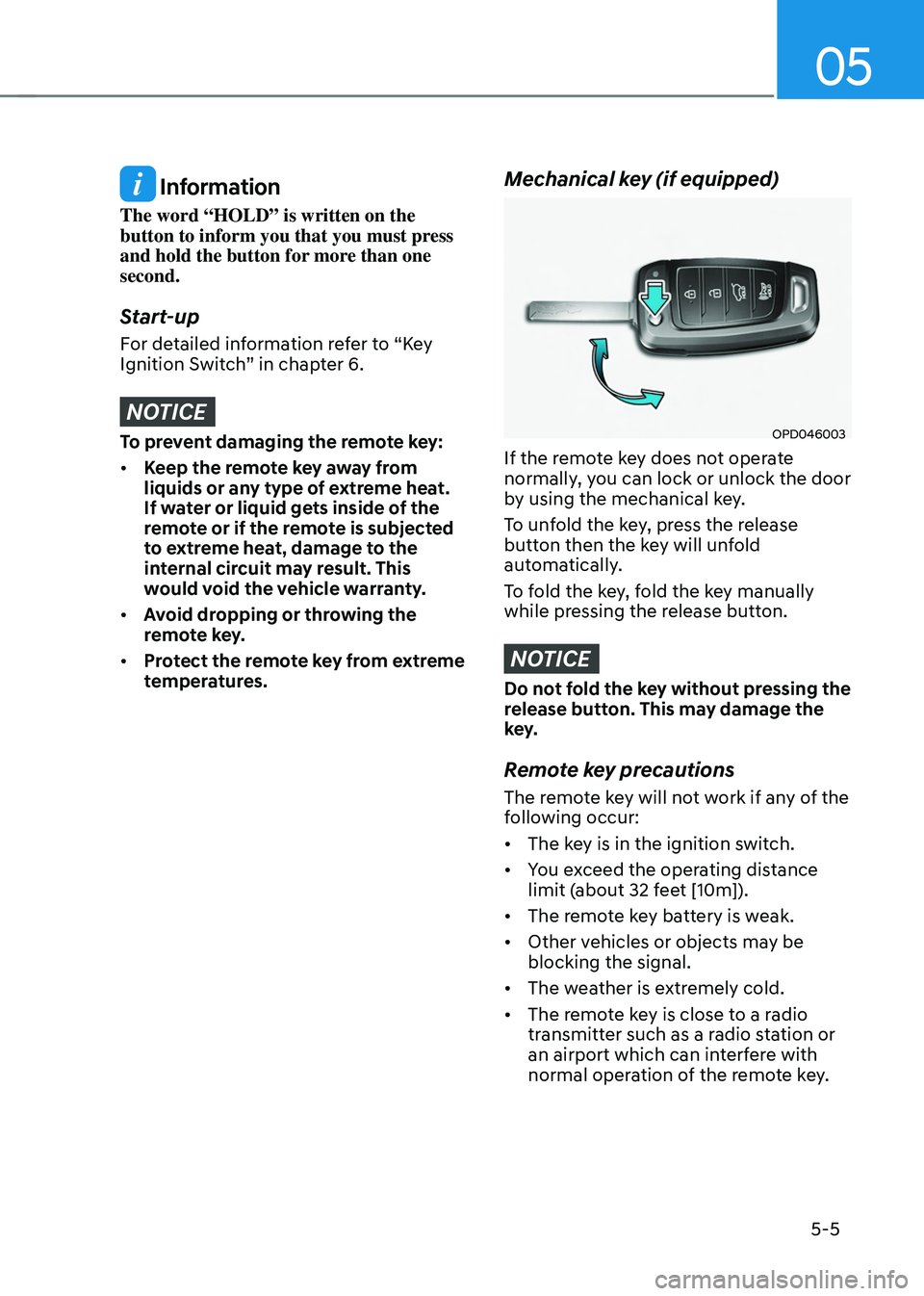
Mechanical key (if equipped)
OPD046003
If the remote key does not operate
normally, you can lock or unlock the door
by using the mechanical key.
To unfold the key, press the release
button then the key will unfold
automatically.
To fold the key, fold the key manually
while pressing the release button.
NOTICE
Do not fold the key without pressing the
release button. This may damage the
key.
Remote key precautions
The remote key will not work if any of the
following occur:
• The key is in the ignition switch.
• You exceed the operating distance
limit (about 32 feet [10m]).
• The remote key battery is weak.
• Other vehicles or objects may be
blocking the signal.
• The weather is extremely cold.
• The remote key is close to a radio
transmitter such as a radio station or
an airport which can interfere with
normal operation of the remote key.
Page 153 of 638
05
5-9
Note that if you press the outside door
handle to lock the doors using the touch
sensor, the doors will not lock under the
following circumstances:
• The Smart Key is in the vehicle
• The Engine Start/Stop button is in the
ACC or ON position
• Any of the doors are open (except for
the liftgate)
If this occurs, then a chime will sound
for about 3 seconds. Check the vehicle
before attempting to lock the car again.
CAUTION
Before you leave your vehicle with the
Smart Key, verify that your vehicle is
locked. When using the touch sensor
on the front door handle, listen to hear
that the lock has actuated, and then
pull the handle within 3 seconds to
confirm the doors are locked.
(if it has been longer than 3 seconds,
verify the doors are locked by pressing
the lock button on the Smart Key. You
will hear a single beep.)
WARNING
Do not leave the Smart Key in
your vehicle with children that are
unattended or unsupervised.
Children could inadvertently press
the Engine Start/Stop button or could
operate the power windows or other
vehicle controls or even cause the
vehicle to move. This could result in
serious injury or death.
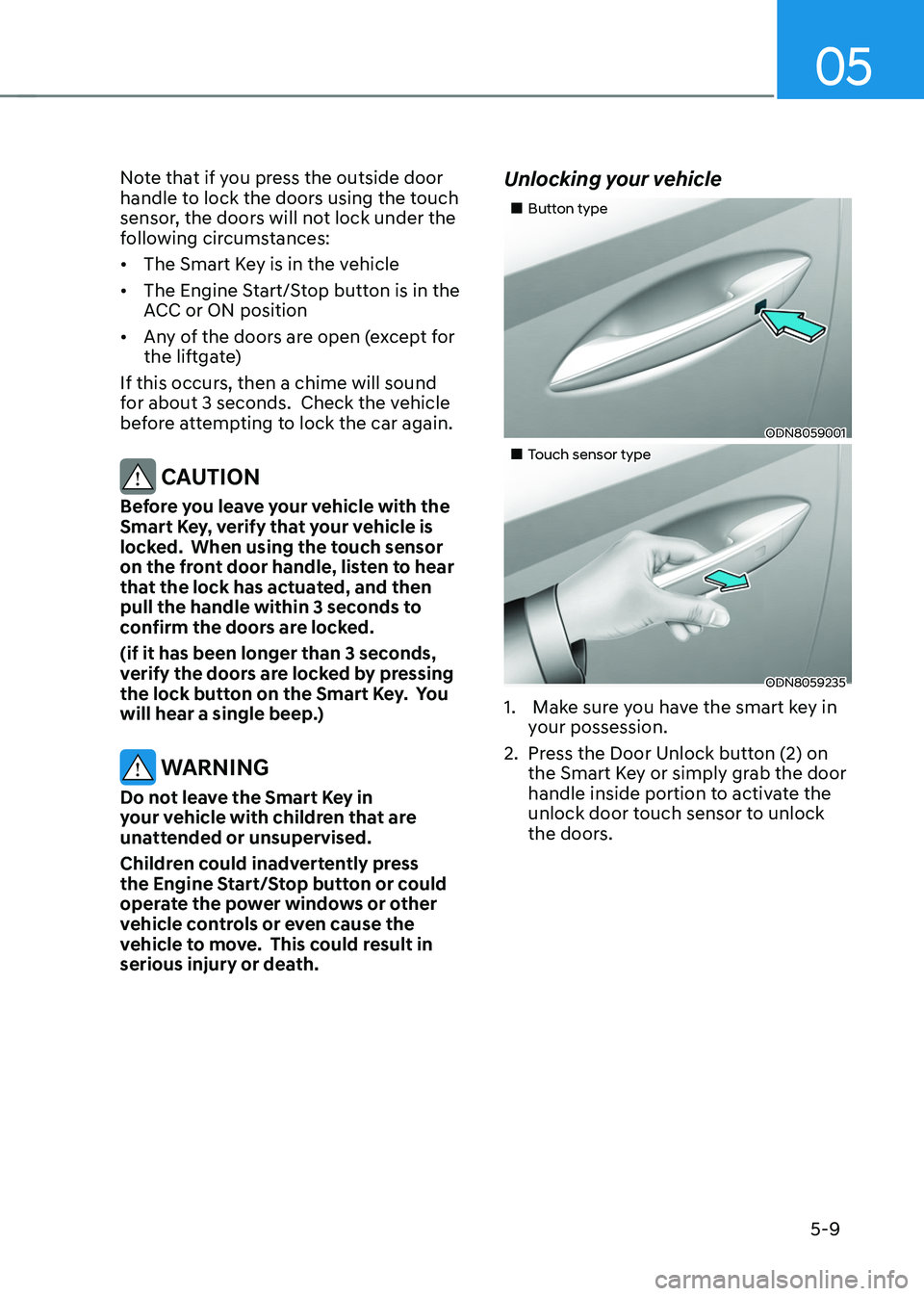
Unlocking your vehicle
„„Button type
ODN8059001
„„Touch sensor type
ODN8059235
1. Make sure you have the smart key in
your possession.
2. Press the Door Unlock button (2) on
the Smart Key or simply grab the door
handle inside portion to activate the
unlock door touch sensor to unlock
the doors.
Page 154 of 638
Convenient features
5-10
3. If you unlock the doors using the
passenger side door handle, all the
doors will unlock. If you unlock the
doors using the driver side door
handle, either the driver side door
will unlock or all the doors will unlock
depending on the setting for the Two
Press Unlock feature. Refer to User
Settings to change the Driver Door
unlock mode.• The door handle button will only
operate when the smart key is
within 28~40 inches (0.7~1 m) from
the outside door handle.
• If you do not open the door after
unlocking within 30 seconds, it will
return to the lock mode.
• If you unlocked the door with the
door handle, the doors cannot be
locked with the sensor within 2
seconds.
To prevent unintentional door lock or
unlock:
Press the lock button on the smart key
and immediately press the unlock button
along with the lock button for more than
4 seconds. The hazard warning lights will
blink four times. At this time, the doors
will not lock or unlock even though the
touch sensor is touched on the outside
door handle.
To deactivate the function, press the
door lock or unlock button on the smart
key. Opening or Unlocking the Liftgate
To open the liftgate:
1. If your vehicle has a Smart Key, make
sure you have the Smart Key in your
possession.
2. Press either the liftgate open/close
button on the vehicle or press and
hold the liftgate open button on
the smart key for more than one
second. The hazard warning lights
will blink twice and the liftgate will be
unlocked. Pull up on the liftgate to
open. If your vehicle is equipped with
power liftgate then the liftgate will
automatically open.
Remotely starting vehicle
(if equipped)
You can start the vehicle using the
Remote Start button on the smart key.
To start the vehicle remotely:
1. Before you can use remote start your
vehicle, the door lock button must be
pressed. Press the door lock button
on the Smart Key. You must be within
about 32 feet (10m) from your vehicle.
2. Press and hold the remote start
button on your Smart Key. You must
press the button within 4 seconds
from when you pressed the door lock
button to activate the remote start.
3. The hazard warning lights will blink
and the engine will start.
4. To turn off the remote start function,
press the Remote Start button once.
Page 155 of 638

05
5-11
Information
• The vehicle must be in P (Park) for the
remote start function to start.
• The engine turns off if you get on the
vehicle without a registered smart key.
• The engine turns off if you do not get
on the vehicle within 10 minutes after
remotely starting the vehicle.
• The Remote Start button may not
operate if the smart key is not within 32
feet (10 m).
• The vehicle will not remotely start if the
engine hood or liftgate is opened.
• Do not idle the engine for a long period.
Remote Smart Parking Assist
Feature (if equipped)
Some models are equipped with Remote
Smart Parking Assist Feature. With the
Smart Key, the vehicle can be moved
forward or backward remotely to enter or
exit a tight parking space.
For more details, refer to “Remote
Smart Parking Assist (RSPA)” section in
chapter 7.
Panic alarm
The horn sounds and the hazard warning
lights blink for about 30 seconds if this
button is pressed for more than 1 second
To stop the horn and lights, press any
button on the transmitter.
Push Button Start/Stop (if equipped)
Some models are equipped with a push
button start instead of a key cylinder.
You can leave your Smart Key in your
pocket or purse when you start your
vehicle.
For more details, refer to the “Engine
Start/Stop Button” section in chapter 6.
Information
If the smart key is not moved for some
time, the detection function for smart key
operation will pause. Lift the smart key to
activate the detection again.
NOTICE
To prevent damaging the smart key:
• Keep the smart key in a cool,
dry place to avoid damage or
malfunction. Exposure to moisture
or high temperature may cause
the internal circuit of the smart key
to malfunction which may not be
covered under warranty.
• Avoid dropping or throwing the
smart key.
• Protect the smart key from extreme
temperatures.
Page 158 of 638
Convenient features
5-14
Immobilizer system
The immobilizer system helps protect
your vehicle from theft. If an improperly
coded key (or other device) is used, the
engine’s fuel system is disabled.
When the Engine Start/Stop button
is pressed to the ON position, the
immobilizer system indicator should
come on briefly, then go off. If the
indicator starts to blink, the system does
not recognize the coding of the key.
Press the Engine Start/Stop button to
the OFF position, then press the Engine
Start/Stop button to the ON position
again.
The system may not recognize your
key’s coding if another immobilizer key
or other metal object (i.e., key chain) is
near the key. The engine may not start
because the metal may interrupt the
transponder signal from transmitting
normally.
If the system repeatedly does not
recognize the coding of the key, it is
recommended that you contact your
HYUNDAI dealer.
Do not attempt to alter this system
or add other devices to it. Electrical
problems could result that may make
your vehicle inoperable. WARNING
In order to prevent theft of your
vehicle, do not leave spare keys
anywhere in your vehicle. Your
immobilizer password is a customer
unique password and should be kept
confidential.
NOTICE
The transponder in your key is an
important part of the immobilizer
system. It is designed to give years
of trouble-free service, however you
should avoid exposure to moisture,
static electricity and rough handling.
Immobilizer system malfunction could
occur.
Information
This device complies with Part 15 of the
FCC rules.
Operation is subject to the following three
conditions:
1. This device may not cause harmful
interference.
2. This device must accept any
interference received, including
interference that may cause undesired
operation.
3. Changes or modifications not expressly
approved by the party responsible
for compliance could void the user’s
authority to operate the device.