brake light HYUNDAI TUCSON HYBRID 2021 User Guide
[x] Cancel search | Manufacturer: HYUNDAI, Model Year: 2021, Model line: TUCSON HYBRID, Model: HYUNDAI TUCSON HYBRID 2021Pages: 630, PDF Size: 77.98 MB
Page 135 of 630
04
4-23
Press brake pedal to start engine (if
equipped)
This message is displayed if the Engine
Start/Stop button changes to the ACC
position twice by pressing the button
repeatedly without depressing the brake
pedal.
You can start the vehicle by depressing
the brake pedal and then pressing the
Engine Start/Stop button.
Key not in vehicle (if equipped)
This message is displayed if the smart
key is not in the vehicle when you press
the Engine Start/ Stop button.
When attempting to start the vehicle,
always have the smart key with you.
Key not detected (if equipped)
This message is displayed if the smart
key is not detected when you press the
Engine Start/Stop button.
Press START button again (if
equipped)
This message is displayed if you were
unable to start the vehicle when the
Engine Start/Stop button was pressed.
If this occurs, attempt to start the engine
by pressing the Engine Start/ Stop button
again.
If the warning message appears each
time you press the Engine Start/Stop
button, we recommend that you have
the vehicle inspected by an authorized
HYUNDAI dealer.
Press START button with key (if
equipped)
This message is displayed if you press
the Engine Start/Stop button while the
warning message “Key not detected” is
displayed.
At this time, the immobilizer indicator
light blinks.
Check BRAKE SWITCH fuse (if
equipped)
This message is displayed if the brake
switch fuse is disconnected.
You need to replace the fuse with a new
one before starting the engine.
If that is not possible, you can start the
engine by pressing the Engine Start/
Stop button for 10 seconds in the ACC
position.
12V battery discharging due to
additional electrical devices (if
equipped)
This message is displayed if the 12V
battery voltage is weak due to any
non-factory electrical accessories (ex.
dashboard camera) while parking. Be
careful that the battery is not discharged.
If the message appears after removing
the non-factory electrical accessories,
we recommend that you have the vehicle
inspected by an authorized HYUNDAI
dealer.
Page 137 of 630
04
4-25
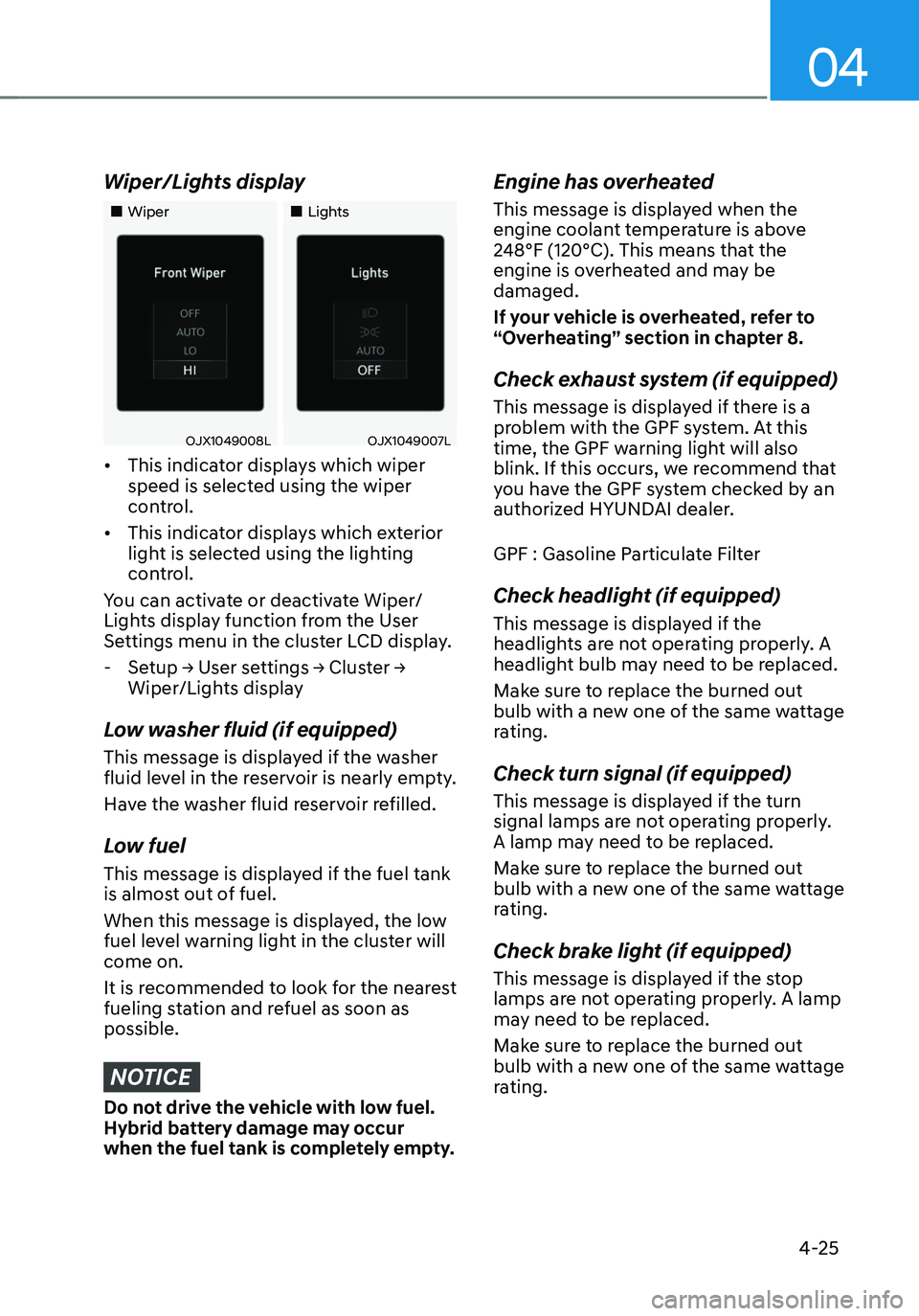
Wiper/Lights display
„„Wiper„„Lights
OJX1049008LOJX1049007L
• This indicator displays which wiper
speed is selected using the wiper
control.
• This indicator displays which exterior
light is selected using the lighting
control.
You can activate or deactivate Wiper/
Lights display function from the User
Settings menu in the cluster LCD display.
- Setup → User settings → Cluster →
Wiper/Lights display
Low washer fluid (if equipped)
This message is displayed if the washer
fluid level in the reservoir is nearly empty.
Have the washer fluid reservoir refilled.
Low fuel
This message is displayed if the fuel tank
is almost out of fuel.
When this message is displayed, the low
fuel level warning light in the cluster will
come on.
It is recommended to look for the nearest
fueling station and refuel as soon as
possible.
NOTICE
Do not drive the vehicle with low fuel.
Hybrid battery damage may occur
when the fuel tank is completely empty.
Engine has overheated
This message is displayed when the
engine coolant temperature is above
248°F (120°C). This means that the
engine is overheated and may be
damaged.
If your vehicle is overheated, refer to
“Overheating” section in chapter 8.
Check exhaust system (if equipped)
This message is displayed if there is a
problem with the GPF system. At this
time, the GPF warning light will also
blink. If this occurs, we recommend that
you have the GPF system checked by an
authorized HYUNDAI dealer.
GPF : Gasoline Particulate Filter
Check headlight (if equipped)
This message is displayed if the
headlights are not operating properly. A
headlight bulb may need to be replaced.
Make sure to replace the burned out
bulb with a new one of the same wattage
rating.
Check turn signal (if equipped)
This message is displayed if the turn
signal lamps are not operating properly.
A lamp may need to be replaced.
Make sure to replace the burned out
bulb with a new one of the same wattage
rating.
Check brake light (if equipped)
This message is displayed if the stop
lamps are not operating properly. A lamp
may need to be replaced.
Make sure to replace the burned out
bulb with a new one of the same wattage
rating.
Page 145 of 630
04
4-33
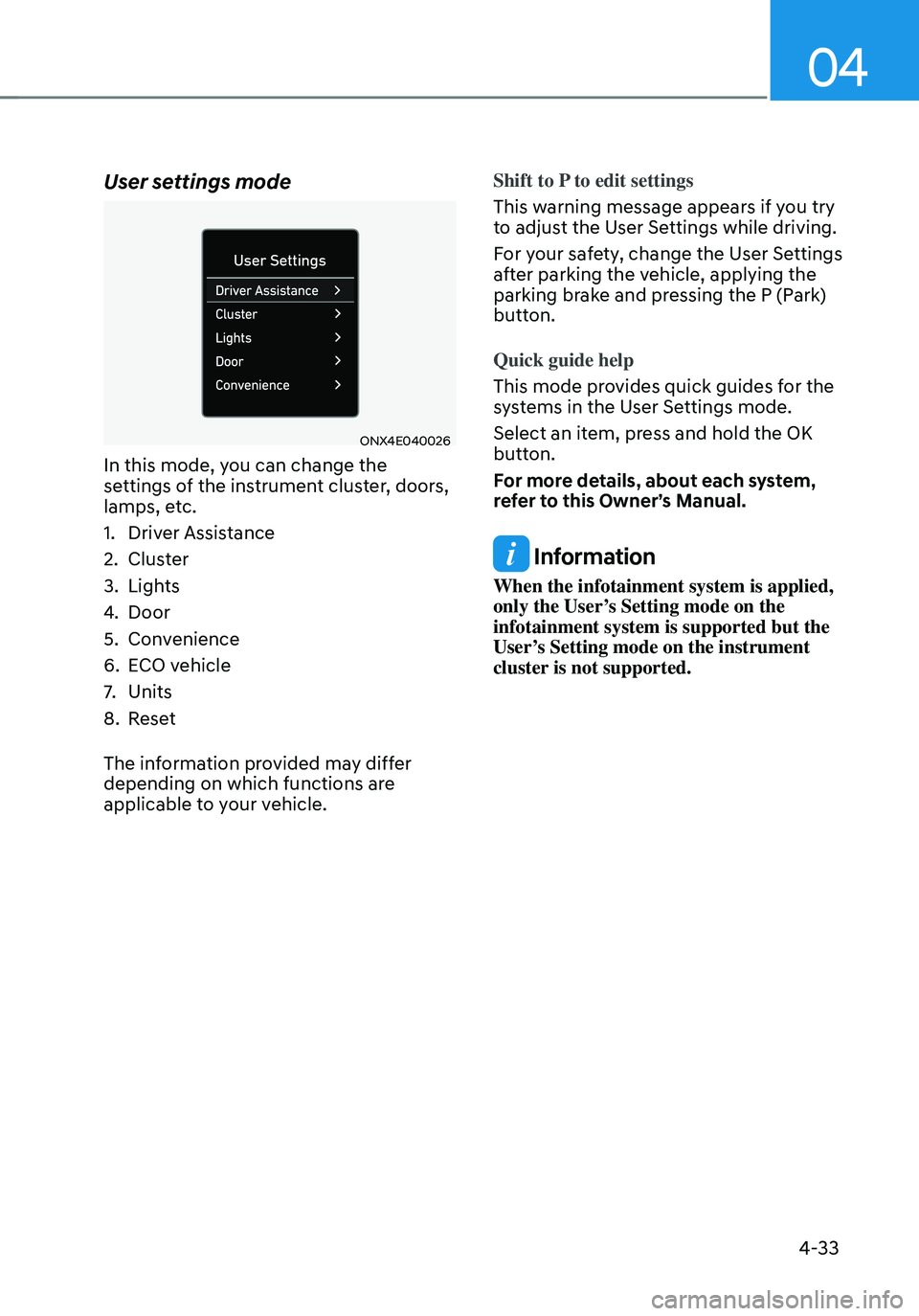
User settings mode
ONX4E040026
In this mode, you can change the
settings of the instrument cluster, doors,
lamps, etc.
1. Driver Assistance
2. Cluster
3. Lights
4. Door
5. Convenience
6. ECO vehicle
7. Units
8. Reset
The information provided may differ
depending on which functions are
applicable to your vehicle. Shift to P to edit settings
This warning message appears if you try
to adjust the User Settings while driving.
For your safety, change the User Settings
after parking the vehicle, applying the
parking brake and pressing the P (Park)
button.
Quick guide help
This mode provides quick guides for the
systems in the User Settings mode.
Select an item, press and hold the OK
button.
For more details, about each system,
refer to this Owner’s Manual.
Information
When the infotainment system is applied,
only the User’s Setting mode on the
infotainment system is supported but the
User’s Setting mode on the instrument
cluster is not supported.
Page 224 of 630
05
5-67
exterior feAtures
Hood
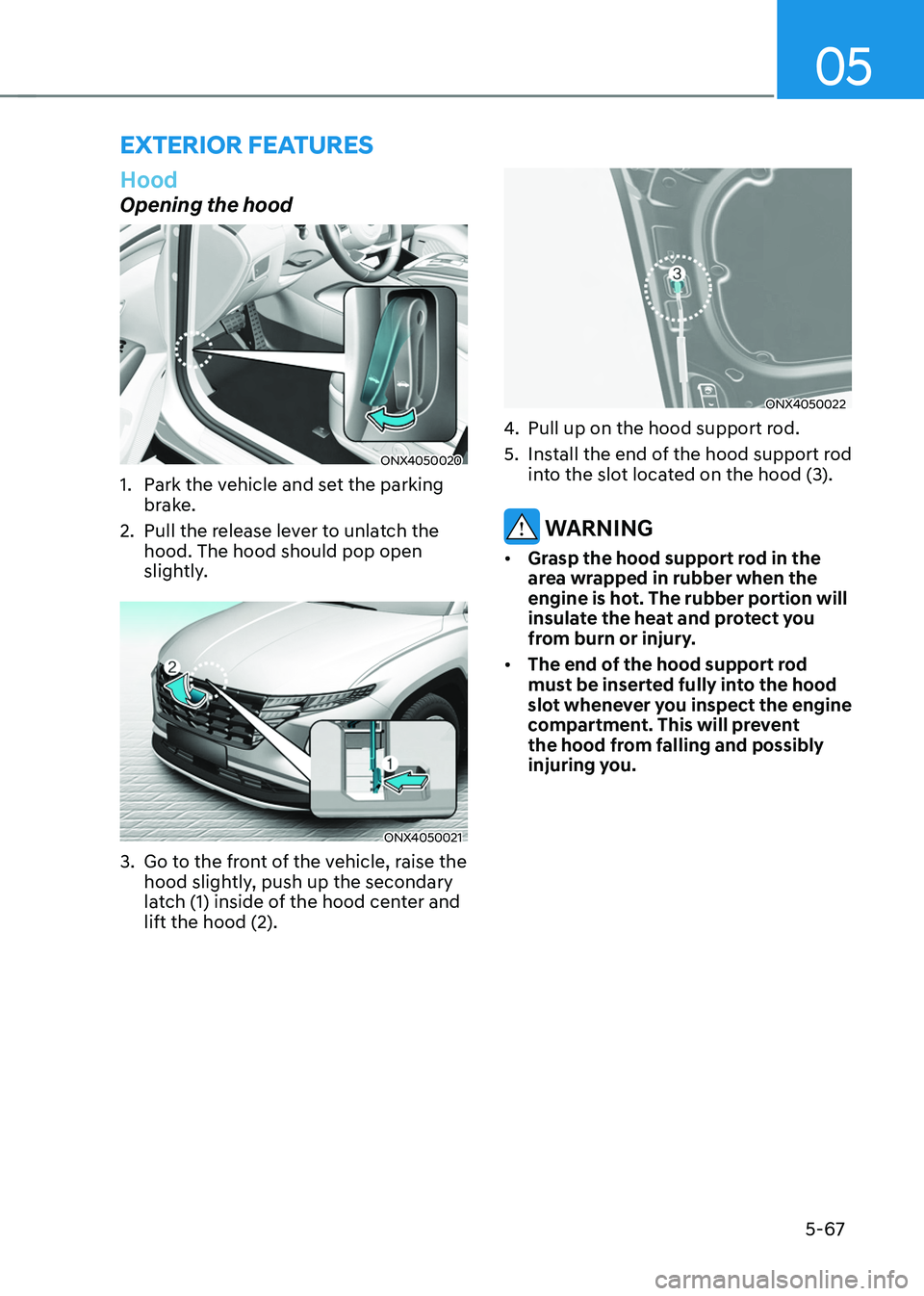
Opening the hood
ONX4050020
1. Park the vehicle and set the parking
brake.
2.
Pull the release le
ver to unlatch the
hood. The hood should pop open
slightly.
ONX4050021
3. Go to the front of the vehicle, raise the
hood sligh tly, push up the secondary
latch (1) inside of the hood center and
lift the hood (2).
ONX4050022
4. Pull up on the hood support rod.
5.
Install the end o
f the hood support rod
into the slot located on the hood (3).
WARNING
• Grasp the hood support rod in the
area wrapped in rubber when the
engine is hot. The rubber portion will
insulate the heat and protect you
from burn or injury.
• The end of the hood support rod
must be inserted fully into the hood
slot whenever you inspect the engine
compartment. This will prevent
the hood from falling and possibly
injuring you.
Page 225 of 630
Convenient features
5-68
Closing the hood
1. Before closing the hood, check in and
around the engine compartment to
ensure the following:
- Any t
ools or other loose objects
are removed from the engine room
area or hood opening area
- All glov
e, rags, or other
combustible material is removed
from the engine compartment
- All filler caps are tigh
tly and
correctly installed
2.
Re
turn the hood support rod rod to its
clip to prevent it from rattling.
3.
Lo
wer the hood until it is about 30 cm
(12in.) above the closed position and
let it drop. Make sure that it locks into
place.
4.
Check that the hood has engaged
pr
operly. If the hood can be raised
slightly, it is not properly engaged.
Open it again and close it with a little
more force.
WARNING
• Before closing the hood, ensure
all obstructions are removed from
around the hood opening.
• Always double check to be sure that
the hood is firmly latched before
driving away. Check there is no
hood open warning light or message
displayed on the instrument cluster.
Driving with the hood opened may
cause a total loss of visibility, which
might result in an accident.
• Do not move the vehicle with the
hood in the raised position, as vision
is obstructed, which might result in
an accident, and the hood could fall
or be damaged.
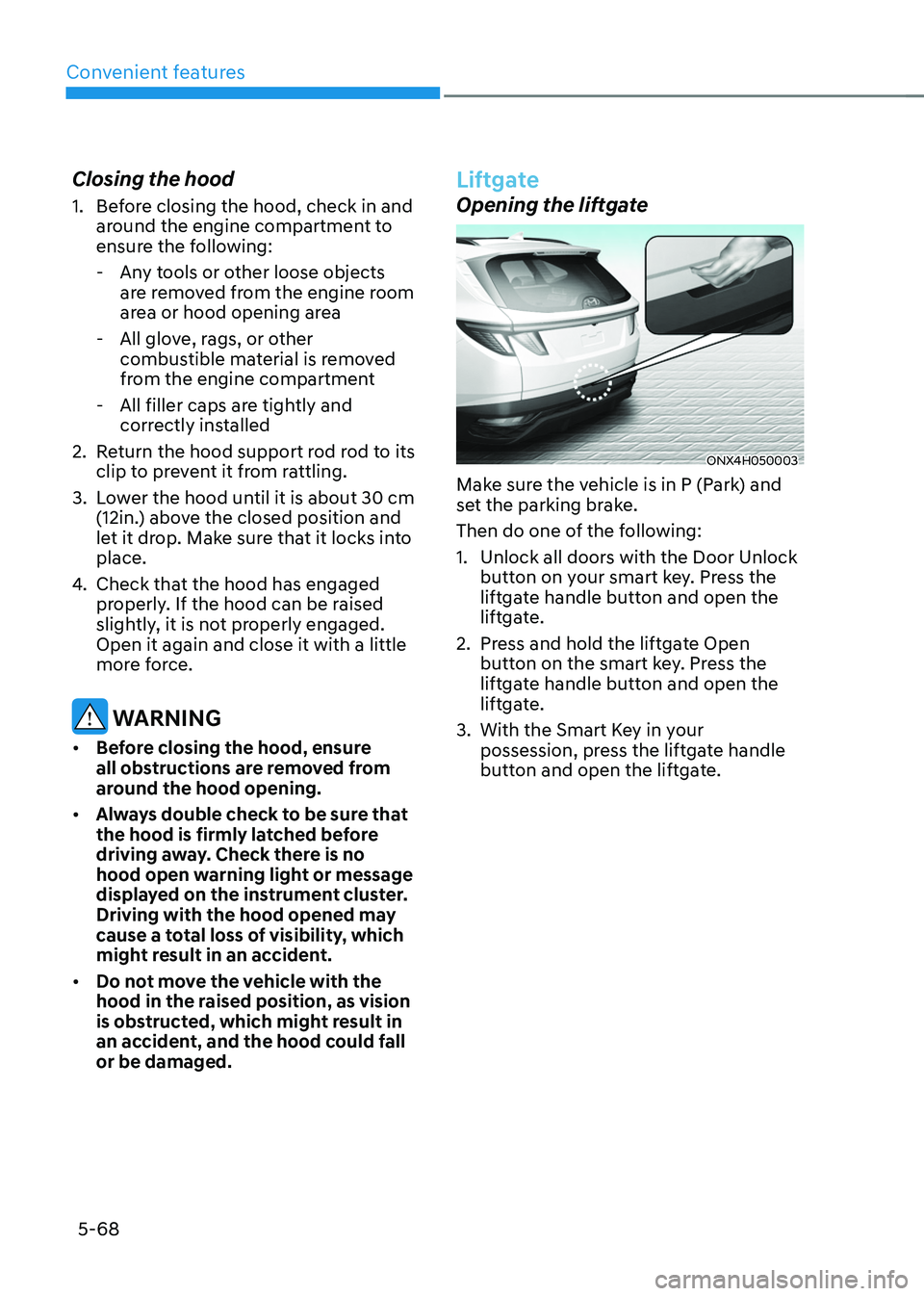
Liftgate
Opening the liftgate
ONX4H050003
Make sure the vehicle is in P (Park) and
set the parking brake.
Then do one of the following:
1.
Unlock all doors with the Door Unlock
butt
on on your smart key. Press the
liftgate handle button and open the
liftgate.
2.
Press and hold the lift
gate Open
button on the smart key. Press the
liftgate handle button and open the
liftgate.
3.
With the Smart Ke
y in your
possession, press the liftgate handle
button and open the liftgate.
Page 236 of 630
05
5-79
Closing the fuel filler door
1. To install the fuel tank cap, turn it
clockwise until it “clicks” one time.
2.
Close the fuel filler door until it is
la
tched securely.
Information
To lock the fuel filler door, make sure the
fuel filler door is completely closed. Press
the LOCK button on the remote key or
smart key to lock your vehicle. The fuel
filler door will also lock.
Note that if the fuel filler door is not
completely closed when the vehicle is
locked, the fuel filler door will not be
locked.
CAUTION
Make sure the fuel filler door is
completely closed before driving
through a car wash or operating a high
pressure spray washer.
WARNING
Automotive fuel is highly flammable
and explosive. Failure to follow these
guidelines may result in SERIOUS
INJURY or DEATH:
• Read and follow all warnings posted
at the gas station.
• Before refueling, note the location
of the Emergency Fuel Shut-Off, if
available, at the gas station.
• Before touching the fuel nozzle, you
should eliminate the potential build-
up of static electricity by touching
a metal part of the vehicle, a safe
distance away from the fuel filler
neck, nozzle, or other gas source,
with your bare hand.
• Do not use mobile phones while
refueling. Electric current and/or
electronic interference from cellular
phones can potentially ignite fuel
vapors and cause a fire. •
Do not get back into a vehicle
once you have begun refueling.
You can generate a buildup of
static electricity by touching,
rubbing or sliding against any item
or fabric capable of producing
static electricity. Static electricity
discharge can ignite fuel vapors
causing a fire. If you must re-enter
the vehicle, you should once again
eliminate potentially dangerous
static electricity discharge by
touching a metal part of the vehicle,
away from the fuel filler neck, nozzle
or other fuel source, with your bare
hand.
• When using an approved portable
fuel container, be sure to place the
container on the ground prior to
refueling. Static electricity discharge
from the container can ignite fuel
vapors causing a fire.
Once refueling has begun, contact
between your bare hand and the
vehicle should be maintained until
the filling is complete.
• Use only approved portable plastic
fuel containers designed to carry and
store fuel.
• When refueling, always shift the
gear to the P (Park) position, set
the parking brake, and press the
Engine Start/Stop button to the
OFF position. Sparks produced by
electrical components related to the
engine can ignite fuel vapors causing
a fire.
• Do not use matches or a lighter and
do not smoke or leave a lit cigarette
in your vehicle while at a gas station,
especially during refueling.
• Do not over-fill or top-off your
vehicle tank, which can cause fuel
spillage.
Page 238 of 630
05
5-81
lighting
Exterior lights
Lighting control
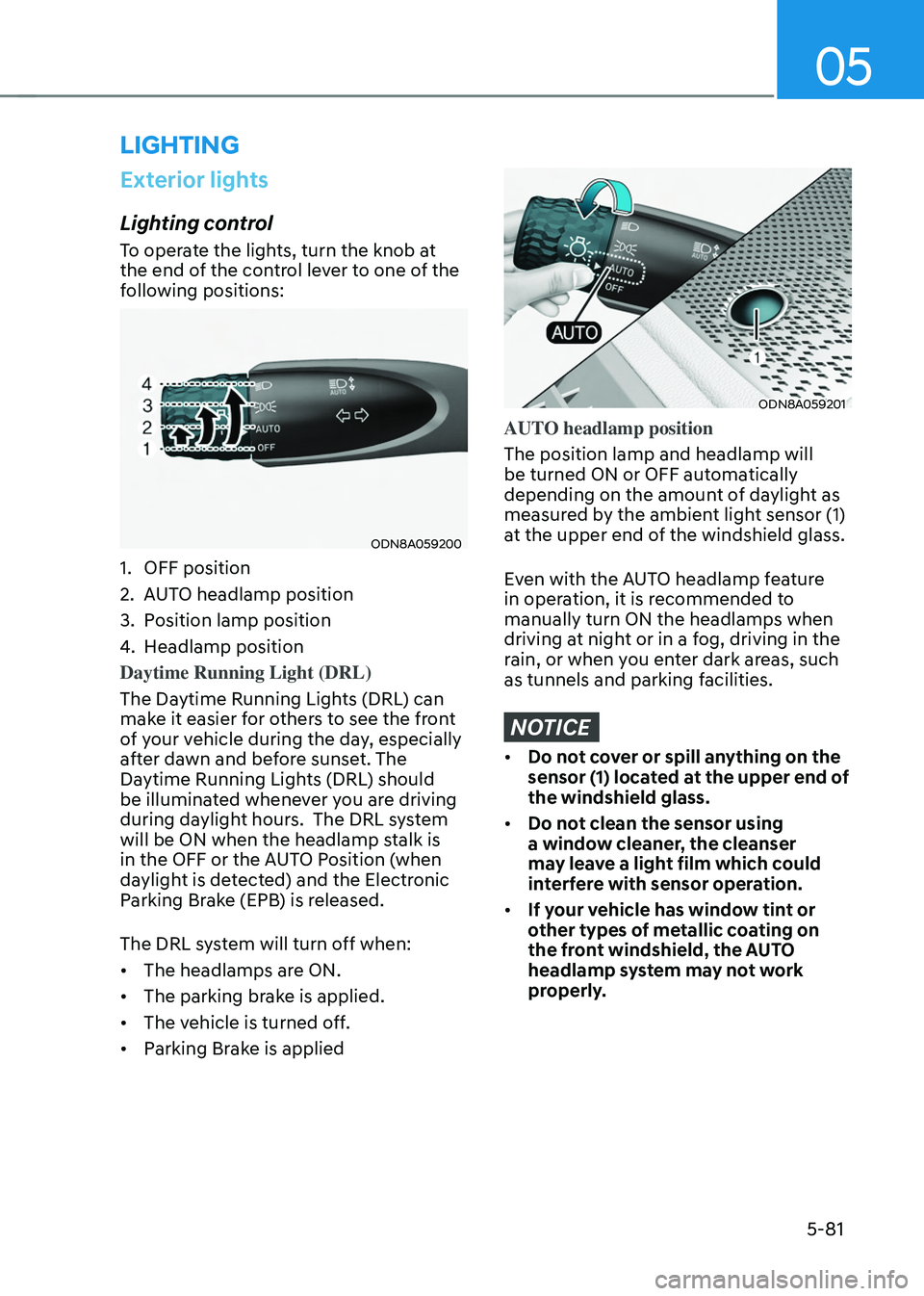
To operate the lights, turn the knob at
the end of the control lever to one of the
following positions:
ODN8A059200
1. OFF position
2.
AUT
O headlamp position
3.
Position lamp position
4.
Headlamp position
Daytime Running Light (DRL)
The Da
ytime Running Lights (DRL) can
make it easier for others to see the front
of your vehicle during the day, especially
after dawn and before sunset. The
Daytime Running Lights (DRL) should
be illuminated whenever you are driving
during daylight hours. The DRL system
will be ON when the headlamp stalk is
in the OFF or the AUTO Position (when
daylight is detected) and the Electronic
Parking Brake (EPB) is released.
The DRL system will turn off when:
• The headlamps are ON.
• The parking brake is applied.
• The vehicle is turned off.
• Parking Brake is applied
ODN8A059201
AUTO headlamp position
The position lamp and headlamp will
be turned ON or OFF automatically
depending on the amount of daylight as
measured by the ambient light sensor (1)
at the upper end of the windshield glass.
Even with the AUTO headlamp feature
in operation, it is recommended to
manually turn ON the headlamps when
driving at night or in a fog, driving in the
rain, or when you enter dark areas, such
as tunnels and parking facilities.
NOTICE
• Do not cover or spill anything on the
sensor (1) located at the upper end of
the windshield glass.
• Do not clean the sensor using
a window cleaner, the cleanser
may leave a light film which could
interfere with sensor operation.
• If your vehicle has window tint or
other types of metallic coating on
the front windshield, the AUTO
headlamp system may not work
properly.
Page 292 of 630
06
6-5
ignition switch
WARNING
To reduce the risk of SERIOUS INJURY or
DEATH, take the following precautions:
• NEVER allow children or any person
who is unfamiliar with the vehicle to
touch the ignition switch or related
parts. Unexpected and sudden
vehicle movement can occur.
• NEVER reach through the steering
wheel for the ignition switch, or any
other control, while the vehicle is in
motion. The presence of your hand
or arm in this area may cause a loss
of vehicle control resulting in an
accident.
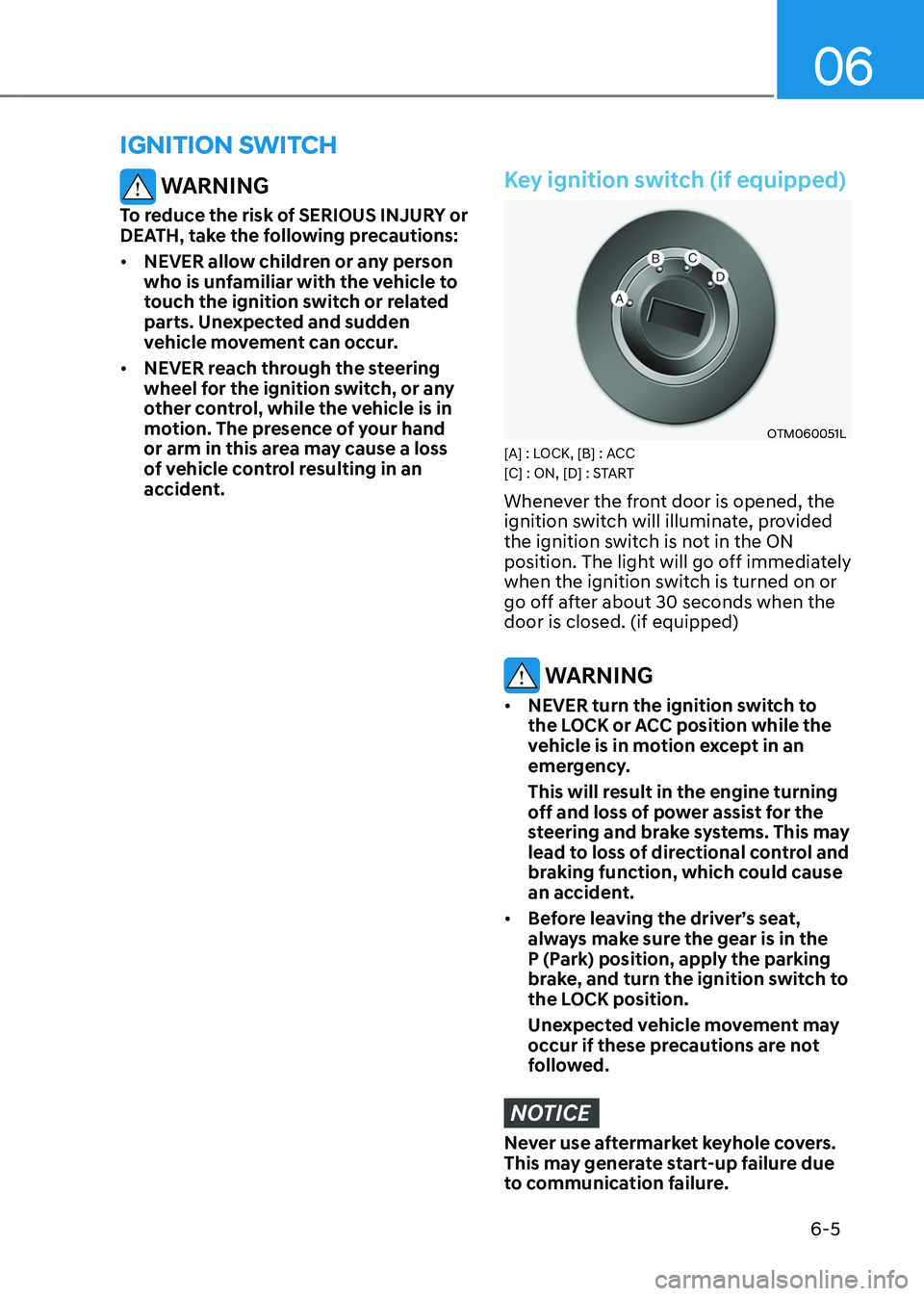
Key ignition switch (if equipped)
OTM060051L[A] : LOCK, [B] : ACC
[C] : ON, [D] : START
Whenever the front door is opened, the
ignition switch will illuminate, provided
the ignition switch is not in the ON
position. The light will go off immediately
when the ignition switch is turned on or
go off after about 30 seconds when the
door is closed. (if equipped)
WARNING
• NEVER turn the ignition switch to
the LOCK or ACC position while the
vehicle is in motion except in an
emergency.
This will result in the engine turning
off and loss of power assist for the
steering and brake systems. This may
lead to loss of directional control and
braking function, which could cause
an accident.
• Before leaving the driver’s seat,
always make sure the gear is in the
P (Park) position, apply the parking
brake, and turn the ignition switch to
the LOCK position.
Unexpected vehicle movement may
occur if these precautions are not
followed.
NOTICE
Never use aftermarket keyhole covers.
This may generate start-up failure due
to communication failure.
Page 296 of 630
06
6-9
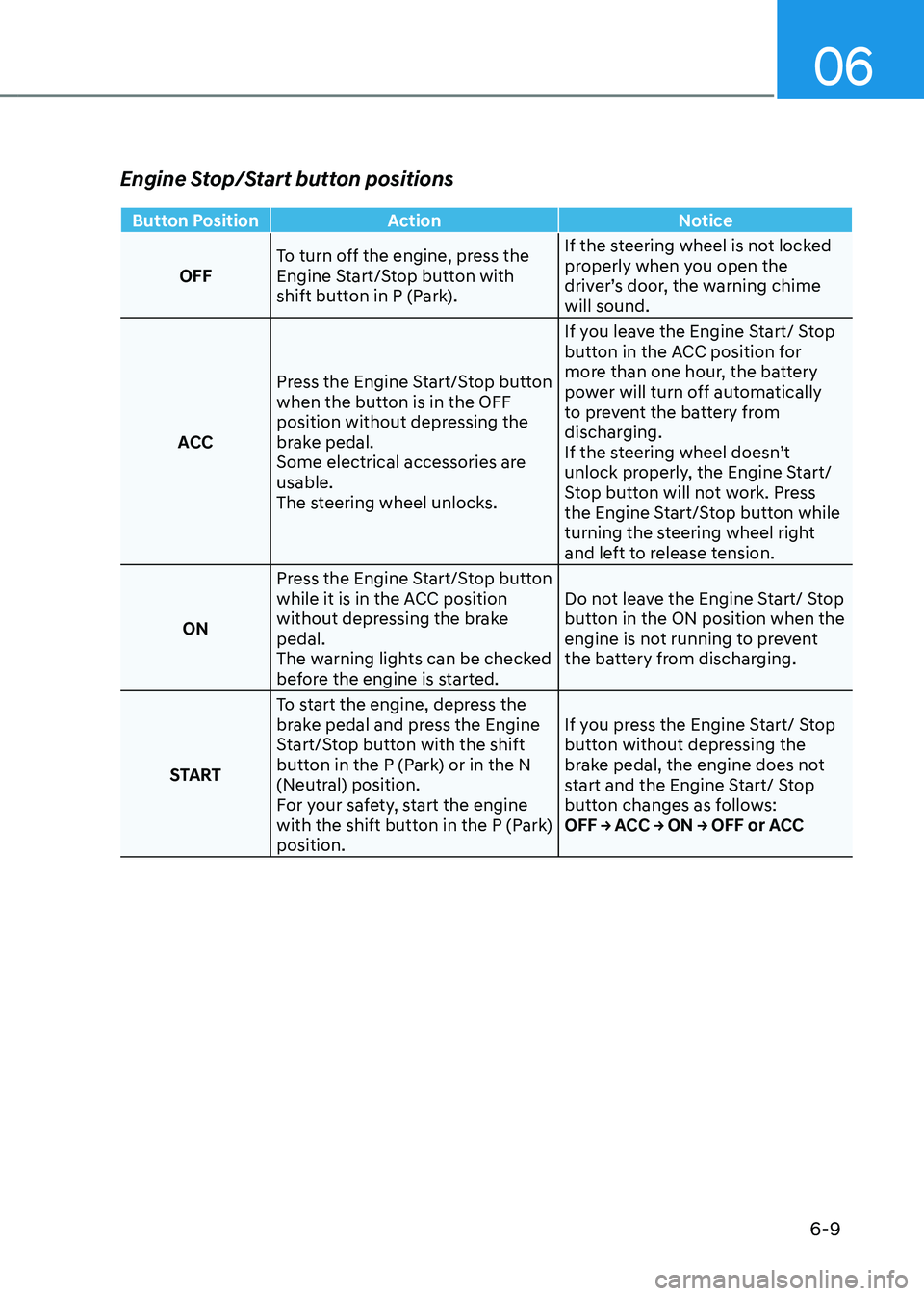
Engine Stop/Start button positions
Button PositionAction Notice
OFF To turn off the engine, press the
Engine Start/Stop button with
shift button in P (Park). If the steering wheel is not locked
properly when you open the
driver’s door, the warning chime
will sound.
ACC Press the Engine Start/Stop button
when the button is in the OFF
position without depressing the
brake pedal.
Some electrical accessories are
usable.
The steering wheel unlocks. If you leave the Engine Start/ Stop
button in the ACC position for
more than one hour, the battery
power will turn off automatically
to prevent the battery from
discharging.
If the steering wheel doesn’t
unlock properly, the Engine Start/
Stop button will not work. Press
the Engine Start/Stop button while
turning the steering wheel right
and left to release tension.
ON Press the Engine Start/Stop button
while it is in the ACC position
without depressing the brake
pedal.
The warning lights can be checked
before the engine is started. Do not leave the Engine Start/ Stop
button in the ON position when the
engine is not running to prevent
the battery from discharging.
START To start the engine, depress the
brake pedal and press the Engine
Start/Stop button with the shift
button in the P (Park) or in the N
(Neutral) position.
For your safety, start the engine
with the shift button in the P (Park)
position. If you press the Engine Start/ Stop
button without depressing the
brake pedal, the engine does not
start and the Engine Start/ Stop
button changes as follows:
OFF → ACC → ON → OFF or ACC
Page 306 of 630
06
6-19
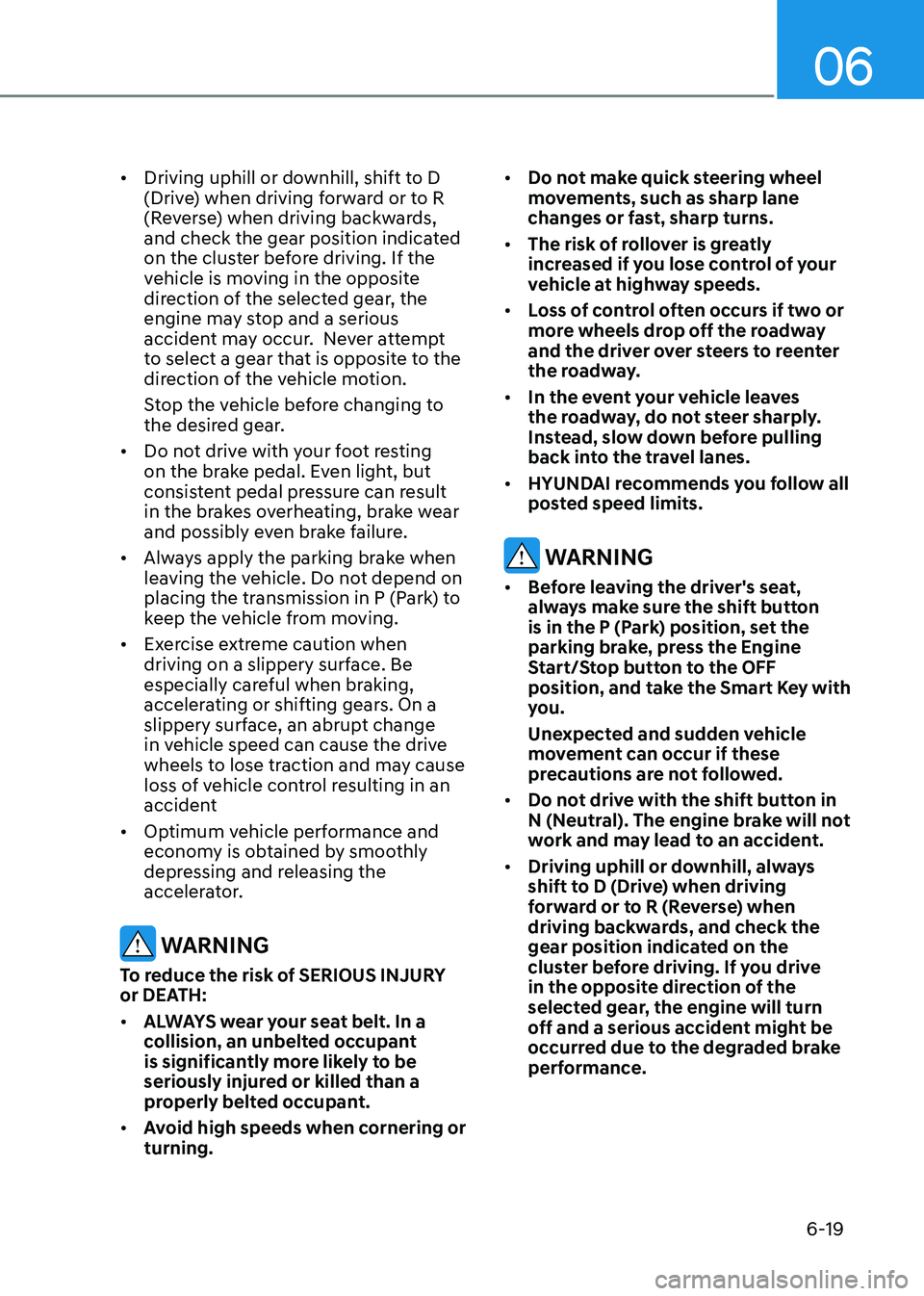
• Driving uphill or downhill, shift to D
(Drive) when driving forward or to R
(Reverse) when driving backwards,
and check the gear position indicated
on the cluster before driving. If the
vehicle is moving in the opposite
direction of the selected gear, the
engine may stop and a serious
accident may occur. Never attempt
to select a gear that is opposite to the
direction of the vehicle motion.
Stop the vehicle before changing to
the desired gear.
• Do not drive with your foot resting
on the brake pedal. Even light, but
consistent pedal pressure can result
in the brakes overheating, brake wear
and possibly even brake failure.
• Always apply the parking brake when
leaving the vehicle. Do not depend on
placing the transmission in P (Park) to
keep the vehicle from moving.
• Exercise extreme caution when
driving on a slippery surface. Be
especially careful when braking,
accelerating or shifting gears. On a
slippery surface, an abrupt change
in vehicle speed can cause the drive
wheels to lose traction and may cause
loss of vehicle control resulting in an
accident
• Optimum vehicle performance and
economy is obtained by smoothly
depressing and releasing the
accelerator.
WARNING
To reduce the risk of SERIOUS INJURY
or DEATH:
• ALWAYS wear your seat belt. In a
collision, an unbelted occupant
is significantly more likely to be
seriously injured or killed than a
properly belted occupant.
• Avoid high speeds when cornering or
turning. •
Do not make quick steering wheel
movements, such as sharp lane
changes or fast, sharp turns.
• The risk of rollover is greatly
increased if you lose control of your
vehicle at highway speeds.
• Loss of control often occurs if two or
more wheels drop off the roadway
and the driver over steers to reenter
the roadway.
• In the event your vehicle leaves
the roadway, do not steer sharply.
Instead, slow down before pulling
back into the travel lanes.
• HYUNDAI recommends you follow all
posted speed limits.
WARNING
• Before leaving the driver's seat,
always make sure the shift button
is in the P (Park) position, set the
parking brake, press the Engine
Start/Stop button to the OFF
position, and take the Smart Key with
you.
Unexpected and sudden vehicle
movement can occur if these
precautions are not followed.
• Do not drive with the shift button in
N (Neutral). The engine brake will not
work and may lead to an accident.
• Driving uphill or downhill, always
shift to D (Drive) when driving
forward or to R (Reverse) when
driving backwards, and check the
gear position indicated on the
cluster before driving. If you drive
in the opposite direction of the
selected gear, the engine will turn
off and a serious accident might be
occurred due to the degraded brake
performance.