remote control HYUNDAI TUCSON HYBRID 2022 User Guide
[x] Cancel search | Manufacturer: HYUNDAI, Model Year: 2022, Model line: TUCSON HYBRID, Model: HYUNDAI TUCSON HYBRID 2022Pages: 630, PDF Size: 77.98 MB
Page 360 of 630
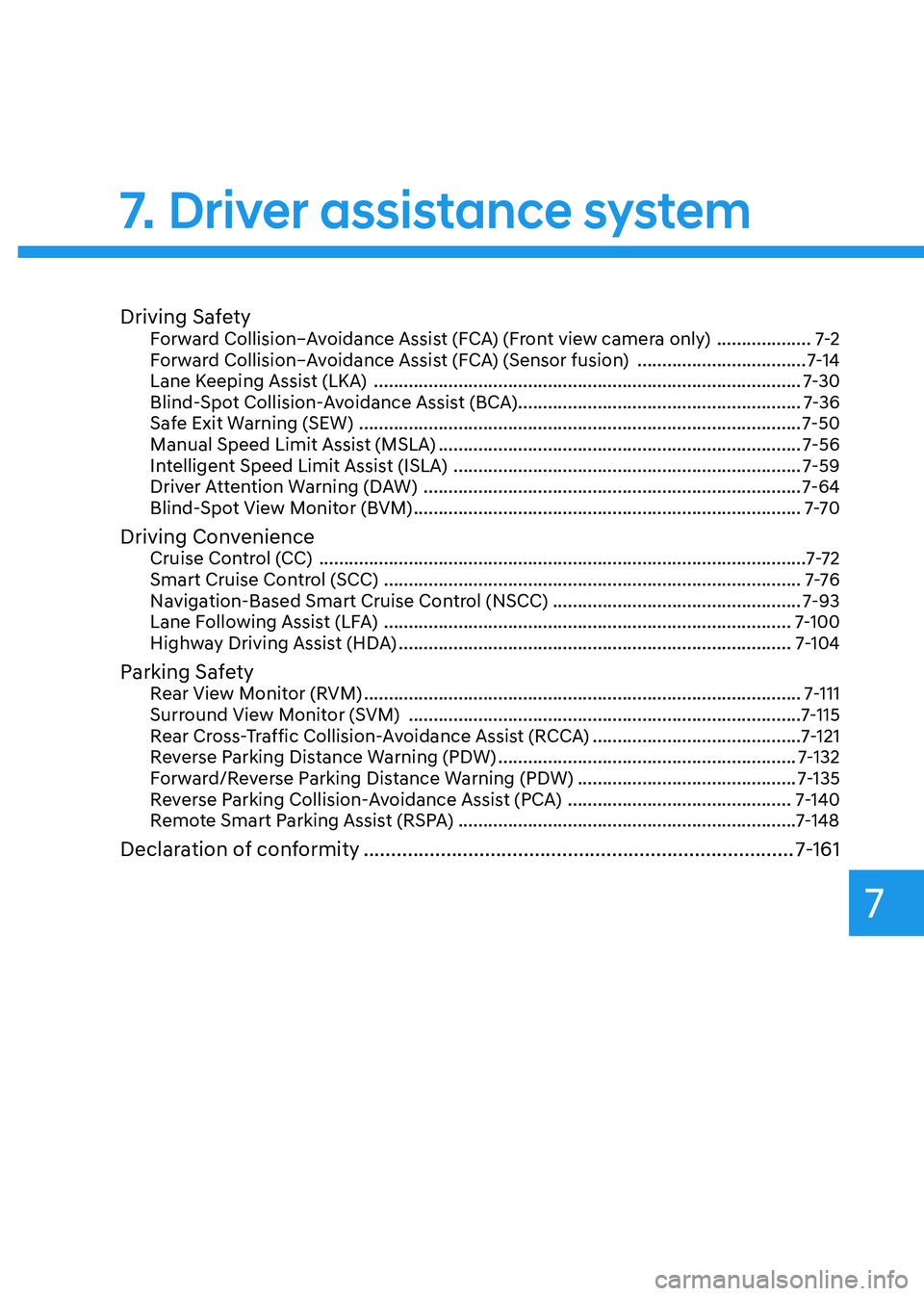
Driving SafetyForward Collision–Avoidance Assist (FCA) (Front view camera only) ...................7-2
F orward Collision–Avoidance Assist (FCA) (Sensor fusion) .................................. 7
-14
Lane Keeping Assist (LKA)
........................................................................\
.............. 7
-30
Blind-Spot Collision-Avoidance Assist (BCA)
......................................................... 7
-36
Safe Exit Warning (SEW)
........................................................................\
................. 7
-50
Manual Speed Limit Assist (MSLA)
........................................................................\
. 7-56
In
telligent Speed Limit Assist (ISLA)
...................................................................... 7
-59
Driver Attention Warning (DAW)
........................................................................\
.... 7
-64
Blind-Spot View Monitor (BVM)
........................................................................\
...... 7
-7 0
Driving ConvenienceCruise Control (CC) ........................................................................\
..........................7-7 2
Smart Cruise Control (SCC) ........................................................................\
............ 7
-76
Navigation-Based Smart Cruise Control (NSCC)
.................................................. 7
-93
Lane Following Assist (LFA)
........................................................................\
.......... 7
-100
Highway Driving Assist (HDA)
........................................................................\
....... 7
-104
Parking SafetyRear View Monitor (RVM) ........................................................................\
................7- 111
Surround View Monitor (SVM) ........................................................................\
....... 7
-115
Rear Cross-Traffic Collision-Avoidance Assist (RCCA)
.......................................... 7
-121
Reverse Parking Distance Warning (PDW)
............................................................ 7
-132
Forward/Reverse Parking Distance Warning (PDW)
............................................ 7
-135
Reverse Parking Collision-Avoidance Assist (PCA)
............................................. 7
-140
Remote Smart Parking Assist (RSPA) ....................................................................7-148
Declaration of conformity ........................................................................\
...... 7- 161
7. Driver assistance system
Driver assistance system
7
Page 440 of 630
07
7-81
Smart Cruise Control Operation
Operating conditions
Smart Cruise Control will operate when
the following conditions are satisfied.
Basic function
• The gear is in D (Drive)
• The
driv
er’s
door is closed
• EPB (Electr
onic Parking Brake) is not
applied
• Your vehicle speed is within the
operating speed range
- 5~110 mph (10~180 km/h): when
ther
e is no vehicle in front
- 0~110 mph (0~180 km/h
): when
there is a vehicle in front
• ESC (Electronic Stability Control) or
ABS is on
• ESC (Electronic Stability Control) or
ABS is not controlling the vehicle
• Engine rpm is not in the red zone
• Forward Collision-Avoidance Assist
brake control is not operating
• Remote Smart Parking Assist brake
control is not operating (if equipped)
Information
At a stop, if there is no vehicle in front of
your vehicle, Smart Cruise Control will
turn on when the brake pedal is depressed. Overtaking Acceleration Assist
Overtaking Acceleration Assist will
operate when the turn signal indicator
is turned on to the left (left-hand drive)
or turned on to the right (right-hand
drive) while Smart Cruise Control is
operating, and the following conditions
are satisfied:
•
Your vehicle speed is above 40 mph
(60 km/h)
• The hazard warning flasher is off
• A vehicle is detected in front of your
vehicle
• Deceleration is not needed to
maintain distance with the vehicle in
front
WARNING
• When the turn signal indicator is
turned on to the left while there is
a vehicle ahead, the vehicle may
accelerate temporarily. Pay attention
to the road conditions at all times.
• Regardless of your countries driving
direction, Overtaking Acceleration
Assist will operate when the
conditions are satisfied. When
using the function in countries with
different driving direction, always
check the road conditions at all
times.
Page 487 of 630
Driver assistance system
7-128
WARNING
• Even though the warning message
does not appear on the cluster, Rear
Cross-Traffic Safety system may not
operate properly.
• Rear Cross-Traffic Safety system may
not operate properly in an area (for
example: open terrain), where any
substance are not detected after
turning ON the engine.
CAUTION
Turn off Rear Cross-Traffic Safety
system to install a trailer, carrier, etc.,
or remove the trailer, carrier, etc. to use
Rear Cross-Traffic Safety system.
Limitations of Rear Cross-Traffic
Safety system
Rear Cross-Traffic Safety system may
not operate normally, or the function
may operate unexpectedly under the
following circumstances:
• Departing from where trees or grass
are overgrown
• Departing from where roads are wet
• Speed of the approaching vehicle is
fast or slow
Braking
con
trol
ma
y
no
t
w
ork,
driv
er’s
att
ention is required in the following
circumstances:
• The vehicle severely vibrates while
driving over a bumpy road, uneven
road or concrete patch
• Driving on a slippery surface due to
snow, water puddle, ice, etc.
• The tire pressure is low or a tire is
damaged
• The brake is reworked
• Remote Smart Parking Assist is
operating (if equipped)
Information
For more details on the limitations of the
rear corner radar, refer to “Blind-Spot
Collision-Avoidance Assist (BCA)” section
in chapter 7.
WARNING
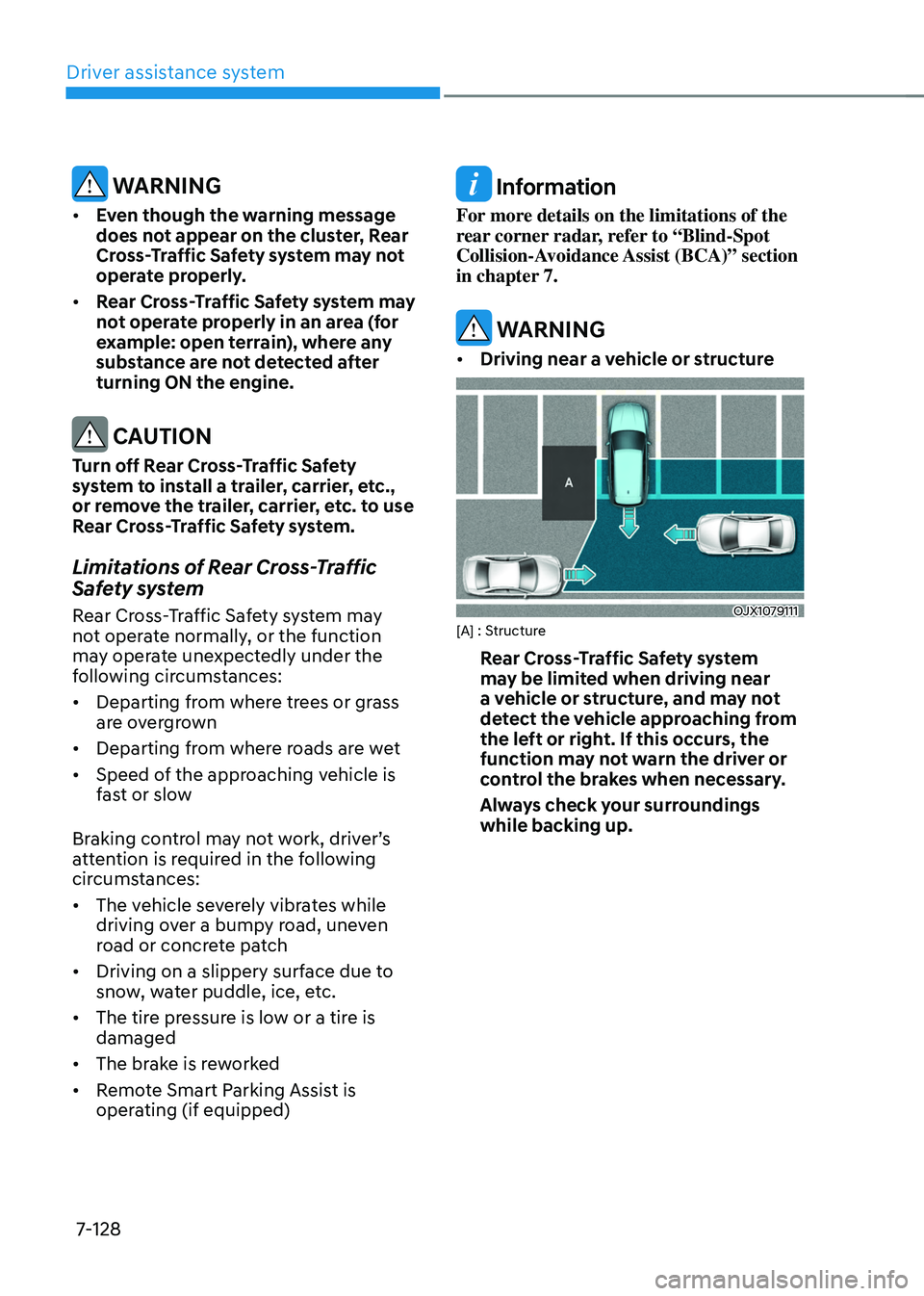
• Driving near a vehicle or structure
OJX1079111[A] : Structure
Rear Cross-Traffic Safety system
may be limited when driving near
a vehicle or structure, and may not
detect the vehicle approaching from
the left or right. If this occurs, the
function may not warn the driver or
control the brakes when necessary.
Always check your surroundings
while backing up.
Page 507 of 630
Driver assistance system
7-148
Remote Smart Parking Assist uses
vehicle sensors to help the driver park
and exit parking spaces remotely from
outside the vehicle by controlling the
steering wheel, vehicle speed and
gearshifts.
Function DescriptionRemote
Forward/
Backward Remotely moving forward/
backward
OJX1079037
• Remote Forward/Backward function
helps the driver move the vehicle
forward or backward from outside the
vehicle using the smart key.
• When Remote Smart Parking Assist
operates, Surround View Monitor and
Parking Distance Warning will also
operate. For more details, refer to
“Surround View Monitor (SVM) and
“Parking Distance Warning (PDW)”
sections in chapter 7.
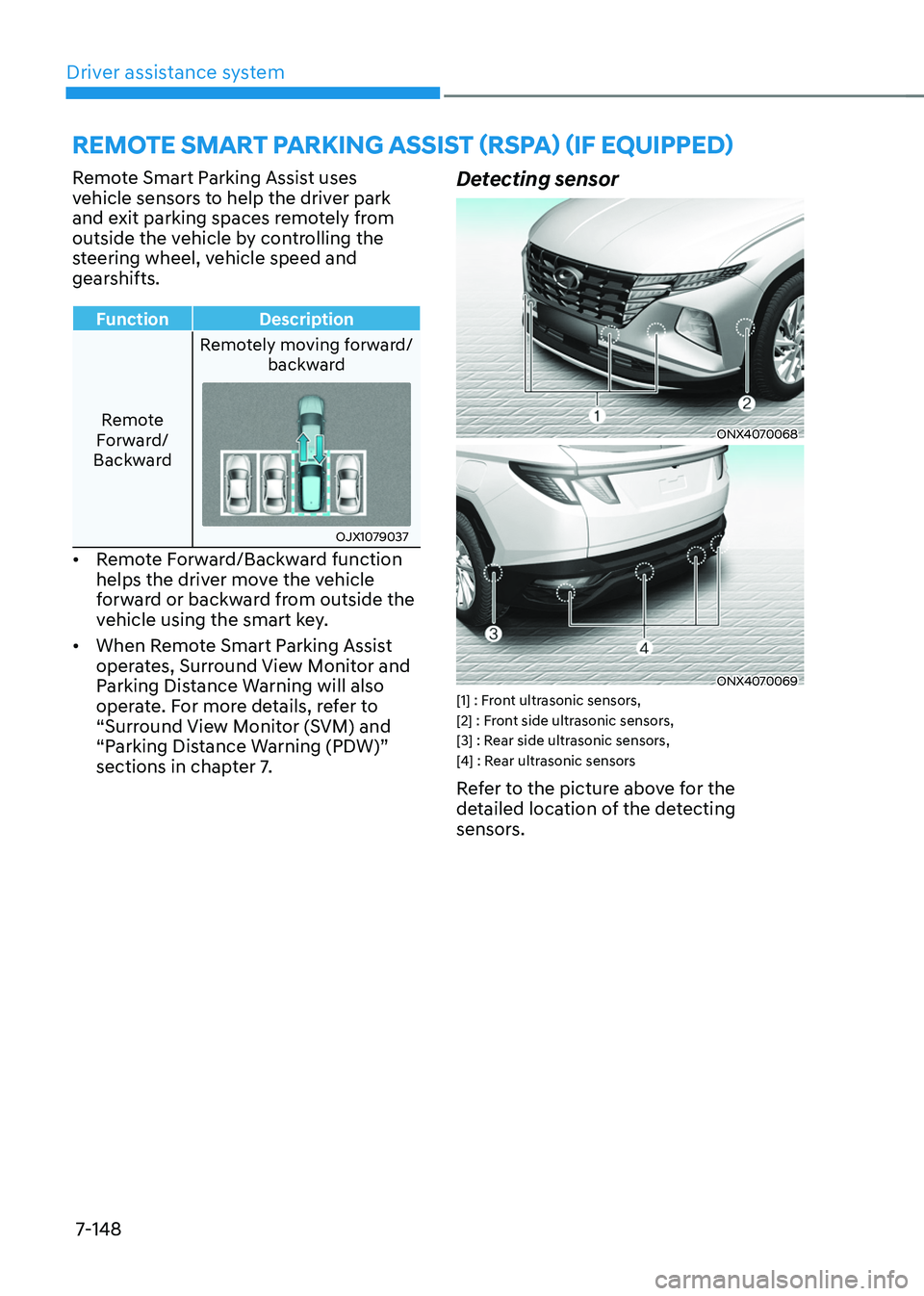
Detecting sensor
ONX4070068
ONX4070069[1] : Front ultrasonic sensors,
[2] : Front side ultrasonic sensors,
[3] : Rear side ultrasonic sensors,
[4] : Rear ultrasonic sensors
Refer to the picture above for the
detailed location of the detecting
sensors.
remote smart parKing assist (r spa) (iF e quipped)
Page 511 of 630
Driver assistance system
7-152
• 'Agree' must be selected on the
infotainment system screen and the
infotainment system has to operate
properly to use Remote Forward/
Backward function.
• Method (2) can be used after the
vehicle has been driven above 3
mph (5 km/h).
• If the function is turned on again
after parallel parking is completed
by Remote Smart Parking Assist,
Remote Forward/Backward function
can be used with Method (2).
• Check that all smart keys are
outside the vehicle when using
Remote Forward/Backward
function.
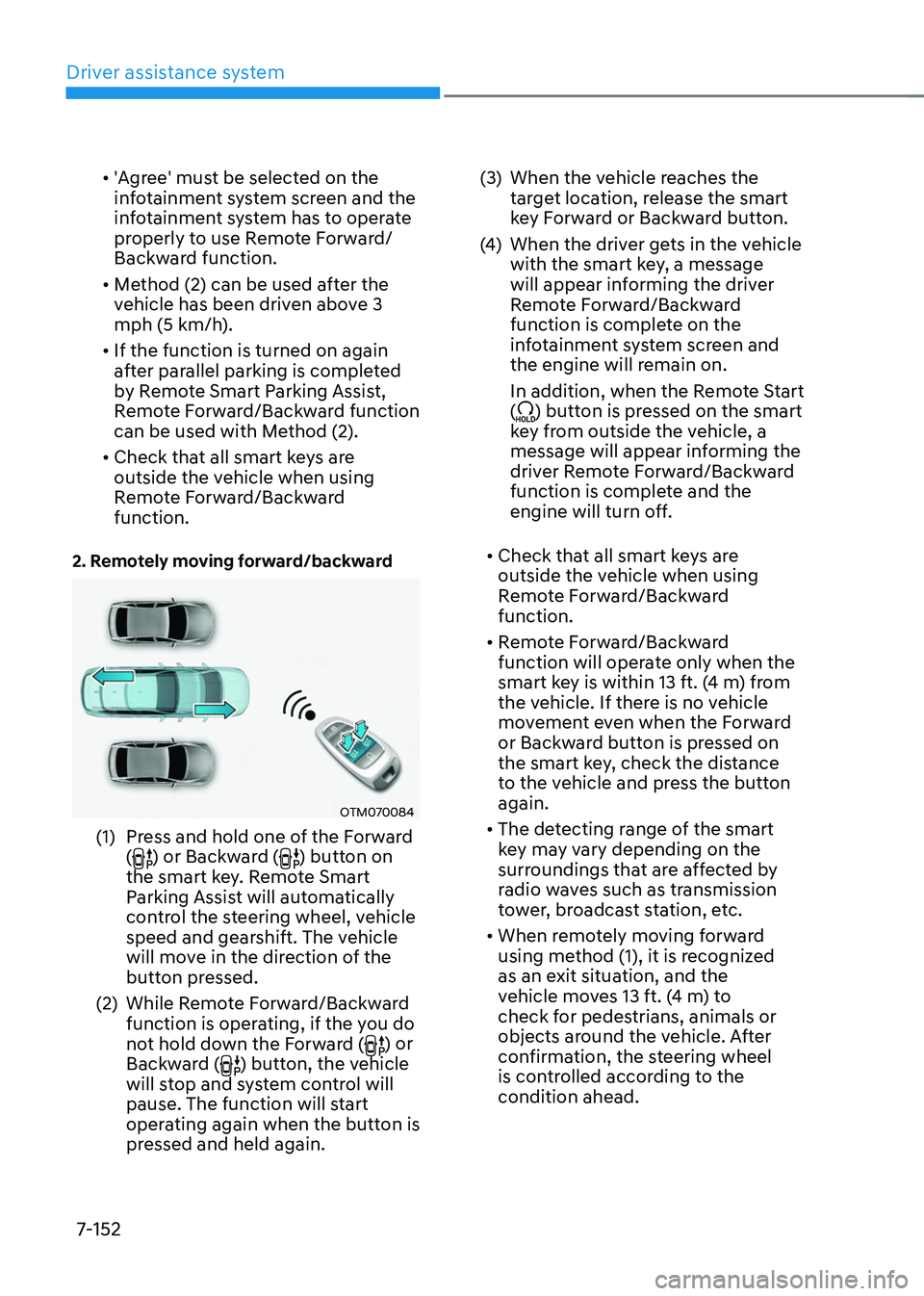
2. Remotely moving forward/backward
OTM070084
(1) Press and hold one of the Forward
() or Backward () button on
the smart key. Remote Smart
Parking Assist will automatically
control the steering wheel, vehicle
speed and gearshift. The vehicle
will move in the direction of the
button pressed.
(2)
While Remo
te Forward/Backward
function is operating, if the you do
not hold down the Forward (
) or
Backward () button, the vehicle
will stop and system control will
pause. The function will start
operating again when the button is
pressed and held again. (3)
When the vehicle r
eaches the
target location, release the smart
key Forward or Backward button.
(4)
When the driver ge
ts in the vehicle
with the smart key, a message
will appear informing the driver
Remote Forward/Backward
function is complete on the
infotainment system screen and
the engine will remain on.
In addition, when the Remote Start
(
) button is pressed on the smart
key from outside the vehicle, a
message will appear informing the
driver Remote Forward/Backward
function is complete and the
engine will turn off.
• Check that all smart keys are
outside the vehicle when using
Remote Forward/Backward
function.
• Remote Forward/Backward
function will operate only when the
smart key is within 13 ft. (4 m) from
the vehicle. If there is no vehicle
movement even when the Forward
or Backward button is pressed on
the smart key, check the distance
to the vehicle and press the button
again.
• The detecting range of the smart
key may vary depending on the
surroundings that are affected by
radio waves such as transmission
tower, broadcast station, etc.
• When remotely moving forward
using method (1), it is recognized
as an exit situation, and the
vehicle moves 13 ft. (4 m) to
check for pedestrians, animals or
objects around the vehicle. After
confirmation, the steering wheel
is controlled according to the
condition ahead.
Page 512 of 630
07
7-153
• When remotely moving forward
using method (2), it is recognized
as a parking situation, and will
immediately control the steering
wheel according to the condition
ahead to assist with entering the
parking space and aligning the
vehicle. However, performance
may reduce depending on the
pedestrians, animals, shape of
objects, location, etc. around the
vehicle.
• For moving remotely backward,
both method (1) and (2) aligns the
steering wheel first, and then will
only move the vehicle straight.
• When remotely moving forward or
backward is completed, the vehicle
will automatically shift to P (Park)
and engage EPB (Electronic Parking
Brake). CAUTION
• When using Remote Forward/
Backward function, make sure that
all passengers have gotten out of the
vehicle.
• If the vehicle’s battery is discharged
or Remote Smart Parking Assist
malfunctions when parked in a
narrow parking space, Remote
Forward/Backward function will not
operate. Always park your vehicle in
a space wide enough for you to get in
or out of your vehicle.
• Please note that depending on the
parking space, you may not be able
to exit from the space you have
entered by using Remote Forward/
Backward function.
• After parking, the surrounding may
change due to the movement of
surrounding vehicles. If this occurs,
Remote Forward/Backward function
may not operate.
• Before leaving the vehicle, close
windows and sunroofs, and make
sure the engine is off before locking
the doors.
Page 513 of 630
Driver assistance system
7-154
Remote Forward/Backward function
operation status
Operation status Smart key LED Hazard
warning light
Under
control Green LED
continuously
blinks
-
Pause Red LED
continuously
blinks Blinks
Off Red LED
illuminates for
4 seconds and
then turns off Blinks 3
times and
turns off
Complete Green LED
illuminates for
4 seconds and
then turns off Blinks 1
time and
turns off
Ã
Operation status by the hazard
w
arning light may not be applicable
based on the regulation of your
country.
à If the smart ke
y is not within the
operating range from the vehicle
(approximately 13 ft. (4 m)), the
smart key LED will not illuminate or
blink. Use the smart key within the
operating range.
How to turn off Remote Forward/
Backward function while operating
• Press the Parking/View () button
while the infotainment system screen
guides the driver using method 2.
• Shift the gear except to P (Park)
while the infotainment system screen
guides the driver using method 2.
• Press the Parking Safety (
) button
or select ‘Cancel’ on the in
fotainment sy
stem screen.
• Press the Remote Start (
) button
on the smart key while the vehicle is
being controlled by Remote Forward/
Backward function. Remote Forward/
Backward function will turn off. At this
time, the engine will turn off.
• Get on the vehicle with the smart key.
Remote Forward/Backward function
will turn off. At this time, the engine
will remain on.
The function will pause in the
following conditions when:
• There is a pedestrian, animal or object
in the direction the vehicle is moving
• The door or liftgate is open
• The Forward (
) or Backward ()
button is not continuously pressed
• Simultaneously pressing multiple
buttons on a smart key
• The smart key is not operated within
13 ft. (4 m) from the vehicle
• Button of another smart key is pressed
in addition to the operating smart key
• Blind-Spot Collision-Avoidance
Assist or Rear Cross-Traffic Collision-
Avoidance Assist operates while the
vehicle is being controlled in the
reverse direction.
Page 514 of 630
07
7-155
• The vehicle moves 22 ft. (7 m)
while the smart key is pressed with
Remote Forward/Backward function
(maximum travel distance per button
press)
When Remote Forward/Backward
function is paused, the vehicle will stop.
If the condition that made the function
to pause disappears, the function may
operate again.
The function will cancel in the
following conditions when:
• The steering wheel is steered
• The gear is shifted while the vehicle is
moving
• Operating EPB while the vehicle is
moving
• The engine hood is open
• The brake pedal or accelerator pedal
is depressed when all the doors are
closed
• The smart key is outside the vehicle
when the brake pedal is depressed
while the driver's door is open
• Rapid acceleration occurs
• Vehicle skid occurs
• The wheel is stuck by an obstacle and
cannot move
• There are pedestrians, animals or
objects at the front and rear of the
vehicle at the same time •
Approximately 3 minutes and 50
seconds have past after Remote
Forward/Backward function has
started to operate
• The slope of the road exceeds the
operational range
• The function is paused for more than
1 minute
• The total travel distance of the vehicle
has exceeded 45 ft. (14 m) after
Remote Forward/Backward function
operation
• The steering wheel, gearshift, braking,
and drive controls are not working
normally
• There is a problem with the smart key
or the smart key battery is low
• ABS, TCS or ESC system operates due
to slippery road conditions
• The alarm of the Theft Alarm System
sounds
When Remote Forward/Backward
function is canceled, the vehicle will
automatically stop, shift the gear to
P (Park) and engage EPB (Electronic
Parking Brake).
Page 619 of 630

Index
I-2
A
Accessing your vehicle
........................................................................\
..................5-4
Hyundai Digital Key ........................................................................\
................5-16
Immobilizer system ........................................................................\
..................5-15
Remote key ........................................................................\
.................................5-4
Smart key ........................................................................\
....................................5-7
Air bag - supplemental restraint system
..............................................................3-44 Additional safety precautions ........................................................................\
...3-66
Air bag warning labels ........................................................................\
.............3-66
How does the air bags system operate? ............................................................3-50
Occupant Classification System (OCS) ...........................................................3-54
SRS care ........................................................................\
...................................3-65
What to expect after an air bag inflates ............................................................3-53
Where are the air bags? ........................................................................\
............3-46
Why didn’t my air bag go of f in a collision? ...................................................3-60
Air cleaner
........................................................................\
...................................9-22 Filter replacement ........................................................................\
.....................9-22
Air conditioner compressor label ........................................................................\
. 2-15
Air conditioning system
........................................................................\
...............2-11
All wheel drive (AWD)
........................................................................\
..............6-40
All Wheel Drive (AWD) operation ..................................................................6-41
Emergency precautions ........................................................................\
............6-45
Reducing the risk of a rollover ........................................................................\
.6-47
Appearance care ........................................................................\
........................... 9-59
Exterior care ........................................................................\
.............................9-59
Interior care ........................................................................\
..............................9-63
Automatic climate control system
.......................................................................5-96
Automatic heating and air conditioning ...........................................................5-97
Manual heating and air conditioning ................................................................5-98
Multi Air Mode........................................................................\
....................... 5-105
System maintenance ........................................................................\
...............5-108
System operation ........................................................................\
....................5-106
Automatic transmission
........................................................................\
...............6-13
Automatic transmission operation ....................................................................6-13
Good driving practices ........................................................................\
.............6-18
LCD display message ........................................................................\
...............6-17
Paddle shifter ........................................................................\
............................6-18
Parking ........................................................................\
.....................................6-16
Page 624 of 630
I
I -7
I
If the 12 Volt Battery Is Discharged
......................................................................8-5
Before Jump Starting ........................................................................\
..................8-5
Jump Starting........................................................................\
..............................8-6
If the Engine Overheats
........................................................................\
.................8-8
If the engine will not start
........................................................................\
..............8-4
If you have a flat tire (with Tire Mobility Kit)
....................................................8-15
Checking the tire inflation pressure .................................................................8-21
Components of the T ire Mobility Kit ...............................................................8-17
Introduction ........................................................................\
..............................8-15
Notes on the safe use of the T ire Mobility Kit .................................................8-16
Using the Tire Mobility Kit ........................................................................\
......8-18
Ignition switch
........................................................................\
...............................6-5
Engine Start/Stop button ........................................................................\
............6-8
Key ignition switch ........................................................................\
....................6-5
Remote start ........................................................................\
..............................6-12
Important safety precautions ........................................................................\
.......... 3-2
Air bag hazards ........................................................................\
...........................3-2
Always wear your seat belt ........................................................................\
........3-2
Control your speed ........................................................................\
.....................3-2
Driver distraction ........................................................................\
........................3-2
Keep your vehicle in safe condition ...................................................................3-2
Restrain all children ........................................................................\
...................3-2
In case of an emergency while driving
..................................................................8-3
If the engine stalls at a crossroad or crossing .....................................................8-3
If the engine stalls while driving ........................................................................\
8-3
If you have a flat tire while driving ....................................................................8-3
Infotainment system ........................................................................\
................... 5-128
Antenna ........................................................................\
..................................5-128
Bluetooth® Wireless Technology ....................................................................5-130
Infotainment system ........................................................................\
...............5-129
Steering wheel remote controls ......................................................................5-128
USB Port ........................................................................\
................................5-128
Voice recognition ........................................................................\
....................5-129