lights HYUNDAI TUCSON HYBRID 2022 Owner's Guide
[x] Cancel search | Manufacturer: HYUNDAI, Model Year: 2022, Model line: TUCSON HYBRID, Model: HYUNDAI TUCSON HYBRID 2022Pages: 630, PDF Size: 77.98 MB
Page 243 of 630
Convenient features
5-86
System operation
Display and control
• After selecting ‘High Beam Assist’
in the Settings menu, High Beam
Assist will operate by following the
procedure below.
- Place the headlamp swit
ch in
the AUTO position and push
the headlamp lever towards the
instrument cluster. The High Beam
Assist (
) indicator light will
illuminate on the cluster and the
system will be enabled.
- When the sy
stem is enabled, high
beam will turn on when vehicle
speed is above 25 mph (40 km/h).
When vehicle speed is below 15
mph (25 km/h), high beam will not
turn on.
- The High Beam () indicator light
will illuminate on the cluster when
high beam is on.
• When High Beam Assist is operating, if
the headlamp lever or switch is used,
the system operates as follow:
- If the headlamp lev
er is pulled
towards you when the high beam
is off, the high beam will turn on
without High Beam Assist canceled.
When you let go of the headlamp
lever, the lever will move to the
middle and the high beam will turn
off.
- If the headlamp lev
er is pulled
towards you when the high beam is
on by High Beam Assist, low beam
will be on and the system will turn
off.
- If the headlamp swit
ch is placed
from AUTO to another position
(headlamp/position/off), High
Beam Assist will turn off and the
corresponding lamp will turn on. •
When High Beam Assist is operating,
high beam switches to low beam if
any of the following conditions occur:
- When the headlamp of an
oncoming v
ehicle is detected.
- When the tail lamp of a v
ehicle in
front is detected.
- When the headlamp or tail lamp of a mo
torcycle or a bicycle is detected.
- When the surrounding ambien
t light
is bright enough that high beams
are not required.
- When str
eetlights or other lights are
detected.
System malfunction and
limitations
System malfunction
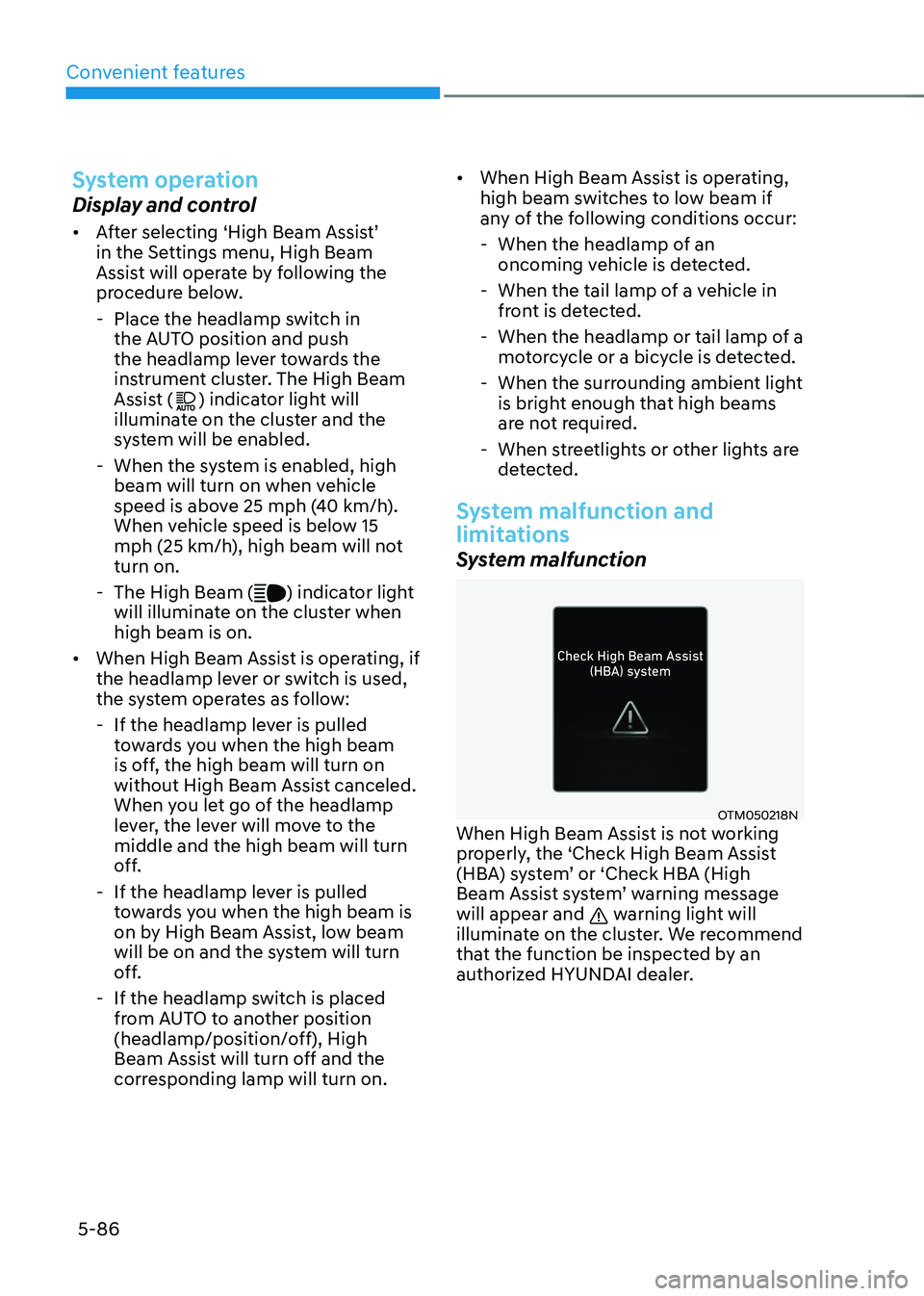
OTM050218NWhen High Beam Assist is not working
properly, the ‘Check High Beam Assist
(HBA) system’ or ‘Check HBA (High
Beam Assist system’ warning message
will appear and
warning light will
illuminate on the cluster. We recommend
that the function be inspected by an
authorized HYUNDAI dealer.
Page 245 of 630
Convenient features
5-88
interior lights
WARNING
Do not use the interior lights when
driving in the dark. The interior lights
may obscure your view and cause an
accident.
NOTICE
Do not use the interior lights for
extended periods when the vehicle is
turned off or the battery will discharge.
Interior Lamp AUTO OFF
The interior lamps will automatically go
off approximately 10 minutes after the
vehicle is turned off and the doors are
closed. If a door is opened, the lamp
will go off 40 minutes after the vehicle
is turned off. If the doors are locked by
the smart key and the vehicle enters the
armed stage of the theft alarm system,
the lamps will go off five seconds later.
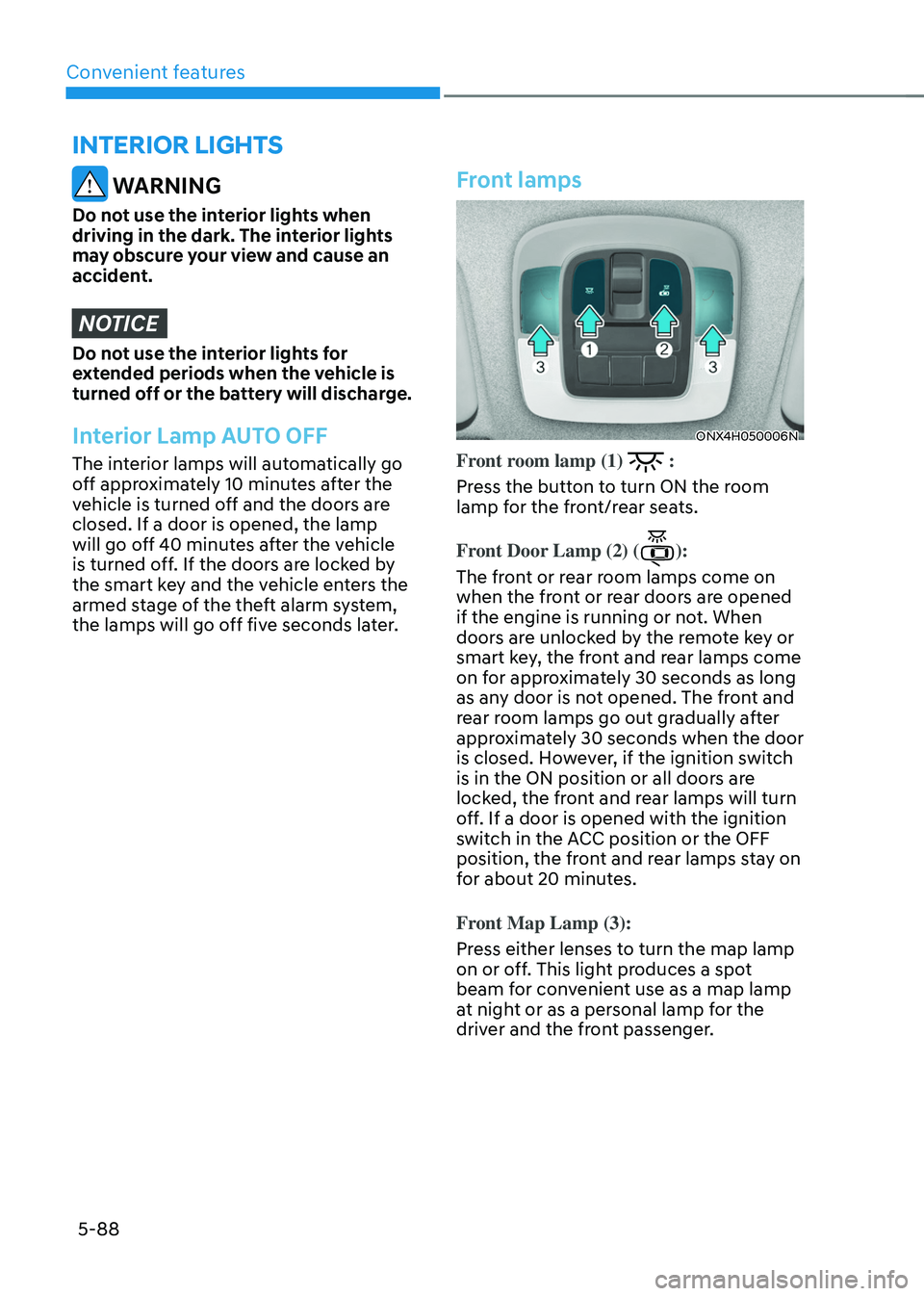
Front lamps
ONX4H050006N
Front room lamp (1) :
Press the button to turn ON the room
lamp for the front/rear seats.
Front Door Lamp (2) (
):
The front or rear room lamps come on
when the front or rear doors are opened
if the engine is running or not. When
doors are unlocked by the remote key or
smart key, the front and rear lamps come
on for approximately 30 seconds as long
as any door is not opened. The front and
rear room lamps go out gradually after
approximately 30 seconds when the door
is closed. However, if the ignition switch
is in the ON position or all doors are
locked, the front and rear lamps will turn
off. If a door is opened with the ignition
switch in the ACC position or the OFF
position, the front and rear lamps stay on
for about 20 minutes.
Front Map Lamp (3):
Press either lenses to turn the map lamp
on or off. This light produces a spot
beam for convenient use as a map lamp
at night or as a personal lamp for the
driver and the front passenger.
Page 248 of 630
05
5-91
Welcome system
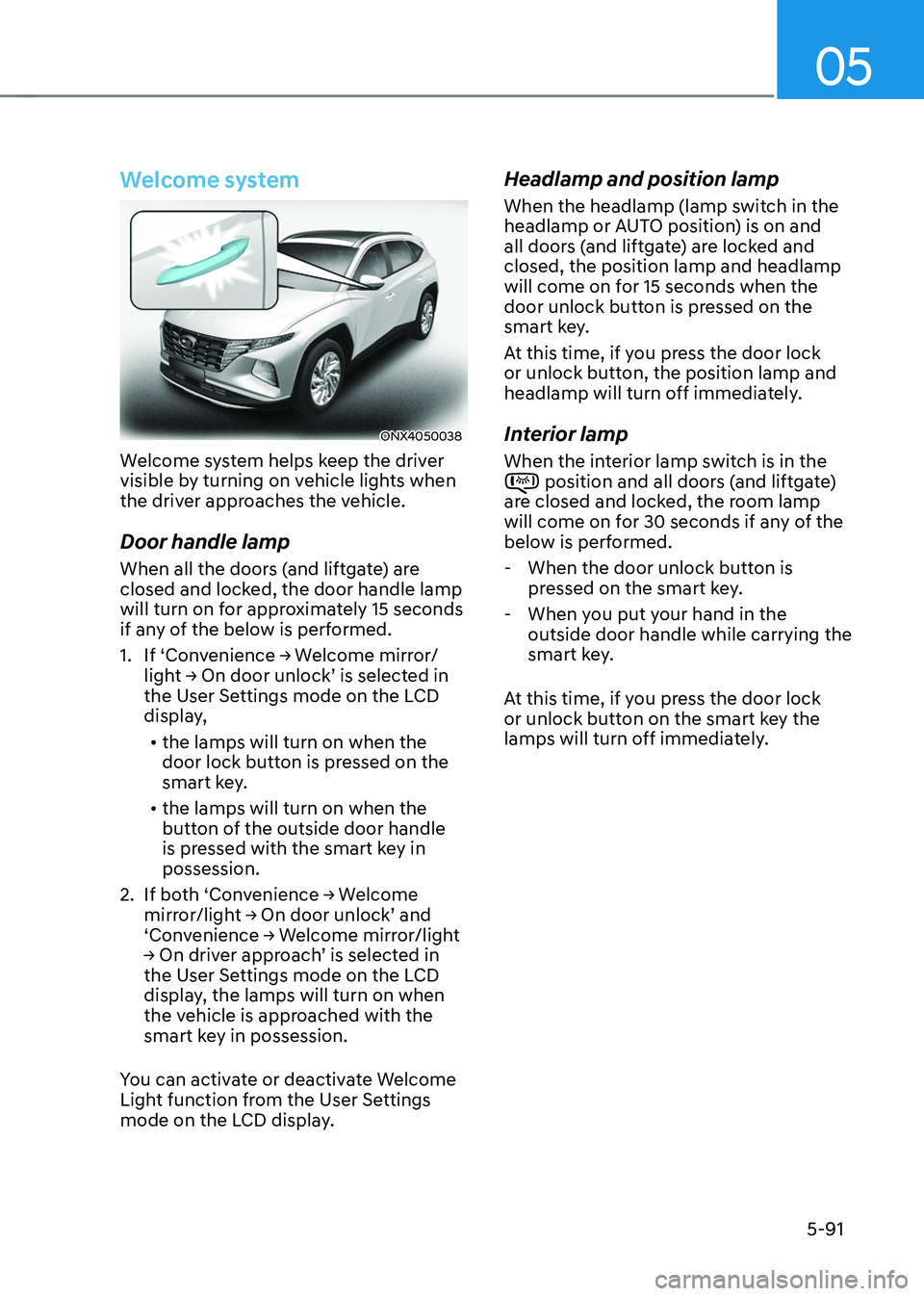
ONX4050038
Welcome system helps keep the driver
visible by turning on vehicle lights when
the driver approaches the vehicle.
Door handle lamp
When all the doors (and liftgate) are
closed and locked, the door handle lamp
will turn on for approximately 15 seconds
if any of the below is performed.
1.
If ‘Con
venience
→ W
elcome
mirr
or/
light
→ On door unlock’ is select
ed
in the User Se
ttings mode on the LCD
display,
• the lamps will turn on when the
door lock button is pressed on the
smart key.
• the lamps will turn on when the
button of the outside door handle
is pressed with the smart key in
possession.
2.
If bo
th
‘Con
venience
→ W
elcome
mirror/ligh
t
→ On door unlock’ and ‘Conv
enience
→ W
elcome
mirr
or/light
→ On driv
er
appr
oach’
is select
ed
in the User Se
ttings mode on the LCD
display, the lamps will turn on when
the vehicle is approached with the
smart key in possession.
You can activate or deactivate Welcome
Light function from the User Settings
mode on the LCD display.
Headlamp and position lamp
When the headlamp (lamp switch in the
headlamp or AUTO position) is on and
all doors (and liftgate) are locked and
closed, the position lamp and headlamp
will come on for 15 seconds when the
door unlock button is pressed on the
smart key.
At this time, if you press the door lock
or unlock button, the position lamp and
headlamp will turn off immediately.
Interior lamp
When the interior lamp switch is in the position and all doors (and liftgate)
are closed and locked, the room lamp
will come on for 30 seconds if any of the
below is performed.
- When the door unlock button is pr
essed on the smart key.
- When you put y
our hand in the
outside door handle while carrying the
smart key.
At this time, if you press the door lock
or unlock button on the smart key the
lamps will turn off immediately.
Page 291 of 630
Driving your vehicle
6-4
Before entering the vehicle
• Be sure all windows, outside mirror(s),
and outside lights are clean and
unobstructed.
• Remove frost, snow, or ice.
• Visually check the tires for uneven
wear and damage.
• Check under the vehicle for any sign
of leaks.
• Be sure there are no obstacles behind
you if you intend to back up.
Before starting
• Make sure the hood, the liftgate, and
the doors are securely closed and
locked.
• Adjust the position of the seat and
steering wheel.
• Adjust the inside and side view
mirrors.
• Verify all the lights work.
• Fasten your seat belt. Check that all
passengers have fastened their seat
belts.
• Check the gauges and indicators
in the instrument panel and the
messages on the instrument display
when the ignition switch is in the ON
position.
• Check that any items you are carrying
are stored properly or fastened down
securely.
WARNING
To reduce the risk of SERIOUS INJURY or
DEATH, take the following precautions:
• ALWAYS wear your seat belt. All
passengers must be properly belted
whenever the vehicle is moving.
For more information, refer to “Seat
Belts” section in chapter 3.
• Always drive defensively. Assume
other drivers or pedestrians may be
careless and make mistakes.
• Stay focused on the task of driving.
Driver distraction can cause
accidents.
• Leave plenty of space between you
and the vehicle in front of you.
WARNING
NEVER drink or take drugs and drive.
Drinking or taking drugs and driving
is dangerous and may result in an
accident and SERIOUS INJURY or
DEATH.
Drunk driving is the number one
contributor to the highway death
toll each year. Even a small amount
of alcohol will affect your reflexes,
perceptions and judgment. Just
one drink can reduce your ability to
respond to changing conditions and
emergencies and your reaction time
gets worse with each additional drink.
Driving while under the influence
of drugs is as dangerous or more
dangerous than driving under the
influence of alcohol.
You are much more likely to have a
serious accident if you drink or take
drugs and drive. If you are drinking or
taking drugs, don’t drive. Do not ride
with a driver who has been drinking
or taking drugs. Choose a designated
driver or call a taxi.
Before driving
Page 293 of 630
Driving your vehicle
6-6
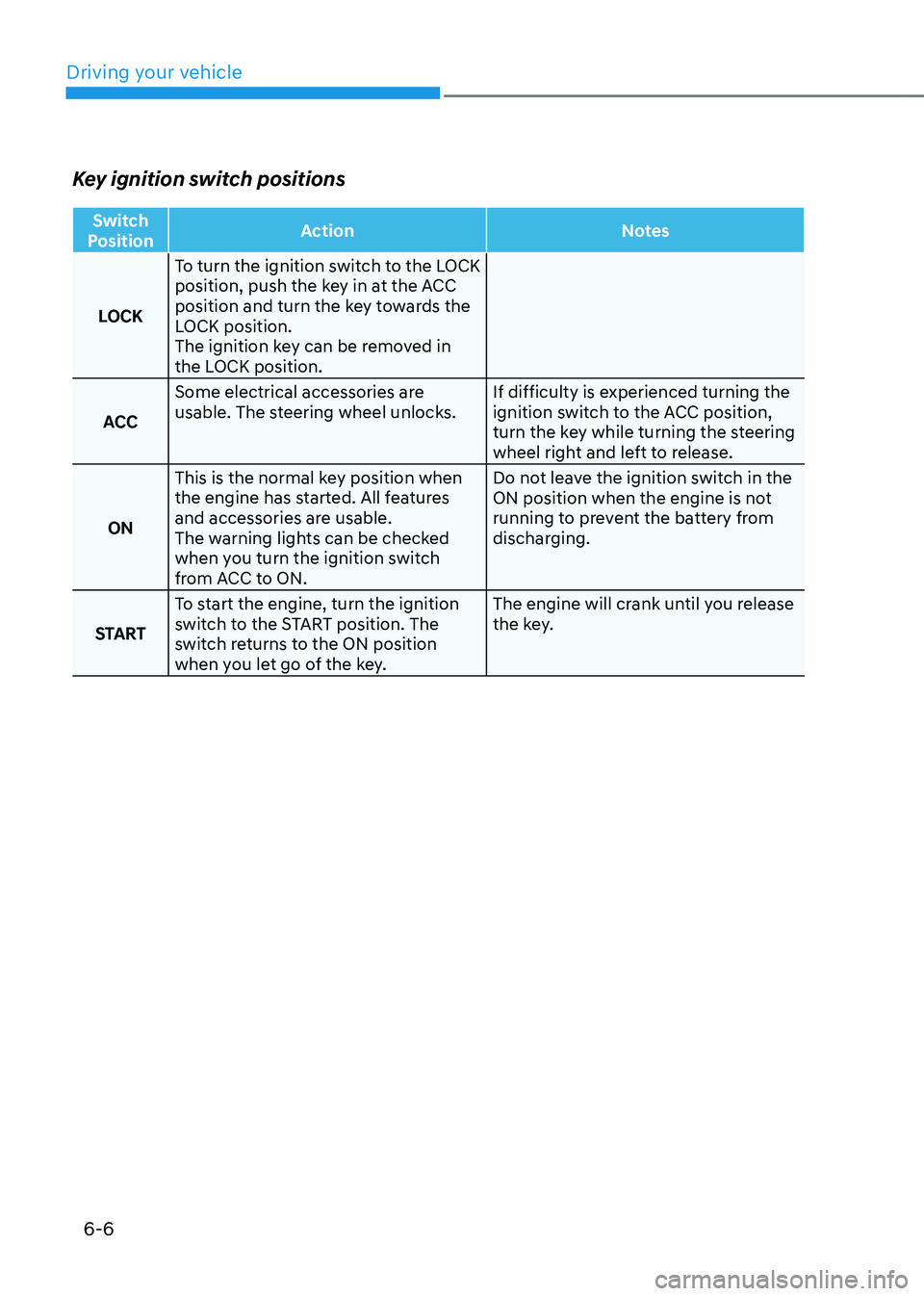
Key ignition switch positions
Switch
Position Action
Notes
LOCK To turn the ignition switch to the LOCK
position, push the key in at the ACC
position and turn the key towards the
LOCK position.
The ignition key can be removed in
the LOCK position.
ACC Some electrical accessories are
usable. The steering wheel unlocks.
If difficulty is experienced turning the
ignition switch to the ACC position,
turn the key while turning the steering
wheel right and left to release.
ON This is the normal key position when
the engine has started. All features
and accessories are usable.
The warning lights can be checked
when you turn the ignition switch
from ACC to ON. Do not leave the ignition switch in the
ON position when the engine is not
running to prevent the battery from
discharging.
START To start the engine, turn the ignition
switch to the START position. The
switch returns to the ON position
when you let go of the key. The engine will crank until you release
the key.
Page 296 of 630
06
6-9
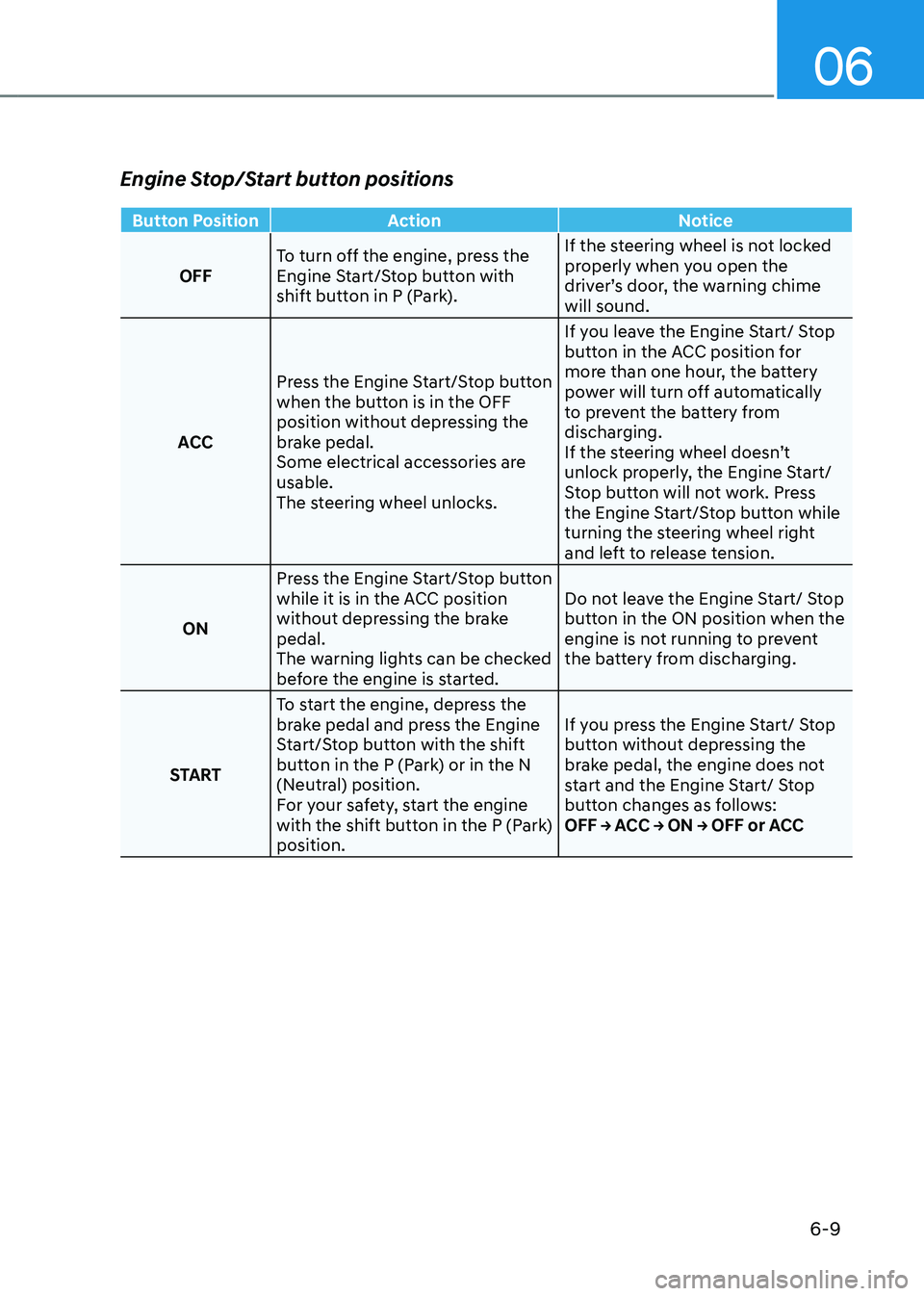
Engine Stop/Start button positions
Button PositionAction Notice
OFF To turn off the engine, press the
Engine Start/Stop button with
shift button in P (Park). If the steering wheel is not locked
properly when you open the
driver’s door, the warning chime
will sound.
ACC Press the Engine Start/Stop button
when the button is in the OFF
position without depressing the
brake pedal.
Some electrical accessories are
usable.
The steering wheel unlocks. If you leave the Engine Start/ Stop
button in the ACC position for
more than one hour, the battery
power will turn off automatically
to prevent the battery from
discharging.
If the steering wheel doesn’t
unlock properly, the Engine Start/
Stop button will not work. Press
the Engine Start/Stop button while
turning the steering wheel right
and left to release tension.
ON Press the Engine Start/Stop button
while it is in the ACC position
without depressing the brake
pedal.
The warning lights can be checked
before the engine is started. Do not leave the Engine Start/ Stop
button in the ON position when the
engine is not running to prevent
the battery from discharging.
START To start the engine, depress the
brake pedal and press the Engine
Start/Stop button with the shift
button in the P (Park) or in the N
(Neutral) position.
For your safety, start the engine
with the shift button in the P (Park)
position. If you press the Engine Start/ Stop
button without depressing the
brake pedal, the engine does not
start and the Engine Start/ Stop
button changes as follows:
OFF → ACC → ON → OFF or ACC
Page 319 of 630
Driving your vehicle
6-32
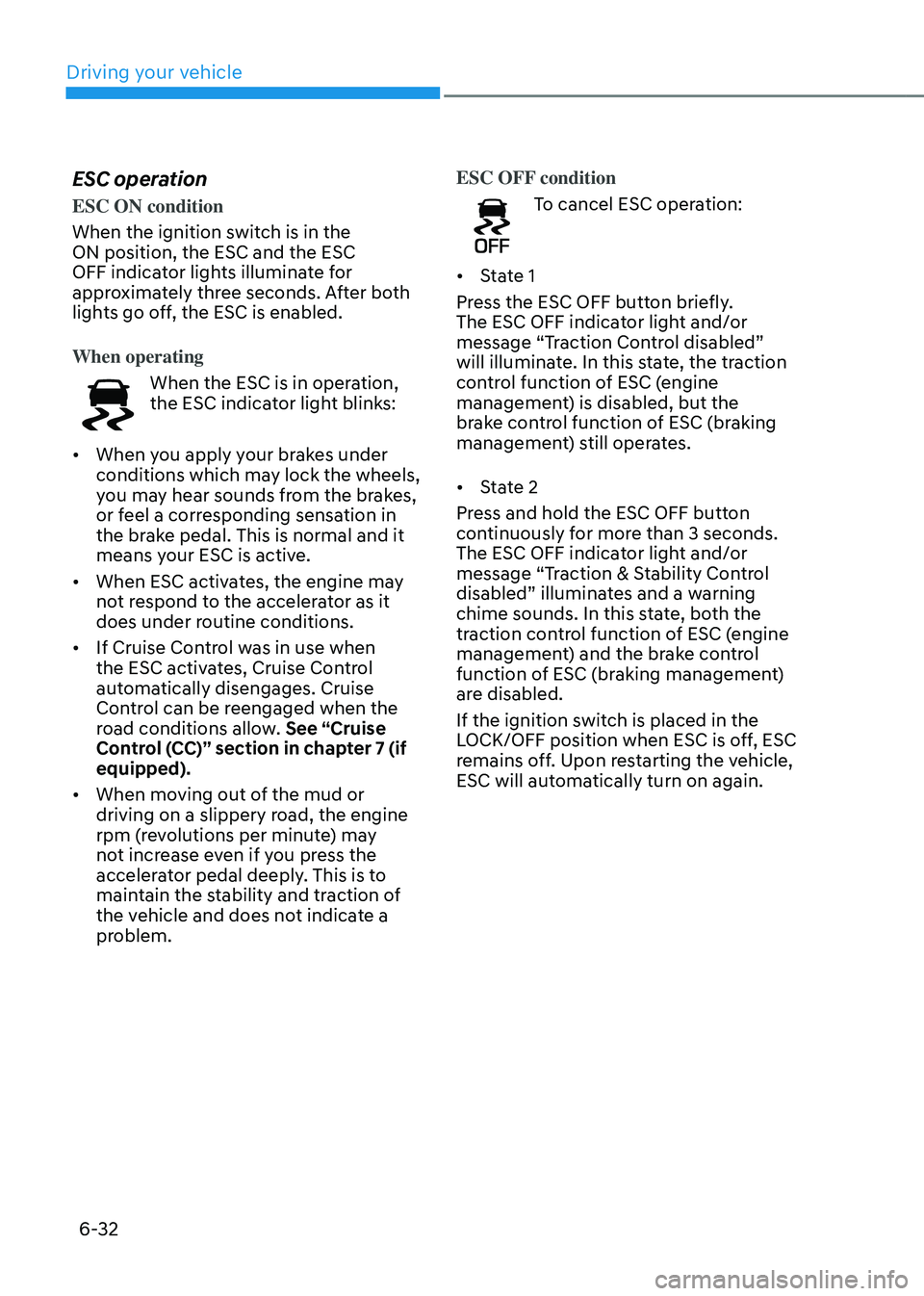
ESC operation
ESC ON condition
When the ignition switch is in the
ON position, the ESC and the ESC
OFF indicator lights illuminate for
approximately three seconds. After both
lights go off, the ESC is enabled.
When operating
When the ESC is in operation,
the ESC indicator light blinks:
• When you apply your brakes under
conditions which may lock the wheels,
you may hear sounds from the brakes,
or feel a corresponding sensation in
the brake pedal. This is normal and it
means your ESC is active.
• When ESC activates, the engine may
not respond to the accelerator as it
does under routine conditions.
• If Cruise Control was in use when
the ESC activates, Cruise Control
automatically disengages. Cruise
Control can be reengaged when the
road conditions allow. See “Cruise
Control (CC)” section in chapter 7 (if
equipped).
• When moving out of the mud or
driving on a slippery road, the engine
rpm (revolutions per minute) may
not increase even if you press the
accelerator pedal deeply. This is to
maintain the stability and traction of
the vehicle and does not indicate a
problem. ESC OFF condition
To cancel ESC operation:
• State 1
Press the ESC OFF button briefly.
The ESC OFF indicator light and/or
message “Traction Control disabled”
will illuminate. In this state, the traction
control function of ESC (engine
management) is disabled, but the
brake control function of ESC (braking
management) still operates.
• State 2
Press and hold the ESC OFF button
continuously for more than 3 seconds.
The ESC OFF indicator light and/or
message “Traction & Stability Control
disabled” illuminates and a warning
chime sounds. In this state, both the
traction control function of ESC (engine
management) and the brake control
function of ESC (braking management)
are disabled.
If the ignition switch is placed in the
LOCK/OFF position when ESC is off, ESC
remains off. Upon restarting the vehicle,
ESC will automatically turn on again.
Page 320 of 630
06
6-33
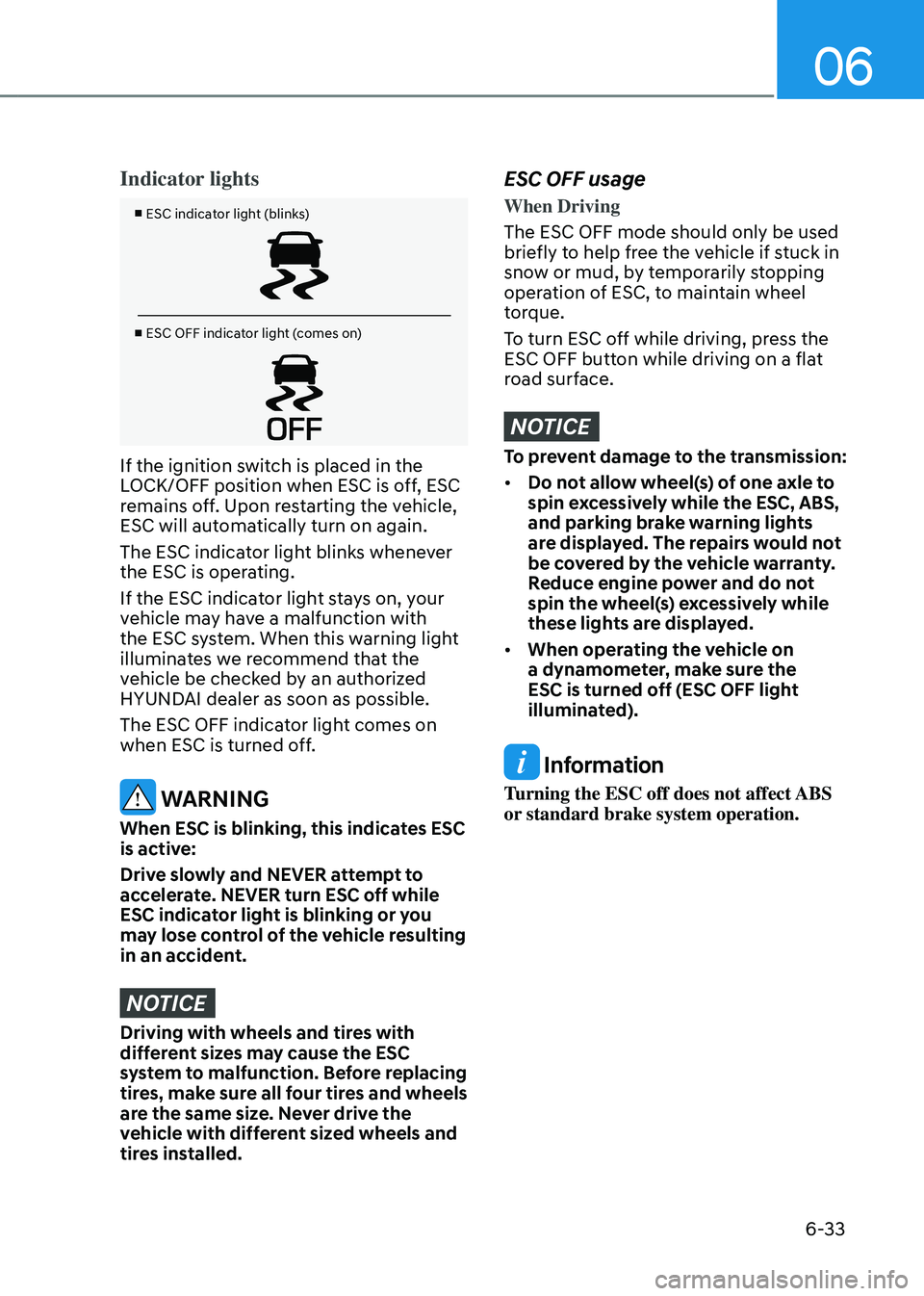
Indicator lights
■ ESC indicator light (blinks)
■ ESC OFF indicator light (comes on)
If the ignition switch is placed in the
LOCK/OFF position when ESC is off, ESC
remains off. Upon restarting the vehicle,
ESC will automatically turn on again.
The ESC indicator light blinks whenever
the ESC is operating.
If the ESC indicator light stays on, your
vehicle may have a malfunction with
the ESC system. When this warning light
illuminates we recommend that the
vehicle be checked by an authorized
HYUNDAI dealer as soon as possible.
The ESC OFF indicator light comes on
when ESC is turned off.
WARNING
When ESC is blinking, this indicates ESC
is active:
Drive slowly and NEVER attempt to
accelerate. NEVER turn ESC off while
ESC indicator light is blinking or you
may lose control of the vehicle resulting
in an accident.
NOTICE
Driving with wheels and tires with
different sizes may cause the ESC
system to malfunction. Before replacing
tires, make sure all four tires and wheels
are the same size. Never drive the
vehicle with different sized wheels and
tires installed.
ESC OFF usage
When Driving
The ESC OFF mode should only be used
briefly to help free the vehicle if stuck in
snow or mud, by temporarily stopping
operation of ESC, to maintain wheel
torque.
To turn ESC off while driving, press the
ESC OFF button while driving on a flat
road surface.
NOTICE
To prevent damage to the transmission:
• Do not allow wheel(s) of one axle to
spin excessively while the ESC, ABS,
and parking brake warning lights
are displayed. The repairs would not
be covered by the vehicle warranty.
Reduce engine power and do not
spin the wheel(s) excessively while
these lights are displayed.
• When operating the vehicle on
a dynamometer, make sure the
ESC is turned off (ESC OFF light
illuminated).
Information
Turning the ESC off does not affect ABS
or standard brake system operation.
Page 339 of 630
Driving your vehicle
6-52
Information
The ESC system must be turned OFF
before rocking the vehicle.
NOTICE
If you are still stuck after rocking the
vehicle a few times, have the vehicle
pulled out by a tow vehicle to avoid
engine overheating, possible damage to
the transmission, and tire damage. See
“Towing” section in chapter 8.
Smooth cornering
Avoid braking or gear changing in
corners, especially when roads are wet.
Ideally, corners should always be taken
under gentle acceleration.
Driving at night
Night driving presents more hazards than
driving in the daylight. Here are some
important tips to remember:
• Slow down and keep more distance
between you and other vehicles, as it
may be more difficult to see at night,
especially in areas where there may
not be any street lights.
• Adjust your mirrors to reduce the glare
from other drivers’ headlamps.
• Keep your headlamps clean and
properly aimed. Dirty or improperly
aimed headlamps will make it much
more difficult to see at night.
• Avoid staring directly at the
headlamps of oncoming vehicles. You
could be temporarily blinded, and it
will take several seconds for your eyes
to readjust to the darkness.
Driving in the rain
Rain and wet roads can make driving
dangerous. Here are a few things to
consider when driving in the rain or on
slick pavement:
• Slow down and allow extra following
distance. A heavy rainfall makes
it harder to see and increases the
distance needed to stop your vehicle.
• Turn OFF your Cruise Control. (if
equipped)
• Replace your windshield wiper blades
when they show signs of streaking or
missing areas on the windshield.
• Be sure your tires have enough tread.
If your tires do not have enough tread,
making a quick stop on wet pavement
can cause a skid and possibly lead to
an accident. See “Tire Tread” section
in chapter 9.
• Turn on your headlamps to make it
easier for others to see you.
• Driving too fast through large puddles
can affect your brakes. If you must go
through puddles, try to drive through
them slowly.
• If you believe your brakes may be wet,
apply them lightly while driving until
normal braking operation returns.
Hydroplaning
If the road is wet enough and you are
going fast enough, your vehicle may
have little or no contact with the road
surface and actually ride on the water.
The best advice is SLOW DOWN when
the road is wet.
The risk of hydroplaning increases as
the depth of tire tread decreases, refer
to “Tire Tread” section in chapter 9.
Page 351 of 630
Driving your vehicle
6-64
Safety chains
You should always attach chains between
your vehicle and your trailer.
Instructions about safety chains may
be provided by the hitch manufacturer
or trailer manufacturer. Follow the
manufacturer’s recommendation for
attaching safety chains. Always leave just
enough slack so you can turn with your
trailer. And, never allow safety chains to
drag on the ground.
Trailer brakes
If your trailer is equipped with a braking
system, make sure it conforms to
your country’s regulations and that
it is properly installed and operating
correctly.
If your trailer weighs more than the
maximum trailer weight without trailer
brakes loaded, then it needs its own
brakes and they must be adequate. Be
sure to read and follow the instructions
for the trailer brakes so you’ll be able
to install, adjust and maintain them
properly. Be sure not to modify your
vehicle’s brake system.
WARNING
Do not use a trailer with its own brakes
unless you are absolutely certain that
you have properly set up the brake
system. This is not a task for amateurs.
Use an experienced, competent trailer
shop for this work.
Driving with a trailer
Towing a trailer requires a certain
amount of experience. Before setting
out for the open road, you must get to
know your trailer. Acquaint yourself with
the feel of handling and braking with the
added weight of the trailer. And always
keep in mind that the vehicle you are
driving is now longer and not nearly as
responsive as your vehicle is by itself.
Before you start, check the trailer hitch
and platform, safety chains, electrical
connector(s), lights, tires and brakes.
During your trip, occasionally check
to be sure that the load is secure, and
that the lights and trailer brakes are still
working.
Distance
Stay at least twice as far behind the
vehicle ahead as you would when driving
your vehicle without a trailer. This can
help you avoid situations that require
heavy braking and sudden turns.
Passing
You will need more passing distance up
ahead when you’re towing a trailer. And,
because of the increased vehicle length,
you’ll need to go much farther beyond
the passed vehicle before you can return
to your lane.