navigation system HYUNDAI TUCSON HYBRID 2023 User Guide
[x] Cancel search | Manufacturer: HYUNDAI, Model Year: 2023, Model line: TUCSON HYBRID, Model: HYUNDAI TUCSON HYBRID 2023Pages: 699, PDF Size: 8.78 MB
Page 525 of 699
Driver Assistance System7-96
Navigation-based Smart Cruise
Control Operation
Operating conditions
Navigation-based Smart Cruise Control
is ready to operate if all of the following
conditions are satisfied:
• Smart Cruise Control is operating
• Driving on main roads of highways
Information
For more details on how to operate Smart
Cruise Control, refer to “Smart Cruise
Control (SCC)” section in this chapter.
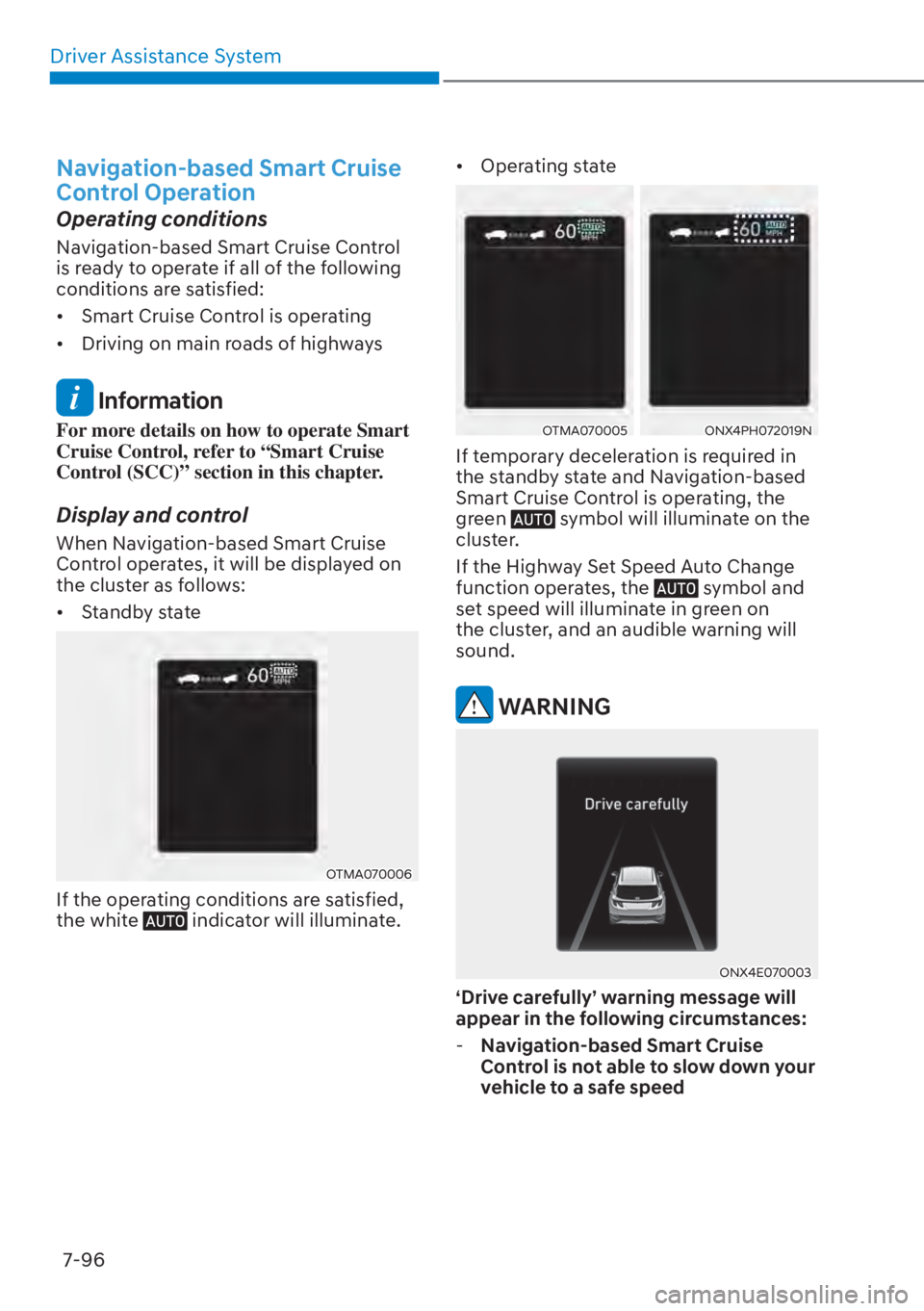
Display and control
When Navigation-based Smart Cruise
Control operates, it will be displayed on
the cluster as follows:
• Standby state
OTMA070006OTMA070006
If the operating conditions are satisfied,
the white indicator will illuminate. • Operating state
OTMA070005OTMA070005ONX4PH072019NONX4PH072019N
If temporary deceleration is required in
the standby state and Navigation-based
Smart Cruise Control is operating, the
green
symbol will illuminate on the
cluster.
If the Highway Set Speed Auto Change
function operates, the
symbol and
set speed will illuminate in green on
the cluster, and an audible warning will
sound.
WARNING
ONX4E070003ONX4E070003
‘Drive carefully’ warning message will
appear in the following circumstances:
- Navigation-based Smart Cruise
Control is not able to slow down your
vehicle to a safe speed
Page 527 of 699
Driver Assistance System7-98
Limitations of Navigation-based
Smart Cruise Control
Navigation-based Smart Cruise Control
may not operate normally under the
following circumstances:
• The navigation is not working properly
• Speed limit and road information in the navigation is not updated
• Map information is not transmitted due to infotainment system's
abnormal operation
• The map information and the actual road is different because of real-time
GPS data or map information error
• The navigation searches for a route while driving
• GPS signals are blocked in areas such as a tunnel
• A road that divides into two or more roads and joins again
• The driver goes off course the route set in the navigation
• The route to the destination is changed or canceled by resetting the
navigation • The vehicle enters a service station or
rest area
• Android Auto or Car Play is operating
• The navigation cannot detect the current vehicle position (for example,
elevated roads including overpass
adjacent to general roads or nearby
roads exist in a parallel way)
• The navigation is being updated while driving
• The navigation is being restarted while driving
• The speed limit of some sections changes according to the road
situations
• Driving on a road under construction
• Driving on a road that is controlled
• There is bad weather, such as heavy rain, heavy snow, etc.
• Driving on a road that is sharply curved
Page 529 of 699
![HYUNDAI TUCSON HYBRID 2023 User Guide Driver Assistance System7-100
OJX1070282LOJX1070282L[1] : Driving route, [2] : Branch line,
[3] : Curved road section, [4] : Main road
• If there is no destination set on the navigation, Highway](/img/35/58889/w960_58889-528.png "HYUNDAI TUCSON HYBRID 2023 User Guide Driver Assistance System7-100
OJX1070282LOJX1070282L[1] : Driving route, [2] : Branch line,
[3] : Curved road section, [4] : Main road
• If there is no destination set on the navigation, Highway")
Driver Assistance System7-100
OJX1070282LOJX1070282L[1] : Driving route, [2] : Branch line,
[3] : Curved road section, [4] : Main road
• If there is no destination set on the navigation, Highway Curve Zone Auto
Slowdown function will operate based
on the curve information on the main
road.
• Even if you depart from the main road, Highway Curve Zone Auto Slowdown
function may temporarily operate
due to navigation information of the
highway curve section.
WARNING
• Navigation-based Smart Cruise
Control is not a substitute for safe
driving practices, but a convenience
function. Always have your eyes on
the road, and it is the responsibility
of the driver to avoid violating traffic
laws.
• The navigation’s speed limit
information may differ from the
actual speed limit information on the
road. It is the driver's responsibility
to check the speed limit on the
actual driving road or lane.
• Navigation-based Smart Cruise
Control will automatically be
cancelled when you leave the
highway (or motorway) main road.
Always pay attention to road and
driving conditions while driving.
• Navigation-based Smart Cruise
Control may not operate due to the
existence of leading vehicles and
the driving conditions of the vehicle.
Always pay attention to road and
driving conditions while driving.
• When you are towing a trailer
or another vehicle, have that
Navigation-based Smart Cruise
Control turned off due to safety
reasons.
Page 535 of 699
Driver Assistance System7-106
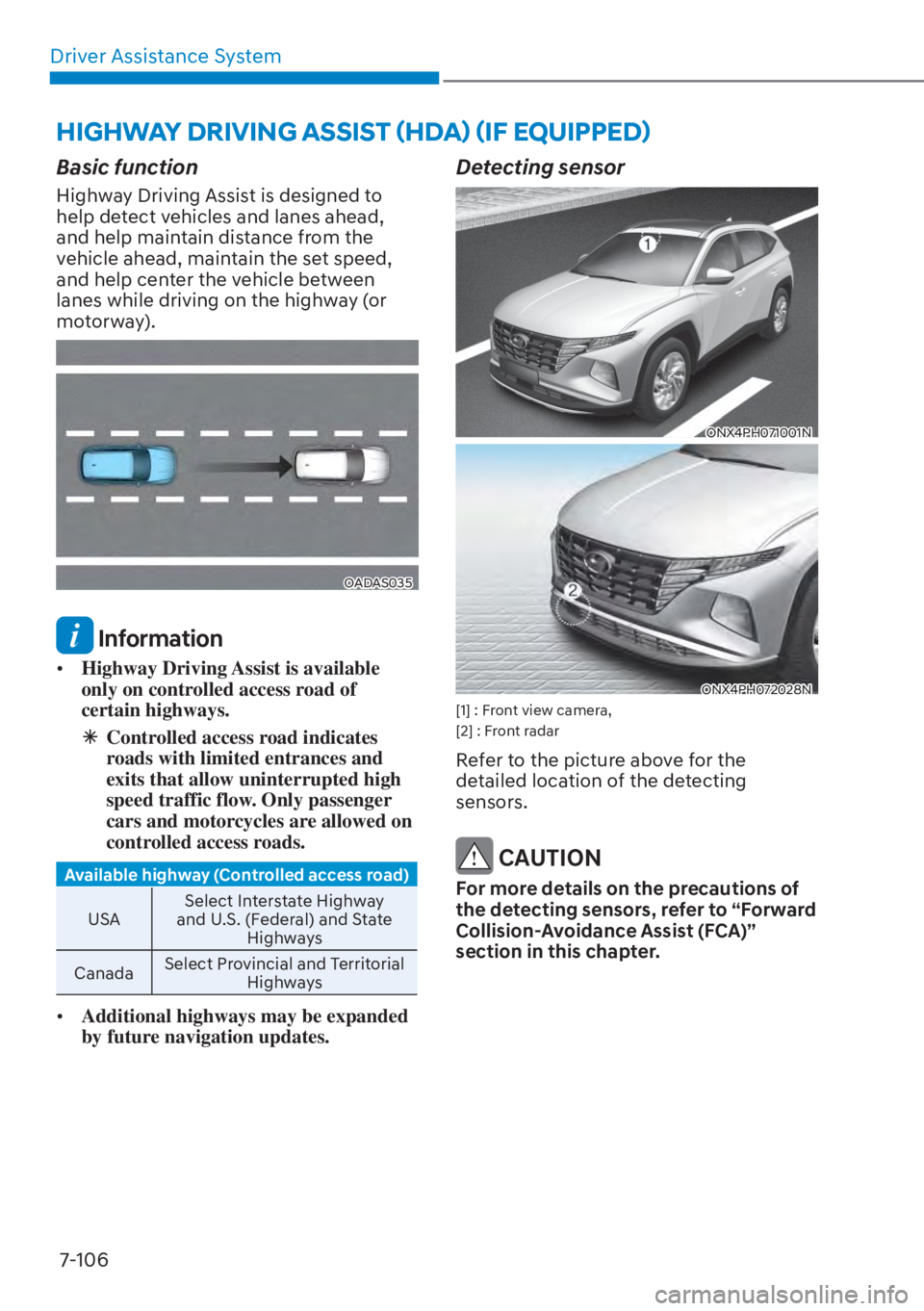
Basic function
Highway Driving Assist is designed to
help detect vehicles and lanes ahead,
and help maintain distance from the
vehicle ahead, maintain the set speed,
and help center the vehicle between
lanes while driving on the highway (or
motorway).
OADAS035OADAS035
Information
• Highway Driving Assist is available
only on controlled access road of
certain highways.
à Controlled access road indicates
roads with limited entrances and
exits that allow uninterrupted high
speed traffic flow. Only passenger
cars and motorcycles are allowed on
controlled access roads.
Available highway (Controlled access road)
USA Select Int
erstate Highway
and U.S. (Federal) and State Highways
Canada Select Provincial and Territorial
Highways
• Additional highways may be expanded
by future navigation updates.
Detecting sensor
ONX4PH071001NONX4PH071001N
ONX4PH072028NONX4PH072028N[1] : Front view camera,
[2] : Front radar
Refer to the picture above for the
detailed location of the detecting
sensors.
CAUTION
For more details on the precautions of
the detecting sensors, refer to “Forward
Collision-Avoidance Assist (FCA)”
section in this chapter.
HIGHWAY DRIVING ASSIST (HDA) (IF EQUIPPED)
Page 540 of 699
07
7-111
WARNING
• The driver is responsible for braking
and safe driving.
• Always have your hands on the
steering wheel while driving.
• Highway Driving Assist is a
supplemental function that assists
the driver in driving the vehicle
and is not a complete autonomous
driving system. Always check road
conditions, and if necessary, take
appropriate actions to drive safely.
• Always have your eyes on the road,
and it is the responsibility of the
driver to avoid violating traffic laws.
The vehicle manufacturer is not
responsible for any traffic violation
or accidents caused by the driver.
• Highway Driving Assist may not
detect possible collisions due to
limitations of the function. Always
be aware of the limitations of the
function. Obstacles such as vehicles,
motorcycles, bicycles, pedestrians,
or unspecified objects or structures
such as guardrails, tollgate, etc., that
may collide with a vehicle may not be
detected.
• Highway Driving Assist will turn off
automatically under the following
situations:
- Driving on roads that Highway
Driving Assist does not operate,
such as a rest area, intersection,
junction, etc.
- The navigation does not operate
properly such as when the
navigation is being updated or
restarted •
Highway Driving Assist may
inadvertently operate or turn off
depending on road conditions
(navigation information) and
surroundings.
• Lane Following Assist function may
be temporarily disabled when the
front view camera cannot detect
lanes properly or the hands-off
warning is on.
• You may not hear the warning sound
of Highway Driving Assist if the
surroundings are noisy.
• If the vehicle is driven at high speed
above a certain speed at a curve,
your vehicle may drive to one side or
may depart from the driving lane.
• When you are towing a trailer or
another vehicle, turn off Highway
Driving Assist.
• The hands–off warning message
may appear early or late depending
on how the steering wheel is held or
road conditions. Always have your
hands on the steering wheel while
driving.
• For your safety, please read the
owner's manual before using the
Highway Driving Assist.
• Highway Driving Assist will not
operate when the engine is started,
or when the detecting sensors or
navigation is being initialized.
Page 541 of 699
Driver Assistance System7-112
Limitations of Highway Driving
Assist
Highway Driving Assist may not operate
normally, or may not operate under the
following circumstances:
• The map information and the actual road is different because the
navigation is not updated
• The map information and the actual road is different because of real-time
GPS data or map information error
• The infotainment system is overloaded by simultaneously performing
functions such as route search, video
playback, voice recognition, etc.
• GPS signals are blocked in areas such as a tunnel
• The driver goes off course or the route to the destination is changed or
canceled by resetting the navigation
• The vehicle enters a service station or rest area
• Android Auto or Car Play is operating
• The navigation cannot detect the current vehicle position (for example,
elevated roads including overpass
adjacent to general roads or nearby
roads exist in a parallel way)
Information
For more details on the limitations of
the front view camera, front radar, front
corner radar and rear corner radar, refer
to “Forward Collision-Avoidance Assist
(FCA)” section in this chapter.
Information
This device complies with Part 15 of the
FCC rules.
Operation is subject to the following three
conditions:
1. This device may not cause harmful
interference, and
2. This device must accept any
interference received, including
interference that may cause undesired
operation.
3. Changes or modifications not expressly
approved by the party responsible
for compliance could void the user's
authority to operate the device.
Information
Radio frequency radiation exposure
information:
This equipment complies with FCC
radiation exposure limits set forth for an
uncontrolled environment.
This equipment should be installed and
operated with minimum distance of 8 in.
(20 cm) between the radiator (antenna)
and your body.
This transmitter must not be co-located or
operating in conjunction with any other
antenna or transmitter.
Page 608 of 699
08
8-15
TPMS (Tire Pressure
Monitoring System)
malfunction indicator
The TPMS Malfunction Indicator
will illuminate after it blinks for
approximately one minute when there
is a problem with the Tire Pressure
Monitoring System.
Have the system checked by an
authorized HYUNDAI dealer as soon as
possible.
NOTICE
If there is a malfunction with the TPMS,
the Low Tire Pressure Position Indicator
will not be displayed even though the
vehicle has an under-inflated tire.
NOTICE
The TPMS Malfunction Indicator may
illuminate after blinking for one minute
if the vehicle is near electric power
supply cables or radio transmitters
such as police stations, government
and public offices, broadcasting
stations, military installations, airports,
transmitting towers, etc.
Additionally, the TPMS Malfunction
Indicator may illuminate if snow chains
are used or electronic devices such as
computers, chargers, remote starters,
navigation, etc. This may interfere with
normal operation of the TPMS.
Changing a Tire with TPMS
If you have a flat tire, the Low Tire
Pressure and Position indicators will
come on. Have the flat tire repaired by an
authorized HYUNDAI dealer as soon as
possible or replace the flat tire with the
spare tire.
NOTICE
It is recommended that you do not
use a puncture-repairing agent not
approved by HYUNDAI dealer or the
equivalent specified for your vehicle to
repair and/or inflate a low pressure tire.
Tire sealant not approved by HYUNDAI
dealer or the equivalent specified for
your vehicle may damage the tire
pressure sensor.
The spare tire (if equipped) does not
come with a tire pressure monitoring
sensor. When the low pressure tire or
the flat tire is replaced with the spare
tire, the Low Tire Pressure Indicator will
remain on. Also, the TPMS Malfunction
Indicator will illuminate after blinking
for one minute if the vehicle is driven
at speed above 15.5 mph (25 km/h) for
approximately 10 minutes.
Once the original tire equipped with
a tire pressure monitoring sensor is
reinflated to the recommended pressure
and reinstalled on the vehicle, the
Low Tire Pressure Indicator and TPMS
Malfunction Indicator will go off within a
few minutes of driving.
If the indicators do not extinguish after
a few minutes, contact an authorized
HYUNDAI dealer.
Each wheel is equipped with a tire
pressure sensor mounted inside the tire
behind the valve stem (except for the
spare tire). You must use TPMS specific
wheels. It is recommended that you
always have your tires serviced by an
authorized HYUNDAI dealer.