light HYUNDAI TUCSON LIMITED 2017 Owners Manual
[x] Cancel search | Manufacturer: HYUNDAI, Model Year: 2017, Model line: TUCSON LIMITED, Model: HYUNDAI TUCSON LIMITED 2017Pages: 642, PDF Size: 9.78 MB
Page 424 of 642
5-40
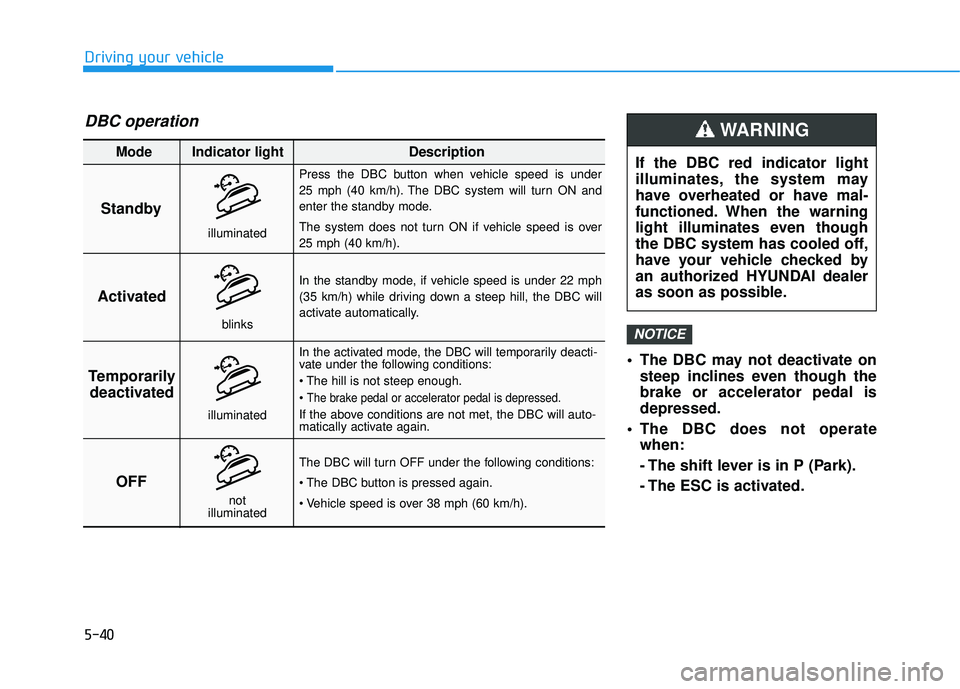
The DBC may not deactivate onsteep inclines even though the brake or accelerator pedal isdepressed.
The DBC does not operate when:
- The shift lever is in P (Park).
- The ESC is activated.
NOTICE
Driving your vehicle
Standby Press the DBC button when vehicle speed is under
25 mph (40 km/h). The DBC system will turn ON and
enter the standby mode.
The system does not turn ON if vehicle speed is over 25 mph (40 km/h).
In the standby mode, if vehicle speed is under 22 mph
(35 km/h) while driving down a steep hill, the DBC will
activate automatically.
In the activated mode, the DBC will temporarily deacti-
vate under the following conditions:
The brake pedal or accelerator pedal is depressed.
If the above conditions are not met, the DBC will auto-
matically activate again.
The DBC will turn OFF under the following conditions:
Activated
Temporarily deactivated
OFF
Mode Indicator light Description
blinks
illuminated
not
illuminated
illuminated
DBC operation
If the DBC red indicator light
illuminates, the system may
have overheated or have mal-
functioned. When the warning
light illuminates even though
the DBC system has cooled off,
have your vehicle checked by
an authorized HYUNDAI dealer
as soon as possible.
WARNING
Page 425 of 642
5-41
Driving your vehicle
5
Good Braking Practices Wet brakes can be dangerous! The
brakes may get wet if the vehicle is
driven through standing water or if it
is washed. Your vehicle will not stop
as quickly if the brakes are wet. Wet
brakes may cause the vehicle to pull
to one side.
To dry the brakes, apply the brakes
lightly until the braking action returns
to normal, taking care to keep the
vehicle under control at all times. If
the braking action does not return to
normal, stop as soon as it is safe to
do so and call an authorized
HYUNDAI dealer for assistance.
DO NOT drive with your foot resting
on the brake pedal. Even light, butconstant pedal pressure can result in
the brakes overheating, brake wear,
and possibly even brake failure.
If a tire goes flat while you are driv-
ing, apply the brakes gently and
keep the vehicle pointed straight
ahead while you slow down. When
you are moving slowly enough for it
to be safe to do so, pull off the road
and stop in a safe location.Keep your foot firmly on the brake
pedal when the vehicle is stopped to
prevent the vehicle from rolling for-
ward.
Whenever leaving the vehicle or
parking, always come to a com-
plete stop and continue to
depress the brake pedal. Move
the shift lever into the P (Park)
position, then apply the parking
brake, and place the ignition
switch in the OFF position.
Vehicles parked with the park- ing brake not applied or not
fully engaged may roll inadver-
tently and may cause injury to
the driver and others. ALWAYS
apply the parking brake before
exiting the vehicle.
WARNING
Page 427 of 642
5-43
Driving your vehicle
AWD operation
5
If AWD warning light ( ) stays on the instrument cluster, your vehicle may have a malfunction with the
AWD system. When the AWD warning light ( ) illuminates have your vehicle checked by an authorized
HYUNDAI dealer as soon as possible.
WARNING
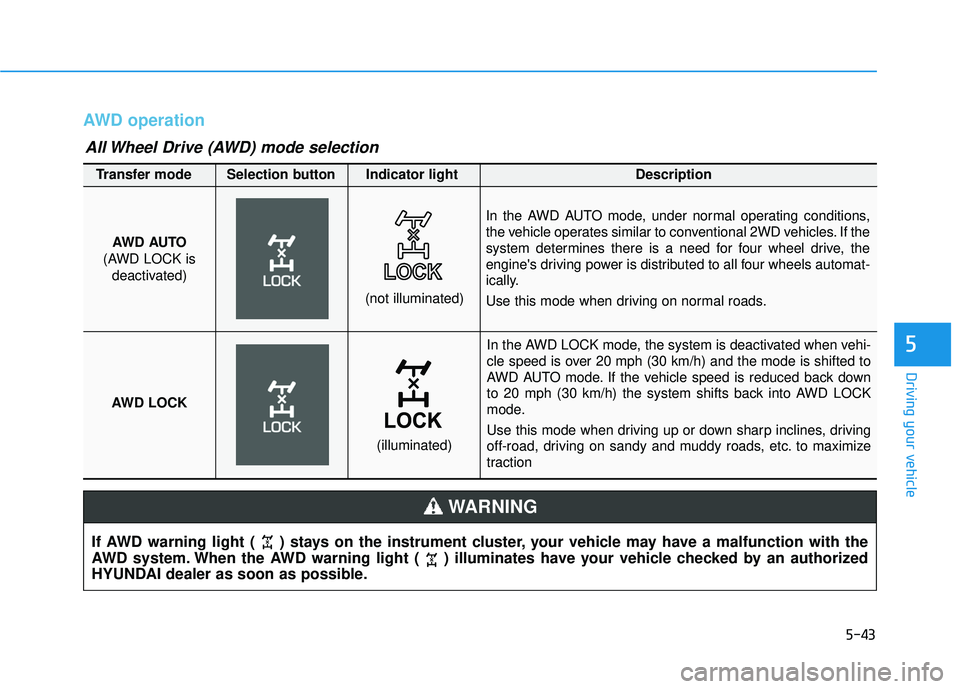
In the AWD LOCK mode, the system is deactivated when vehi-
cle speed is over 20 mph (30 km/h) and the mode is shifted to
AWD AUTO mode. If the vehicle speed is reduced back down
to 20 mph (30 km/h) the system shifts back into AWD LOCK
mode.
Use this mode when driving up or down sharp inclines, driving
off-road, driving on sandy and muddy roads, etc. to maximize
traction
AWD AUTO
(AWD LOCK is deactivated)
(not illuminated)
Transfer mode Selection button Indicator light Description
In the AWD AUTO mode, under normal operating conditions,
the vehicle operates similar to conventional 2WD vehicles. If the
system determines there is a need for four wheel drive, the
engine's driving power is distributed to all four wheels automat-
ically.
Use this mode when driving on normal roads.
AWD LOCK
(illuminated)
All Wheel Drive (AWD) mode selection
Page 428 of 642
5-44
When the AWD LOCK mode is
deactivated, a sensation may be
felt as the driving power is deliv-
ered entirely to the front wheels.
For safe AWD operation
Before driving
Make sure all passengers arewearing seat belts.
Sit upright and closer to the steer- ing wheel than usual. Adjust the
steering wheel to a position com-
fortable for you to drive.
Driving on snow-covered or icy
roads
Start off slowly by applying theaccelerator pedal gently.
Use snow tires or tire chains.
Keep sufficient distance between your vehicle and the vehicle in front
of you.
Apply engine braking during decel- eration by switching the gear shift
lever to Manual Shift Mode and
manually selecting a lower gear.
Avoid speeding, rapid acceleration, sudden brake applications, and
sharp turns to prevent skids.
Driving in sand or mud
Maintain slow and constant speed.
Use tire chains driving in mud ifnecessary.
Keep sufficient distance between your vehicle and the vehicle in front
of you.
Reduce vehicle speed and always check the road condition.
Avoid speeding, rapid acceleration, sudden brake applications, and
sharp turns to prevent getting
stuck.
NOTICE
Driving your vehicle
When driving on normal roads,
deactivate the AWD LOCK mode
by pushing the AWD LOCK but-
ton (AWD LOCK indicator light
goes off). Driving on normal
roads with the AWD LOCK
mode, especially, when corner-
ing may cause mechanical
noise or vibration. The noiseand vibration will disappear
when the AWD LOCK mode is
deactivated. Prolong drivingwith the noise and vibration
may damage some parts of the
power train.
CAUTION
When the vehicle is stuck in
snow, sand or mud, place a non-slip material under the drive
wheels to provide traction OR
Slowly spin the wheels in for-
ward and reverse directions
which causes a rocking motion
that may free the vehicle.
However, avoid running the
engine continuously at high
rpm, doing so may damage the
AWD system.
CAUTION
Page 429 of 642
5-45
Driving your vehicle
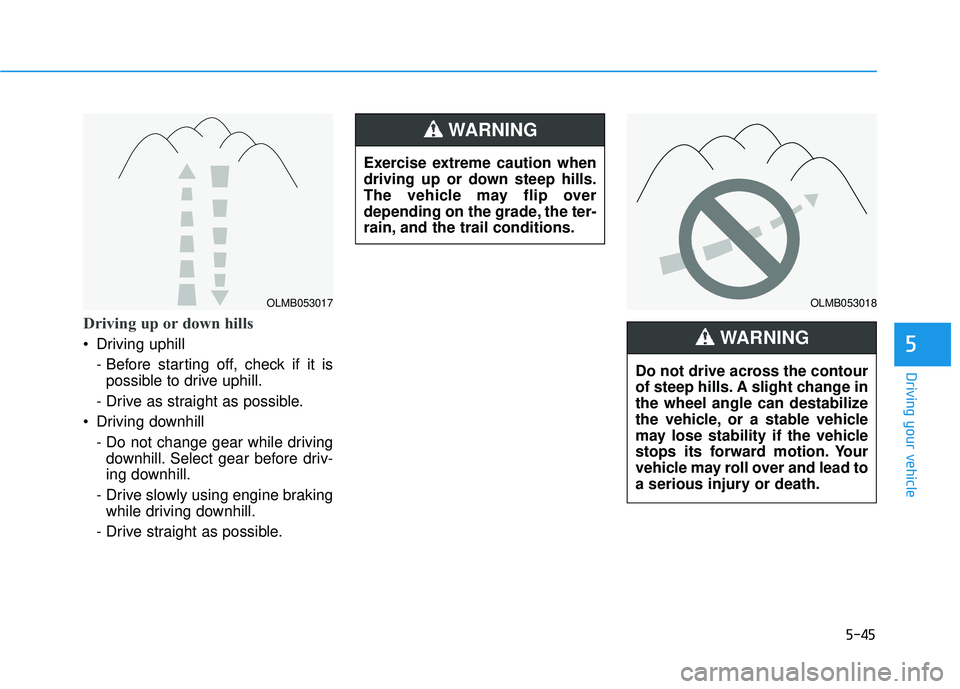
Driving up or down hills
Driving uphill - Before starting off, check if it ispossible to drive uphill.
- Drive as straight as possible.
Driving downhill
- Do not change gear while drivingdownhill. Select gear before driv-
ing downhill.
- Drive slowly using engine braking while driving downhill.
- Drive straight as possible.5
OLMB053017OLMB053018
Exercise extreme caution when
driving up or down steep hills.
The vehicle may flip over
depending on the grade, the ter-
rain, and the trail conditions.
WARNING
Do not drive across the contour
of steep hills. A slight change in
the wheel angle can destabilize
the vehicle, or a stable vehicle
may lose stability if the vehicle
stops its forward motion. Your
vehicle may roll over and lead to
a serious injury or death.
WARNING
Page 434 of 642
5-50
When the ECO mode is activated:
The acceleration response may beslightly reduced as the accelerator
pedal is depressed moderately.
The air conditioner performance may be limited.
The shift pattern of the automatic transmission or dual clutch trans-
mission may change.
The engine noise may get louder.
The above situations are normal conditions when the ECO mode is
activated to improve fuel efficiency. Limitation of the ECO mode oper-ation:
If the following conditions occur while
the ECO mode is operating, the sys-
tem operation is limited even thoughthere is no change in the ECO indi-
cator.
When the coolant temperature is
low: The system will be limited until
engine performance becomes nor-mal.
When driving up a hill:
The system will be limited to gain
power when driving uphill because
engine torque is restricted.
When driving the vehicle with the automatic transmission or the dual
clutch transmission gear shift lever
in manual shift mode. The system will be limited accord- ing to the shift location.SPORT mode
SPORT mode manages
the driving dynamics byautomatically adjusting the
electric power steering
and the engine and transmission
control logic for enhanced driver per-
formance.
When SPORT mode is selected by pressing the DRIVE MODE button,
the SPORT indicator (yellow color)
will illuminate.
Whenever the engine is restarted, the Drive Mode will revert back to
NORMAL mode. If SPORT mode is
desired, re-select SPORT mode
from the DRIVE MODE button.
When SPORT mode is activated: - The engine rpm will tend toremain raised over a certain
length of time even after releas-
ing the accelerator
- Upshifts are delayed when accel- erating
Information
In SPORT mode, the fuel efficiency
may decrease.
i
Driving your vehicle
Page 436 of 642
5-52
BSD (Blind Spot Detection) /
LCA (Lane Change Assist)
Operating conditions
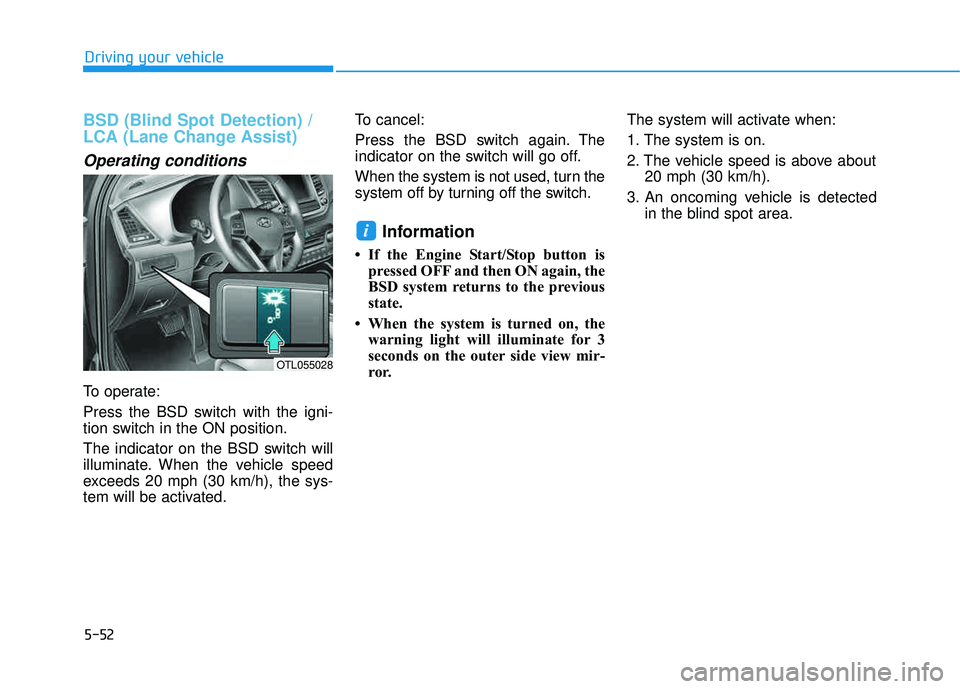
To operate:
Press the BSD switch with the igni-
tion switch in the ON position.
The indicator on the BSD switch will
illuminate. When the vehicle speed
exceeds 20 mph (30 km/h), the sys-
tem will be activated.To cancel:
Press the BSD switch again. The
indicator on the switch will go off.
When the system is not used, turn the
system off by turning off the switch.
Information
If the Engine Start/Stop button is
pressed OFF and then ON again, the
BSD system returns to the previous
state.
When the system is turned on, the warning light will illuminate for 3
seconds on the outer side view mir-
ror. The system will activate when:
1. The system is on.
2. The vehicle speed is above about
20 mph (30 km/h).
3. An oncoming vehicle is detected in the blind spot area.
i
Driving your vehicle
OTL055028
Page 437 of 642
5-53
Driving your vehicle
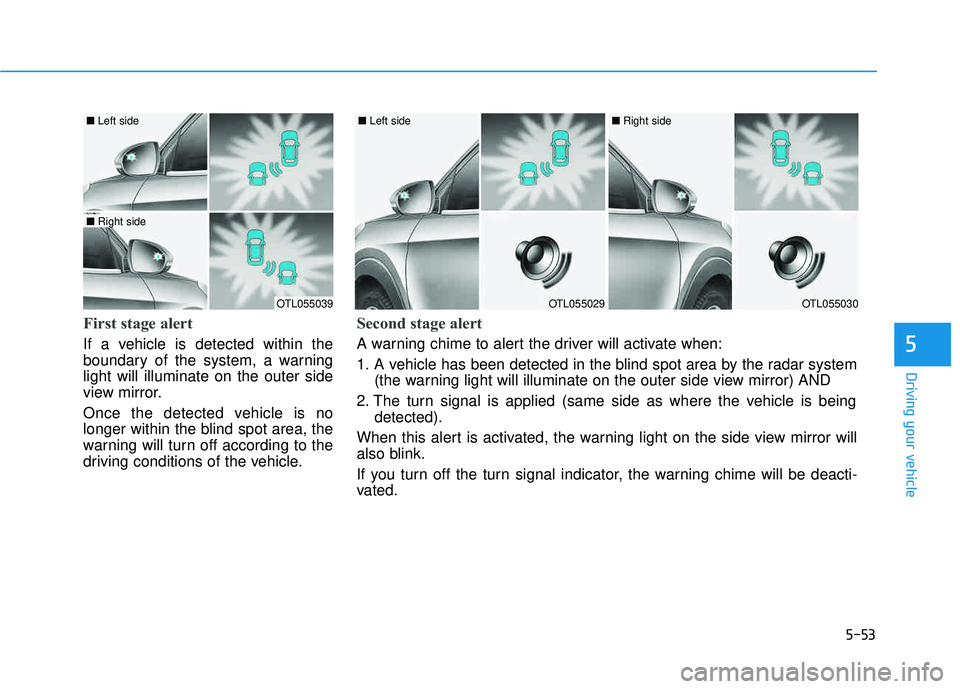
First stage alert
If a vehicle is detected within the
boundary of the system, a warninglight will illuminate on the outer side
view mirror.
Once the detected vehicle is no
longer within the blind spot area, the
warning will turn off according to the
driving conditions of the vehicle.5
OTL055039
■ Left side
■ Right side
OTL055029
■ Left side
OTL055030
■ Right side
Second stage alert
A warning chime to alert the driver will activate when:
1. A vehicle has been detected in the blind spot area by the radar system
(the warning light will illuminate on the outer side view mirror) AND
2. The turn signal is applied (same side as where the vehicle is being detected).
When this alert is activated, the warning light on the side view mirror will
also blink.
If you turn off the turn signal indicator, the warning chime will be deacti-
vated.
Page 438 of 642
5-54
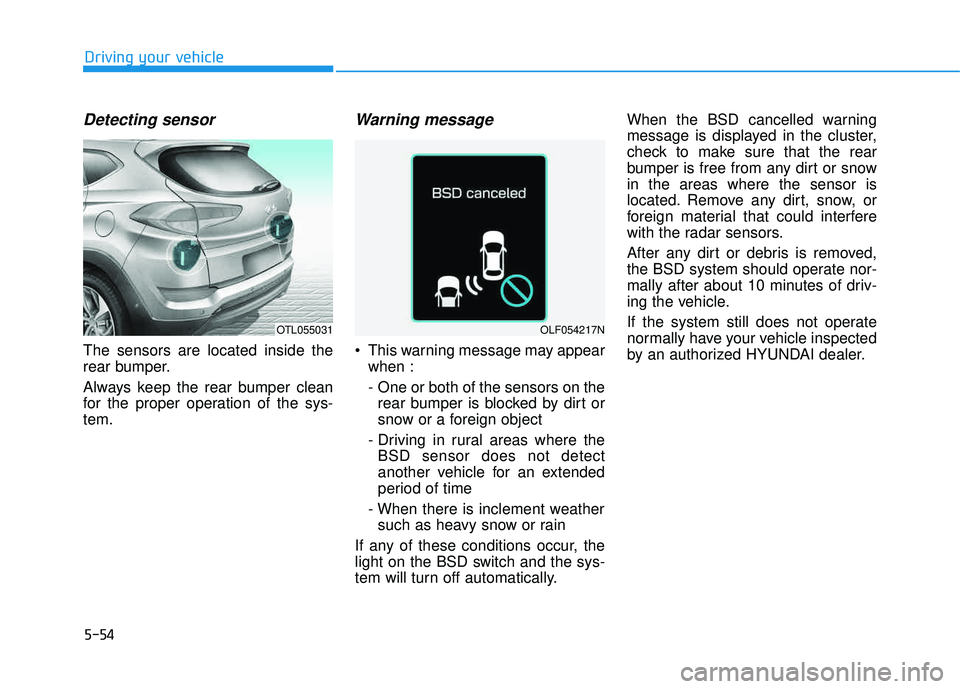
Detecting sensor
The sensors are located inside the
rear bumper.
Always keep the rear bumper clean
for the proper operation of the sys-tem.
Warning message
This warning message may appearwhen :
- One or both of the sensors on therear bumper is blocked by dirt or
snow or a foreign object
- Driving in rural areas where the BSD sensor does not detect
another vehicle for an extended
period of time
- When there is inclement weather such as heavy snow or rain
If any of these conditions occur, the
light on the BSD switch and the sys-
tem will turn off automatically. When the BSD cancelled warning
message is displayed in the cluster,
check to make sure that the rear
bumper is free from any dirt or snowin the areas where the sensor is
located. Remove any dirt, snow, or
foreign material that could interfere
with the radar sensors.
After any dirt or debris is removed,
the BSD system should operate nor-
mally after about 10 minutes of driv-
ing the vehicle.
If the system still does not operate
normally have your vehicle inspected
by an authorized HYUNDAI dealer.
Driving your vehicle
OTL055031OLF054217N
Page 439 of 642
5-55
Driving your vehicle
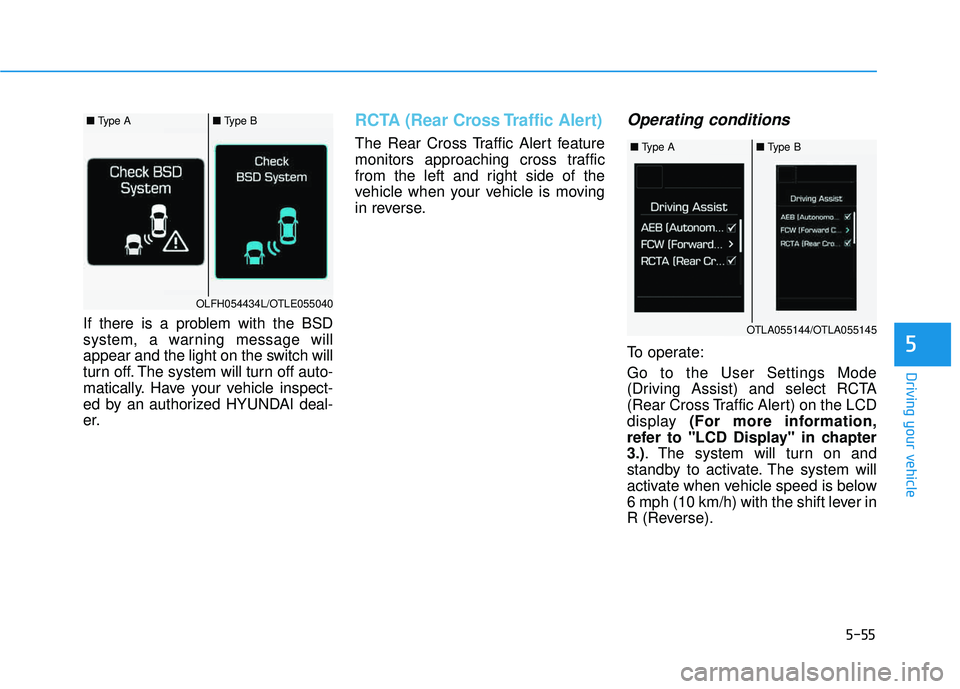
If there is a problem with the BSD
system, a warning message will
appear and the light on the switch will
turn off. The system will turn off auto-
matically. Have your vehicle inspect-
ed by an authorized HYUNDAI deal-
er.
RCTA (Rear Cross Traffic Alert)
The Rear Cross Traffic Alert feature
monitors approaching cross traffic
from the left and right side of the
vehicle when your vehicle is moving
in reverse.
Operating conditions
To operate: Go to the User Settings Mode
(Driving Assist) and select RCTA
(Rear Cross Traffic Alert) on the LCD
display (For more information,
refer to "LCD Display" in chapter3.) . The system will turn on and
standby to activate. The system will
activate when vehicle speed is below
6 mph (10 km/h) with the shift lever in
R (Reverse).5
■ Type A■ Type B
OLFH054434L/OTLE055040
■ Type A■ Type B
OTLA055144/OTLA055145