Led HYUNDAI TUCSON LIMITED 2017 Owner's Guide
[x] Cancel search | Manufacturer: HYUNDAI, Model Year: 2017, Model line: TUCSON LIMITED, Model: HYUNDAI TUCSON LIMITED 2017Pages: 642, PDF Size: 9.78 MB
Page 138 of 642
3-40
Convenient features of your vehicle
Auto up/down window (if equipped)
Pressing or pulling up the power win-
dow switch momentarily to the sec-ond detent position (6) completely
lowers or lifts the window even when
the switch is released. To stop the
window at the desired position while
the window is in operation, pull up or
press down and release the switch.
To reset the power windows
If the power windows do not operate
normally, the automatic power win-
dow system must be reset as follows:
1. Place the ignition switch to the ON position.
2. Close the window and continue pulling up on the power window
switch for at least one second.
If the power windows do not operate
properly after resetting, have the
system checked by an authorized
HYUNDAI dealer.
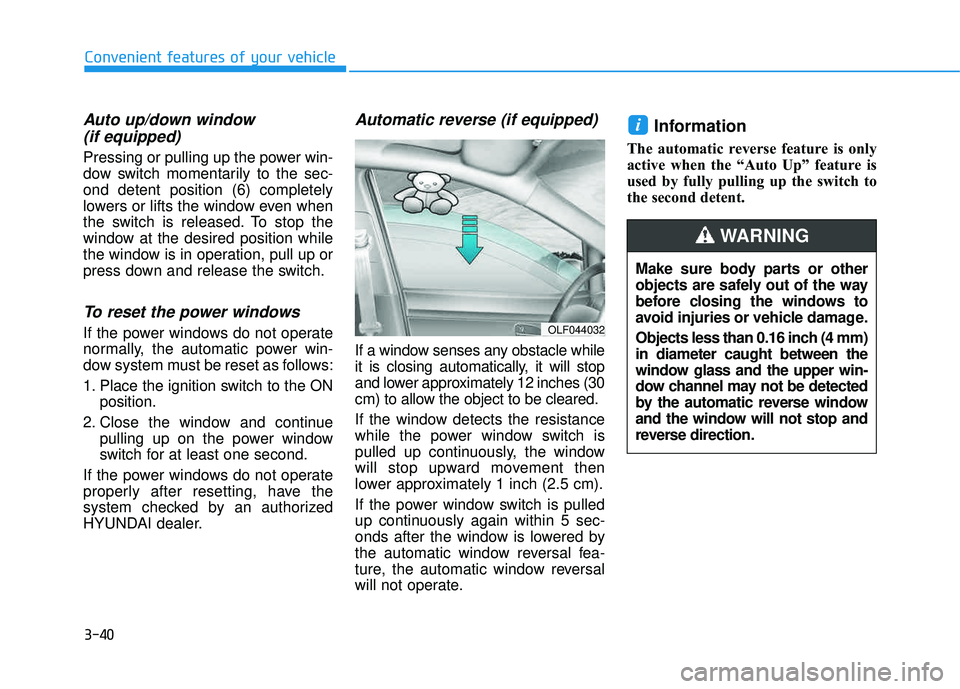
Automatic reverse (if equipped)
If a window senses any obstacle while
it is closing automatically, it will stop
and lower approximately 12 inches (30
cm) to allow the object to be cleared.
If the window detects the resistance
while the power window switch is
pulled up continuously, the window
will stop upward movement then
lower approximately 1 inch (2.5 cm).
If the power window switch is pulled
up continuously again within 5 sec-
onds after the window is lowered by
the automatic window reversal fea-
ture, the automatic window reversal
will not operate.
Information
The automatic reverse feature is only
active when the “Auto Up” feature is
used by fully pulling up the switch to
the second detent.
i
OLF044032
Make sure body parts or other
objects are safely out of the way
before closing the windows to
avoid injuries or vehicle damage.
Objects less than 0.16 inch (4 mm) in diameter caught between the
window glass and the upper win-
dow channel may not be detected
by the automatic reverse window
and the window will not stop and
reverse direction.
WARNING
Page 145 of 642

3-47
Convenient features of your vehicle
Closing the hood
1. Before closing the hood, check thefollowing:
partment must be correctly installed.
bustible material must be
removed from the engine com-
partment.
2. Return the support rod to its clip to prevent it from rattling.
3. Lower the hood halfway and push down to securely lock in place.
Then double check to be sure the
hood is secure.
3
Before closing the hood, ensure all obstructions are
removed from around hoodopening.
Always double check to be
sure that the hood is firmly
latched before driving away. If
it is not latched, the hood
could open while the vehicle
is being driven, causing a
total loss of visibility, whichmight result in an accident.
Do not move the vehicle with the hood in the raised posi-
tion, as vision is obstructed.Doing so could result in an
accident. The hood could also
fall and become damaged.
WARNING
Grasp the support rod in the area
wrapped in rubber. The rubber
will help prevent you from being
burned by hot metal when theengine is hot.
WARNING
Page 148 of 642
3-50
Convenient features of your vehicle
Information
Make sure to refuel your vehicle
according to the "Fuel Requirements"
suggested in the Introduction chapter.
Do not spill fuel on the exteriorsurfaces of the vehicle. Any type of fuel spilled on painted sur-
faces may damage the paint.
If the fuel filler cap requires replacement, use only a genuine
HYUNDAI cap or the equivalent
specified for your vehicle. Anincorrect fuel filler cap canresult in a serious malfunctionof the fuel system or emission
control system.
NOTICE
i(Continued)
Once refueling has begun,
contact between your bare
hand and the vehicle shouldbe maintained until the filling
is complete.
Use only approved portable
plastic fuel containers designed
to carry and store gasoline.
When refueling, always move
the shift lever to the P (Park)
position, set the parking
brake, and place the ignition
switch to the LOCK/OFF posi-
tion. Sparks produced byelectrical components relatedto the engine can ignite fuel
vapors causing a fire.
Do not use matches or a lighter and do not smoke or
leave a lit cigarette in your
vehicle while at a gas station,
especially during refueling.
Do not over-fill or top-off your
vehicle tank, which can cause
gasoline spillage. (Continued)
(Continued)
If a fire breaks out during refu-
eling, leave the vicinity of the
vehicle, and immediately con-
tact the manager of the gasstation and then contact the
local fire department. Follow
any safety instructions they
provide.
If pressurized fuel sprays out,
it can cover your clothes or
skin and thus subject you to
the risk of fire and burns.
Always remove the fuel cap
carefully and slowly. If the cap
is venting fuel or if you hear a
hissing sound, wait until the
condition stops before com-
pletely removing the cap.
Always check that the fuel cap
is installed securely to pre-
vent fuel spillage in the eventof an accident.
Page 157 of 642
3-59
Convenient features of your vehicle
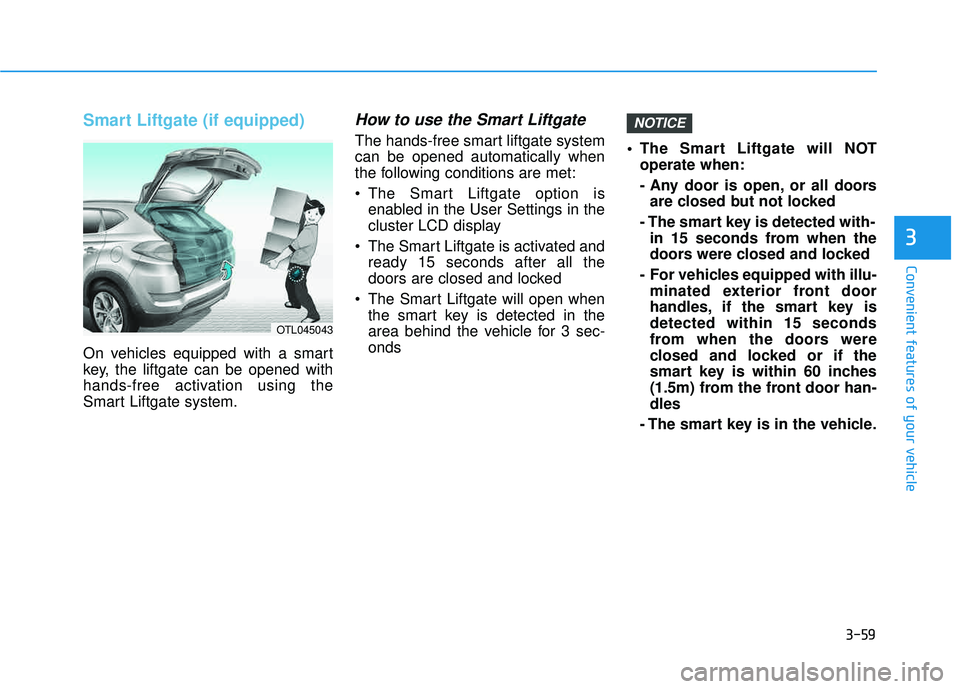
Smart Liftgate (if equipped)
On vehicles equipped with a smart
key, the liftgate can be opened with
hands-free activation using the
Smart Liftgate system.
How to use the Smart Liftgate
The hands-free smart liftgate systemcan be opened automatically when
the following conditions are met:
The Smart Liftgate option isenabled in the User Settings in the
cluster LCD display
The Smart Liftgate is activated and ready 15 seconds after all the
doors are closed and locked
The Smart Liftgate will open when the smart key is detected in the
area behind the vehicle for 3 sec-onds The Smart Liftgate will NOT
operate when:
- Any door is open, or all doorsare closed but not locked
- The smart key is detected with- in 15 seconds from when the
doors were closed and locked
- For vehicles equipped with illu- minated exterior front door
handles, if the smart key isdetected within 15 seconds
from when the doors were
closed and locked or if the
smart key is within 60 inches
(1.5m) from the front door han-dles
- The smart key is in the vehicle.
NOTICE
3
OTL045043
Page 174 of 642
3-76
Convenient features of your vehicle
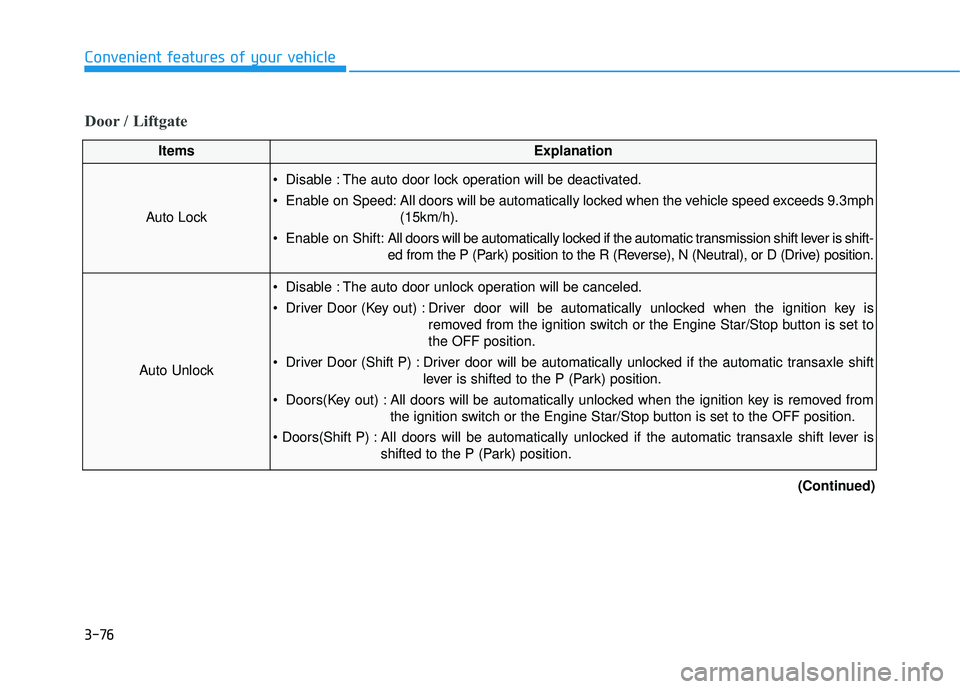
Door / Liftgate
ItemsExplanation
Auto Lock
Disable : The auto door lock operation will be deactivated.
Enable on Speed: All doors will be automatically locked when the vehicle speed exceeds 9.3mph(15km/h).
Enable on Shift: All doors will be automatically locked if the automatic transmission shift lever is shift-
ed from the P (Park) position to the R (Reverse), N (Neutral), or D (Drive) position.
Auto Unlock
Disable : The auto door unlock operation will be canceled.
Driver Door (Key out) : Driver door will be automatically unlocked when the ignition key is
removed from the ignition switch or the Engine Star/Stop button is set to the OFF position.
Driver Door (Shift P) : Driver door will be automatically unlocked if the automatic transaxle shift lever is shifted to the P (Park) position.
Doors(Key out) : All doors will be automatically unlocked when the ignition key is removed from the ignition switch or the Engine Star/Stop button is set to the OFF position.
All doors will be automatically unlocked if the automatic transaxle shift lever is shifted to the P (Park) position.
(Continued)
Page 184 of 642
3-86
Convenient features of your vehicle
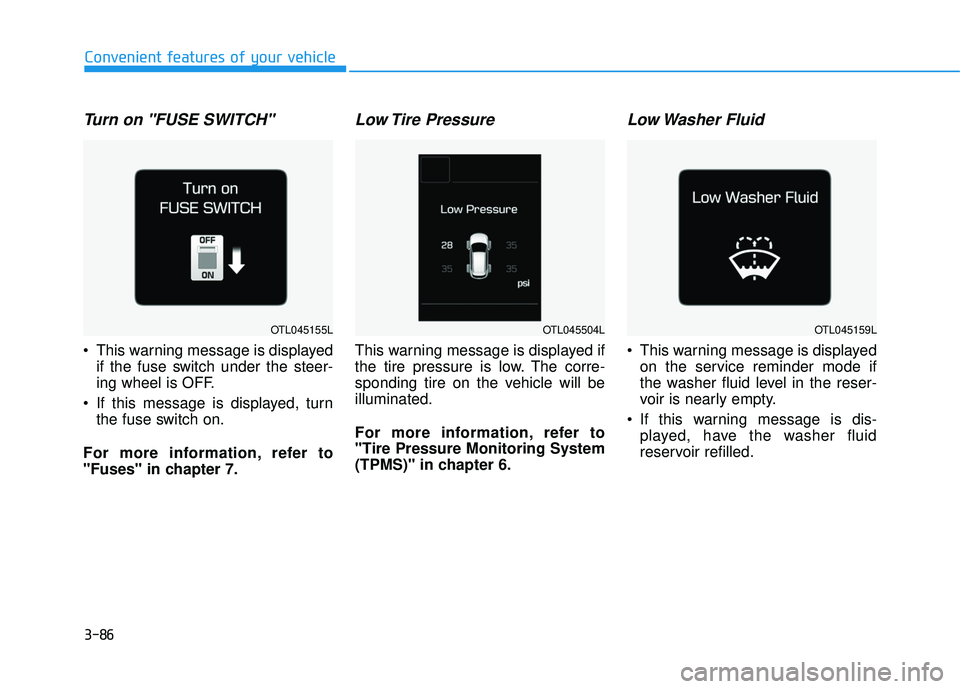
Turn on "FUSE SWITCH"
This warning message is displayedif the fuse switch under the steer-
ing wheel is OFF.
If this message is displayed, turn the fuse switch on.
For more information, refer to
"Fuses" in chapter 7.
Low Tire Pressure
This warning message is displayed if
the tire pressure is low. The corre-
sponding tire on the vehicle will beilluminated.
For more information, refer to "Tire Pressure Monitoring System
(TPMS)" in chapter 6.
Low Washer Fluid
This warning message is displayed on the service reminder mode if
the washer fluid level in the reser-
voir is nearly empty.
If this warning message is dis- played, have the washer fluid
reservoir refilled.
OTL045159LOTL045155LOTL045504L
Page 185 of 642
3-87
Convenient features of your vehicle
3
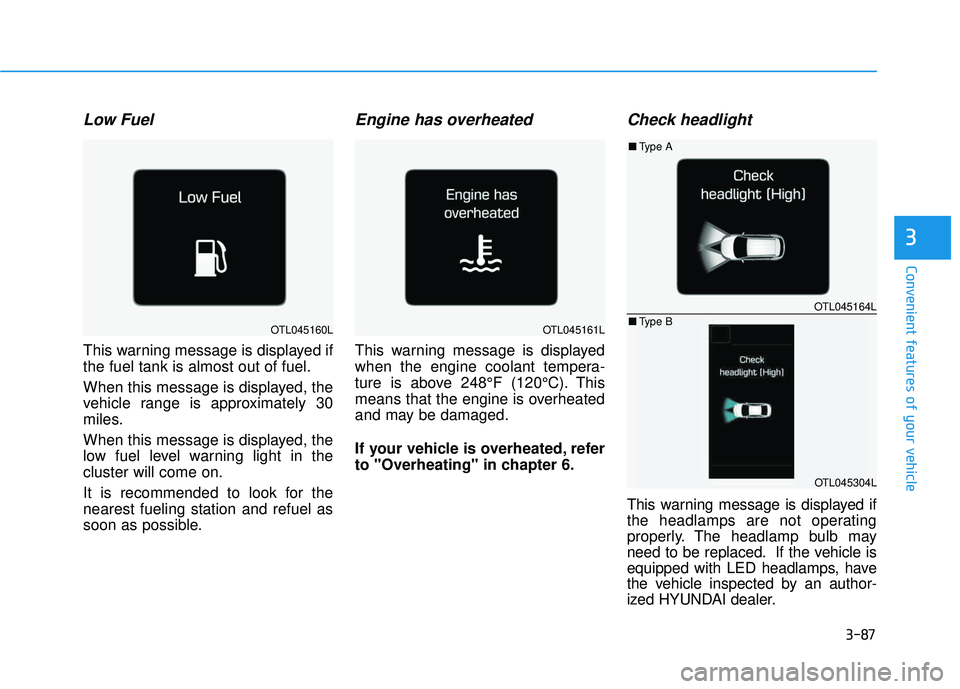
Low Fuel
This warning message is displayed if the fuel tank is almost out of fuel.
When this message is displayed, the
vehicle range is approximately 30
miles.
When this message is displayed, the
low fuel level warning light in thecluster will come on.
It is recommended to look for the nearest fueling station and refuel as
soon as possible.
Engine has overheated
This warning message is displayed
when the engine coolant tempera-
ture is above 248°F (120°C). This
means that the engine is overheated
and may be damaged.
If your vehicle is overheated, refer
to "Overheating" in chapter 6.
Check headlight
This warning message is displayed if
the headlamps are not operating
properly. The headlamp bulb may
need to be replaced. If the vehicle is
equipped with LED headlamps, have
the vehicle inspected by an author-
ized HYUNDAI dealer.
OTL045164L
OTL045304L
■Type A
■ Type B
OTL045160LOTL045161L
Page 187 of 642
3-89
Convenient features of your vehicle
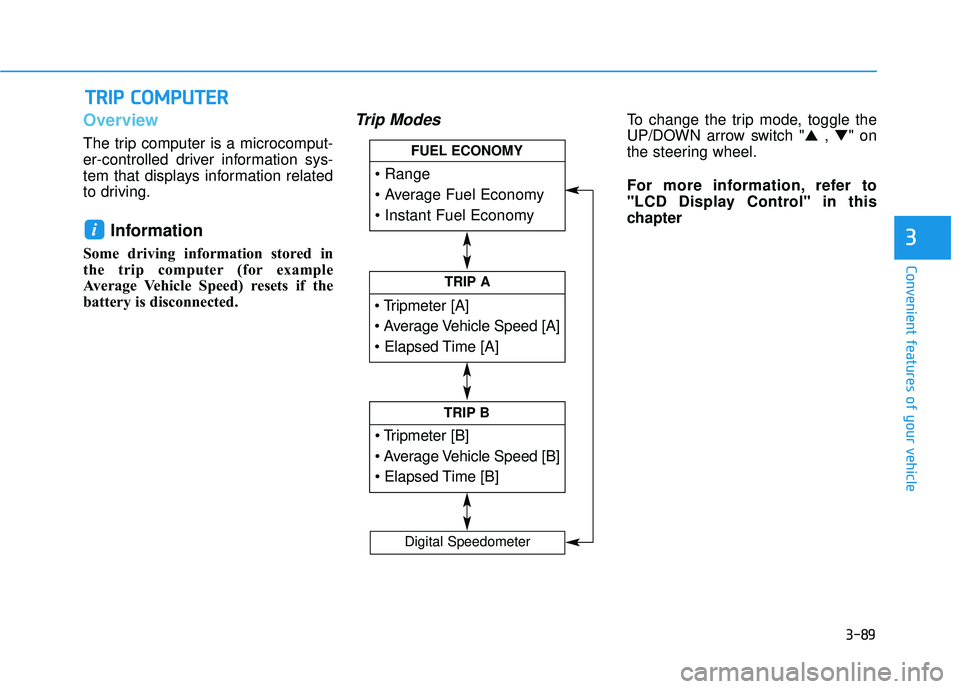
Overview
The trip computer is a microcomput-
er-controlled driver information sys-
tem that displays information related
to driving.
Information
Some driving information stored in
the trip computer (for example
Average Vehicle Speed) resets if the
battery is disconnected.
Trip ModesTo change the trip mode, toggle the
UP/DOWN arrow switch "▲ , ▼ " on
the steering wheel.
For more information, refer to
"LCD Display Control" in this
chapter
i
TT RR IIPP CC OO MM PPUU TTEERR
3
TRIP A
TRIP B
FUEL ECONOMY
Digital Speedometer
Page 199 of 642
3-101
Convenient features of your vehicle
3
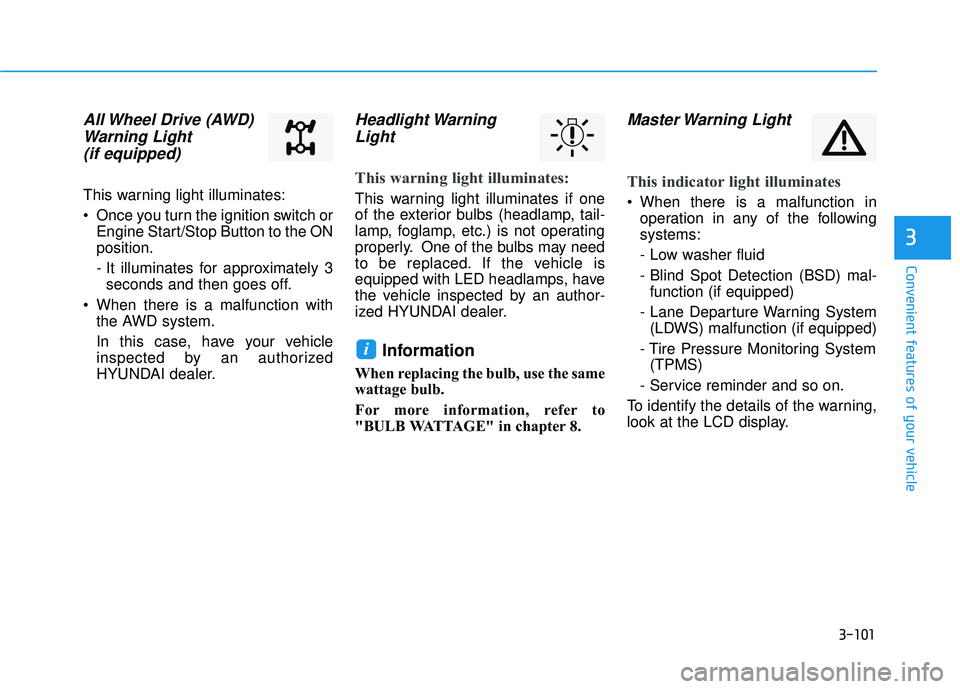
All Wheel Drive (AWD)Warning Light (if equipped)
This warning light illuminates:
Once you turn the ignition switch or Engine Start/Stop Button to the ON position.
- It illuminates for approximately 3seconds and then goes off.
When there is a malfunction with the AWD system.
In this case, have your vehicle
inspected by an authorized
HYUNDAI dealer.
Headlight Warning
Light
This warning light illuminates:
This warning light illuminates if one
of the exterior bulbs (headlamp, tail-
lamp, foglamp, etc.) is not operating
properly. One of the bulbs may need
to be replaced. If the vehicle is
equipped with LED headlamps, have
the vehicle inspected by an author-
ized HYUNDAI dealer.
Information
When replacing the bulb, use the same
wattage bulb.
For more information, refer to
"BULB WATTAGE" in chapter 8.
Master Warning Light
This indicator light illuminates
When there is a malfunction in operation in any of the following systems:
- Low washer fluid
- Blind Spot Detection (BSD) mal-function (if equipped)
- Lane Departure Warning System (LDWS) malfunction (if equipped)
- Tire Pressure Monitoring System (TPMS)
- Service reminder and so on.
To identify the details of the warning,
look at the LCD display.
i
Page 201 of 642
3-103
Convenient features of your vehicle
3
This indicator light illuminates for
2 seconds and goes off:
If the smart key is in the vehicle and
the Engine Start/Stop button is ON,
but the vehicle cannot detect the
smart key.
In this case, have your vehicle inspect-
ed by an authorized HYUNDAI dealer.
This indicator light blinks:
When the battery voltage of thesmart key is low.
- At this time, you can not start theengine. However, you can start the
engine if you press the ignition
switch or the Engine Start/Stop but-
ton with the smart key. (For more
information, refer to "Starting
the Engine" in chapter 5) .
When there is a malfunction with the immobilizer system.
In this case, have your vehicle
inspected by an authorized
HYUNDAI dealer.
Turn Signal Indicator
Light
This indicator light blinks:
When you operate the turn signal
indicator.
If any of the following occurs, there
may be a malfunction with the turnsignal system.
- The turn signal indicator light illu-minates but does not blink
- The turn signal indicator light blinks rapidly
- The turn signal indicator light does not illuminate at all
If either of these conditions occur,
have your vehicle inspected by an
authorized HYUNDAI dealer.
High Beam Indicator Light
This indicator light illuminates:
When the headlights are on and in the high beam position.
When the turn signal lever is pulled into the Flash-to-Pass position.