lock HYUNDAI TUCSON LIMITED 2017 Manual PDF
[x] Cancel search | Manufacturer: HYUNDAI, Model Year: 2017, Model line: TUCSON LIMITED, Model: HYUNDAI TUCSON LIMITED 2017Pages: 642, PDF Size: 9.78 MB
Page 223 of 642
3-125
Convenient features of your vehicle
Rear parking assist system precautions
The rear parking assist systemmay not operate consistently in some circumstances depending on
the speed of the vehicle and theshapes of the objects detected.
The rear parking assist system may malfunction if the vehicle bumperheight or sensor installation has
been modified or damaged. Any
non-factory installed equipment or
accessories may also interfere with
the sensor performance.
The sensor may not recognize objects less than 15 in. (40 cm)
from the sensor, or it may sense an
incorrect distance. Use caution.
When the sensor is blocked with snow, dirt, debris, or ice, the rear
parking assist system may be inop-
erative until the snow or ice melts,
or the debris is removed. Use a
soft cloth to wipe debris away from
the sensor.
Do not push, scratch or strike the sensor with any hard objects that
could damage the surface of the
sensor. Sensor damage could occur. Do not spray the sensors or its sur-
rounding area directly with a high
pressure washer. Doing so may
cause the sensors to fail to operate
normally.
3Your new vehicle warranty does
not cover any accidents or dam-
age to the vehicle or injuries toits occupants related to a Rear
Parking Assist System. Always
drive safely and cautiously.
WARNING
Page 224 of 642
3-126
Convenient features of your vehicle
DDEEFFRR OO SSTT EERR
The rear window defroster is com-
prised of conductors bonded tothe inside surface of the rear win-
dow. Never use sharp instruments
or window cleaners that contain
abrasives to clean the window.
Damage to the rear window
defroster may result.
If you want to defrost and defog
the front windshield, refer to the
"Windshield Defrosting and
Defogging" section in this chapter.
Rear Window Defroster
The defroster heats the window to
remove frost, fog and thin ice from
the interior and exterior of the rear
window, while the engine is running. To activate the rear window
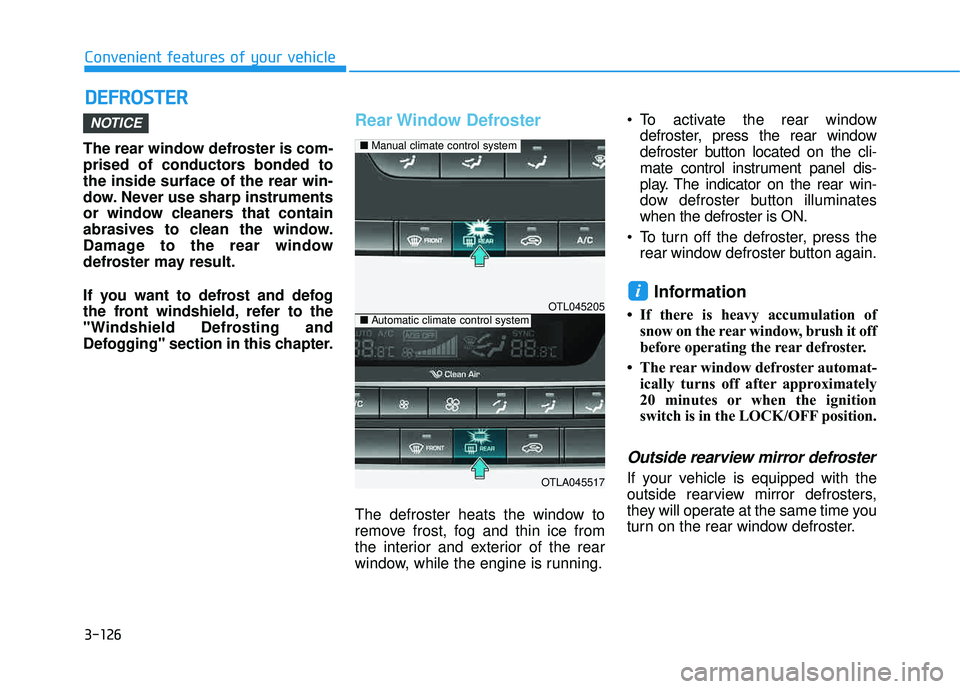
defroster, press the rear window
defroster button located on the cli-
mate control instrument panel dis-
play. The indicator on the rear win-
dow defroster button illuminateswhen the defroster is ON.
To turn off the defroster, press the rear window defroster button again.
Information
If there is heavy accumulation ofsnow on the rear window, brush it off
before operating the rear defroster.
The rear window defroster automat- ically turns off after approximately
20 minutes or when the ignition
switch is in the LOCK/OFF position.
Outside rearview mirror defroster
If your vehicle is equipped with the
outside rearview mirror defrosters,
they will operate at the same time you
turn on the rear window defroster.
i
NOTICE
OTL045205
OTLA045517
■Manual climate control system
■Automatic climate control system
Page 237 of 642
3-139
Convenient features of your vehicle
3
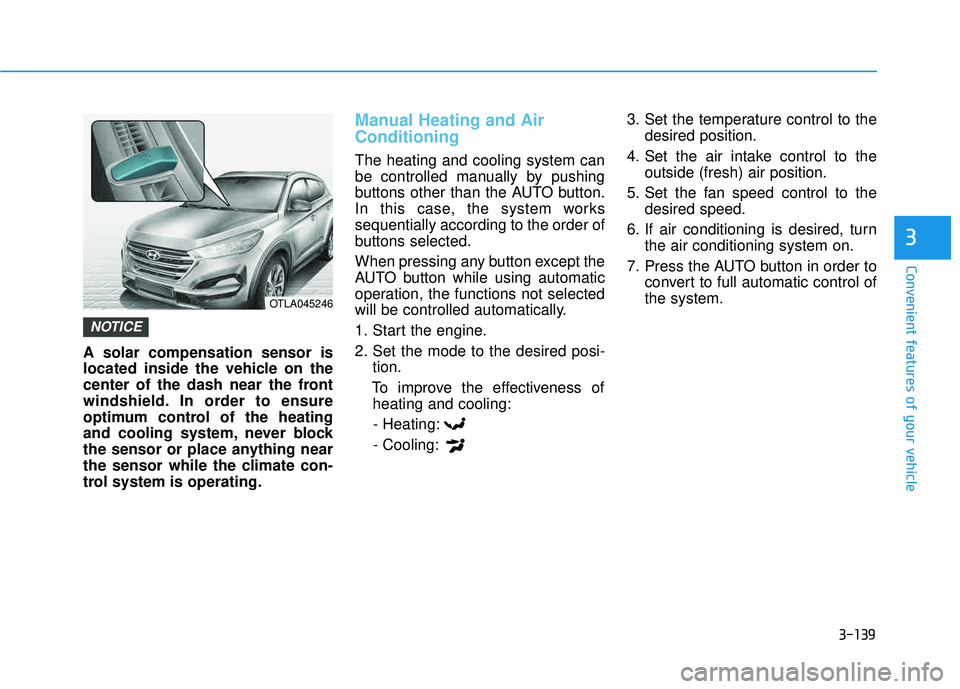
A solar compensation sensor is
located inside the vehicle on the
center of the dash near the front
windshield. In order to ensure
optimum control of the heating
and cooling system, never block
the sensor or place anything near
the sensor while the climate con-
trol system is operating.
Manual Heating and Air Conditioning
The heating and cooling system can
be controlled manually by pushing
buttons other than the AUTO button.
In this case, the system workssequentially according to the order of
buttons selected.
When pressing any button except the
AUTO button while using automatic
operation, the functions not selected
will be controlled automatically.
1. Start the engine.
2. Set the mode to the desired posi-tion.
To improve the effectiveness of heating and cooling:
- Heating:- Cooling: 3. Set the temperature control to the
desired position.
4. Set the air intake control to the outside (fresh) air position.
5. Set the fan speed control to the desired speed.
6. If air conditioning is desired, turn the air conditioning system on.
7. Press the AUTO button in order to convert to full automatic control of the system.
NOTICE
OTLA045246
Page 252 of 642
3-154
Convenient features of your vehicle
Sunglass Holder
To open:
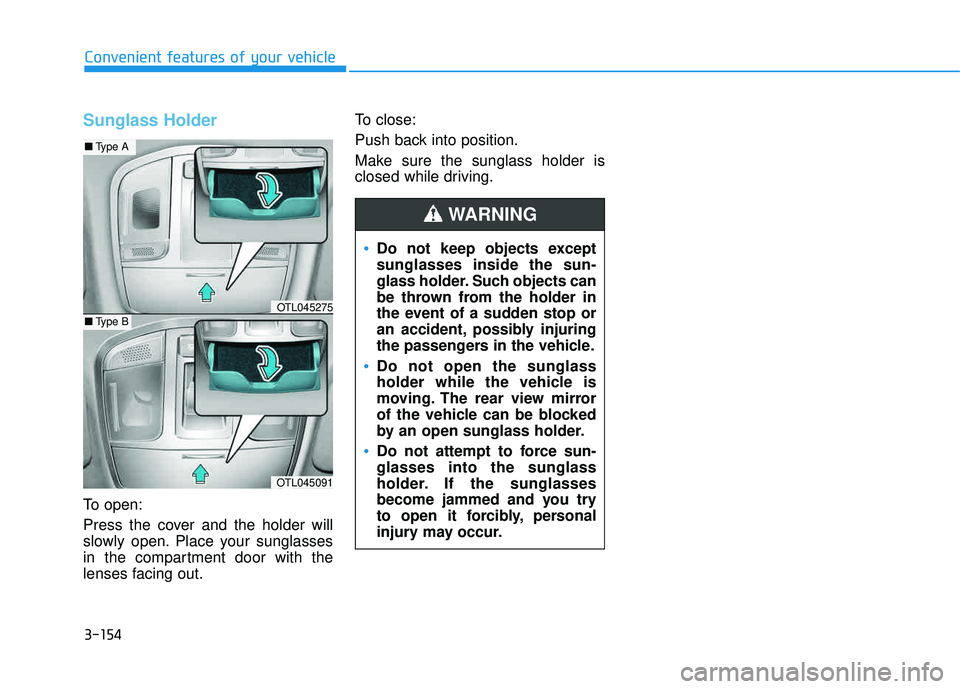
Press the cover and the holder will
slowly open. Place your sunglasses
in the compartment door with the
lenses facing out.To close:
Push back into position.
Make sure the sunglass holder is
closed while driving.
Do not keep objects except sunglasses inside the sun-
glass holder. Such objects can
be thrown from the holder in
the event of a sudden stop or
an accident, possibly injuring
the passengers in the vehicle.
Do not open the sunglass
holder while the vehicle is
moving. The rear view mirror
of the vehicle can be blocked
by an open sunglass holder.
Do not attempt to force sun- glasses into the sunglass
holder. If the sunglasses
become jammed and you try
to open it forcibly, personal
injury may occur.
WARNING
OTL045091
■
Type A
■Type BOTL045275
Page 254 of 642
3-156
Convenient features of your vehicle
Sunvisor
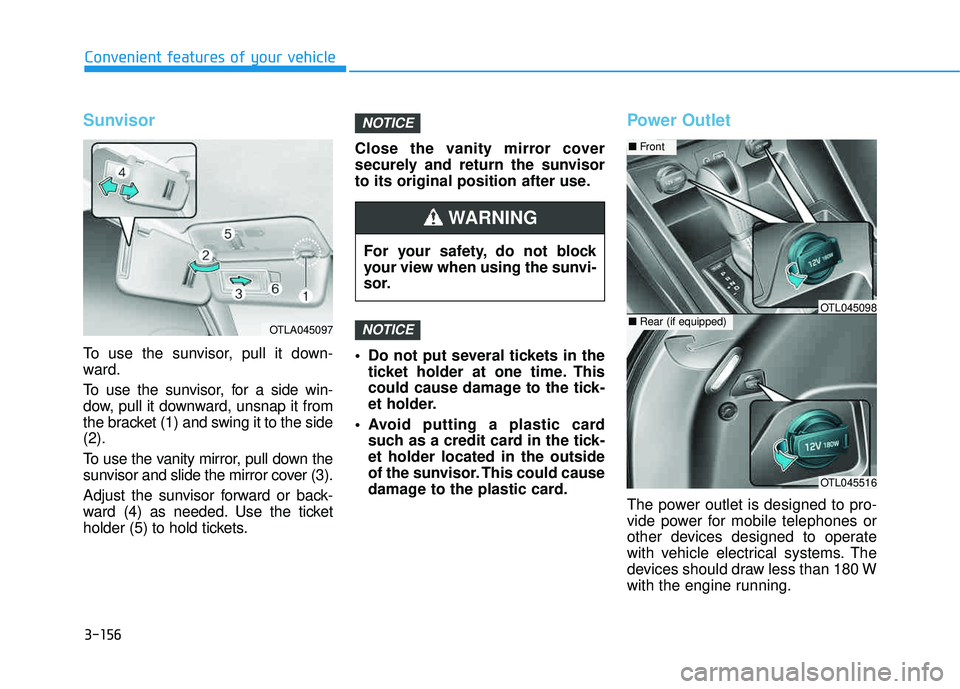
To use the sunvisor, pull it down-
ward.
To use the sunvisor, for a side win-
dow, pull it downward, unsnap it from
the bracket (1) and swing it to the side(2).
To use the vanity mirror, pull down the
sunvisor and slide the mirror cover (3).
Adjust the sunvisor forward or back-
ward (4) as needed. Use the ticket
holder (5) to hold tickets.Close the vanity mirror cover
securely and return the sunvisor
to its original position after use.
Do not put several tickets in the
ticket holder at one time. This
could cause damage to the tick-
et holder.
Avoid putting a plastic card such as a credit card in the tick-et holder located in the outside
of the sunvisor. This could cause
damage to the plastic card.
Power Outlet
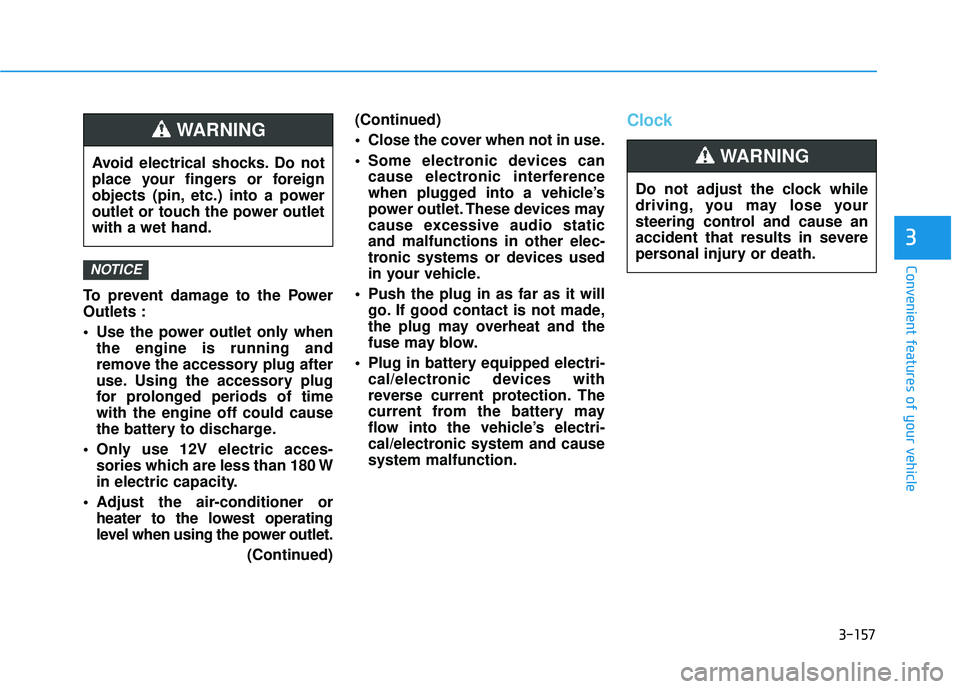
The power outlet is designed to pro-
vide power for mobile telephones or
other devices designed to operate
with vehicle electrical systems. The
devices should draw less than 180 W
with the engine running.
NOTICE
NOTICE
OTLA045097
For your safety, do not block
your view when using the sunvi-
sor.
WARNING
OTL045516
■Front
■Rear (if equipped)OTL045098
Page 255 of 642
3-157
Convenient features of your vehicle
3
To prevent damage to the Power Outlets :
Use the power outlet only whenthe engine is running and
remove the accessory plug after
use. Using the accessory plug
for prolonged periods of timewith the engine off could cause
the battery to discharge.
Only use 12V electric acces- sories which are less than 180 W
in electric capacity.
Adjust the air-conditioner or heater to the lowest operating
level when using the power outlet.
(Continued)(Continued)
Close the cover when not in use.
Some electronic devices can
cause electronic interference
when plugged into a vehicle’s
power outlet. These devices may
cause excessive audio staticand malfunctions in other elec-
tronic systems or devices used
in your vehicle.
Push the plug in as far as it will go. If good contact is not made,
the plug may overheat and the
fuse may blow.
Plug in battery equipped electri- cal/electronic devices with
reverse current protection. The
current from the battery may
flow into the vehicle’s electri-
cal/electronic system and causesystem malfunction.
Clock
NOTICE
Avoid electrical shocks. Do not
place your fingers or foreign
objects (pin, etc.) into a power
outlet or touch the power outletwith a wet hand.
WARNING
Do not adjust the clock while
driving, you may lose your
steering control and cause an
accident that results in severe
personal injury or death.
WARNING
Page 256 of 642
3-158
Convenient features of your vehicle
With Audio system
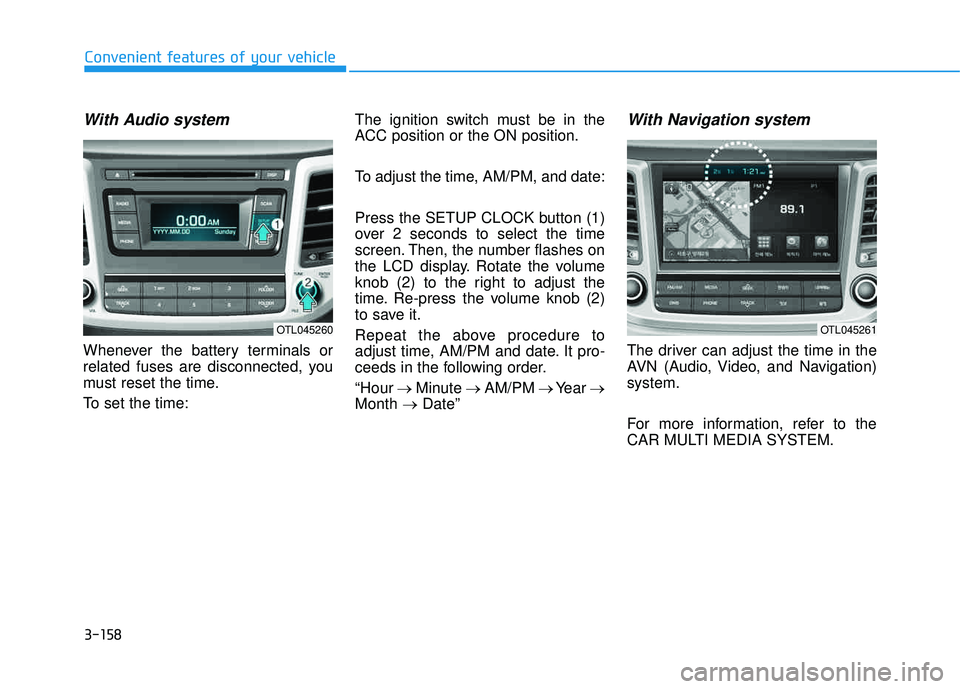
Whenever the battery terminals or
related fuses are disconnected, you
must reset the time.
To set the time:The ignition switch must be in the
ACC position or the ON position.
To adjust the time, AM/PM, and date:
Press the SETUP CLOCK button (1)
over 2 seconds to select the time
screen. Then, the number flashes on
the LCD display. Rotate the volume
knob (2) to the right to adjust the
time. Re-press the volume knob (2)
to save it.
Repeat the above procedure to
adjust time, AM/PM and date. It pro-
ceeds in the following order. “Hour
Minute AM/PM Year
Month Date”
With Navigation system
The driver can adjust the time in the
AVN (Audio, Video, and Navigation)system.
For more information, refer to the
CAR MULTI MEDIA SYSTEM.
OTL045260OTL045261
Page 257 of 642
3-159
Convenient features of your vehicle
3
GPS Time check
The clock is automatically updated
through the navigation system.
GPS Time non-check
The clock can be manually adjusted.
1. Select the "System Settings" onthe "INFO/Setup" screen.
2. Select the "Clock Settings".
3. Select "Time Settings" on the screen
4. Select the "Time Format" to the 12 hour or 24 hour format.
For more information, please refer to
the manual that was separately sup-
plied with your vehicle.
Clothes Hanger
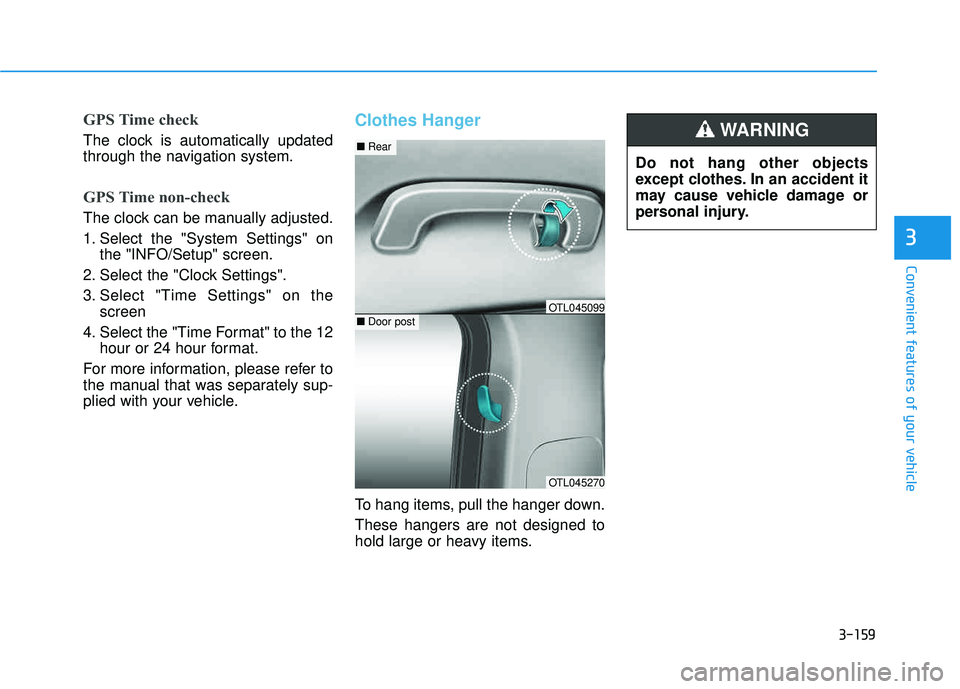
To hang items, pull the hanger down. These hangers are not designed to
hold large or heavy items. Do not hang other objects
except clothes. In an accident it
may cause vehicle damage or
personal injury.
WARNING
OTL045270
■
Rear
■Door postOTL045099
Page 265 of 642
4-2
• If you install an aftermarket HIDhead lamp, your vehicle’s audio
and electronic device may mal-function.
Use caution to keep chemicals such as perfumes, cosmetics,
sun screen lotions, hand sanitiz-
ers, or air fresheners from con-
tacting any interior components.
These chemicals may cause
damage or discoloration to theinterior materials.
AUX, USB and iPod ®
Por t
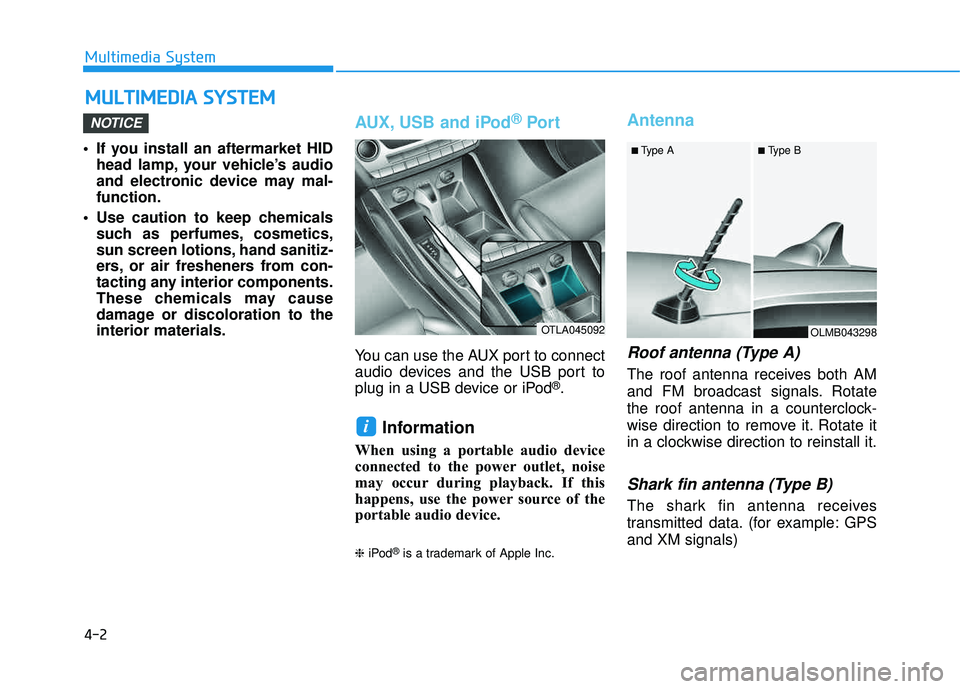
You can use the AUX port to connect
audio devices and the USB port to
plug in a USB device or iPod
®.
Information
When using a portable audio device
connected to the power outlet, noise
may occur during playback. If this
happens, use the power source of the
portable audio device. ❈iPod
®is a trademark of Apple Inc.
Antenna
Roof antenna (Type A)
The roof antenna receives both AM
and FM broadcast signals. Rotate
the roof antenna in a counterclock-
wise direction to remove it. Rotate it
in a clockwise direction to reinstall it.
Shark fin antenna (Type B)
The shark fin antenna receives
transmitted data. (for example: GPS and XM signals)
i
NOTICE
MM UULLTT IIMM EEDD IIAA SS YY SSTT EEMM
Multimedia System
OTLA045092OLMB043298
■
Type A ■ Type B
Page 269 of 642
4-6
Multimedia System
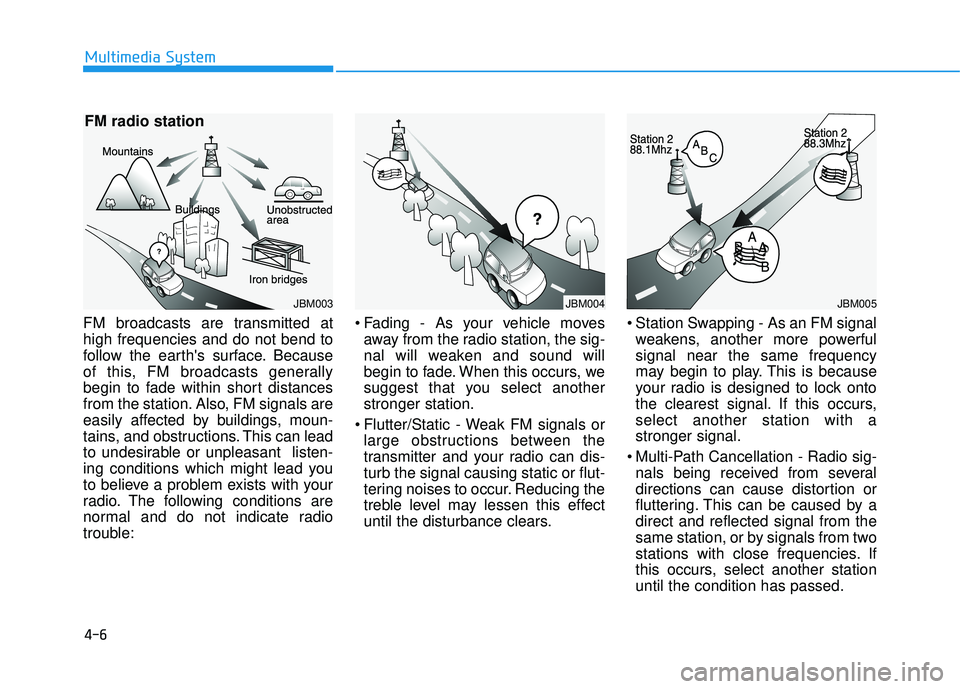
FM broadcasts are transmitted at high frequencies and do not bend to
follow the earth's surface. Because
of this, FM broadcasts generally
begin to fade within short distances
from the station. Also, FM signals are
easily affected by buildings, moun-
tains, and obstructions. This can lead
to undesirable or unpleasant listen-
ing conditions which might lead you
to believe a problem exists with your
radio. The following conditions are
normal and do not indicate radio
trouble: Fading - As your vehicle moves
away from the radio station, the sig-
nal will weaken and sound will
begin to fade. When this occurs, we
suggest that you select anotherstronger station.
Flutter/Static - Weak FM signals or large obstructions between the
transmitter and your radio can dis-turb the signal causing static or flut-
tering noises to occur. Reducing the
treble level may lessen this effect
until the disturbance clears. Station Swapping - As an FM signal
weakens, another more powerfulsignal near the same frequency
may begin to play. This is because
your radio is designed to lock onto
the clearest signal. If this occurs,select another station with astronger signal.
Multi-Path Cancellation - Radio sig- nals being received from several
directions can cause distortion or
fluttering. This can be caused by adirect and reflected signal from the
same station, or by signals from two
stations with close frequencies. If
this occurs, select another stationuntil the condition has passed.
JBM003
FM radio station
JBM004JBM005