charging HYUNDAI VELOSTER 2019 User Guide
[x] Cancel search | Manufacturer: HYUNDAI, Model Year: 2019, Model line: VELOSTER, Model: HYUNDAI VELOSTER 2019Pages: 491, PDF Size: 15.17 MB
Page 223 of 491
5-11
Driving your vehicle
5
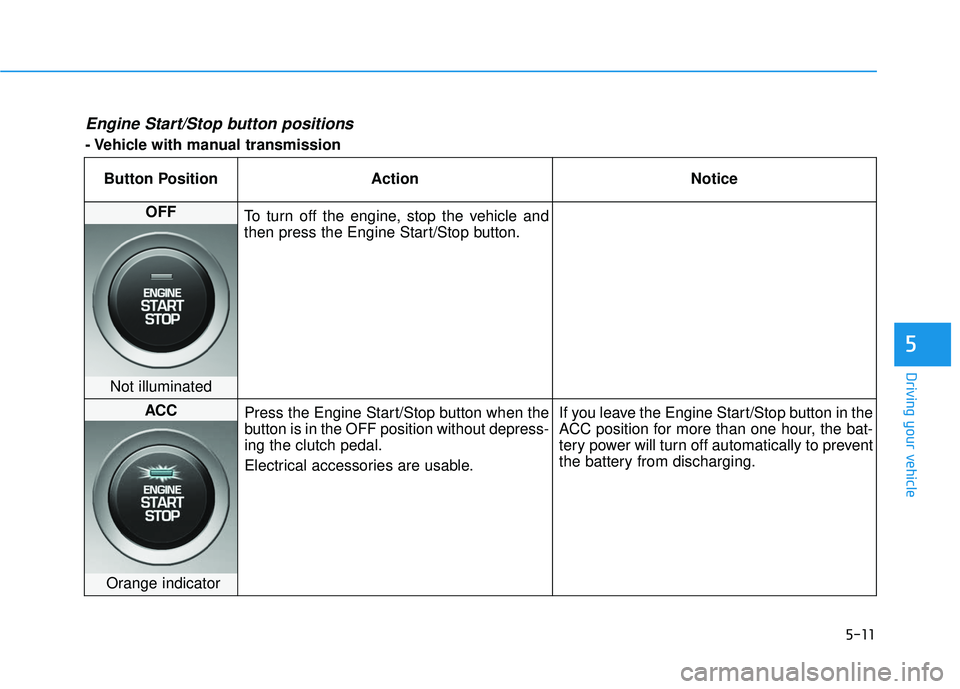
Engine Start/Stop button positions
- Vehicle with manual transmissionButton Position Action Notice
OFF To turn off the engine, stop the vehicle and
then press the Engine Start/Stop button.
Not illuminated
ACC Press the Engine Start/Stop button when the
button is in the OFF position without depress-
ing the clutch pedal.
Electrical accessories are usable. If you leave the Engine Start/Stop button in the
ACC position for more than one hour, the bat-
tery power will turn off automatically to prevent
the battery from discharging.
Orange indicator
Page 224 of 491
5-12
Driving your vehicleButton Position Action Notice
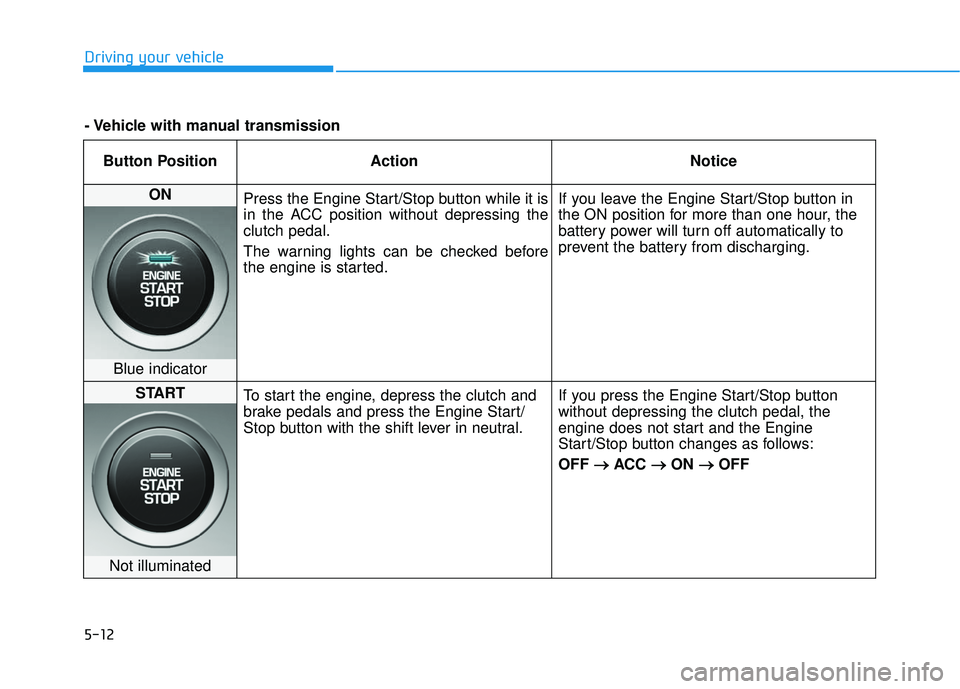
ON Press the Engine Start/Stop button while it is
in the ACC position without depressing the
clutch pedal.
The warning lights can be checked before
the engine is started. If you leave the Engine Start/Stop button in
the ON position for more than one hour, the
battery power will turn off automatically to
prevent the battery from discharging.
Blue indicator
START
To start the engine, depress the clutch and
brake pedals and press the Engine Start/
Stop button with the shift lever in neutral. If you press the Engine Start/Stop button
without depressing the clutch pedal, the
engine does not start and the Engine
Start/Stop button changes as follows:
OFF
→ →
ACC →
→
ON →
→
OFF
Not illuminated
- Vehicle with manual transmission
Page 225 of 491
5-13
Driving your vehicle
5
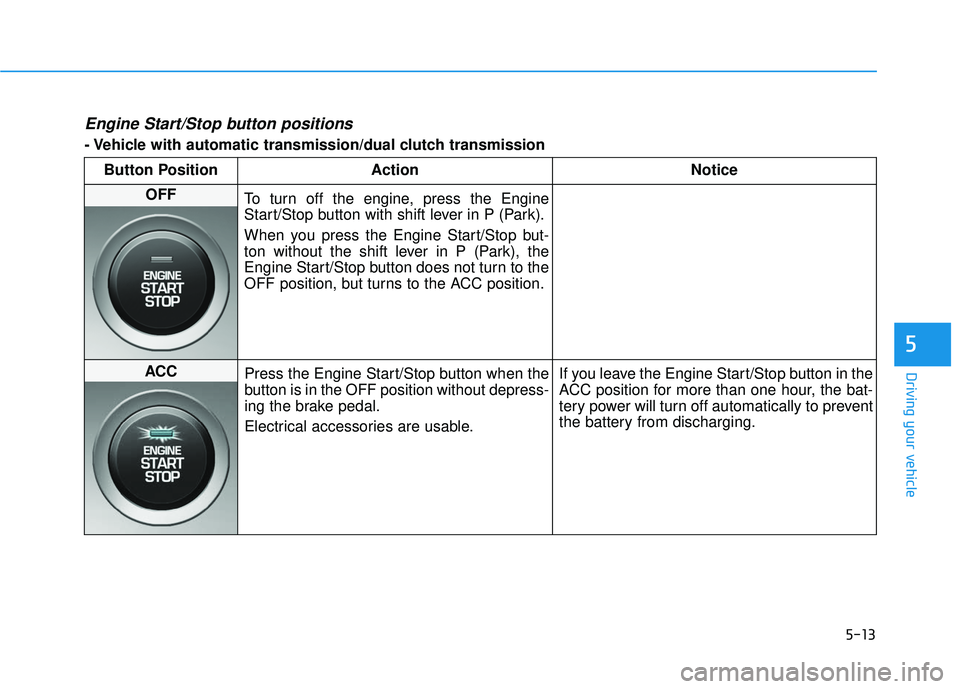
Engine Start/Stop button positions
- Vehicle with automatic transmission/dual clutch transmissionButton Position Action Notice
OFF To turn off the engine, press the Engine
Start/Stop button with shift lever in P (Park).
When you press the Engine Start/Stop but-
ton without the shift lever in P (Park), the
Engine Start/Stop button does not turn to the
OFF position, but turns to the ACC position.
ACC Press the Engine Start/Stop button when the
button is in the OFF position without depress-
ing the brake pedal.
Electrical accessories are usable. If you leave the Engine Start/Stop button in the
ACC position for more than one hour, the bat-
tery power will turn off automatically to prevent
the battery from discharging.
Page 226 of 491
5-14
Driving your vehicleButton Position Action Notice
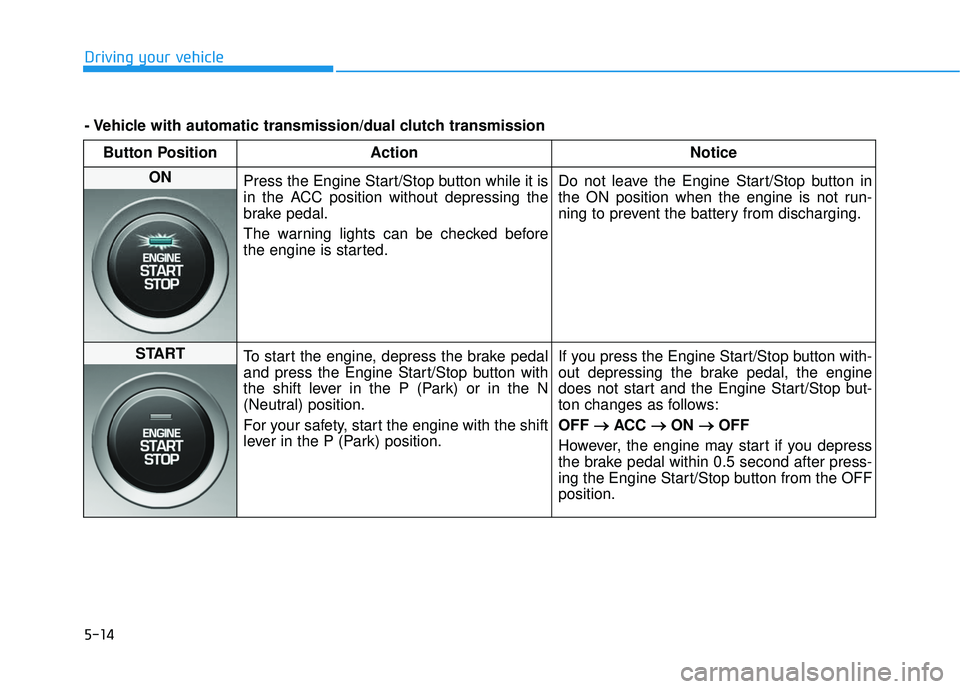
ON Press the Engine Start/Stop button while it is
in the ACC position without depressing the
brake pedal.
The warning lights can be checked before
the engine is started. Do not leave the Engine Start/Stop button in
the ON position when the engine is not run-
ning to prevent the battery from discharging.
START
To start the engine, depress the brake pedal
and press the Engine Start/Stop button with
the shift lever in the P (Park) or in the N
(Neutral) position.
For your safety, start the engine with the shift
lever in the P (Park) position. If you press the Engine Start/Stop button with-
out depressing the brake pedal, the engine
does not start and the Engine Start/Stop but-
ton changes as follows:
OFF
→ →
ACC →
→
ON →
→
OFF
However, the engine may start if you depress
the brake pedal within 0.5 second after press-
ing the Engine Start/Stop button from the OFF
position.
- Vehicle with automatic transmission/dual clutch transmission
Page 350 of 491
6-6
What to do in an emergency
7. Connect the other end of the sec- ond jumper cable to the black,
negative (-) chassis ground of
your vehicle (4).
Do not allow the jumper cables to
contact anything except the cor-
rect battery or jumper terminals or
the correct ground. Do not lean
over the battery when making
connections.
8. Start the engine of the assisting vehicle and let it run at approxi-
mately 2,000 rpm for a few min-
utes. Then start your vehicle.
If your vehicle will not start after a
few attempts, it probably requires
servicing. In this event please seek
qualified assistance. If the cause of
your battery discharging is not
apparent, have your vehicle checked
by an authorized HYUNDAI dealer. Disconnect the jumper cables in the
exact reverse order you connected
them:
1. Disconnect the jumper cable from
the black, negative (-) chassis
ground of your vehicle (4).
2. Disconnect the other end of the jumper cable from the black, neg-
ative (-) battery/chassis ground of
the assisting vehicle (3).
3. Disconnect the second jumper cable from the red, positive (+)
battery/jumper terminal of the
assisting vehicle (2).
4. Disconnect the other end of the jumper cable from the red, positive
(+) jumper terminal of your vehicle
(1). If your temperature gage indicates
overheating, you experience a loss
of power, or hear loud pinging or
knocking, the engine may be over-
heating. If this happens, you should:
1. Pull off the road and stop as soon
as it is safe to do so.
2. Place the shift lever in P (Park) and set the parking brake. If the air
conditioning is ON, turn it OFF.
3. If engine coolant is running out under the vehicle or steam is com-
ing out from the hood, stop the
engine. Do not open the hood until
the coolant has stopped running
or the steaming has stopped. If
there is no visible loss of engine
coolant and no steam, leave the
engine running and check to be
sure the engine cooling fan is
operating. If the fan is not running,
turn the engine off.
I IF
F
T
T H
H E
E
E
E N
N G
GI
IN
N E
E
O
O V
VE
ER
R H
H E
EA
A T
TS
S
Page 375 of 491
7
Maintenance
7
Maintenance
Engine compartment .............................................7-3
Maintenance services ...........................................7-4
Owner's Responsibility .....................................................7-4
Owner Maintenance Precautions..................................7-4
Owner maintenance ...............................................7-5
Owner Maintenance Schedule .......................................7-6
Scheduled maintenance services.........................7-7
Normal Maintenance Schedule (Nu 2.0 MPI) .............7-8
Maintenance Under Severe Usage Conditions
(Nu 2.0 MPI)......................................................................7-\
11
Normal Maintenance Schedule (Gamma 1.6 T-GDI) ... 7-13
Maintenance Under Severe Usage Conditions
(Gamma 1.6 T-GDI) .........................................................7-16
Explanation of scheduled maintenance items .. 7-18
Engine oil ..............................................................7-21
Checking the Engine Oil Level .....................................7-21
Checking the Engine Oil and Filter .............................7-22
Engine coolant......................................................7-23
Checking the Engine Coolant Level ............................7-23
Changing Engine Coolant ..............................................7-26
Brake/clutch fluid ................................................7-27
Checking the brake/clutch Fluid Level ......................7-27
Washer fluid .........................................................7-28
Checking the Washer Fluid Level................................7-28
Parking brake .......................................................7-28
Checking the Parking Brake .........................................7-28
Air cleaner ............................................................7-29
Filter Replacement ..........................................................7-29
Climate control air filter .....................................7-30
Filter Inspection ...............................................................7-30
Wiper blades .........................................................7-31
Blade Inspection ..............................................................7-31
Blade Replacement .........................................................7-31
Battery...................................................................7-34
For Best Battery Service ..............................................7-35
Battery Recharging ........................................................7-35
Reset Features.................................................................7-36
7
Page 409 of 491
7-35
7
Maintenance
When you do not use the vehiclefor a long time in a low tempera-
ture area, disconnect the battery
and keep it indoors.
Always charge the battery fully to prevent battery case damage
in low temperature areas.
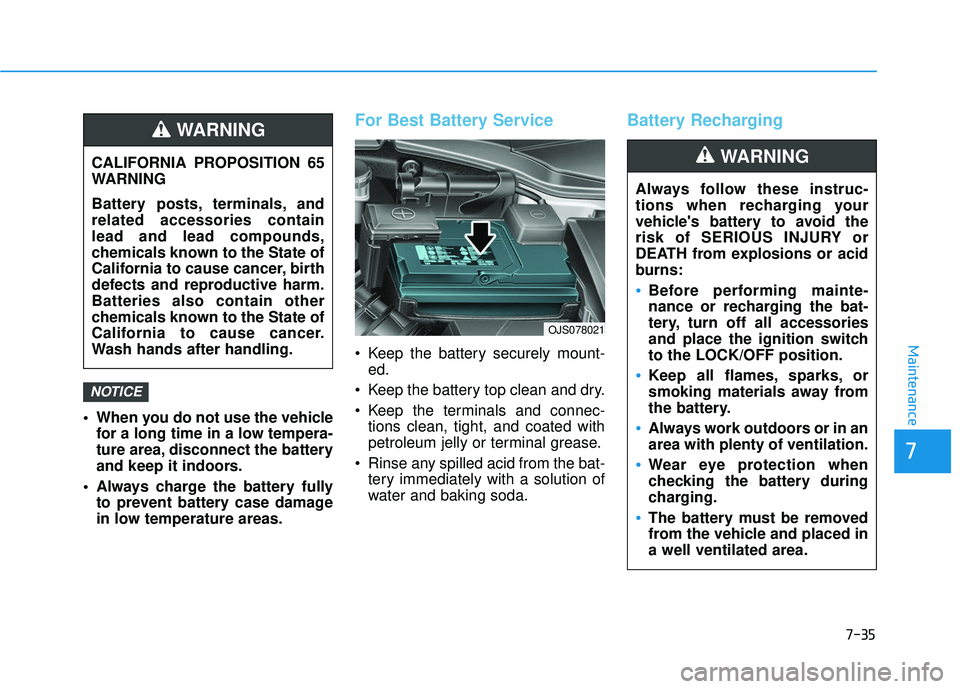
For Best Battery Service
Keep the battery securely mount-ed.
Keep the battery top clean and dry.
Keep the terminals and connec- tions clean, tight, and coated with
petroleum jelly or terminal grease.
Rinse any spilled acid from the bat- tery immediately with a solution of
water and baking soda.
Battery Recharging
NOTICE
CALIFORNIA PROPOSITION 65
WARNING
Battery posts, terminals, and
related accessories contain
lead and lead compounds,
chemicals known to the State of
California to cause cancer, birth
defects and reproductive harm.
Batteries also contain other
chemicals known to the State of
California to cause cancer.
Wash hands after handling.
WARNING
Always follow these instruc-
tions when recharging your
vehicle's battery to avoid the
risk of SERIOUS INJURY or
DEATH from explosions or acid
burns:
Before performing mainte-
nance or recharging the bat-
tery, turn off all accessories
and place the ignition switch
to the LOCK/OFF position.
Keep all flames, sparks, or
smoking materials away from
the battery.
Always work outdoors or in an
area with plenty of ventilation.
Wear eye protection when
checking the battery during
charging.
The battery must be removed
from the vehicle and placed in
a well ventilated area.
WARNING
OJS078021
Page 410 of 491
7-36
Maintenance
By jump starting
After a jump start from a good bat-
tery, drive the vehicle for 20-30 min-
utes before it is shutoff. The vehicle
may not restart if you shut it off
before the battery had a chance to
adequately recharge. See "Jump
Starting" in chapter 6 for more details
on jump starting procedures.
Information
An inappropriately disposedbattery can be harmful to
the environment and human
health. Dispose of the bat-
tery according to your local
law(s) or regulations.
Reset Features
The following items may need to be
reset after the battery has been dis-
charged or the battery has been dis-
connected. See chapter 3 or 4 for:
Power Windows
Trip Computer
Climate Control System
Clock
Audio System
Sunroof
i
Watch the battery during
charging, and stop or reduce
the charging rate if the battery
cells begin boiling violently.
The negative battery cable
must be removed first and
installed last when the battery
is disconnected. Disconnect
the battery charger in the fol-
lowing order:
(1) Turn off the battery charg- er main switch.
(2) Unhook the negative
clamp from the negative
battery terminal.
(3) Unhook the positive clamp from the positive battery
terminal.
Always use a genuine
HYUNDAI approved battery
when you replace the battery.
Page 480 of 491

I-3
Battery ........................................................................\
.....7-34Battery recharging ......................................................7-35
Battery saver function .....................................................3-86
Before driving ...................................................................5-4
Blade type fuse ...............................................................7-54
Blind spot mirror.............................................................3-23
Blind-Spot Collision Warning (BCW) system ...............5-55
Blue Link
®center ...........................................................3-22
Bluetooth®Wireless Technology hands-free ....................4-4
Brake fluid ......................................................................7-\
27
Brake system ...................................................................5-40 Power brakes ..............................................................5-40
Disc brakes wear indicator .........................................5-41
Parking brake..............................................................5-41
Anti-lock Brake System (ABS)..................................5-43
Electronic Stability Control (ESC).............................5-45
Vehicle Stability Management (VSM) .......................5-47
Good braking practices ..............................................5-49 Bulb replacement ............................................................7-67
Headlamp....................................................................7-68\
Front position lamp ....................................................7-68
Front turn signal lamp ................................................7-68
Daytime running light (DRL) ....................................7-68
Side marker ................................................................7-68
Side repeater lamp ......................................................7-72
Rear combination light bulb .......................................7-73
High mounted stop lamp ............................................7-76
License plate light ......................................................7-76
Interior light................................................................7-77
Bulb wattage .....................................................................8-3\
Capacities (Lubricants) .....................................................3-7
Care Tire care ......................................................................7-\
37
Exterior care ...............................................................7-78
Interior care ................................................................7-83
Cargo area cover ...........................................................3-128
Cartridge type fuse..........................................................7-54
Center console storage ..................................................3-119
Central door lock/unlock switch .....................................3-15
Certification label ...........................................................8-10
I
Index
B
C
Page 484 of 491
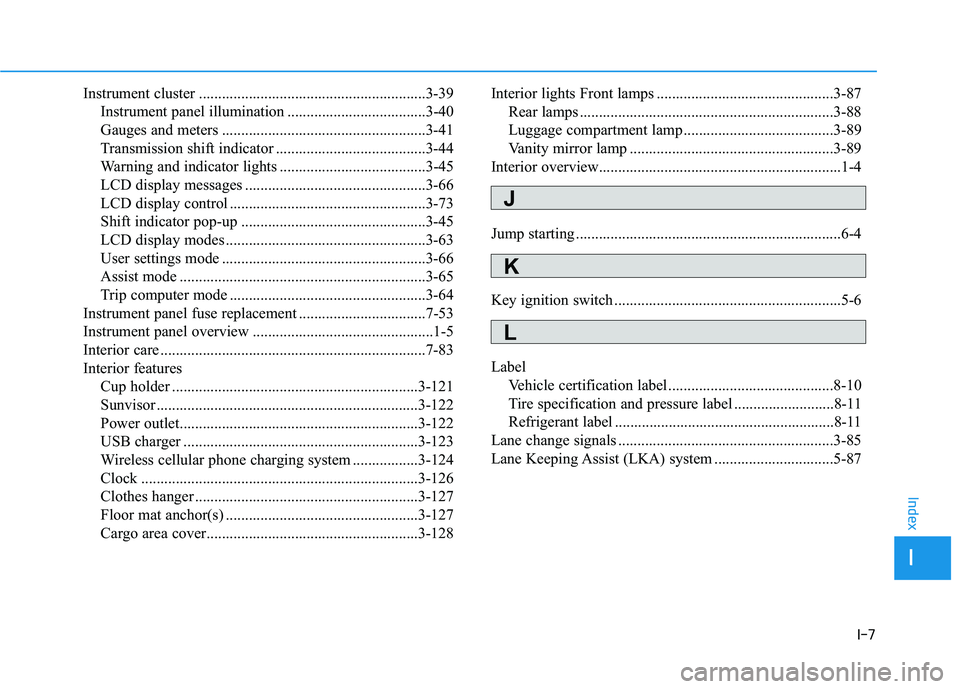
I-7
Instrument cluster ...........................................................3-39Instrument panel illumination ....................................3-40
Gauges and meters .....................................................3-41
Transmission shift indicator .......................................3-44
Warning and indicator lights ......................................3-45
LCD display messages ...............................................3-66
LCD display control ...................................................3-73
Shift indicator pop-up ................................................3-45
LCD display modes ....................................................3-63
User settings mode .....................................................3-66
Assist mode ................................................................3-65
Trip computer mode ...................................................3-64
Instrument panel fuse replacement .................................7-53
Instrument panel overview ...............................................1-5
Interior care .....................................................................7-8\
3
Interior features Cup holder ................................................................3-121
Sunvisor ....................................................................3-12\
2
Power outlet..............................................................3-122
USB charger .............................................................3-123
Wireless cellular phone charging system .................3-124
Clock ........................................................................\
3-126
Clothes hanger ..........................................................3-127
Floor mat anchor(s) ..................................................3-127
Cargo area cover.......................................................3-128 Interior lights Front lamps ..............................................3-87
Rear lamps ..................................................................3-88
Luggage compartment lamp .......................................3-89
Vanity mirror lamp .....................................................3-89
Interior overview...............................................................1-4
Jump starting .....................................................................6-4\
Key ignition switch ...........................................................5-6
Label Vehicle certification label ...........................................8-10
Tire specification and pressure label ..........................8-11
Refrigerant label .........................................................8-11
Lane change signals ........................................................3-85
Lane Keeping Assist (LKA) system ...............................5-87
I
Index
J
K
L