dashboard HYUNDAI VELOSTER 2019 User Guide
[x] Cancel search | Manufacturer: HYUNDAI, Model Year: 2019, Model line: VELOSTER, Model: HYUNDAI VELOSTER 2019Pages: 491, PDF Size: 15.17 MB
Page 306 of 491
5-94
Driving your vehicle
There is a boundary structure in the roadway such as a concrete
barrier, guardrail and reflector post
that is inadvertently being detected
by the camera.
When light coming from a street light or an oncoming vehicle is
reflected on a wet road surface
such as a puddle in the road.
Road surface is not evenness.
The field of view in front is obstructed by sun glare.
There is not enough distance between you and the vehicle in
front to be able to detect the lane
line or the vehicle ahead is driving
on the lane line.
Driving on a steep grade, over a hill, or when driving on a curved
road.
The adverse road conditions cause excessive vehicle vibrations while
driving.
The surrounding of the inside rear view mirror temperature is high
due to direct sunlight and etc. When front visibility is poor
The windshield or the LKA system
camera lens is blocked with dirt or
debris.
The windshield glass is fogged up; a clear view of the road is obstruct-
ed.
Placing objects on the dashboard, etc.
LKA system Function Change
The driver can change LKA to Lane
Departure Warning (LDW) system or
change the LKA system mode
between Standard LKA and Active
LKA from the LCD display. Go to the
'User Settings → Driver Assistance →
Lane Keeping Assist → Lane
Departure Warning/Standard
LKA/Active LKA'.
Lane Departure Warning
LDW system alerts the driver with a
visual warning and a warning alarm
when the system detects the vehicle
departing the lane. The steering
wheel will not be controlled.
Standard LKA
The Standard LKA mode guides the
driver to help keep the vehicle within
the lanes. It rarely controls the steer-
ing wheel, when the vehicle drives
well inside the lanes. However, it
starts to control the steering wheel,
when the vehicle is about to deviate
out of the lanes.
Active LKA
The Active LKA mode provides more
frequent steering wheel control in
comparison with the Standard LKA
mode. Active LKA can help reduce
the driver's fatigue to assist the
steering for maintaining the vehicle
in the middle of the lane.
Page 310 of 491
5-98
Driving your vehicle
The Driver Attention Warning sys-
tem utilizes the camera sensor on
the front windshield for its opera-
tion. To keep the camera sensor in
the best condition, you should
observe the followings:
NEVER install any accessories or stickers on the front wind-
shield, nor tint the front wind-
shield.
NEVER locate any reflective objects (i.e. white paper, mirror)
over the dashboard. Any light
reflection may cause a malfunc-
tion of the Driver Attention Alert
(DAW) system.
Pay extreme caution to keep the camera sensor out of water.
NEVER arbitrarily disassemble the camera assembly, nor apply
any impact on the camera
assembly.
NOTICE
The Driver Attention Warning
(DAW) system may not properly
operate with limited alerting in
the following situations:
The lane detection perform-
ance is limited. (For more
details, refer to "Lane Keeping
Assist (LKA) system" in this
chapter.)
The vehicle is violently driven
or is abruptly turned for obsta-
cle avoidance (e.g. construc-
tion area, other vehicles, fallen
objects, bumpy road).
Forward drivability of the vehi-
cle is severely undermined
(possibly due to wide variation
in tire pressures, uneven tire
wear-out, toe-in/toe-out align-
ment).
The vehicle drives on a curvy
road.
The vehicle drives on a bumpy
road.
The vehicle drives through a
windy area.
The vehicle is controlled by the
following driving assist sys-
tems:
- Lane Keeping Assist (LKA)system
- Forward Collision-avoidance Assist (FCA) systemCAUTION
Playing the vehicle audio sys-
tem at high volume may offset
the Driver Attention Warning
(DAW) system warning sounds.
CAUTION
Page 474 of 491
8-10
Specifications, Consumer information and Reporting safety defects
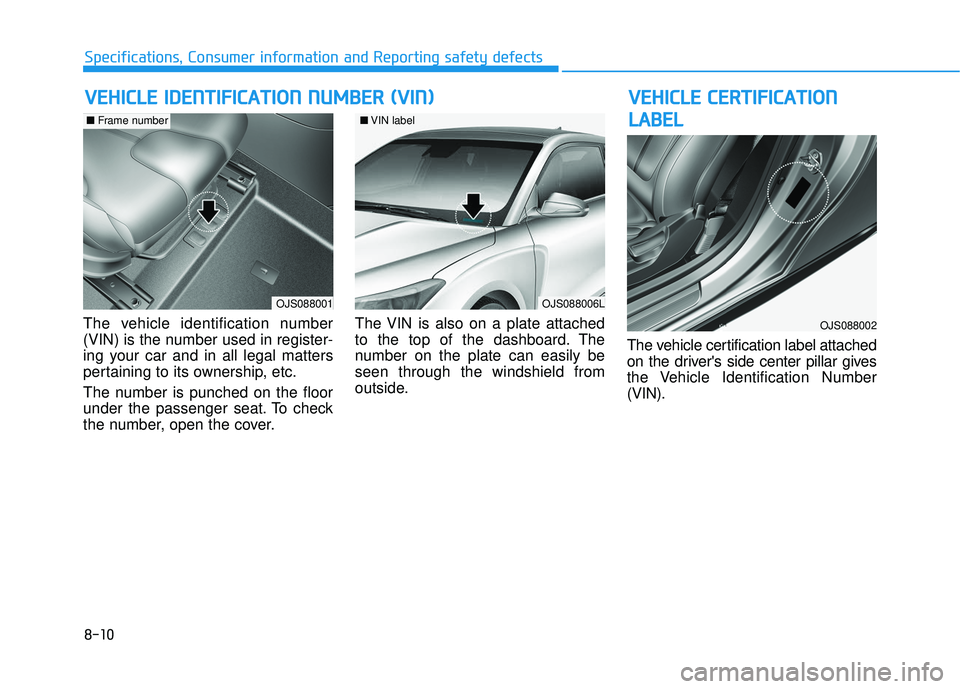
The vehicle identification number
(VIN) is the number used in register-
ing your car and in all legal matters
pertaining to its ownership, etc.
The number is punched on the floor
under the passenger seat. To check
the number, open the cover. The VIN is also on a plate attached
to the top of the dashboard. The
number on the plate can easily be
seen through the windshield from
outside.
The vehicle certification label attached
on the driver's side center pillar gives
the Vehicle Identification Number
(VIN).
V V
E
EH
H I
IC
C L
LE
E
I
ID
D E
EN
N T
TI
IF
F I
IC
C A
A T
TI
IO
O N
N
N
N U
U M
M B
BE
ER
R
(
( V
V I
IN
N )
)
OJS088006L
■ VIN label
OJS088001
■ Frame number
OJS088002
V
VE
EH
H I
IC
C L
LE
E
C
C E
E R
R T
TI
IF
F I
IC
C A
A T
TI
IO
O N
N
L
L A
A B
BE
EL
L