stop start HYUNDAI VELOSTER 2019 User Guide
[x] Cancel search | Manufacturer: HYUNDAI, Model Year: 2019, Model line: VELOSTER, Model: HYUNDAI VELOSTER 2019Pages: 491, PDF Size: 15.17 MB
Page 111 of 491
3-31
Convenient features of your vehicle
3
Periodically remove any dirt thatmay accumulate on the sunroof
guide rail or between the sun-
roof and roof panel which can
make a noise.
Do not try to open the sunroof when the temperature is below
freezing or when the sunroof is
covered with snow or ice, other-
wise the motor could be dam-
aged. In cold and wet climates,
the sunroof may not work prop-
erly.
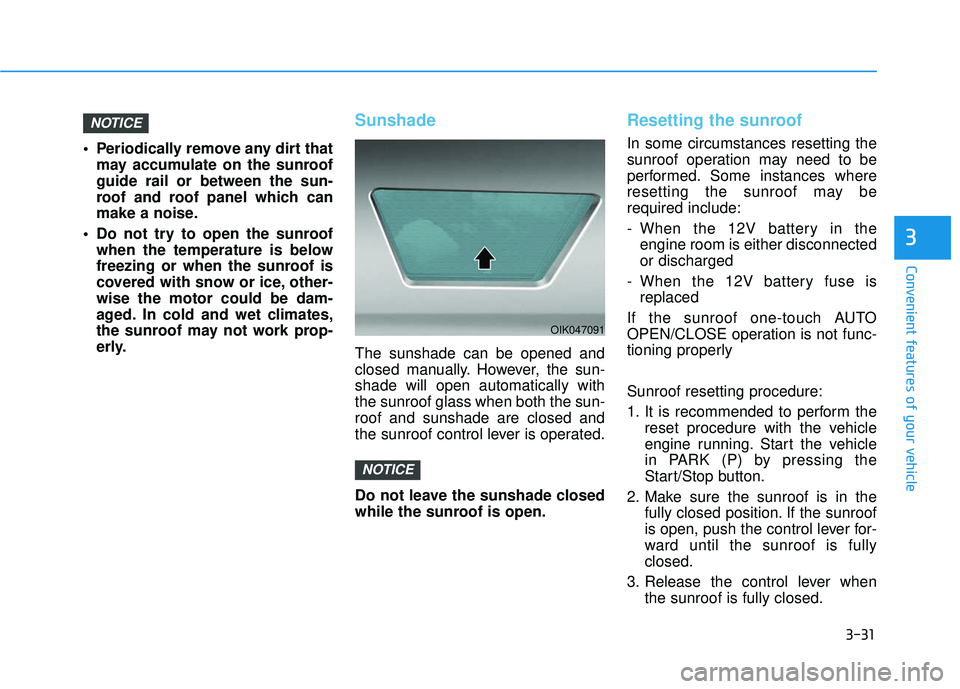
Sunshade
The sunshade can be opened and
closed manually. However, the sun-
shade will open automatically with
the sunroof glass when both the sun-
roof and sunshade are closed and
the sunroof control lever is operated.
Do not leave the sunshade closed
while the sunroof is open.
Resetting the sunroof
In some circumstances resetting the
sunroof operation may need to be
performed. Some instances where
resetting the sunroof may be
required include:
- When the 12V battery in theengine room is either disconnected
or discharged
- When the 12V battery fuse is replaced
If the sunroof one-touch AUTO
OPEN/CLOSE operation is not func-
tioning properly
Sunroof resetting procedure:
1. It is recommended to perform the reset procedure with the vehicle
engine running. Start the vehicle
in PARK (P) by pressing the
Start/Stop button.
2. Make sure the sunroof is in the fully closed position. If the sunroof
is open, push the control lever for-
ward until the sunroof is fully
closed.
3. Release the control lever when the sunroof is fully closed.
NOTICE
NOTICE
OIK047091
Page 129 of 491
3-49
Convenient features of your vehicle
3
Charging SystemWarning Light
When this warning light illuminates
while the engine is running, the bat-
tery is not being charged. Immediately
turn OFF all electrical accessories.
Try not to use electrically operated
controls, such as the power windows.
Keep the engine running.
Have the vehicle inspected by an
authorized HYUNDAI dealer as soon
as possible.
Engine Oil PressureWarning Light
This warning light illuminates:
When the engine oil pressure is low.
If the engine oil pressure is low:
1. Drive carefully to the nearest safe
location and stop your vehicle.
2. Turn the engine off and check the engine oil level (For more details,
refer to "Engine Oil" in chapter 7) .
If the level is low, add oil as required.
If the warning light remains on
after adding oil or if oil is not avail-
able, have the vehicle inspected
by an authorized HYUNDAI dealer
as soon as possible. If the engine does not stop
immediately after the Engine Oil
Pressure Warning Light is illumi-
nated, severe damage could
result.
If the warning light stays on while the engine is running, it
indicates that there may be seri-
ous engine damage or malfunc-
tion. In this case:
1. Stop the vehicle as soon as it is safe to do so.
2. Turn off the engine and check the oil level. If the oil level is
low, fill the engine oil to the
proper level.
3. Start the engine again. If the warning light stays on after
the engine is started, turn the
engine off immediately. In this
case, have the vehicle
inspected by an authorized
HYUNDAI dealer.
NOTICE
Page 132 of 491
3-52
Convenient features of your vehicle
Immobilizer IndicatorLight (without smartkey) (if equipped)
This indicator light illuminates:
When the vehicle detects the
immobilizer in the key with the igni-
tion switch in the ON position.
- At this time, you can start theengine.
- The indicator light goes off after starting the engine.
This indicator light blinks:
When there is a malfunction with the immobilizer system.
In this case, have the vehicle
inspected by an authorized
HYUNDAI dealer.
Immobilizer IndicatorLight (with smart key(if equipped)
This indicator light illuminates for
up to 30 seconds:
When the vehicle detects the
smart key in the vehicle with the
Engine Start/Stop button in the
ACC or ON position.
- Once the smart key is detected,you can start the engine.
- The indicator light goes off after starting the engine.
This indicator light blinks for a few
seconds:
When the smart key is not in the vehicle.
- If the smart key is not detected,you cannot start the engine.
This indicator light illuminates for
2 seconds and goes off:
If the smart key is in the vehicle and the Engine Start/Stop button is
ON, but the vehicle cannot detect
the smart key.
In this case, have the vehicle inspect-
ed by an authorized HYUNDAI deal-
er.
This indicator light blinks:
When the battery voltage of thesmart key is low.
- If this occurs, you will not be ableto start the engine by simply
pressing the Start/Stop button.
However, you can still start the
engine by pressing the Start/Stop
button directly with the smart key.
(Refer to "Starting the Engine"
in chapter 5.)
When there is a malfunction with the immobilizer system.
In this case, have the vehicle
inspected by an authorized
HYUNDAI dealer.
Page 134 of 491
3-54
Convenient features of your vehicle
LED Headlight WarningLight (if equipped)
This warning light illuminates:
When you place the ignition switch
or the Engine Start/Stop button to
the ON position.
When there is a malfunction with the LED headlight.
If this occurs, have the vehicle
inspected by an authorized
HYUNDAI dealer.
This warning light blinks:
When there is a malfunction with a
LED headlight related part.
In this case, have the vehicle inspect-
ed by an authorized HYUNDAI dealer.
Continuous driving with the LED
Headlight Warning Light on or
blinking can reduce LED headlight
life.
High Beam Assist(HBA) indicator light(if equipped)
This indicator light illuminates :
When the high-Beam is on with the
light switch in the AUTO light posi-
tion.
If your vehicle detects oncoming or preceding vehicles, the High Beam
Assist (HBA) system will switch the
high beam to low beam automati-
cally.
For more details, refer to "High
Beam Assist (HBA) system" in this
chapter.
Icy Road Warning Light (if equipped)
This warning light is to warn the driver
the road may be icy.
When the outside temperature
gauge reads below 40°F (4°C), the
Icy Road Warning Light and Outside
Temperature Gauge blinks and then
illuminates. Also, the warning chime
sounds 1 time.
Information
If the icy road warning light illumi-
nates while driving, it means that the
outside temperature has reduced and
that the road conditions may be icy.
As a precaution you should reduce
your speed and drive more carefully
and with greater attention to the road
conditions.
i
NOTICE
Page 136 of 491
3-56
Convenient features of your vehicle
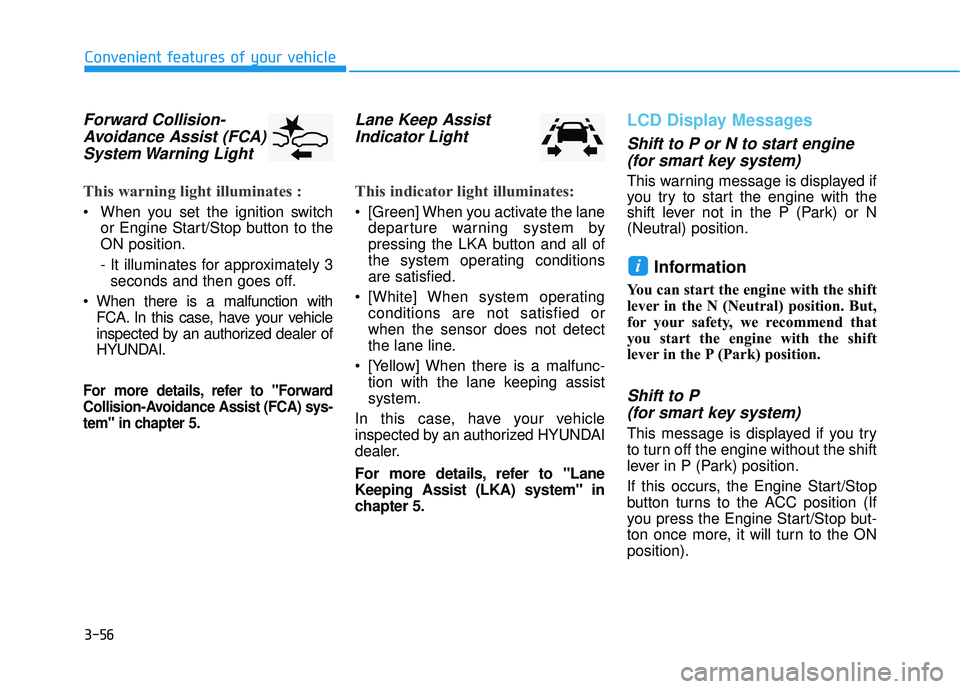
Forward Collision-Avoidance Assist (FCA)System Warning Light
This warning light illuminates :
When you set the ignition switch
or Engine Start/Stop button to the
ON position.
- It illuminates for approximately 3seconds and then goes off.
When there is a malfunction with FCA. In this case, have your vehicle
inspected by an authorized dealer of
HYUNDAI.
For more details, refer to "Forward
Collision-Avoidance Assist (FCA) sys-
tem" in chapter 5.
Lane Keep AssistIndicator Light
This indicator light illuminates:
[Green] When you activate the lane
departure warning system by
pressing the LKA button and all of
the system operating conditions
are satisfied.
[White] When system operating conditions are not satisfied or
when the sensor does not detect
the lane line.
[Yellow] When there is a malfunc- tion with the lane keeping assist
system.
In this case, have your vehicle
inspected by an authorized HYUNDAI
dealer.
For more details, refer to "Lane
Keeping Assist (LKA) system" in
chapter 5.
LCD Display Messages
Shift to P or N to start engine (for smart key system)
This warning message is displayed if
you try to start the engine with the
shift lever not in the P (Park) or N
(Neutral) position.
Information
You can start the engine with the shift
lever in the N (Neutral) position. But,
for your safety, we recommend that
you start the engine with the shift
lever in the P (Park) position.
Shift to P (for smart key system)
This message is displayed if you try
to turn off the engine without the shift
lever in P (Park) position.
If this occurs, the Engine Start/Stop
button turns to the ACC position (If
you press the Engine Start/Stop but-
ton once more, it will turn to the ON
position).
i
Page 137 of 491
3-57
Convenient features of your vehicle
3
Low key battery (for smart key system)
This warning message is displayed if
the battery of the smart key is dis-
charged while changing the Engine
Start/Stop button to the OFF position.
Press brake pedal to startengine (for smart key systemand automatic transmission/dual clutch transmission)
This warning message is displayed if
the Engine Start/Stop button
changes to the ACC position twice
by pressing the button repeatedly
without depressing the brake pedal.
You can start the vehicle by depress-
ing the brake pedal and then press-
ing the Engine Start/Stop button.
Press clutch pedal to startengine (for smart key systemand manual transmission)
This warning message is displayed if
the Engine Start/Stop button
changes to the ACC position twice
by pressing the button repeatedly
without depressing the clutch pedal.
You can start the engine by depress-
ing the clutch pedal to.
Key not in vehicle(for smart key system)
This warning message is displayed if
the smart key is not in the vehicle
when you press the Engine Start/
Stop button.
When attempting to start the vehicle,
always have the smart key with you.
Key not detected (for smart key system)
This warning message is displayed if
the smart key is not detected when you
press the Engine Start/Stop button.
Press START button again(for smart key system)
This message is displayed if you
were unable to start the vehicle when
the Engine Start/Stop button was
pressed.
If this occurs, attempt to start the
engine by pressing the Engine Start/
Stop button again.
If the warning message appears
each time you press the Engine
Start/Stop button, have your vehicle
inspected by an authorized
HYUNDAI dealer.
Page 138 of 491
3-58
Convenient features of your vehicle
Battery discharging due toexternal electrical devices
This message is displayed if the bat-
tery voltage is weak due to any non-
factory electrical accessories (ex.
dashboard camera) while parking.
Be careful that the battery is not dis-
charged.
If the warning message appears
after removing the non-factory elec-
trical accessories, we recommend
that you have the vehicle inspected
by an authorized HYUNDAI dealer.
Press START button with key(for smart key system)
This warning message is displayed if
you press the Engine Start/Stop but-
ton while the warning message "Key
not detected" is displayed.
At this time, the immobilizer indicator
light blinks.
Check BRAKE SWITCH fuse (for smart key system)
This warning message is displayed if
the brake switch fuse is disconnected.
You need to replace the fuse with a
new one before starting the engine.
If that is not possible, you can start
the engine by pressing the Engine
Start/Stop button for 10 seconds in
the ACC position.
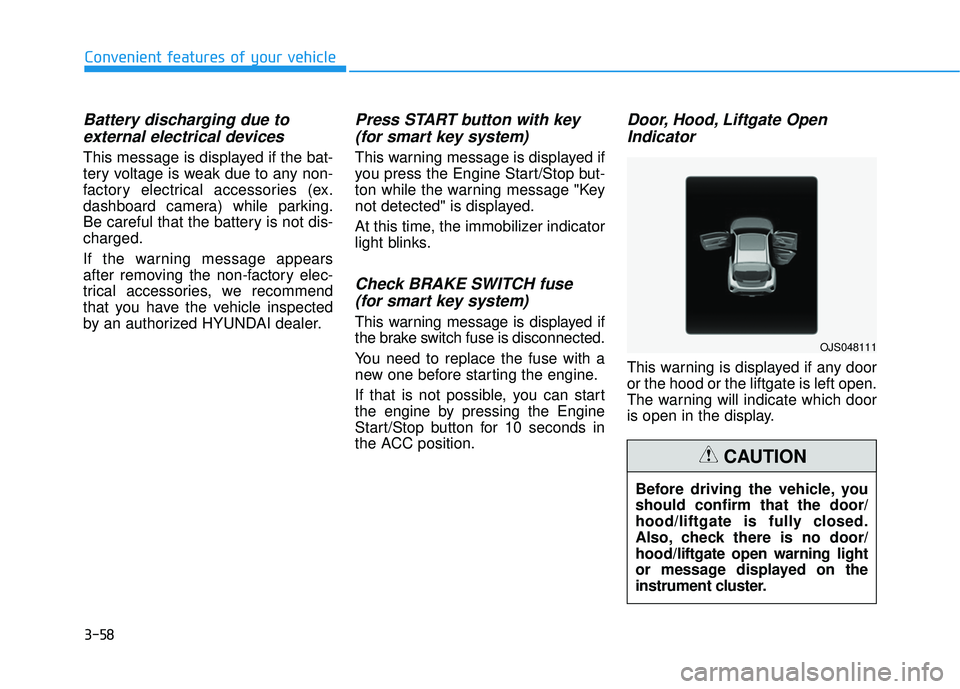
Door, Hood, Liftgate OpenIndicator
This warning is displayed if any door
or the hood or the liftgate is left open.
The warning will indicate which door
is open in the display.
Before driving the vehicle, you
should confirm that the door/
hood/liftgate is fully closed.
Also, check there is no door/
hood/liftgate open warning light
or message displayed on the
instrument cluster.
CAUTION
OJS048111
Page 148 of 491
3-68
Convenient features of your vehicle
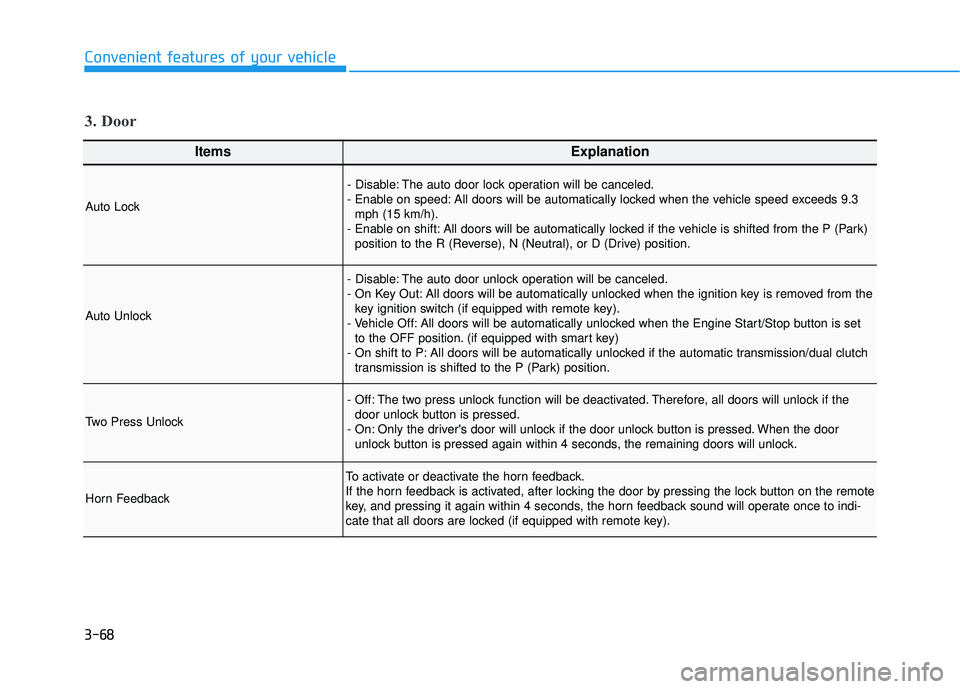
ItemsExplanation
Auto Lock
- Disable: The auto door lock operation will be canceled.
- Enable on speed: All doors will be automatically locked when the vehicle speed exceeds 9.3mph (15 km/h).
- Enable on shift: All doors will be automatically locked if the vehicle is shifted from the P (Park) position to the R (Reverse), N (Neutral), or D (Drive) position.
Auto Unlock
- Disable: The auto door unlock operation will be canceled.
- On Key Out: All doors will be automatically unlocked when the ignition key is removed from thekey ignition switch (if equipped with remote key).
- Vehicle Off: All doors will be automatically unlocked when the Engine Start/Stop button is set to the OFF position. (if equipped with smart key)
- On shift to P: All doors will be automatically unlocked if the automatic transmission/dual clutch transmission is shifted to the P (Park) position.
Two Press Unlock
- Off: The two press unlock function will be deactivated. Therefore, all doors will unlock if thedoor unlock button is pressed.
- On: Only the driver's door will unlock if the door unlock button is pressed. When the door unlock button is pressed again within 4 seconds, the remaining doors will unlock.
Horn Feedback
To activate or deactivate the horn feedback.
If the horn feedback is activated, after locking the door by pressing the lock button on the remote
key, and pressing it again within 4 seconds, the horn feedback sound will operate once to indi-
cate that all doors are locked (if equipped with remote key).
3. Door
Page 201 of 491
3-121
Convenient features of your vehicle
3
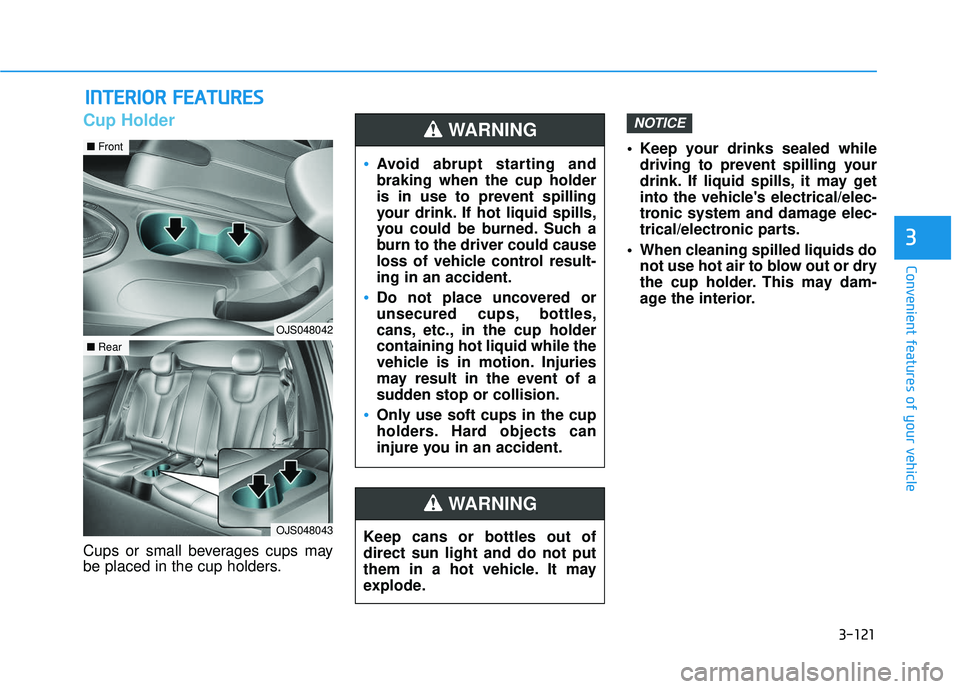
Cup Holder
Cups or small beverages cups may
be placed in the cup holders. Keep your drinks sealed while
driving to prevent spilling your
drink. If liquid spills, it may get
into the vehicle's electrical/elec-
tronic system and damage elec-
trical/electronic parts.
When cleaning spilled liquids do not use hot air to blow out or dry
the cup holder. This may dam-
age the interior.
NOTICE
I IN
N T
TE
ER
R I
IO
O R
R
F
F E
E A
A T
TU
U R
RE
ES
S
Keep cans or bottles out of
direct sun light and do not put
them in a hot vehicle. It may
explode.
WARNING
Avoid abrupt starting and
braking when the cup holder
is in use to prevent spilling
your drink. If hot liquid spills,
you could be burned. Such a
burn to the driver could cause
loss of vehicle control result-
ing in an accident.
Do not place uncovered or
unsecured cups, bottles,
cans, etc., in the cup holder
containing hot liquid while the
vehicle is in motion. Injuries
may result in the event of a
sudden stop or collision.
Only use soft cups in the cup
holders. Hard objects can
injure you in an accident.
WARNING
OJS048042
■ Front
OJS048043
■Rear
Page 205 of 491
3-125
Convenient features of your vehicle
3
If your cellular phone is not charging:
- Slightly change the position of thecellular phone on the charging pad.
- Make sure the indicator light is orange.
The indicator light will blink orange
for 10 seconds if there is a malfunc-
tion in the wireless charging system.
In this case, temporarily stop the
charging process, and re-attempt to
charge your cellular phone again.
The system warns you with a mes-
sage on the LCD display if the cellular
phone is still on the wireless charging
unit after the engine is turned OFF
and the front door is opened.
Information
For some manufacturer's cellular
phones, the system may not warn you
even though the cellular phone is left
on the wireless charging unit. This is
due to the particular characteristic of
the cellular phone and not a malfunc-
tion of the wireless charging. The wireless cellular phone
charging system may not sup-
port certain cellular phones,
which are not verified for the Qi
specification ( ).
When placing your cellular phone on the charging mat,
position the phone in the middle
of the mat for optimal charging
performance. If your cell phone
is off to the side, the charging
rate may be less and in some
cases the cell phone may experi-
ence higher heat conduction.
In some cases, the wireless charging may stop temporarily
when the Smart Key is used,
either when starting the vehicle or
locking/unlocking the doors, etc.
When charging certain cellular phones, the charging indicator
may not change to green when
the cell phone is fully charged. The wireless charging process
may temporarily stop due to the
"self-protection" function of the
cellular phone, when tempera-
ture abnormally increases inside
the wireless cellular phone
charging system. The wireless
charging process restarts, when
temperature falls to a certain
level.
The wireless charging process may temporarily stop when
there is any metallic item, such
as a coin, between the wireless
cellular phone charging system
and cellular phone.
When charging some cell phones with the case still applied, the
wireless charging speed may
decrease and the wireless charg-
ing may stop.
If the cellular phone has a thick cover, the wireless charging may
not be possible.
If the cell phone is not complete- ly contacting the charging pad,
wireless charging may not oper-
ate properly.
NOTICE
i