drive mode HYUNDAI VELOSTER 2019 Workshop Manual
[x] Cancel search | Manufacturer: HYUNDAI, Model Year: 2019, Model line: VELOSTER, Model: HYUNDAI VELOSTER 2019Pages: 491, PDF Size: 15.17 MB
Page 307 of 491
5-95
Driving your vehicle
5
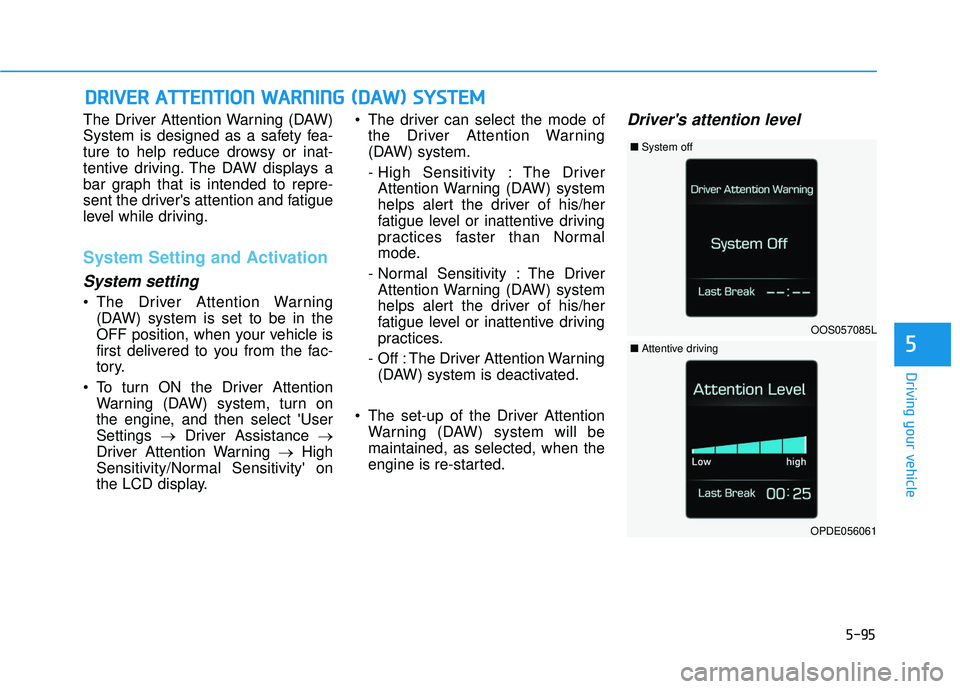
The Driver Attention Warning (DAW)
System is designed as a safety fea-
ture to help reduce drowsy or inat-
tentive driving. The DAW displays a
bar graph that is intended to repre-
sent the driver's attention and fatigue
level while driving.
System Setting and Activation
System setting
The Driver Attention Warning(DAW) system is set to be in the
OFF position, when your vehicle is
first delivered to you from the fac-
tory.
To turn ON the Driver Attention Warning (DAW) system, turn on
the engine, and then select 'User
Settings →Driver Assistance →
Driver Attention Warning →High
Sensitivity/Normal Sensitivity' on
the LCD display. The driver can select the mode of
the Driver Attention Warning
(DAW) system.
- High Sensitivity : The DriverAttention Warning (DAW) system
helps alert the driver of his/her
fatigue level or inattentive driving
practices faster than Normal
mode.
- Normal Sensitivity : The Driver Attention Warning (DAW) system
helps alert the driver of his/her
fatigue level or inattentive driving
practices.
- Off : The Driver Attention Warning (DAW) system is deactivated.
The set-up of the Driver Attention Warning (DAW) system will be
maintained, as selected, when the
engine is re-started.
Driver's attention level
D DR
RI
IV
V E
ER
R
A
A T
TT
TE
EN
N T
TI
IO
O N
N
W
W A
AR
RN
N I
IN
N G
G
(
( D
D A
A W
W )
)
S
S Y
Y S
ST
T E
EM
M
OOS057085L
■ System off
OPDE056061
■Attentive driving
Page 308 of 491
5-96
Driving your vehicle
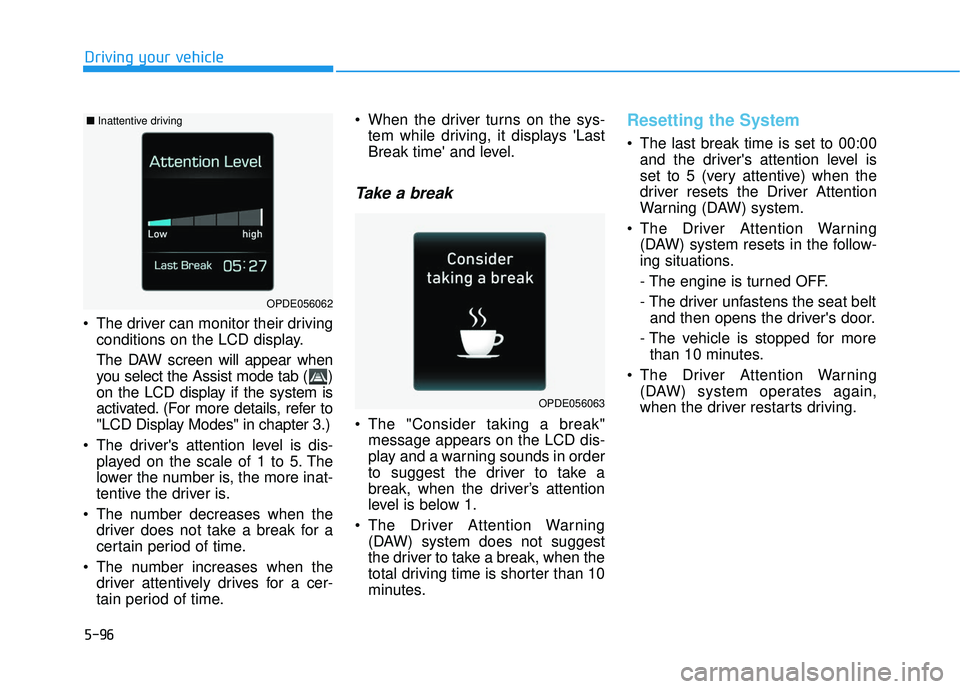
The driver can monitor their driving conditions on the LCD display.
The DAW screen will appear when
you select the Assist mode tab ( )
on the LCD display if the system is
activated. (For more details, refer to
"LCD Display Modes" in chapter 3.)
The driver's attention level is dis- played on the scale of 1 to 5. The
lower the number is, the more inat-
tentive the driver is.
The number decreases when the driver does not take a break for a
certain period of time.
The number increases when the driver attentively drives for a cer-
tain period of time. When the driver turns on the sys-
tem while driving, it displays 'Last
Break time' and level.
Take a break
The "Consider taking a break"message appears on the LCD dis-
play and a warning sounds in order
to suggest the driver to take a
break, when the driver’s attention
level is below 1.
The Driver Attention Warning (DAW) system does not suggest
the driver to take a break, when the
total driving time is shorter than 10
minutes.
Resetting the System
The last break time is set to 00:00and the driver's attention level is
set to 5 (very attentive) when the
driver resets the Driver Attention
Warning (DAW) system.
The Driver Attention Warning (DAW) system resets in the follow-
ing situations.
- The engine is turned OFF.
- The driver unfastens the seat beltand then opens the driver's door.
- The vehicle is stopped for more than 10 minutes.
The Driver Attention Warning (DAW) system operates again,
when the driver restarts driving.
OPDE056063
OPDE056062
■ Inattentive driving
Page 316 of 491
5-104
Driving your vehicle
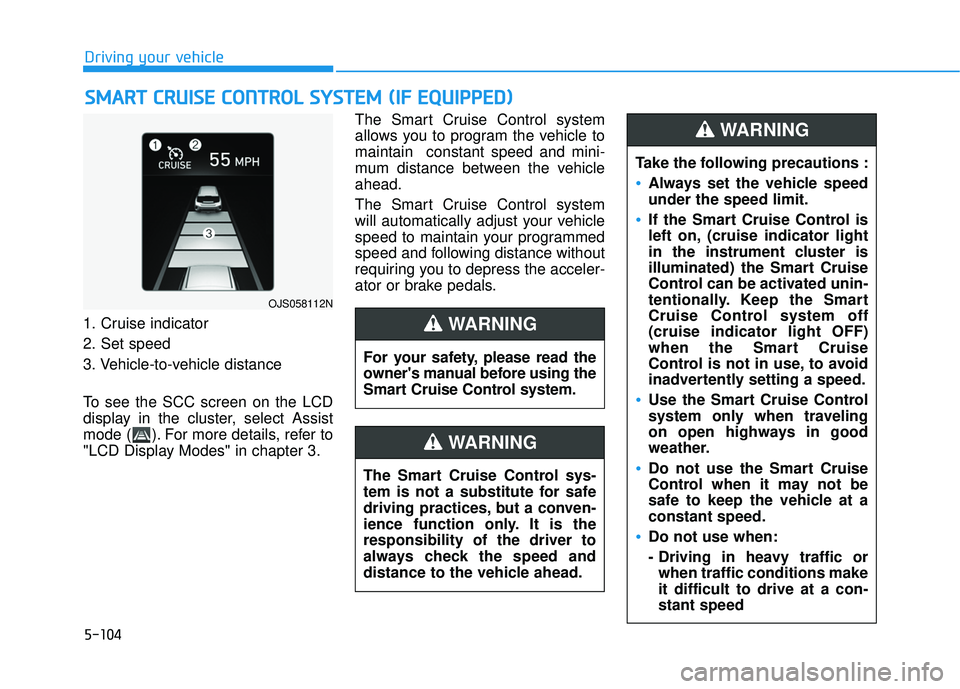
1. Cruise indicator
2. Set speed
3. Vehicle-to-vehicle distance
To see the SCC screen on the LCD
display in the cluster, select Assist
mode ( ). For more details, refer to
"LCD Display Modes" in chapter 3. The Smart Cruise Control system
allows you to program the vehicle to
maintain constant speed and mini-
mum distance between the vehicle
ahead.
The Smart Cruise Control system
will automatically adjust your vehicle
speed to maintain your programmed
speed and following distance without
requiring you to depress the acceler-
ator or brake pedals.
S
S
M
M A
AR
RT
T
C
C R
R U
U I
IS
S E
E
C
C O
O N
NT
TR
R O
O L
L
S
S Y
Y S
ST
T E
EM
M
(
( I
IF
F
E
E Q
Q U
UI
IP
P P
PE
ED
D )
)
OJS058112N
For your safety, please read the
owner's manual before using the
Smart Cruise Control system.
WARNING
The Smart Cruise Control sys-
tem is not a substitute for safe
driving practices, but a conven-
ience function only. It is the
responsibility of the driver to
always check the speed and
distance to the vehicle ahead.
WARNING
Take the following precautions :
Always set the vehicle speed
under the speed limit.
If the Smart Cruise Control is
left on, (cruise indicator light
in the instrument cluster is
illuminated) the Smart Cruise
Control can be activated unin-
tentionally. Keep the Smart
Cruise Control system off
(cruise indicator light OFF)
when the Smart Cruise
Control is not in use, to avoid
inadvertently setting a speed.
Use the Smart Cruise Control
system only when traveling
on open highways in good
weather.
Do not use the Smart Cruise
Control when it may not be
safe to keep the vehicle at a
constant speed.
Do not use when:
- Driving in heavy traffic or
when traffic conditions make
it difficult to drive at a con-
stant speed
WARNING
Page 327 of 491
5-115
Driving your vehicle
5
To Convert to Cruise Control
Mode
The driver may choose to switch to
use the conventional Cruise Control
mode (speed only control function)
by following these steps:
1. Push the CRUISE button on thesteering wheel to turn the system
on. The cruise ( ) indi-
cator will illuminate.
2. Push and hold the Vehicle-to- Vehicle Distance button for more
than 2 seconds.
3. Choose between "Smart Cruise Control" and "Cruise Control".
When the system is canceled using
the CRUISE button or the CRUISE
button is used after the engine is
turned on, the Smart Cruise Control
mode will turn on.
Limitations of the System
The Smart Cruise Control system
may have limits to its ability to detect
distance to the vehicle ahead due to
road and traffic conditions.
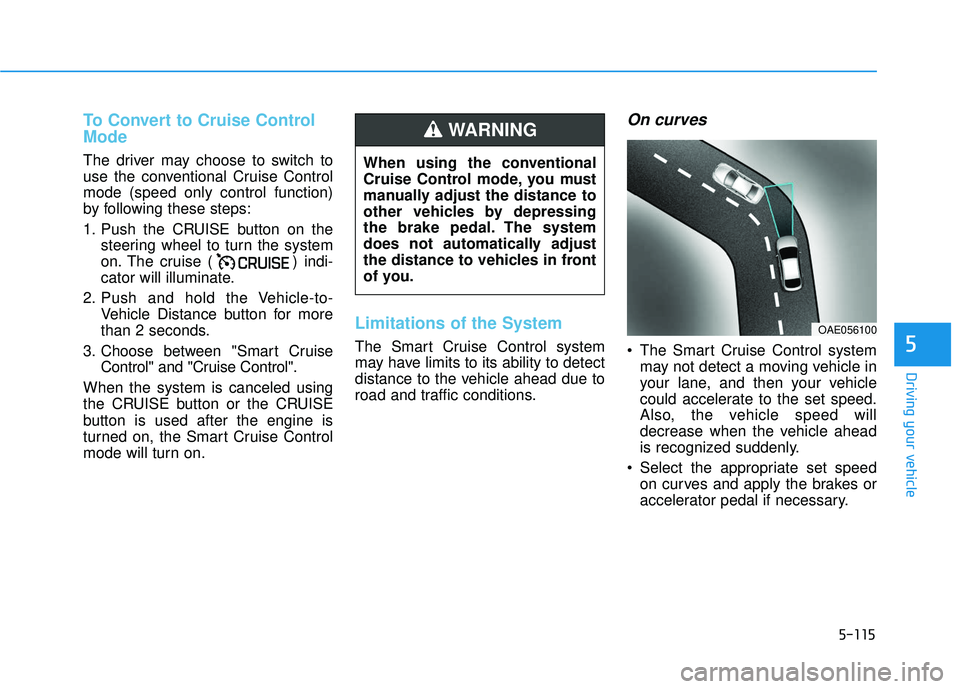
On curves
The Smart Cruise Control system may not detect a moving vehicle in
your lane, and then your vehicle
could accelerate to the set speed.
Also, the vehicle speed will
decrease when the vehicle ahead
is recognized suddenly.
Select the appropriate set speed on curves and apply the brakes or
accelerator pedal if necessary.
When using the conventional
Cruise Control mode, you must
manually adjust the distance to
other vehicles by depressing
the brake pedal. The system
does not automatically adjust
the distance to vehicles in front
of you.
WARNING
OAE056100
Page 334 of 491
5-122
Driving your vehicle
Driving too fast through large pud- dles can affect your brakes. If you
must go through puddles, try to
drive through them slowly.
If you believe your brakes may be wet, apply them lightly while driv-
ing until normal braking operation
returns.
Hydroplaning
If the road is wet enough and you are
going fast enough, your vehicle may
have little or no contact with the road
surface and actually ride on the
water. The best advice is SLOW
DOWN when the road is wet.
The risk of hydroplaning increas-
es as the depth of tire tread
decreases, refer to "Tire
Replacement" in chapter 7.
Driving in Flooded Areas
Avoid driving through flooded areas
unless you are sure the water is no
higher than the bottom of the wheel
hub. Drive through any water slowly.
Allow adequate stopping distance
because brake performance may be
reduced.
After driving through water, dry the
brakes by gently applying them sev-
eral times while the vehicle is moving
slowly.
Highway Driving
Tires
Adjust the tire inflation, as specified.
Under-inflation may overheat or
damage the tires.
Do not install worn-out or damaged
tires, which may reduce traction or
adversely affect vehicle handling.
This could lead to sudden tire failure
that may cause loss of vehicle con-
trol resulting in an accident.
Information
Never over-inflate your tires above the
maximum inflation pressure, as speci-
fied on your tires.
Fuel, engine coolant and engineoil
Driving at higher speeds on the high-
way consumes more fuel and is less
efficient than driving at a slower,
more moderate speed. Maintain a
moderate speed in order to conserve
fuel when driving on the highway.
Be sure to check both the engine
coolant level and the engine oil
before driving.
Drive belt
A loose or damaged drive belt may
overheat the engine.
i
Page 352 of 491
6-8
What to do in an emergency
T
TI
IR
R E
E
P
P R
R E
ES
SS
SU
U R
RE
E
M
M O
ON
NI
IT
T O
O R
RI
IN
N G
G
S
S Y
Y S
ST
T E
EM
M
(
( T
T P
P M
M S
S)
)
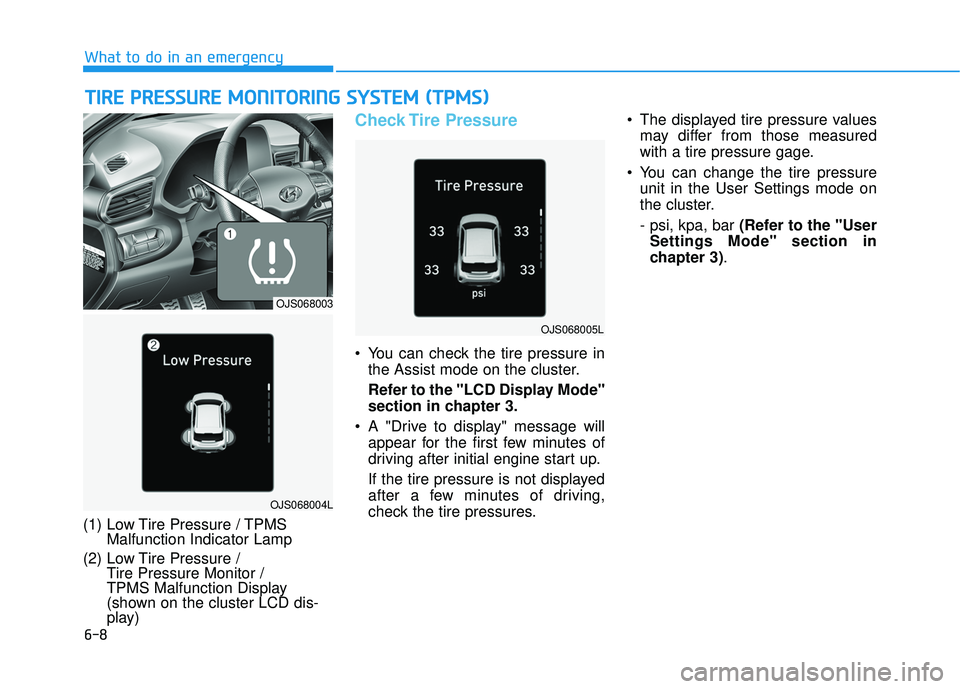
(1) Low Tire Pressure / TPMS
Malfunction Indicator Lamp
(2) Low Tire Pressure / Tire Pressure Monitor /
TPMS Malfunction Display
(shown on the cluster LCD dis-
play)
Check Tire Pressure
You can check the tire pressure in
the Assist mode on the cluster.
Refer to the "LCD Display Mode"
section in chapter 3.
A "Drive to display" message will appear for the first few minutes of
driving after initial engine start up.
If the tire pressure is not displayed
after a few minutes of driving,
check the tire pressures. The displayed tire pressure values
may differ from those measured
with a tire pressure gage.
You can change the tire pressure unit in the User Settings mode on
the cluster.
- psi, kpa, bar (Refer to the "User
Settings Mode" section in
chapter 3).
OJS068004L
OJS068003
OJS068005L
Page 363 of 491
6-19
What to do in an emergency
6
Jack label
To prevent damaging the com-
pact spare tire and your vehicle:
Drive slowly enough for the
road conditions to avoid all
hazards, such as a potholes
or debris.
Avoid driving over obstacles.
The compact spare tire diame-
ter is smaller than the diame-
ter of a conventional tire and
reduces the ground clearance
approximately 1 inch (25 mm).
Do not use tire chains on the
compact spare tire. Because
of the smaller size, a tire chain
will not fit properly.
Do not use the compact spare
tire on any other wheels, nor
should standard tires, snow
tires, wheel covers or trim
rings be used with the com-
pact spare wheel.
CAUTION
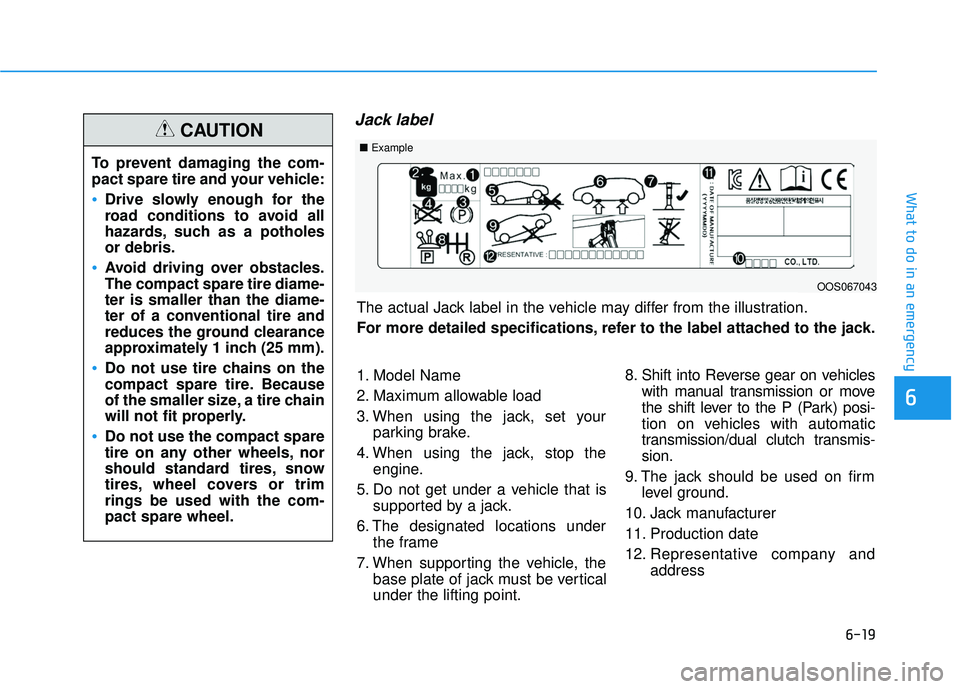
The actual Jack label in the vehicle may differ from the illustration.
For more detailed specifications, refer to the label attached to the jack.
1. Model Name
2. Maximum allowable load
3. When using the jack, set yourparking brake.
4. When using the jack, stop the engine.
5. Do not get under a vehicle that is supported by a jack.
6. The designated locations under the frame
7. When supporting the vehicle, the base plate of jack must be vertical
under the lifting point. 8. Shift into Reverse gear on vehicles
with manual transmission or move
the shift lever to the P (Park) posi-
tion on vehicles with automatic
transmission/dual clutch transmis-
sion.
9. The jack should be used on firm level ground.
10. Jack manufacturer
11. Production date
12. Representative company and address
■Example
OOS067043
Page 431 of 491
7-57
7
Maintenance
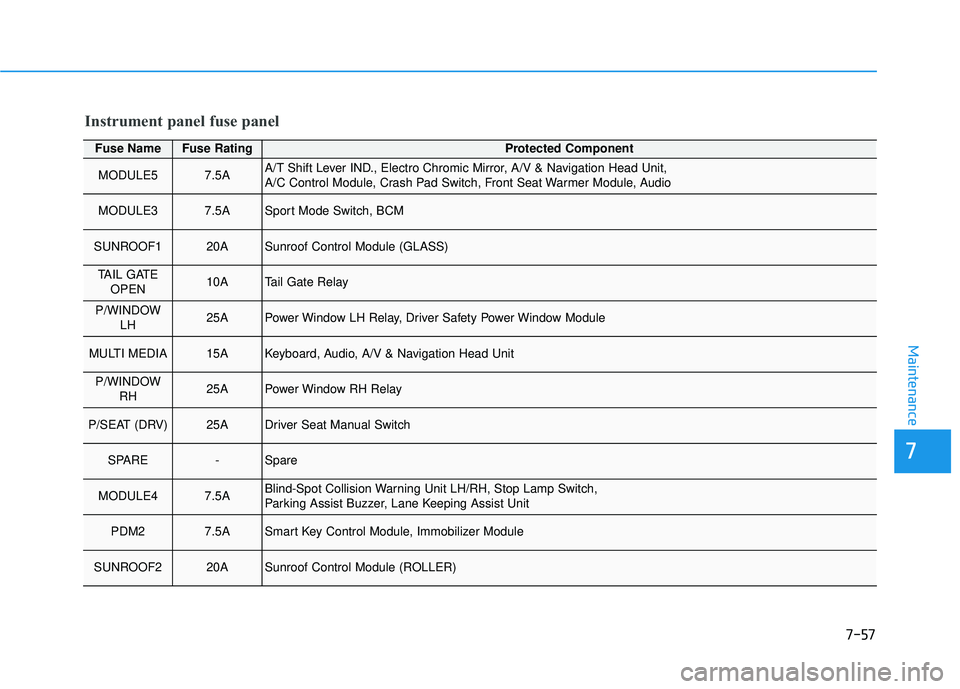
Fuse NameFuse RatingProtected Component
MODULE57.5AA/T Shift Lever IND., Electro Chromic Mirror, A/V & Navigation Head Unit,
A/C Control Module, Crash Pad Switch, Front Seat Warmer Module, Audio
MODULE37.5ASport Mode Switch, BCM
SUNROOF120ASunroof Control Module (GLASS)
TAIL GATEOPEN10ATail Gate Relay
P/WINDOW LH25APower Window LH Relay, Driver Safety Power Window Module
MULTI MEDIA15AKeyboard, Audio, A/V & Navigation Head Unit
P/WINDOWRH25APower Window RH Relay
P/SEAT (DRV)25ADriver Seat Manual Switch
SPARE-Spare
MODULE47.5ABlind-Spot Collision Warning Unit LH/RH, Stop Lamp Switch,
Parking Assist Buzzer, Lane Keeping Assist Unit
PDM27.5ASmart Key Control Module, Immobilizer Module
SUNROOF220ASunroof Control Module (ROLLER)
Instrument panel fuse panel
Page 479 of 491

I-2
Air bag warning labels ....................................................2-63
Air bags ........................................................................\
...2-41Driver's air bag ...........................................................2-43
Passenger's front air bag.............................................2-43
Side air bags ...............................................................2-44
Curtain air bags ..........................................................2-45
How does the air bags system operate? .....................2-46
SRS components and functions..................................2-47
SRS warning light ......................................................2-47
What to expect after an air bag inflates .....................2-51
Occupant Classification System (OCS) .....................2-52
Air bag collision sensors ............................................2-58
Why didn't my air bag go off in a collision ...............2-57
Air bag inflation conditions .......................................2-59
Air bag non-inflation conditions ................................2-60
SRS Care ....................................................................2-62\
Additional safety precautions .....................................2-63
Air bag warning labels ...............................................2-63
Air cleaner filter replacement .........................................7-29
Air conditioning system specification ..............................8-6
Antenna ........................................................................\
.....4-2
Anti-lock Brake System (ABS) ......................................5-43
Appearance care..............................................................7-78 Exterior care ...............................................................7-78
Interior care ................................................................7-83 Audio/Video/Navigation system .......................................4-4
Auto defogging system .................................................3-115
Auto light position ..........................................................3-80
Auto LOCK - Enable on shift.........................................3-17
Auto LOCK - Enable on speed.......................................3-17
Auto UNLOCK - Enable on shift ...................................3-17
Auto UNLOCK -Air bag deployment ............................3-17
Automatic climate control system ................................3-104
Automatic heating and air conditioning ...................3-104
Manual heating and air conditioning .......................3-106
Mode selection .........................................................3-106
Instrument panel vents .............................................3-107
Temperature control .................................................3-108
Air intake control .....................................................3-108
Fan speed control .....................................................3-109
Air conditioning .......................................................3-109
OFF mode.................................................................3-109
System maintenance .................................................3-111
Air conditioning refrigerant label.............................3-112
Automatic transmission ..................................................5-22 Transmission ranges ...................................................5-23
Paddle shifter ..............................................................5-25
Shift lock system ........................................................5-25
Good driving practices ...............................................5-27
Automatic ventilation....................................................3-118
AUX, USB and iPod
®port ...............................................4-2
Index
A
Page 481 of 491
I-4
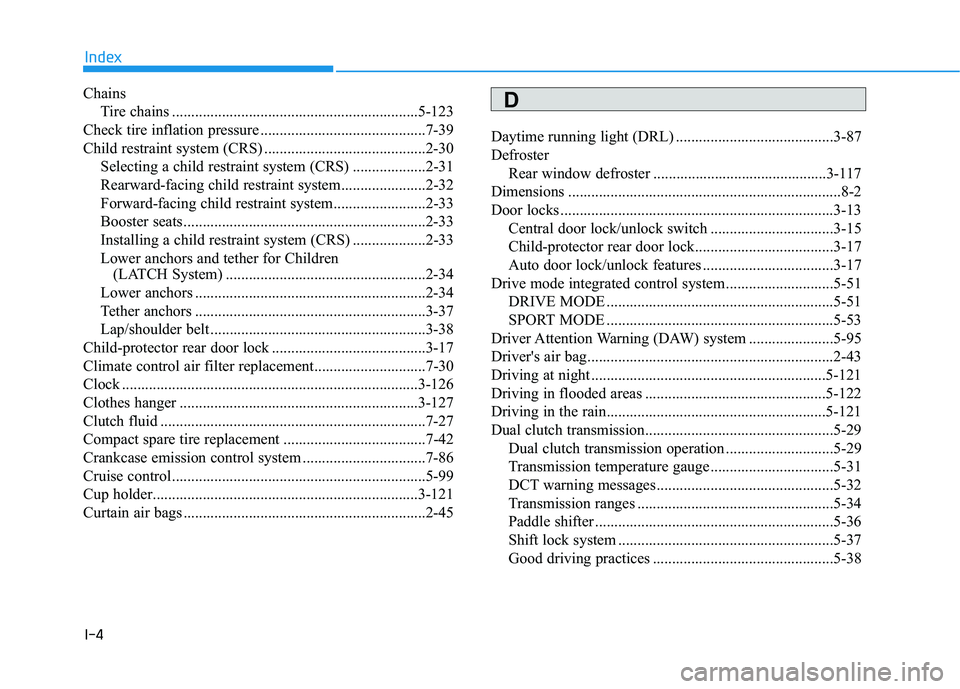
ChainsTire chains ................................................................5-123
Check tire inflation pressure ...........................................7-39
Child restraint system (CRS) ..........................................2-30 Selecting a child restraint system (CRS) ...................2-31
Rearward-facing child restraint system......................2-32
Forward-facing child restraint system........................2-33
Booster seats...............................................................2-33
Installing a child restraint system (CRS) ...................2-33
Lower anchors and tether for Children (LATCH System) ....................................................2-34
Lower anchors ............................................................2-34
Tether anchors ............................................................3-37
Lap/shoulder belt ........................................................3-38
Child-protector rear door lock ........................................3-17
Climate control air filter replacement.............................7-30
Clock ........................................................................\
.....3-126
Clothes hanger ..............................................................3-127
Clutch fluid .....................................................................7-2\
7
Compact spare tire replacement .....................................7-42
Crankcase emission control system ................................7-86
Cruise control..................................................................5-99
Cup holder.....................................................................3-1\
21
Curtain air bags ...............................................................2-45 Daytime running light (DRL) .........................................3-87
Defroster
Rear window defroster .............................................3-117
Dimensions .......................................................................8\
-2
Door locks .......................................................................3\
-13 Central door lock/unlock switch ................................3-15
Child-protector rear door lock....................................3-17
Auto door lock/unlock features ..................................3-17
Drive mode integrated control system ............................5-51 DRIVE MODE ...........................................................5-51
SPORT MODE ...........................................................5-53
Driver Attention Warning (DAW) system ......................5-95
Driver's air bag................................................................2-43
Driving at night .............................................................5-121
Driving in flooded areas ...............................................5-122
Driving in the rain.........................................................5-121
Dual clutch transmission.................................................5-29 Dual clutch transmission operation ............................5-29
Transmission temperature gauge ................................5-31
DCT warning messages..............................................5-32
Transmission ranges ...................................................5-34
Paddle shifter ..............................................................5-36
Shift lock system ........................................................5-37
Good driving practices ...............................................5-38
Index
D