USB port HYUNDAI VELOSTER 2019 Owners Manual
[x] Cancel search | Manufacturer: HYUNDAI, Model Year: 2019, Model line: VELOSTER, Model: HYUNDAI VELOSTER 2019Pages: 491, PDF Size: 15.17 MB
Page 16 of 491
I
IN
N S
ST
T R
R U
U M
M E
EN
N T
T
P
P A
A N
N E
EL
L
O
O V
VE
ER
R V
V I
IE
E W
W
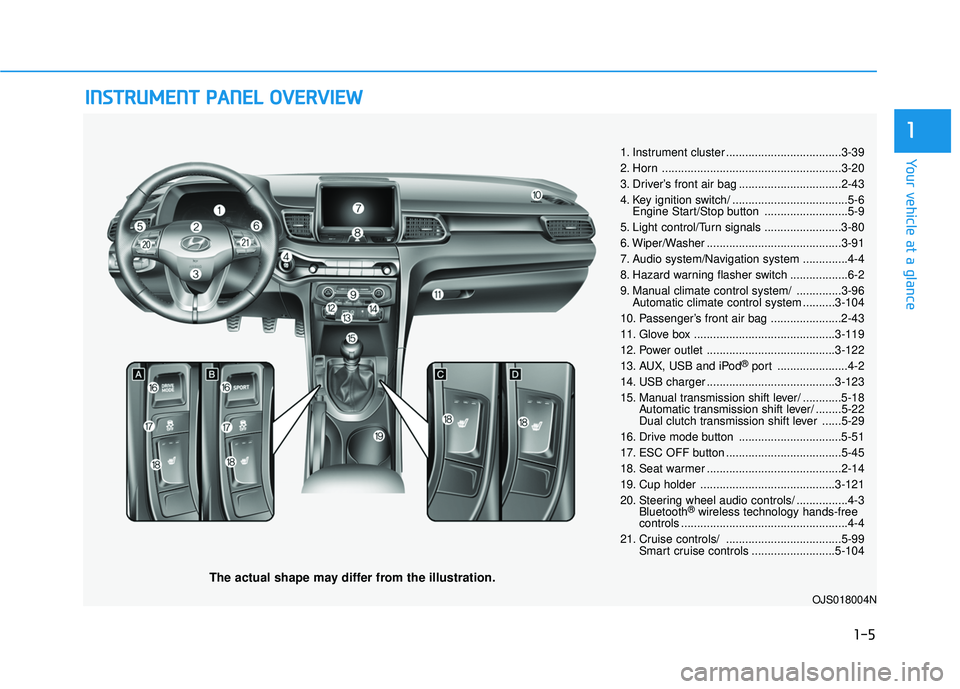
The actual shape may differ from the illustration.
1-5
Your vehicle at a glance
1
1. Instrument cluster ....................................3-39
2. Horn ........................................................3-20
3. Driver’s front air bag ................................2-43
4. Key ignition switch/ ....................................5-6
Engine Start/Stop button ..........................5-9
5. Light control/Turn signals ........................3-80
6. Wiper/Washer ..........................................3-91
7. Audio system/Navigation system ..............4-4
8. Hazard warning flasher switch ..................6-2
9. Manual climate control system/ ..............3-96 Automatic climate control system ..........3-104
10. Passenger’s front air bag ......................2-43
11. Glove box ............................................3-119
12. Power outlet ........................................3-122
13. AUX, USB and iPod
®port ......................4-2
14. USB charger ........................................3-123
15. Manual transmission shift lever/ ............5-18 Automatic transmission shift lever/ ........5-22
Dual clutch transmission shift lever ......5-29
16. Drive mode button ................................5-51
17. ESC OFF button ....................................5-45
18. Seat warmer ..........................................2-14
19. Cup holder ..........................................3-121
20. Steering wheel audio controls/ ................4-3 Bluetooth
®wireless technology hands-free
controls ....................................................4-4
21. Cruise controls/ ....................................5-99 Smart cruise controls ..........................5-104
OJS018004N
Page 203 of 491
3-123
Convenient features of your vehicle
3
To prevent damage to the Power
Outlets :
Use the power outlet only whenthe engine is running and
remove the accessory plug after
use. Using the accessory plug
for prolonged periods of time
with the engine off could cause
the battery to discharge.
Only use 12V electric acces- sories which are less than 180 W
in electric capacity.
Adjust the air-conditioner or heater to the lowest operating
level when using the power outlet.
Close the cover when not in use. Some electronic devices can
cause electronic interference
when plugged into a vehicle's
power outlet. These devices may
cause excessive audio static
and malfunctions in other elec-
tronic systems or devices used
in your vehicle.
Push the plug in as far as it will go. If good contact is not made,
the plug may overheat and the
fuse may open.
Plug in battery equipped electri- cal/electronic devices with
reverse current protection. The
current from the battery may
flow into the vehicle's electri-
cal/electronic system and cause
system malfunction.
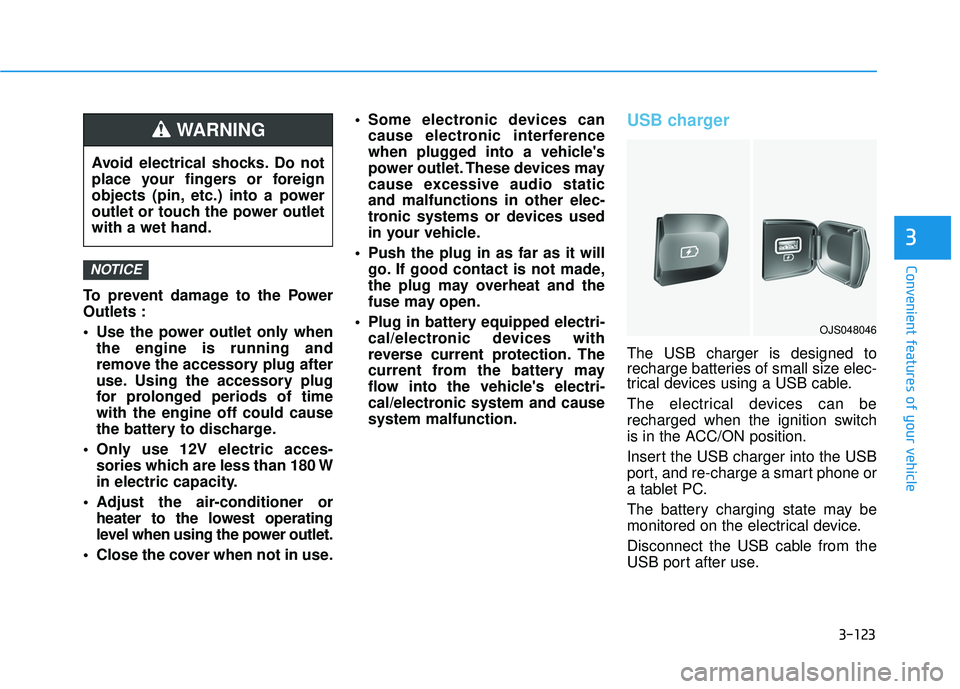
USB charger
The USB charger is designed to
recharge batteries of small size elec-
trical devices using a USB cable.
The electrical devices can be
recharged when the ignition switch
is in the ACC/ON position.
Insert the USB charger into the USB
port, and re-charge a smart phone or
a tablet PC.
The battery charging state may be
monitored on the electrical device.
Disconnect the USB cable from the
USB port after use.
NOTICE
Avoid electrical shocks. Do not
place your fingers or foreign
objects (pin, etc.) into a power
outlet or touch the power outlet
with a wet hand.
WARNING
OJS048046
Page 209 of 491
Multimedia System
Multimedia System.................................................4-2
AUX, USB and iPod®Port ...............................................4-2
Antenna ........................................................................\
.......4-2
Steering Wheel Audio Controls ......................................4-3
Bluetooth®Wireless Technology Hands-Free ...........4-4
Audio (Display Audio) / Video /
Navigation System (AVN).................................................4-4
4
Page 210 of 491
4-2
Multimedia System
• If you install an aftermarket HID head lamp, your vehicle's audio
and electronic devices may not
function properly.
Prevent chemicals such as per- fume, cosmetic oil, sun cream,
hand cleaner, and air freshener
from contacting the interior
parts because they may cause
damage or discoloration.
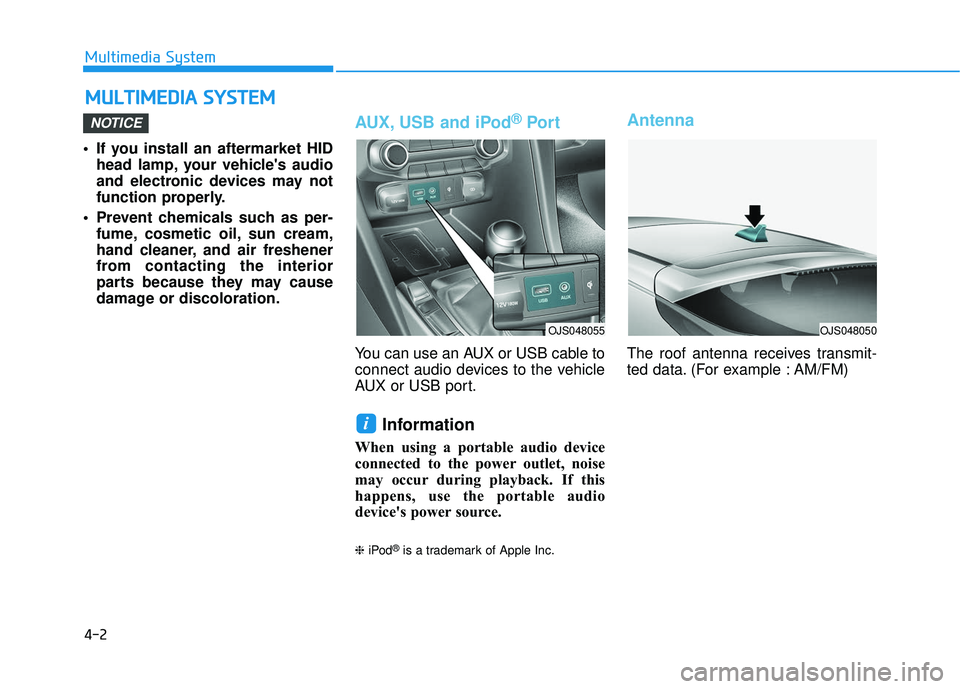
AUX, USB and iPod®Por t
You can use an AUX or USB cable to
connect audio devices to the vehicle
AUX or USB port.
Information
When using a portable audio device
connected to the power outlet, noise
may occur during playback. If this
happens, use the portable audio
device's power source.
❈ iPod®is a trademark of Apple Inc.
Antenna
The roof antenna receives transmit-
ted data. (For example : AM/FM)
i
NOTICE
M MU
UL
LT
T I
IM
M E
ED
D I
IA
A
S
S Y
Y S
ST
T E
EM
M
OJS048055OJS048050
Page 479 of 491

I-2
Air bag warning labels ....................................................2-63
Air bags ........................................................................\
...2-41Driver's air bag ...........................................................2-43
Passenger's front air bag.............................................2-43
Side air bags ...............................................................2-44
Curtain air bags ..........................................................2-45
How does the air bags system operate? .....................2-46
SRS components and functions..................................2-47
SRS warning light ......................................................2-47
What to expect after an air bag inflates .....................2-51
Occupant Classification System (OCS) .....................2-52
Air bag collision sensors ............................................2-58
Why didn't my air bag go off in a collision ...............2-57
Air bag inflation conditions .......................................2-59
Air bag non-inflation conditions ................................2-60
SRS Care ....................................................................2-62\
Additional safety precautions .....................................2-63
Air bag warning labels ...............................................2-63
Air cleaner filter replacement .........................................7-29
Air conditioning system specification ..............................8-6
Antenna ........................................................................\
.....4-2
Anti-lock Brake System (ABS) ......................................5-43
Appearance care..............................................................7-78 Exterior care ...............................................................7-78
Interior care ................................................................7-83 Audio/Video/Navigation system .......................................4-4
Auto defogging system .................................................3-115
Auto light position ..........................................................3-80
Auto LOCK - Enable on shift.........................................3-17
Auto LOCK - Enable on speed.......................................3-17
Auto UNLOCK - Enable on shift ...................................3-17
Auto UNLOCK -Air bag deployment ............................3-17
Automatic climate control system ................................3-104
Automatic heating and air conditioning ...................3-104
Manual heating and air conditioning .......................3-106
Mode selection .........................................................3-106
Instrument panel vents .............................................3-107
Temperature control .................................................3-108
Air intake control .....................................................3-108
Fan speed control .....................................................3-109
Air conditioning .......................................................3-109
OFF mode.................................................................3-109
System maintenance .................................................3-111
Air conditioning refrigerant label.............................3-112
Automatic transmission ..................................................5-22 Transmission ranges ...................................................5-23
Paddle shifter ..............................................................5-25
Shift lock system ........................................................5-25
Good driving practices ...............................................5-27
Automatic ventilation....................................................3-118
AUX, USB and iPod
®port ...............................................4-2
Index
A
Page 486 of 491

I-9
Main fuse ........................................................................\
7-55
MaintenanceMaintenance services ...................................................7-4
Owner maintenance ......................................................7-5
Scheduled maintenance services ..................................7-7
Normal maintenance schedule ...........................7-8, 7-13
Maintenance under severe usage conditions.....7-11, 7-16
Explanation of scheduled maintenance items ............7-18
Tire maintenance ........................................................7-42
Maintenance services ........................................................7-4
Manual climate control system .......................................3-96 Mode selection ...........................................................3-97
Instrument panel vents ...............................................3-99
Temperature control ...................................................3-99
Air intake control .......................................................3-99
Fan speed control .....................................................3-100
Air conditioning .......................................................3-100
System maintenance .................................................3-102
Air conditioning refrigerant label.............................3-103
Manual transmission .......................................................5-18 Manual transmission operation ..................................5-18
Good driving practices ...............................................5-20
Master warning mode .....................................................3-65 Mirrors ........................................................................\
....3-21
Inside rearview mirror ................................................3-21
Blue Link®center .......................................................3-22
Side view mirrors .......................................................3-22
Adjusting the side view mirrors .................................3-23
Folding/Unfolding the side view mirror ....................3-24
Multi fuse ........................................................................\
7-55
Multimedia system............................................................4-2 AUX, USB and iPod
®port ..........................................4-2
Antenna ........................................................................\
4-2
Steering wheel audio controls ......................................4-3
Audio/Video/Navigation system ..................................4-4
Bluetooth
®Wireless Technology hands-free................4-4
Occupant Classification System (OCS)..........................2-52
Odometer........................................................................\
.3-43
Oil (Engine) ....................................................................7-21\
Outside temperature gauge .............................................3-43
Owner maintenance ..........................................................7-5
I
Index
M
O