trip computer HYUNDAI VELOSTER 2019 Owners Manual
[x] Cancel search | Manufacturer: HYUNDAI, Model Year: 2019, Model line: VELOSTER, Model: HYUNDAI VELOSTER 2019Pages: 491, PDF Size: 15.17 MB
Page 81 of 491

Convenient features of your vehicle
Accessing Your Vehicle .........................................3-3
Remote Key........................................................................\
.3-3
Smart Key ........................................................................\
....3-6
Immobilizer System .........................................................3-11
Door Locks ............................................................3-13
Operating Door Locks from Outside the Vehicle ....3-13
Operating Door Locks from Inside the Vehicle .......3-14
Automatic Door Lock and Unlock Features .............3-17
Child-Protector Rear Door Locks ...............................3-17
Theft-Alarm System ............................................3-18
Steering Wheel .....................................................3-19
Electric Power Steering (EPS) .....................................3-19
Tilt Steering / Telescope Steering ..............................3-20
Horn ........................................................................\
............3-20
Mirrors ...................................................................3-21
Inside Rearview Mirror ..................................................3-21
Side View Mirrors ...........................................................3-22
Windows ................................................................3-25
Power Windows ...............................................................3-26
Wide sunroof ........................................................3-29
Sunroof Opening and Closing ......................................3-30
Sliding the Sunroof .........................................................3-30
Tilting the Sunroof .........................................................3-30
Sunshade ........................................................................\
...3-31Resetting the sunroof ....................................................3-31
Sunroof Open Warning ..................................................3-32
Exterior Features .................................................3-33
Hood ........................................................................\
...........3-33
Liftgate ........................................................................\
......3-34
Fuel Filler Door ................................................................3-36
Instrument Cluster ...............................................3-39
Instrument Cluster Control............................................3-40
Gauges and Meters ........................................................3-41
Transmission Shift Indicator .........................................3-44
Warning and Indicator Lights .......................................3-45
LCD Display Messages ...................................................3-56
LCD Display ...........................................................3-62
LCD Display Control ........................................................3-62
LCD Display Modes .........................................................3-63
Trip Computer .......................................................3-73
Head Up Display (HUD) .......................................3-77
Lighting..................................................................3-80
Exterior Lights .................................................................3-80
Interior Lights...................................................................3-87
Welcome System .............................................................3-89
Wipers and Washers ............................................3-91
Windshield Wipers...........................................................3-91
Windshield Washers .......................................................3-93
Rear Window Wiper and Washer ................................3-94
3
Page 119 of 491
3-39
Convenient features of your vehicle
3
I
IN
N S
ST
T R
R U
U M
M E
EN
N T
T
C
C L
LU
U S
ST
T E
ER
R
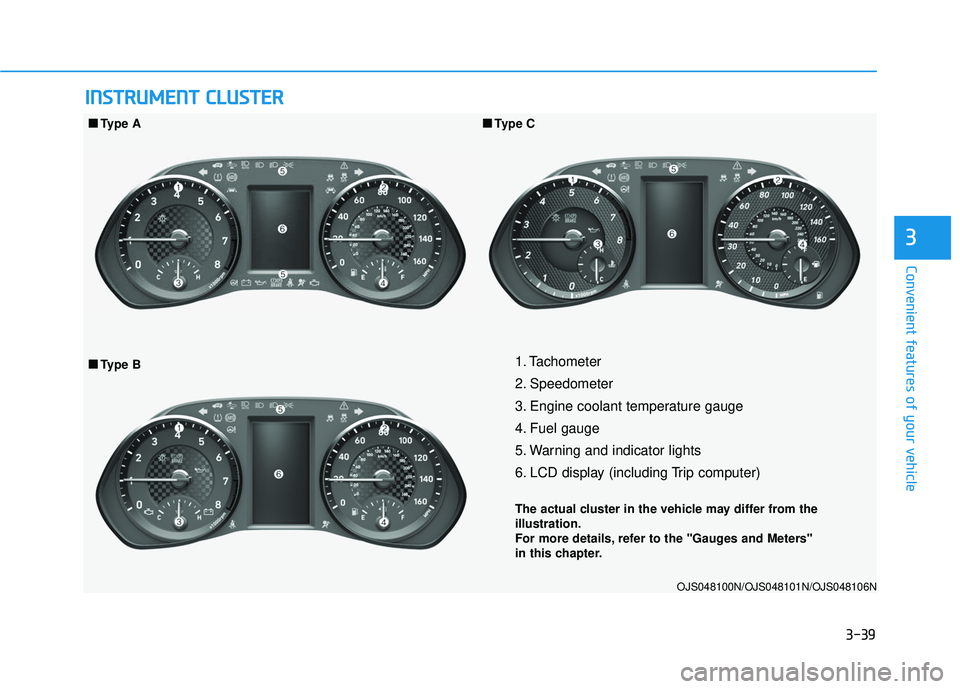
1. Tachometer
2. Speedometer
3. Engine coolant temperature gauge
4. Fuel gauge
5. Warning and indicator lights
6. LCD display (including Trip computer)
The actual cluster in the vehicle may differ from the
illustration.
For more details, refer to the "Gauges and Meters"
in this chapter.
OJS048100N/OJS048101N/OJS048106N
■ ■
Type B
■
■
Type A
■
■Type C
Page 123 of 491
3-43
Convenient features of your vehicle
3
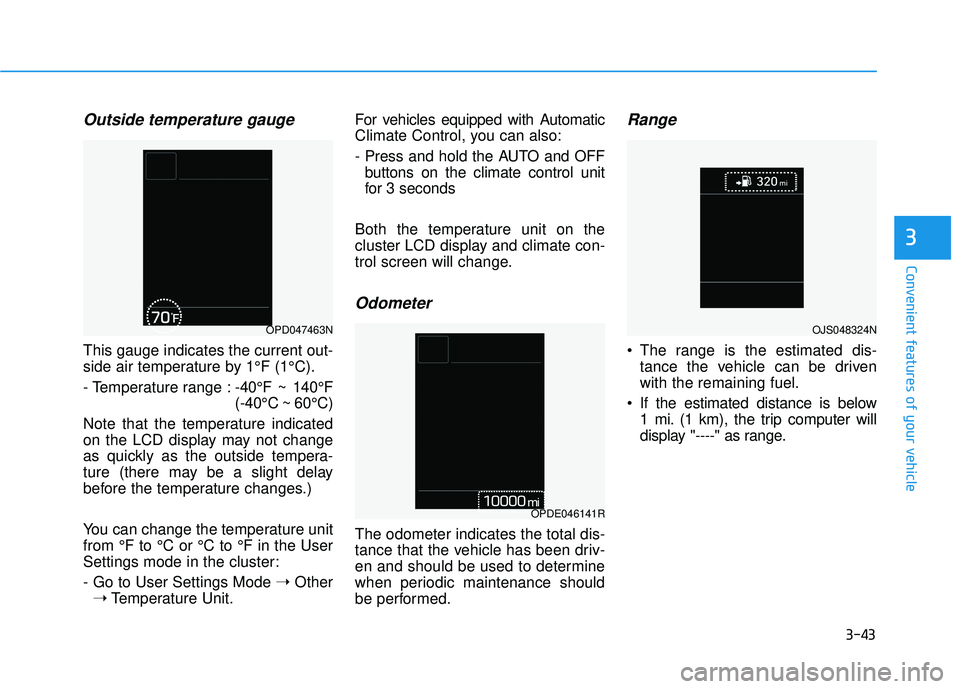
Outside temperature gauge
This gauge indicates the current out-
side air temperature by 1°F (1°C).
- Temperature range :-40°F ~ 140°F
(-40°C ~ 60°C)
Note that the temperature indicated
on the LCD display may not change
as quickly as the outside tempera-
ture (there may be a slight delay
before the temperature changes.)
You can change the temperature unit
from °F to °C or °C to °F in the User
Settings mode in the cluster:
- Go to User Settings Mode ➝Other
➝ Temperature Unit. For vehicles equipped with Automatic
Climate Control, you can also:
- Press and hold the AUTO and OFF
buttons on the climate control unit
for 3 seconds
Both the temperature unit on the
cluster LCD display and climate con-
trol screen will change.
Odometer
The odometer indicates the total dis-
tance that the vehicle has been driv-
en and should be used to determine
when periodic maintenance should
be performed.
Range
The range is the estimated dis- tance the vehicle can be driven
with the remaining fuel.
If the estimated distance is below 1 mi. (1 km), the trip computer will
display "----" as range.
OPD047463N
OPDE046141R
OJS048324N
Page 124 of 491
3-44
Convenient features of your vehicle
Information
• If the vehicle is not on level groundor the battery power has been inter-
rupted, the range function may not
operate correctly.
• The range may differ from the actu- al driving distance as it is only an
estimate of the available driving
range for the vehicle and driving
conditions.
• The trip computer may not register additional fuel if less than 1.6 gallon
(6 liters) of fuel are added to the
vehicle.
• The range may vary significantly based on driving conditions, driving
habits, and condition of the vehicle.
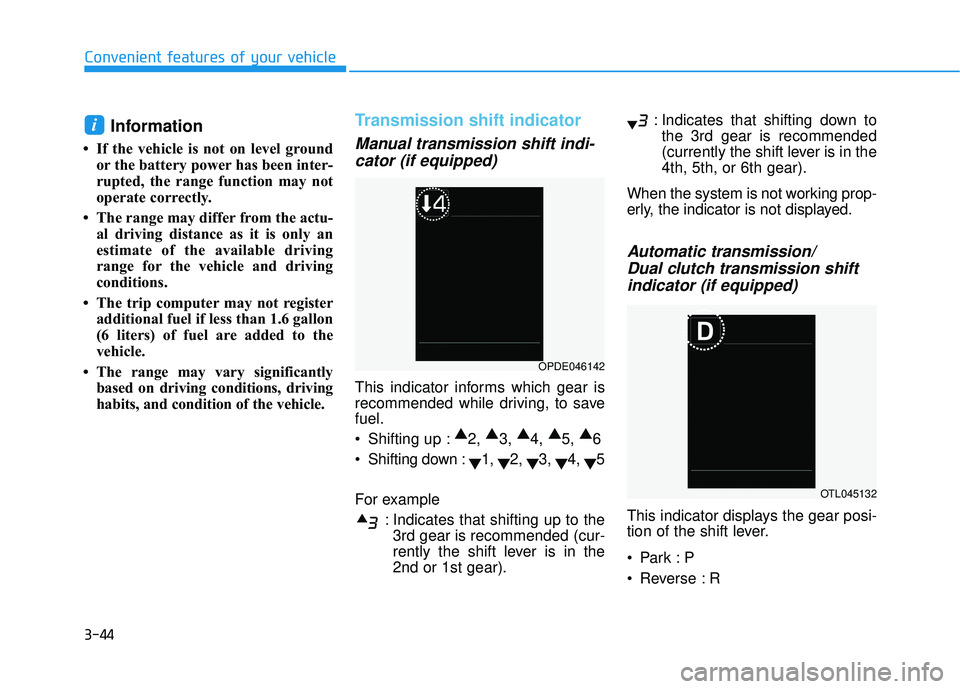
Transmission shift indicator
Manual transmission shift indi-cator (if equipped)
This indicator informs which gear is
recommended while driving, to save
fuel.
Shifting up : ▲
2, ▲
3, ▲
4, ▲
5, ▲
6
Shifting down : ▼1,
▼2,
▼3,
▼4,
▼5
For example : Indicates that shifting up to the3rd gear is recommended (cur-
rently the shift lever is in the
2nd or 1st gear). : Indicates that shifting down to
the 3rd gear is recommended
(currently the shift lever is in the
4th, 5th, or 6th gear).
When the system is not working prop-
erly, the indicator is not displayed.
Automatic transmission/ Dual clutch transmission shiftindicator (if equipped)
This indicator displays the gear posi-
tion of the shift lever.
Reverse : R
i
OPDE046142
OTL045132
Page 143 of 491
3-63
Convenient features of your vehicle
3
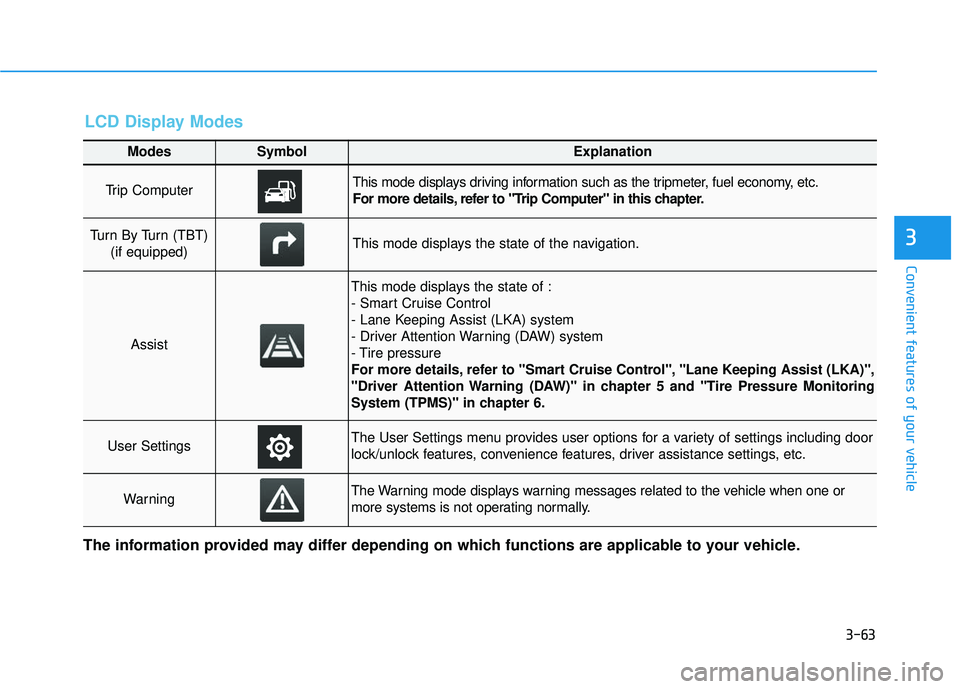
Modes SymbolExplanation
Trip Computer This mode displays driving information such as the tripmeter, fuel economy, etc.
For more details, refer to "Trip Computer" in this chapter.
Turn By Turn (TBT) (if equipped)This mode displays the state of the navigation.
Assist
This mode displays the state of :
- Smart Cruise Control
- Lane Keeping Assist (LKA) system
- Driver Attention Warning (DAW) system
- Tire pressure
For more details, refer to "Smart Cruise Control", "Lane Keeping Assist (LKA)",
"Driver Attention Warning (DAW)" in chapter 5 and "Tire Pressure Monitoring
System (TPMS)" in chapter 6.
User SettingsThe User Settings menu provides user options for a variety of settings including door
lock/unlock features, convenience features, driver assistance settings, etc.
WarningThe Warning mode displays warning messages related to the vehicle when one or
more systems is not operating normally.
The information provided may differ depending on which functions are applicable to your vehicle.
LCD Display Modes
Page 144 of 491
3-64
Convenient features of your vehicle
Shift to P to edit settings
This warning message appears if
you try to adjust the User Settings
while driving.
- Manual transmission
For your safety, change the User
Settings after parking the vehicle,
applying the parking brake and mov-
ing the shift lever to neutral.
- Automatic transmission / dual clutch transmission
For your safety, change the User
Settings after parking the vehicle,
applying the parking brake and mov-
ing the shift lever to P (Park).
Quick guide help
This mode provides quick guides for
the systems in the User Settings
mode.
Select an item, press and hold the OK
button.
For more details about each sys-
tem, refer to this Owner's Manual.
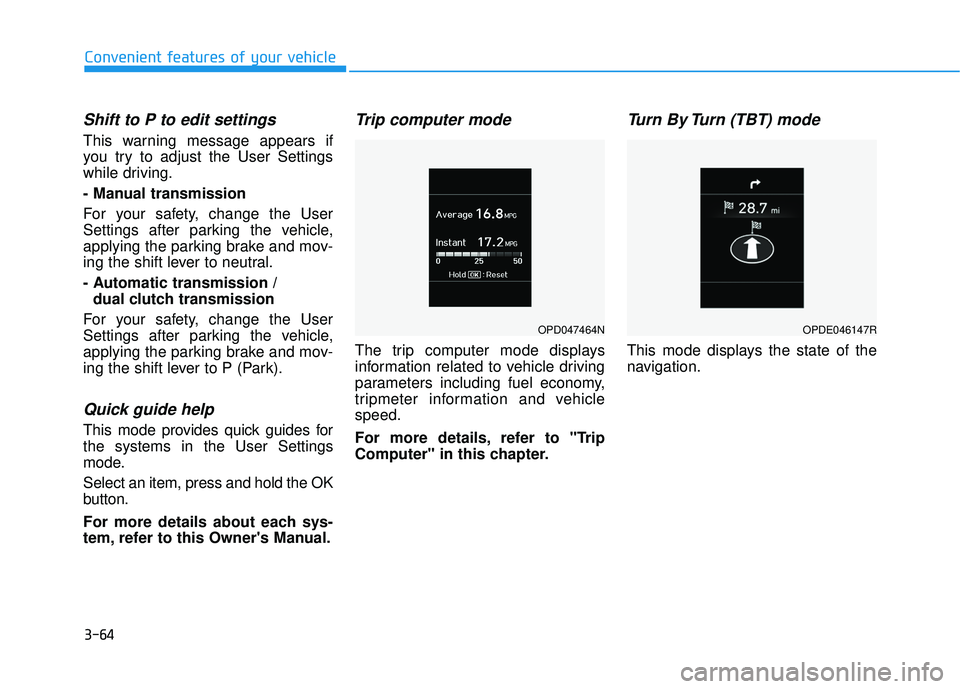
Trip computer mode
The trip computer mode displays
information related to vehicle driving
parameters including fuel economy,
tripmeter information and vehicle
speed.
For more details, refer to "Trip
Computer" in this chapter.
Turn By Turn (TBT) mode
This mode displays the state of the
navigation.
OPD047464NOPDE046147R
Page 152 of 491
3-72
Convenient features of your vehicle
ItemsExplanation
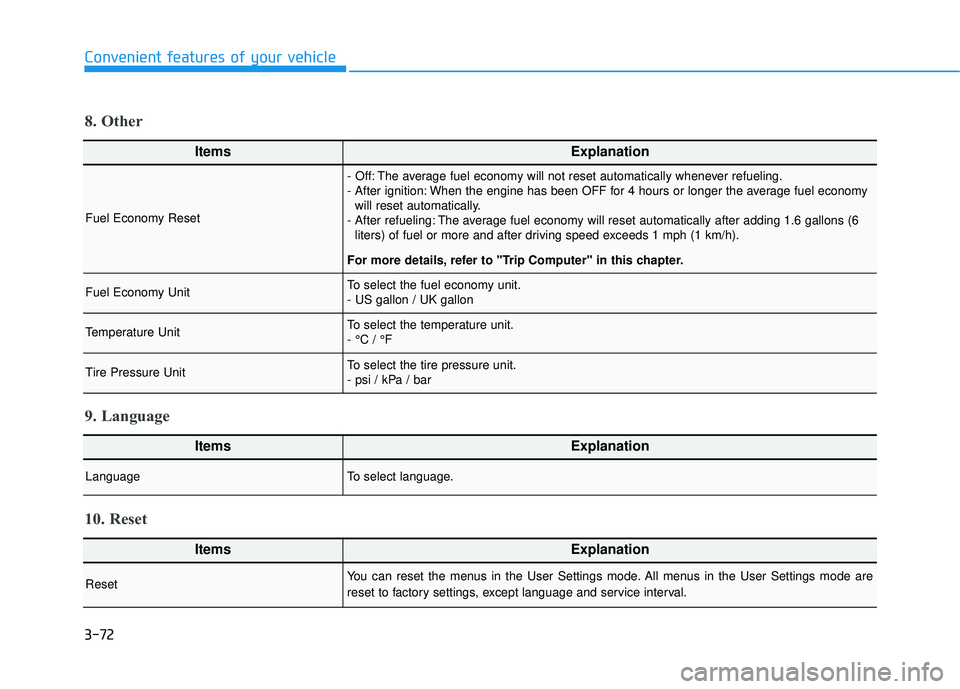
Fuel Economy Reset
- Off: The average fuel economy will not reset automatically whenever refueling.
- After ignition: When the engine has been OFF for 4 hours or longer the average fuel economywill reset automatically.
- After refueling: The average fuel economy will reset automatically after adding 1.6 gallons (6 liters) of fuel or more and after driving speed exceeds 1 mph (1 km/h).
For more details, refer to "Trip Computer" in this chapter.
Fuel Economy UnitTo select the fuel economy unit.
- US gallon / UK gallon
Temperature UnitTo select the temperature unit.
- °C / °F
Tire Pressure UnitTo select the tire pressure unit.
- psi / kPa / bar
8. Other
ItemsExplanation
LanguageTo select language.
9. Language
ItemsExplanation
ResetYou can reset the menus in the User Settings mode. All menus in the User Settings mode are
reset to factory settings, except language and service interval.
10. Reset
Page 153 of 491
3-73
Convenient features of your vehicle
3
The trip computer is a microcomput-
er-controlled driver information sys-
tem that displays information related
to driving.
Information
Some driving information stored in the
trip computer (for example Average
Vehicle Speed) resets if the battery is
disconnected.
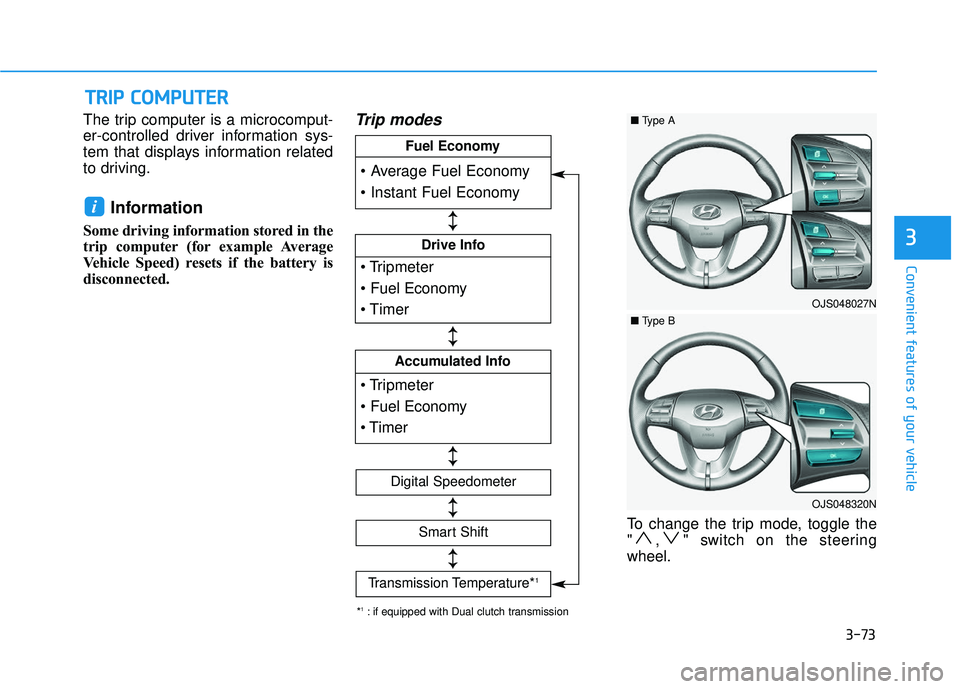
Trip modes
To change the trip mode, toggle the
" , " switch on the steering
wheel.
i
T
TR
R I
IP
P
C
C O
O M
M P
PU
U T
TE
ER
R
Drive Info
Accumulated Info
Fuel Economy
Digital Speedometer
Smart Shift
Transmission Temperature*1
↕ ↕
↕ ↕
↕ ↕
↕ ↕
↕ ↕
*1: if equipped with Dual clutch transmission
OJS048027N
■ Type A
OJS048320N
■Type B
Page 243 of 491
5-31
Driving your vehicle
5
Always come to a complete stopbefore shifting into D (Drive) or
R (Reverse).
Do not put the shift lever in N (Neutral) while driving.
LCD display for transmission
temperature and warning mes-
sage
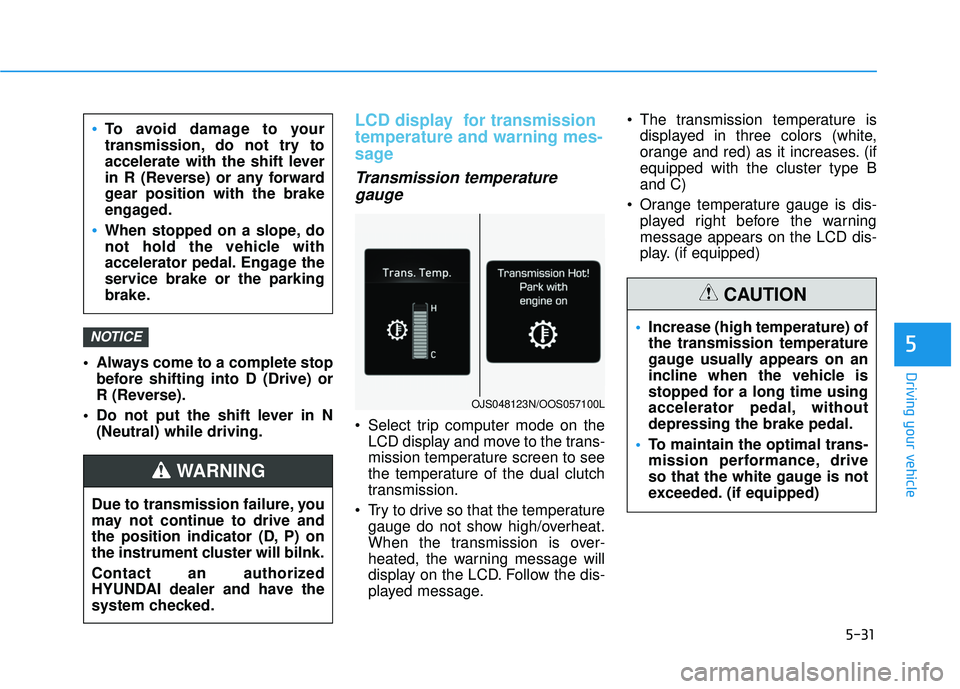
Transmission temperaturegauge
Select trip computer mode on the
LCD display and move to the trans-
mission temperature screen to see
the temperature of the dual clutch
transmission.
Try to drive so that the temperature gauge do not show high/overheat.
When the transmission is over-
heated, the warning message will
display on the LCD. Follow the dis-
played message. The transmission temperature is
displayed in three colors (white,
orange and red) as it increases. (if
equipped with the cluster type B
and C)
Orange temperature gauge is dis- played right before the warning
message appears on the LCD dis-
play. (if equipped)
NOTICE
To avoid damage to your
transmission, do not try to
accelerate with the shift lever
in R (Reverse) or any forward
gear position with the brake
engaged.
When stopped on a slope, do
not hold the vehicle with
accelerator pedal. Engage the
service brake or the parking
brake.
Due to transmission failure, you
may not continue to drive and
the position indicator (D, P) on
the instrument cluster will bilnk.
Contact an authorized
HYUNDAI dealer and have the
system checked.
WARNING
OJS048123N/OOS057100L
Increase (high temperature) of
the transmission temperature
gauge usually appears on an
incline when the vehicle is
stopped for a long time using
accelerator pedal, without
depressing the brake pedal.
To maintain the optimal trans-
mission performance, drive
so that the white gauge is not
exceeded. (if equipped)
CAUTION
Page 410 of 491
7-36
Maintenance
By jump starting
After a jump start from a good bat-
tery, drive the vehicle for 20-30 min-
utes before it is shutoff. The vehicle
may not restart if you shut it off
before the battery had a chance to
adequately recharge. See "Jump
Starting" in chapter 6 for more details
on jump starting procedures.
Information
An inappropriately disposedbattery can be harmful to
the environment and human
health. Dispose of the bat-
tery according to your local
law(s) or regulations.
Reset Features
The following items may need to be
reset after the battery has been dis-
charged or the battery has been dis-
connected. See chapter 3 or 4 for:
Power Windows
Trip Computer
Climate Control System
Clock
Audio System
Sunroof
i
Watch the battery during
charging, and stop or reduce
the charging rate if the battery
cells begin boiling violently.
The negative battery cable
must be removed first and
installed last when the battery
is disconnected. Disconnect
the battery charger in the fol-
lowing order:
(1) Turn off the battery charg- er main switch.
(2) Unhook the negative
clamp from the negative
battery terminal.
(3) Unhook the positive clamp from the positive battery
terminal.
Always use a genuine
HYUNDAI approved battery
when you replace the battery.