lock HYUNDAI VELOSTER 2020 Repair Manual
[x] Cancel search | Manufacturer: HYUNDAI, Model Year: 2020, Model line: VELOSTER, Model: HYUNDAI VELOSTER 2020Pages: 480, PDF Size: 6.16 MB
Page 198 of 480
3-64
Convenient features of your vehicle
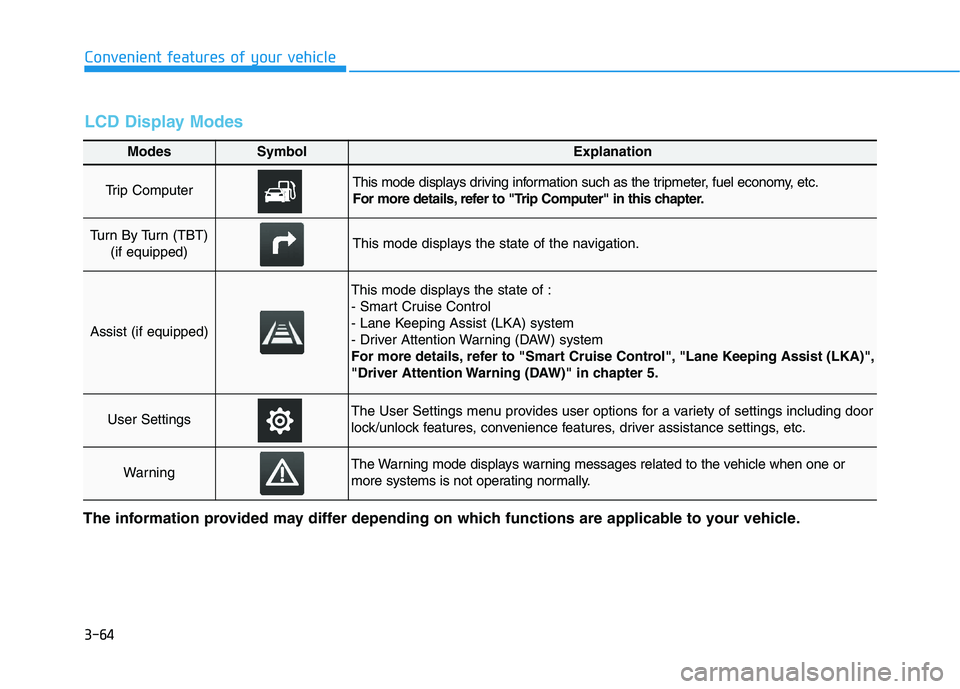
Modes SymbolExplanation
Trip Computer This mode displays driving information such as the tripmeter, fuel economy, etc.
For more details, refer to "Trip Computer" in this chapter.
Turn By Turn (TBT)
(if equipped)This mode displays the state of the navigation.
Assist (if equipped)
This mode displays the state of :
- Smart Cruise Control
- Lane Keeping Assist (LKA) system
- Driver Attention Warning (DAW) system
For more details, refer to "Smart Cruise Control", "Lane Keeping Assist (LKA)",
"Driver Attention Warning (DAW)" in chapter 5.
User SettingsThe User Settings menu provides user options for a variety of settings including door
lock/unlock features, convenience features, driver assistance settings, etc.
WarningThe Warning mode displays warning messages related to the vehicle when one or
more systems is not operating normally.
The information provided may differ depending on which functions are applicable to your vehicle.
LCD Display Modes
Page 203 of 480
3-69
Convenient features of your vehicle
3
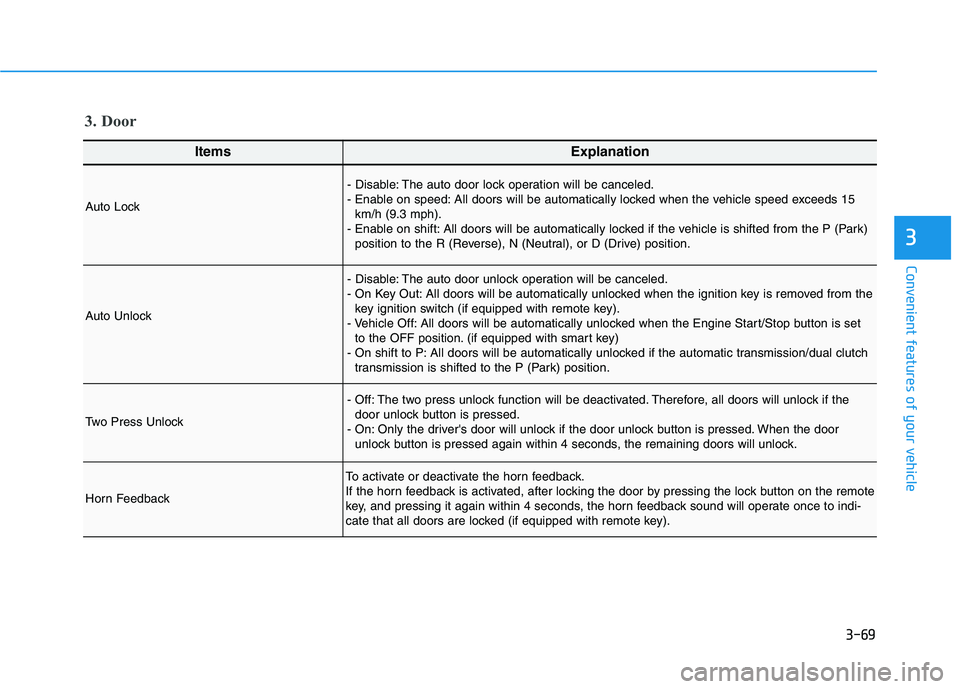
ItemsExplanation
Auto Lock
- Disable: The auto door lock operation will be canceled.
- Enable on speed: All doors will be automatically locked when the vehicle speed exceeds 15
km/h (9.3 mph).
- Enable on shift: All doors will be automatically locked if the vehicle is shifted from the P (Park)
position to the R (Reverse), N (Neutral), or D (Drive) position.
Auto Unlock
- Disable: The auto door unlock operation will be canceled.
- On Key Out: All doors will be automatically unlocked when the ignition key is removed from the
key ignition switch (if equipped with remote key).
- Vehicle Off: All doors will be automatically unlocked when the Engine Start/Stop button is set
to the OFF position. (if equipped with smart key)
- On shift to P: All doors will be automatically unlocked if the automatic transmission/dual clutch
transmission is shifted to the P (Park) position.
Two Press Unlock
- Off: The two press unlock function will be deactivated. Therefore, all doors will unlock if the
door unlock button is pressed.
- On: Only the driver's door will unlock if the door unlock button is pressed. When the door
unlock button is pressed again within 4 seconds, the remaining doors will unlock.
Horn Feedback
To activate or deactivate the horn feedback.
If the horn feedback is activated, after locking the door by pressing the lock button on the remote
key, and pressing it again within 4 seconds, the horn feedback sound will operate once to indi-
cate that all doors are locked (if equipped with remote key).
3. Door
Page 205 of 480
3-71
Convenient features of your vehicle
3
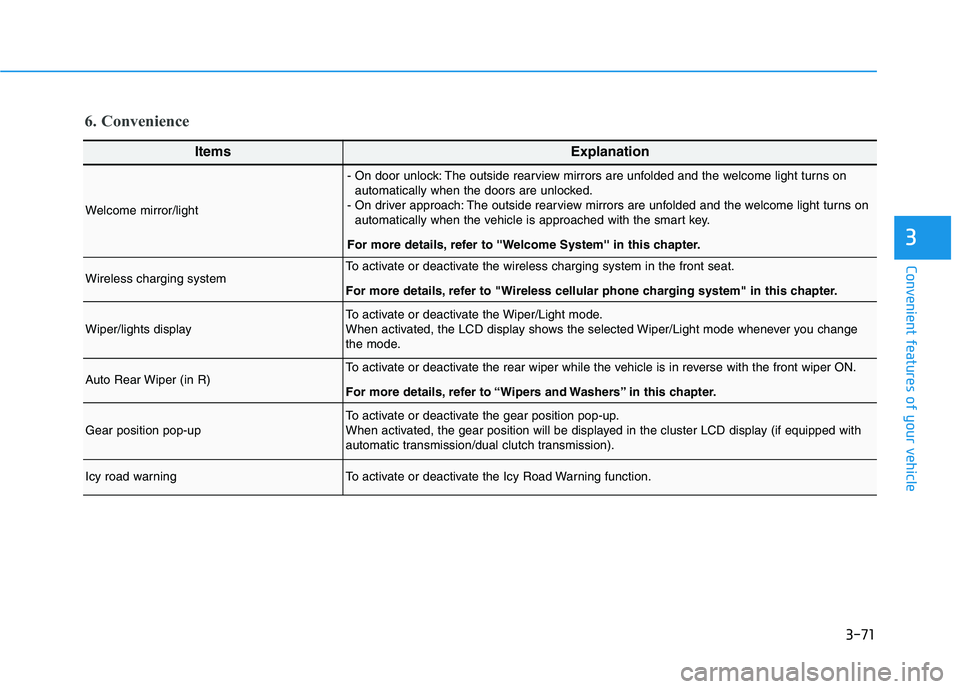
6. Convenience
ItemsExplanation
Welcome mirror/light
- On door unlock: The outside rearview mirrors are unfolded and the welcome light turns on
automatically when the doors are unlocked.
- On driver approach: The outside rearview mirrors are unfolded and the welcome light turns on
automatically when the vehicle is approached with the smart key.
For more details, refer to ''Welcome System'' in this chapter.
Wireless charging systemTo activate or deactivate the wireless charging system in the front seat.
For more details, refer to "Wireless cellular phone charging system" in this chapter.
Wiper/lights displayTo activate or deactivate the Wiper/Light mode.
When activated, the LCD display shows the selected Wiper/Light mode whenever you change
the mode.
Auto Rear Wiper (in R)To activate or deactivate the rear wiper while the vehicle is in reverse with the front wiper ON.
For more details, refer to “Wipers and Washers” in this chapter.
Gear position pop-upTo activate or deactivate the gear position pop-up.
When activated, the gear position will be displayed in the cluster LCD display (if equipped with
automatic transmission/dual clutch transmission).
Icy road warningTo activate or deactivate the Icy Road Warning function.
Page 213 of 480
3-79
Convenient features of your vehicle
3
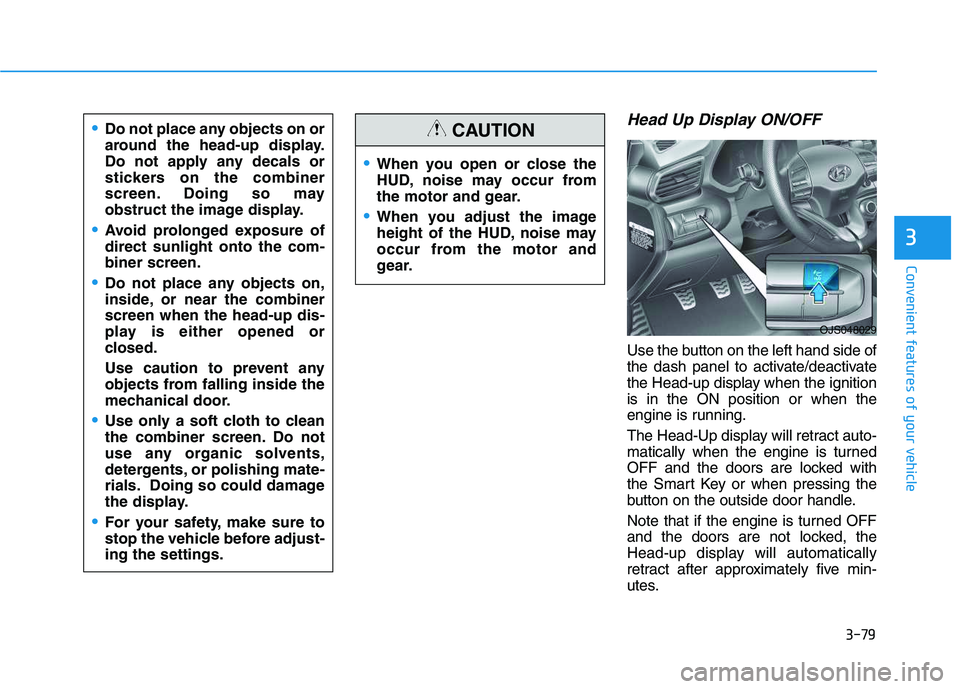
Head Up Display ON/OFF
Use the button on the left hand side of
the dash panel to activate/deactivate
the Head-up display when the ignition
is in the ON position or when the
engine is running.
The Head-Up display will retract auto-
matically when the engine is turned
OFF and the doors are locked with
the Smart Key or when pressing the
button on the outside door handle.
Note that if the engine is turned OFF
and the doors are not locked, the
Head-up display will automatically
retract after approximately five min-
utes.
When you open or close the
HUD, noise may occur from
the motor and gear.
When you adjust the image
height of the HUD, noise may
occur from the motor and
gear.
CAUTIONDo not place any objects on or
around the head-up display.
Do not apply any decals or
stickers on the combiner
screen. Doing so may
obstruct the image display.
Avoid prolonged exposure of
direct sunlight onto the com-
biner screen.
Do not place any objects on,
inside, or near the combiner
screen when the head-up dis-
play is either opened or
closed.
Use caution to prevent any
objects from falling inside the
mechanical door.
Use only a soft cloth to clean
the combiner screen. Do not
use any organic solvents,
detergents, or polishing mate-
rials. Doing so could damage
the display.
For your safety, make sure to
stop the vehicle before adjust-
ing the settings.
OJS048029
Page 219 of 480
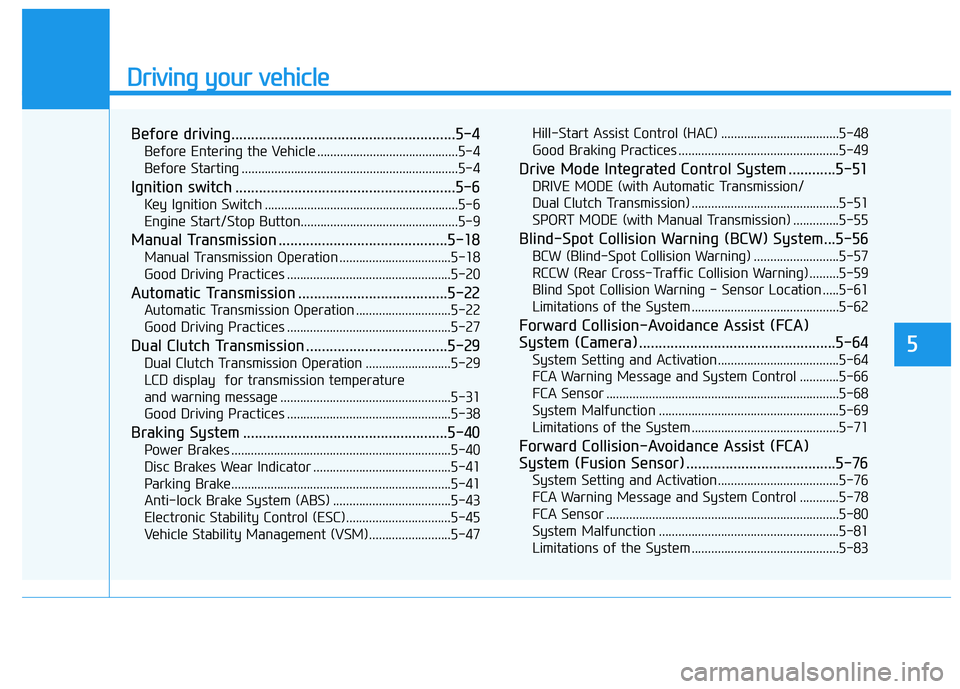
Driving your vehicle
5
Before driving.........................................................5-4
Before Entering the Vehicle ...........................................5-4
Before Starting ..................................................................5-4
Ignition switch ........................................................5-6
Key Ignition Switch ...........................................................5-6
Engine Start/Stop Button................................................5-9
Manual Transmission ...........................................5-18
Manual Transmission Operation ..................................5-18
Good Driving Practices ..................................................5-20
Automatic Transmission ......................................5-22
Automatic Transmission Operation .............................5-22
Good Driving Practices ..................................................5-27
Dual Clutch Transmission ....................................5-29
Dual Clutch Transmission Operation ..........................5-29
LCD display for transmission temperature
and warning message ....................................................5-31
Good Driving Practices ..................................................5-38
Braking System ....................................................5-40
Power Brakes ...................................................................5-40
Disc Brakes Wear Indicator ..........................................5-41
Parking Brake...................................................................5-41
Anti-lock Brake System (ABS) ....................................5-43
Electronic Stability Control (ESC)................................5-45
Vehicle Stability Management (VSM).........................5-47Hill-Start Assist Control (HAC) ....................................5-48
Good Braking Practices .................................................5-49
Drive Mode Integrated Control System ............5-51
DRIVE MODE (with Automatic Transmission/
Dual Clutch Transmission) .............................................5-51
SPORT MODE (with Manual Transmission) ..............5-55
Blind-Spot Collision Warning (BCW) System...5-56
BCW (Blind-Spot Collision Warning) ..........................5-57
RCCW (Rear Cross-Traffic Collision Warning) .........5-59
Blind Spot Collision Warning - Sensor Location .....5-61
Limitations of the System .............................................5-62
Forward Collision-Avoidance Assist (FCA)
System (Camera) ..................................................5-64
System Setting and Activation.....................................5-64
FCA Warning Message and System Control ............5-66
FCA Sensor .......................................................................5-68
System Malfunction .......................................................5-69
Limitations of the System .............................................5-71
Forward Collision-Avoidance Assist (FCA)
System (Fusion Sensor) ......................................5-76
System Setting and Activation.....................................5-76
FCA Warning Message and System Control ............5-78
FCA Sensor .......................................................................5-80
System Malfunction .......................................................5-81
Limitations of the System .............................................5-83
Page 222 of 480
5-4
Driving your vehicle
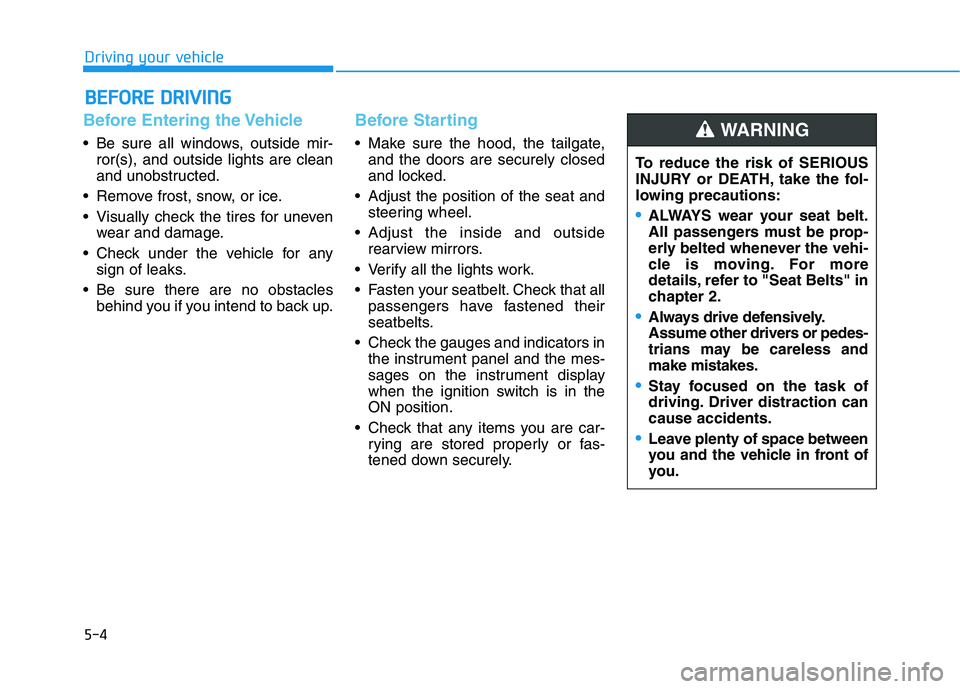
Before Entering the Vehicle
• Be sure all windows, outside mir-
ror(s), and outside lights are clean
and unobstructed.
Remove frost, snow, or ice.
Visually check the tires for uneven
wear and damage.
Check under the vehicle for any
sign of leaks.
Be sure there are no obstacles
behind you if you intend to back up.
Before Starting
Make sure the hood, the tailgate,
and the doors are securely closed
and locked.
Adjust the position of the seat and
steering wheel.
Adjust the inside and outside
rearview mirrors.
Verify all the lights work.
Fasten your seatbelt. Check that all
passengers have fastened their
seatbelts.
Check the gauges and indicators in
the instrument panel and the mes-
sages on the instrument display
when the ignition switch is in the
ON position.
Check that any items you are car-
rying are stored properly or fas-
tened down securely.
B BE
EF
FO
OR
RE
E
D
DR
RI
IV
VI
IN
NG
G
To reduce the risk of SERIOUS
INJURY or DEATH, take the fol-
lowing precautions:
•ALWAYS wear your seat belt.
All passengers must be prop-
erly belted whenever the vehi-
cle is moving. For more
details, refer to "Seat Belts" in
chapter 2.
Always drive defensively.
Assume other drivers or pedes-
trians may be careless and
make mistakes.
Stay focused on the task of
driving. Driver distraction can
cause accidents.
Leave plenty of space between
you and the vehicle in front of
you.
WARNING
Page 224 of 480
5-6
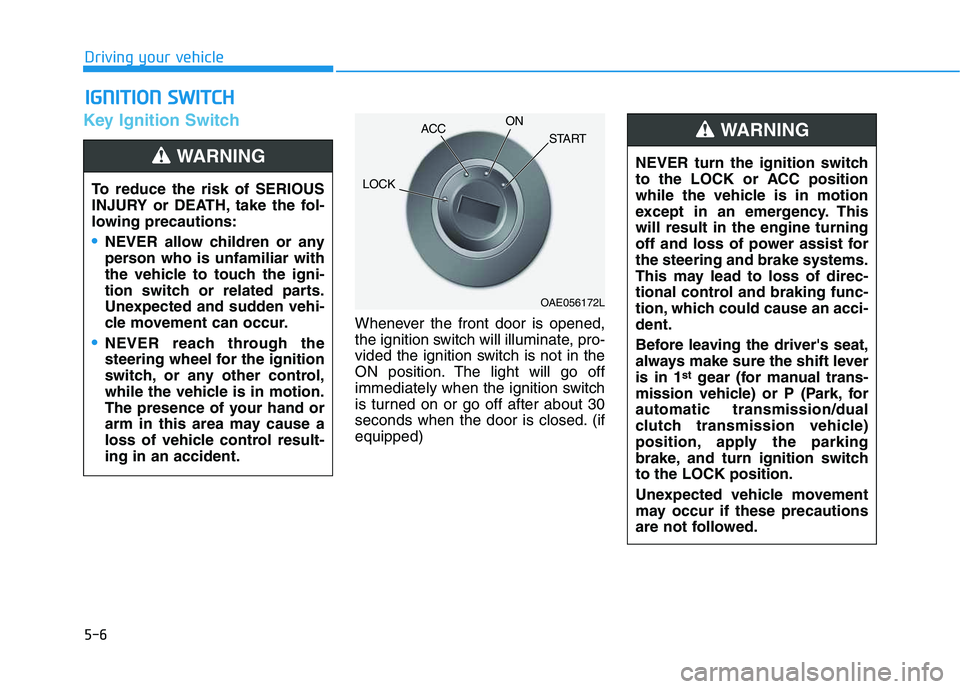
Key Ignition Switch
Whenever the front door is opened,
the ignition switch will illuminate, pro-
vided the ignition switch is not in the
ON position. The light will go off
immediately when the ignition switch
is turned on or go off after about 30
seconds when the door is closed. (if
equipped)
I IG
GN
NI
IT
TI
IO
ON
N
S
SW
WI
IT
TC
CH
H
Driving your vehicle
To reduce the risk of SERIOUS
INJURY or DEATH, take the fol-
lowing precautions:
NEVER allow children or any
person who is unfamiliar with
the vehicle to touch the igni-
tion switch or related parts.
Unexpected and sudden vehi-
cle movement can occur.
NEVER reach through the
steering wheel for the ignition
switch, or any other control,
while the vehicle is in motion.
The presence of your hand or
arm in this area may cause a
loss of vehicle control result-
ing in an accident.
WARNING NEVER turn the ignition switch
to the LOCK or ACC position
while the vehicle is in motion
except in an emergency. This
will result in the engine turning
off and loss of power assist for
the steering and brake systems.
This may lead to loss of direc-
tional control and braking func-
tion, which could cause an acci-
dent.
Before leaving the driver's seat,
always make sure the shift lever
is in 1
stgear (for manual trans-
mission vehicle) or P (Park, for
automatic transmission/dual
clutch transmission vehicle)
position, apply the parking
brake, and turn ignition switch
to the LOCK position.
Unexpected vehicle movement
may occur if these precautions
are not followed.
WARNING
OAE056172L
LOCKACCON
START
Page 225 of 480
5-7
Driving your vehicle
5
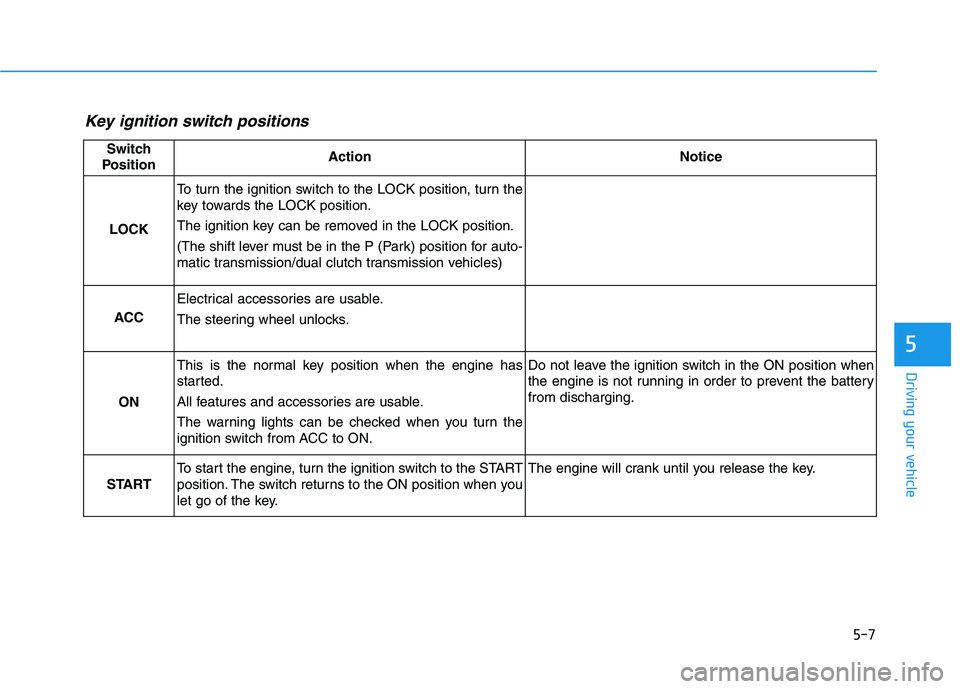
Key ignition switch positions
Switch
PositionActionNotice
LOCK
To turn the ignition switch to the LOCK position, turn the
key towards the LOCK position.
The ignition key can be removed in the LOCK position.
(The shift lever must be in the P (Park) position for auto-
matic transmission/dual clutch transmission vehicles)
ACC
Electrical accessories are usable.
The steering wheel unlocks.
ON
This is the normal key position when the engine has
started.
All features and accessories are usable.
The warning lights can be checked when you turn the
ignition switch from ACC to ON.Do not leave the ignition switch in the ON position when
the engine is not running in order to prevent the battery
from discharging.
START
To start the engine, turn the ignition switch to the START
position. The switch returns to the ON position when you
let go of the key.The engine will crank until you release the key.
Page 236 of 480
5-18
Manual Transmission
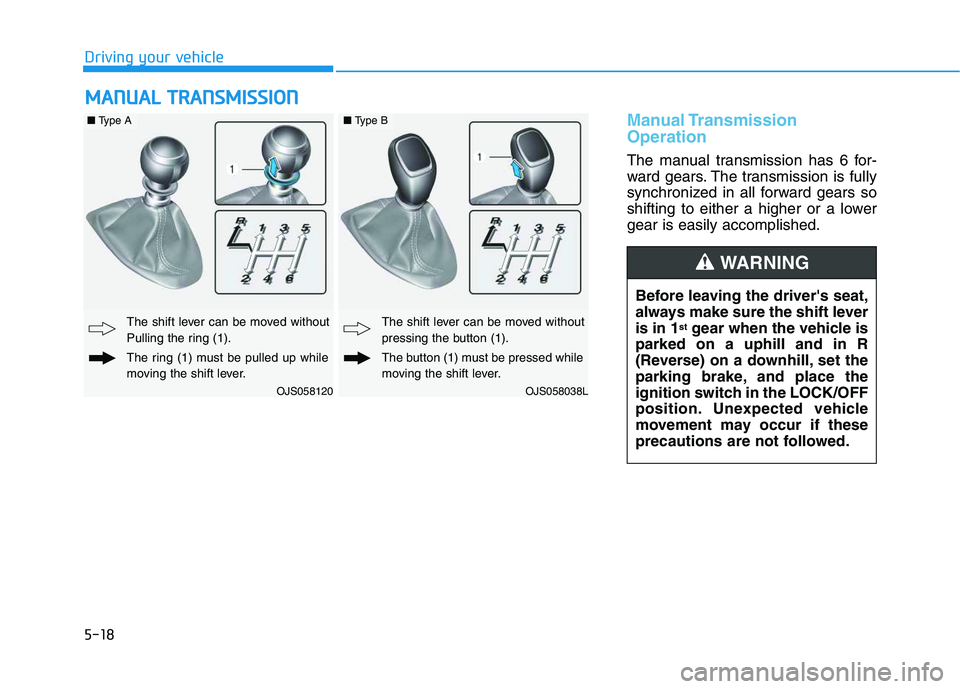
Operation
The manual transmission has 6 for-
ward gears. The transmission is fully
synchronized in all forward gears so
shifting to either a higher or a lower
gear is easily accomplished.
M MA
AN
NU
UA
AL
L
T
TR
RA
AN
NS
SM
MI
IS
SS
SI
IO
ON
N
Driving your vehicle
Before leaving the driver's seat,
always make sure the shift lever
is in 1
stgear when the vehicle is
parked on a uphill and in R
(Reverse) on a downhill, set the
parking brake, and place the
ignition switch in the LOCK/OFF
position. Unexpected vehicle
movement may occur if these
precautions are not followed.
WARNING
OJS058120
The shift lever can be moved without
Pulling the ring (1).
The ring (1) must be pulled up while
moving the shift lever.
OJS058038L
The shift lever can be moved without
pressing the button (1).
The button (1) must be pressed while
moving the shift lever.
■Type A■Type B
Page 240 of 480
5-22
A AU
UT
TO
OM
MA
AT
TI
IC
C
T
TR
RA
AN
NS
SM
MI
IS
SS
SI
IO
ON
N
Driving your vehicle
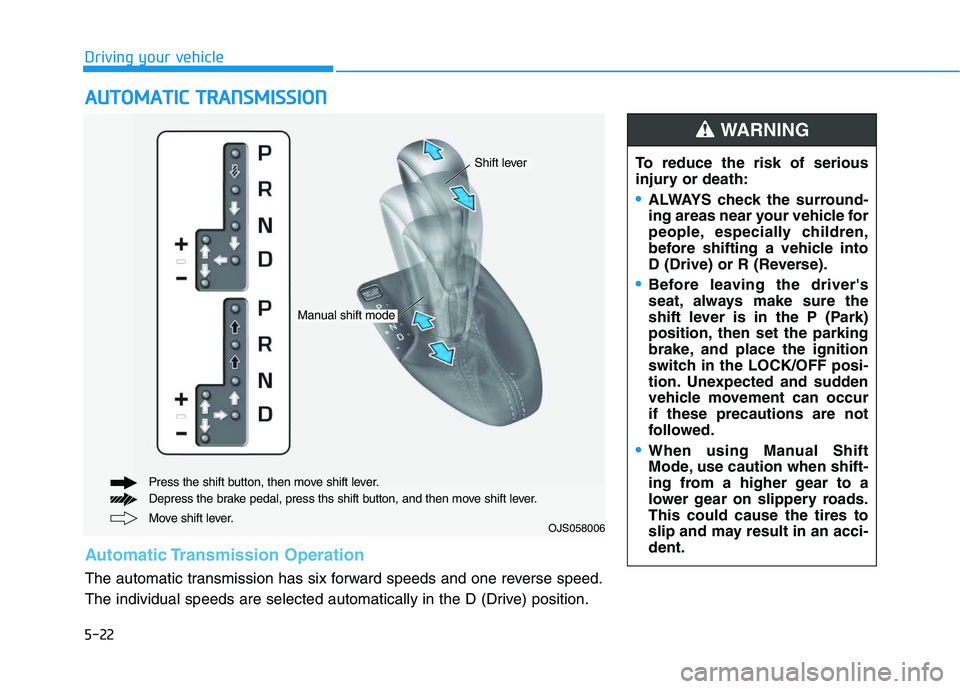
Move shift lever. Press the shift button, then move shift lever.
Depress the brake pedal, press ths shift button, and then move shift lever.OJS058006
Automatic Transmission Operation
The automatic transmission has six forward speeds and one reverse speed.
The individual speeds are selected automatically in the D (Drive) position.To reduce the risk of serious
injury or death:
ALWAYS check the surround-
ing areas near your vehicle for
people, especially children,
before shifting a vehicle into
D (Drive) or R (Reverse).
Before leaving the driver's
seat, always make sure the
shift lever is in the P (Park)
position, then set the parking
brake, and place the ignition
switch in the LOCK/OFF posi-
tion. Unexpected and sudden
vehicle movement can occur
if these precautions are not
followed.
When using Manual Shift
Mode, use caution when shift-
ing from a higher gear to a
lower gear on slippery roads.
This could cause the tires to
slip and may result in an acci-
dent.
WARNING
Manual shift mode
Shift lever