navigation system HYUNDAI VELOSTER 2020 Owners Manual
[x] Cancel search | Manufacturer: HYUNDAI, Model Year: 2020, Model line: VELOSTER, Model: HYUNDAI VELOSTER 2020Pages: 480, PDF Size: 6.16 MB
Page 16 of 480
I IN
NS
ST
TR
RU
UM
ME
EN
NT
T
P
PA
AN
NE
EL
L
O
OV
VE
ER
RV
VI
IE
EW
W
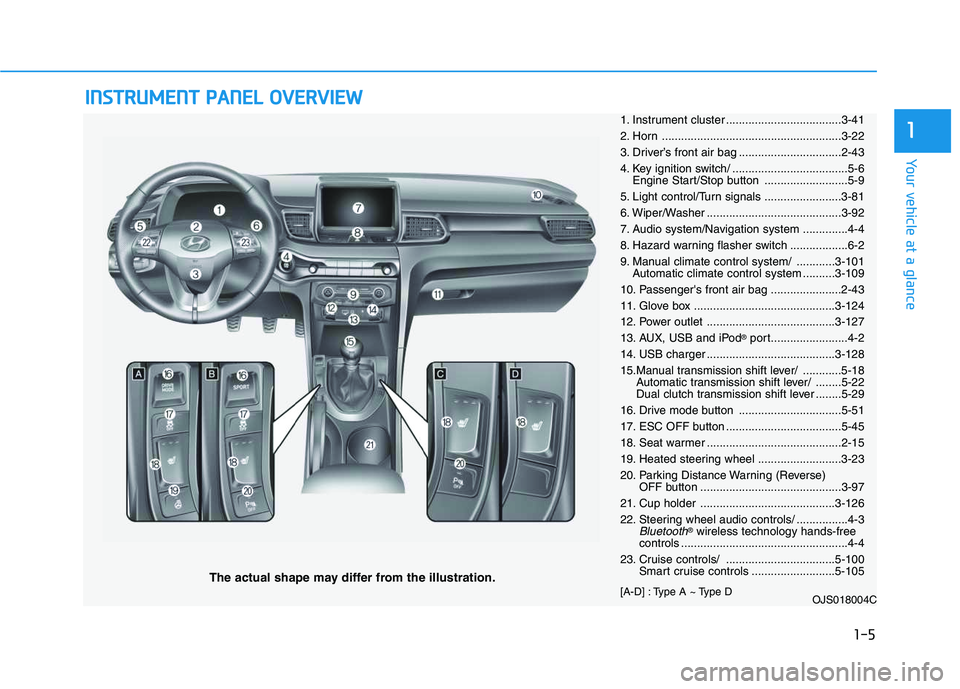
The actual shape may differ from the illustration.
1-5
Your vehicle at a glance
11. Instrument cluster ....................................3-41
2. Horn ........................................................3-22
3. Driver’s front air bag ................................2-43
4. Key ignition switch/ ....................................5-6
Engine Start/Stop button ..........................5-9
5. Light control/Turn signals ........................3-81
6. Wiper/Washer ..........................................3-92
7. Audio system/Navigation system ..............4-4
8. Hazard warning flasher switch ..................6-2
9. Manual climate control system/ ............3-101
Automatic climate control system ..........3-109
10. Passenger's front air bag ......................2-43
11. Glove box ............................................3-124
12. Power outlet ........................................3-127
13. AUX, USB and iPod
®port........................4-2
14. USB charger ........................................3-128
15.Manual transmission shift lever/ ............5-18
Automatic transmission shift lever/ ........5-22
Dual clutch transmission shift lever ........5-29
16. Drive mode button ................................5-51
17. ESC OFF button ....................................5-45
18. Seat warmer ..........................................2-15
19. Heated steering wheel ..........................3-23
20. Parking Distance Warning (Reverse)
OFF button ............................................3-97
21. Cup holder ..........................................3-126
22. Steering wheel audio controls/ ................4-3
Bluetooth®wireless technology hands-free
controls ....................................................4-4
23. Cruise controls/ ..................................5-100
Smart cruise controls ..........................5-105
[A-D] : Type A ~ Type D
OJS018004C
Page 131 of 480
3-131
Convenient features of your vehicle
3
Some magnetic items like credit
cards, phone cards or rail tickets
may be damaged if left with the
cellular phone during the charg-
ing process.
If the cellular phone without the
wireless charging function or
the metallic items are placed on
the charging pad, it may cause
slight noise. This noise does not
affect the cellular phone and the
vehicle, because this noise is an
operating sound during deter-
mining the item on the charging
pad.
If the ignition switch is OFF, the
charging also stops.Information
This device complies with Industry
Canada RSS-210 standard.
Operation is subject to the following
two conditions:
1. This device may not cause harmful
interference, and
2. This device must accept any inter-
ference received, including interfer-
ence that may cause undesired
operation.
Clock
Vehicles with Audio system
Select the [SETUP]button on the
audio system ➟Select [Date/Time].
Set time: Set the time displayed on
the audio screen.
Time format: Choose between 12-
hour and 24-hour time formats.
Vehicles with Navigation system
Select the Settings menu on the
Navigation system➟Select
[Date/Time].
GPS time: Displays time according
to the received GNSS time.
24-hour: Switches to 12 hour or 24
hour.
i
Do not attempt to adjust the
clock while driving. Doing so
may result in distracted driving
which may lead to an accident
involving personal injury or
death.
WARNING
Page 198 of 480
3-64
Convenient features of your vehicle
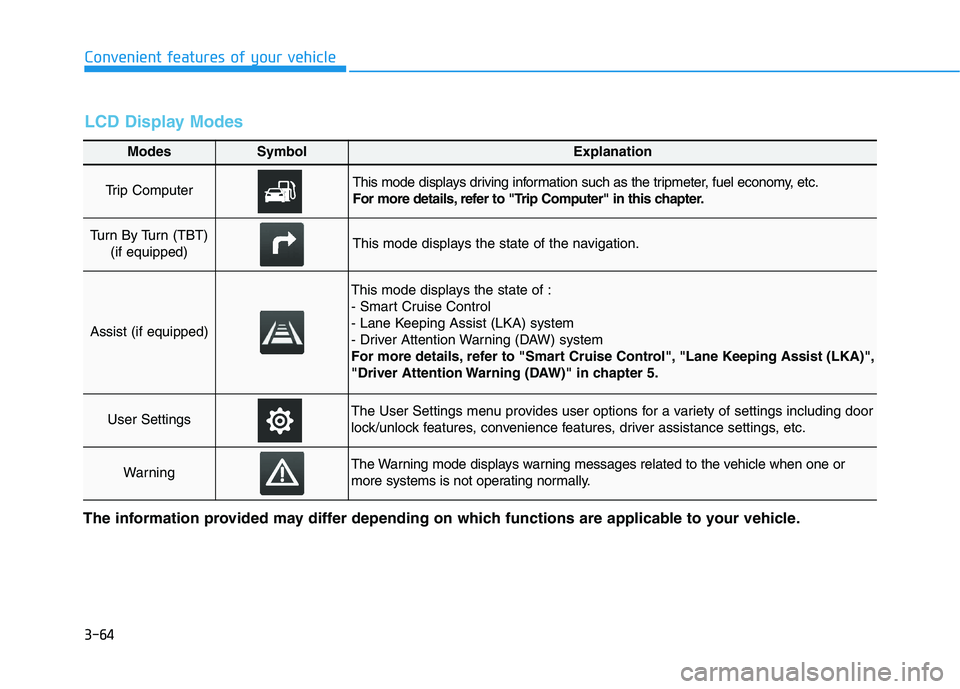
Modes SymbolExplanation
Trip Computer This mode displays driving information such as the tripmeter, fuel economy, etc.
For more details, refer to "Trip Computer" in this chapter.
Turn By Turn (TBT)
(if equipped)This mode displays the state of the navigation.
Assist (if equipped)
This mode displays the state of :
- Smart Cruise Control
- Lane Keeping Assist (LKA) system
- Driver Attention Warning (DAW) system
For more details, refer to "Smart Cruise Control", "Lane Keeping Assist (LKA)",
"Driver Attention Warning (DAW)" in chapter 5.
User SettingsThe User Settings menu provides user options for a variety of settings including door
lock/unlock features, convenience features, driver assistance settings, etc.
WarningThe Warning mode displays warning messages related to the vehicle when one or
more systems is not operating normally.
The information provided may differ depending on which functions are applicable to your vehicle.
LCD Display Modes
Page 200 of 480
3-66
Convenient features of your vehicle
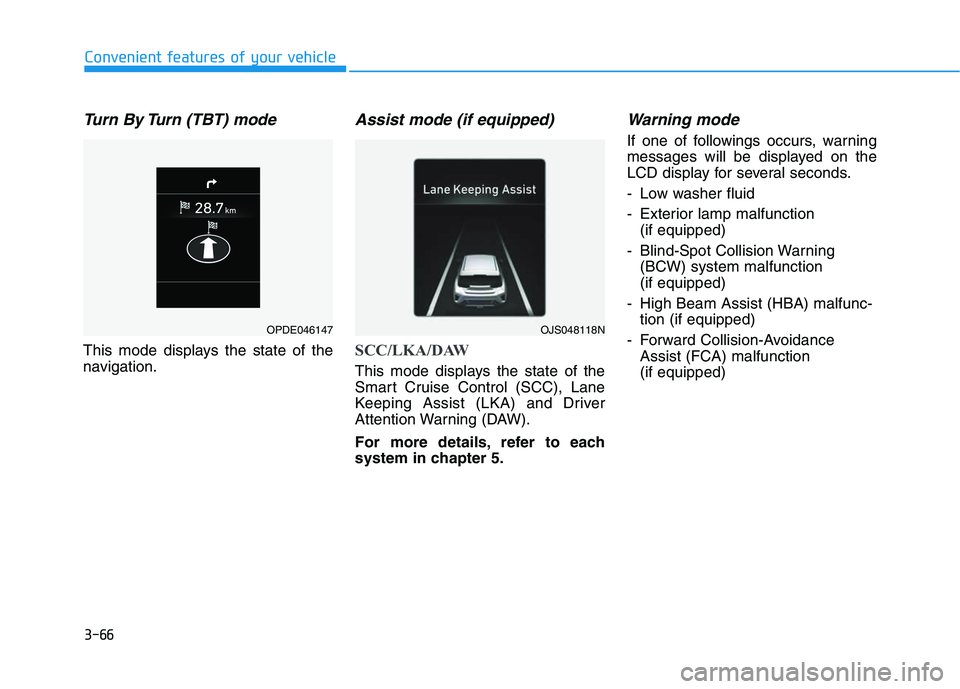
Turn By Turn (TBT) mode
This mode displays the state of the
navigation.
Assist mode (if equipped)
SCC/LKA/DAW
This mode displays the state of the
Smart Cruise Control (SCC), Lane
Keeping Assist (LKA) and Driver
Attention Warning (DAW).
For more details, refer to each
system in chapter 5.
Warning mode
If one of followings occurs, warning
messages will be displayed on the
LCD display for several seconds.
- Low washer fluid
- Exterior lamp malfunction
(if equipped)
- Blind-Spot Collision Warning
(BCW) system malfunction
(if equipped)
- High Beam Assist (HBA) malfunc-
tion (if equipped)
- Forward Collision-Avoidance
Assist (FCA) malfunction
(if equipped)
OJS048118NOPDE046147
Page 214 of 480
3-80
Convenient features of your vehicle
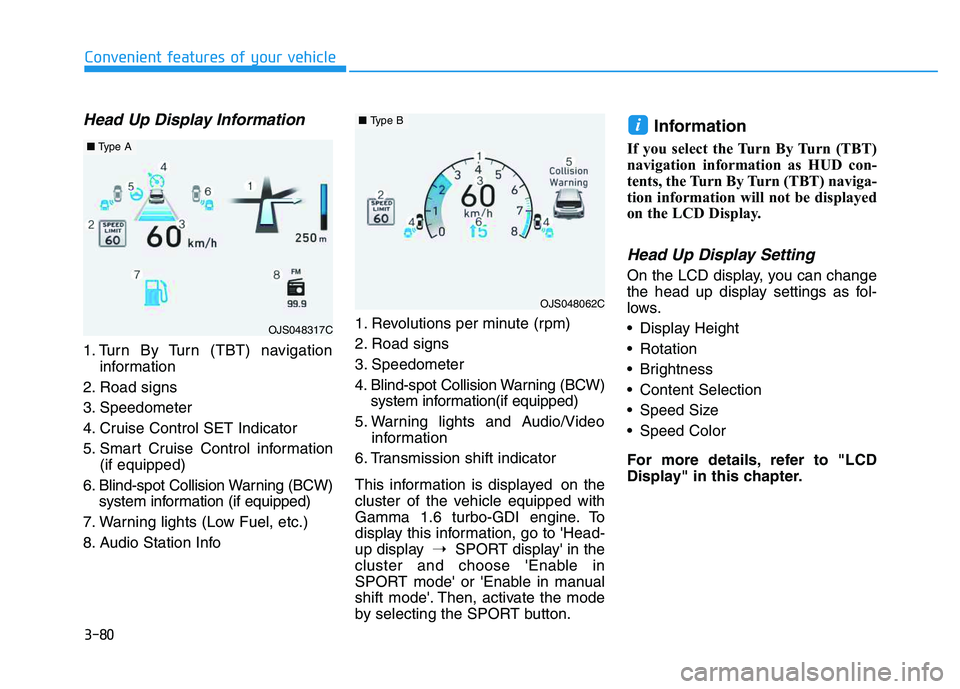
Head Up Display Information
1. Turn By Turn (TBT) navigation
information
2. Road signs
3. Speedometer
4. Cruise Control SET Indicator
5. Smart Cruise Control information
(if equipped)
6. Blind-spot Collision Warning (BCW)
system information (if equipped)
7. Warning lights (Low Fuel, etc.)
8. Audio Station Info1. Revolutions per minute (rpm)
2. Road signs
3. Speedometer
4. Blind-spot Collision Warning (BCW)
system information(if equipped)
5. Warning lights and Audio/Video
information
6. Transmission shift indicator
This information is displayed on the
cluster of the vehicle equipped with
Gamma 1.6 turbo-GDI engine. To
display this information, go to 'Head-
up display➝SPORT display' in the
cluster and choose 'Enable in
SPORT mode' or 'Enable in manual
shift mode'. Then, activate the mode
by selecting the SPORT button.
Information
If you select the Turn By Turn (TBT)
navigation information as HUD con-
tents, the Turn By Turn (TBT) naviga-
tion information will not be displayed
on the LCD Display.
Head Up Display Setting
On the LCD display, you can change
the head up display settings as fol-
lows.
Display Height
Rotation
Brightness
Content Selection
Speed Size
Speed Color
For more details, refer to "LCD
Display" in this chapter.
i
OJS048317C
■Type A
OJS048062C
■Type B
Page 215 of 480
Multimedia System
Multimedia System.................................................4-2
AUX, USB and iPod®Port ...............................................4-2
Antenna ...............................................................................4-2
Steering Wheel Audio Controls ......................................4-3
Bluetooth®Wireless Technology Hands-Free ...........4-4
Audio (Display Audio) / Video /
Navigation System (AVN).................................................4-4
4
Page 218 of 480
4-4
Multimedia System
Bluetooth®Wireless
Technology Hands-Free
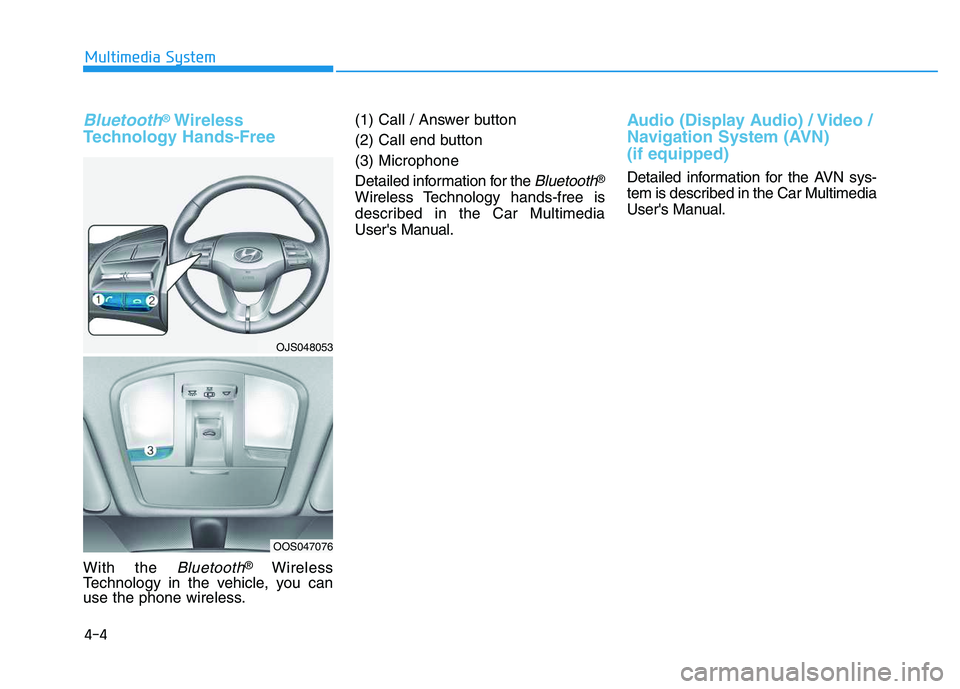
With the Bluetooth®Wireless
Technology in the vehicle, you can
use the phone wireless.(1) Call / Answer button
(2) Call end button
(3) Microphone
Detailed information for the
Bluetooth®
Wireless Technology hands-free is
described in the Car Multimedia
User's Manual.
Audio (Display Audio) / Video /
Navigation System (AVN)
(if equipped)
Detailed information for the AVN sys-
tem is described in the Car Multimedia
User's Manual.
OJS048053
OOS047076
Page 471 of 480
I-2
Accessing Your Vehicle ....................................................3-3
Immobilizer System ...................................................3-12
Remote Key ..................................................................3-3
Smart Key.....................................................................3-7
Air bag - advanced supplemental restraint system .........2-41
Additional Safety Precautions ....................................2-63
Air Bag Warning Labels.............................................2-63
Curtain air bags ..........................................................2-45
Driver's front air bag ..................................................2-43
How Does the Air Bag System Operate? ...................2-46
Occupant Classification System (OCS) .....................2-52
Passenger's front air bag.............................................2-43
Side air bags ...............................................................2-44
SRS Care ....................................................................2-62
What to Expect After an Air Bag Inflates ..................2-51
Where Are the Air Bags? ...........................................2-43
Why Didn't My Air Bag Go Off in a Collision?........2-57
Air Cleaner......................................................................7-29
Filter Replacement .....................................................7-29
Air Conditioning System ..................................................8-6
Antenna .............................................................................4-2
Anti-lock Brake System (ABS) ......................................5-43
Appearance care..............................................................7-78
Exterior Care ..............................................................7-78
Interior Care ...............................................................7-83Audio (Display Audio)/Video/Navigation System
(AVN) ............................................................................4-4
Auto Defogging System (Additional Feature with
Automatic Temperature Control System) ..................3-120
Automatic Climate Control System..............................3-109
Automatic Temperature Control Mode ....................3-110
Manual Temperature Control Mode .........................3-111
System Maintenance.................................................3-116
System Operation .....................................................3-114
Automatic Transmission .................................................5-22
Automatic Transmission Operation............................5-22
Good Driving Practices ..............................................5-27
Automatic Ventilation ...................................................3-123
AUX, USB and iPod
®Port ...............................................4-2
Basic Troubleshooting Guide .........................................6-18
Battery .............................................................................7-34
Battery Recharging .....................................................7-35
For Best Battery Service ............................................7-35
Reset Features ............................................................7-36
Before driving ...................................................................5-4
Before Entering the Vehicle .........................................5-4
Before Starting .............................................................5-4
Index
A
B
Page 477 of 480
I-8
Multimedia System ...........................................................4-2
Antenna ........................................................................4-2
Audio (Display Audio)/Video/Navigation System
(AVN) ........................................................................4-4
AUX, USB and iPod
®Port ..........................................4-2
Bluetooth®Wireless Technology Hands-Free ..............4-4
Steering Wheel Audio Controls....................................4-3
Owner Maintenance ..........................................................7-5
Owner Maintenance Schedule......................................7-6
Parking Brake ........................................................5-41, 7-28
Checking the Parking Brake ......................................7-28
Parking Distance Warning (Reverse) system .................3-97
Position lamp ..................................................................7-68
Power Brakes ..................................................................5-40
Power Outlet .................................................................3-127
Power Windows ..............................................................3-28Rear Combination Light Bulb Replacement ..................7-73
Rear Seats .........................................................................2-8
Folding the rear seat .....................................................2-8
Rear view monitor ..........................................................3-96
Rear Window Defroster ................................................3-122
Rear Window Wiper and Washer....................................3-95
Recommended Lubricants and Capacities ........................8-7
Recommended SAE viscosity number .........................8-9
Remote Key ......................................................................3-3
Scheduled Maintenance Services .....................................7-7
Maintenance Under Severe Usage Conditions
(Gamma 1.6 Turbo-GDI) ........................................7-16
Maintenance Under Severe Usage Conditions
(Nu 2.0 MPI) ...........................................................7-11
Normal Maintenance Schedule
(Gamma 1.6 Turbo-GDI) ........................................7-13
Normal Maintenance Schedule (Nu 2.0 MPI) .............7-8
Seat belts .........................................................................2-17
Additional Seat Belt Safety Precautions ....................2-26
Care of Seat Belts .......................................................2-29
Seat Belt Restraint System .........................................2-20
Seat Belt Safety Precautions ......................................2-17
Seat Belt Warning Light .............................................2-18
Index
O
PS
R