park assist HYUNDAI VELOSTER 2020 Owners Manual
[x] Cancel search | Manufacturer: HYUNDAI, Model Year: 2020, Model line: VELOSTER, Model: HYUNDAI VELOSTER 2020Pages: 480, PDF Size: 6.16 MB
Page 96 of 480
3-96
Convenient features of your vehicle
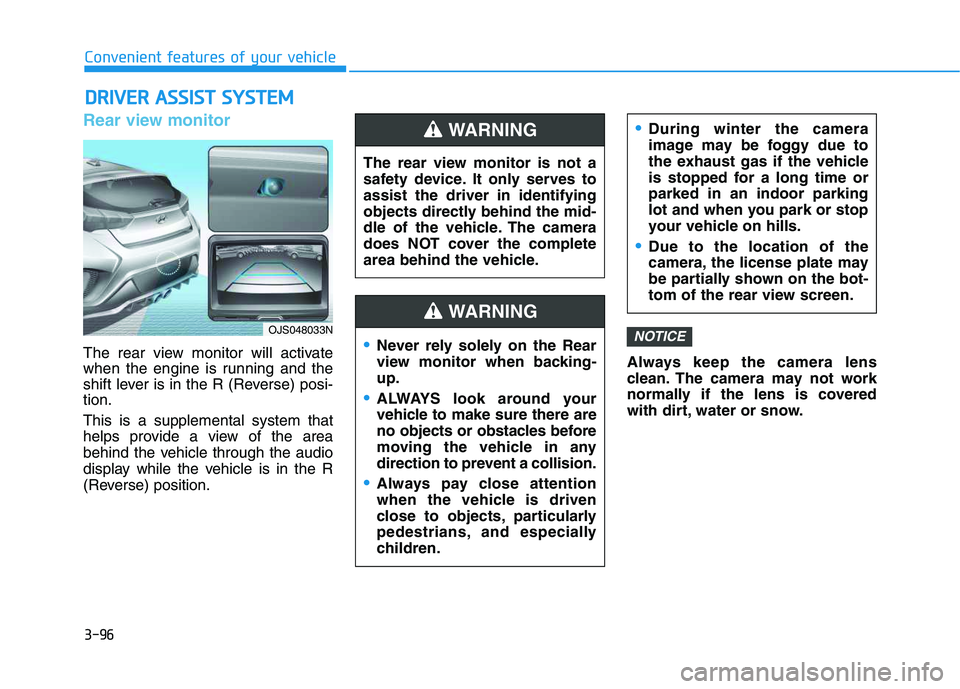
Rear view monitor
The rear view monitor will activate
when the engine is running and the
shift lever is in the R (Reverse) posi-
tion.
This is a supplemental system that
helps provide a view of the area
behind the vehicle through the audio
display while the vehicle is in the R
(Reverse) position.Always keep the camera lens
clean. The camera may not work
normally if the lens is covered
with dirt, water or snow.
NOTICE
D DR
RI
IV
VE
ER
R
A
AS
SS
SI
IS
ST
T
S
SY
YS
ST
TE
EM
M
The rear view monitor is not a
safety device. It only serves to
assist the driver in identifying
objects directly behind the mid-
dle of the vehicle. The camera
does NOT cover the complete
area behind the vehicle.
WARNING
Never rely solely on the Rear
view monitor when backing-
up.
ALWAYS look around your
vehicle to make sure there are
no objects or obstacles before
moving the vehicle in any
direction to prevent a collision.
Always pay close attention
when the vehicle is driven
close to objects, particularly
pedestrians, and especially
children.
During winter the camera
image may be foggy due to
the exhaust gas if the vehicle
is stopped for a long time or
parked in an indoor parking
lot and when you park or stop
your vehicle on hills.
Due to the location of the
camera, the license plate may
be partially shown on the bot-
tom of the rear view screen.
WARNING
OJS048033N
Page 97 of 480
![HYUNDAI VELOSTER 2020 Owners Manual 3-97
Convenient features of your vehicle
3
Parking Distance Warning
(Reverse) system (if equipped)
[A] : Sensor
The optional Parking Distance
Warning (Reverse) system assists
the driver during reverse](/img/35/58890/w960_58890-96.png "HYUNDAI VELOSTER 2020 Owners Manual 3-97
Convenient features of your vehicle
3
Parking Distance Warning
(Reverse) system (if equipped)
[A] : Sensor
The optional Parking Distance
Warning (Reverse) system assists
the driver during reverse")
3-97
Convenient features of your vehicle
3
Parking Distance Warning
(Reverse) system (if equipped)
[A] : Sensor
The optional Parking Distance
Warning (Reverse) system assists
the driver during reverse movement
of the vehicle by chiming if any object
is sensed within approximately 120
cm (50 in) behind the vehicle.
This system is a supplemental sys-
tem that senses objects within the
range and location of the sensors, it
cannot detect objects in other areas
where sensors are not installed.
Operation of the Parking
Distance Warning (Reverse)
system
Operating condition
This system will activate when
backing up with the ignition switch
in the ON position. However, if the
vehicle speed exceeds 5 km/h (3
mph), the system may not detect
objects.
If the vehicle speed exceeds 10
km/h (6 mph), the system will not
warn you even though objects are
detected.
When more than two objects are
sensed at the same time, the clos-
est one will be recognized first.
ALWAYS look around your vehi-
cle to make sure there are not
any objects or obstacles before
moving the vehicle in any direc-
tion to prevent a collision.
Always pay close attention
when the vehicle is driven close
to objects, particularly pedestri-
ans, and especially children.
Be aware that some objects
may not be visible on the
screen or be detected by the
sensors, due to the objects
distance, size or material, all of
which can limit the effective-
ness of the sensor.
WARNING
OJS048030
Page 98 of 480
3-98
Convenient features of your vehicle
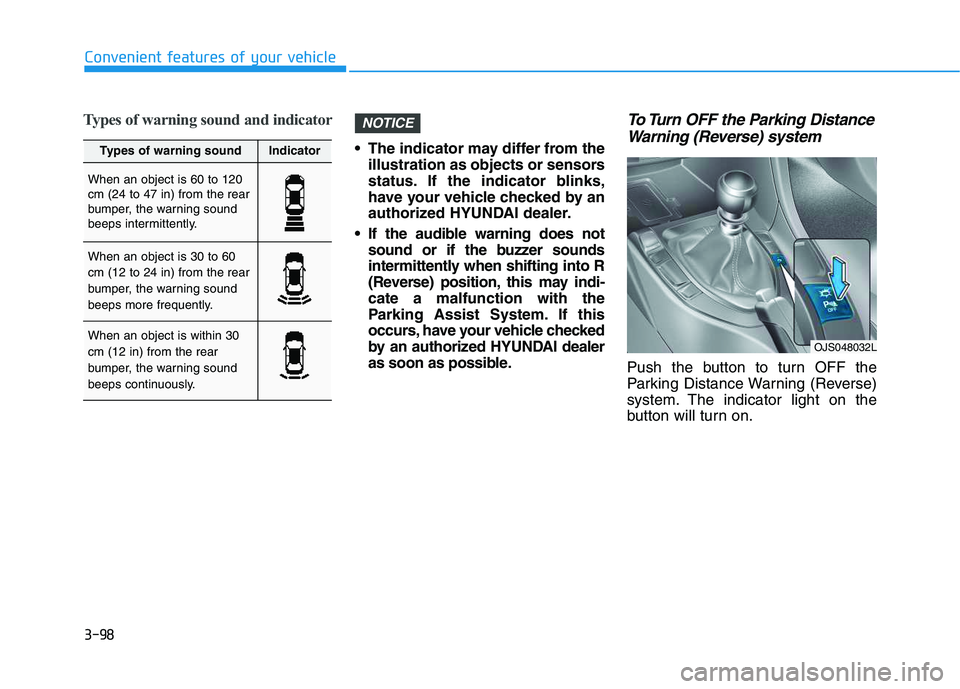
Types of warning sound and indicator
The indicator may differ from the
illustration as objects or sensors
status. If the indicator blinks,
have your vehicle checked by an
authorized HYUNDAI dealer.
If the audible warning does not
sound or if the buzzer sounds
intermittently when shifting into R
(Reverse) position, this may indi-
cate a malfunction with the
Parking Assist System. If this
occurs, have your vehicle checked
by an authorized HYUNDAI dealer
as soon as possible.
To Turn OFF the Parking Distance
Warning (Reverse) system
Push the button to turn OFF the
Parking Distance Warning (Reverse)
system. The indicator light on the
button will turn on.
NOTICE
Types of warning soundIndicator
When an object is 60 to 120
cm (24 to 47 in) from the rear
bumper, the warning sound
beeps intermittently.
When an object is 30 to 60
cm (12 to 24 in) from the rear
bumper, the warning sound
beeps more frequently.
When an object is within 30
cm (12 in) from the rear
bumper, the warning sound
beeps continuously.OJS048032L
Page 136 of 480
Wipers and Washers ............................................3-92
Windshield Wipers...........................................................3-92
Windshield Washers .......................................................3-94
Rear Window Wiper and Washer ................................3-95
Driver Assist System ...........................................3-96
Rear view monitor...........................................................3-96
Parking Distance Warning (Reverse) system ...........3-97
Parking Distance Warning (Reverse) system
Precautions.....................................................................3-100
Manual Climate Control System.......................3-101
Heating and Air Conditioning .....................................3-102
System Operation .........................................................3-105
System Maintenance....................................................3-107
Automatic Climate Control System ..................3-109
Automatic Temperature Control Mode ....................3-110
Manual Temperature Control Mode .........................3-111
System Operation .........................................................3-114
System Maintenance....................................................3-116
Windshield Defrosting and Defogging ............3-118
Auto Defogging System (Additional Feature with
Automatic Temperature Control System)................3-120
Rear Window Defroster ..............................................3-122
Climate Control Additional Features ...............3-123
Automatic Ventilation ...................................................3-123
Sunroof Inside Air Recirculation ...............................3-123
Storage Compartment .......................................3-124
Center Console Storage ..............................................3-124
Glove Box ........................................................................3-124
Sunglass Holder.............................................................3-125
Interior Features ................................................3-126
Cup Holder ......................................................................3-126
Sunvisor ...........................................................................3-127
Power Outlet ..................................................................3-127
USB charger ...................................................................3-128
Wireless Cellular Phone Charging System..............3-129
Clock .................................................................................3-131
Clothes Hanger ..............................................................3-132
Floor Mat Anchor(s).....................................................3-132
Luggage net (Hook)......................................................3-133
Cargo Area Cover..........................................................3-134
3
Page 219 of 480
Driving your vehicle
5
Before driving.........................................................5-4
Before Entering the Vehicle ...........................................5-4
Before Starting ..................................................................5-4
Ignition switch ........................................................5-6
Key Ignition Switch ...........................................................5-6
Engine Start/Stop Button................................................5-9
Manual Transmission ...........................................5-18
Manual Transmission Operation ..................................5-18
Good Driving Practices ..................................................5-20
Automatic Transmission ......................................5-22
Automatic Transmission Operation .............................5-22
Good Driving Practices ..................................................5-27
Dual Clutch Transmission ....................................5-29
Dual Clutch Transmission Operation ..........................5-29
LCD display for transmission temperature
and warning message ....................................................5-31
Good Driving Practices ..................................................5-38
Braking System ....................................................5-40
Power Brakes ...................................................................5-40
Disc Brakes Wear Indicator ..........................................5-41
Parking Brake...................................................................5-41
Anti-lock Brake System (ABS) ....................................5-43
Electronic Stability Control (ESC)................................5-45
Vehicle Stability Management (VSM).........................5-47Hill-Start Assist Control (HAC) ....................................5-48
Good Braking Practices .................................................5-49
Drive Mode Integrated Control System ............5-51
DRIVE MODE (with Automatic Transmission/
Dual Clutch Transmission) .............................................5-51
SPORT MODE (with Manual Transmission) ..............5-55
Blind-Spot Collision Warning (BCW) System...5-56
BCW (Blind-Spot Collision Warning) ..........................5-57
RCCW (Rear Cross-Traffic Collision Warning) .........5-59
Blind Spot Collision Warning - Sensor Location .....5-61
Limitations of the System .............................................5-62
Forward Collision-Avoidance Assist (FCA)
System (Camera) ..................................................5-64
System Setting and Activation.....................................5-64
FCA Warning Message and System Control ............5-66
FCA Sensor .......................................................................5-68
System Malfunction .......................................................5-69
Limitations of the System .............................................5-71
Forward Collision-Avoidance Assist (FCA)
System (Fusion Sensor) ......................................5-76
System Setting and Activation.....................................5-76
FCA Warning Message and System Control ............5-78
FCA Sensor .......................................................................5-80
System Malfunction .......................................................5-81
Limitations of the System .............................................5-83
Page 224 of 480
5-6
Key Ignition Switch
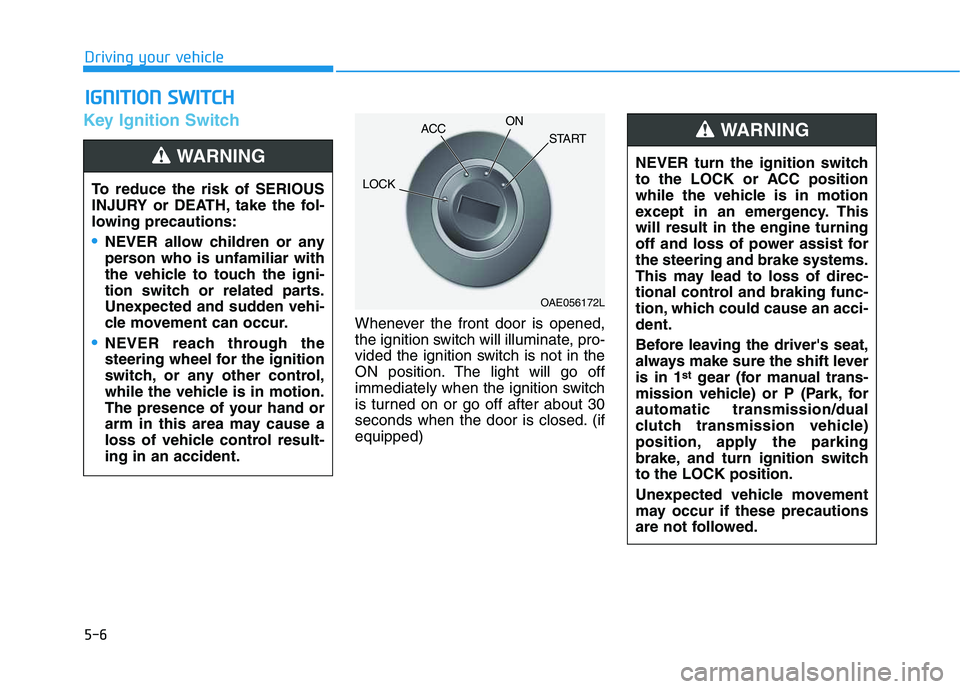
Whenever the front door is opened,
the ignition switch will illuminate, pro-
vided the ignition switch is not in the
ON position. The light will go off
immediately when the ignition switch
is turned on or go off after about 30
seconds when the door is closed. (if
equipped)
I IG
GN
NI
IT
TI
IO
ON
N
S
SW
WI
IT
TC
CH
H
Driving your vehicle
To reduce the risk of SERIOUS
INJURY or DEATH, take the fol-
lowing precautions:
NEVER allow children or any
person who is unfamiliar with
the vehicle to touch the igni-
tion switch or related parts.
Unexpected and sudden vehi-
cle movement can occur.
NEVER reach through the
steering wheel for the ignition
switch, or any other control,
while the vehicle is in motion.
The presence of your hand or
arm in this area may cause a
loss of vehicle control result-
ing in an accident.
WARNING NEVER turn the ignition switch
to the LOCK or ACC position
while the vehicle is in motion
except in an emergency. This
will result in the engine turning
off and loss of power assist for
the steering and brake systems.
This may lead to loss of direc-
tional control and braking func-
tion, which could cause an acci-
dent.
Before leaving the driver's seat,
always make sure the shift lever
is in 1
stgear (for manual trans-
mission vehicle) or P (Park, for
automatic transmission/dual
clutch transmission vehicle)
position, apply the parking
brake, and turn ignition switch
to the LOCK position.
Unexpected vehicle movement
may occur if these precautions
are not followed.
WARNING
OAE056172L
LOCKACCON
START
Page 228 of 480
5-10
Driving your vehicle
NEVER press the Engine
Start/Stop button while the
vehicle is in motion except in
an emergency. This will result
in the engine turning off and
loss of power assist for the
steering and brake systems.
This may lead to loss of direc-
tional control and braking
function, which could cause
an accident.
Before leaving the driver's
seat, always make sure the
shift lever is in the P (Park)
position, set the parking
brake, press the Engine Start/
Stop button to the OFF posi-
tion, and take the Smart Key
with you. Unexpected vehicle
movement may occur if these
precautions are not followed.
WARNING NEVER reach through the
steering wheel for the Engine
Start/Stop button or any other
control while the vehicle is in
motion. The presence of your
hand or arm in this area may
cause a loss of vehicle control
resulting in an accident.
Page 266 of 480
5-48
Driving your vehicle
VSM operation
VSM ON condition
The VSM operates when:
The Electronic Stability Control
(ESC) is on.
Vehicle speed is approximately
above 15 km/h (9 mph) on curve
roads.
Vehicle speed is approximately
above 20 km/h (12 mph) when the
vehicle is braking on rough roads.
When operating
When you apply your brakes under
conditions which may activate the
ESC, you may hear sounds from the
brakes, or feel a corresponding sen-
sation in the brake pedal. This is nor-
mal and it means your VSM is active.The VSM does not operate when:
Driving on a banked road such
as gradient or incline.
Driving rearward.
ESC OFF indicator light is on.
EPS (Electric Power Steering)
warning light ( ) is on or
blinks.
Driving with wheels and tires with dif-
ferent sizes may cause the ESC sys-
tem to malfunction. Before replacing
tires, make sure all four tires and
wheels are the same size. Never
drive the vehicle with different sized
tires and wheels installed.
Hill-Start Assist Control (HAC)
The Hill-Start Assist Control (HAC)
helps prevent the vehicle from rolling
backwards when starting a vehicle
from a stop on a hill. The system
operates the brakes automatically for
approximately 2 seconds and releas-
es the brake after 2 seconds or when
the accelerator pedal is depressed.
The HAC does not operate when
the shift lever is in P (Park) or N
(Neutral)
The HAC activates even though
the ESC (Electronic Stability
Control) is off but does not acti-
vate when the ESC has malfunc-
tioned.
NOTICE
NOTICE
If ESC indicator light ( ) or
EPS warning light ( ) stays on
or blinks, your vehicle may have
a malfunction with the VSM sys-
tem. When the warning light illu-
minates, have your vehicle
checked by an authorized
HYUNDAI dealer as soon as
possible.
WARNING Always be ready to depress the
accelerator pedal when starting
off on a incline. The HAC activates
only for approximately 2 seconds.
WARNING
Page 267 of 480
5-49
Driving your vehicle
5
Good Braking Practices Wet brakes can be dangerous! The
brakes may get wet if the vehicle is
driven through standing water or if it
is washed. Your vehicle will not stop
as quickly if the brakes are wet. Wet
brakes may cause the vehicle to pull
to one side.
To dry the brakes, apply the brakes
lightly until the braking action returns
to normal, taking care to keep the
vehicle under control at all times. If
the braking action does not return to
normal, stop as soon as it is safe to
do so and call an authorized
HYUNDAI dealer for assistance.
DO NOT drive with your foot resting
on the brake pedal. Even light, but
constant pedal pressure can result in
the brakes overheating, brake wear,
and possibly even brake failure.
If a tire goes flat while you are driv-
ing, apply the brakes gently and
keep the vehicle pointed straight
ahead while you slow down. When
you are moving slowly enough for it
to be safe to do so, pull off the road
and stop in a safe location.Keep your foot firmly on the brake
pedal when the vehicle is stopped to
prevent the vehicle from rolling for-
ward.
If your vehicle is equipped with
the automatic transmission/dual
clutch transmission, do not let
your vehicle creep forward. To
avoid creeping forward, keep
your foot firmly on the brake
pedal when the vehicle is
stopped.
Be cautious when parking on a
hill. Firmly engage the parking
brake and place the shift lever in
P (automatic transmission/dual
clutch transmission) or in first
or reverse gear (manual trans-
mission). If your vehicle is fac-
ing downhill, steer the front
wheels to the curb to help pre-
vent the vehicle from rolling. If
your vehicle is facing uphill, turn
the front wheels away from the
curb to help prevent the vehicle
from rolling. If there is no curb
or if the vehicle has to be kept
from rolling due to conditions
block the wheels.
NOTICEWhenever leaving the vehicle or
parking, always come to a com-
plete stop and continue to
depress the brake pedal. Move
the shift lever into 1
stgear (for
manual transmission vehicle) or
P (Park, for automatic transmis-
sion/dual clutch transmission
vehicle) position, then apply the
parking brake, and place the
ignition switch in the LOCK/OFF
position.
Vehicles parked with the park-
ing brake not applied or not
fully engaged may roll inadver-
tently and may cause injury to
the driver and others. ALWAYS
apply the parking brake before
exiting the vehicle.
WARNING
Page 289 of 480
5-71
Driving your vehicle
5
Limitations of the System
The Forward Collision avoidance
assist (FCA) system is designed to
monitor the vehicle ahead on the
roadway through camera recognition
to warn the driver that a collision is
imminent, and if necessary, apply
emergency braking.
In certain situations, the camera may
not be able to detect the vehicle
ahead. In these cases, the FCA sys-
tem may not operate normally. The
driver must pay careful attention in
the following situations where the
FCA operation may be limited.
Detecting vehicles
The sensor may be limited when:
The camera is blocked with a for-
eign object or debris
The camera lens is contaminated
due to tinted, filmed or coated
windshield, damaged glass, or
stuck of foreign matter (sticker,
bug, etc.) on the glass
Inclement weather such as heavy
rain or snow obscures the field of
camera view
There is interference by electro-
magnetic waves
The camera sensor recognition is
limited
The vehicle in front is too small to
be detected (for example a motor-
cycle or a bicycle, etc.)
The vehicle in front is an oversize
vehicle or trailer that is too big to
be detected by the camera recog-
nition system (for example a tractor
trailer, etc.)
The driver's field of view is not well
illuminated (either too dark or too
much reflection or too much back-
light that obscures the field of view)
The FCA system operates
only to detect vehicles in front
of the vehicle.
The FCA system does not
operate when the vehicle is in
reverse.
The FCA system does not
detect vehicles in the oppo-
site lane.
The FCA system does not
detect cross traffic vehicles
that are approaching.
The FCA system cannot
detect the driver approaching
the side view of a parked vehi-
cle (for example on a dead
end street.)
In these cases, you must main-
tain a safe braking distance,
and if necessary, depress the
brake pedal to reduce the driv-
ing speed in order to maintain a
safe distance.
WARNING