brake HYUNDAI VELOSTER 2021 Owner's Manual
[x] Cancel search | Manufacturer: HYUNDAI, Model Year: 2021, Model line: VELOSTER, Model: HYUNDAI VELOSTER 2021Pages: 482, PDF Size: 37.54 MB
Page 229 of 482
5-13
Driving your vehicle
5
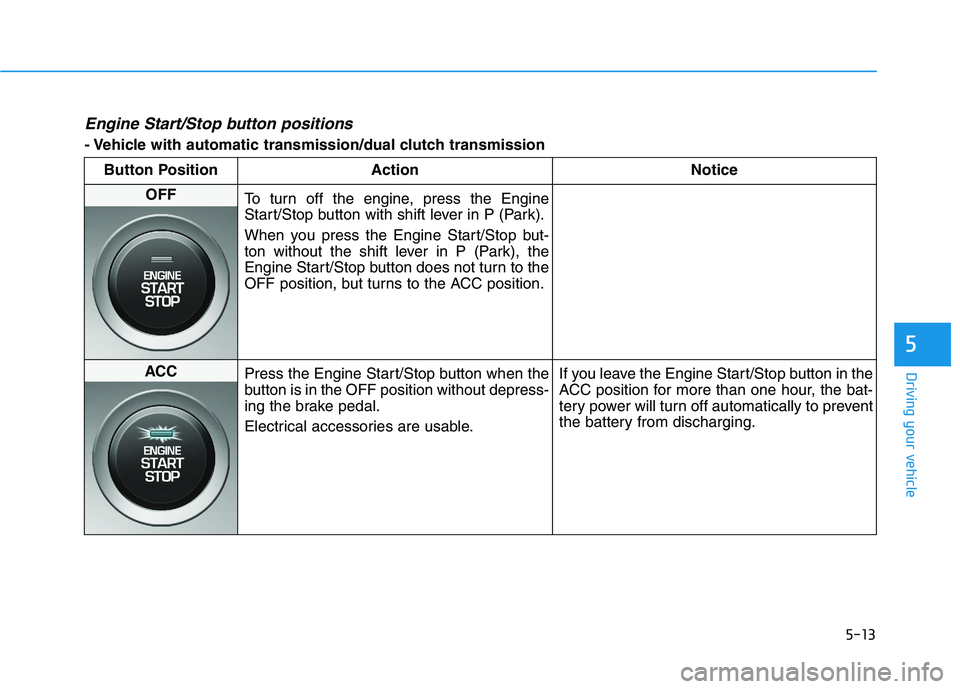
Engine Start/Stop button positions
- Vehicle with automatic transmission/dual clutch transmission
Button Position Action Notice
OFF
To turn off the engine, press the Engine
Start/Stop button with shift lever in P (Park).
When you press the Engine Start/Stop but-
ton without the shift lever in P (Park), the
Engine Start/Stop button does not turn to the
OFF position, but turns to the ACC position.
ACC
Press the Engine Start/Stop button when the
button is in the OFF position without depress-
ing the brake pedal.
Electrical accessories are usable.If you leave the Engine Start/Stop button in the
ACC position for more than one hour, the bat-
tery power will turn off automatically to prevent
the battery from discharging.
Page 230 of 482
5-14
Driving your vehicle
Button Position Action Notice
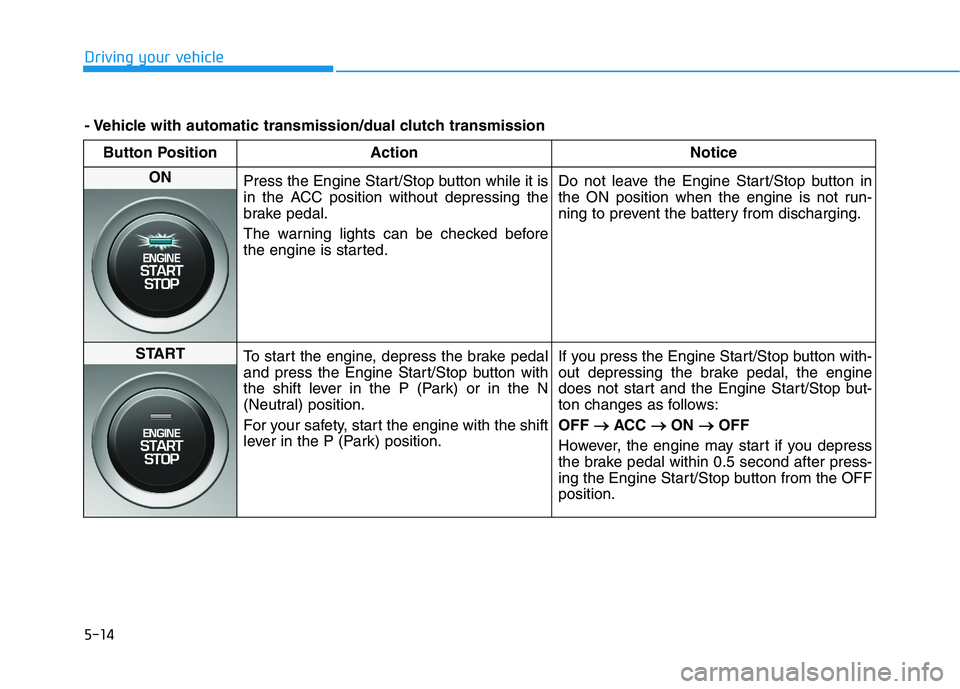
ON
Press the Engine Start/Stop button while it is
in the ACC position without depressing the
brake pedal.
The warning lights can be checked before
the engine is started.Do not leave the Engine Start/Stop button in
the ON position when the engine is not run-
ning to prevent the battery from discharging.
START
To start the engine, depress the brake pedal
and press the Engine Start/Stop button with
the shift lever in the P (Park) or in the N
(Neutral) position.
For your safety, start the engine with the shift
lever in the P (Park) position.If you press the Engine Start/Stop button with-
out depressing the brake pedal, the engine
does not start and the Engine Start/Stop but-
ton changes as follows:
OFF → →
ACC → →
ON → →
OFF
However, the engine may start if you depress
the brake pedal within 0.5 second after press-
ing the Engine Start/Stop button from the OFF
position.
- Vehicle with automatic transmission/dual clutch transmission
Page 231 of 482
5-15
Driving your vehicle
5
Starting the engine Information
• The engine will start by pressing the
Engine Start/Stop button, only when
the smart key is in the vehicle.
• Even if the smart key is in the vehi-
cle, if it is far away from the driver,
the engine may not start.
• When the Engine Start/Stop button
is in the ACC or ON position, if any
door is open, the system checks for
the smart key. If the smart key is not
in the vehicle, the " " indicator
will blink and the warning "Key not
in vehicle" will come on and if all
doors are closed, the chime will also
sound for about 5 seconds. Keep the
smart key in the vehicle when using
the ACC position or if the vehicle
engine is ON.Vehicle with manual transmission:
1. Always carry the smart key with
you.
2. Make sure the parking brake is
applied.
3. Make sure the shift lever is in neu-
tral.
4. Depress the clutch and brake ped-
als.
5. Press the Engine Start/Stop but-
ton.
Information
Depress the brake pedal and clutch
pedal until the engine starts.
Vehicle with automatic transmission/
dual clutch transmission:
1. Always carry the smart key with
you.
2. Make sure the parking brake is
applied.
3. Make sure the shift lever is in P
(Park).
4. Depress the brake pedal.
5. Press the Engine Start/Stop but-
ton.
i
i
Always wear appropriate shoes
when operating your vehicle.
Unsuitable shoes, such as
high heels, ski boots, sandals,
flip-flops, etc., may interfere
with your ability to use the
brake and accelerator pedals.
Do not start the vehicle with the
accelerator pedal depressed.
The vehicle can move and lead
to an accident.
Wait until the engine rpm is
normal. The vehicle may sud-
denly move if the brake pedal
is released when the rpm is
high.
WARNING
Page 232 of 482
5-16
Driving your vehicle
Information
• Do not wait for the engine to warm
up while the vehicle remains station-
ary. Start driving at moderate
engine speeds. (Aggressive accelerat-
ing and decelerating should be
avoided.)
• Always start the vehicle with your
foot on the brake pedal. Do not
depress the accelerator while start-
ing the vehicle. Do not rev the
engine while warming it up.
To prevent damage to the vehicle:
If the engine stalls while you are
in motion, do not attempt to
move the shift lever to the P
(Park) position.
If traffic and road conditions
permit, you may put the shift
lever in the N (Neutral) position
while the vehicle is still moving
and press the Engine Start/Stop
button in an attempt to restart
the engine.
Do not push or tow your vehicle
to start the engine.To prevent damage to the vehicle:
When the stop lamp switch fuse is
blown, you can't start the engine
normally. Replace the fuse with a
new one. If you are not able to
replace the fuse, you can start the
engine by pressing and holding
the Engine Start/Stop button for
10 seconds with the Engine Start/
Stop button in the ACC position.
Do not press the Engine Start/Stop
button for more than 10 seconds
except when the stop lamp switch
fuse is blown.
For your safety always depress
the brake pedal before starting the
engine.
Starting and stopping the engine
for turbocharger intercooler
1. Do not race or accelerate the
engine immediately after starting
the engine.
If the engine is cold, idle for sever-
al seconds before sufficient lubri-
cation is ensured in the tur-
bocharger.
2. After high speed or extended driv-
ing that requires heavy engine
load, idle the engine about 1
minute before turning the engine
off. This idle time will allow the tur-
bocharger to cool prior to shutting
the engine off.
Do not turn off the engine immedi-
ately after it has been subjected to
a heavy load. Doing so may cause
severe damage to the engine or
turbocharger.
NOTICE
NOTICE
NOTICE
i
Page 234 of 482
5-18
Manual Transmission
Operation
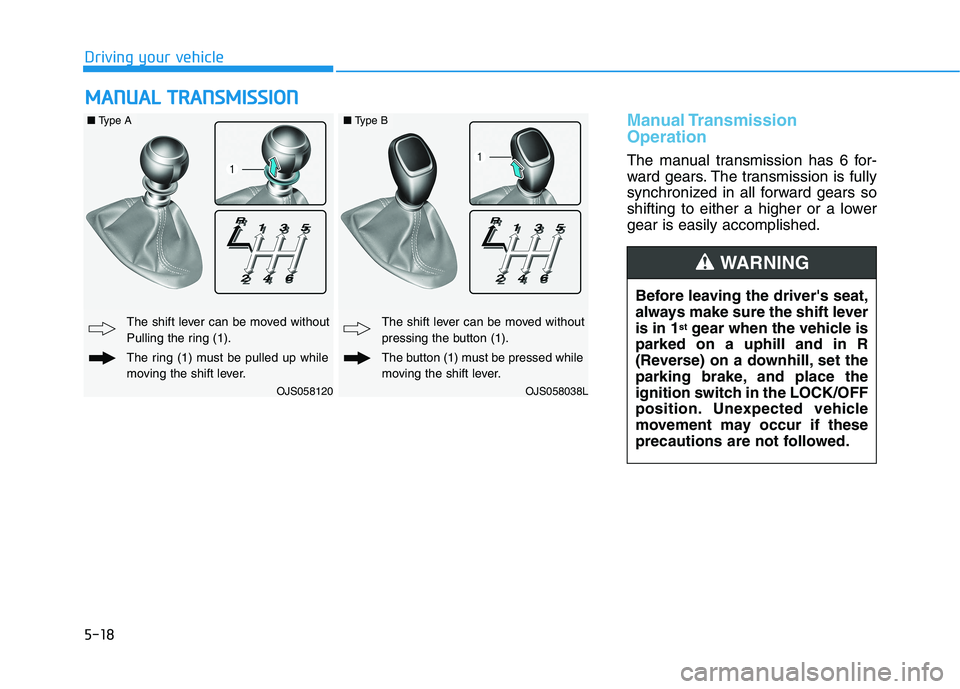
The manual transmission has 6 for-
ward gears. The transmission is fully
synchronized in all forward gears so
shifting to either a higher or a lower
gear is easily accomplished.
M MA
AN
NU
UA
AL
L
T
TR
RA
AN
NS
SM
MI
IS
SS
SI
IO
ON
N
Driving your vehicle
Before leaving the driver's seat,
always make sure the shift lever
is in 1
stgear when the vehicle is
parked on a uphill and in R
(Reverse) on a downhill, set the
parking brake, and place the
ignition switch in the LOCK/OFF
position. Unexpected vehicle
movement may occur if these
precautions are not followed.
WARNING
OJS058120
The shift lever can be moved without
Pulling the ring (1).
The ring (1) must be pulled up while
moving the shift lever.
OJS058038L
The shift lever can be moved without
pressing the button (1).
The button (1) must be pressed while
moving the shift lever.
■Type A■Type B
Page 236 of 482
5-20
Downshifting
Down shift to a lower gear when
slowing down in heavy traffic or driv-
ing up a steep hill to prevent high
engine loads.
Also, downshifting reduces the
chance of stalling and helps reaccel-
erate the vehicle when you need to
increase your speed.
When the vehicle is going downhill,
downshifting helps maintain safe
speed by providing engine braking
(brake power from the engine) and
results in less wear on the brakes.To prevent damage to the engine,
clutch and transmission:
When downshifting from 5
th
gear to 4thgear, be careful not to
inadvertently push the shift
lever sideways engaging the 2
nd
gear. A drastic downshift may
cause the engine speed to
increase to the point the
tachometer will enter the red-
zone and may cause engine
damage.
Do not downshift more than two
gear at a time or downshift the
gear when the engine is running
at high speed (5,000 RPM or
higher).
Such down shifting may damage
the engine, clutch and the trans-
mission.
Good Driving Practices
Never take the vehicle out of gear
and coast down a hill. This is
extremely dangerous.
Don't "ride" the brakes. This can
cause the brakes and related parts
to overheat and malfunction.
When you are driving down a long
hill, slow down and shift to a lower
gear. Engine braking will help slow
down the vehicle.
Slow down before shifting to a
lower gear. This will help avoid
over-revving the engine, which can
cause damage.
Slow down when you encounter
cross winds. This gives you much
better control of your vehicle.
Be sure the vehicle is completely
stopped before you shift into R
(Reverse) to prevent damage to
the transmission.
NOTICE
Driving your vehicle
Page 238 of 482
5-22
A AU
UT
TO
OM
MA
AT
TI
IC
C
T
TR
RA
AN
NS
SM
MI
IS
SS
SI
IO
ON
N
Driving your vehicle
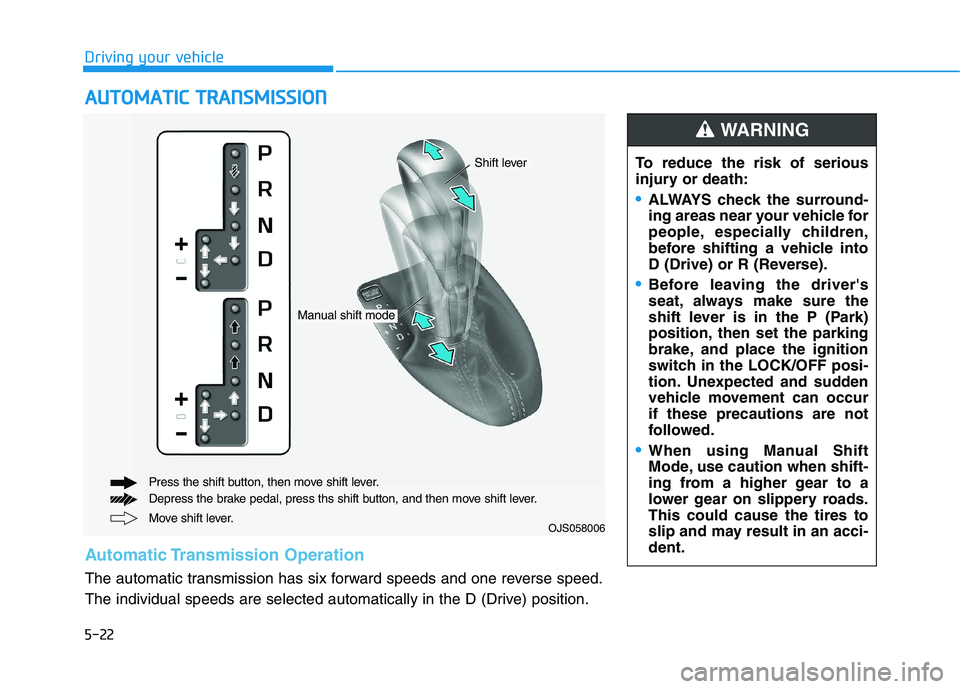
Move shift lever. Press the shift button, then move shift lever.
Depress the brake pedal, press ths shift button, and then move shift lever.OJS058006
Automatic Transmission Operation
The automatic transmission has six forward speeds and one reverse speed.
The individual speeds are selected automatically in the D (Drive) position.To reduce the risk of serious
injury or death:
ALWAYS check the surround-
ing areas near your vehicle for
people, especially children,
before shifting a vehicle into
D (Drive) or R (Reverse).
Before leaving the driver's
seat, always make sure the
shift lever is in the P (Park)
position, then set the parking
brake, and place the ignition
switch in the LOCK/OFF posi-
tion. Unexpected and sudden
vehicle movement can occur
if these precautions are not
followed.
When using Manual Shift
Mode, use caution when shift-
ing from a higher gear to a
lower gear on slippery roads.
This could cause the tires to
slip and may result in an acci-
dent.
WARNING
Manual shift mode
Shift lever
Page 239 of 482
5-23
Driving your vehicle
5
Transmission ranges
The indicator in the instrument clus-
ter displays the shift lever position
when the ignition switch is in the ON
position.
P (Park)
Always come to a complete stop
before shifting into P (Park).
To shift from P (Park), you must
depress firmly on the brake pedal
and make sure your foot is off the
accelerator pedal.
If you have done all of the above and
still cannot shift the lever out of P
(Park), see "Shift-Lock Release" in
this section.
The shift lever must be in P (Park)
before turning the engine off.
R (Reverse)
Use this position to drive the vehicle
backward.
Always come to a complete stop
before shifting into or out of R
(Reverse); you may damage the
transmission if you shift into R
(Reverse) while the vehicle is in
motion.
N (Neutral)
The wheels and transmission are not
engaged.
Use N (Neutral) if you need to restart
a stalled engine.
Shift into P (Park) if you need to
leave your vehicle for any reason.
Always depress the brake pedal
when you are shifting from N
(Neutral) to another gear.
NOTICE
Shifting into P (Park) while the
vehicle is in motion may
cause you to lose control of
the vehicle.
After the vehicle has stopped,
always make sure the shift
lever is in P (Park), apply the
parking brake, and turn the
engine off.
When parking on an incline,
place the shift lever in P (Park)
and apply the parking brake to
prevent the vehicle from
rolling downhill.
WARNING
Page 240 of 482
5-24
Driving your vehicle
D (Drive)
This is the normal driving position.
The transmission will automatically
shift through a six-gear sequence,
providing the best fuel economy and
power.
For extra power when passing anoth-
er vehicle or driving uphill depress
the accelerator pedal further until
you feel the transmission downshift
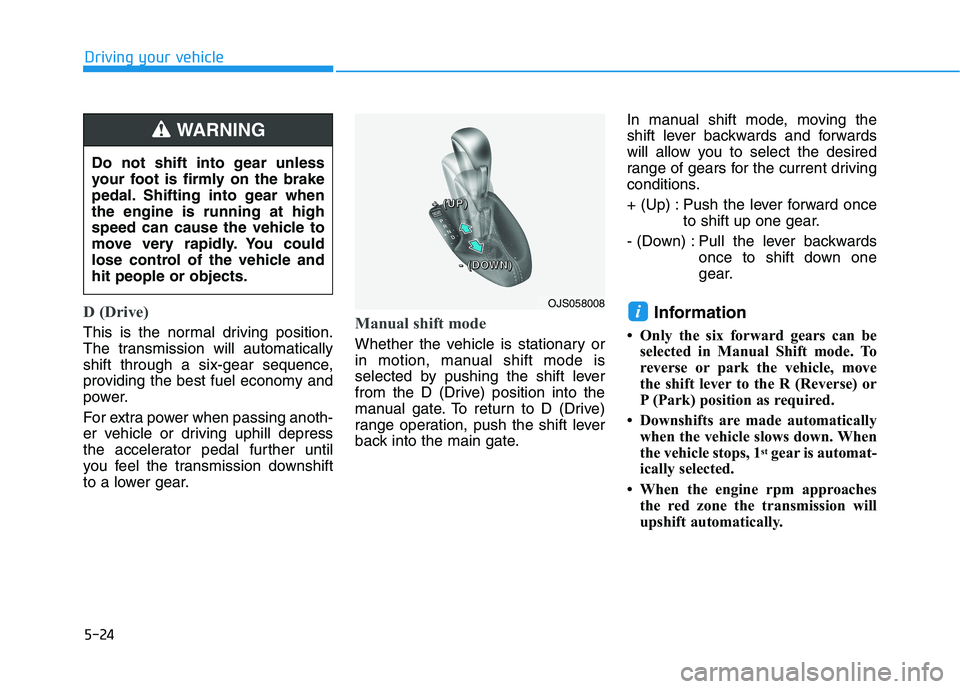
to a lower gear.Manual shift mode
Whether the vehicle is stationary or
in motion, manual shift mode is
selected by pushing the shift lever
from the D (Drive) position into the
manual gate. To return to D (Drive)
range operation, push the shift lever
back into the main gate.In manual shift mode, moving the
shift lever backwards and forwards
will allow you to select the desired
range of gears for the current driving
conditions.
+ (Up) : Push the lever forward once
to shift up one gear.
- (Down) : Pull the lever backwards
once to shift down one
gear.
Information
• Only the six forward gears can be
selected in Manual Shift mode. To
reverse or park the vehicle, move
the shift lever to the R (Reverse) or
P (Park) position as required.
• Downshifts are made automatically
when the vehicle slows down. When
the vehicle stops, 1
stgear is automat-
ically selected.
• When the engine rpm approaches
the red zone the transmission will
upshift automatically.
i
Do not shift into gear unless
your foot is firmly on the brake
pedal. Shifting into gear when
the engine is running at high
speed can cause the vehicle to
move very rapidly. You could
lose control of the vehicle and
hit people or objects.
WARNING
OJS058008
+ + + +
( ( ( (
U U U U
P P P P
) ) ) )
- - - -
( ( ( (
D D D D
O O O O
W W W W
N N N N
) ) ) )
Page 241 of 482
5-25
Driving your vehicle
5
• If the driver presses the lever to
+ (Up) or - (Down) position, the
transmission may not make the
requested gear change if the next
gear is outside of the allowable
engine rpm range. The driver must
execute upshifts in accordance with
road conditions, taking care to keep
the engine rpms below the red zone.
• When accelerating from a stop on a
slippery road, push the shift lever
forward into the + (Up) position.
This allows the transmission to shift
into the 2
ndgear which is better for
smooth driving on a slippery road.
Push the shift lever to the - (Down)
side to shift back to the 1
stgear.
• When driving in Manual Shift
Mode, slow down before shifting to
a lower gear. Otherwise, the lower
gear may not be engaged if the
engine rpms are outside of the
allowable range.
Shift-lock system
For your safety, the automatic trans-
mission has a shift-lock system
which prevents shifting the transmis-
sion from P (Park) into R (Reverse)
unless the brake pedal is depressed.
To shift the transmission from P
(Park) into R (Reverse):
1. Depress and hold the brake pedal.
2. Start the engine or place the igni-
tion switch in the ON position.
3. Move the shift lever.
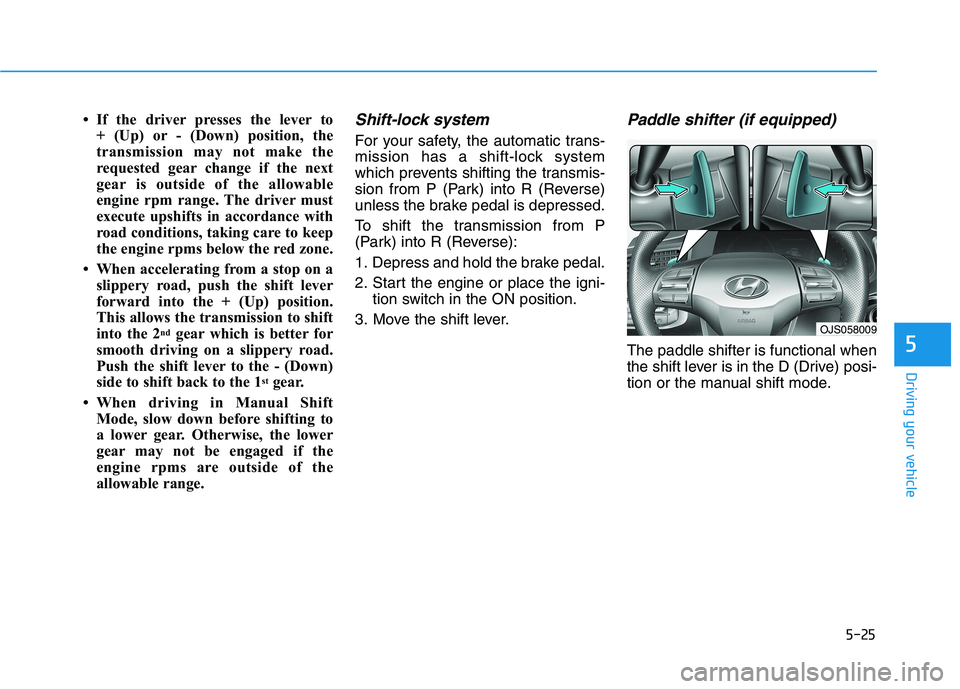
Paddle shifter (if equipped)
The paddle shifter is functional when
the shift lever is in the D (Drive) posi-
tion or the manual shift mode.
OJS058009