tires HYUNDAI VELOSTER 2021 Owners Manual
[x] Cancel search | Manufacturer: HYUNDAI, Model Year: 2021, Model line: VELOSTER, Model: HYUNDAI VELOSTER 2021Pages: 482, PDF Size: 37.54 MB
Page 15 of 482
1-2
E EX
XT
TE
ER
RI
IO
OR
R
O
OV
VE
ER
RV
VI
IE
EW
W
Your vehicle at a glance
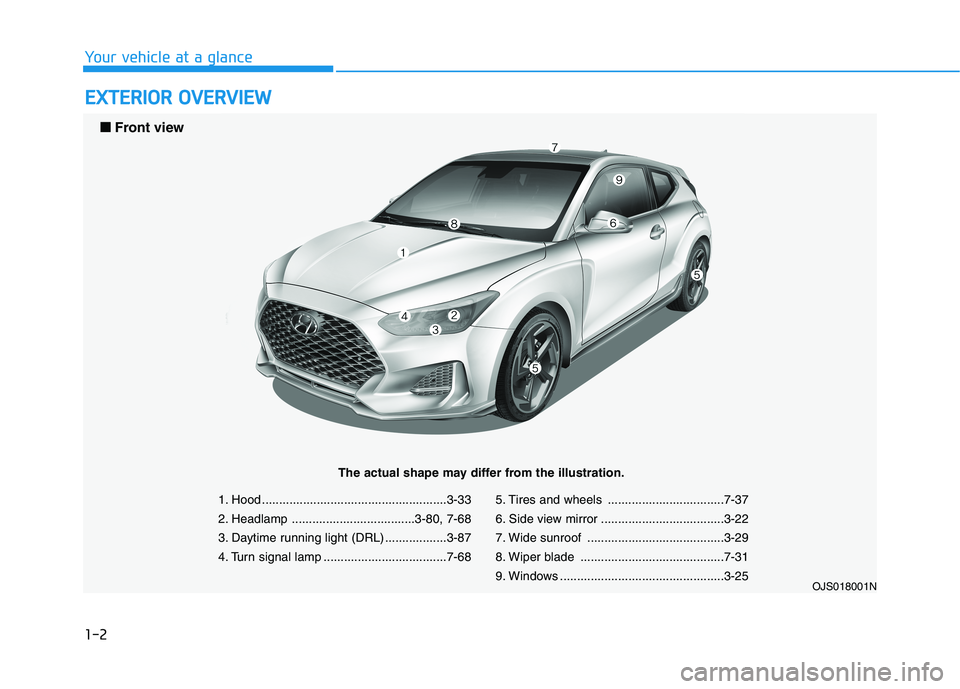
1. Hood ......................................................3-33
2. Headlamp ....................................3-80, 7-68
3. Daytime running light (DRL) ..................3-87
4. Turn signal lamp ....................................7-685. Tires and wheels ..................................7-37
6. Side view mirror ....................................3-22
7. Wide sunroof ........................................3-29
8. Wiper blade ..........................................7-31
9. Windows ................................................3-25
OJS018001N
■ ■
Front view
The actual shape may differ from the illustration.
Page 132 of 482
3-50
Convenient features of your vehicle
Low Fuel Level
Warning Light
This warning light illuminates:
When the fuel tank is nearly empty.
Add fuel as soon as possible.
Driving with the Low Fuel Level
warning light on or with the fuel
level below "E" can cause the
engine to misfire and damage the
catalytic converter.
Master Warning Light
This warning light illuminates:
When there is a malfunction in
operation in any of the following
systems:
- Low washer fluid
- Exterior lamp malfunction
(if equipped)
- Blind-Spot Collision Warning
(BCW) malfunction (if equipped)
- Tire Pressure Monitoring System
(TPMS)
To identify the details of the warn-
ing, look at the LCD display.
Low Tire Pressure
Warning Light
This warning light illuminates:
When you place the ignition switch
ON position.
- It illuminates for approximately 3
seconds and then goes off.
When one or more of your tires are
significantly underinflated. (The
location of the underinflated tires
are displayed on the LCD display.)
For more details, refer to "Tire
Pressure Monitoring System
(TPMS)" in chapter 6.
NOTICE
Page 220 of 482
5-4
Driving your vehicle
Before Entering the Vehicle
• Be sure all windows, outside mir-
ror(s), and outside lights are clean
and unobstructed.
Remove frost, snow, or ice.
Visually check the tires for uneven
wear and damage.
Check under the vehicle for any
sign of leaks.
Be sure there are no obstacles
behind you if you intend to back up.
Before Starting
Make sure the hood, the liftgate,
and the doors are securely closed
and locked.
Adjust the position of the seat and
steering wheel.
Adjust the inside and outside
rearview mirrors.
Verify all the lights work.
Fasten your seatbelt. Check that all
passengers have fastened their
seatbelts.
Check the gauges and indicators in
the instrument panel and the mes-
sages on the instrument display
when the ignition switch is in the
ON position.
Check that any items you are car-
rying are stored properly or fas-
tened down securely. CALIFORNIA PROPOSITION 65
WARNING
Engine exhaust and a wide vari-
ety of automobile components
including components found in
the interior furnishings in a
vehicle, contain or emit harmful
chemicals known to the State of
California to cause cancer and
birth defects and reproductive
harm. In addition, certain fluids
contained in vehicles and cer-
tain products of components
contain or emit chemicals
known to the State of California
to cause cancer and birth
defects or other reproductive
harm.WARNING
B BE
EF
FO
OR
RE
E
D
DR
RI
IV
VI
IN
NG
G
Page 237 of 482
5-21
Driving your vehicle
Exercise extreme caution when
driving on a slippery surface. Be
especially careful when braking,
accelerating or shifting gears. On a
slippery surface, an abrupt change
in vehicle speed can cause the
drive wheels to lose traction and
may cause loss of vehicle control
resulting in an accident.
5
Do not use aggressive engine
braking (shifting from a higher
gear to a lower gear) on slip-
pery roads. This could cause
the tires to slip and may result
in an accident.
WARNING
Avoid high speeds when cor-
nering or turning.
Do not make quick steering
wheel movements, such as
sharp lane changes or fast,
sharp turns.
The risk of rollover is greatly
increased if you lose control
of your vehicle at highway
speeds.
Loss of control often occurs if
two or more wheels drop off
the roadway and the driver
over steers to reenter the
roadway.
In the event your vehicle
leaves the roadway, do not
steer sharply. Instead, slow
down before pulling back into
the travel lanes.
HYUNDAI recommends you
follow all posted speed limits.To reduce the risk of SERIOUS
INJURY or DEATH:
ALWAYS wear your seatbelt.
In a collision, an unbelted
occupant is significantly more
likely to be seriously injured
or killed than a properly belt-
ed occupant.
WARNING
Page 238 of 482
5-22
A AU
UT
TO
OM
MA
AT
TI
IC
C
T
TR
RA
AN
NS
SM
MI
IS
SS
SI
IO
ON
N
Driving your vehicle
Move shift lever. Press the shift button, then move shift lever.
Depress the brake pedal, press ths shift button, and then move shift lever.OJS058006
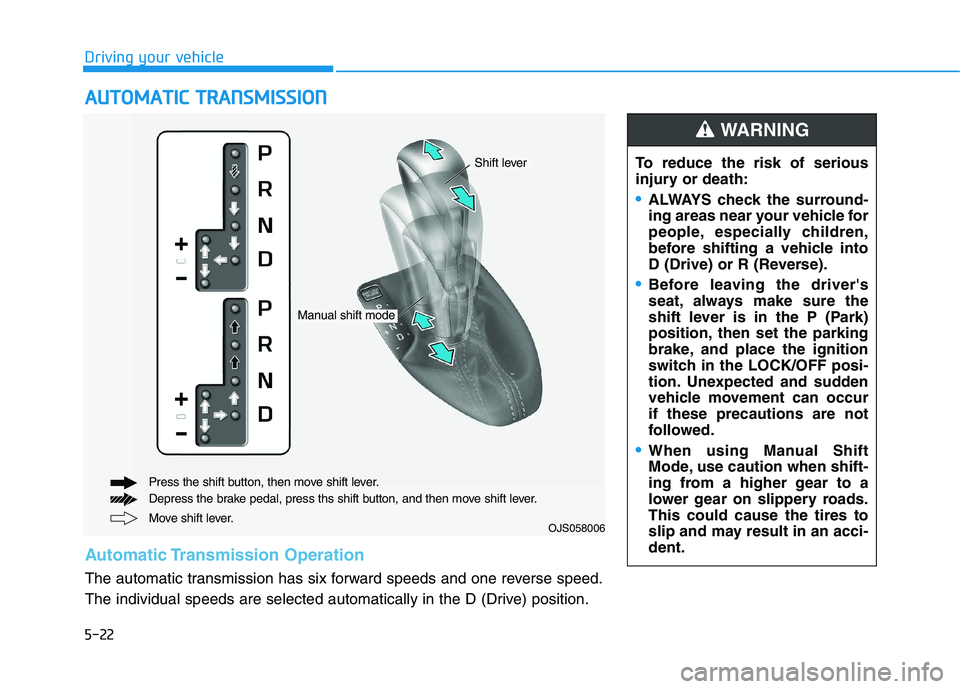
Automatic Transmission Operation
The automatic transmission has six forward speeds and one reverse speed.
The individual speeds are selected automatically in the D (Drive) position.To reduce the risk of serious
injury or death:
ALWAYS check the surround-
ing areas near your vehicle for
people, especially children,
before shifting a vehicle into
D (Drive) or R (Reverse).
Before leaving the driver's
seat, always make sure the
shift lever is in the P (Park)
position, then set the parking
brake, and place the ignition
switch in the LOCK/OFF posi-
tion. Unexpected and sudden
vehicle movement can occur
if these precautions are not
followed.
When using Manual Shift
Mode, use caution when shift-
ing from a higher gear to a
lower gear on slippery roads.
This could cause the tires to
slip and may result in an acci-
dent.
WARNING
Manual shift mode
Shift lever
Page 246 of 482
5-30
Driving your vehicle
The dual clutch transmission
adopts a dry-type dual clutch,
which is different from the torque
converter of the automatic trans-
mission. It shows better accelera-
tion performance and increased
fuel efficiency while driving but ini-
tial launch might be little bit slower
than the automatic transmission.
As a result, gear shifts are some-
times more noticeable than a con-
ventional automatic transmission
and a light vibration during launch-
ing can be felt as the transmission
speed is matched with the engine
speed. This is a normal condition of
the dual clutch transmission.
The dry-type clutch transfers
torque more directly and provides
a direct-drive feeling which may
feel different from a conventional
automatic transmission with a
torque converter. This may be
more noticeable when launching
the vehicle from a stop or when
traveling at low, stop-and-go vehi-
cle speeds.
When rapidly accelerating at a low
vehicle speed, the engine rpm may
increase highly depending on the
vehicle's driving condition. For a smooth uphill launch,
depress the accelerator pedal
smoothly depending on the current
conditions.
If you release your foot from the
accelerator pedal at low vehicle
speed, you may feel strong engine
braking, which is similar to manual
transmission.
When driving downhill, you may
use Sports Mode or press the pad-
dle shifters (if equipped) to down-
shift to a lower gear in order to con-
trol your speed without using the
brake pedal excessively.
When you turn the engine on and
off, you may hear clicking sounds
as the system goes through a self-
test. This is a normal sound for the
dual clutch transmission.
During the first 1000 miles, you
may feel that the vehicle may not
be smooth when accelerating at
low speed. During this break-in
period, the shift quality and per-
formance of your new vehicle is
continuously optimized.To reduce the risk of serious
injury or death:
ALWAYS check the surround-
ing areas near your vehicle for
people, especially children,
before shifting a vehicle into
D (Drive) or R (Reverse).
Before leaving the driver's
seat, always make sure the
shift lever is in the P (Park)
position, then set the parking
brake, and place the ignition
switch in the LOCK/OFF posi-
tion. Unexpected and sudden
vehicle movement can occur
if these precautions are not
followed.
Do not use aggressive engine
braking (shifting from a high-
er gear to a lower gear) on
slippery roads. This could
cause the tires to slip and may
result in an accident.
WARNING
Page 262 of 482
5-46
Driving your vehicle
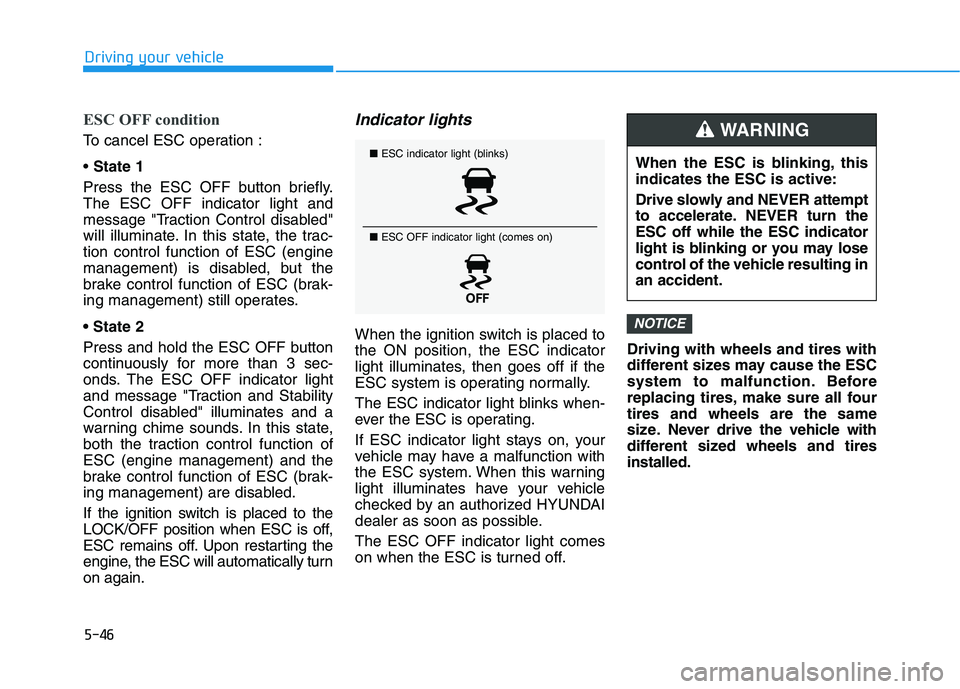
ESC OFF condition
To cancel ESC operation :
State 1
Press the ESC OFF button briefly.
The ESC OFF indicator light and
message "Traction Control disabled"
will illuminate. In this state, the trac-
tion control function of ESC (engine
management) is disabled, but the
brake control function of ESC (brak-
ing management) still operates.
Press and hold the ESC OFF button
continuously for more than 3 sec-
onds. The ESC OFF indicator light
and message "Traction and Stability
Control disabled" illuminates and a
warning chime sounds. In this state,
both the traction control function of
ESC (engine management) and the
brake control function of ESC (brak-
ing management) are disabled.
If the ignition switch is placed to the
LOCK/OFF position when ESC is off,
ESC remains off. Upon restarting the
engine, the ESC will automatically turn
on again.
Indicator lights
When the ignition switch is placed to
the ON position, the ESC indicator
light illuminates, then goes off if the
ESC system is operating normally.
The ESC indicator light blinks when-
ever the ESC is operating.
If ESC indicator light stays on, your
vehicle may have a malfunction with
the ESC system. When this warning
light illuminates have your vehicle
checked by an authorized HYUNDAI
dealer as soon as possible.
The ESC OFF indicator light comes
on when the ESC is turned off.Driving with wheels and tires with
different sizes may cause the ESC
system to malfunction. Before
replacing tires, make sure all four
tires and wheels are the same
size. Never drive the vehicle with
different sized wheels and tires
installed.NOTICE
■ESC indicator light (blinks)
■ ESC OFF indicator light (comes on)When the ESC is blinking, this
indicates the ESC is active:
Drive slowly and NEVER attempt
to accelerate. NEVER turn the
ESC off while the ESC indicator
light is blinking or you may lose
control of the vehicle resulting in
an accident.
WARNING
Page 263 of 482
5-47
Driving your vehicle
5
ESC OFF usage
When Driving
The ESC OFF mode should only be
used briefly to help free the vehicle if
stuck in snow or mud by temporarily
stopping operation of the ESC to
maintain wheel torque.
To turn ESC off while driving, press
the ESC OFF button while driving on
a flat road surface.To prevent damage to the trans-
mission:
Do not allow wheel(s) of one
axle to spin excessively while
the ESC, ABS, and parking brake
warning lights are displayed.
The repairs would not be cov-
ered by the vehicle warranty.
Reduce engine power and do
not spin the wheel(s) excessive-
ly while these lights are dis-
played.
When operating the vehicle on a
dynamometer, make sure the
ESC is turned off (ESC OFF light
illuminated).
Information
Turning the ESC off does not affect ABS
or standard brake system operation.
Vehicle Stability Management
(VSM)
The Vehicle Stability Management
(VSM) is a function of the Electronic
Stability Control (ESC) system. It
helps ensure the vehicle stays stable
when accelerating or braking sud-
denly on wet, slippery and rough
roads where traction over the four
tires can suddenly become uneven.
i
NOTICE
Take the following precautions
when using the Vehicle Stability
Management (VSM):
ALWAYS check the speed and
the distance to the vehicle
ahead. The VSM is not a sub-
stitute for safe driving prac-
tices.
Never drive too fast for the
road conditions. The VSM sys-
tem will not prevent acci-
dents. Excessive speed in bad
weather, slippery and uneven
roads can result in severe
accidents.
WARNING
Page 264 of 482
5-48
Driving your vehicle
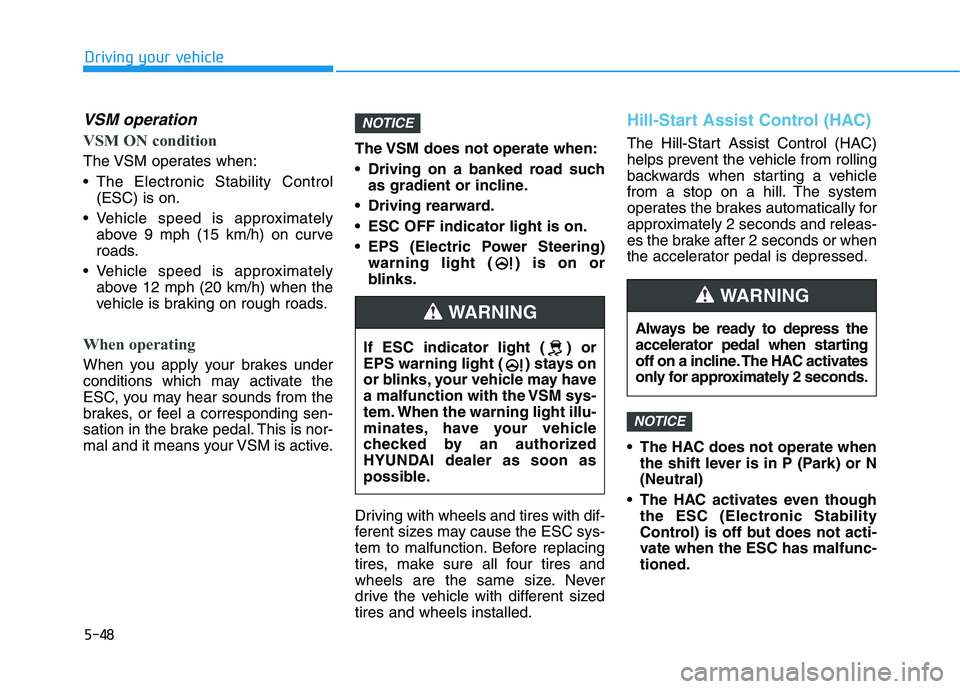
VSM operation
VSM ON condition
The VSM operates when:
The Electronic Stability Control
(ESC) is on.
Vehicle speed is approximately
above 9 mph (15 km/h) on curve
roads.
Vehicle speed is approximately
above 12 mph (20 km/h) when the
vehicle is braking on rough roads.
When operating
When you apply your brakes under
conditions which may activate the
ESC, you may hear sounds from the
brakes, or feel a corresponding sen-
sation in the brake pedal. This is nor-
mal and it means your VSM is active.The VSM does not operate when:
Driving on a banked road such
as gradient or incline.
Driving rearward.
ESC OFF indicator light is on.
EPS (Electric Power Steering)
warning light ( ) is on or
blinks.
Driving with wheels and tires with dif-
ferent sizes may cause the ESC sys-
tem to malfunction. Before replacing
tires, make sure all four tires and
wheels are the same size. Never
drive the vehicle with different sized
tires and wheels installed.
Hill-Start Assist Control (HAC)
The Hill-Start Assist Control (HAC)
helps prevent the vehicle from rolling
backwards when starting a vehicle
from a stop on a hill. The system
operates the brakes automatically for
approximately 2 seconds and releas-
es the brake after 2 seconds or when
the accelerator pedal is depressed.
The HAC does not operate when
the shift lever is in P (Park) or N
(Neutral)
The HAC activates even though
the ESC (Electronic Stability
Control) is off but does not acti-
vate when the ESC has malfunc-
tioned.
NOTICE
NOTICE
If ESC indicator light ( ) or
EPS warning light ( ) stays on
or blinks, your vehicle may have
a malfunction with the VSM sys-
tem. When the warning light illu-
minates, have your vehicle
checked by an authorized
HYUNDAI dealer as soon as
possible.
WARNING Always be ready to depress the
accelerator pedal when starting
off on a incline. The HAC activates
only for approximately 2 seconds.
WARNING
Page 335 of 482
5-119
Driving your vehicle
5
Information
The Smart Cruise Control system
may not operate temporarily due to:
• Electrical interference
• Modifying the suspension
• Differences of tire abrasion or tire
pressure
• Installing different type of tires
Information
This device complies with Part 15 of
the FCC rules.
Operation is subject to the following
three conditions:
1. This device may not cause harmful
interference, and
2. This device must accept any interfer-
ence received, including interference
that may cause undesired operation.
3. Changes or modifications not
expressly approved by the party
responsible for compliance could
void the user's authority to operate
the device.
Information
Radio frequency radiation exposure
information:
This equipment complies with FCC
radiation exposure limits set forth for
an uncontrolled environment.
This equipment should be installed
and operated with minimum distance
of 8 in. (20 cm) between the radiator
(antenna) and your body.
This transmitter must not be co-locat-
ed or operating in conjunction with
any other antenna or transmitter.
i
i
i
Keep a safe distance accord-
ing to road conditions and
vehicle speed. If the vehicle to
vehicle distance is too close
during a high-speed driving, a
serious collision may result.
Always maintain sufficient
braking distance and deceler-
ate your vehicle by applying
the brakes if necessary.
The Smart Cruise Control sys-
tem cannot recognize a
stopped vehicle, pedestrians or
an oncoming vehicle. Always
look ahead cautiously to pre-
vent unexpected and sudden
situations from occurring.
Vehicles moving in front of
you with a frequent lane
change may cause a delay in
the system's reaction or may
cause the system to react to a
vehicle actually in an adjacent
lane. Always drive cautiously
to prevent unexpected and
sudden situations from occur-
ring.
Always be aware of the select-
ed speed and vehicle to vehi-
cle distance. The driver
should not solely rely on the
system but always pay atten-
tion to driving conditions and
control your vehicle speed.
The Smart Cruise Control sys-
tem may not recognize com-
plex driving situations so
always pay attention to driv-
ing conditions and control
your vehicle speed.