infotainment HYUNDAI VELOSTER 2022 User Guide
[x] Cancel search | Manufacturer: HYUNDAI, Model Year: 2022, Model line: VELOSTER, Model: HYUNDAI VELOSTER 2022Pages: 446, PDF Size: 7.37 MB
Page 254 of 446
5-60
Driving your vehicle
Shift Indicator
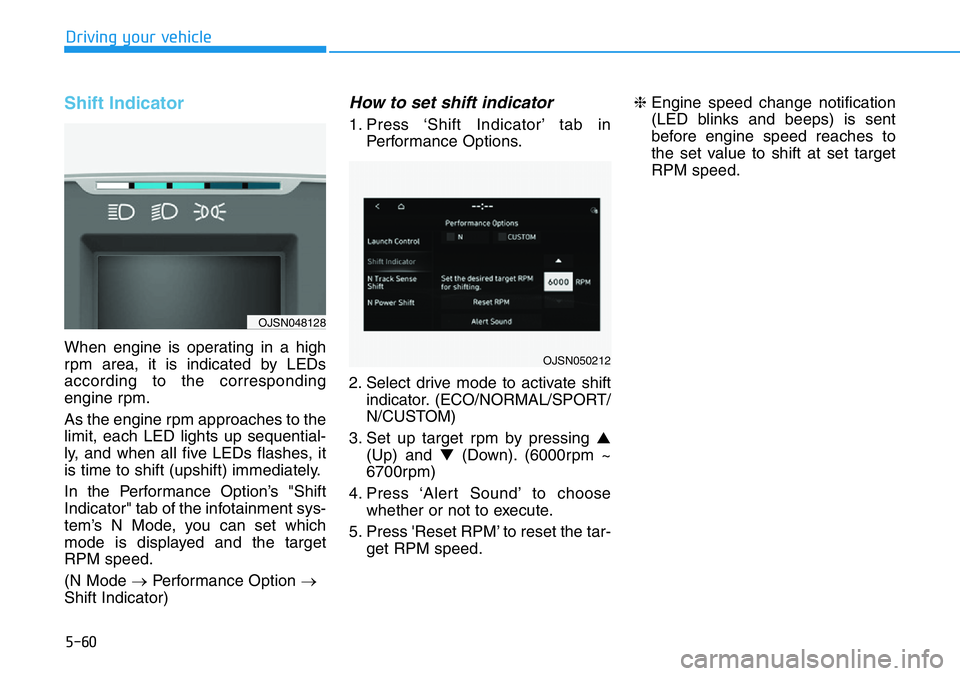
When engine is operating in a high
rpm area, it is indicated by LEDs
according to the corresponding
engine rpm.
As the engine rpm approaches to the
limit, each LED lights up sequential-
ly, and when all five LEDs flashes, it
is time to shift (upshift) immediately.
In the Performance Option’s "Shift
Indicator" tab of the infotainment sys-
tem’s N Mode, you can set which
mode is displayed and the target
RPM speed.
(N Mode →Performance Option →
Shift Indicator)
How to set shift indicator
1. Press ‘Shift Indicator’ tab in
Performance Options.
2. Select drive mode to activate shift
indicator. (ECO/NORMAL/SPORT/
N/CUSTOM)
3. Set up target rpm by pressing ▲
(Up) and ▼(Down). (6000rpm ~
6700rpm)
4. Press ‘Alert Sound’ to choose
whether or not to execute.
5. Press 'Reset RPM’ to reset the tar-
get RPM speed.❈Engine speed change notification
(LED blinks and beeps) is sent
before engine speed reaches to
the set value to shift at set target
RPM speed.
OJSN050212
OJSN048128
Page 255 of 446
5-61
Driving your vehicle
5
Shift Indicator operation table
(For Dual Clutch Transmission)
Blinking of all 5 LEDs, works only in
the fixed shift mode where manual
upshift is required.
N Track Sense Shift (For Dual
Clutch Transmission)
N Track Sense Shift is automatically
activated when dynamic driving con-
dition with lots of cornering maneu-
ver is detected. (i.e. Race track driv-
ing).
The program enables stress-free
track driving by automatically shifting
down at the entry of corner and
maintains lower gear during corner-
ing as if you are shifting manually in
professional manner. N Track Sense
Shift provides lower gear when level
of driving aggression increases.
How to set N Track Sense Shift
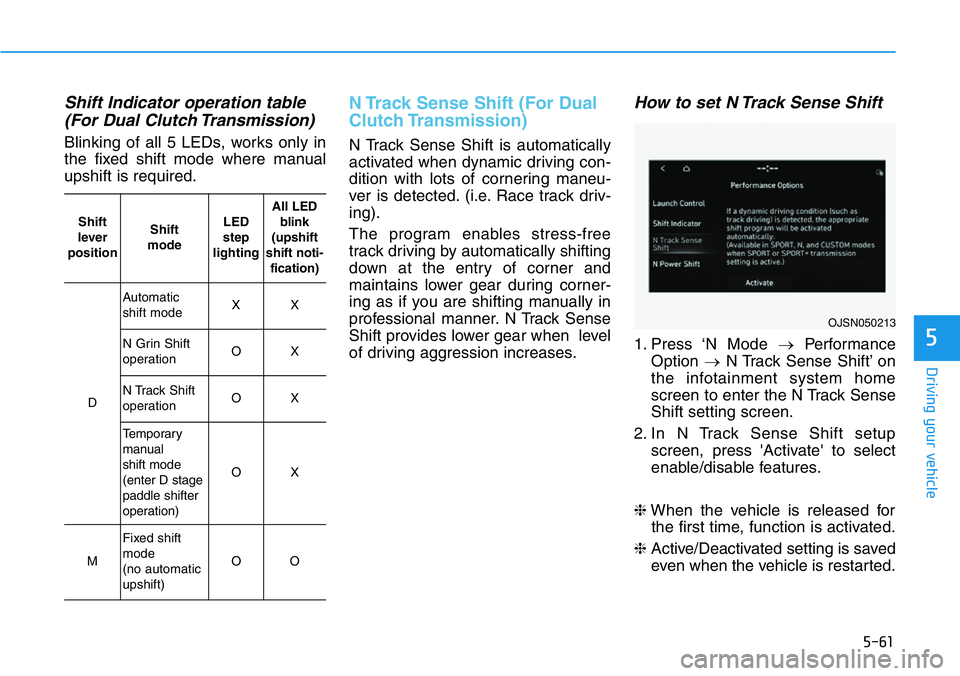
1. Press ‘N Mode →Performance
Option →N Track Sense Shift’ on
the infotainment system home
screen to enter the N Track Sense
Shift setting screen.
2. In N Track Sense Shift setup
screen, press 'Activate' to select
enable/disable features.
❈When the vehicle is released for
the first time, function is activated.
❈Active/Deactivated setting is saved
even when the vehicle is restarted.
OJSN050213
Shift
lever
positionShift
modeLED
step
lightingAll LED
blink
(upshift
shift noti-
fication)
D
Automatic
shift modeXX
N Grin Shift
operationOX
N Track Shift
operationOX
Temporary
manual
shift mode
(enter D stage
paddle shifter
operation)
OX
M
Fixed shift
mode
(no automatic
upshift)
OO
Page 309 of 446
5-115
Driving your vehicle
5
Collision Warning
• To warn the driver of an approach-
ing vehicle from the rear left/right
side of your vehicle, the side view
mirror will blink and a warning will
appear on the cluster. At the same
time, an audible warning will
sound. If the Rear View Monitor is
operating, a warning will also
appear on the infotainment system
screen.• The system will operate when all
the following conditions are satis-
fied:
- The gear is shifted to R (Reverse)
- Vehicle speed is below 5 mph (8
km/h)
- The approaching vehicle is within
approximately 82 ft. (25 m) from
the left and right side of your vehi-
cle
- The speed of the vehicle
approaching from the left and
right is above 3 mph (5 km/h)
Information
If the operating conditions are satis-
fied, there will be a warning whenever
the vehicle approaches from the left or
right side even though your vehicle
speed is 0 mph (0 km/h).
i
Take the following precautions
when using Rear Cross-Traffic
Safety system:
•For your safety, change the
Settings after parking the
vehicle at a safe location.
•If any other system’s warning
message is displayed or audi-
ble warning is generated,
Rear Cross-Traffic Safety sys-
tem’s warning message may
not be displayed and audible
warning may not be generat-
ed.
•You may not hear the warning
sound of Rear Cross-Traffic
Safety system if the surround-
ing is noisy.
•Rear Cross-Traffic Safety sys-
tem may warn the driver late
or may not warn the driver
depending on the road and
driving conditions.
WARNING