ECO mode HYUNDAI VELOSTER 2022 Owner's Manual
[x] Cancel search | Manufacturer: HYUNDAI, Model Year: 2022, Model line: VELOSTER, Model: HYUNDAI VELOSTER 2022Pages: 446, PDF Size: 7.37 MB
Page 193 of 446
4-3
Infotainment System
4
Steering Wheel Audio Control
Do not operate multiple audio
remote control buttons simultane-
ously.
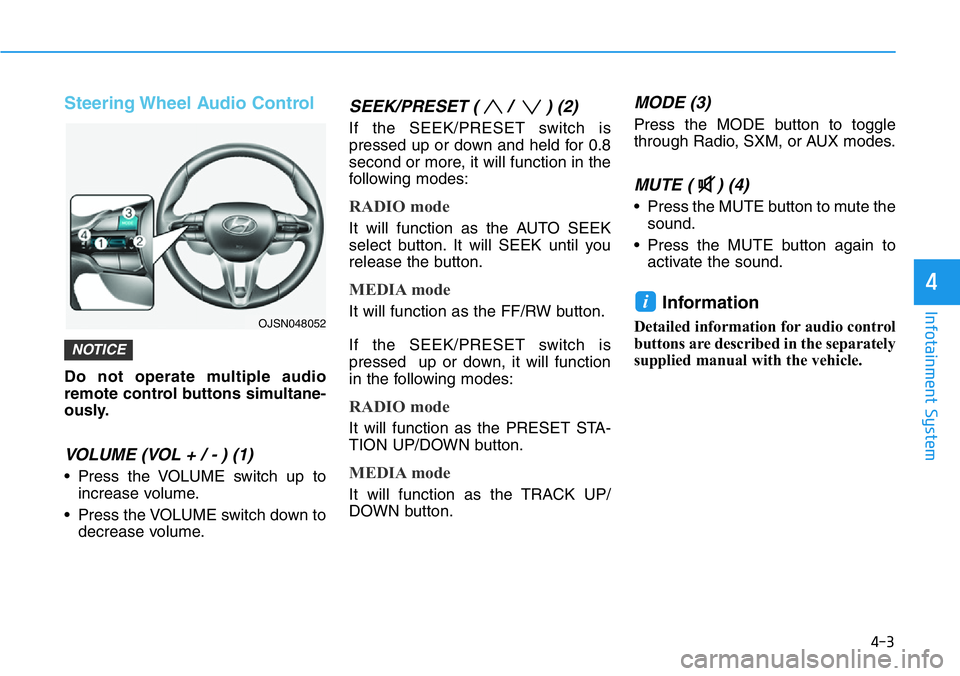
VOLUME (VOL + / - ) (1)
• Press the VOLUME switch up to
increase volume.
• Press the VOLUME switch down to
decrease volume.
SEEK/PRESET ( / ) (2)
If the SEEK/PRESET switch is
pressed up or down and held for 0.8
second or more, it will function in the
following modes:
RADIO mode
It will function as the AUTO SEEK
select button. It will SEEK until you
release the button.
MEDIA mode
It will function as the FF/RW button.
If the SEEK/PRESET switch is
pressed up or down, it will function
in the following modes:
RADIO mode
It will function as the PRESET STA-
TION UP/DOWN button.
MEDIA mode
It will function as the TRACK UP/
DOWN button.
MODE (3)
Press the MODE button to toggle
through Radio, SXM, or AUX modes.
MUTE ( ) (4)
• Press the MUTE button to mute the
sound.
• Press the MUTE button again to
activate the sound.
Information
Detailed information for audio control
buttons are described in the separately
supplied manual with the vehicle.
i
NOTICE
OJSN048052
Page 204 of 446
5-10
Driving your vehicle
Information
• Do not wait for the engine to warm
up while the vehicle remains station-
ary. Start driving at moderate
engine speeds. (Aggressive accelerat-
ing and decelerating should be
avoided.)
• Always start the vehicle with your
foot on the brake pedal. Do not
depress the accelerator while start-
ing the vehicle. Do not rev the
engine while warming it up.
To prevent damage to the vehicle:
• If traffic and road conditions
permit, you may put the shift
lever in the N (Neutral) position
while the vehicle is still moving
and press the Engine Start/Stop
button in an attempt to restart
the engine.
• Do not push or tow your vehicle
to start the engine.To prevent damage to the vehicle:
When the stop lamp switch fuse is
blown, you can't start the engine
normally. Replace the fuse with a
new one. If you are not able to
replace the fuse, you can start the
engine by pressing and holding
the Engine Start/Stop button for
10 seconds with the Engine Start/
Stop button in the ACC position.
Do not press the Engine Start/Stop
button for more than 10 seconds
except when the stop lamp switch
fuse is blown.
For your safety always depress
the brake pedal before starting the
engine.
Starting and stopping the engine
for turbocharger intercooler
1. Do not race or accelerate the
engine immediately after starting
the engine.
If the engine is cold, idle for sever-
al seconds before sufficient lubri-
cation is ensured in the tur-
bocharger.
2. After high speed or extended driv-
ing that requires heavy engine
load, idle the engine about 1
minute before turning the engine
off. This idle time will allow the tur-
bocharger to cool prior to shutting
the engine off.
Do not turn off the engine immedi-
ately after it has been subjected to
a heavy load. Doing so may cause
severe damage to the engine or
turbocharger.
NOTICE
NOTICE
NOTICE
i
Page 210 of 446
5-16
Driving your vehicle
Rev Matching activation
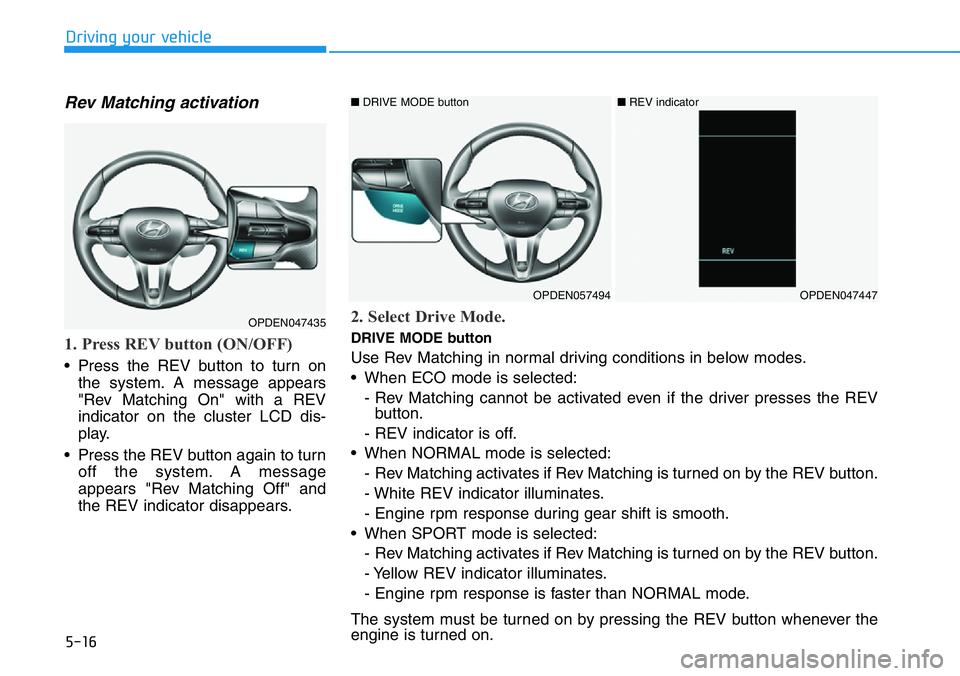
1. Press REV button (ON/OFF)
• Press the REV button to turn on
the system. A message appears
"Rev Matching On" with a REV
indicator on the cluster LCD dis-
play.
• Press the REV button again to turn
off the system. A message
appears "Rev Matching Off" and
the REV indicator disappears.
OPDEN047435
OPDEN057494OPDEN047447
■DRIVE MODE button ■REV indicator
2. Select Drive Mode.
DRIVE MODE button
Use Rev Matching in normal driving conditions in below modes.
• When ECO mode is selected:
- Rev Matching cannot be activated even if the driver presses the REV
button.
- REV indicator is off.
• When NORMAL mode is selected:
- Rev Matching activates if Rev Matching is turned on by the REV button.
- White REV indicator illuminates.
- Engine rpm response during gear shift is smooth.
• When SPORT mode is selected:
- Rev Matching activates if Rev Matching is turned on by the REV button.
- Yellow REV indicator illuminates.
- Engine rpm response is faster than NORMAL mode.
The system must be turned on by pressing the REV button whenever the
engine is turned on.
Page 216 of 446
5-22
Driving your vehicle
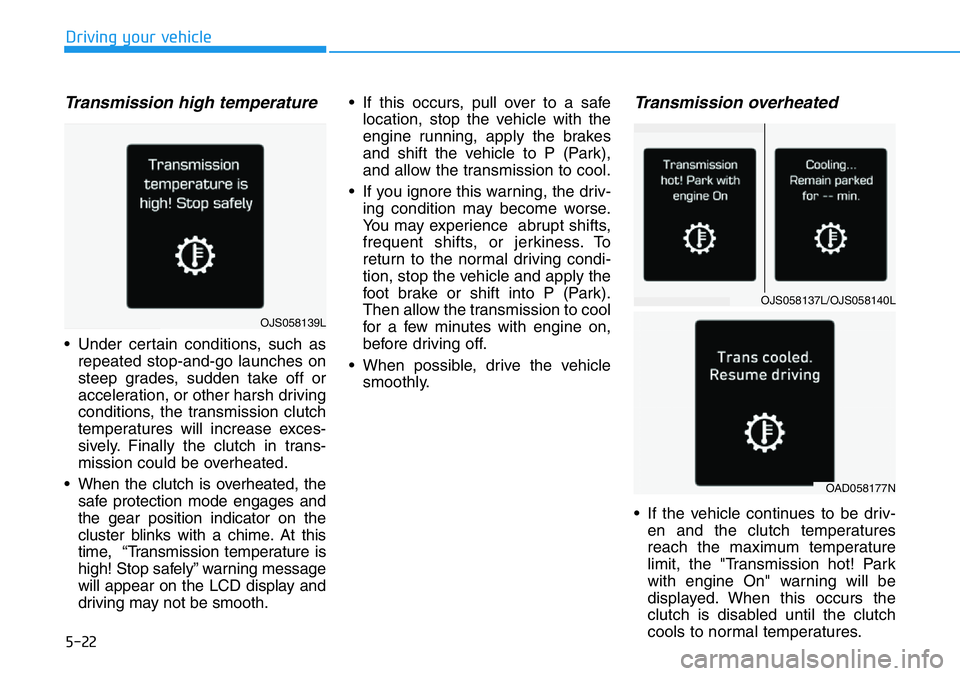
Transmission high temperature
• Under certain conditions, such as
repeated stop-and-go launches on
steep grades, sudden take off or
acceleration, or other harsh driving
conditions, the transmission clutch
temperatures will increase exces-
sively. Finally the clutch in trans-
mission could be overheated.
• When the clutch is overheated, the
safe protection mode engages and
the gear position indicator on the
cluster blinks with a chime. At this
time, “Transmission temperature is
high! Stop safely” warning message
will appear on the LCD display and
driving may not be smooth.• If this occurs, pull over to a safe
location, stop the vehicle with the
engine running, apply the brakes
and shift the vehicle to P (Park),
and allow the transmission to cool.
• If you ignore this warning, the driv-
ing condition may become worse.
You may experience abrupt shifts,
frequent shifts, or jerkiness. To
return to the normal driving condi-
tion, stop the vehicle and apply the
foot brake or shift into P (Park).
Then allow the transmission to cool
for a few minutes with engine on,
before driving off.
• When possible, drive the vehicle
smoothly.
Transmission overheated
• If the vehicle continues to be driv-
en and the clutch temperatures
reach the maximum temperature
limit, the "Transmission hot! Park
with engine On" warning will be
displayed. When this occurs the
clutch is disabled until the clutch
cools to normal temperatures.
OJS058137L/OJS058140L
OAD058177N
OJS058139L
Page 221 of 446
5-27
Driving your vehicle
5
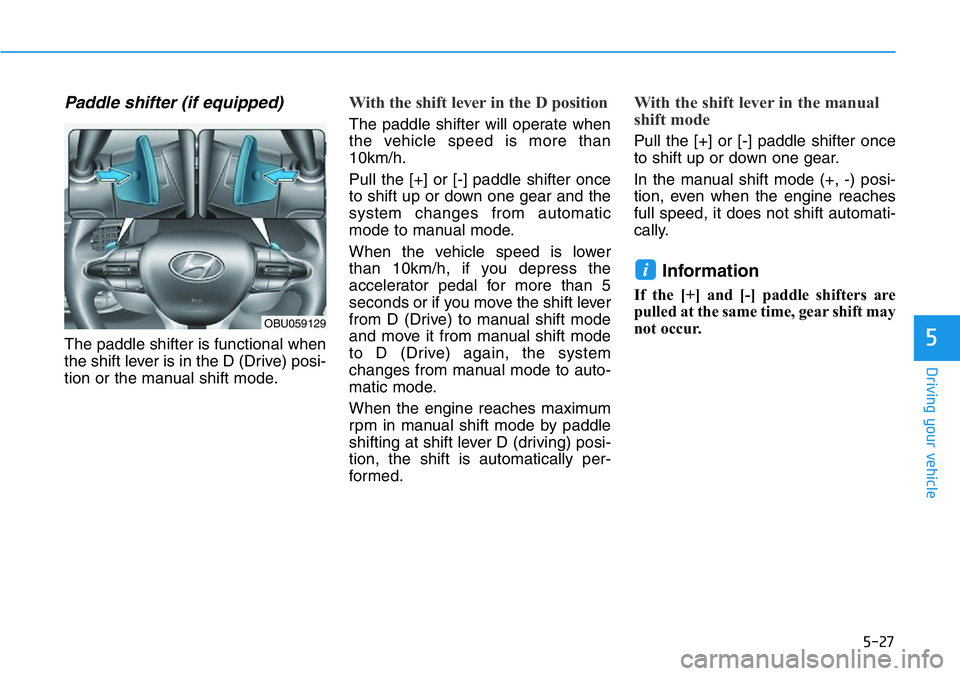
Paddle shifter (if equipped)
The paddle shifter is functional when
the shift lever is in the D (Drive) posi-
tion or the manual shift mode.
With the shift lever in the D position
The paddle shifter will operate when
the vehicle speed is more than
10km/h.
Pull the [+] or [-] paddle shifter once
to shift up or down one gear and the
system changes from automatic
mode to manual mode.
When the vehicle speed is lower
than 10km/h, if you depress the
accelerator pedal for more than 5
seconds or if you move the shift lever
from D (Drive) to manual shift mode
and move it from manual shift mode
to D (Drive) again, the system
changes from manual mode to auto-
matic mode.
When the engine reaches maximum
rpm in manual shift mode by paddle
shifting at shift lever D (driving) posi-
tion, the shift is automatically per-
formed.
With the shift lever in the manual
shift mode
Pull the [+] or [-] paddle shifter once
to shift up or down one gear.
In the manual shift mode (+, -) posi-
tion, even when the engine reaches
full speed, it does not shift automati-
cally.
Information
If the [+] and [-] paddle shifters are
pulled at the same time, gear shift may
not occur.
i
OBU059129
Page 223 of 446
5-29
Driving your vehicle
5
Parking
Always come to a complete stop and
continue to depress the brake pedal.
Move the shift lever into the P (Park)
position, apply the parking brake,
and place the ignition switch in the
LOCK/OFF position. Take the Key
with you when exiting the vehicle.
Good driving practices
• Never move the shift lever from P
(Park) or N (Neutral) to any other
position with the accelerator pedal
depressed.
• Never move the shift lever into P
(Park) when the vehicle is in
motion.
• Be sure the vehicle is completely
stopped before you attempt to shift
into R (Revers) or D (Drive).
• Never take the vehicle out of gear
and coast down a hill. Always leave
the vehicle in gear when moving.
• Do not “ride” the brakes. This can
cause them to overheat and mal-
function. Instead, when you are
driving down a long hill, slow down
and shift to a lower gear. When you
do this, engine braking will help
slow the car.
• When driving in manual shift mode,
slow down before shifting to a
lower gear. Otherwise, the lower
gear may not be engaged if the
engine rpms are outside of the
allowable range.• Always apply the parking brake
when leaving the vehicle. Do not
depend on placing the transmis-
sion in P (Park) to keep the vehicle
from moving.
• Exercise extreme caution when
driving on a slippery surface. Be
especially careful when braking,
accelerating or shifting gears. On a
slippery surface, an abrupt change
in vehicle speed can cause the
drive wheels to lose traction and
may cause loss of vehicle control
resulting in an accident.
• Optimum vehicle performance and
economy is obtained by smoothly
depressing and releasing the
accelerator. When you stay in the vehicle
with the engine running, be
careful not to depress the accel-
erator pedal for a long period of
time. The engine or exhaust
system may overheat and start
a fire.
The exhaust gas and the
exhaust system are very hot.
Keep away from the exhaust
system components.
Do not stop or park over flam-
mable materials, such as dry
grass, paper or leaves. They
may ignite and cause a fire.
WARNING
Page 229 of 446
5-35
Driving your vehicle
5
ABS is an electronic braking system
that helps prevent a braking skid.
ABS allows the driver to steer and
brake at the same time.
Using ABS
To obtain the maximum benefit from
your ABS in an emergency situation,
do not attempt to modulate your
brake pressure and do not try to
pump your brakes. Depress your
brake pedal as hard as possible.
When you apply your brakes under
conditions which may lock the
wheels, you may hear sounds from
the brakes, or feel a corresponding
sensation in the brake pedal. This is
normal and it means your ABS is
active.
ABS does not reduce the time or dis-
tance it takes to stop the vehicle.
Always maintain a safe distance from
the vehicle in front of you.
ABS will not prevent a skid that
results from sudden changes in
direction, such as trying to take a
corner too fast or making a sudden
lane change. Always drive at a safe
speed for the road and weather con-
ditions.ABS cannot prevent a loss of stabili-
ty. Always steer moderately when
braking hard. Severe or sharp steer-
ing wheel movement can still cause
your vehicle to veer into oncoming
traffic or off the road.
On loose or uneven road surfaces,
operation of the anti-lock brake sys-
tem may result in a longer stopping
distance than for vehicles equipped
with a conventional brake system.
The ABS warning light ( ) will stay
on for several seconds after the igni-
tion switch is in the ON position.
During that time, the ABS will go
through self-diagnosis and the light
will go off if everything is normal. If
the light stays on, you may have a
problem with your ABS. Contact an
authorized HYUNDAI dealer as soon
as possible•Tire chains are installed on
your vehicle.
The safety features of an ABS
or ESC equipped vehicle should
not be tested by high speed
driving or cornering. This could
endanger the safety of yourself
or others.
Page 231 of 446
5-37
Driving your vehicle
5
ESC operation
ESC ON condition
When the ignition switch is
in the ON position, the ESC
and the ESC OFF indicator
lights illuminate for approxi-
mately three seconds and goes off,
then the ESC is turned on. (After a
new ignition cycle, the ESC ON
mode is always activated (default
setting).)
You may select between the follow-
ing state of ESC:
• ESC NORMAL activated (ESC
ON)
• ESC SPORT activated (ESC
SPORT indicator illuminates)
• ESC deactivated (ESC OFF indi-
cator illuminates)
When operating
When the ESC is in operation, the
ESC indicator light blinks:
• When you apply your brakes under
conditions which may lock the
wheels, you may hear sounds from
the brakes, or feel a corresponding
sensation in the brake pedal. This
is normal and it means your ESC is
active.
• When the ESC operates, the
engine may not respond to the
accelerator as it does under rou-
tine conditions.
• If the Cruise Control was in use
when the ESC activates, the
Cruise Control automatically disen-
gages. The Cruise Control can be
reengaged when the road condi-
tions allow.See "Cruise Control
System" later in this chapter.(if
equipped)• When moving out of the mud or
driving on a slippery road, the
engine rpm (revolutions per
minute) may not increase even if
you press the accelerator pedal
deeply. This is to maintain the sta-
bility and traction of the vehicle and
does not indicate a problem.
Page 232 of 446
5-38
Driving your vehicle
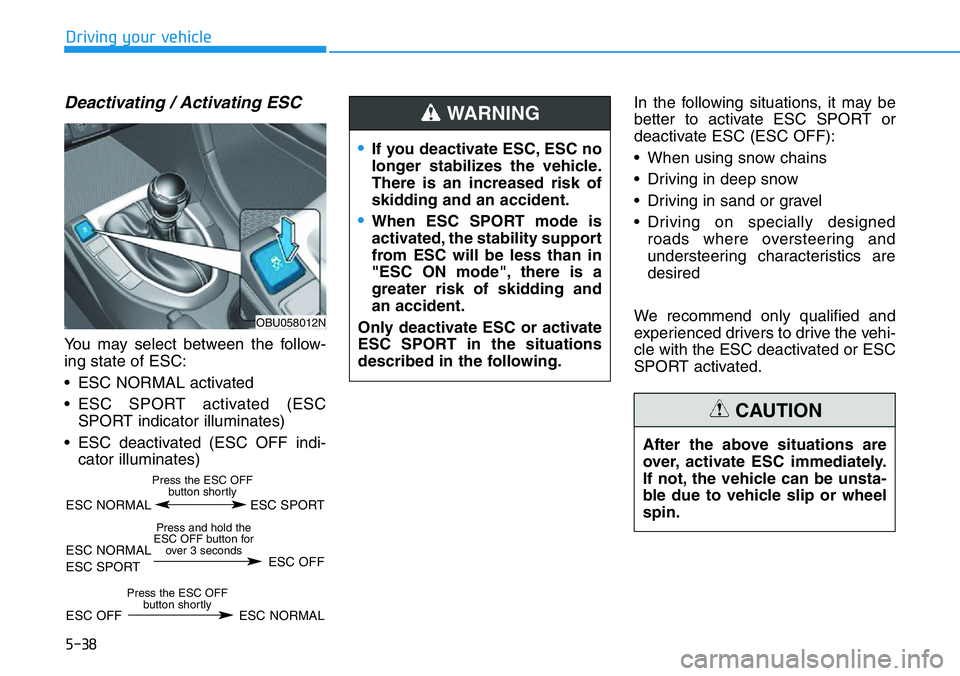
Deactivating / Activating ESC
You may select between the follow-
ing state of ESC:
• ESC NORMAL activated
• ESC SPORT activated (ESC
SPORT indicator illuminates)
• ESC deactivated (ESC OFF indi-
cator illuminates)In the following situations, it may be
better to activate ESC SPORT or
deactivate ESC (ESC OFF):
• When using snow chains
• Driving in deep snow
• Driving in sand or gravel
• Driving on specially designed
roads where oversteering and
understeering characteristics are
desired
We recommend only qualified and
experienced drivers to drive the vehi-
cle with the ESC deactivated or ESC
SPORT activated.
After the above situations are
over, activate ESC immediately.
If not, the vehicle can be unsta-
ble due to vehicle slip or wheel
spin.
CAUTION
•If you deactivate ESC, ESC no
longer stabilizes the vehicle.
There is an increased risk of
skidding and an accident.
•When ESC SPORT mode is
activated, the stability support
from ESC will be less than in
"ESC ON mode", there is a
greater risk of skidding and
an accident.
Only deactivate ESC or activate
ESC SPORT in the situations
described in the following.
WARNING
OBU058012N
ESC NORMAL ESC SPORT
Press the ESC OFF
button shortly
ESC NORMAL
ESC SPORTESC OFF
Press and hold the
ESC OFF button for
over 3 seconds
ESC OFF ESC NORMAL
Press the ESC OFF
button shortly
Page 233 of 446
5-39
Driving your vehicle
5
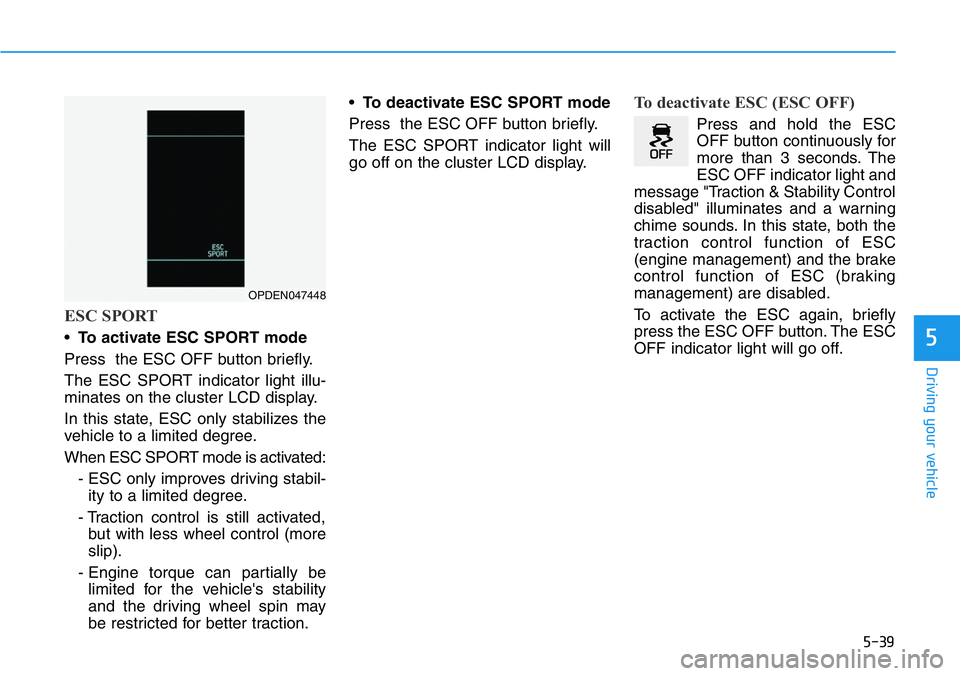
ESC SPORT
•To activate ESC SPORT mode
Press the ESC OFF button briefly.
The ESC SPORT indicator light illu-
minates on the cluster LCD display.
In this state, ESC only stabilizes the
vehicle to a limited degree.
When ESC SPORT mode is activated:
- ESC only improves driving stabil-
ity to a limited degree.
- Traction control is still activated,
but with less wheel control (more
slip).
- Engine torque can partially be
limited for the vehicle's stability
and the driving wheel spin may
be restricted for better traction.•To deactivate ESC SPORT mode
Press the ESC OFF button briefly.
The ESC SPORT indicator light will
go off on the cluster LCD display.
To deactivate ESC (ESC OFF)
Press and hold the ESC
OFF button continuously for
more than 3 seconds. The
ESC OFF indicator light and
message "Traction & Stability Control
disabled" illuminates and a warning
chime sounds. In this state, both the
traction control function of ESC
(engine management) and the brake
control function of ESC (braking
management) are disabled.
To activate the ESC again, briefly
press the ESC OFF button. The ESC
OFF indicator light will go off.
OPDEN047448