audio HYUNDAI VELOSTER N 2022 User Guide
[x] Cancel search | Manufacturer: HYUNDAI, Model Year: 2022, Model line: VELOSTER N, Model: HYUNDAI VELOSTER N 2022Pages: 446, PDF Size: 9.71 MB
Page 211 of 446
5-17
Driving your vehicle
5
Rev Matching operation
Engine speed is automatically syn-
chronized with the next selected
gear. The accelerator pedal does not
have to be depressed to speed up
the engine rpm.
• Clutch depressed with the gear
engaged
At once, engine speed automatically
decreases right after the clutch is
disengaged, but the selected gear is
fixed and then the engine rpm
reverts to the selected gear's target
speed. This operation method gives
more comfortable feeling in public
road driving.
• Upshifting
Engine speed will automatically
decrease and stay at the target
engine speed before the clutch is
engaged.
• Downshifting
Engine speed will automatically
increase and stay at the target
engine speed.
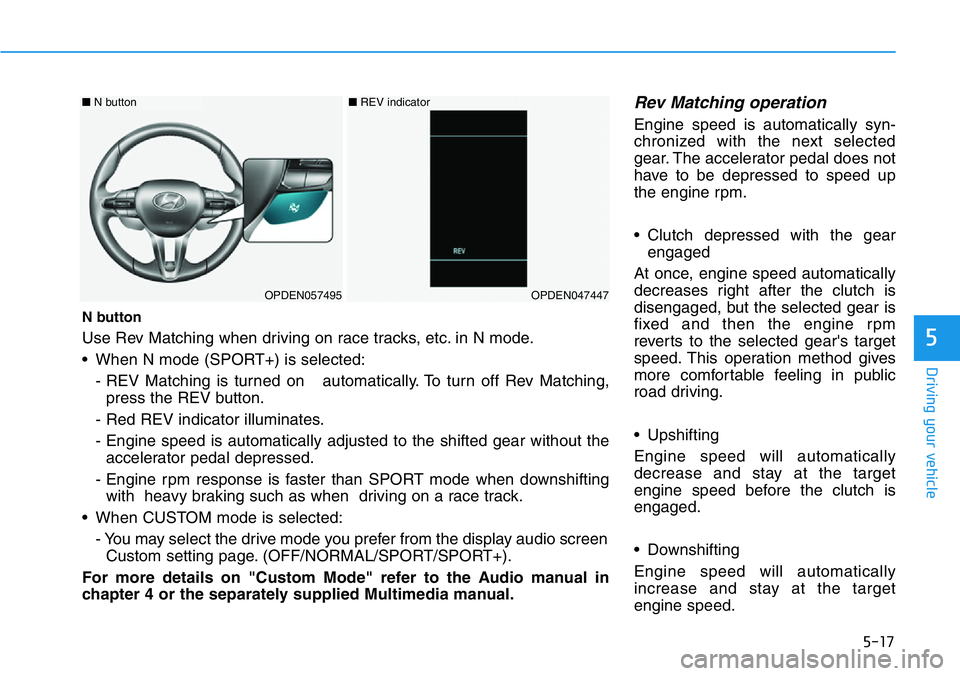
N button
Use Rev Matching when driving on race tracks, etc. in N mode.
• When N mode (SPORT+) is selected:
- REV Matching is turned on automatically. To turn off Rev Matching,
press the REV button.
- Red REV indicator illuminates.
- Engine speed is automatically adjusted to the shifted gear without the
accelerator pedal depressed.
- Engine rpm response is faster than SPORT mode when downshifting
with heavy braking such as when driving on a race track.
• When CUSTOM mode is selected:
- You may select the drive mode you prefer from the display audio screen
Custom setting page. (OFF/NORMAL/SPORT/SPORT+).
For more details on "Custom Mode" refer to the Audio manual in
chapter 4 or the separately supplied Multimedia manual.
OPDEN057495OPDEN047447
■N button ■REV indicator
Page 236 of 446
5-42
Driving your vehicle
CUSTOM mode
You may select the drive mode you
prefer from the display audio screen.
• Select CUSTOM mode by pressing
the N button on the steering wheel.
The display audio screen will dis-
play the CUSTOM mode menu.
From the CUSTOM mode menu,
select 'ESC →NORMAL / SPORT
/ OFF'.
• You may directly go to the CUS-
TOM mode menu by touching the
display audio screen.
For more details, refer to the dis-
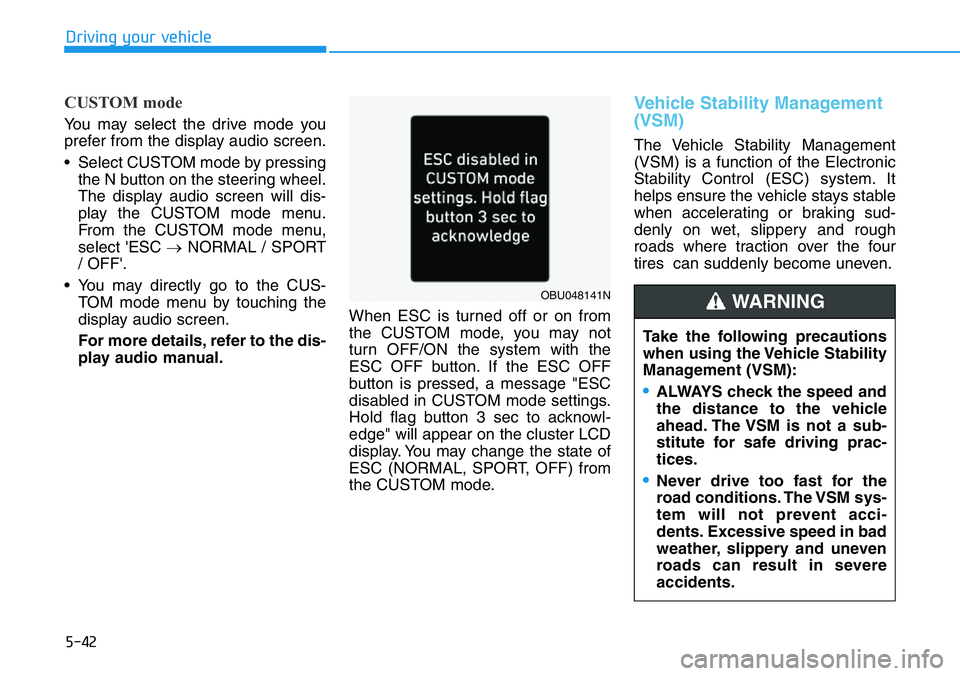
play audio manual.When ESC is turned off or on from
the CUSTOM mode, you may not
turn OFF/ON the system with the
ESC OFF button. If the ESC OFF
button is pressed, a message "ESC
disabled in CUSTOM mode settings.
Hold flag button 3 sec to acknowl-
edge" will appear on the cluster LCD
display. You may change the state of
ESC (NORMAL, SPORT, OFF) from
the CUSTOM mode.
Vehicle Stability Management
(VSM)
The Vehicle Stability Management
(VSM) is a function of the Electronic
Stability Control (ESC) system. It
helps ensure the vehicle stays stable
when accelerating or braking sud-
denly on wet, slippery and rough
roads where traction over the four
tires can suddenly become uneven.
Take the following precautions
when using the Vehicle Stability
Management (VSM):
•ALWAYS check the speed and
the distance to the vehicle
ahead. The VSM is not a sub-
stitute for safe driving prac-
tices.
•Never drive too fast for the
road conditions. The VSM sys-
tem will not prevent acci-
dents. Excessive speed in bad
weather, slippery and uneven
roads can result in severe
accidents.
WARNING OBU048141N
Page 241 of 446
5-47
Driving your vehicle
5
Electronic Limited Slip Differential
refers to a feature equipped with a
mechanism that controls the differen-
tial functions of the wheels.
The Electronic Limited Slip
Differential helps:
- Improve handling performance
when circling at high speed.
- Improve launching performance.
- Prevent slipping on rainy or snowy
roads due to dissimilar friction of
the left and right wheels.Drive mode selection
The characteristic of e-LSD varies
according to which drive mode is
selected by pressing the DRIVE
MODE or N button on the steering
wheel.
For more details, refer to "Drive
Mode Integrated Control System"
in this chapter.
CUSTOM mode
You may select the drive mode you
prefer from the display audio screen.
• Select CUSTOM mode by pressing
the N button on the steering wheel.
The display audioscreen will dis-
play the CUSTOM mode menu.
From the CUSTOM mode menu,
select 'e-LSD →NORMAL/SPORT'.
• You may directly go to the CUS-
TOM mode menu by touching the
display audio screen.
For more details, refer to the dis-
play audio manual.
ELECTRONIC LIMITED SLIP DIFFERENTIAL (IF EQUIPPED)
Never run wheels with one of
them lifted by the jack. It is
extremely dangerous for a vehi-
cle equipped with Electronic
Limited Slip Differential.
WARNING
Mode buttonSelected
modeCharacteristic
of e-LSD
DRIVE MODE
button
ECO modeNORMAL
NORMAL
modeNORMAL
SPORT modeSPORT
N button
N modeSPORT
N CUSTOM
modeNORMAL/
SPORT
Page 246 of 446
5-52
Driving your vehicle
CUSTOM mode
In CUSTOM mode, the
driver can select the drive
mode for each component
they prefer on the display
audio screen.
- Engine : NORMAL/SPORT/
SPORT+
- Transmission (for DCT) : NOR-
MAL/SPORT/SPORT+ and
CREEP START function*1 ON/
OFF (For DCT)
- Rev matching (for MT) :OFF/NOR-
MAL/SPORT/SPORT+
- E-LSD (Electronic Limited Slip
Differential) : NORMAL/SPORT
- Suspension : NORMAL/SPORT/
SPORT+
- Steering : NORMAL/SPORT/
SPORT+
- ESC (Electronic Stability Control) :
NORMAL/SPORT/OFF
- Exhaust sound : NORMAL/
SPORT/SPORT+*1 CREEP START function (default
setting ON) :
When OFF is set, vehicle will not start
automatically even if the brake pedal
is not pressed in D stop state.
For more details, refer to the sepa-
rately supplied Multimedia manual.
NGS (N Grin Shift)
Controls engine / transmission to
maximum performance when press-
ing NGS button on the steering
wheel remote control in situations
where rapid acceleration is required.&86720
Page 383 of 446
7-31
7
Maintenance
By jump starting
After a jump start from a good bat-
tery, drive the vehicle for 20-30 min-
utes before it is shutoff. The vehicle
may not restart if you shut it off
before the battery had a chance to
adequately recharge. See "Jump
Starting" in chapter 6 for more details
on jump starting procedures.
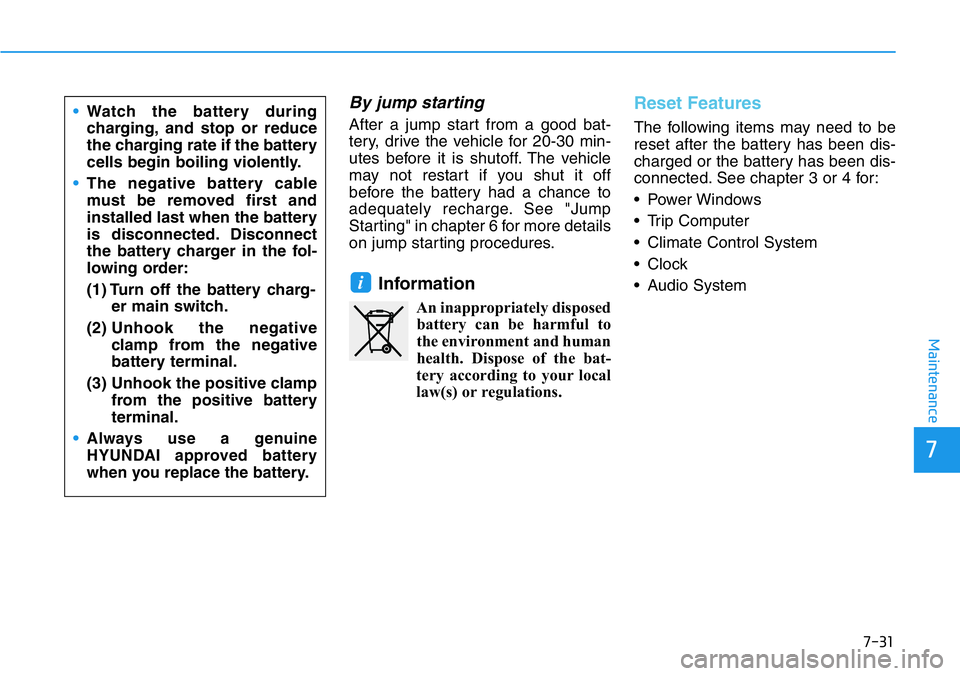
Information
An inappropriately disposed
battery can be harmful to
the environment and human
health. Dispose of the bat-
tery according to your local
law(s) or regulations.
Reset Features
The following items may need to be
reset after the battery has been dis-
charged or the battery has been dis-
connected. See chapter 3 or 4 for:
• Power Windows
• Trip Computer
• Climate Control System
• Clock
• Audio System
i
•Watch the battery during
charging, and stop or reduce
the charging rate if the battery
cells begin boiling violently.
•The negative battery cable
must be removed first and
installed last when the battery
is disconnected. Disconnect
the battery charger in the fol-
lowing order:
(1) Turn off the battery charg-
er main switch.
(2) Unhook the negative
clamp from the negative
battery terminal.
(3) Unhook the positive clamp
from the positive battery
terminal.
•
Always use a genuine
HYUNDAI approved battery
when you replace the battery.
Page 401 of 446
7-49
7
Maintenance
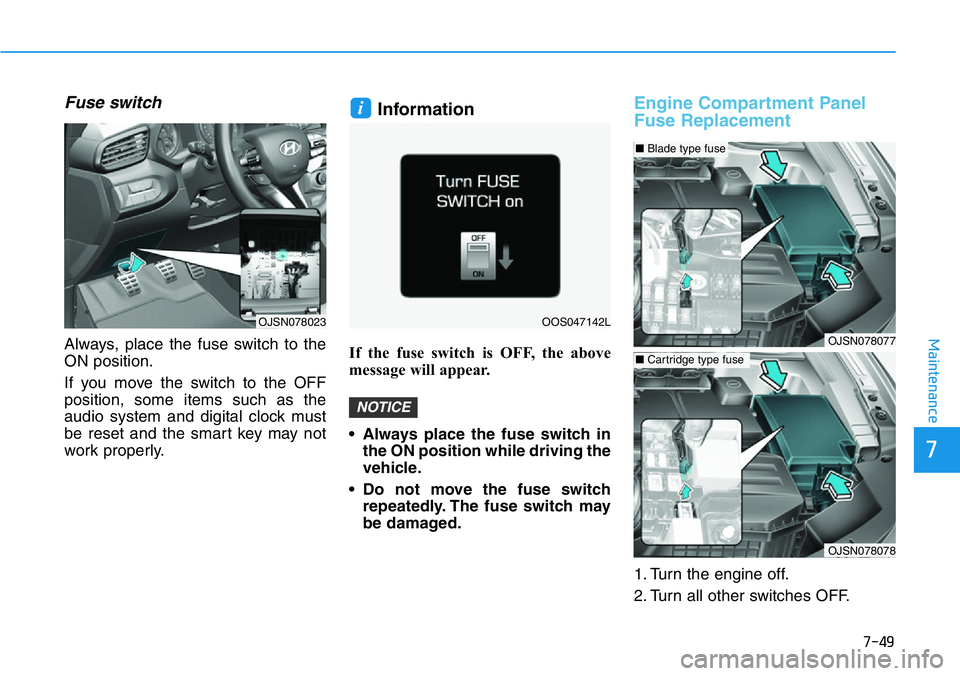
Fuse switch
Always, place the fuse switch to the
ON position.
If you move the switch to the OFF
position, some items such as the
audio system and digital clock must
be reset and the smart key may not
work properly.
Information
If the fuse switch is OFF, the above
message will appear.
• Always place the fuse switch in
the ON position while driving the
vehicle.
• Do not move the fuse switch
repeatedly. The fuse switch may
be damaged.
Engine Compartment Panel
Fuse Replacement
1. Turn the engine off.
2. Turn all other switches OFF.
NOTICE
i
OJSN078023OOS047142L
OJSN078077
OJSN078078
■Blade type fuse
■Cartridge type fuse
Page 404 of 446
Maintenance
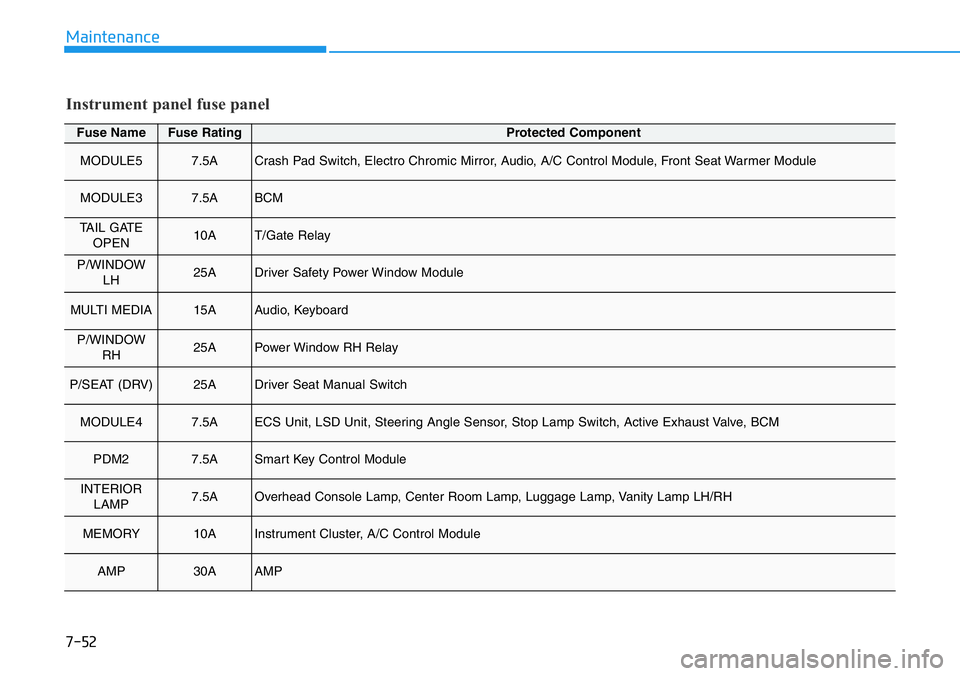
Fuse NameFuse RatingProtected Component
MODULE57.5ACrash Pad Switch, Electro Chromic Mirror, Audio, A/C Control Module, Front Seat Warmer Module
MODULE37.5ABCM
TAIL GATE
OPEN10AT/Gate Relay
P/WINDOW
LH25ADriver Safety Power Window Module
MULTI MEDIA15AAudio, Keyboard
P/WINDOW
RH25APower Window RH Relay
P/SEAT (DRV)25ADriver Seat Manual Switch
MODULE47.5AECS Unit, LSD Unit, Steering Angle Sensor, Stop Lamp Switch, Active Exhaust Valve, BCM
PDM27.5ASmart Key Control Module
INTERIOR
LAMP7.5AOverhead Console Lamp, Center Room Lamp, Luggage Lamp, Vanity Lamp LH/RH
MEMORY10AInstrument Cluster, A/C Control Module
AMP30AAMP
Instrument panel fuse panel
7-52
Page 406 of 446
7-54
Maintenance
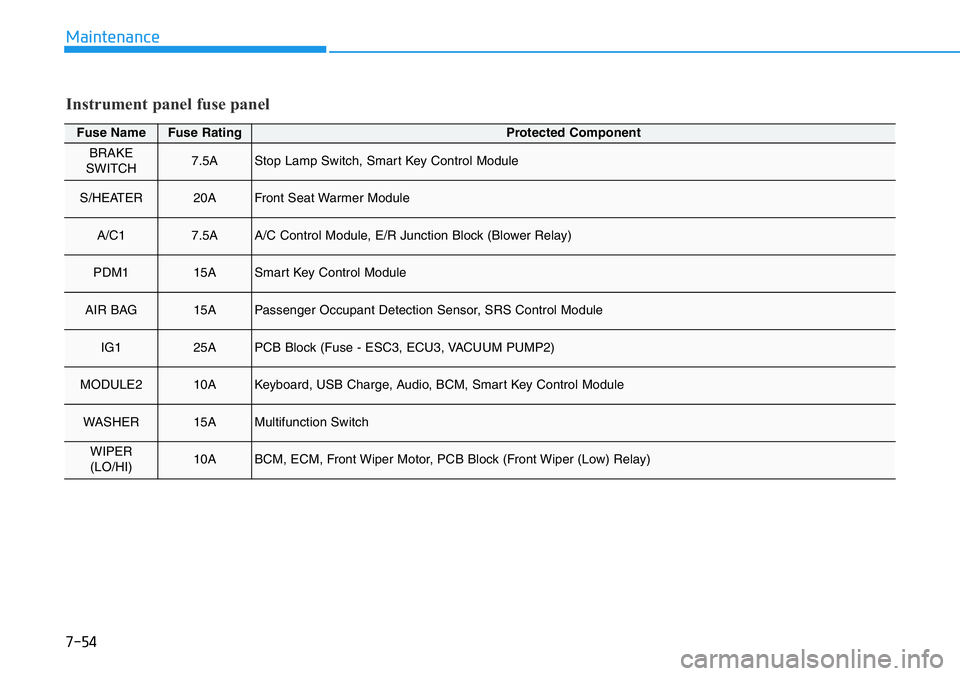
Fuse NameFuse RatingProtected Component
BRAKE
SWITCH7.5AStop Lamp Switch, Smart Key Control Module
S/HEATER20AFront Seat Warmer Module
A/C17.5AA/C Control Module, E/R Junction Block (Blower Relay)
PDM115ASmart Key Control Module
AIR BAG15APassenger Occupant Detection Sensor, SRS Control Module
IG125APCB Block (Fuse - ESC3, ECU3, VACUUM PUMP2)
MODULE210AKeyboard, USB Charge, Audio, BCM, Smart Key Control Module
WASHER15AMultifunction Switch
WIPER
(LO/HI)10ABCM, ECM, Front Wiper Motor, PCB Block (Front Wiper (Low) Relay)
Instrument panel fuse panel