mirror HYUNDAI VELOSTER N 2022 User Guide
[x] Cancel search | Manufacturer: HYUNDAI, Model Year: 2022, Model line: VELOSTER N, Model: HYUNDAI VELOSTER N 2022Pages: 446, PDF Size: 9.71 MB
Page 182 of 446
3-104
Convenient features of your vehicle
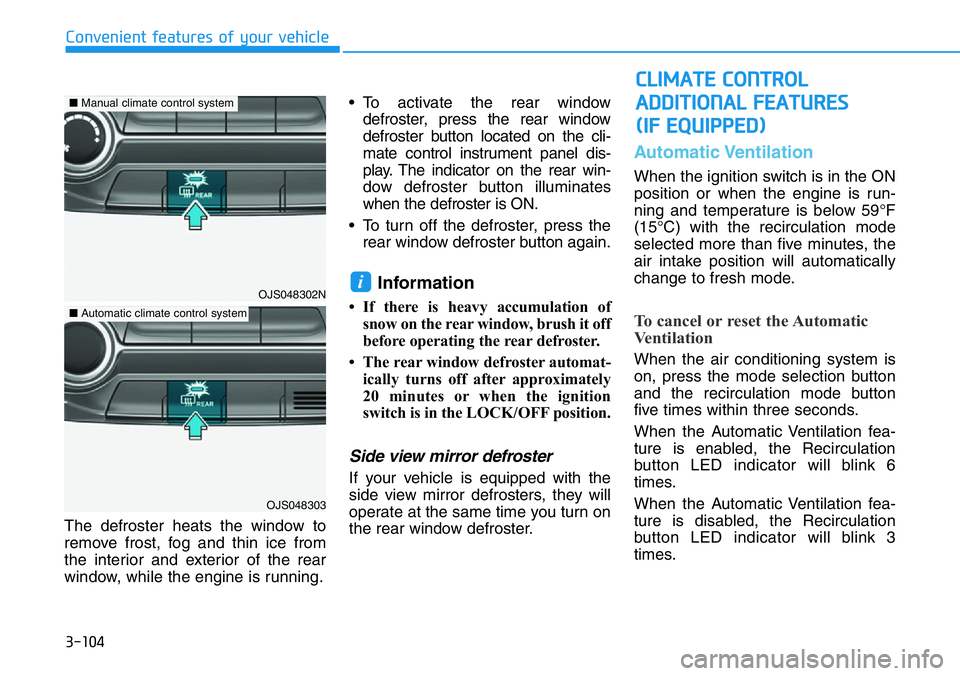
The defroster heats the window to
remove frost, fog and thin ice from
the interior and exterior of the rear
window, while the engine is running.• To activate the rear window
defroster, press the rear window
defroster button located on the cli-
mate control instrument panel dis-
play. The indicator on the rear win-
dow defroster button illuminates
when the defroster is ON.
• To turn off the defroster, press the
rear window defroster button again.
Information
• If there is heavy accumulation of
snow on the rear window, brush it off
before operating the rear defroster.
• The rear window defroster automat-
ically turns off after approximately
20 minutes or when the ignition
switch is in the LOCK/OFF position.
Side view mirror defroster
If your vehicle is equipped with the
side view mirror defrosters, they will
operate at the same time you turn on
the rear window defroster.
Automatic Ventilation
When the ignition switch is in the ON
position or when the engine is run-
ning and temperature is below 59°F
(15°C) with the recirculation mode
selected more than five minutes, the
air intake position will automatically
change to fresh mode.
To cancel or reset the Automatic
Ventilation
When the air conditioning system is
on, press the mode selection button
and the recirculation mode button
five times within three seconds.
When the Automatic Ventilation fea-
ture is enabled, the Recirculation
button LED indicator will blink 6
times.
When the Automatic Ventilation fea-
ture is disabled, the Recirculation
button LED indicator will blink 3
times.
i
CLIMATE CONTROL
ADDITIONAL FEATURES
(IF EQUIPPED)
OJS048302N
OJS048303
■Manual climate control system
■Automatic climate control system
Page 184 of 446
3-106
Convenient features of your vehicle
Sunglass Holder
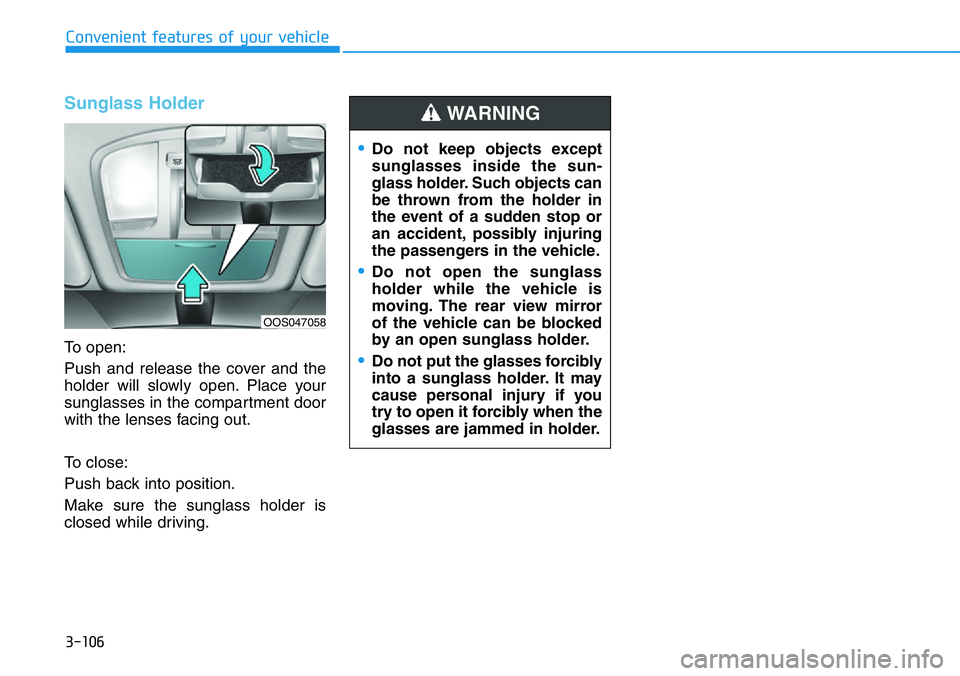
To open:
Push and release the cover and the
holder will slowly open. Place your
sunglasses in the compartment door
with the lenses facing out.
To close:
Push back into position.
Make sure the sunglass holder is
closed while driving.
•Do not keep objects except
sunglasses inside the sun-
glass holder. Such objects can
be thrown from the holder in
the event of a sudden stop or
an accident, possibly injuring
the passengers in the vehicle.
•Do not open the sunglass
holder while the vehicle is
moving. The rear view mirror
of the vehicle can be blocked
by an open sunglass holder.
•Do not put the glasses forcibly
into a sunglass holder. It may
cause personal injury if you
try to open it forcibly when the
glasses are jammed in holder.
WARNING
OOS047058
Page 186 of 446
3-108
Convenient features of your vehicle
Sunvisor
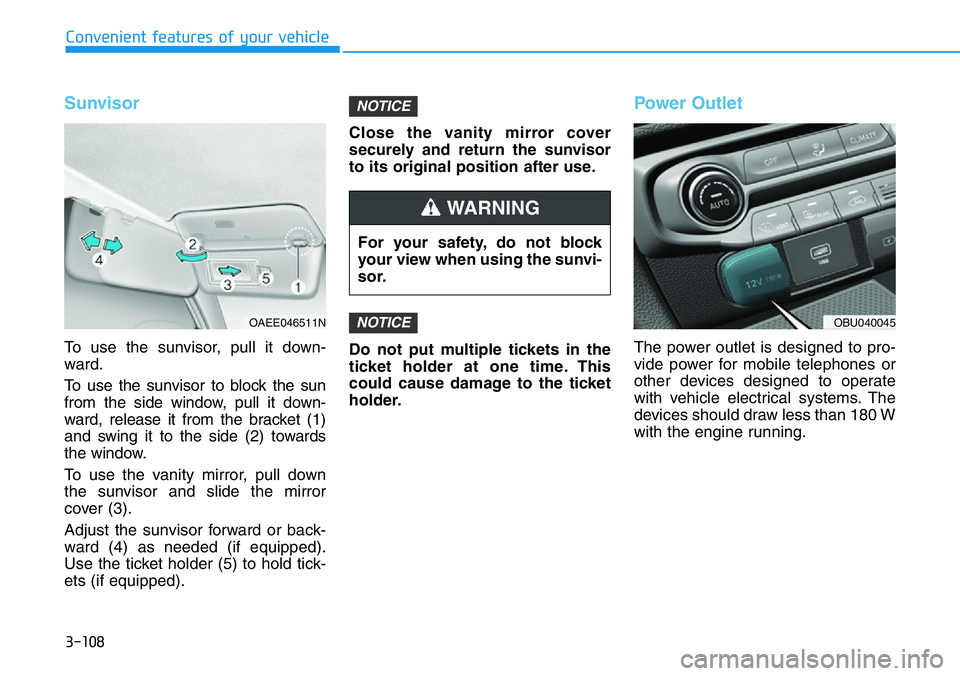
To use the sunvisor, pull it down-
ward.
To use the sunvisor to block the sun
from the side window, pull it down-
ward, release it from the bracket (1)
and swing it to the side (2) towards
the window.
To use the vanity mirror, pull down
the sunvisor and slide the mirror
cover (3).
Adjust the sunvisor forward or back-
ward (4) as needed (if equipped).
Use the ticket holder (5) to hold tick-
ets (if equipped).Close the vanity mirror cover
securely and return the sunvisor
to its original position after use.
Do not put multiple tickets in the
ticket holder at one time. This
could cause damage to the ticket
holder.
Power Outlet
The power outlet is designed to pro-
vide power for mobile telephones or
other devices designed to operate
with vehicle electrical systems. The
devices should draw less than 180 W
with the engine running.
NOTICE
NOTICE
For your safety, do not block
your view when using the sunvi-
sor.
WARNING
OAEE046511NOBU040045
Page 280 of 446
5-86
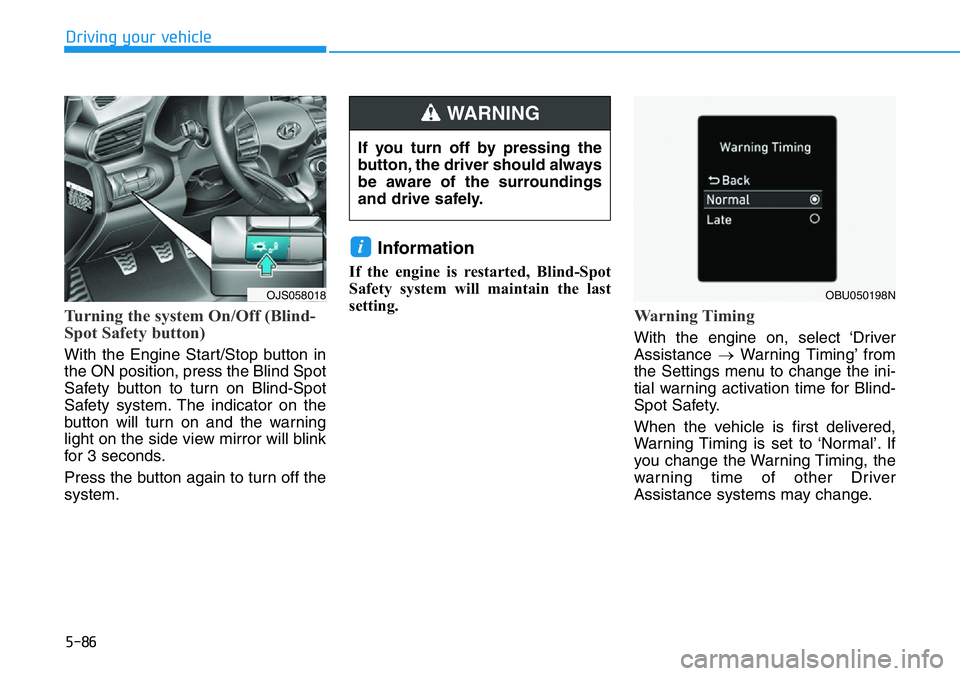
Turning the system On/Off (Blind-
Spot Safety button)
With the Engine Start/Stop button in
the ON position, press the Blind Spot
Safety button to turn on Blind-Spot
Safety system. The indicator on the
button will turn on and the warning
light on the side view mirror will blink
for 3 seconds.
Press the button again to turn off the
system.
Information
If the engine is restarted, Blind-Spot
Safety system will maintain the last
setting.
Warning Timing
With the engine on, select ‘Driver
Assistance →Warning Timing’ from
the Settings menu to change the ini-
tial warning activation time for Blind-
Spot Safety.
When the vehicle is first delivered,
Warning Timing is set to ‘Normal’. If
you change the Warning Timing, the
warning time of other Driver
Assistance systems may change.
i
Driving your vehicle
OJS058018
If you turn off by pressing the
button, the driver should always
be aware of the surroundings
and drive safely.
WARNING
OBU050198N
Page 281 of 446
5-87
Driving your vehicle
5
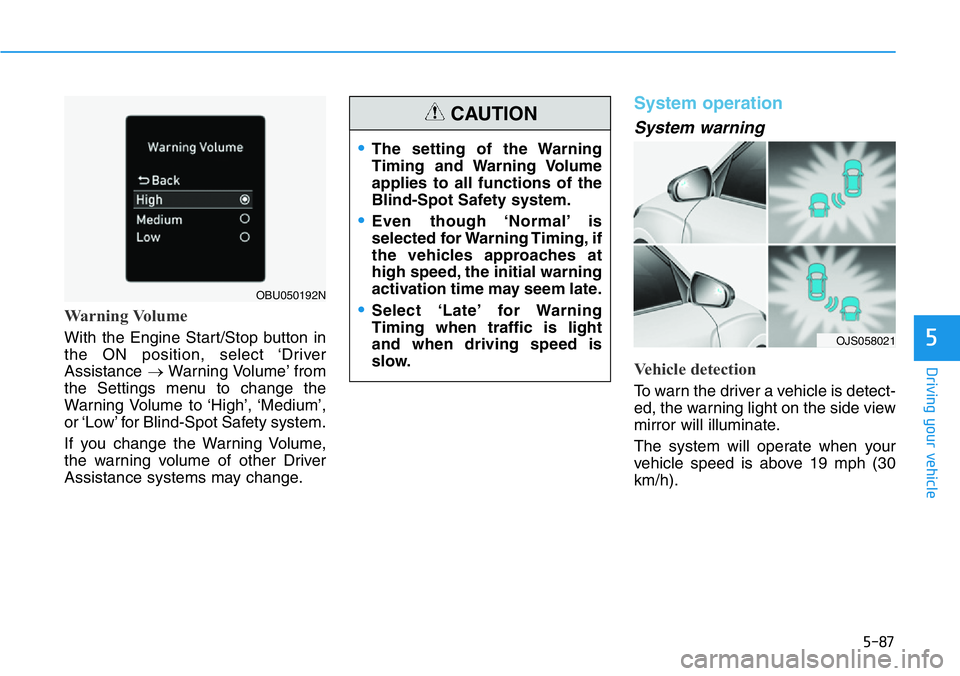
Warning Volume
With the Engine Start/Stop button in
the ON position, select ‘Driver
Assistance →Warning Volume’ from
the Settings menu to change the
Warning Volume to ‘High’, ‘Medium’,
or ‘Low’ for Blind-Spot Safety system.
If you change the Warning Volume,
the warning volume of other Driver
Assistance systems may change.
System operation
System warning
Vehicle detection
To warn the driver a vehicle is detect-
ed, the warning light on the side view
mirror will illuminate.
The system will operate when your
vehicle speed is above 19 mph (30
km/h).
OBU050192N
•The setting of the Warning
Timing and Warning Volume
applies to all functions of the
Blind-Spot Safety system.
•Even though ‘Normal’ is
selected for Warning Timing, if
the vehicles approaches at
high speed, the initial warning
activation time may seem late.
•Select ‘Late’ for Warning
Timing when traffic is light
and when driving speed is
slow.
CAUTION
OJS058021
Page 309 of 446
5-115
Driving your vehicle
5
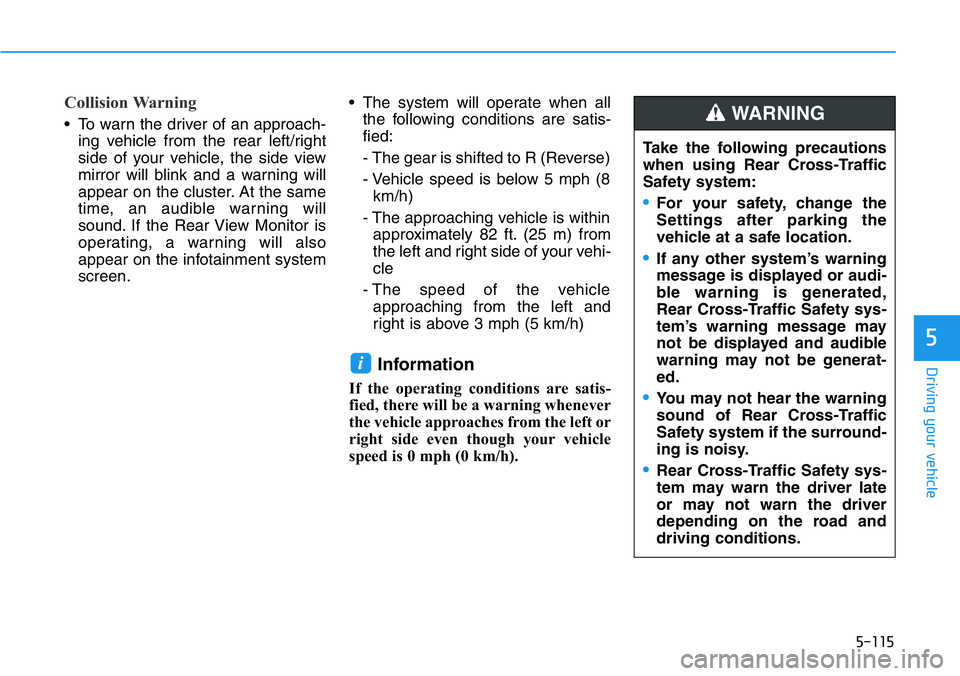
Collision Warning
• To warn the driver of an approach-
ing vehicle from the rear left/right
side of your vehicle, the side view
mirror will blink and a warning will
appear on the cluster. At the same
time, an audible warning will
sound. If the Rear View Monitor is
operating, a warning will also
appear on the infotainment system
screen.• The system will operate when all
the following conditions are satis-
fied:
- The gear is shifted to R (Reverse)
- Vehicle speed is below 5 mph (8
km/h)
- The approaching vehicle is within
approximately 82 ft. (25 m) from
the left and right side of your vehi-
cle
- The speed of the vehicle
approaching from the left and
right is above 3 mph (5 km/h)
Information
If the operating conditions are satis-
fied, there will be a warning whenever
the vehicle approaches from the left or
right side even though your vehicle
speed is 0 mph (0 km/h).
i
Take the following precautions
when using Rear Cross-Traffic
Safety system:
•For your safety, change the
Settings after parking the
vehicle at a safe location.
•If any other system’s warning
message is displayed or audi-
ble warning is generated,
Rear Cross-Traffic Safety sys-
tem’s warning message may
not be displayed and audible
warning may not be generat-
ed.
•You may not hear the warning
sound of Rear Cross-Traffic
Safety system if the surround-
ing is noisy.
•Rear Cross-Traffic Safety sys-
tem may warn the driver late
or may not warn the driver
depending on the road and
driving conditions.
WARNING
Page 315 of 446
5-121
Driving your vehicle
5
Information
The ESC system must be turned OFF
before rocking the vehicle.
If you are still stuck after rocking
the vehicle a few times, have the
vehicle pulled out by a tow vehicle
to avoid engine overheating, pos-
sible damage to the transmission,
and tire damage. See "Towing" in
chapter 6.
Smooth Cornering
Avoid braking or gear changing in
corners, especially when roads are
wet. Ideally, corners should always
be taken under gentle acceleration.
Driving at Night
Night driving presents more hazards
than driving in the daylight. Here are
some important tips to remember:
• Slow down and keep more dis-
tance between you and other vehi-
cles, as it may be more difficult to
see at night, especially in areas
where there may not be any street
lights.
• Adjust your mirrors to reduce the
glare from other driver's head-
lamps.
• Keep your headlamps clean and
properly aimed. Dirty or improperly
aimed headlamps will make it
much more difficult to see at night.
• Avoid staring directly at the head-
lamps of oncoming vehicles. You
could be temporarily blinded, and it
will take several seconds for your
eyes to readjust to the darkness.
Driving in the Rain
Rain and wet roads can make driving
dangerous. Here are a few things to
consider when driving in the rain or
on slick pavement:
• Slow down and allow extra follow-
ing distance. A heavy rainfall
makes it harder to see and increas-
es the distance needed to stop
your vehicle.
• Turn OFF your Cruise Control.
• Replace your windshield wiper
blades when they show signs of
streaking or missing areas on the
windshield.
• Tires should be properly main-
tained with at least 2/32nds of an
inch of tread depth. If your tires do
not have enough tread, making a
quick stop on wet pavement can
cause a skid and possibly lead to
an accident.See "Tire
Replacement" in chapter 7.
• Turn on your headlamps to make it
easier for others to see you.
NOTICE
i
Page 404 of 446
Maintenance
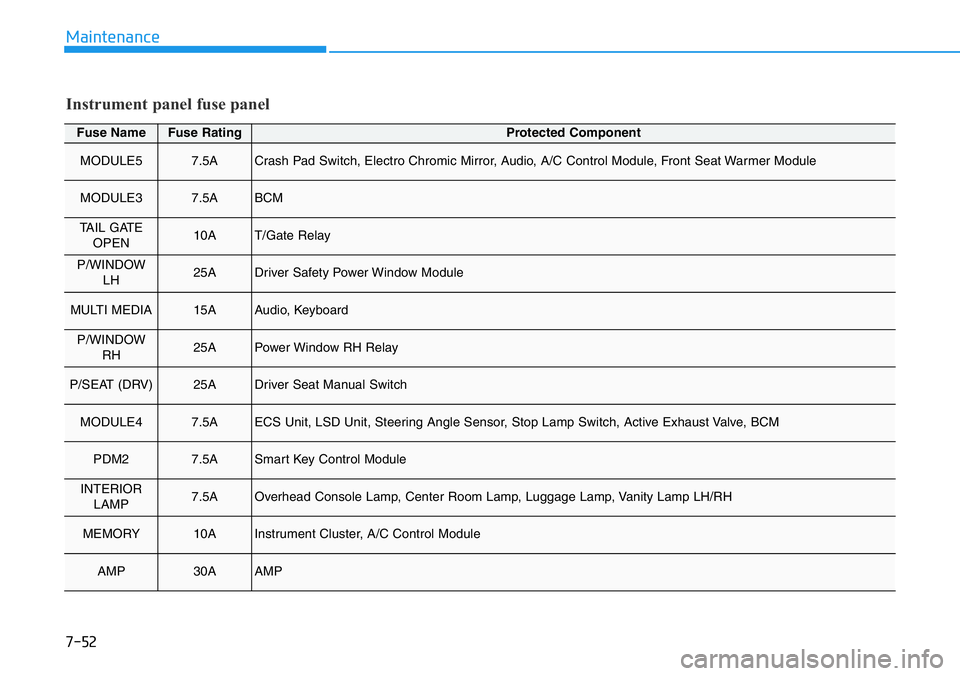
Fuse NameFuse RatingProtected Component
MODULE57.5ACrash Pad Switch, Electro Chromic Mirror, Audio, A/C Control Module, Front Seat Warmer Module
MODULE37.5ABCM
TAIL GATE
OPEN10AT/Gate Relay
P/WINDOW
LH25ADriver Safety Power Window Module
MULTI MEDIA15AAudio, Keyboard
P/WINDOW
RH25APower Window RH Relay
P/SEAT (DRV)25ADriver Seat Manual Switch
MODULE47.5AECS Unit, LSD Unit, Steering Angle Sensor, Stop Lamp Switch, Active Exhaust Valve, BCM
PDM27.5ASmart Key Control Module
INTERIOR
LAMP7.5AOverhead Console Lamp, Center Room Lamp, Luggage Lamp, Vanity Lamp LH/RH
MEMORY10AInstrument Cluster, A/C Control Module
AMP30AAMP
Instrument panel fuse panel
7-52
Page 407 of 446
7-55
7
Maintenance
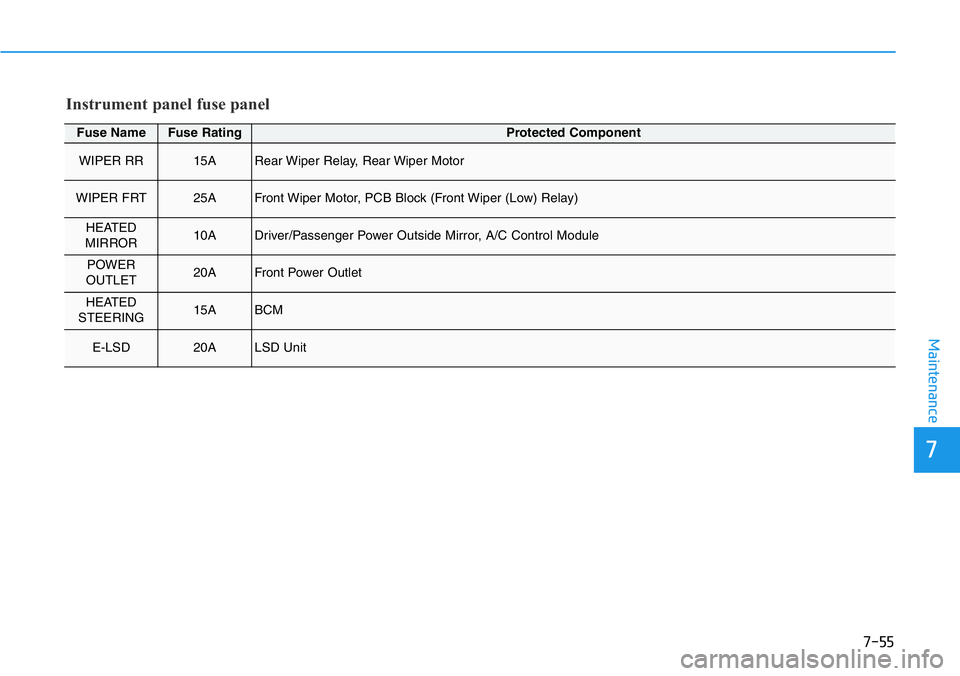
Fuse NameFuse RatingProtected Component
WIPER RR15ARear Wiper Relay, Rear Wiper Motor
WIPER FRT25AFront Wiper Motor, PCB Block (Front Wiper (Low) Relay)
HEATED
MIRROR10ADriver/Passenger Power Outside Mirror, A/C Control Module
POWER
OUTLET20AFront Power Outlet
HEATED
STEERING15ABCM
E-LSD20ALSD Unit
Instrument panel fuse panel
Page 421 of 446
7-69
7
Maintenance
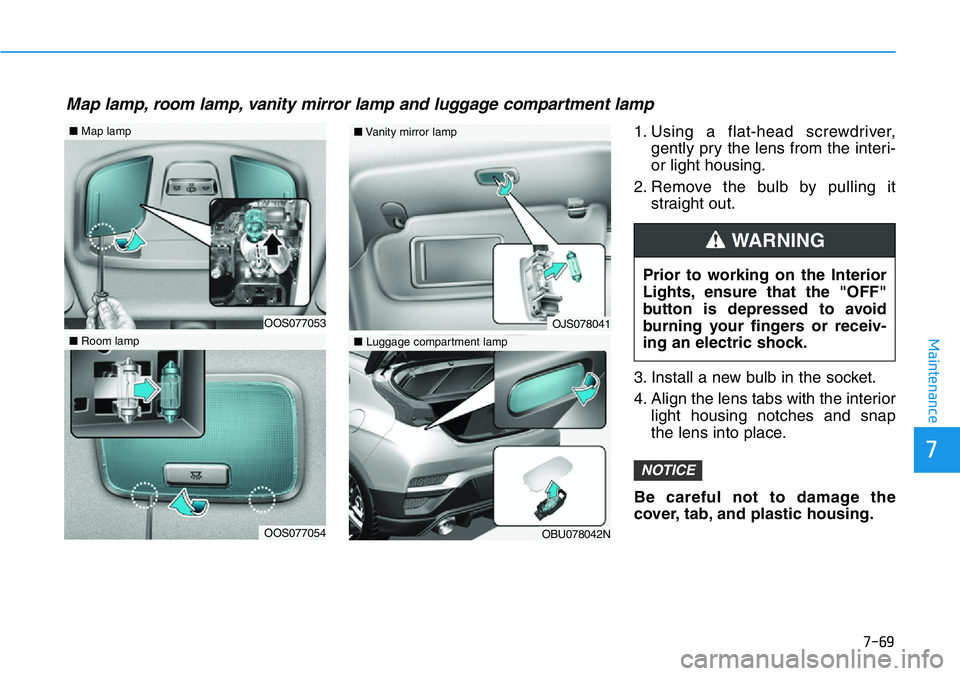
1. Using a flat-head screwdriver,
gently pry the lens from the interi-
or light housing.
2. Remove the bulb by pulling it
straight out.
3. Install a new bulb in the socket.
4. Align the lens tabs with the interior
light housing notches and snap
the lens into place.
Be careful not to damage the
cover, tab, and plastic housing.
NOTICE
Prior to working on the Interior
Lights, ensure that the "OFF"
button is depressed to avoid
burning your fingers or receiv-
ing an electric shock.
WARNING
Map lamp, room lamp, vanity mirror lamp and luggage compartment lamp
OOS077053
■Map lamp
OOS077054
■Room lamp
OJS078041
■Vanity mirror lamp
OBU078042N
■Luggage compartment lamp