ECU HYUNDAI VELOSTER N 2022 Owner's Manual
[x] Cancel search | Manufacturer: HYUNDAI, Model Year: 2022, Model line: VELOSTER N, Model: HYUNDAI VELOSTER N 2022Pages: 446, PDF Size: 9.71 MB
Page 152 of 446
3-74
Convenient features of your vehicle
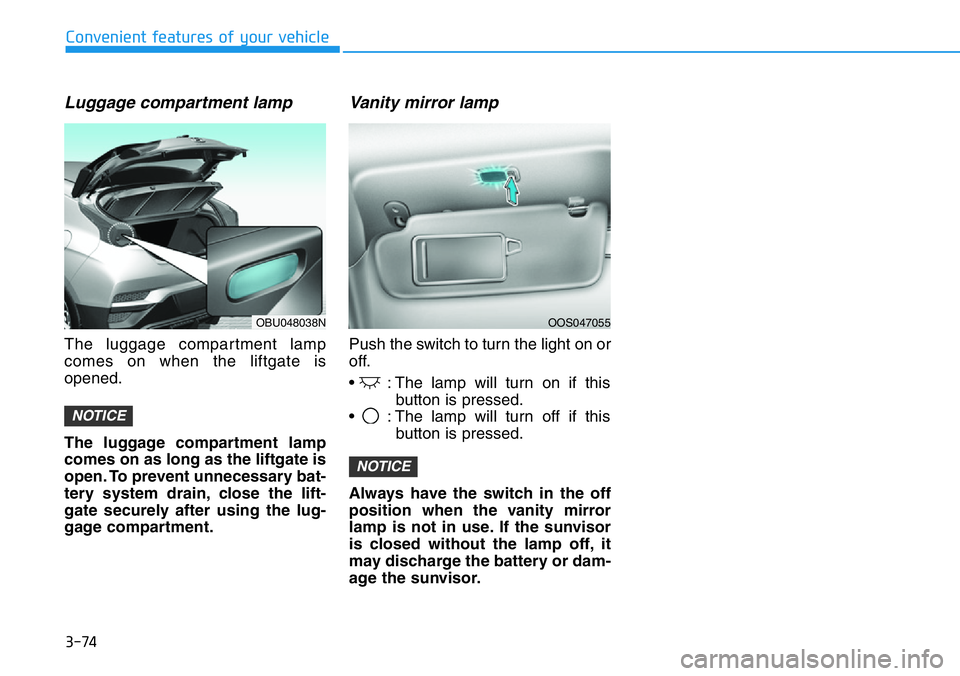
Luggage compartment lamp
The luggage compartment lamp
comes on when the liftgate is
opened.
The luggage compartment lamp
comes on as long as the liftgate is
open. To prevent unnecessary bat-
tery system drain, close the lift-
gate securely after using the lug-
gage compartment.
Vanity mirror lamp
Push the switch to turn the light on or
off.
• : The lamp will turn on if this
button is pressed.
• : The lamp will turn off if this
button is pressed.
Always have the switch in the off
position when the vanity mirror
lamp is not in use. If the sunvisor
is closed without the lamp off, it
may discharge the battery or dam-
age the sunvisor.
NOTICE
NOTICE
OBU048038NOOS047055
Page 183 of 446
3-105
Convenient features of your vehicle
3
STORAGE COMPARTMENT
To avoid possible theft, do not
leave valuables in the storage
compartments.
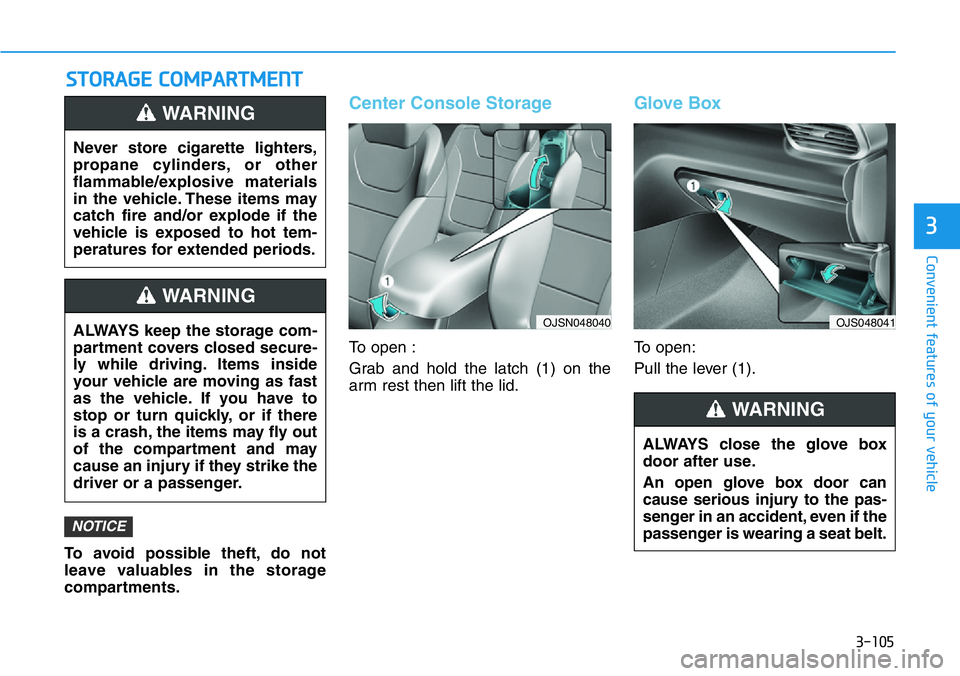
Center Console Storage
To open :
Grab and hold the latch (1) on the
arm rest then lift the lid.
Glove Box
To open:
Pull the lever (1).
NOTICE
Never store cigarette lighters,
propane cylinders, or other
flammable/explosive materials
in the vehicle. These items may
catch fire and/or explode if the
vehicle is exposed to hot tem-
peratures for extended periods.
WARNING
ALWAYS keep the storage com-
partment covers closed secure-
ly while driving. Items inside
your vehicle are moving as fast
as the vehicle. If you have to
stop or turn quickly, or if there
is a crash, the items may fly out
of the compartment and may
cause an injury if they strike the
driver or a passenger.
WARNING
ALWAYS close the glove box
door after use.
An open glove box door can
cause serious injury to the pas-
senger in an accident, even if the
passenger is wearing a seat belt.
WARNING
OJSN048040 OJS048041
Page 186 of 446
3-108
Convenient features of your vehicle
Sunvisor
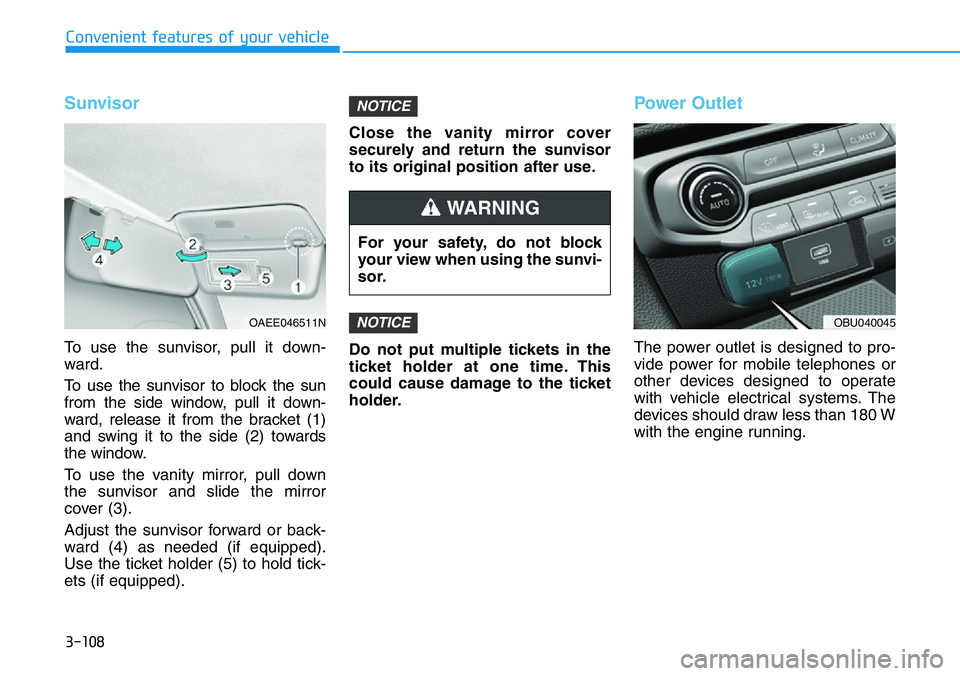
To use the sunvisor, pull it down-
ward.
To use the sunvisor to block the sun
from the side window, pull it down-
ward, release it from the bracket (1)
and swing it to the side (2) towards
the window.
To use the vanity mirror, pull down
the sunvisor and slide the mirror
cover (3).
Adjust the sunvisor forward or back-
ward (4) as needed (if equipped).
Use the ticket holder (5) to hold tick-
ets (if equipped).Close the vanity mirror cover
securely and return the sunvisor
to its original position after use.
Do not put multiple tickets in the
ticket holder at one time. This
could cause damage to the ticket
holder.
Power Outlet
The power outlet is designed to pro-
vide power for mobile telephones or
other devices designed to operate
with vehicle electrical systems. The
devices should draw less than 180 W
with the engine running.
NOTICE
NOTICE
For your safety, do not block
your view when using the sunvi-
sor.
WARNING
OAEE046511NOBU040045
Page 189 of 446
3-111
Convenient features of your vehicle
3
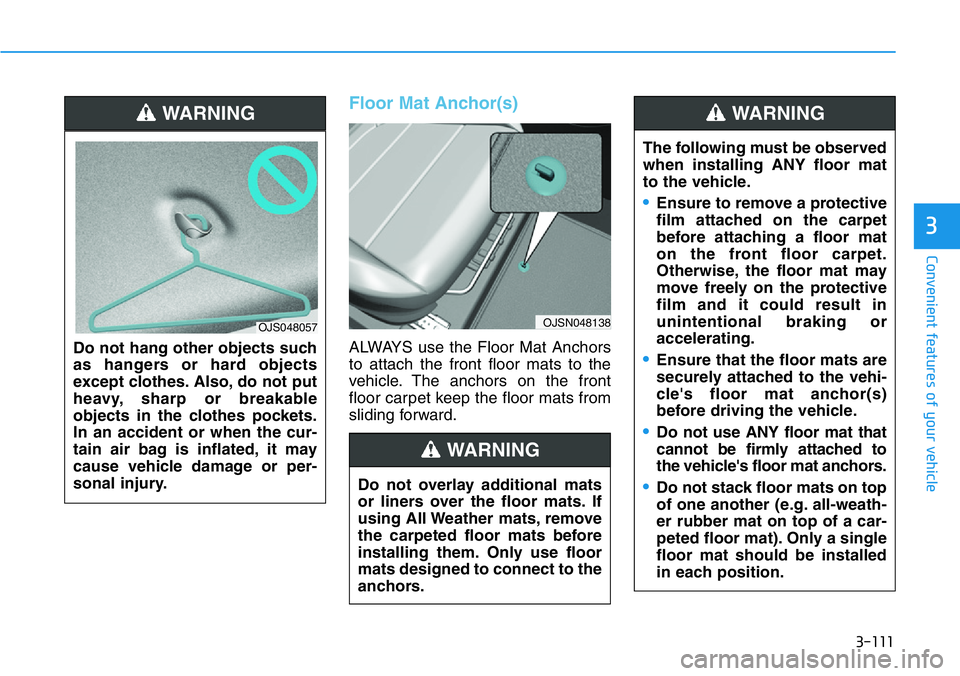
Floor Mat Anchor(s)
ALWAYS use the Floor Mat Anchors
to attach the front floor mats to the
vehicle. The anchors on the front
floor carpet keep the floor mats from
sliding forward. Do not hang other objects such
as hangers or hard objects
except clothes. Also, do not put
heavy, sharp or breakable
objects in the clothes pockets.
In an accident or when the cur-
tain air bag is inflated, it may
cause vehicle damage or per-
sonal injury.
OJS048057
Do not overlay additional mats
or liners over the floor mats. If
using All Weather mats, remove
the carpeted floor mats before
installing them. Only use floor
mats designed to connect to the
anchors.
WARNING
OJSN048138
WARNING
The following must be observed
when installing ANY floor mat
to the vehicle.
•Ensure to remove a protective
film attached on the carpet
before attaching a floor mat
on the front floor carpet.
Otherwise, the floor mat may
move freely on the protective
film and it could result in
unintentional braking or
accelerating.
•Ensure that the floor mats are
securely attached to the vehi-
cle's floor mat anchor(s)
before driving the vehicle.
•Do not use ANY floor mat that
cannot be firmly attached to
the vehicle's floor mat anchors.
•Do not stack floor mats on top
of one another (e.g. all-weath-
er rubber mat on top of a car-
peted floor mat). Only a single
floor mat should be installed
in each position.
WARNING
Page 190 of 446
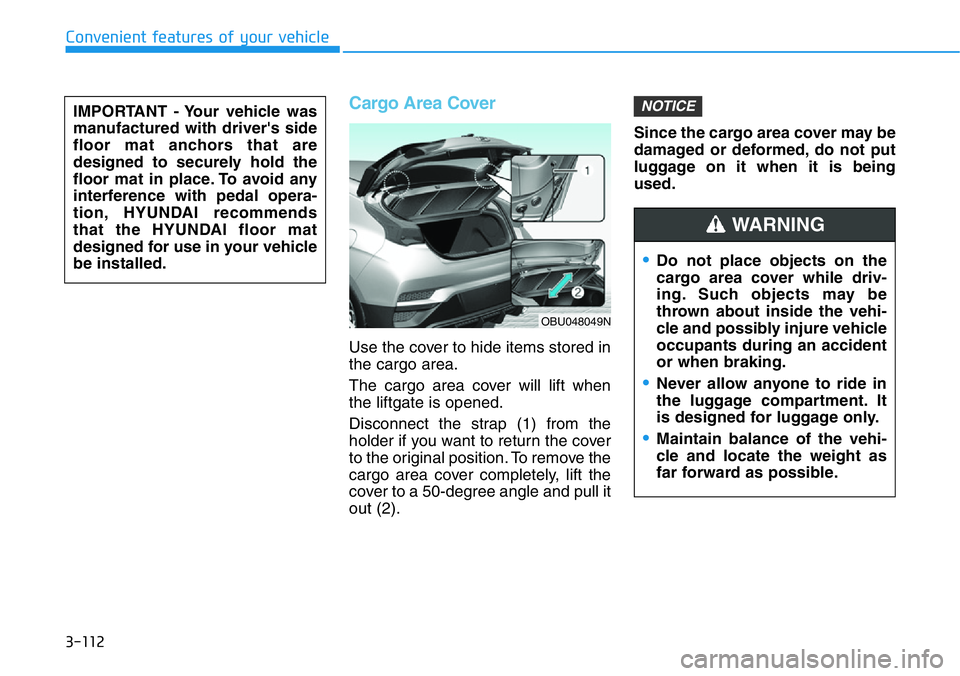
Cargo Area Cover
Use the cover to hide items stored in
the cargo area.
The cargo area cover will lift when
the liftgate is opened.
Disconnect the strap (1) from the
holder if you want to return the cover
to the original position. To remove the
cargo area cover completely, lift the
cover to a 50-degree angle and pull it
out (2).Since the cargo area cover may be
damaged or deformed, do not put
luggage on it when it is being
used.
NOTICE
•Do not place objects on the
cargo area cover while driv-
ing. Such objects may be
thrown about inside the vehi-
cle and possibly injure vehicle
occupants during an accident
or when braking.
•Never allow anyone to ride in
the luggage compartment. It
is designed for luggage only.
•Maintain balance of the vehi-
cle and locate the weight as
far forward as possible.
WARNING
OBU048049N
IMPORTANT - Your vehicle was
manufactured with driver's side
floor mat anchors that are
designed to securely hold the
floor mat in place. To avoid any
interference with pedal opera-
tion, HYUNDAI recommends
that the HYUNDAI floor mat
designed for use in your vehicle
be installed.
Convenient features of your vehicle
3-112
Page 198 of 446
5-4
Driving your vehicle
Before Entering the Vehicle
• Be sure all windows, outside mir-
ror(s), and outside lights are clean
and unobstructed.
• Remove frost, snow, or ice.
• Visually check the tires for uneven
wear and damage.
• Check under the vehicle for any
sign of leaks.
• Be sure there are no obstacles
behind you if you intend to back up.
Before Starting
• Make sure the hood, the liftgate,
and the doors are securely closed
and locked.
• Adjust the position of the seat and
steering wheel.
• Adjust the inside and side view mir-
rors.
• Verify all the lights work.
• Fasten your seatbelt. Check that all
passengers have fastened their
seatbelts.
• Check the gauges and indicators in
the instrument panel and the mes-
sages on the instrument display
when the ignition switch is in the
ON position.
• Check that any items you are car-
rying are stored properly or fas-
tened down securely. CALIFORNIA PROPOSITION 65
WARNING
Engine exhaust and a wide vari-
ety of automobile components
including components found in
the interior furnishings in a
vehicle, contain or emit harmful
chemicals known to the State of
California to cause cancer and
birth defects and reproductive
harm. In addition, certain fluids
contained in vehicles and cer-
tain products of components
contain or emit chemicals
known to the State of California
to cause cancer and birth
defects or other reproductive
harm.WARNING
BEFORE DRIVING
Page 220 of 446
5-26
Driving your vehicle
In manual shift mode, moving the
shift lever backwards and forwards
will allow you to select the desired
range of gears for the current driving
conditions.
M : Drive mode is shifted to manual
shift mode when shifting lever is
operated at M stage.
Up (+) :Pull the lever backwards
once to shift down one gear.
Down (-) :Push the lever forward
once to shift up one gear.
Information
• If the driver presses the lever to
+(Up) or – (Down) position, the
transmission may not make the
requested gear change if the next
gear is outside of the allowable
engine rpm range. The driver must
execute upshifts in accordance with
road conditions, taking care to keep
the engine rpms below the red zone.
• In manual shift mode, only the 8
forward gears can be selected. To
reverse or park the vehicle, move
the shift lever to the R (Reverse) or
P (Park) position as required, and
only when the vehicle is stopped and
not moving.
• In manual shift mode, downshifts
are made automatically when the
vehicle slows down. When the vehi-
cle stops, 1st gear is automatically
selected.
• To maintain the required levels of
vehicle performance and safety, the
system may not execute certain
gearshifts when the shift lever is
operated.
• In manual shift mode, the fuel effi-
ciency may decrease.While stopping the vehicle by
applying parking brake in D gear,
even if you release the parking
brake, the vehicle may not move.
In this case, you can drive the
vehicle by applying the foot brake
and release, applying the acceler-
ator or shifting the lever (D
→N →
D).
NOTICEi
Page 248 of 446
5-54
Driving your vehicle
M/TComponentDRIVE MODE ButtonN Button
ECO modeNORMAL modeSPORT modeN modeCUSTOM mode
Engine & Driving
EngineECONORMALSPORTSPORT+NORMAL / SPORT /
SPORT+
Rev matchingOFFNORMALSPORTSPORT+OFF / NORMAL /
SPORT / SPORT+
e-LSD *1NORMALNORMALSPORTSPORTNORMAL / SPORT
Chassis
SuspensionNORMALNORMALSPORTSPORT+NORMAL / SPORT /
SPORT+
SteeringNORMALNORMALSPORTSPORT+NORMAL / SPORT /
SPORT+
ESC *2NORMALNORMALNORMALSPORTNORMAL / SPORT /
OFF
SoundExhaust sound *3ECONORMALSPORTSPORT+NORMAL / SPORT /
SPORT+
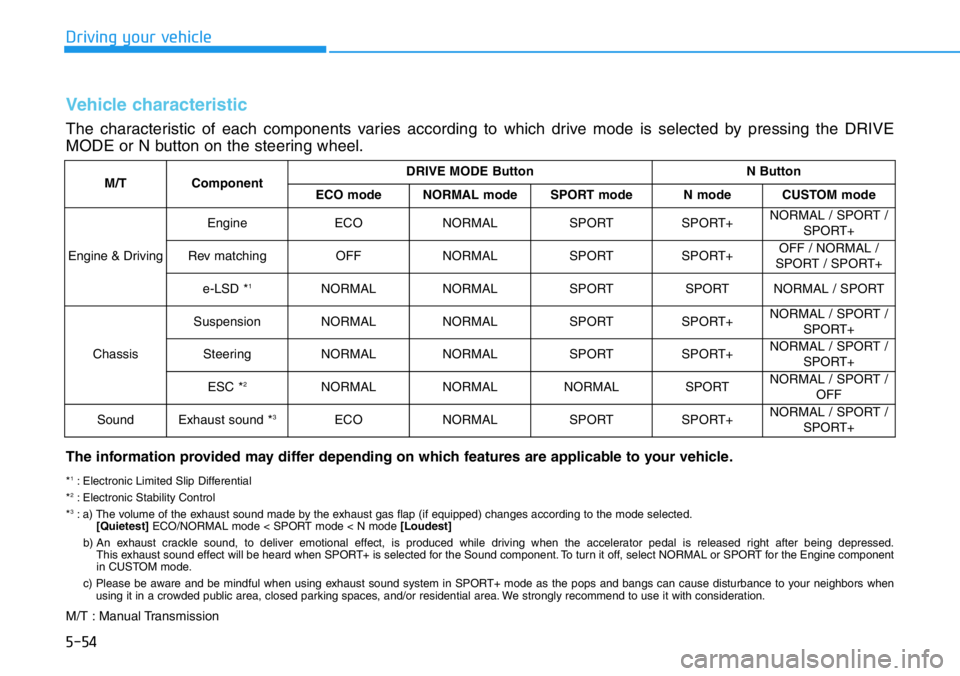
Vehicle characteristic
The characteristic of each components varies according to which drive mode is selected by pressing the DRIVE
MODE or N button on the steering wheel.
The information provided may differ depending on which features are applicable to your vehicle.
*1: Electronic Limited Slip Differential
*2: Electronic Stability Control
*3: a) The volume of the exhaust sound made by the exhaust gas flap (if equipped) changes according to the mode selected.
[Quietest]ECO/NORMAL mode < SPORT mode < N mode [Loudest]
b) An exhaust crackle sound, to deliver emotional effect, is produced while driving when the accelerator pedal is released right after being depressed.
This exhaust sound effect will be heard when SPORT+ is selected for the Sound component. To turn it off, select NORMAL or SPORT for the Engine component
in CUSTOM mode.
c) Please be aware and be mindful when using exhaust sound system in SPORT+ mode as the pops and bangs can cause disturbance to your neighbors when
using it in a crowded public area, closed parking spaces, and/or residential area. We strongly recommend to use it with consideration.
M/T : Manual Transmission
Page 249 of 446

5-55
Driving your vehicle
5
DCTComponentDRIVE MODE ButtonN ButtonNGS Button
(N Grin Shfit)
ECO modeNORMAL modeSPORT modeN modeCUSTOM mode
Engine &
Driving
EngineECONORMALSPORTSPORT+NORMAL / SPORT /
SPORT+SPORT+
Transmission*4ECONORMALSPORTSPORT+NORMAL / SPORT /
SPORT+SPORT+
e-LSD *1NORMALNORMALSPORTSPORTNORMAL / SPORT
Maintain mode
before entering NGS
Chassis
SuspensionNORMALNORMALSPORTSPORT+NORMAL / SPORT /
SPORT+
SteeringNORMALNORMALSPORTSPORT+NORMAL / SPORT /
SPORT+
ESC *2NORMALNORMALNORMALSPORTNORMAL / SPORT /
OFF
SoundExhaust sound *3ECONORMALSPORTSPORT+NORMAL / SPORT /
SPORT+SPORT+
*1: Electronic Limited Slip Differential
*2: Electronic Stability Control
*3: a) The volume of the exhaust sound made by the exhaust gas flap (if equipped) changes according to the mode selected.
[Quietest]ECO/NORMAL mode < SPORT mode < N mode [Loudest]
b) An exhaust crackle sound, to deliver emotional effect, is produced while driving when the accelerator pedal is released right after being depressed.
This exhaust sound effect will be heard when SPORT+ is selected for the Sound component. To turn it off, select NORMAL or SPORT for the Engine component
in CUSTOM mode.
c) Please be aware and be mindful when using exhaust sound system in SPORT+ mode as the pops and bangs can cause disturbance to your neighbors when
using it in a crowded public area, closed parking spaces, and/or residential area. We strongly recommend to use it with consideration.
*
4: Automatic creep start function can be turned ON / OFF in CUSTOM setup menu.
DCT : Dual Clutch Transmission
Page 254 of 446
5-60
Driving your vehicle
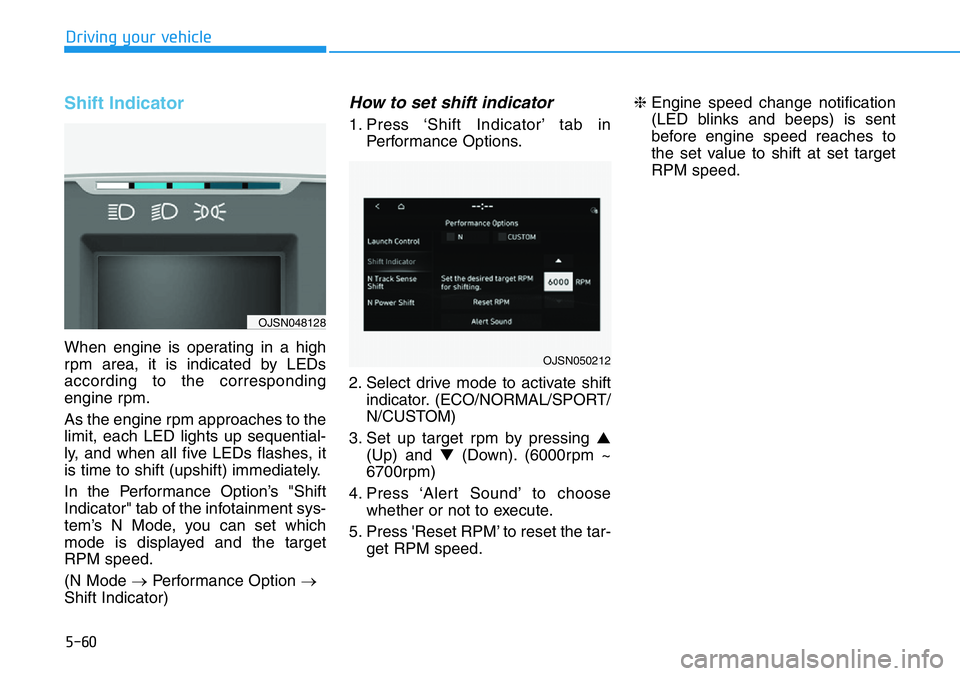
Shift Indicator
When engine is operating in a high
rpm area, it is indicated by LEDs
according to the corresponding
engine rpm.
As the engine rpm approaches to the
limit, each LED lights up sequential-
ly, and when all five LEDs flashes, it
is time to shift (upshift) immediately.
In the Performance Option’s "Shift
Indicator" tab of the infotainment sys-
tem’s N Mode, you can set which
mode is displayed and the target
RPM speed.
(N Mode →Performance Option →
Shift Indicator)
How to set shift indicator
1. Press ‘Shift Indicator’ tab in
Performance Options.
2. Select drive mode to activate shift
indicator. (ECO/NORMAL/SPORT/
N/CUSTOM)
3. Set up target rpm by pressing ▲
(Up) and ▼(Down). (6000rpm ~
6700rpm)
4. Press ‘Alert Sound’ to choose
whether or not to execute.
5. Press 'Reset RPM’ to reset the tar-
get RPM speed.❈Engine speed change notification
(LED blinks and beeps) is sent
before engine speed reaches to
the set value to shift at set target
RPM speed.
OJSN050212
OJSN048128