steering wheel HYUNDAI VELOSTER N 2022 Owner's Guide
[x] Cancel search | Manufacturer: HYUNDAI, Model Year: 2022, Model line: VELOSTER N, Model: HYUNDAI VELOSTER N 2022Pages: 446, PDF Size: 9.71 MB
Page 248 of 446
5-54
Driving your vehicle
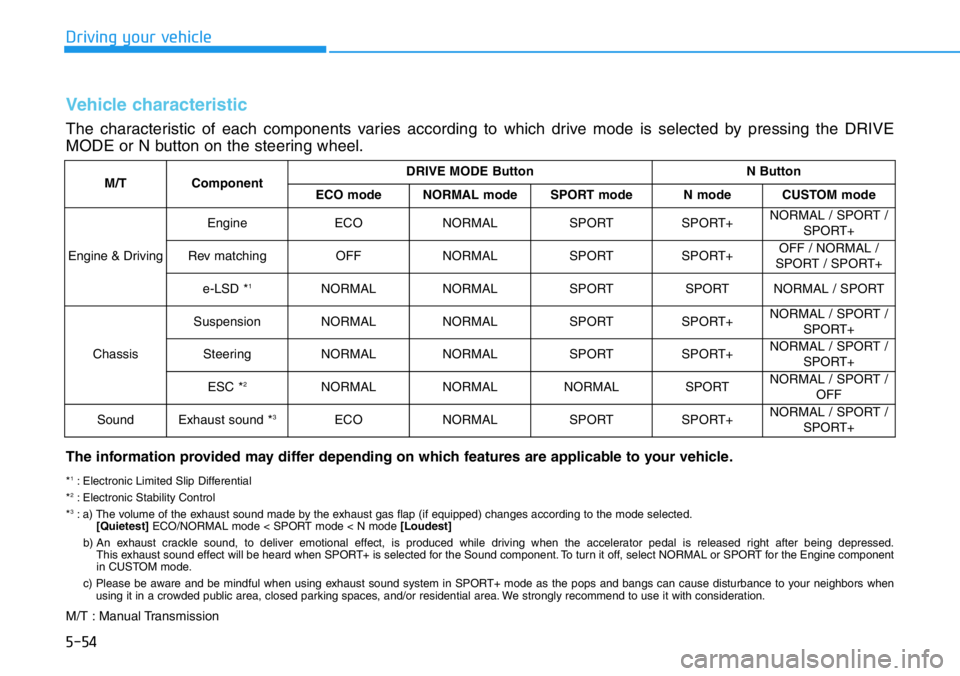
M/TComponentDRIVE MODE ButtonN Button
ECO modeNORMAL modeSPORT modeN modeCUSTOM mode
Engine & Driving
EngineECONORMALSPORTSPORT+NORMAL / SPORT /
SPORT+
Rev matchingOFFNORMALSPORTSPORT+OFF / NORMAL /
SPORT / SPORT+
e-LSD *1NORMALNORMALSPORTSPORTNORMAL / SPORT
Chassis
SuspensionNORMALNORMALSPORTSPORT+NORMAL / SPORT /
SPORT+
SteeringNORMALNORMALSPORTSPORT+NORMAL / SPORT /
SPORT+
ESC *2NORMALNORMALNORMALSPORTNORMAL / SPORT /
OFF
SoundExhaust sound *3ECONORMALSPORTSPORT+NORMAL / SPORT /
SPORT+
Vehicle characteristic
The characteristic of each components varies according to which drive mode is selected by pressing the DRIVE
MODE or N button on the steering wheel.
The information provided may differ depending on which features are applicable to your vehicle.
*1: Electronic Limited Slip Differential
*2: Electronic Stability Control
*3: a) The volume of the exhaust sound made by the exhaust gas flap (if equipped) changes according to the mode selected.
[Quietest]ECO/NORMAL mode < SPORT mode < N mode [Loudest]
b) An exhaust crackle sound, to deliver emotional effect, is produced while driving when the accelerator pedal is released right after being depressed.
This exhaust sound effect will be heard when SPORT+ is selected for the Sound component. To turn it off, select NORMAL or SPORT for the Engine component
in CUSTOM mode.
c) Please be aware and be mindful when using exhaust sound system in SPORT+ mode as the pops and bangs can cause disturbance to your neighbors when
using it in a crowded public area, closed parking spaces, and/or residential area. We strongly recommend to use it with consideration.
M/T : Manual Transmission
Page 251 of 446
5-57
Driving your vehicle
5
• Warm up the tires before using
launch control for the best
result.
• Launch Control is intended for
use at a closed race track with
dry road surface and not intend-
ed for use on public roads. It will
not compensate for driver's who
are inexperienced or lack famil-
iarity with the race track.
• Do not use Launch Control in
poor road condition (ex. wet,
sand, snow). Control over vehi-
cle may be lost with poor road
condition and driver inatten-
tions. Do not endanger other
road users by using Launch
Control.
• Do not use Launch Control dur-
ing break-in period of the vehi-
cle.
• Constant use of Launch Control
can put enormous stress on the
vehicle resulting in premature
wear of related components.
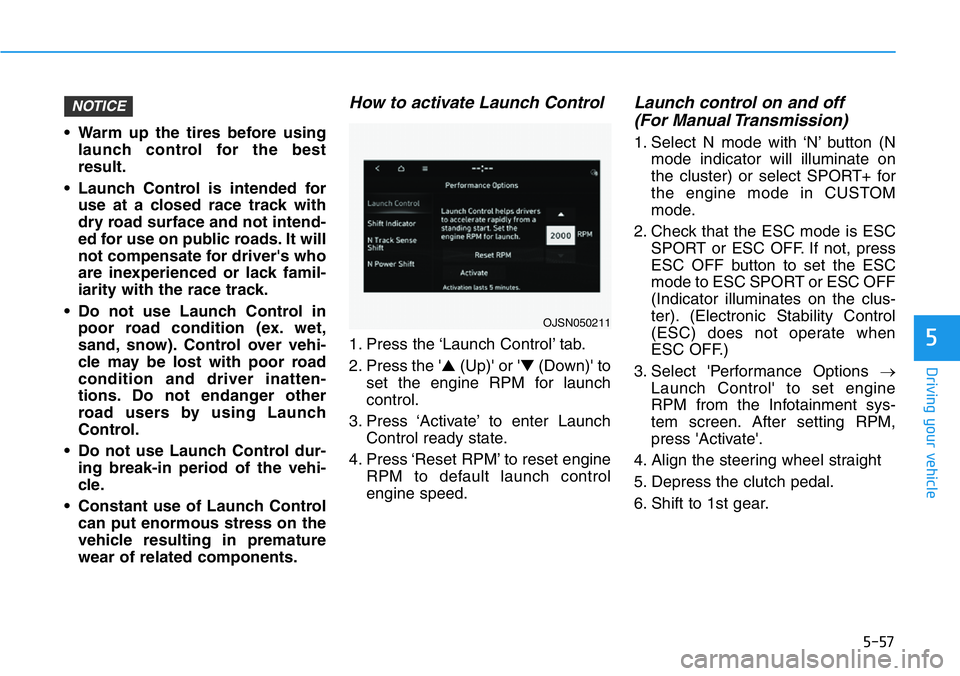
How to activate Launch Control
1. Press the ‘Launch Control’ tab.
2. Press the '▲(Up)' or '▼(Down)' to
set the engine RPM for launch
control.
3. Press ‘Activate’ to enter Launch
Control ready state.
4. Press ‘Reset RPM’ to reset engine
RPM to default launch control
engine speed.
Launch control on and off
(For Manual Transmission)
1. Select N mode with ‘N’ button (N
mode indicator will illuminate on
the cluster) or select SPORT+ for
the engine mode in CUSTOM
mode.
2. Check that the ESC mode is ESC
SPORT or ESC OFF. If not, press
ESC OFF button to set the ESC
mode to ESC SPORT or ESC OFF
(Indicator illuminates on the clus-
ter). (Electronic Stability Control
(ESC) does not operate when
ESC OFF.)
3. Select 'Performance Options →
Launch Control' to set engine
RPM from the Infotainment sys-
tem screen. After setting RPM,
press 'Activate'.
4. Align the steering wheel straight
5. Depress the clutch pedal.
6. Shift to 1st gear.
NOTICE
OJSN050211
Page 252 of 446
5-58
Driving your vehicle
7. While depressing the clutch pedal
with your left foot, quickly and fully
depress the accelerator pedal with
your right foot. Launch control will
be in the ready state. The mes-
sage 'Launch Control Ready' will
appear on the cluster. If neces-
sary, adjust engine rpm with the
cruise control switch (+/-).
8. A smooth, quick release of the
clutch pedal within 8 seconds,
while maintaining full depression
of the accelerator pedal will initiate
launching of the vehicle. The mes-
sage 'Launch Control Active' will
appear on the cluster.
9. Control will deactivate when the
accelerator pedal is released.
Launch control on and off
(For Dual Clutch Transmission)
1. Select N mode with 'N' button (N
mode indicator will illuminate on
the cluster) or select SPORT+ for
the engine mode in CUSTOM
mode.
2. Check that the ESC mode is ESC
SPORT or ESC OFF. If not, press
ESC OFF button to set the ESC
mode to ESC SPORT or ESC OFF
(Indicator illuminates on the clus-
ter). (Electronic Stability Control
(ESC) does not operate when
ESC OFF.)
3. Shift the gear to D (Drive) or M
(Manual shift mode). (When
Manual shift mode is selected,
driver must shift manually.)
4. Select 'Performance Options →
Launch Control' to set engine
RPM from the Infotainment sys-
tem screen. After setting RPM,
press 'Activate’.
5. Align the steering wheel straight
6. Depress the brake pedal to the
maximum with your left foot.7. While depressing the brake pedal
with your left foot, quickly and fully
depress the accelerator pedal with
your right foot. Launch control will
be in the ready state. The mes-
sage 'Launch Control Ready' will
appear on the cluster. If neces-
sary, adjust engine rpm with the
cruise control switch (+/-).
8. A smooth, quick release of the
brake pedal within 8 seconds,
while maintaining full depression
of the accelerator pedal will initiate
launching of the vehicle. The mes-
sage 'Launch Control Active' will
appear on the cluster.
9. Launch Control will deactivate
when the accelerator pedal is
released.
Page 272 of 446
5-78
Driving your vehicle
- If ‘Lane Departure Warning’ is
selected, the functions for the sys-
tem will warn the driver with an
audible warning when lane depar-
ture is detected. The driver must
steer the vehicle.
- If ‘Off’ is selected, the functions for
the system will turn off. The
indicator light will turn off on the
cluster.
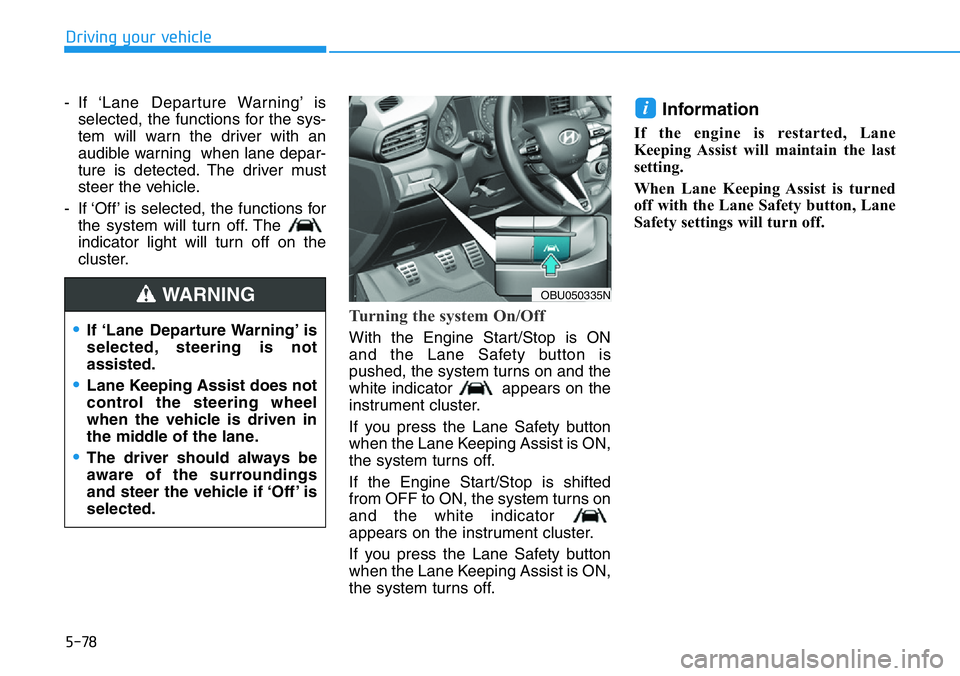
Turning the system On/Off
With the Engine Start/Stop is ON
and the Lane Safety button is
pushed, the system turns on and the
white indicator appears on the
instrument cluster.
If you press the Lane Safety button
when the Lane Keeping Assist is ON,
the system turns off.
If the Engine Start/Stop is shifted
from OFF to ON, the system turns on
and the white indicator
appears on the instrument cluster.
If you press the Lane Safety button
when the Lane Keeping Assist is ON,
the system turns off.
Information
If the engine is restarted, Lane
Keeping Assist will maintain the last
setting.
When Lane Keeping Assist is turned
off with the Lane Safety button, Lane
Safety settings will turn off.
i
OBU050335N
•If ‘Lane Departure Warning’ is
selected, steering is not
assisted.
•Lane Keeping Assist does not
control the steering wheel
when the vehicle is driven in
the middle of the lane.
•The driver should always be
aware of the surroundings
and steer the vehicle if ‘Off’ is
selected.
WARNING
Page 274 of 446
5-80
Driving your vehicle
• The system will operate when your
vehicle speed is between approxi-
mately 40~120 mph (60~200 km/h).
Lane Keeping Assist
• To warn the driver that the vehicle
is departing from the projected
lane in front, the green indi-
cator light will blink on the cluster,
and the steering wheel will make
adjustments to keep vehicle inside
the lane.
• The system will operate when your
vehicle speed is between approxi-
mately 40~120 mph (60~200 km/h).
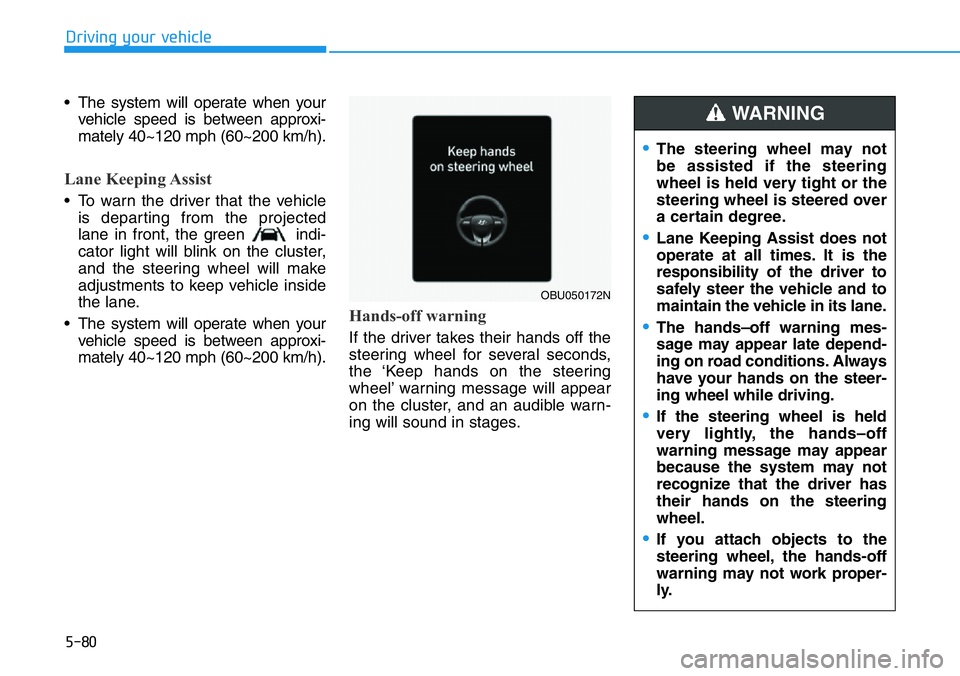
Hands-off warning
If the driver takes their hands off the
steering wheel for several seconds,
the ‘Keep hands on the steering
wheel’ warning message will appear
on the cluster, and an audible warn-
ing will sound in stages.
OBU050172N
•The steering wheel may not
be assisted if the steering
wheel is held very tight or the
steering wheel is steered over
a certain degree.
•Lane Keeping Assist does not
operate at all times. It is the
responsibility of the driver to
safely steer the vehicle and to
maintain the vehicle in its lane.
•The hands–off warning mes-
sage may appear late depend-
ing on road conditions. Always
have your hands on the steer-
ing wheel while driving.
•If the steering wheel is held
very lightly, the hands–off
warning message may appear
because the system may not
recognize that the driver has
their hands on the steering
wheel.
•If you attach objects to the
steering wheel, the hands-off
warning may not work proper-
ly.
WARNING
Page 275 of 446
5-81
Driving your vehicle
5
Information
• You may change settings from the
instrument cluster (User Settings),
refer to ‘LCD display’ section in
chapter 3.
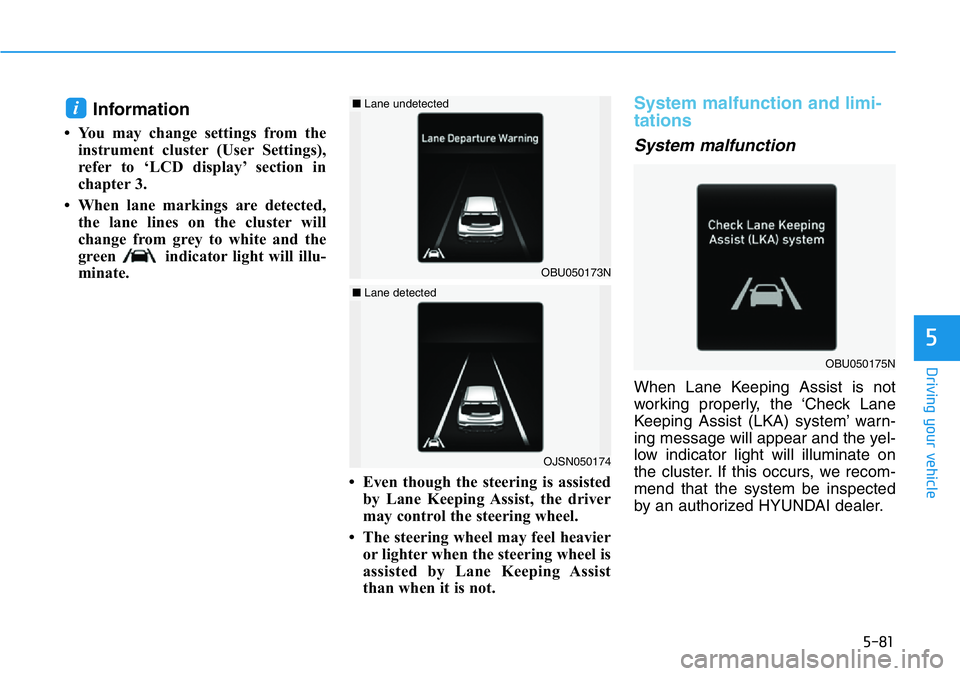
• When lane markings are detected,
the lane lines on the cluster will
change from grey to white and the
green indicator light will illu-
minate.
• Even though the steering is assisted
by Lane Keeping Assist, the driver
may control the steering wheel.
• The steering wheel may feel heavier
or lighter when the steering wheel is
assisted by Lane Keeping Assist
than when it is not.
System malfunction and limi-
tations
System malfunction
When Lane Keeping Assist is not
working properly, the ‘Check Lane
Keeping Assist (LKA) system’ warn-
ing message will appear and the yel-
low indicator light will illuminate on
the cluster. If this occurs, we recom-
mend that the system be inspected
by an authorized HYUNDAI dealer.
i
OJSN050174
■Lane detected
OBU050175N
OBU050173N
■Lane undetected
Page 276 of 446
5-82
Driving your vehicle
•If the vehicle is driven at high
speed, the steering wheel will
not be controlled. The driver
must always follow the speed
limit when using the system.
•If any other system’s warning
message is displayed or audi-
ble warning is generated,
Lane Keeping Assist warning
message may not be dis-
played and audible warning
may not be generated.
•You may not hear the warning
sound of Lane Keeping Assist
if the surrounding is noisy.
•If you attach objects to the
steering wheel, steering may
not be assisted properly.
•Lane Keeping Assist may not
operate for 15 seconds after
the vehicle is started, or the
front view camera is initial-
ized.
•Lane Keeping Assist will not
operate when:
- The turn signal or hazard
warning flasher is turned on
- The vehicle is not driven in
the center of the lane when
the system is turned on or
right after changing a lane
- ESC (Electronic Stability
Control) or VSM (Vehicle
Stability Management) is
activated
- The vehicle is driven on a
sharp curve
- Vehicle speed is below 35
mph (55 km/h) or above 130
mph (210 km/h)
- The vehicle makes sharp
lane changes
- The vehicle brakes suddenly
Take the following precautions
when using Lane Keeping
Assist:
•The driver should hold the
responsibility to safely drive
and control the vehicle. Do
not solely rely on the system
and drive dangerously.
•The operation of Lane
Keeping Assist can be can-
celled or not work properly
depending on road conditions
and surroundings. Always be
cautious while driving.
•Refer to “Limitations of the
System” if the lane is not
detected properly.
•When you are towing a trailer
or another vehicle, we recom-
mend that Lane Keeping
Assist is turned off due to
safety reasons.
WARNING
Page 301 of 446
5-107
Driving your vehicle
5
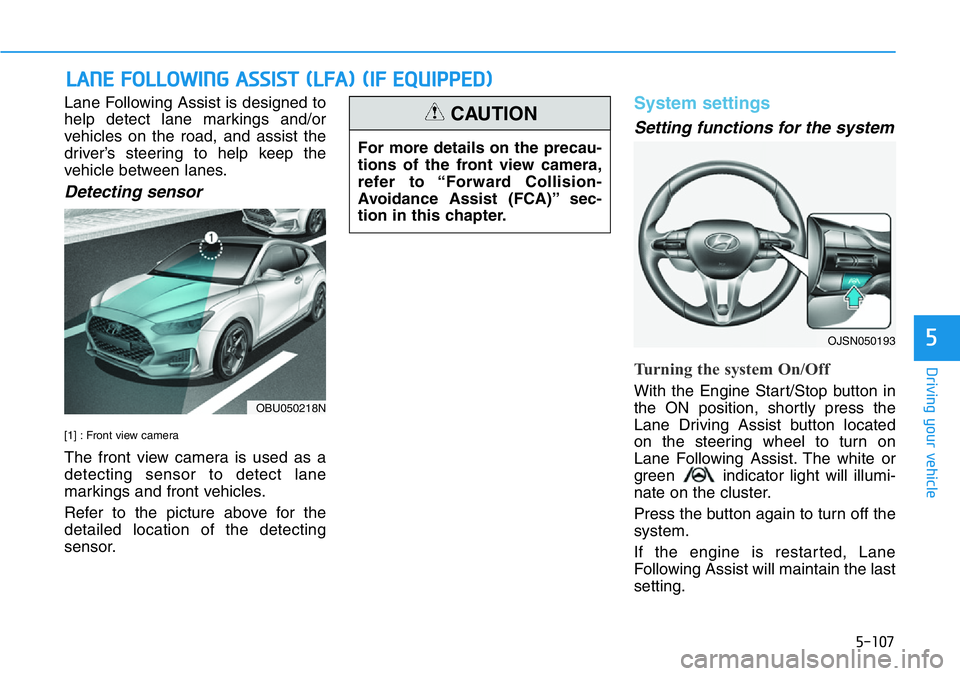
Lane Following Assist is designed to
help detect lane markings and/or
vehicles on the road, and assist the
driver’s steering to help keep the
vehicle between lanes.
Detecting sensor
[1] : Front view camera
The front view camera is used as a
detecting sensor to detect lane
markings and front vehicles.
Refer to the picture above for the
detailed location of the detecting
sensor.
System settings
Setting functions for the system
Turning the system On/Off
With the Engine Start/Stop button in
the ON position, shortly press the
Lane Driving Assist button located
on the steering wheel to turn on
Lane Following Assist. The white or
green indicator light will illumi-
nate on the cluster.
Press the button again to turn off the
system.
If the engine is restarted, Lane
Following Assist will maintain the last
setting.
LANE FOLLOWING ASSIST (LFA) (IF EQUIPPED)
For more details on the precau-
tions of the front view camera,
refer to “Forward Collision-
Avoidance Assist (FCA)” sec-
tion in this chapter.
CAUTION
OBU050218N
OJSN050193
Page 302 of 446
5-108
Driving your vehicle
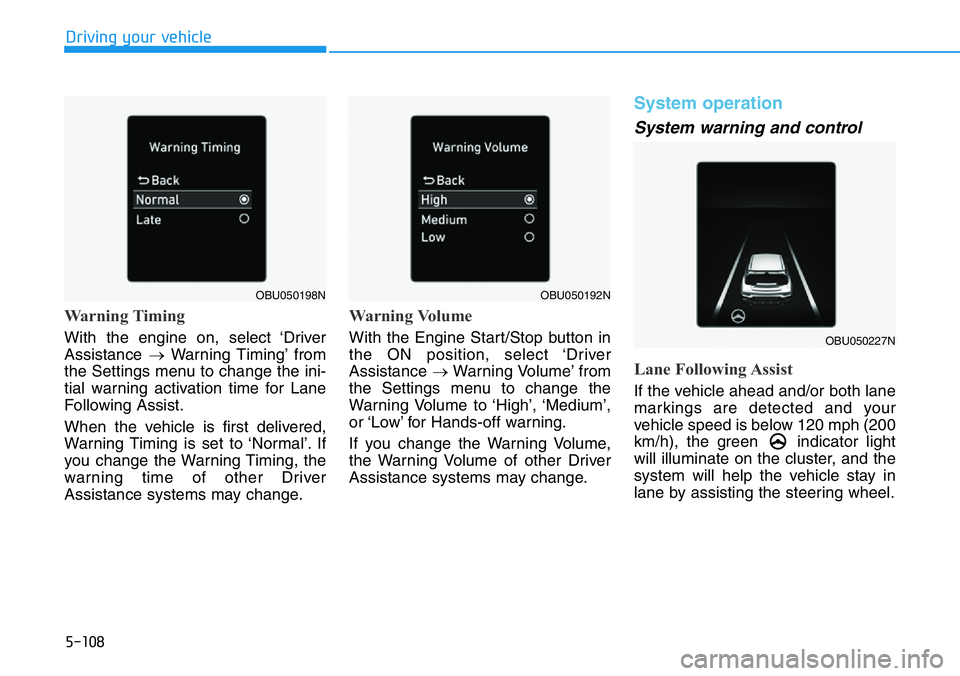
Warning Timing
With the engine on, select ‘Driver
Assistance →Warning Timing’ from
the Settings menu to change the ini-
tial warning activation time for Lane
Following Assist.
When the vehicle is first delivered,
Warning Timing is set to ‘Normal’. If
you change the Warning Timing, the
warning time of other Driver
Assistance systems may change.
Warning Volume
With the Engine Start/Stop button in
the ON position, select ‘Driver
Assistance →Warning Volume’ from
the Settings menu to change the
Warning Volume to ‘High’, ‘Medium’,
or ‘Low’ for Hands-off warning.
If you change the Warning Volume,
the Warning Volume of other Driver
Assistance systems may change.
System operation
System warning and control
Lane Following Assist
If the vehicle ahead and/or both lane
markings are detected and your
vehicle speed is below 120 mph (200
km/h), the green indicator light
will illuminate on the cluster, and the
system will help the vehicle stay in
lane by assisting the steering wheel.
OBU050192N
OBU050227N
OBU050198N
Page 303 of 446
5-109
Driving your vehicle
5
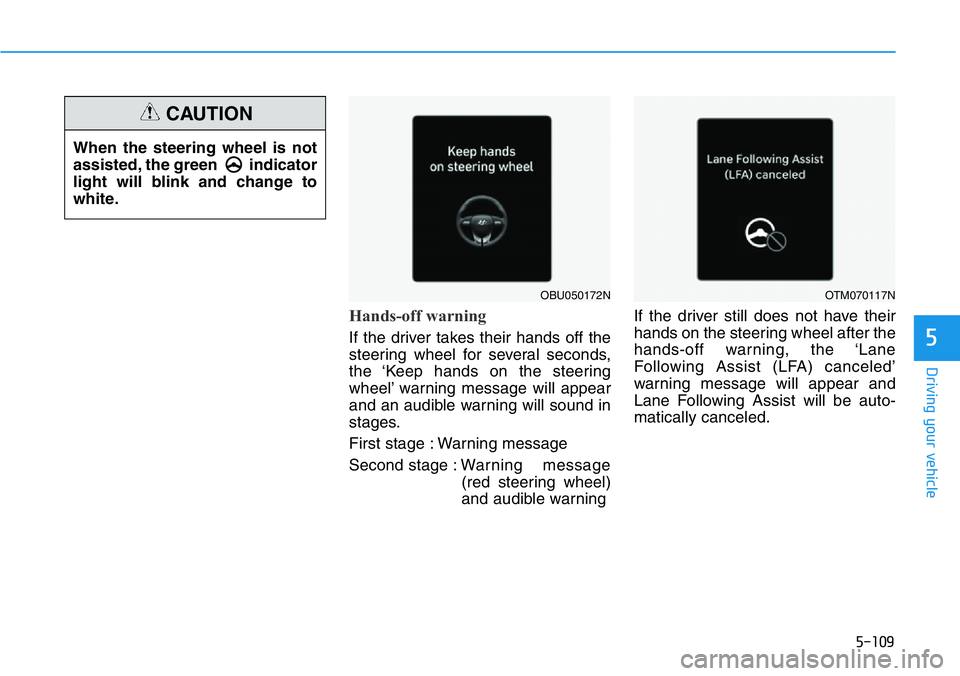
Hands-off warning
If the driver takes their hands off the
steering wheel for several seconds,
the ‘Keep hands on the steering
wheel’ warning message will appear
and an audible warning will sound in
stages.
First stage : Warning message
Second stage : Warning message
(red steering wheel)
and audible warningIf the driver still does not have their
hands on the steering wheel after the
hands-off warning, the ‘Lane
Following Assist (LFA) canceled’
warning message will appear and
Lane Following Assist will be auto-
matically canceled.
OBU050172NOTM070117N
When the steering wheel is not
assisted, the green indicator
light will blink and change to
white.
CAUTION