Jack HYUNDAI VELOSTER N 2022 Owners Manual
[x] Cancel search | Manufacturer: HYUNDAI, Model Year: 2022, Model line: VELOSTER N, Model: HYUNDAI VELOSTER N 2022Pages: 446, PDF Size: 9.71 MB
Page 85 of 446
3-7
Convenient features of your vehicle
If the smart key is in close proximity
to your mobile phone, the signal
could be blocked by your mobile
phone's normal operational signals.
This is specifically relevant when the
phone is active such as making and
receiving calls, text messaging,
and/or sending/receiving emails.
When possible, avoid keeping the
smart key and your mobile phone in
the same location such as a pants or
jacket pocket in order to avoid inter-
ference between the two devices.
Keep the smart key away from
electromagnetic materials that
blocks electromagnetic waves to
the key surface.
Always have the smart key with
you when leaving the vehicle. If
the smart key is left near the vehi-
cle, the vehicle battery may be dis-
charged.Information
This device complies with Part 15 of
the FCC rules.
Operation is subject to the following
three conditions:
1. This device may not cause harmful
interference.
2. This device must accept any inter-
ference received, including interfer-
ence that may cause undesired
operation.
3. Changes or modifications not
expressly approved by the party
responsible for compliance could
void the user's authority to operate
the device.
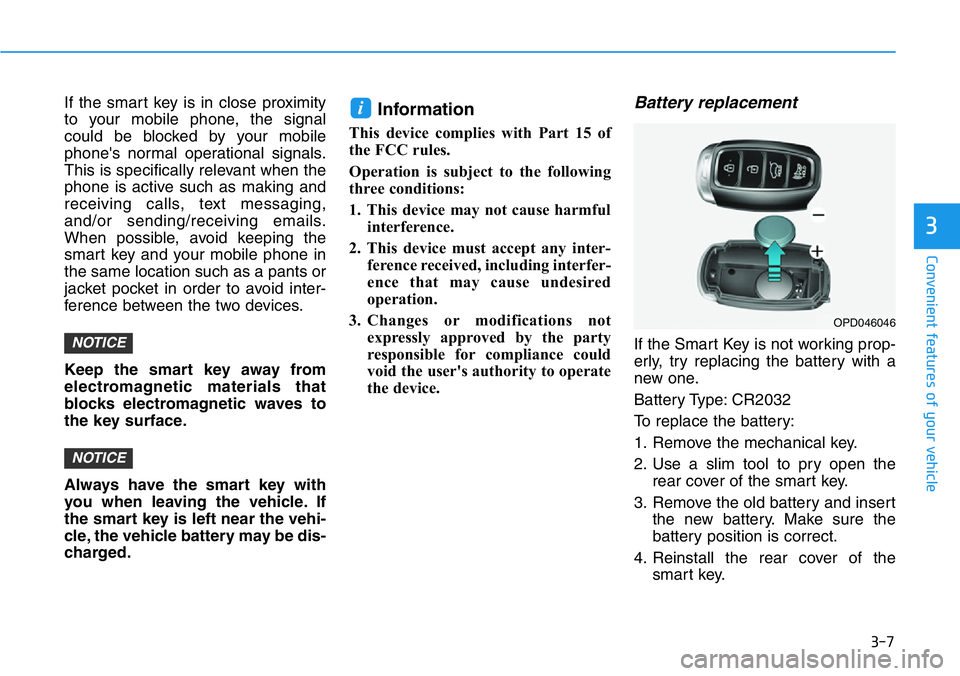
Battery replacement
If the Smart Key is not working prop-
erly, try replacing the battery with a
new one.
Battery Type: CR2032
To replace the battery:
1. Remove the mechanical key.
2. Use a slim tool to pry open the
rear cover of the smart key.
3. Remove the old battery and insert
the new battery. Make sure the
battery position is correct.
4. Reinstall the rear cover of the
smart key.
i
NOTICE
NOTICE
3
OPD046046
Page 241 of 446
5-47
Driving your vehicle
5
Electronic Limited Slip Differential
refers to a feature equipped with a
mechanism that controls the differen-
tial functions of the wheels.
The Electronic Limited Slip
Differential helps:
- Improve handling performance
when circling at high speed.
- Improve launching performance.
- Prevent slipping on rainy or snowy
roads due to dissimilar friction of
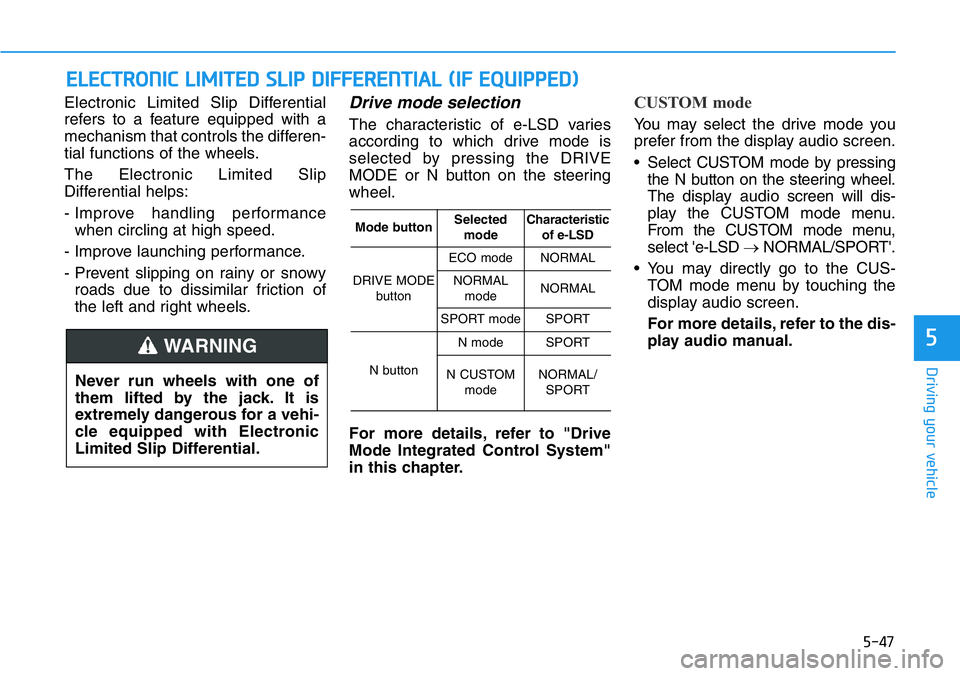
the left and right wheels.Drive mode selection
The characteristic of e-LSD varies
according to which drive mode is
selected by pressing the DRIVE
MODE or N button on the steering
wheel.
For more details, refer to "Drive
Mode Integrated Control System"
in this chapter.
CUSTOM mode
You may select the drive mode you
prefer from the display audio screen.
• Select CUSTOM mode by pressing
the N button on the steering wheel.
The display audioscreen will dis-
play the CUSTOM mode menu.
From the CUSTOM mode menu,
select 'e-LSD →NORMAL/SPORT'.
• You may directly go to the CUS-
TOM mode menu by touching the
display audio screen.
For more details, refer to the dis-
play audio manual.
ELECTRONIC LIMITED SLIP DIFFERENTIAL (IF EQUIPPED)
Never run wheels with one of
them lifted by the jack. It is
extremely dangerous for a vehi-
cle equipped with Electronic
Limited Slip Differential.
WARNING
Mode buttonSelected
modeCharacteristic
of e-LSD
DRIVE MODE
button
ECO modeNORMAL
NORMAL
modeNORMAL
SPORT modeSPORT
N button
N modeSPORT
N CUSTOM
modeNORMAL/
SPORT