automatic transmission HYUNDAI VELOSTER TURBO 2016 User Guide
[x] Cancel search | Manufacturer: HYUNDAI, Model Year: 2016, Model line: VELOSTER TURBO, Model: HYUNDAI VELOSTER TURBO 2016Pages: 406, PDF Size: 7.83 MB
Page 233 of 406
525
Driving your vehicle
(Continued)
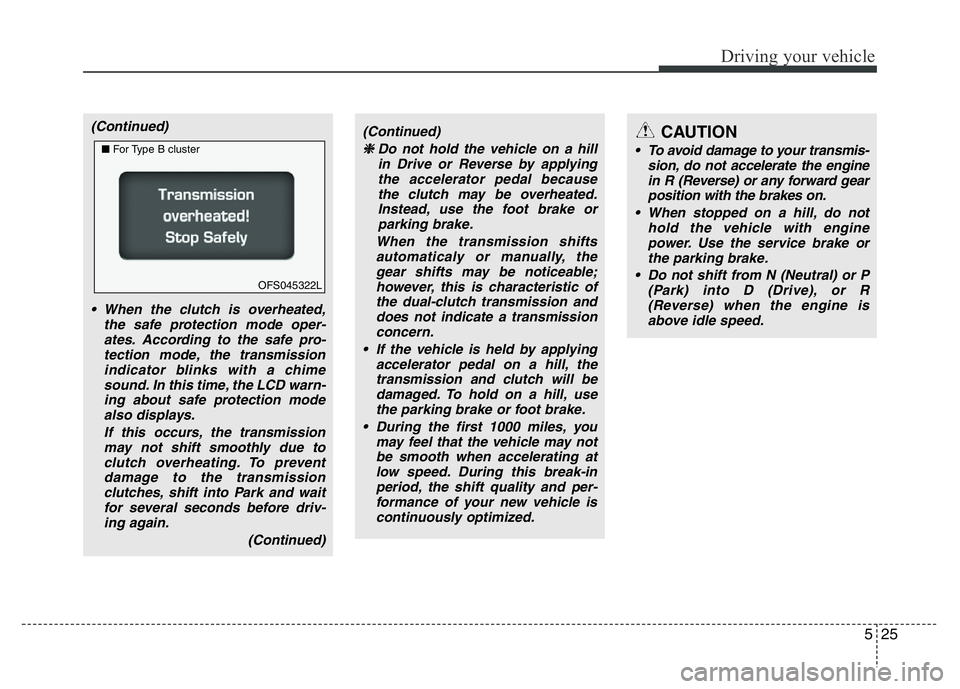
• When the clutch is overheated,
the safe protection mode oper-
ates. According to the safe pro-
tection mode, the transmission
indicator blinks with a chime
sound. In this time, the LCD warn-
ing about safe protection mode
also displays.
If this occurs, the transmission
may not shift smoothly due to
clutch overheating. To prevent
damage to the transmission
clutches, shift into Park and wait
for several seconds before driv-
ing again.
(Continued)(Continued)
❈Do not hold the vehicle on a hill
in Drive or Reverse by applying
the accelerator pedal because
the clutch may be overheated.
Instead, use the foot brake or
parking brake.
When the transmission shifts
automaticaly or manually, the
gear shifts may be noticeable;
however, this is characteristic of
the dual-clutch transmission and
does not indicate a transmission
concern.
Page 234 of 406
Driving your vehicle
26 5
Transmission ranges
P (Park)
Always come to a complete stop before
shifting into P (Park). This position locks
the transmission and prevents the front
wheels from rotating.R (Reverse)
Use this position to drive the vehicle
backward.
N (Neutral)
The wheels and transmission are not
locked. The vehicle will roll freely even on
the slightest incline unless the parking
brake or service brakes are applied.D (Drive)
This is the normal forward driving posi-
tion. The transmission will automatically
shift through a 6-gear sequence, provid-
ing the best fuel economy and power.
For extra power when passing another
vehicle or climbing grades, depress the
accelerator fully, at which time the trans-
mission will automatically downshift to
the next lower gear.
WARNING
• Shifting into P (Park) while the
vehicle is in motion will cause the
drive wheels to lock which will
cause you to lose control of the
vehicle.
• Do not use the P (Park) position
in place of the parking brake.
Always make sure the shift lever
is latched in the P (Park) position
and set the parking brake fully.
• Never leave a child unattended in
a vehicle.
CAUTION
Always come to a complete stop
before shifting into or out of
Reverse (R) or Drive (D) to prevent
damage to the transmission, except
as explained in “Rocking the vehi-
cle” in this section.
Page 235 of 406
527
Driving your vehicle
Sports mode
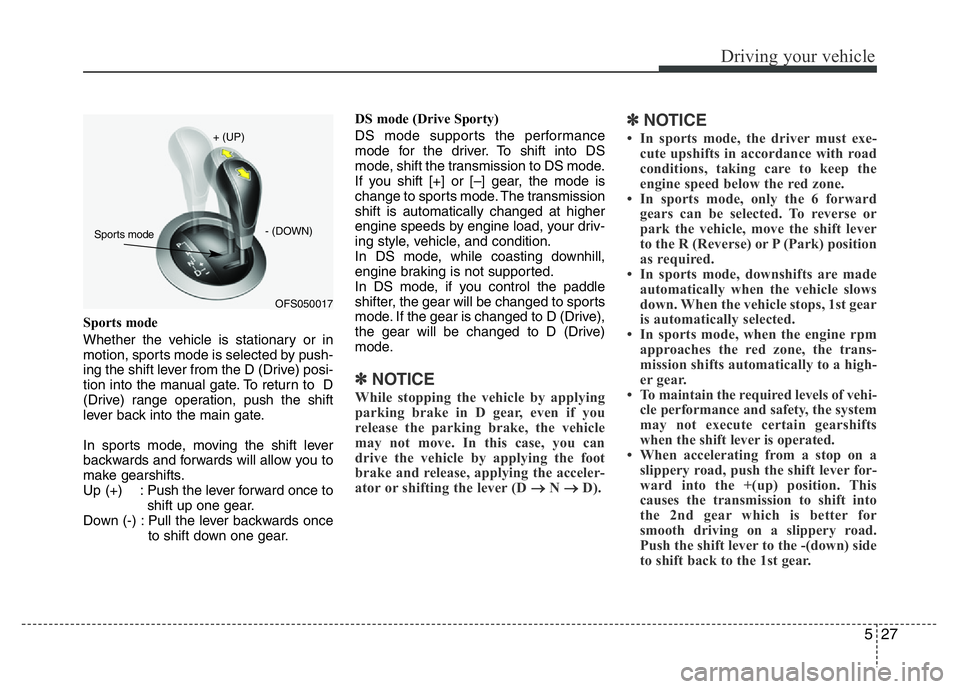
Whether the vehicle is stationary or in
motion, sports mode is selected by push-
ing the shift lever from the D (Drive) posi-
tion into the manual gate. To return to D
(Drive) range operation, push the shift
lever back into the main gate.
In sports mode, moving the shift lever
backwards and forwards will allow you to
make gearshifts.
Up (+) : Push the lever forward once to
shift up one gear.
Down (-) : Pull the lever backwards once
to shift down one gear.DS mode (Drive Sporty)
DS mode supports the performance
mode for the driver. To shift into DS
mode, shift the transmission to DS mode.
If you shift [+] or [–] gear, the mode is
change to sports mode. The transmission
shift is automatically changed at higher
engine speeds by engine load, your driv-
ing style, vehicle, and condition.
In DS mode, while coasting downhill,
engine braking is not supported.
In DS mode, if you control the paddle
shifter, the gear will be changed to sports
mode. If the gear is changed to D (Drive),
the gear will be changed to D (Drive)
mode.
✽NOTICE
While stopping the vehicle by applying
parking brake in D gear, even if you
release the parking brake, the vehicle
may not move. In this case, you can
drive the vehicle by applying the foot
brake and release, applying the acceler-
ator or shifting the lever (D
→ N → D).
✽NOTICE
• In sports mode, the driver must exe-
cute upshifts in accordance with road
conditions, taking care to keep the
engine speed below the red zone.
• In sports mode, only the 6 forward
gears can be selected. To reverse or
park the vehicle, move the shift lever
to the R (Reverse) or P (Park) position
as required.
• In sports mode, downshifts are made
automatically when the vehicle slows
down. When the vehicle stops, 1st gear
is automatically selected.
• In sports mode, when the engine rpm
approaches the red zone, the trans-
mission shifts automatically to a high-
er gear.
• To maintain the required levels of vehi-
cle performance and safety, the system
may not execute certain gearshifts
when the shift lever is operated.
• When accelerating from a stop on a
slippery road, push the shift lever for-
ward into the +(up) position. This
causes the transmission to shift into
the 2nd gear which is better for
smooth driving on a slippery road.
Push the shift lever to the -(down) side
to shift back to the 1st gear.
OFS050017 + (UP)
- (DOWN)Sports mode
Page 240 of 406
Driving your vehicle
32 5
• The Ecoshift dual clutch transmission
gives the driving feel of a manual trans-
mission, yet provides the ease of a
fully automatic transmission. Unlike a
traditional automatic transmission, the
gear shifting can be felt (and heard) on
the Ecoshift dual clutch transmission.
- Think of it as an automatically shifting
manual transmission.
- Shift into Drive range and get fully
automatic shifting, similar to a con-
ventional automatic transmission.
• Ecoshift dual clutch transmission
adopts dry-type dual clutch, which is
different from torque converter of auto-
matic transmission, and shows better
acceleration performance during driv-
ing. But, initial launch might be little bit
slower than Automatic Transmission.
• The dry-type clutch transfers torque
and provides a direct driving feeling
which may feel different from a con-
ventional automatic transmission with
a torque converter. This may be more
noticeable when starting from a stop or
low vehicle speed.
• When rapidly accelerating at low vehi-
cle speed, engine could rev at high
rpm depending on vehicle drive condi-
tion.• For smooth launch uphill, press down
the accelerator pedal smoothly
depending on the current conditions.
• If you release your foot from the accel-
erator pedal at low vehicle speed, you
may feel strong engine brake, which is
similar to manual transmission.
• When driving downhill, you may use
Sports Mode and press the paddle
shifters to downshift to a lower gear in
order to control your speed without
using the brake pedal excessively.
• When you turn the engine on and off,
you may hear clicking sounds as the
system goes through a self test. This is
a normal sound for the Ecoshift dual
clutch transmission.
WARNING
To reduce the risk of serious injury
or death:
• ALWAYS check the surrounding
areas near your vehicle for peo-
ple, especially children, before
shifting a vehicle into D (Drive) or
R (Reverse).
• Before leaving the driver’s seat,
always make sure the shift lever
is in the P (Park) position, then
set the parking brake, and place
the ignition switch in the
LOCK/OFF position. Unexpected
and sudden vehicle movement
can occur if these precautions
are not followed.
• Do not use engine braking (shift-
ing from a high gear to lower
gear) rapidly on slippery roads.
The vehicle may slip causing an
accident.
Page 243 of 406
535
Driving your vehicle
N (Neutral)
The wheels and transmission are not
engaged.
Use N (Neutral) if you need to restart a
stalled engine, or if it is necessary to stop
with the engine ON. Shift into P (Park) if
you need to leave your vehicle for any
reason.
Always depress the brake pedal when
you are shifting from N (Neutral) to
another gear.D (Drive)
This is the normal driving position. The
transmission will automatically shift
through a seven-gear sequence, provid-
ing the best fuel economy and power.
For extra power when passing another
vehicle or driving uphill depress the
accelerator pedal further until you feel
the transmission downshift to a lower
gear.
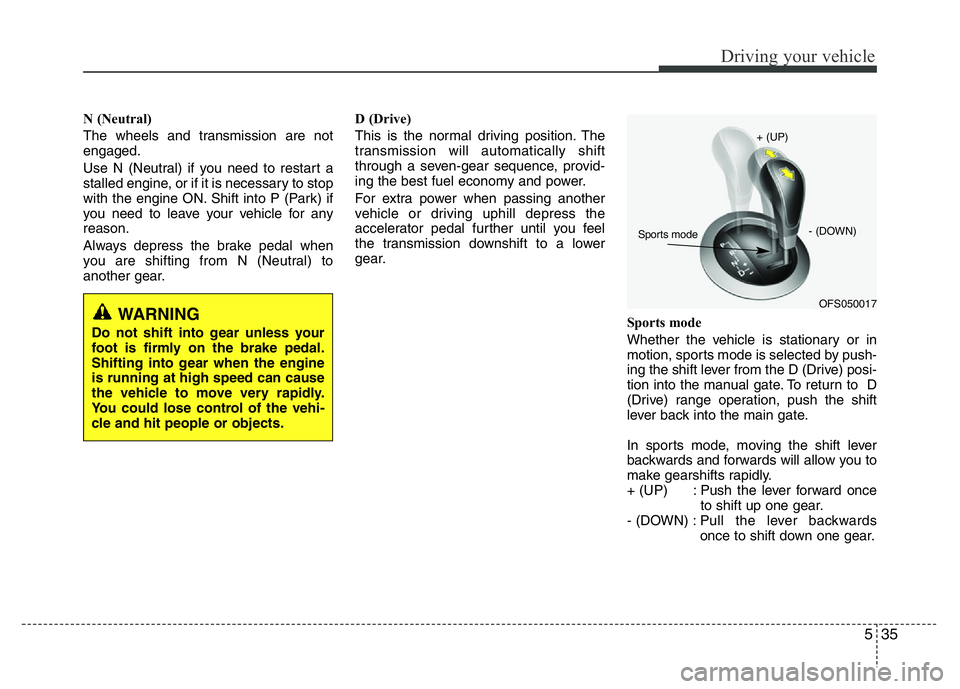
Sports mode
Whether the vehicle is stationary or in
motion, sports mode is selected by push-
ing the shift lever from the D (Drive) posi-
tion into the manual gate. To return to D
(Drive) range operation, push the shift
lever back into the main gate.
In sports mode, moving the shift lever
backwards and forwards will allow you to
make gearshifts rapidly.
+ (UP) : Push the lever forward once
to shift up one gear.
- (DOWN) :Pull the lever backwards
once to shift down one gear.
WARNING
Do not shift into gear unless your
foot is firmly on the brake pedal.
Shifting into gear when the engine
is running at high speed can cause
the vehicle to move very rapidly.
You could lose control of the vehi-
cle and hit people or objects.
OFS050017 + (UP)
- (DOWN)Sports mode
Page 244 of 406
Driving your vehicle
36 5
DS mode (Drive Sporty)
Ds mode supports the performance
mode for driver. To shift the Ds mode,
shift the transmission to Ds mode which
is center of sports mode. If you shift [+] or
[–] gear, the mode is change to sports
mode. The transmission shift is automat-
ically changed at higher engine speeds
by engine load, your driving style, vehicle
condition.
In Ds mode, while coasting downhill, the
engine does not support the vehicle to
slow down.
In Ds mode, if you control the paddle
shifter, the gear will be changed to sports
mode. If the gear is changed to D (Drive),
the gear will be changed to D (Drive)
mode.✽NOTICE
• In sports mode, the driver must exe-
cute upshifts in accordance with road
conditions, taking care to keep the
engine speed below the red zone.
• In sports mode, only the 7 forward
gears can be selected. To reverse or
park the vehicle, move the shift lever
to the R (Reverse) or P (Park) position
as required.
• In sports mode, downshifts are made
automatically when the vehicle slows
down. When the vehicle stops, 1st gear
is automatically selected.
• In sports mode, when the engine rpm
approaches the red zone shift points
are varied to upshift automatically.
• To maintain the required levels of
vehicle performance and safety, the
system may not execute certain
gearshifts when the shift lever is oper-
ated.
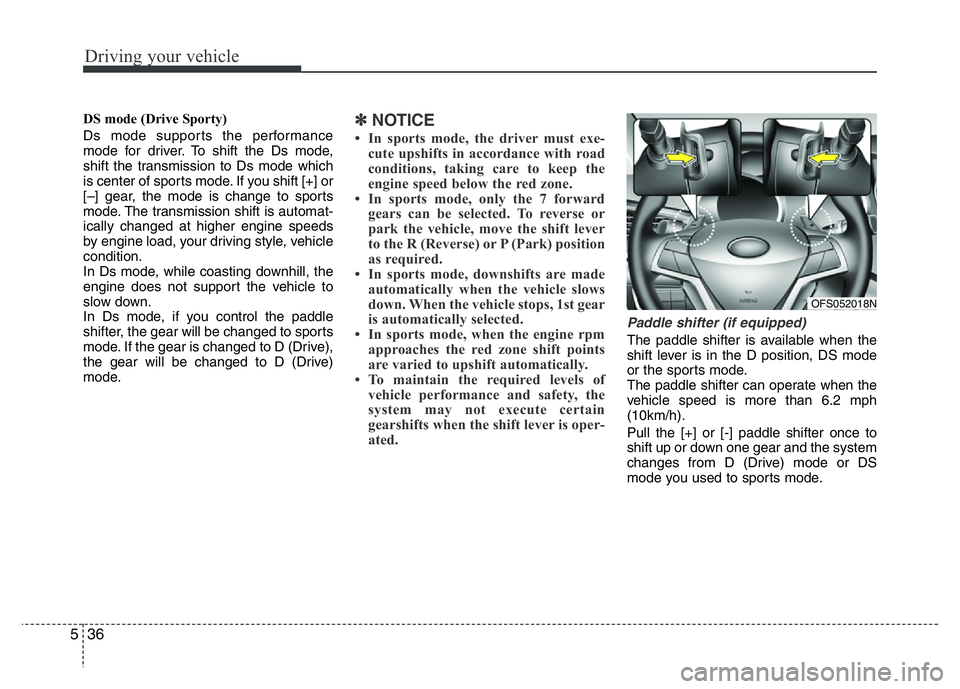
Paddle shifter (if equipped)
The paddle shifter is available when the
shift lever is in the D position, DS mode
or the sports mode.
The paddle shifter can operate when the
vehicle speed is more than 6.2 mph
(10km/h).
Pull the [+] or [-] paddle shifter once to
shift up or down one gear and the system
changes from D (Drive) mode or DS
mode you used to sports mode.
OFS052018N
Page 249 of 406
541
Driving your vehicle
Disc brakes wear indicator
(if equipped)
Your vehicle has disc brakes.
When your brake pads are worn and new
pads are required, you will hear a high-
pitched warning sound from your front
brakes or rear brakes. You may hear this
sound come and go or it may occur
whenever you depress the brake pedal.
Please remember that some driving con-
ditions or climates may cause a brake
squeal when you first apply (or lightly
apply) the brakes. This is normal and does
not indicate a problem with your brakes.
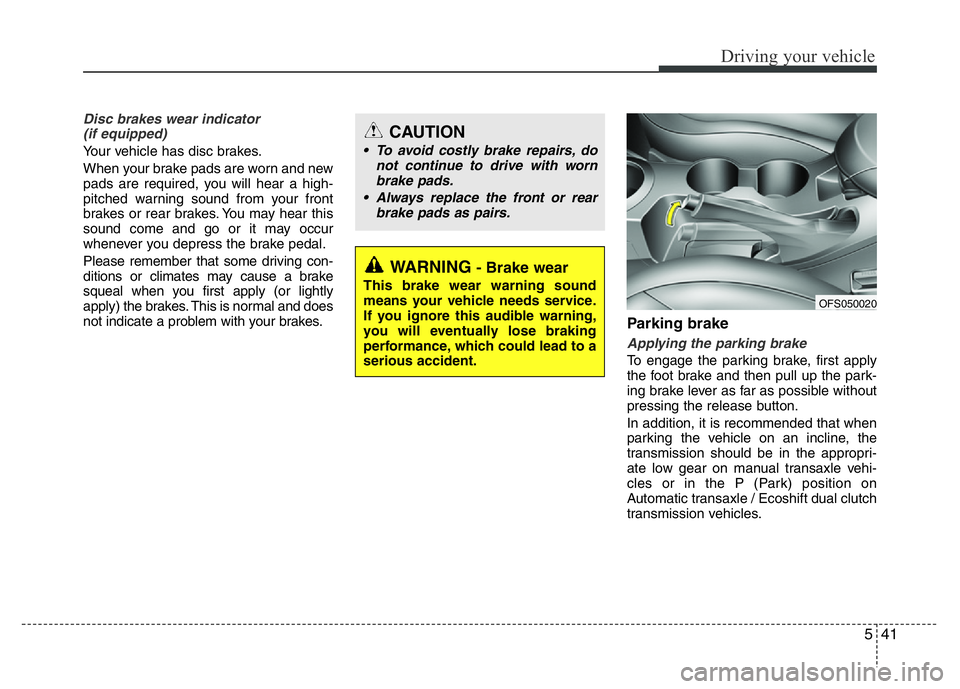
Parking brake
Applying the parking brake
To engage the parking brake, first apply
the foot brake and then pull up the park-
ing brake lever as far as possible without
pressing the release button.
In addition, it is recommended that when
parking the vehicle on an incline, the
transmission should be in the appropri-
ate low gear on manual transaxle vehi-
cles or in the P (Park) position on
Automatic transaxle / Ecoshift dual clutch
transmission vehicles.
WARNING- Brake wear
This brake wear warning sound
means your vehicle needs service.
If you ignore this audible warning,
you will eventually lose braking
performance, which could lead to a
serious accident.
CAUTION
• To avoid costly brake repairs, do
not continue to drive with worn
brake pads.
• Always replace the front or rear
brake pads as pairs.
OFS050020
Page 250 of 406
Driving your vehicle
42 5
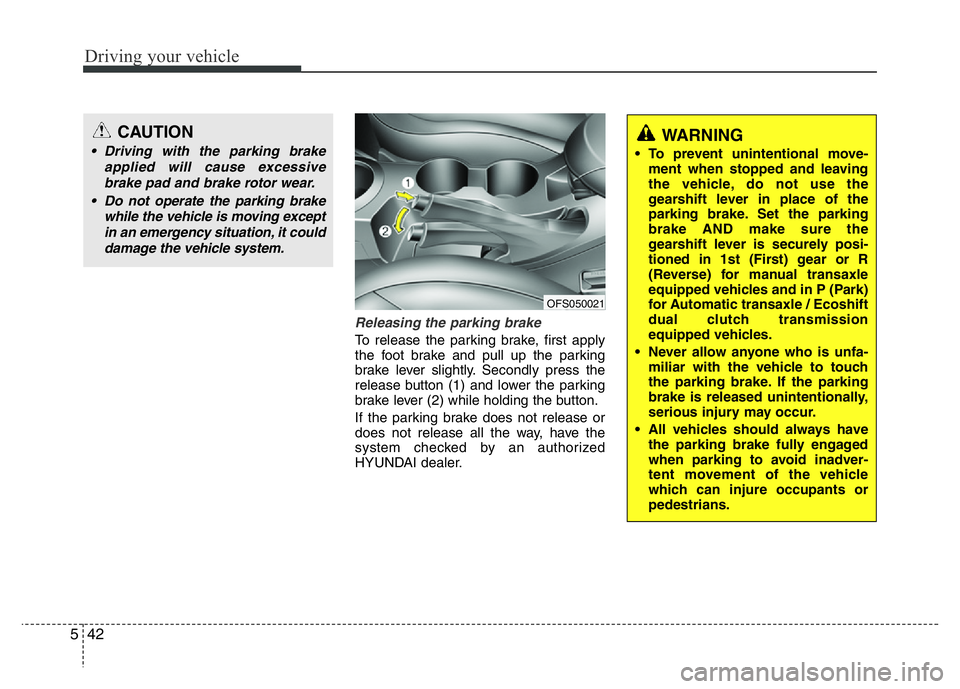
Releasing the parking brake
To release the parking brake, first apply
the foot brake and pull up the parking
brake lever slightly. Secondly press the
release button (1) and lower the parking
brake lever (2) while holding the button.
If the parking brake does not release or
does not release all the way, have the
system checked by an authorized
HYUNDAI dealer.
CAUTION
• Driving with the parking brake
applied will cause excessive
brake pad and brake rotor wear.
• Do not operate the parking brake
while the vehicle is moving except
in an emergency situation, it could
damage the vehicle system.WARNING
• To prevent unintentional move-
ment when stopped and leaving
the vehicle, do not use the
gearshift lever in place of the
parking brake. Set the parking
brake AND make sure the
gearshift lever is securely posi-
tioned in 1st (First) gear or R
(Reverse) for manual transaxle
equipped vehicles and in P (Park)
for Automatic transaxle / Ecoshift
dual clutch transmission
equipped vehicles.
• Never allow anyone who is unfa-
miliar with the vehicle to touch
the parking brake. If the parking
brake is released unintentionally,
serious injury may occur.
• All vehicles should always have
the parking brake fully engaged
when parking to avoid inadver-
tent movement of the vehicle
which can injure occupants or
pedestrians.
OFS050021
Page 257 of 406
549
Driving your vehicle
To dry the brakes, apply the brakes light-
ly until the braking action returns to nor-
mal, taking care to keep the car under
control at all times. If the braking action
does not return to normal, stop as soon
as it is safe to do so and call an author-
ized HYUNDAI dealer for assistance.
• Do not coast down hills with the car out
of gear. This is extremely hazardous.
Keep the car in gear at all times, use
the brakes to slow down, then shift to a
lower gear so that engine braking will
help you maintain a safe speed.
• Do not "ride" the brake pedal. Resting
your foot on the brake pedal while driv-
ing can be dangerous because it can
result in the brakes overheating and los-
ing their effectiveness. It also increases
the wear of the brake components.
• If a tire goes flat while you are driving,
apply the brakes gently and keep the
car pointed straight ahead while you
slow down. When you are moving slow-
ly enough for it to be safe to do so, pull
off the road and stop in a safe place.
• If your vehicle is equipped with a
Automatic transaxle / Ecoshift dual
clutch transmission, don't let your vehi-
cle creep forward. To avoid creeping for-
ward, keep your foot firmly on the brake
pedal when the vehicle is stopped.• Use caution when parking on a hill.
Firmly engage the parking brake and
place the shift lever in P (Automatic
transaxle / Ecoshift dual clutch trans-
mission) or in first or reverse gear
(manual transaxle). If your vehicle is
facing downhill, turn the front wheels
into the curb to help keep the vehicle
from rolling. If your vehicle is facing
uphill, turn the front wheels away from
the curb to help keep the vehicle from
rolling. If there is no curb or if it is
required by other conditions to keep the
vehicle from rolling, block the wheels.
• Under some conditions your parking
brake can freeze in the engaged posi-
tion. This is most likely to happen when
there is an accumulation of snow or ice
around or near the rear brakes or if the
brakes are wet. If there is a risk that the
parking brake may freeze, apply it only
temporarily while you put the gear
selector lever in P (Automatic transaxle
/ Ecoshift dual clutch transmission) or
in first or reverse gear (manual
transaxle) and block the rear wheels so
the vehicle cannot roll. Then release
the parking brake.
• Do not hold the vehicle on the a hill with
the accelerator pedal. This can cause
the transaxle to overheat. Always use
the brake pedal or parking brake.Vehicle stability management
(VSM) (if equipped)
This system provides further enhance-
ments to vehicle stability and steering
responses when the vehicle is driving on
a slippery road or the vehicle detects a
change in coefficient of friction between
the left and right wheels.
VSM operation
When the VSM is in operation, ESC indi-
cator light ( ) blinks.
When the vehicle stability management
is operating properly, you can feel a slight
pulsation in the vehicle and/or abnormal
steering responses (EPS). This is only
the effect of brake and EPS control and
indicates nothing unusual.
The VSM does not operate when:
• Driving on bank road such as gradient
or incline
• Driving in reverse
• ESC OFF indicator light ( ) remains
on the instrument cluster
• EPS indicator light remains on the
instrument cluster
Page 261 of 406
553
Driving your vehicle
To decrease the cruising speed:
Follow either of these procedures:
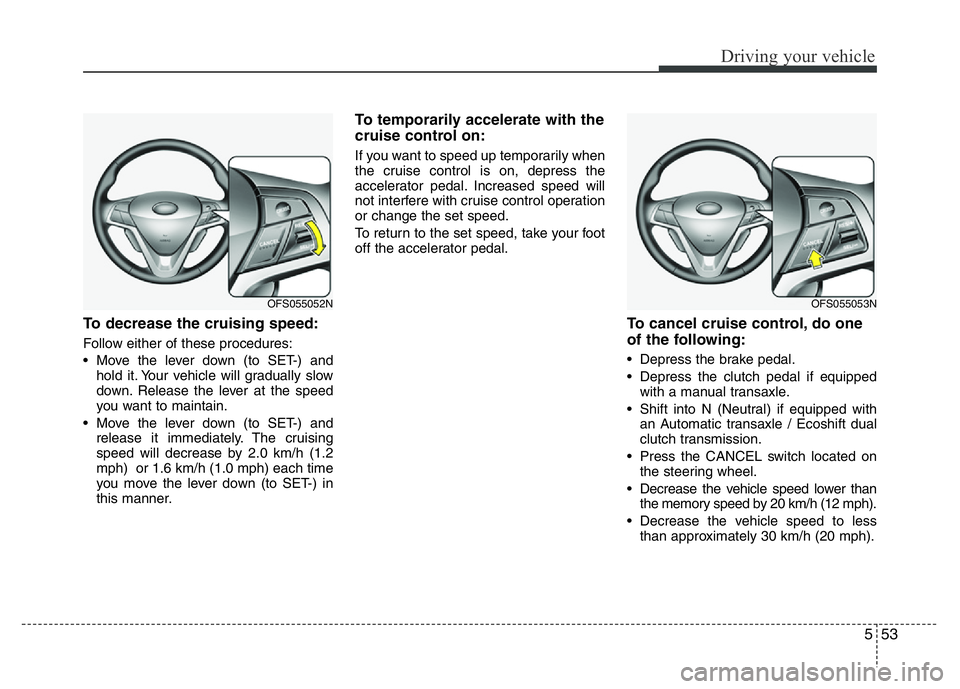
• Move the lever down (to SET-) and
hold it. Your vehicle will gradually slow
down. Release the lever at the speed
you want to maintain.
• Move the lever down (to SET-) and
release it immediately. The cruising
speed will decrease by 2.0 km/h (1.2
mph) or 1.6 km/h (1.0 mph) each time
you move the lever down (to SET-) in
this manner.
To temporarily accelerate with the
cruise control on:
If you want to speed up temporarily when
the cruise control is on, depress the
accelerator pedal. Increased speed will
not interfere with cruise control operation
or change the set speed.
To return to the set speed, take your foot
off the accelerator pedal.
To cancel cruise control, do one
of the following:
• Depress the brake pedal.
• Depress the clutch pedal if equipped
with a manual transaxle.
• Shift into N (Neutral) if equipped with
an Automatic transaxle / Ecoshift dual
clutch transmission.
• Press the CANCEL switch located on
the steering wheel.
• Decrease the vehicle speed lower than
the memory speed by 20 km/h (12 mph).
• Decrease the vehicle speed to less
than approximately 30 km/h (20 mph).
OFS055052NOFS055053N